26/01/2017 1Jonathan Eemans JE Consulting
Authorisations in SAP
Best practices
26/01/2017 2
Authorisations in SAP: best practices
1. Role naming conventions
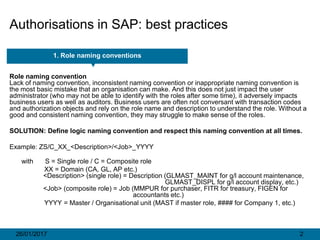
Role naming convention
Lack of naming convention, inconsistent naming convention or inappropriate naming convention is
the most basic mistake that an organisation can make. And this does not just impact the user
administrator (who may not be able to identify with the roles after some time), it adversely impacts
business users as well as auditors. Business users are often not conversant with transaction codes
and authorization objects and rely on the role name and description to understand the role. Without a
good and consistent naming convention, they may struggle to make sense of the roles.
SOLUTION: Define logic naming convention and respect this naming convention at all times.
Example: ZS/C_XX_<Description>/<Job>_YYYY
with S = Single role / C = Composite role
XX = Domain (CA, GL, AP etc.)
<Description> (single role) = Description (GLMAST_MAINT for g/l account maintenance,
GLMAST_DISPL for g/l account display, etc.)
<Job> (composite role) = Job (MMPUR for purchaser, FITR for treasury, FIGEN for
accountants etc.)
YYYY = Master / Organisational unit (MAST if master role, #### for Company 1, etc.)
26/01/2017 3
Authorisations in SAP: best practices
2. Role design
Role design
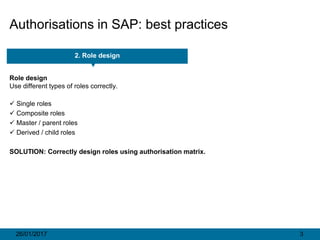
Use different types of roles correctly.
 Single roles
 Composite roles
 Master / parent roles
 Derived / child roles
SOLUTION: Correctly design roles using authorisation matrix.
26/01/2017 4
Authorisations in SAP: best practices
2. Role design
1. Define single roles
2. Assign single roles to composite roles
3. Define slave roles
4. Assign composite roles to users
26/01/2017 5
Authorisations in SAP: best practices
2. Role design: Master / derived roles
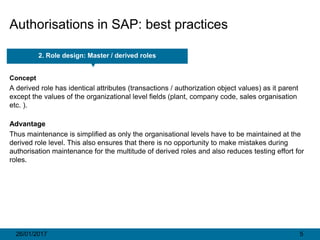
Concept
A derived role has identical attributes (transactions / authorization object values) as it parent
except the values of the organizational level fields (plant, company code, sales organisation
etc. ).
Advantage
Thus maintenance is simplified as only the organisational levels have to be maintained at the
derived role level. This also ensures that there is no opportunity to make mistakes during
authorisation maintenance for the multitude of derived roles and also reduces testing effort for
roles.
26/01/2017 6
Authorisations in SAP: best practices
2. Role design: Master / derived roles
Example
Master role Derived role
Transactions and authorisations Derived role
are maintained in the master role is assigned to
master role
Organisation levels are not assigned
in master role Organisational
levels are assigned
26/01/2017 7
Authorisations in SAP: best practices
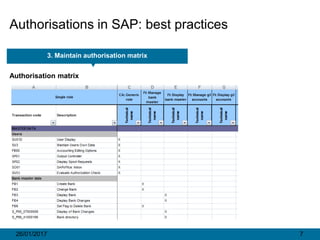
3. Maintain authorisation matrix
Authorisation matrix
26/01/2017 8
Authorisations in SAP: best practices
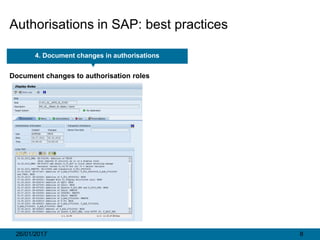
4. Document changes in authorisations
Document changes to authorisation roles
26/01/2017 9
Authorisations in SAP: best practices
5. Non-maintained authorisations
Unmaintained authorisations
Many user administrators leave unmaintained authorisation (i.e. objects with some
unmaintained field values) in the profile. Such unmaintained authorization often become big
nuisance in long run. They are also one of the most common reason behind false positives
raised during authorization review.
SOLUTION: Maintain all authorisation objects in the authorisation profile.
26/01/2017 10
Authorisations in SAP: best practices
Tip 1 for maintaining authorisations: deactivate but keep the standard
When changing authorisation objects the best way is to make a copy, deactivate the standard,
and make changes to the copy.
26/01/2017 11
Authorisations in SAP: best practices
Tip 2 for maintaining authorisations: Read old status and merge with new data
Use option ‘Read old status and merge with new data’
If you have a ‘Standard’ and a ‘Change’, the option ‘Read old status and merge with old data’ will not
insert a new authorisation object.

Authorisations in SAP: best practices

  • 1.
    26/01/2017 1Jonathan EemansJE Consulting Authorisations in SAP Best practices
  • 2.
    26/01/2017 2 Authorisations inSAP: best practices 1. Role naming conventions Role naming convention Lack of naming convention, inconsistent naming convention or inappropriate naming convention is the most basic mistake that an organisation can make. And this does not just impact the user administrator (who may not be able to identify with the roles after some time), it adversely impacts business users as well as auditors. Business users are often not conversant with transaction codes and authorization objects and rely on the role name and description to understand the role. Without a good and consistent naming convention, they may struggle to make sense of the roles. SOLUTION: Define logic naming convention and respect this naming convention at all times. Example: ZS/C_XX_<Description>/<Job>_YYYY with S = Single role / C = Composite role XX = Domain (CA, GL, AP etc.) <Description> (single role) = Description (GLMAST_MAINT for g/l account maintenance, GLMAST_DISPL for g/l account display, etc.) <Job> (composite role) = Job (MMPUR for purchaser, FITR for treasury, FIGEN for accountants etc.) YYYY = Master / Organisational unit (MAST if master role, #### for Company 1, etc.)
  • 3.
    26/01/2017 3 Authorisations inSAP: best practices 2. Role design Role design Use different types of roles correctly.  Single roles  Composite roles  Master / parent roles  Derived / child roles SOLUTION: Correctly design roles using authorisation matrix.
  • 4.
    26/01/2017 4 Authorisations inSAP: best practices 2. Role design 1. Define single roles 2. Assign single roles to composite roles 3. Define slave roles 4. Assign composite roles to users
  • 5.
    26/01/2017 5 Authorisations inSAP: best practices 2. Role design: Master / derived roles Concept A derived role has identical attributes (transactions / authorization object values) as it parent except the values of the organizational level fields (plant, company code, sales organisation etc. ). Advantage Thus maintenance is simplified as only the organisational levels have to be maintained at the derived role level. This also ensures that there is no opportunity to make mistakes during authorisation maintenance for the multitude of derived roles and also reduces testing effort for roles.
  • 6.
    26/01/2017 6 Authorisations inSAP: best practices 2. Role design: Master / derived roles Example Master role Derived role Transactions and authorisations Derived role are maintained in the master role is assigned to master role Organisation levels are not assigned in master role Organisational levels are assigned
  • 7.
    26/01/2017 7 Authorisations inSAP: best practices 3. Maintain authorisation matrix Authorisation matrix
  • 8.
    26/01/2017 8 Authorisations inSAP: best practices 4. Document changes in authorisations Document changes to authorisation roles
  • 9.
    26/01/2017 9 Authorisations inSAP: best practices 5. Non-maintained authorisations Unmaintained authorisations Many user administrators leave unmaintained authorisation (i.e. objects with some unmaintained field values) in the profile. Such unmaintained authorization often become big nuisance in long run. They are also one of the most common reason behind false positives raised during authorization review. SOLUTION: Maintain all authorisation objects in the authorisation profile.
  • 10.
    26/01/2017 10 Authorisations inSAP: best practices Tip 1 for maintaining authorisations: deactivate but keep the standard When changing authorisation objects the best way is to make a copy, deactivate the standard, and make changes to the copy.
  • 11.
    26/01/2017 11 Authorisations inSAP: best practices Tip 2 for maintaining authorisations: Read old status and merge with new data Use option ‘Read old status and merge with new data’ If you have a ‘Standard’ and a ‘Change’, the option ‘Read old status and merge with old data’ will not insert a new authorisation object.