IT322: MICROPROCESSOR BASED DESIGN
Processor Registers
Registers
• The main tools to write programs in x86 assembly are the processor
registers.
• The registers are like variables built in the processor.
• Using registers instead of memory to store values makes the process
faster and cleaner.
• The problem with the x86 series of processors is that there are few
registers to use.
• We describe the main use of each register and ways to use them.
• We discuss the suggested rules to follow where some operations need
absolutely some kind of registers though others can use any of the freely.
• Next, we discuss the available registers on the 386 and higher
processors. This list shows the 32 bit registers. Most of the can be
broken down to 16 or even 8 bits register.
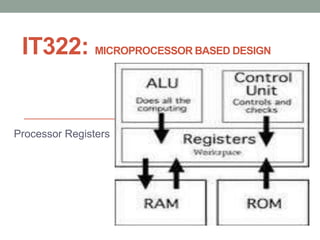
• Therefore, registers are memory cells built right into the CPU that contain
specific data needed by the CPU, particularly the arithmetic and logic unit
(ALU).
• A register is a small amount of storage available as part of a digital
processor, such as a CPU. Such registers are (typically) addressed by
mechanisms other than main memory and can be accessed faster.
General (Purpose) Registers
• These are the ones used most of the time.
• Most of the instructions perform on these registers.
• They can be broken down into 16 and 8 bit registers.
32 bits : EAX, EBX, ECX, EDX
16 bits : AX, BX, CX, DX
8 bits : AH, AL, BH, BL, CH, CL, DH, DL
• The "H" and "L" suffix on the 8 bit registers stand for high byte and low
byte.
EAX, AX, A H, AL (Accumulator register)
• It is used for I/O port access, arithmetic, interrupt calls, etc...
EBX,BX,BH,BL (Base register)
• It is used as a base pointer for memory access.
• It gets some interrupt return values
ECX,CX,CH,CL (Counter register)
• It is used as a loop counter and for shifts.
• It gets some interrupt values.
EDX,DX,DH,DL (Data register)
• It is used for I/O port access, arithmetic, some interrupt calls.
Segment Registers
• Segment registers hold the segment address of various items.
• They are only available in 16 values.
• They can only be set by a general register or special instructions.
• Some of them are critical for the good execution of the program.
Code Segment (CS)
• Holds the Code segment in which the program runs.
• Changing its value might make the computer hang.
Data Segment (DS)
• Holds the Data segment that the program accesses.
• Changing its value might give erroneous data.
Extra Segment (ES), FS,GS
• These are extra segment registers available for far pointer addressing
like video memory and such.
• FS & GS segment registers were introduced in Intel 80386 with no
specific use defined by the hardware.
Stack Segment (SS)
• Holds the Stack segment the program uses.
• Sometimes has the same value as DS.
• Changing its value can give unpredictable results, mostly data related.
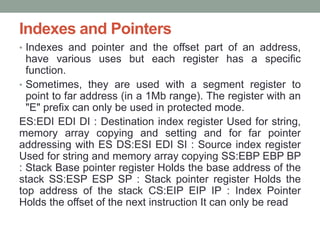
Indexes and Pointers
• Indexes and pointer and the offset part of an address,
have various uses but each register has a specific
function.
• Sometimes, they are used with a segment register to
point to far address (in a 1Mb range). The register with an
"E" prefix can only be used in protected mode.
ES:EDI EDI DI : Destination index register Used for string,
memory array copying and setting and for far pointer
addressing with ES DS:ESI EDI SI : Source index register
Used for string and memory array copying SS:EBP EBP BP
: Stack Base pointer register Holds the base address of the
stack SS:ESP ESP SP : Stack pointer register Holds the
top address of the stack CS:EIP EIP IP : Index Pointer
Holds the offset of the next instruction It can only be read
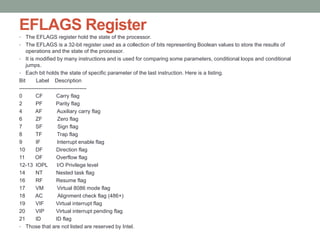
EFLAGS Register
• The EFLAGS register hold the state of the processor.
• The EFLAGS is a 32-bit register used as a collection of bits representing Boolean values to store the results of
operations and the state of the processor.
• It is modified by many instructions and is used for comparing some parameters, conditional loops and conditional
jumps.
• Each bit holds the state of specific parameter of the last instruction. Here is a listing.
Bit Label Description
--------------------------------------
0 CF Carry flag
2 PF Parity flag
4 AF Auxiliary carry flag
6 ZF Zero flag
7 SF Sign flag
8 TF Trap flag
9 IF Interrupt enable flag
10 DF Direction flag
11 OF Overflow flag
12-13 IOPL I/O Privilege level
14 NT Nested task flag
16 RF Resume flag
17 VM Virtual 8086 mode flag
18 AC Alignment check flag (486+)
19 VIF Virtual interrupt flag
20 VIP Virtual interrupt pending flag
21 ID ID flag
• Those that are not listed are reserved by Intel.
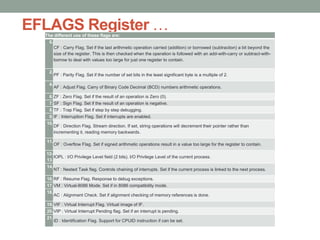
EFLAGS Register …The different use of these flags are:
0.
CF : Carry Flag. Set if the last arithmetic operation carried (addition) or borrowed (subtraction) a bit beyond the
size of the register. This is then checked when the operation is followed with an add-with-carry or subtract-with-
borrow to deal with values too large for just one register to contain.
2.
PF : Parity Flag. Set if the number of set bits in the least significant byte is a multiple of 2.
4.
AF : Adjust Flag. Carry of Binary Code Decimal (BCD) numbers arithmetic operations.
6.ZF : Zero Flag. Set if the result of an operation is Zero (0).
7.SF : Sign Flag. Set if the result of an operation is negative.
8.TF : Trap Flag. Set if step by step debugging.
9.IF : Interruption Flag. Set if interrupts are enabled.
10.
DF : Direction Flag. Stream direction. If set, string operations will decrement their pointer rather than
incrementing it, reading memory backwards.
11.
OF : Overflow Flag. Set if signed arithmetic operations result in a value too large for the register to contain.
12-
13.
IOPL : I/O Privilege Level field (2 bits). I/O Privilege Level of the current process.
14.
NT : Nested Task flag. Controls chaining of interrupts. Set if the current process is linked to the next process.
16.RF : Resume Flag. Response to debug exceptions.
17.VM : Virtual-8086 Mode. Set if in 8086 compatibility mode.
18.
AC : Alignment Check. Set if alignment checking of memory references is done.
19.VIF : Virtual Interrupt Flag. Virtual image of IF.
20.VIP : Virtual Interrupt Pending flag. Set if an interrupt is pending.
21.
ID : Identification Flag. Support for CPUID instruction if can be set.
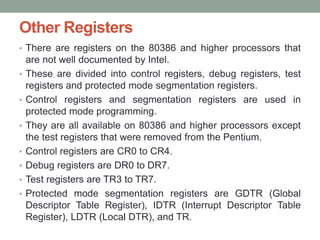
Other Registers
• There are registers on the 80386 and higher processors that
are not well documented by Intel.
• These are divided into control registers, debug registers, test
registers and protected mode segmentation registers.
• Control registers and segmentation registers are used in
protected mode programming.
• They are all available on 80386 and higher processors except
the test registers that were removed from the Pentium.
• Control registers are CR0 to CR4.
• Debug registers are DR0 to DR7.
• Test registers are TR3 to TR7.
• Protected mode segmentation registers are GDTR (Global
Descriptor Table Register), IDTR (Interrupt Descriptor Table
Register), LDTR (Local DTR), and TR.
Cache and Registers
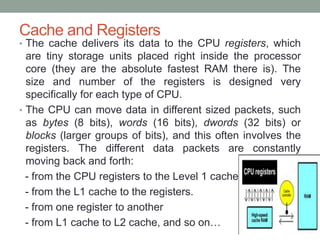
• The cache delivers its data to the CPU registers, which
are tiny storage units placed right inside the processor
core (they are the absolute fastest RAM there is). The
size and number of the registers is designed very
specifically for each type of CPU.
• The CPU can move data in different sized packets, such
as bytes (8 bits), words (16 bits), dwords (32 bits) or
blocks (larger groups of bits), and this often involves the
registers. The different data packets are constantly
moving back and forth:
- from the CPU registers to the Level 1 cache.
- from the L1 cache to the registers.
- from one register to another
- from L1 cache to L2 cache, and so on…
Cache and Registers …
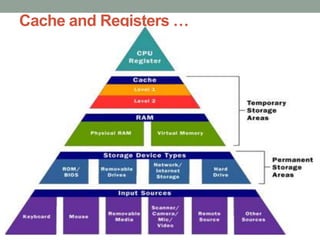
Caches are designed to make the data used most often by the CPU instantly
available. Use of cache greatly reduces the overhead needed when the CPU
has to wait for data from the main memory.
Small amount of memory – primary or level 1 (L1) cache found in the CPU.
L1 cache is very small, normally ranging between 2 kilobytes (KB) and 64 KB.
Secondary or level 2 (L2) cache typically resides on a memory card located
near the CPU (Level 2 cache has a direct connection to the CPU); the size of
L2 cache ranges from 256KB to 2MB - depending on the CPU.
• Many high performance CPUs have L2 cache built into the CPU chip.
• The size of the L2 cache and whether it is onboard (on the CPU) is a major
determining factor in the performance of a CPU.
Static Random Access Memory (SRAM), is used primarily for cache. It can be
asynchronous or synchronous (Synchronous SRAM is designed to exactly
match the speed of the CPU, while asynchronous is not).
• That little bit of timing makes a difference in performance.
• Matching the CPU's clock speed is a good thing, hence use synchronized
SRAM.
Cache and Registers …

It322 intro 1

  • 1.
    IT322: MICROPROCESSOR BASEDDESIGN Processor Registers
  • 2.
    Registers • The maintools to write programs in x86 assembly are the processor registers. • The registers are like variables built in the processor. • Using registers instead of memory to store values makes the process faster and cleaner. • The problem with the x86 series of processors is that there are few registers to use. • We describe the main use of each register and ways to use them. • We discuss the suggested rules to follow where some operations need absolutely some kind of registers though others can use any of the freely. • Next, we discuss the available registers on the 386 and higher processors. This list shows the 32 bit registers. Most of the can be broken down to 16 or even 8 bits register. • Therefore, registers are memory cells built right into the CPU that contain specific data needed by the CPU, particularly the arithmetic and logic unit (ALU). • A register is a small amount of storage available as part of a digital processor, such as a CPU. Such registers are (typically) addressed by mechanisms other than main memory and can be accessed faster.
  • 3.
    General (Purpose) Registers •These are the ones used most of the time. • Most of the instructions perform on these registers. • They can be broken down into 16 and 8 bit registers. 32 bits : EAX, EBX, ECX, EDX 16 bits : AX, BX, CX, DX 8 bits : AH, AL, BH, BL, CH, CL, DH, DL • The "H" and "L" suffix on the 8 bit registers stand for high byte and low byte. EAX, AX, A H, AL (Accumulator register) • It is used for I/O port access, arithmetic, interrupt calls, etc... EBX,BX,BH,BL (Base register) • It is used as a base pointer for memory access. • It gets some interrupt return values ECX,CX,CH,CL (Counter register) • It is used as a loop counter and for shifts. • It gets some interrupt values. EDX,DX,DH,DL (Data register) • It is used for I/O port access, arithmetic, some interrupt calls.
  • 4.
    Segment Registers • Segmentregisters hold the segment address of various items. • They are only available in 16 values. • They can only be set by a general register or special instructions. • Some of them are critical for the good execution of the program. Code Segment (CS) • Holds the Code segment in which the program runs. • Changing its value might make the computer hang. Data Segment (DS) • Holds the Data segment that the program accesses. • Changing its value might give erroneous data. Extra Segment (ES), FS,GS • These are extra segment registers available for far pointer addressing like video memory and such. • FS & GS segment registers were introduced in Intel 80386 with no specific use defined by the hardware. Stack Segment (SS) • Holds the Stack segment the program uses. • Sometimes has the same value as DS. • Changing its value can give unpredictable results, mostly data related.
  • 5.
    Indexes and Pointers •Indexes and pointer and the offset part of an address, have various uses but each register has a specific function. • Sometimes, they are used with a segment register to point to far address (in a 1Mb range). The register with an "E" prefix can only be used in protected mode. ES:EDI EDI DI : Destination index register Used for string, memory array copying and setting and for far pointer addressing with ES DS:ESI EDI SI : Source index register Used for string and memory array copying SS:EBP EBP BP : Stack Base pointer register Holds the base address of the stack SS:ESP ESP SP : Stack pointer register Holds the top address of the stack CS:EIP EIP IP : Index Pointer Holds the offset of the next instruction It can only be read
  • 6.
    EFLAGS Register • TheEFLAGS register hold the state of the processor. • The EFLAGS is a 32-bit register used as a collection of bits representing Boolean values to store the results of operations and the state of the processor. • It is modified by many instructions and is used for comparing some parameters, conditional loops and conditional jumps. • Each bit holds the state of specific parameter of the last instruction. Here is a listing. Bit Label Description -------------------------------------- 0 CF Carry flag 2 PF Parity flag 4 AF Auxiliary carry flag 6 ZF Zero flag 7 SF Sign flag 8 TF Trap flag 9 IF Interrupt enable flag 10 DF Direction flag 11 OF Overflow flag 12-13 IOPL I/O Privilege level 14 NT Nested task flag 16 RF Resume flag 17 VM Virtual 8086 mode flag 18 AC Alignment check flag (486+) 19 VIF Virtual interrupt flag 20 VIP Virtual interrupt pending flag 21 ID ID flag • Those that are not listed are reserved by Intel.
  • 7.
    EFLAGS Register …Thedifferent use of these flags are: 0. CF : Carry Flag. Set if the last arithmetic operation carried (addition) or borrowed (subtraction) a bit beyond the size of the register. This is then checked when the operation is followed with an add-with-carry or subtract-with- borrow to deal with values too large for just one register to contain. 2. PF : Parity Flag. Set if the number of set bits in the least significant byte is a multiple of 2. 4. AF : Adjust Flag. Carry of Binary Code Decimal (BCD) numbers arithmetic operations. 6.ZF : Zero Flag. Set if the result of an operation is Zero (0). 7.SF : Sign Flag. Set if the result of an operation is negative. 8.TF : Trap Flag. Set if step by step debugging. 9.IF : Interruption Flag. Set if interrupts are enabled. 10. DF : Direction Flag. Stream direction. If set, string operations will decrement their pointer rather than incrementing it, reading memory backwards. 11. OF : Overflow Flag. Set if signed arithmetic operations result in a value too large for the register to contain. 12- 13. IOPL : I/O Privilege Level field (2 bits). I/O Privilege Level of the current process. 14. NT : Nested Task flag. Controls chaining of interrupts. Set if the current process is linked to the next process. 16.RF : Resume Flag. Response to debug exceptions. 17.VM : Virtual-8086 Mode. Set if in 8086 compatibility mode. 18. AC : Alignment Check. Set if alignment checking of memory references is done. 19.VIF : Virtual Interrupt Flag. Virtual image of IF. 20.VIP : Virtual Interrupt Pending flag. Set if an interrupt is pending. 21. ID : Identification Flag. Support for CPUID instruction if can be set.
  • 8.
    Other Registers • Thereare registers on the 80386 and higher processors that are not well documented by Intel. • These are divided into control registers, debug registers, test registers and protected mode segmentation registers. • Control registers and segmentation registers are used in protected mode programming. • They are all available on 80386 and higher processors except the test registers that were removed from the Pentium. • Control registers are CR0 to CR4. • Debug registers are DR0 to DR7. • Test registers are TR3 to TR7. • Protected mode segmentation registers are GDTR (Global Descriptor Table Register), IDTR (Interrupt Descriptor Table Register), LDTR (Local DTR), and TR.
  • 9.
    Cache and Registers •The cache delivers its data to the CPU registers, which are tiny storage units placed right inside the processor core (they are the absolute fastest RAM there is). The size and number of the registers is designed very specifically for each type of CPU. • The CPU can move data in different sized packets, such as bytes (8 bits), words (16 bits), dwords (32 bits) or blocks (larger groups of bits), and this often involves the registers. The different data packets are constantly moving back and forth: - from the CPU registers to the Level 1 cache. - from the L1 cache to the registers. - from one register to another - from L1 cache to L2 cache, and so on…
  • 10.
    Cache and Registers… Caches are designed to make the data used most often by the CPU instantly available. Use of cache greatly reduces the overhead needed when the CPU has to wait for data from the main memory. Small amount of memory – primary or level 1 (L1) cache found in the CPU. L1 cache is very small, normally ranging between 2 kilobytes (KB) and 64 KB. Secondary or level 2 (L2) cache typically resides on a memory card located near the CPU (Level 2 cache has a direct connection to the CPU); the size of L2 cache ranges from 256KB to 2MB - depending on the CPU. • Many high performance CPUs have L2 cache built into the CPU chip. • The size of the L2 cache and whether it is onboard (on the CPU) is a major determining factor in the performance of a CPU. Static Random Access Memory (SRAM), is used primarily for cache. It can be asynchronous or synchronous (Synchronous SRAM is designed to exactly match the speed of the CPU, while asynchronous is not). • That little bit of timing makes a difference in performance. • Matching the CPU's clock speed is a good thing, hence use synchronized SRAM.
  • 11.