Introduction to NASM 
Prepared By: 
Muhammed Yazar Y 
Updated By: 
Sonia V Mathew 
Govind R 
B Tech 
Dept: of CSE 
NIT Calicut 
Under The Guidance of: 
Mr. Jayaraj P B 
Mr. Saidalavi Kalady 
Assistant Professors 
Dept: of CSE 
NIT Calicut 
Department Of Computer Science & Engineering 
NATIONAL INSTITUTE OF TECHNOLOGY CALICUT 
2014
Contents 
1 Basics of Computer Organization 3 
2 How to Start 13 
3 X86 - Basic Instruction Set 19 
4 Basic I/O in NASM 31 
5 Subprograms 41 
6 Arrays and Strings 53 
1
Acknowledgement 
I would like to express my gratitude to Saidalavy Kalady Sir and Jayaraj P B 
Sir (Assistant Professors, Dept: of CSE, NIT Calicut) for guiding me throughout 
while making this reference material on NASM Assembly language programming. 
Without their constant support and guidance this work would not have been pos-sible. 
Thanks to Lyla B Das madam (Associate Professor, Dept: of ECE, NIT 
Calicut) for encouraging me to bring out an updated version of this work. I would 
also wish to thank Meera Sudharman, my classmate who helped me in verifying 
the contents of this document. Special thanks are due to Govind R and Sonia 
V Mathew (BTech 2011-2015 Batch) for updating the contents and adding more 
working examples to it. Thanks to all my dear batch mates and juniors who have 
been supporting me through the work of this and for providing me with their valu-able 
suggestions. 
Muhammed Yazar 
2
Chapter 1 
Basics of Computer Organization 
In order to program in assembly language it is necessary to have basic knowledge 
of Computer organization and processor architecture. This chapter gives you the 
basic idea of how a processor works, how it access data from main memory, how 
it reads or writes information from other I/O (Input / Output) devices etc. 
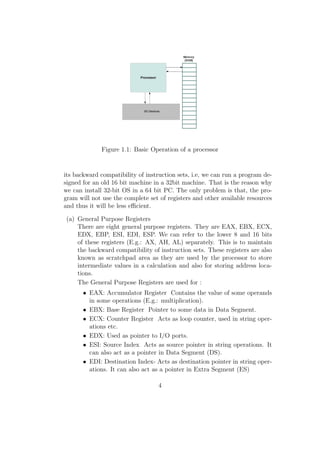
The basic operational design of a computer is called architecture. 80X86 series 
of processors follow Von Newmann Architecture which is based on the stored pro-gram 
concept. 
1. Processor 
Processor is the brain of the computer. It performs all mathematical, logical 
and control operations of a computer. It is that component of the computer 
which executes all the instructions given to it in the form of programs. It 
interacts with I/O devices, memory (RAM) and secondary storage devices 
and thus implements the instructions given by the user. 
2. Registers 
Registers are the most immediately accessible memory units for the proces-sor. 
They are the fastest among all the types of memory. They reside inside 
the processor and the processor can access the contents of any register in a 
single clock cycle. It is the working memory for a processor, i.e , if we want 
the processor to perform any task it needs the data to be present in any of 
its registers. The series of processors released on or after 80186 like 80186, 
80286, 80386, Pentium etc are referred to as x86 or 80x86 processors. The 
processors released on or after 80386 are called I386 processors. They are 32 
bit processors internally and externally. So their register sizes are generally 
32 bit. In this section we will go through the I386 registers. Intel maintains 
3
Figure 1.1: Basic Operation of a processor 
its backward compatibility of instruction sets, i.e, we can run a program de-signed 
for an old 16 bit machine in a 32bit machine. That is the reason why 
we can install 32-bit OS in a 64 bit PC. The only problem is that, the pro-gram 
will not use the complete set of registers and other available resources 
and thus it will be less ecient. 
(a) General Purpose Registers 
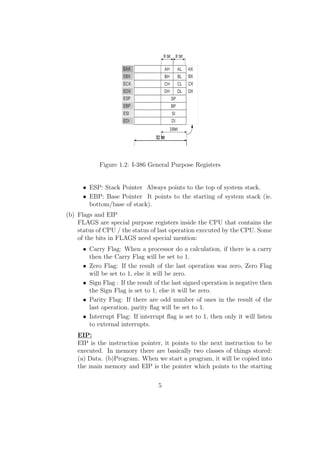
There are eight general purpose registers. They are EAX, EBX, ECX, 
EDX, EBP, ESI, EDI, ESP. We can refer to the lower 8 and 16 bits 
of these registers (E.g.: AX, AH, AL) separately. This is to maintain 
the backward compatibility of instruction sets. These registers are also 
known as scratchpad area as they are used by the processor to store 
intermediate values in a calculation and also for storing address loca-tions. 
The General Purpose Registers are used for : 
 EAX: Accumulator Register Contains the value of some operands 
in some operations (E.g.: multiplication). 
 EBX: Base Register Pointer to some data in Data Segment. 
 ECX: Counter Register Acts as loop counter, used in string oper-ations 
etc. 
 EDX: Used as pointer to I/O ports. 
 ESI: Source Index Acts as source pointer in string operations. It 
can also act as a pointer in Data Segment (DS). 
 EDI: Destination Index- Acts as destination pointer in string oper-ations. 
It can also act as a pointer in Extra Segment (ES) 
4
Figure 1.2: I-386 General Purpose Registers 
 ESP: Stack Pointer Always points to the top of system stack. 
 EBP: Base Pointer It points to the starting of system stack (ie. 
bottom/base of stack). 
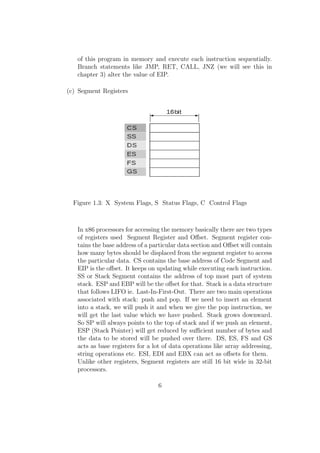
(b) Flags and EIP 
FLAGS are special purpose registers inside the CPU that contains the 
status of CPU / the status of last operation executed by the CPU. Some 
of the bits in FLAGS need special mention: 
 Carry Flag: When a processor do a calculation, if there is a carry 
then the Carry Flag will be set to 1. 
 Zero Flag: If the result of the last operation was zero, Zero Flag 
will be set to 1, else it will be zero. 
 Sign Flag : If the result of the last signed operation is negative then 
the Sign Flag is set to 1, else it will be zero. 
 Parity Flag: If there are odd number of ones in the result of the 
last operation, parity 
ag will be set to 1. 
 Interrupt Flag: If interrupt 
ag is set to 1, then only it will listen 
to external interrupts. 
EIP: 
EIP is the instruction pointer, it points to the next instruction to be 
executed. In memory there are basically two classes of things stored: 
(a) Data. (b)Program. When we start a program, it will be copied into 
the main memory and EIP is the pointer which points to the starting 
5
of this program in memory and execute each instruction sequentially. 
Branch statements like JMP, RET, CALL, JNZ (we will see this in 
chapter 3) alter the value of EIP. 
(c) Segment Registers 
Figure 1.3: X System Flags, S Status Flags, C Control Flags 
In x86 processors for accessing the memory basically there are two types 
of registers used Segment Register and Oset. Segment register con-tains 
the base address of a particular data section and Oset will contain 
how many bytes should be displaced from the segment register to access 
the particular data. CS contains the base address of Code Segment and 
EIP is the oset. It keeps on updating while executing each instruction. 
SS or Stack Segment contains the address of top most part of system 
stack. ESP and EBP will be the oset for that. Stack is a data structure 
that follows LIFO ie. Last-In-First-Out. There are two main operations 
associated with stack: push and pop. If we need to insert an element 
into a stack, we will push it and when we give the pop instruction, we 
will get the last value which we have pushed. Stack grows downward. 
So SP will always points to the top of stack and if we push an element, 
ESP (Stack Pointer) will get reduced by sucient number of bytes and 
the data to be stored will be pushed over there. DS, ES, FS and GS 
acts as base registers for a lot of data operations like array addressing, 
string operations etc. ESI, EDI and EBX can act as osets for them. 
Unlike other registers, Segment registers are still 16 bit wide in 32-bit 
processors. 
6
In modern 32 bit processor the segment address will be just an en-try 
into a descriptor table in memory and using the oset it will get 
the exact memory locations through some manipulations. This is called 
segmentation. 
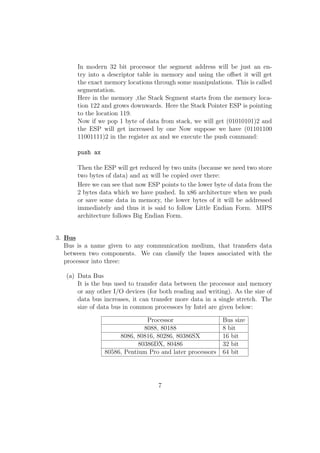
Here in the memory ,the Stack Segment starts from the memory loca-tion 
122 and grows downwards. Here the Stack Pointer ESP is pointing 
to the location 119. 
Now if we pop 1 byte of data from stack, we will get (01010101)2 and 
the ESP will get increased by one Now suppose we have (01101100 
11001111)2 in the register ax and we execute the push command: 
push ax 
Then the ESP will get reduced by two units (because we need two store 
two bytes of data) and ax will be copied over there: 
Here we can see that now ESP points to the lower byte of data from the 
2 bytes data which we have pushed. In x86 architecture when we push 
or save some data in memory, the lower bytes of it will be addressed 
immediately and thus it is said to follow Little Endian Form. MIPS 
architecture follows Big Endian Form. 
3. Bus 
Bus is a name given to any communication medium, that transfers data 
between two components. We can classify the buses associated with the 
processor into three: 
(a) Data Bus 
It is the bus used to transfer data between the processor and memory 
or any other I/O devices (for both reading and writing). As the size of 
data bus increases, it can transfer more data in a single stretch. The 
size of data bus in common processors by Intel are given below: 
Processor Bus size 
8088, 80188 8 bit 
8086, 80816, 80286, 80386SX 16 bit 
80386DX, 80486 32 bit 
80586, Pentium Pro and later processors 64 bit 
7
(b) Address Bus 
RAM or random access memory is the working memory for a com-puter. 
It is a primary storage device, i.e. the data stored in RAM will 
be erased when the power is gone. All the instructions and data used by 
the computer is copied to RAM from other secondary storage devices 
like Hard Disk, Floppy drive, DVD drive etc. When we power on the 
PC the booting process will happen, which is the process of copying / 
loading Operating System from a secondary storage device to the main 
memory or RAM. When we start a program, the associated instructions 
and data are copied into RAM. Later on when processor needs the data 
from RAM it will copy that into its registers. RAM consists of contigu-ous 
storage units each of which is 8 bit wide (1 byte) and each location 
in RAM is given a location number starting from 0. 
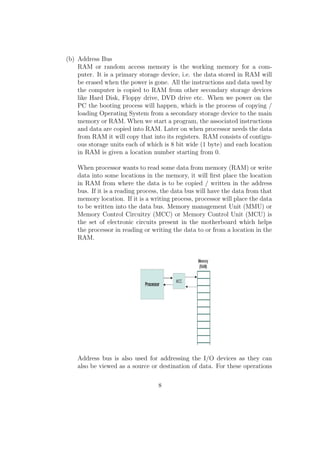
When processor wants to read some data from memory (RAM) or write 
data into some locations in the memory, it will
rst place the location 
in RAM from where the data is to be copied / written in the address 
bus. If it is a reading process, the data bus will have the data from that 
memory location. If it is a writing process, processor will place the data 
to be written into the data bus. Memory management Unit (MMU) or 
Memory Control Circuitry (MCC) or Memory Control Unit (MCU) is 
the set of electronic circuits present in the motherboard which helps 
the processor in reading or writing the data to or from a location in the 
RAM. 
Address bus is also used for addressing the I/O devices as they can 
also be viewed as a source or destination of data. For these operations 
8
control buses help a lot. 
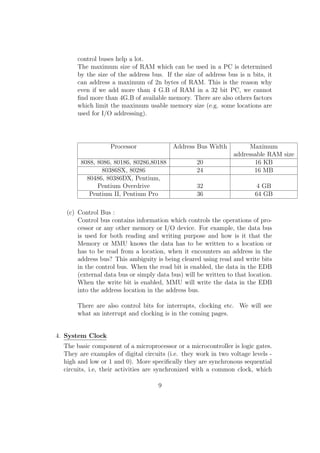
The maximum size of RAM which can be used in a PC is determined 
by the size of the address bus. If the size of address bus is n bits, it 
can address a maximum of 2n bytes of RAM. This is the reason why 
even if we add more than 4 G.B of RAM in a 32 bit PC, we cannot
nd more than 4G.B of available memory. There are also others factors 
which limit the maximum usable memory size (e.g. some locations are 
used for I/O addressing). 
Processor Address Bus Width Maximum 
addressable RAM size 
8088, 8086, 80186, 80286,80188 20 16 KB 
80386SX, 80286 24 16 MB 
80486, 80386DX, Pentium, 
Pentium Overdrive 32 4 GB 
Pentium II, Pentium Pro 36 64 GB 
(c) Control Bus : 
Control bus contains information which controls the operations of pro-cessor 
or any other memory or I/O device. For example, the data bus 
is used for both reading and writing purpose and how is it that the 
Memory or MMU knows the data has to be written to a location or 
has to be read from a location, when it encounters an address in the 
address bus? This ambiguity is being cleared using read and write bits 
in the control bus. When the read bit is enabled, the data in the EDB 
(external data bus or simply data bus) will be written to that location. 
When the write bit is enabled, MMU will write the data in the EDB 
into the address location in the address bus. 
There are also control bits for interrupts, clocking etc. We will see 
what an interrupt and clocking is in the coming pages. 
4. System Clock 
The basic component of a microprocessor or a microcontroller is logic gates. 
They are examples of digital circuits (i.e. they work in two voltage levels - 
high and low or 1 and 0). More speci
cally they are synchronous sequential 
circuits, i.e, their activities are synchronized with a common clock, which 
9
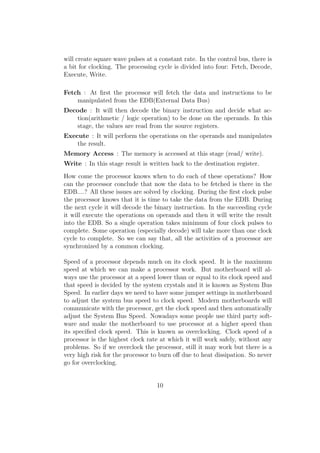
will create square wave pulses at a constant rate. In the control bus, there is 
a bit for clocking. The processing cycle is divided into four: Fetch, Decode, 
Execute, Write. 
Fetch : At
rst the processor will fetch the data and instructions to be 
manipulated from the EDB(External Data Bus) 
Decode : It will then decode the binary instruction and decide what ac-tion( 
arithmetic / logic operation) to be done on the operands. In this 
stage, the values are read from the source registers. 
Execute : It will perform the operations on the operands and manipulates 
the result. 
Memory Access : The memory is accessed at this stage (read/ write). 
Write : In this stage result is written back to the destination register. 
How come the processor knows when to do each of these operations? How 
can the processor conclude that now the data to be fetched is there in the 
EDB....? All these issues are solved by clocking. During the
rst clock pulse 
the processor knows that it is time to take the data from the EDB. During 
the next cycle it will decode the binary instruction. In the succeeding cycle 
it will execute the operations on operands and then it will write the result 
into the EDB. So a single operation takes minimum of four clock pulses to 
complete. Some operation (especially decode) will take more than one clock 
cycle to complete. So we can say that, all the activities of a processor are 
synchronized by a common clocking. 
Speed of a processor depends much on its clock speed. It is the maximum 
speed at which we can make a processor work. But motherboard will al-ways 
use the processor at a speed lower than or equal to its clock speed and 
that speed is decided by the system crystals and it is known as System Bus 
Speed. In earlier days we need to have some jumper settings in motherboard 
to adjust the system bus speed to clock speed. Modern motherboards will 
communicate with the processor, get the clock speed and then automatically 
adjust the System Bus Speed. Nowadays some people use third party soft-ware 
and make the motherboard to use processor at a higher speed than 
its speci
ed clock speed. This is known as overclocking. Clock speed of a 
processor is the highest clock rate at which it will work safely, without any 
problems. So if we overclock the processor, still it may work but there is a 
very high risk for the processor to burn o due to heat dissipation. So never 
go for overclocking. 
10
5. Interrupts: 
Interrupts are the most critical routines executed by a processor. Interrupts 
may be triggered by external sources or due to internal operations. In linux 
based systems 80h is the interrupt number for OS generated interrupts and 
in windows based systems it is 21h. The Operating System Interrupt is used 
for implementing systems calls. 
Whenever an interrupt occurs, processor will stop its present work, preserve 
the values in registers into memory and then execute the ISR (Interrupt 
Service Routine) by referring to an interrupt vector table. ISR is the set of 
instructions to be executed when an interrupt occurs. By referring to the 
interrupt vector table, the processor can get which ISR it should execute 
for the given interrupt. After executing the ISR, processor will restore the 
registers to its previous state and continue the process that it was executing 
before. Almost all the I/O devices work by utilizing the interrupt requests. 
11
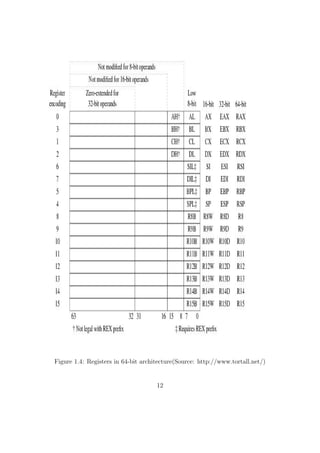
Figure 1.4: Registers in 64-bit architecture(Source: http://www.tortall.net/) 
12
Chapter 2 
How to Start 
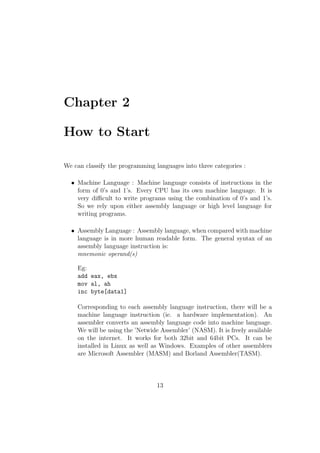
We can classify the programming languages into three categories : 
 Machine Language : Machine language consists of instructions in the 
form of 0's and 1's. Every CPU has its own machine language. It is 
very dicult to write programs using the combination of 0's and 1's. 
So we rely upon either assembly language or high level language for 
writing programs. 
 Assembly Language : Assembly language, when compared with machine 
language is in more human readable form. The general syntax of an 
assembly language instruction is: 
mnemonic operand(s) 
Eg: 
add eax, ebx 
mov al, ah 
inc byte[data1] 
Corresponding to each assembly language instruction, there will be a 
machine language instruction (ie. a hardware implementation). An 
assembler converts an assembly language code into machine language. 
We will be using the 'Netwide Assembler' (NASM). It is freely available 
on the internet. It works for both 32bit and 64bit PCs. It can be 
installed in Linux as well as Windows. Examples of other assemblers 
are Microsoft Assembler (MASM) and Borland Assembler(TASM). 
13
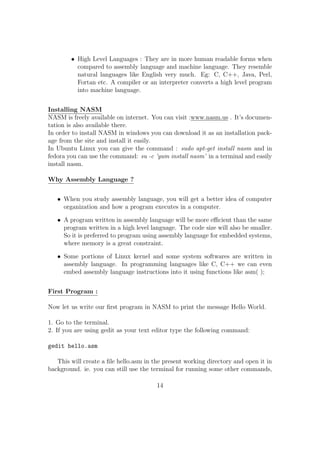
High Level Languages : They are in more human readable forms when 
compared to assembly language and machine language. They resemble 
natural languages like English very much. Eg: C, C++, Java, Perl, 
Fortan etc. A compiler or an interpreter converts a high level program 
into machine language. 
Installing NASM 
NASM is freely available on internet. You can visit :www.nasm.us . It's documen-tation 
is also available there. 
In order to install NASM in windows you can download it as an installation pack-age 
from the site and install it easily. 
In Ubuntu Linux you can give the command : sudo apt-get install nasm and in 
fedora you can use the command: su -c 'yum install nasm' in a terminal and easily 
install nasm. 
Why Assembly Language ? 
 When you study assembly language, you will get a better idea of computer 
organization and how a program executes in a computer. 
 A program written in assembly language will be more ecient than the same 
program written in a high level language. The code size will also be smaller. 
So it is preferred to program using assembly language for embedded systems, 
where memory is a great constraint. 
 Some portions of Linux kernel and some system softwares are written in 
assembly language. In programming languages like C, C++ we can even 
embed assembly language instructions into it using functions like asm( ); 
First Program : 
Now let us write our
rst program in NASM to print the message Hello World. 
1. Go to the terminal. 
2. If you are using gedit as your text editor type the following command: 
gedit hello.asm 
This will create a
le hello.asm in the present working directory and open it in 
background. ie. you can still use the terminal for running some other commands, 
14
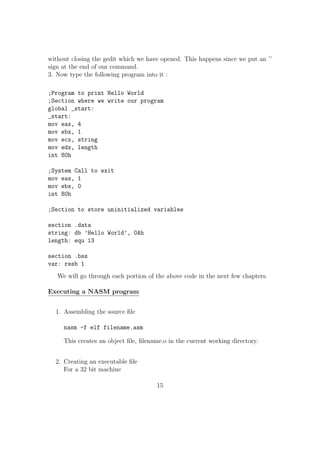
without closing the gedit which we have opened. This happens since we put an '' 
sign at the end of our command. 
3. Now type the following program into it : 
;Program to print Hello World 
;Section where we write our program 
global _start: 
_start: 
mov eax, 4 
mov ebx, 1 
mov ecx, string 
mov edx, length 
int 80h 
;System Call to exit 
mov eax, 1 
mov ebx, 0 
int 80h 
;Section to store uninitialized variables 
section .data 
string: db 'Hello World', 0Ah 
length: equ 13 
section .bss 
var: resb 1 
We will go through each portion of the above code in the next few chapters. 
Executing a NASM program 
1. Assembling the source
le 
nasm -f elf filename.asm 
This creates an object
le,
lename.o in the current working directory. 
2. Creating an executable
le 
For a 32 bit machine 
15
ld filename.o -o output filename 
For 64 bit machine 
ld -melf i386 filename 
This creates an executable
le of the name output
lename. 
3. Program execution 
./output filename 
For example, if the program to be run is test.asm 
nasm -f elf test.asm 
ld test.o -o output 
./output 
Sections in NASM: 
A typical NASM Program contain dierent sections. They are mainly: 
Section .text: This is the part of a NASM Program which contains the exe-cutable 
code. It is the place from where the execution starts in NASM program, 
analogous to the main( ) function in C-Programming. 
section .bss : This is the part of program used to declare variables without 
initialization 
section .data : This is the part of program used to declare and initialize the 
variables in the program. 
Eg: 
section .data 
var1: db 10 
str1: db Hello World!.. 
16
section .bss 
var3: db resb 1 
var4: db resq 1 
 RESx directive is used to reserve just space in memory for a variable without 
giving any initial values. 
 Dx directive is used for declaring space in the memory for any variable and 
also providing the initial values at that moment. 
x Meaning Number of Bytes 
b BYTE 1 
w WORD 2 
d DOUBLE WORD 4 
q QUAD WORD 8 
t TEN BYTE 20 
var1: resb 1 ;Reserves 1 byte for storing var1 
var2: dw 25 ;Reserve 1 word in memory for storing var2 and initial value 
;of var2 = 25 
NB: 
 ; Semicolon is used to give comments in NASM. 
 011101b Represents a number (011101)2 Binary Number. 
 31h Represents a number (31)16 Hexadecimal Number. 
 23415o Represents a number (23415)8 Octal Number. 
Decalring Multiple Elements Together(Arrays) 
var: db 10,5,8,9 ;Reserves 4 bytes in memory for var and stores 
the values 10, 5, 8, 9 respectively in that. 
Strings: 
17
string: db Hello 
string2: db H, e, l, l, o 
Here both string and string2 are identical. They are 5 bytes long and stores the 
String Hello. Each character in the string will be
rst converted to ASCII Code 
and that numeric value will be stored in each byte location. 
TIMES: 
TIMES is used to create and initialize large arrays with a common initial value 
for all its elements. 
Eg: 
var: times 100 db 1 ; Creates an array of 100 bytes and each element 
will be initialized with the value 1 
Dereferencing Mechanism in NASM: 
In NASM if we have some operands in memory, we need the address of that 
memory location in some variables or in any of the general purpose registers. Let 
us assume that we have an address in the variable label. If we need to get the 
value at that address then we need to use the dereferencing operator [ ] 
Eg: 
mov eax, [label] ;Value stored in the address location will be copied to eax 
mov ebx, label ;The address location will be copied to ebx reg. 
We need to do the type casting operations to instructions for the operands for 
which the assembler wont be able to predict the number of memory locations to 
be dereferenced to get the data(like INC , MOV etc). For other instructions (like 
ADD, SUB etc) it is not mandatory. The directives used for specifying the data 
type are: BYTE, WORD, DWORD, QWORD, TWORD. 
Eg: 
MOV dword[ebx], 1 
INC BYTE[label] 
ADD eax, dword[label] 
18
Chapter 3 
X86 - Basic Instruction Set 
In this chapter we will explore the syntax of basic instructions in NASM. We will 
see few examples of each instruction. 
1. MOV Move/Copy 
Copy the content of one register/memory to another or change the value or 
a reg / memory variable to an immediate value. 
sy: mov dest, src 
 src should be a register / memory operand 
 Both src and dest cannot together be memory operands. 
Eg: 
mov eax, ebx ;Copy the content of ebx to eax 
mov ecx, 109 ;Changes the value of ecx to 109 
mov al, bl 
mov byte[var1], al ;Copy the content of al reg to the variable var in memory 
mov word[var2], 200 
mov eax, dword[var3] 
2. MOVZX Move and Extend 
Copy and extend a variable from a lower spaced memory / reg location to a 
higher one 
sy:mov src, dest 
 size of dest should be  size of src 
 src should be a register / memory operand 
19
Both src and dest cannot together be memory operands. 
 Works only with signed numbers. 
Eg: 
movzx eax, ah 
movzx cx, al 
 For extending signed numbers we use instructions like CBW (Convert 
Byte to Word), CWD (Convert Word to Double). 
 CBW extends the AL reg to AX 
 CWD extends the AX reg to DX:AX reg pair 
3. ADD Addition 
sy :add dest, src 
dest = dest + src; 
Used to add the values of two reg / memory var and store the result in the
rst operand. 
 src should be a register / memory operand 
 Both src and dest cannot together be memory operands. 
 Both the operands should have the same size. 
Eg: 
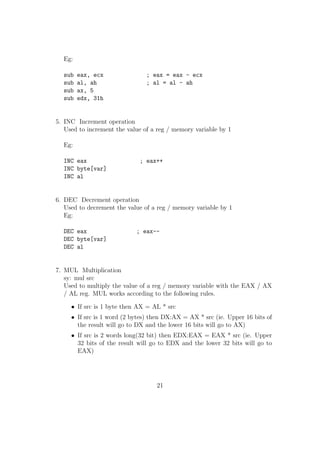
add eax, ecx ; eax = eax + ecx 
add al, ah ; al = al + ah 
add ax, 5 
add edx, 31h 
4. SUB - Subtraction 
sy: sub dest, src 
dest = dest - src; 
Used to subtract the values of two reg / memory var and store the result in 
the
rst operand. 
 src should be a register / memory operand 
 Both src and dest cannot together be memory operands. 
 Both the operands should have the same size. 
20
Eg: 
sub eax, ecx ; eax = eax - ecx 
sub al, ah ; al = al - ah 
sub ax, 5 
sub edx, 31h 
5. INC Increment operation 
Used to increment the value of a reg / memory variable by 1 
Eg: 
INC eax ; eax++ 
INC byte[var] 
INC al 
6. DEC Decrement operation 
Used to decrement the value of a reg / memory variable by 1 
Eg: 
DEC eax ; eax-- 
DEC byte[var] 
DEC al 
7. MUL Multiplication 
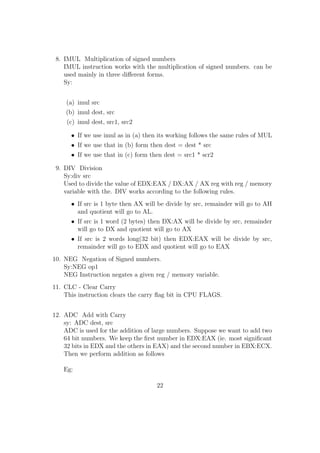
sy: mul src 
Used to multiply the value of a reg / memory variable with the EAX / AX 
/ AL reg. MUL works according to the following rules. 
 If src is 1 byte then AX = AL * src 
 If src is 1 word (2 bytes) then DX:AX = AX * src (ie. Upper 16 bits of 
the result will go to DX and the lower 16 bits will go to AX) 
 If src is 2 words long(32 bit) then EDX:EAX = EAX * src (ie. Upper 
32 bits of the result will go to EDX and the lower 32 bits will go to 
EAX) 
21
8. IMUL Multiplication of signed numbers 
IMUL instruction works with the multiplication of signed numbers. can be 
used mainly in three dierent forms. 
Sy: 
(a) imul src 
(b) imul dest, src 
(c) imul dest, src1, src2 
 If we use imul as in (a) then its working follows the same rules of MUL 
 If we use that in (b) form then dest = dest * src 
 If we use that in (c) form then dest = src1 * scr2 
9. DIV Division 
Sy:div src 
Used to divide the value of EDX:EAX / DX:AX / AX reg with reg / memory 
variable with the. DIV works according to the following rules. 
 If src is 1 byte then AX will be divide by src, remainder will go to AH 
and quotient will go to AL. 
 If src is 1 word (2 bytes) then DX:AX will be divide by src, remainder 
will go to DX and quotient will go to AX 
 If src is 2 words long(32 bit) then EDX:EAX will be divide by src, 
remainder will go to EDX and quotient will go to EAX 
10. NEG Negation of Signed numbers. 
Sy:NEG op1 
NEG Instruction negates a given reg / memory variable. 
11. CLC - Clear Carry 
This instruction clears the carry 
ag bit in CPU FLAGS. 
12. ADC Add with Carry 
sy: ADC dest, src 
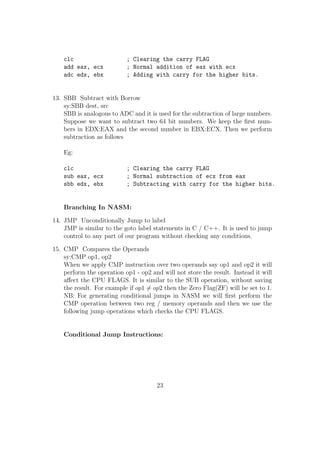
ADC is used for the addition of large numbers. Suppose we want to add two 
64 bit numbers. We keep the
rst number in EDX:EAX (ie. most signi
cant 
32 bits in EDX and the others in EAX) and the second number in EBX:ECX. 
Then we perform addition as follows 
Eg: 
22
clc ; Clearing the carry FLAG 
add eax, ecx ; Normal addition of eax with ecx 
adc edx, ebx ; Adding with carry for the higher bits. 
13. SBB Subtract with Borrow 
sy:SBB dest, src 
SBB is analogous to ADC and it is used for the subtraction of large numbers. 
Suppose we want to subtract two 64 bit numbers. We keep the
rst num-bers 
in EDX:EAX and the second number in EBX:ECX. Then we perform 
subtraction as follows 
Eg: 
clc ; Clearing the carry FLAG 
sub eax, ecx ; Normal subtraction of ecx from eax 
sbb edx, ebx ; Subtracting with carry for the higher bits. 
Branching In NASM: 
14. JMP Unconditionally Jump to label 
JMP is similar to the goto label statements in C / C++. It is used to jump 
control to any part of our program without checking any conditions. 
15. CMP Compares the Operands 
sy:CMP op1, op2 
When we apply CMP instruction over two operands say op1 and op2 it will 
perform the operation op1 - op2 and will not store the result. Instead it will 
aect the CPU FLAGS. It is similar to the SUB operation, without saving 
the result. For example if op16= op2 then the Zero Flag(ZF) will be set to 1. 
NB: For generating conditional jumps in NASM we will
rst perform the 
CMP operation between two reg / memory operands and then we use the 
following jump operations which checks the CPU FLAGS. 
Conditional Jump Instructions: 
23
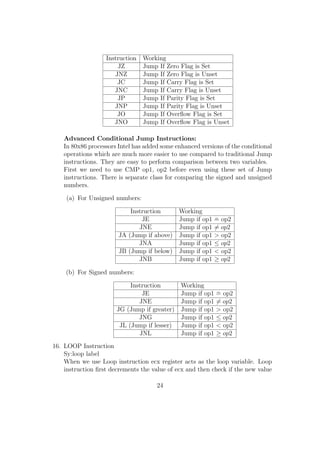
Instruction Working 
JZ Jump If Zero Flag is Set 
JNZ Jump If Zero Flag is Unset 
JC Jump If Carry Flag is Set 
JNC Jump If Carry Flag is Unset 
JP Jump If Parity Flag is Set 
JNP Jump If Parity Flag is Unset 
JO Jump If Over
ow Flag is Set 
JNO Jump If Over
ow Flag is Unset 
Advanced Conditional Jump Instructions: 
In 80x86 processors Intel has added some enhanced versions of the conditional 
operations which are much more easier to use compared to traditional Jump 
instructions. They are easy to perform comparison between two variables. 
First we need to use CMP op1, op2 before even using these set of Jump 
instructions. There is separate class for comparing the signed and unsigned 
numbers. 
(a) For Unsigned numbers: 
Instruction Working 
JE Jump if op1 = op2 
JNE Jump if op16= op2 
JA (Jump if above) Jump if op1  op2 
JNA Jump if op1  op2 
JB (Jump if below) Jump if op1  op2 
JNB Jump if op1  op2 
(b) For Signed numbers: 
Instruction Working 
JE Jump if op1 = op2 
JNE Jump if op16= op2 
JG (Jump if greater) Jump if op1  op2 
JNG Jump if op1  op2 
JL (Jump if lesser) Jump if op1  op2 
JNL Jump if op1  op2 
16. LOOP Instruction 
Sy:loop label 
When we use Loop instruction ecx register acts as the loop variable. Loop 
instruction
rst decrements the value of ecx and then check if the new value 
24
of ecx6= 0. If so it will jump to the label following that instruction. Else 
control jumps to the very next statement. 
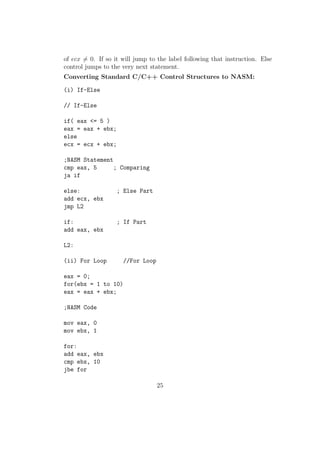
Converting Standard C/C++ Control Structures to NASM: 
(i) If-Else 
// If-Else 
if( eax = 5 ) 
eax = eax + ebx; 
else 
ecx = ecx + ebx; 
;NASM Statement 
cmp eax, 5 ; Comparing 
ja if 
else: ; Else Part 
add ecx, ebx 
jmp L2 
if: ; If Part 
add eax, ebx 
L2: 
(ii) For Loop //For Loop 
eax = 0; 
for(ebx = 1 to 10) 
eax = eax + ebx; 
;NASM Code 
mov eax, 0 
mov ebx, 1 
for: 
add eax, ebx 
cmp ebx, 10 
jbe for 
25
-------- 
-------- 
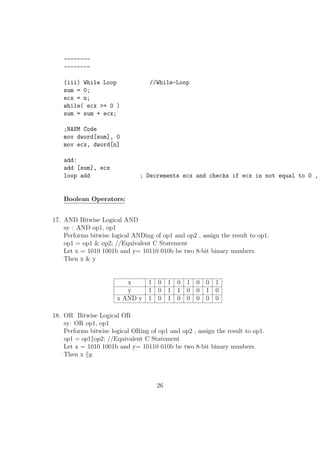
(iii) While Loop //While-Loop 
sum = 0; 
ecx = n; 
while( ecx = 0 ) 
sum = sum + ecx; 
;NASM Code 
mov dword[sum], 0 
mov ecx, dword[n] 
add: 
add [sum], ecx 
loop add ; Decrements ecx and checks if ecx is not equal to 0 , Boolean Operators: 
17. AND Bitwise Logical AND 
sy : AND op1, op1 
Performs bitwise logical ANDing of op1 and op2 , assign the result to op1. 
op1 = op1  op2; //Equivalent C Statement 
Let x = 1010 1001b and y= 10110 010b be two 8-bit binary numbers. 
Then x  y 
x 1 0 1 0 1 0 0 1 
y 1 0 1 1 0 0 1 0 
x AND y 1 0 1 0 0 0 0 0 
18. OR Bitwise Logical OR 
sy: OR op1, op1 
Performs bitwise logical ORing of op1 and op2 , assign the result to op1. 
op1 = op1kop2; //Equivalent C Statement 
Let x = 1010 1001b and y= 10110 010b be two 8-bit binary numbers. 
Then x ky 
26
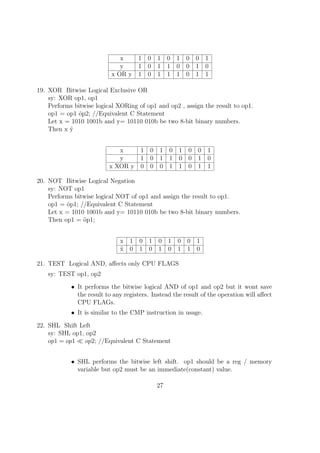
x 1 0 1 0 1 0 0 1 
y 1 0 1 1 0 0 1 0 
x OR y 1 0 1 1 1 0 1 1 
19. XOR Bitwise Logical Exclusive OR 
sy: XOR op1, op1 
Performs bitwise logical XORing of op1 and op2 , assign the result to op1. 
op1 = op1 ^op2; //Equivalent C Statement 
Let x = 1010 1001b and y= 10110 010b be two 8-bit binary numbers. 
Then x ^y 
x 1 0 1 0 1 0 0 1 
y 1 0 1 1 0 0 1 0 
x XOR y 0 0 0 1 1 0 1 1 
20. NOT Bitwise Logical Negation 
sy: NOT op1 
Performs bitwise logical NOT of op1 and assign the result to op1. 
op1 = ~op1; //Equivalent C Statement 
Let x = 1010 1001b and y= 10110 010b be two 8-bit binary numbers. 
Then op1 = ~op1; 
x 1 0 1 0 1 0 0 1 
~x 0 1 0 1 0 1 1 0 
21. TEST Logical AND, aects only CPU FLAGS 
sy: TEST op1, op2 
 It performs the bitwise logical AND of op1 and op2 but it wont save 
the result to any registers. Instead the result of the operation will aect 
CPU FLAGs. 
 It is similar to the CMP instruction in usage. 
22. SHL Shift Left 
sy: SHL op1, op2 
op1 = op1  op2; //Equivalent C Statement 
 SHL performs the bitwise left shift. op1 should be a reg / memory 
variable but op2 must be an immediate(constant) value. 
27
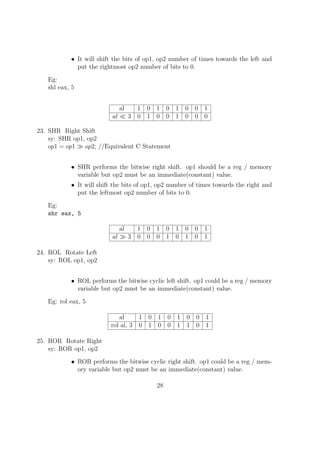
It will shift the bits of op1, op2 number of times towards the left and 
put the rightmost op2 number of bits to 0. 
Eg: 
shl eax, 5 
al 1 0 1 0 1 0 0 1 
al  3 0 1 0 0 1 0 0 0 
23. SHR Right Shift 
sy: SHR op1, op2 
op1 = op1  op2; //Equivalent C Statement 
 SHR performs the bitwise right shift. op1 should be a reg / memory 
variable but op2 must be an immediate(constant) value. 
 It will shift the bits of op1, op2 number of times towards the right and 
put the leftmost op2 number of bits to 0. 
Eg: 
shr eax, 5 
al 1 0 1 0 1 0 0 1 
al  3 0 0 0 1 0 1 0 1 
24. ROL Rotate Left 
sy: ROL op1, op2 
 ROL performs the bitwise cyclic left shift. op1 could be a reg / memory 
variable but op2 must be an immediate(constant) value. 
Eg: rol eax, 5 
al 1 0 1 0 1 0 0 1 
rol al, 3 0 1 0 0 1 1 0 1 
25. ROR Rotate Right 
sy: ROR op1, op2 
 ROR performs the bitwise cyclic right shift. op1 could be a reg / mem-ory 
variable but op2 must be an immediate(constant) value. 
28
Eg: 
ror eax, 5 
al 1 0 1 0 1 0 0 1 
ror al, 3 0 1 1 0 1 0 1 0 
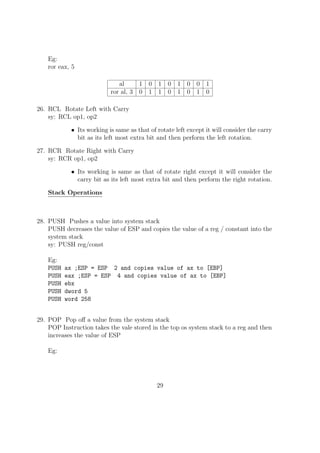
26. RCL Rotate Left with Carry 
sy: RCL op1, op2 
 Its working is same as that of rotate left except it will consider the carry 
bit as its left most extra bit and then perform the left rotation. 
27. RCR Rotate Right with Carry 
sy: RCR op1, op2 
 Its working is same as that of rotate right except it will consider the 
carry bit as its left most extra bit and then perform the right rotation. 
Stack Operations 
28. PUSH Pushes a value into system stack 
PUSH decreases the value of ESP and copies the value of a reg / constant into the 
system stack 
sy: PUSH reg/const 
Eg: 
PUSH ax ;ESP = ESP 2 and copies value of ax to [EBP] 
PUSH eax ;ESP = ESP 4 and copies value of ax to [EBP] 
PUSH ebx 
PUSH dword 5 
PUSH word 258 
29. POP Pop o a value from the system stack 
POP Instruction takes the vale stored in the top os system stack to a reg and then 
increases the value of ESP 
Eg: 
29
POP bx ; ESP= ESP + 2 
POP ebx ; ESP= ESP + 4 
POP eax 
30. PUSHA Pushes the value of all general purpose registers 
PUSHA is used to save the value of general purpose registers especially when 
calling some subprograms which will modify their values. 
31. POPA POP o the value of all general purpose registers which we have pushed 
before using PUSHA instruction 
32. PUSHF Pushes all the CPU FLAGS 
33. POPF POP o and restore the values of all CPU Flags which have been pushed 
before using PUSHF instructions. 
NB: It is important to pop o the values pushed into the stack properly. Even a 
minute mistake in any of the PUSH / POP instruction could make the program 
not working. 
34. Pre-processor Directives in NASM 
In NASM %de
ne acts similar to the C's preprocessor directive de
ne. This can 
be used to declare constants. 
Eg: 
%define SIZE 100 
30
Chapter 4 
Basic I/O in NASM 
The input from the standard input device (Keyboard) and Output to the standard 
output device (monitor) in a NASM Program is implemented using the Operating 
Systems read and write system call. Interrupt no: 80h is given to the software 
generated interrupt in Linux Systems. Applications implement the System Calls 
using this interrupt. When an application triggers int 80h, then OS will understand 
that it is a request for a system call and it will refer the general purpose registers 
to
nd out and execute the exact Interrupt Service Routine (ie. System Call 
here).The standard convention to use the software 80h interrupt is, we will put 
the system call no: in eax register and other parameters needed to implement the 
system calls in the other general purpose registers. Then we will trigger the 80h 
interrupt using the instruction INT 80h. Then OS will implement the system call. 
(a) Exit System Call 
 System call number for exit is 1, so it is copied to eax reg. 
 Output of a program if the exit is successful is 0 and it is being 
passed as a parameter for exit( ) system call. We need to copy 0 to 
ebx reg. 
 Then we will trigger INT 80h 
mov eax, 1 ; System Call Number 
mov ebx, 0 ; Parameter 
int 80h ; Triggering OS Interrupt 
(b) Read System Call 
 Using this we could read only string / character 
31
System Call Number for Read is 3. It is copied to eax. 
 The standard Input device(keyboard) is having the reference num-ber 
0 and it must be copied to ebx reg. 
 We need to copy the pointer in memory, to which we need to store 
the input string to ecx reg. 
 We need to copy the number of characters in the string to edx reg. 
 Then we will trigger INT 80h. 
 We will get the string to the location which we copied to ecx reg. 
mov eax, 3 ; Sys_call number for read 
mov ebx, 0 ; Source Keyboard 
mov ecx, var ; Pointer to memory location 
mov edx, dword[size] ; Size of the string 
int 80h ; Triggering OS Interrupt 
 This method is also used for reading integers and it is a bit tricky. 
If we need to read a single digit, we will read it as a single character 
and then subtract 30h from it(ASCII of 0 = 30h). Then we will get 
the actual value of that number in that variable. 
mov eax, 3 
mov ebx, 0 
mov ecx, digit1 
mov edx, 1 
int 80h 
sub byte[digit1], 30h ;Now we have the actual number in [var] 
Reading a two digit number: 
;Reading first digit 
mov eax, 3 
mov ebx, 0 
mov ecx, digit1 
mov edx, 1 
int 80h 
;Reading second digit 
32
mov eax, 3 
mov ebx, 0 
mov ecx, digit2 
mov edx, 2 ;Here we put 2 because we need to read and 
int 80h omit enter key press as well 
sub byte[digit1], 30h 
sub byte[digit2], 30h 
;Getting the number from ASCII 
; num = (10* digit1) + digit2 
mov al, byte[digit1] ; Copying first digit to al 
mov bl, 10 
mul bl ; Multiplying al with 10 
movzx bx, byte[digit2] ; Copying digit2 to bx 
add ax, bx 
mov byte[num], al ; We are sure that no less than 256, so we can 
omit higher 8 bits of the result. 
(c) Write System Call 
 Using this we could write only string / character 
 System Call Number for Write is 4. It is copied to eax. 
 The standard Output device(Monitor) is having the reference num-ber 
1 and it must be copied to ebx reg. 
 We need to copy the pointer in memory, where the output sting 
resides to ecx reg. 
 We need to copy the number of characters in the string to edx reg. 
 Then we will trigger INT 80h. 
Eg: 
mov eax, 4 ;Sys_call number 
mov ebx, 1 ;Standard Output device 
mov ecx, msg1 ;Pointer to output string 
mov edx, size1 ;Number of characters 
int 80h ;Triggering interrupt. 
33
This method is even used to output numbers. If we have a number 
we will break that into digits. Then we keep each of that digit in 
a variable of size 1 byte. Then we add 30h (ASCII of 0) to each, 
doing so we will get the ASCII of character to be print. 
Sample Programs: 
1. Hello World Program 
section .text ; Code Section 
global _start: 
_start: 
mov eax, 4 ; Using int 80h to implement write() sys_call 
mov ebx, 1 
mov ecx, string 
mov edx, length 
int 80h 
;Exit System Call 
mov eax, 1 
mov ebx, 0 
int 80h 
section .data ;For Storing Initialized Variables 
string: db 'Hello World', 0Ah ;String Hello World followed by a 
newline character 
length: equ 13 ; Length of the string stored to a constant. 
NB: Using equ we declare constants, ie. their value wont change during execution. 
$ -string will return the length of string variables in bytes (ie. number of characters) 
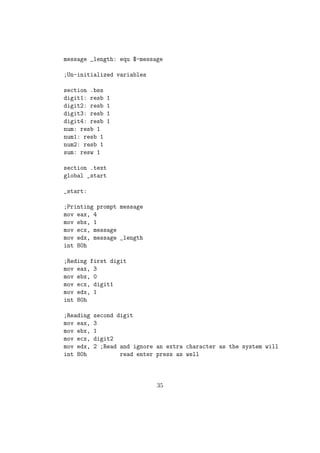
2.Program to add two one two digit numbers 
;Initialized variables 
section .data 
message: db Enter a two digit number :  
34
message _length: equ $-message 
;Un-initialized variables 
section .bss 
digit1: resb 1 
digit2: resb 1 
digit3: resb 1 
digit4: resb 1 
num: resb 1 
num1: resb 1 
num2: resb 1 
sum: resw 1 
section .text 
global _start 
_start: 
;Printing prompt message 
mov eax, 4 
mov ebx, 1 
mov ecx, message 
mov edx, message _length 
int 80h 
;Reding first digit 
mov eax, 3 
mov ebx, 0 
mov ecx, digit1 
mov edx, 1 
int 80h 
;Reading second digit 
mov eax, 3 
mov ebx, 1 
mov ecx, digit2 
mov edx, 2 ;Read and ignore an extra character as the system will 
int 80h read enter press as well 
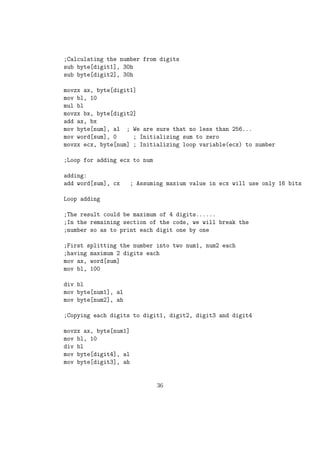
35
;Calculating the number from digits 
sub byte[digit1], 30h 
sub byte[digit2], 30h 
movzx ax, byte[digit1] 
mov bl, 10 
mul bl 
movzx bx, byte[digit2] 
add ax, bx 
mov byte[num], al ; We are sure that no less than 256... 
mov word[sum], 0 ; Initializing sum to zero 
movzx ecx, byte[num] ; Initializing loop variable(ecx) to number 
;Loop for adding ecx to num 
adding: 
add word[sum], cx ; Assuming maxium value in ecx will use only 16 bits 
Loop adding 
;The result could be maximum of 4 digits...... 
;In the remaining section of the code, we will break the 
;number so as to print each digit one by one 
;First splitting the number into two num1, num2 each 
;having maximum 2 digits each 
mov ax, word[sum] 
mov bl, 100 
div bl 
mov byte[num1], al 
mov byte[num2], ah 
;Copying each digits to digit1, digit2, digit3 and digit4 
movzx ax, byte[num1] 
mov bl, 10 
div bl 
mov byte[digit4], al 
mov byte[digit3], ah 
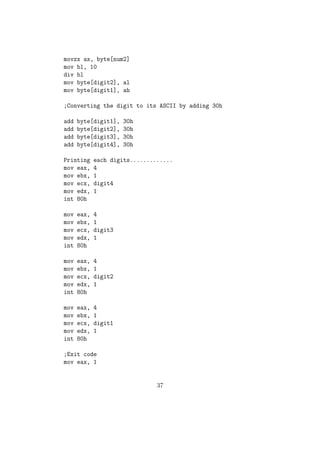
36
movzx ax, byte[num2] 
mov bl, 10 
div bl 
mov byte[digit2], al 
mov byte[digit1], ah 
;Converting the digit to its ASCII by adding 30h 
add byte[digit1], 30h 
add byte[digit2], 30h 
add byte[digit3], 30h 
add byte[digit4], 30h 
Printing each digits............. 
mov eax, 4 
mov ebx, 1 
mov ecx, digit4 
mov edx, 1 
int 80h 
mov eax, 4 
mov ebx, 1 
mov ecx, digit3 
mov edx, 1 
int 80h 
mov eax, 4 
mov ebx, 1 
mov ecx, digit2 
mov edx, 1 
int 80h 
mov eax, 4 
mov ebx, 1 
mov ecx, digit1 
mov edx, 1 
int 80h 
;Exit code 
mov eax, 1 
37
mov ebx, 0 
int 80h 
NB: Problem with the above code is we need to give the input as two digits. If we 
need to input 9 we need to give it as 09 Output will be printed in 4 digits. ie even 
if the sum is just 45 the output will be : 0045 We can correct this by reading each 
digits by pushing to a stack and the popping out when new line character is being 
encountered in the input. In your programs you are expected to use this method 
for reading and writing numbers. 
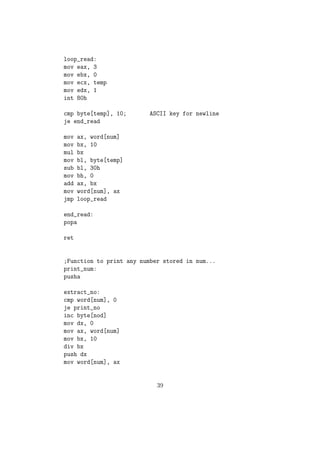
The code snippet given below gives the sample code with subprograms for reading 
and printing a general 16 bit number stored in memory variable num by splitting 
the number using stack. This will be the better way for inputting / outputting a 
number. 
section .bss 
num: resw 1 ; For storing a number, to be read of printed.... 
nod: resb 1 ; For storing the number of digits.... 
temp: resb 2 
section .text 
global _start 
_start: 
call read_num 
call print_num 
exit: 
mov eax, 1 
mov ebx, 0 
int 80h 
;Function to read a number from console and to store that in num 
read_num: 
pusha 
mov word[num], 0 
38
loop_read: 
mov eax, 3 
mov ebx, 0 
mov ecx, temp 
mov edx, 1 
int 80h 
cmp byte[temp], 10; ASCII key for newline 
je end_read 
mov ax, word[num] 
mov bx, 10 
mul bx 
mov bl, byte[temp] 
sub bl, 30h 
mov bh, 0 
add ax, bx 
mov word[num], ax 
jmp loop_read 
end_read: 
popa 
ret 
;Function to print any number stored in num... 
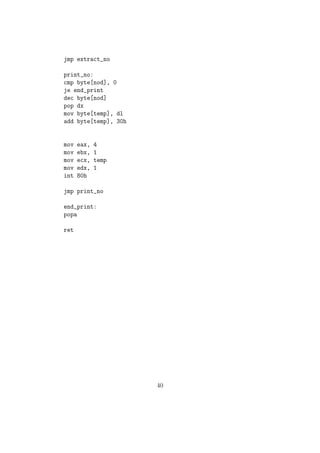
print_num: 
pusha 
extract_no: 
cmp word[num], 0 
je print_no 
inc byte[nod] 
mov dx, 0 
mov ax, word[num] 
mov bx, 10 
div bx 
push dx 
mov word[num], ax 
39
jmp extract_no 
print_no: 
cmp byte[nod], 0 
je end_print 
dec byte[nod] 
pop dx 
mov byte[temp], dl 
add byte[temp], 30h 
mov eax, 4 
mov ebx, 1 
mov ecx, temp 
mov edx, 1 
int 80h 
jmp print_no 
end_print: 
popa 
ret 
40
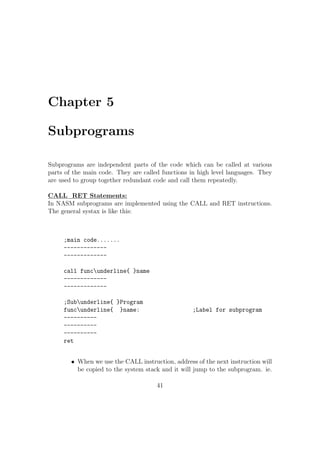
Chapter 5 
Subprograms 
Subprograms are independent parts of the code which can be called at various 
parts of the main code. They are called functions in high level languages. They 
are used to group together redundant code and call them repeatedly. 
CALL RET Statements: 
In NASM subprograms are implemented using the CALL and RET instructions. 
The general systax is like this: 
;main code....... 
------------- 
------------- 
call funcunderline{ }name 
------------- 
------------- 
;Subunderline{ }Program 
funcunderline{ }name: ;Label for subprogram 
---------- 
---------- 
---------- 
ret 
 When we use the CALL instruction, address of the next instruction will 
be copied to the system stack and it will jump to the subprogram. ie. 
41
ESP will be decreased by 4 units and address of the next instruction 
will go over there. 
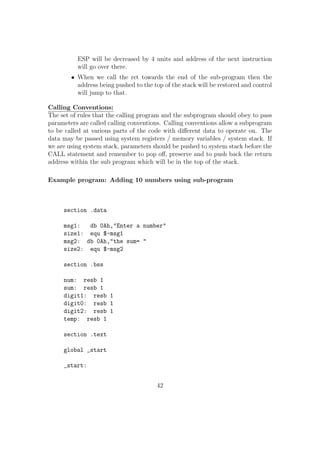
 When we call the ret towards the end of the sub-program then the 
address being pushed to the top of the stack will be restored and control 
will jump to that. 
Calling Conventions: 
The set of rules that the calling program and the subprogram should obey to pass 
parameters are called calling conventions. Calling conventions allow a subprogram 
to be called at various parts of the code with dierent data to operate on. The 
data may be passed using system registers / memory variables / system stack. If 
we are using system stack, parameters should be pushed to system stack before the 
CALL statement and remember to pop o, preserve and to push back the return 
address within the sub program which will be in the top of the stack. 
Example program: Adding 10 numbers using sub-program 
section .data 
msg1: db 0Ah,Enter a number 
size1: equ $-msg1 
msg2: db 0Ah,the sum=  
size2: equ $-msg2 
section .bss 
num: resb 1 
sum: resb 1 
digit1: resb 1 
digit0: resb 1 
digit2: resb 1 
temp: resb 1 
section .text 
global _start 
_start: 
42
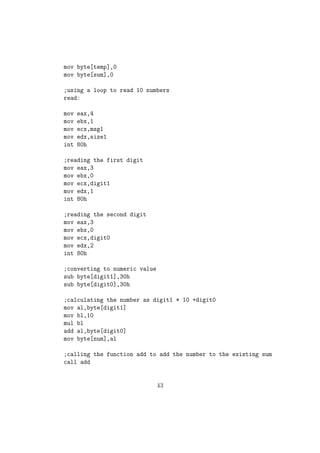
mov byte[temp],0 
mov byte[sum],0 
;using a loop to read 10 numbers 
read: 
mov eax,4 
mov ebx,1 
mov ecx,msg1 
mov edx,size1 
int 80h 
;reading the first digit 
mov eax,3 
mov ebx,0 
mov ecx,digit1 
mov edx,1 
int 80h 
;reading the second digit 
mov eax,3 
mov ebx,0 
mov ecx,digit0 
mov edx,2 
int 80h 
;converting to numeric value 
sub byte[digit1],30h 
sub byte[digit0],30h 
;calculating the number as digit1 * 10 +digit0 
mov al,byte[digit1] 
mov bl,10 
mul bl 
add al,byte[digit0] 
mov byte[num],al 
;calling the function add to add the number to the existing sum 
call add 
43
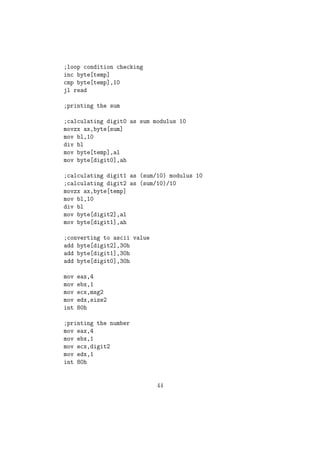
;loop condition checking 
inc byte[temp] 
cmp byte[temp],10 
jl read 
;printing the sum 
;calculating digit0 as sum modulus 10 
movzx ax,byte[sum] 
mov bl,10 
div bl 
mov byte[temp],al 
mov byte[digit0],ah 
;calculating digit1 as (sum/10) modulus 10 
;calculating digit2 as (sum/10)/10 
movzx ax,byte[temp] 
mov bl,10 
div bl 
mov byte[digit2],al 
mov byte[digit1],ah 
;converting to ascii value 
add byte[digit2],30h 
add byte[digit1],30h 
add byte[digit0],30h 
mov eax,4 
mov ebx,1 
mov ecx,msg2 
mov edx,size2 
int 80h 
;printing the number 
mov eax,4 
mov ebx,1 
mov ecx,digit2 
mov edx,1 
int 80h 
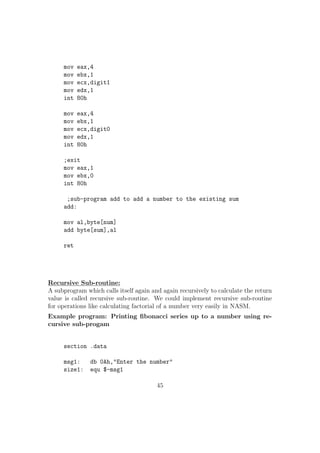
44
mov eax,4 
mov ebx,1 
mov ecx,digit1 
mov edx,1 
int 80h 
mov eax,4 
mov ebx,1 
mov ecx,digit0 
mov edx,1 
int 80h 
;exit 
mov eax,1 
mov ebx,0 
int 80h 
;sub-program add to add a number to the existing sum 
add: 
mov al,byte[num] 
add byte[sum],al 
ret 
Recursive Sub-routine: 
A subprogram which calls itself again and again recursively to calculate the return 
value is called recursive sub-routine. We could implement recursive sub-routine 
for operations like calculating factorial of a number very easily in NASM. 
Example program: Printing
bonacci series up to a number using re- 
cursive sub-progam 
section .data 
msg1: db 0Ah,Enter the number 
size1: equ $-msg1 
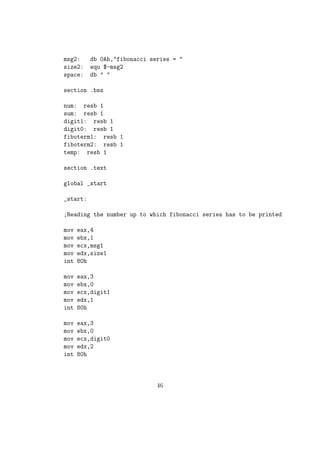
45
msg2: db 0Ah,fibonacci series =  
size2: equ $-msg2 
space: db   
section .bss 
num: resb 1 
sum: resb 1 
digit1: resb 1 
digit0: resb 1 
fiboterm1: resb 1 
fiboterm2: resb 1 
temp: resb 1 
section .text 
global _start 
_start: 
;Reading the number up to which fibonacci series has to be printed 
mov eax,4 
mov ebx,1 
mov ecx,msg1 
mov edx,size1 
int 80h 
mov eax,3 
mov ebx,0 
mov ecx,digit1 
mov edx,1 
int 80h 
mov eax,3 
mov ebx,0 
mov ecx,digit0 
mov edx,2 
int 80h 
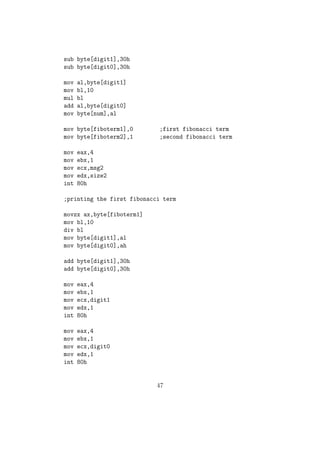
46
sub byte[digit1],30h 
sub byte[digit0],30h 
mov al,byte[digit1] 
mov bl,10 
mul bl 
add al,byte[digit0] 
mov byte[num],al 
mov byte[fiboterm1],0 ;first fibonacci term 
mov byte[fiboterm2],1 ;second fibonacci term 
mov eax,4 
mov ebx,1 
mov ecx,msg2 
mov edx,size2 
int 80h 
;printing the first fibonacci term 
movzx ax,byte[fiboterm1] 
mov bl,10 
div bl 
mov byte[digit1],al 
mov byte[digit0],ah 
add byte[digit1],30h 
add byte[digit0],30h 
mov eax,4 
mov ebx,1 
mov ecx,digit1 
mov edx,1 
int 80h 
mov eax,4 
mov ebx,1 
mov ecx,digit0 
mov edx,1 
int 80h 
47
mov eax,4 
mov ebx,1 
mov ecx,space 
mov edx,1 
int 80h 
;printing the second fibonacci term 
movzx ax,byte[fiboterm2] 
mov bl,10 
div bl 
mov byte[digit1],al 
mov byte[digit0],ah 
add byte[digit1],30h 
add byte[digit0],30h 
mov eax,4 
mov ebx,1 
mov ecx,digit1 
mov edx,1 
int 80h 
mov eax,4 
mov ebx,1 
mov ecx,digit0 
mov edx,1 
int 80h 
mov eax,4 
mov ebx,1 
mov ecx,space 
mov edx,1 
int 80h 
;calling recursive sub-program fibo to print the series 
call fibo 
48
;exit 
mov eax,1 
mov ebx,0 
int 80h 
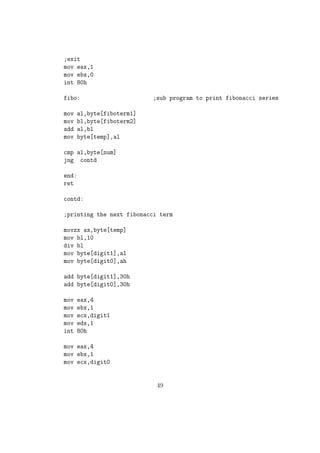
fibo: ;sub program to print fibonacci series 
mov al,byte[fiboterm1] 
mov bl,byte[fiboterm2] 
add al,bl 
mov byte[temp],al 
cmp al,byte[num] 
jng contd 
end: 
ret 
contd: 
;printing the next fibonacci term 
movzx ax,byte[temp] 
mov bl,10 
div bl 
mov byte[digit1],al 
mov byte[digit0],ah 
add byte[digit1],30h 
add byte[digit0],30h 
mov eax,4 
mov ebx,1 
mov ecx,digit1 
mov edx,1 
int 80h 
mov eax,4 
mov ebx,1 
mov ecx,digit0 
49
mov edx,1 
int 80h 
mov eax,4 
mov ebx,1 
mov ecx,space 
mov edx,1 
int 80h 
movzx ax,byte[fiboterm2] 
mov byte[fiboterm1],al 
movzx bx,byte[temp] 
mov byte[fiboterm2],bl 
call fibo 
jmp end 
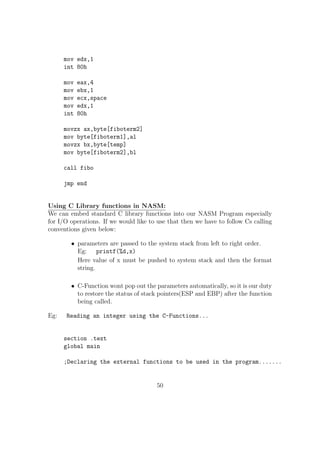
Using C Library functions in NASM: 
We can embed standard C library functions into our NASM Program especially 
for I/O operations. If we would like to use that then we have to follow Cs calling 
conventions given below: 
 parameters are passed to the system stack from left to right order. 
Eg: printf(%d,x) 
Here value of x must be pushed to system stack and then the format 
string. 
 C-Function wont pop out the parameters automatically, so it is our duty 
to restore the status of stack pointers(ESP and EBP) after the function 
being called. 
Eg: Reading an integer using the C-Functions... 
section .text 
global main 
;Declaring the external functions to be used in the program....... 
50
extern scanf 
extern printf 
;Code to read an integer using the scanf function 
getint: 
push ebp ;Steps to store the stack pointers 
mov ebp , esp 
;scanf(%d,x) 
;Creating a space of 2 bytes on top of stack to store the int value 
sub esp , 2 
lea eax , [ ebp-2] 
push eax ; Pushing the address of that location 
push fmt1 ; Pushing format string 
call scanf ; Calling scanf function 
mov ax, word [ebp-2] 
mov word[num], ax 
;Restoring the stack registers. 
mov esp , ebp 
pop ebp 
ret 
putint: 
push ebp ; Steps to store the stack pointers 
mov ebp , esp 
;printf(%d,x) 
sub esp , 2 ; Creating a space of 2 bytes and storing the int value mov ax, word[num] 
mov word[ebp-2], ax 
push fmt2 ; Pushing pointer to format string 
call printf ; Calling printf( ) function 
mov esp , ebp ; Restoring stack to initial values 
pop ebp 
ret 
main: ; Main( ) Function 
51
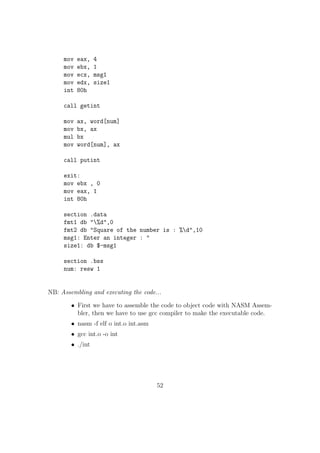
mov eax, 4 
mov ebx, 1 
mov ecx, msg1 
mov edx, size1 
int 80h 
call getint 
mov ax, word[num] 
mov bx, ax 
mul bx 
mov word[num], ax 
call putint 
exit: 
mov ebx , 0 
mov eax, 1 
int 80h 
section .data 
fmt1 db %d,0 
fmt2 db Square of the number is : %d,10 
msg1: Enter an integer :  
size1: db $-msg1 
section .bss 
num: resw 1 
NB: Assembling and executing the code... 
 First we have to assemble the code to object code with NASM Assem-bler, 
then we have to use gcc compiler to make the executable code. 
 nasm -f elf o int.o int.asm 
 gcc int.o -o int 
 ./int 
52
Chapter 6 
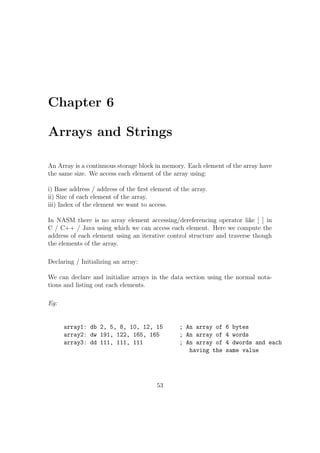
Arrays and Strings 
An Array is a continuous storage block in memory. Each element of the array have 
the same size. We access each element of the array using: 
i) Base address / address of the
rst element of the array. 
ii) Size of each element of the array. 
iii) Index of the element we want to access. 
In NASM there is no array element accessing/dereferencing operator like [ ] in 
C / C++ / Java using which we can access each element. Here we compute the 
address of each element using an iterative control structure and traverse though 
the elements of the array. 
Declaring / Initializing an array: 
We can declare and initialize arrays in the data section using the normal nota-tions 
and listing out each elements. 
Eg: 
array1: db 2, 5, 8, 10, 12, 15 ; An array of 6 bytes 
array2: dw 191, 122, 165, 165 ; An array of 4 words 
array3: dd 111, 111, 111 ; An array of 4 dwords and each 
having the same value 
53
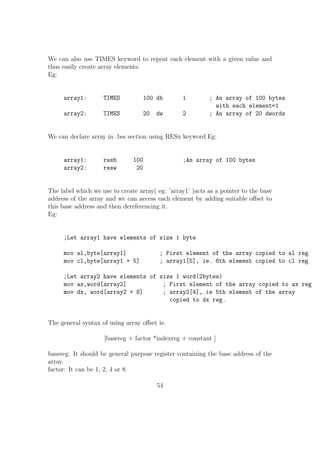
We can also use TIMES keyword to repeat each element with a given value and 
thus easily create array elements: 
Eg: 
array1: TIMES 100 db 1 ; An array of 100 bytes 
with each element=1 
array2: TIMES 20 dw 2 ; An array of 20 dwords 
We can declare array in .bss section using RESx keyword.Eg: 
array1: resb 100 ;An array of 100 bytes 
array2: resw 20 
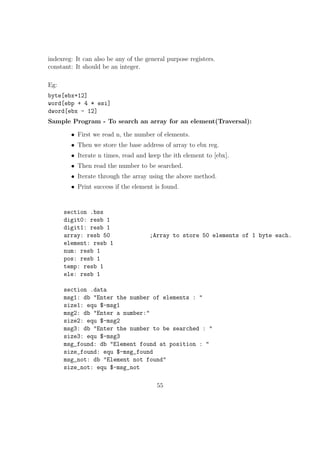
The label which we use to create array( eg: 'array1' )acts as a pointer to the base 
address of the array and we can access each element by adding suitable oset to 
this base address and then dereferencing it. 
Eg: 
;Let array1 have elements of size 1 byte 
mov al,byte[array1] ; First element of the array copied to al reg 
mov cl,byte[array1 + 5] ; array1[5], ie. 6th element copied to cl reg 
;Let array2 have elements of size 1 word(2bytes) 
mov ax,word[array2] ; First element of the array copied to ax reg 
mov dx, word[array2 + 8] ; array2[4], ie 5th element of the array 
copied to dx reg. 
The general syntax of using array oset is: 
[basereg + factor *indexreg + constant ] 
basereg: It should be general purpose register containing the base address of the 
array. 
factor: It can be 1, 2, 4 or 8. 
54
indexreg: It can also be any of the general purpose registers. 
constant: It should be an integer. 
Eg: 
byte[ebx+12] 
word[ebp + 4 * esi] 
dword[ebx - 12] 
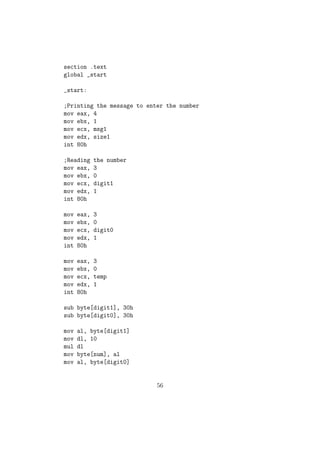
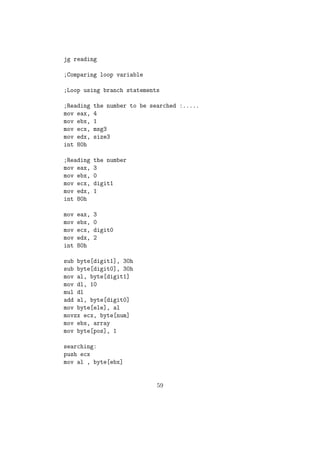
Sample Program - To search an array for an element(Traversal): 
 First we read n, the number of elements. 
 Then we store the base address of array to ebx reg. 
 Iterate n times, read and keep the ith element to [ebx]. 
 Then read the number to be searched. 
 Iterate through the array using the above method. 
 Print success if the element is found. 
section .bss 
digit0: resb 1 
digit1: resb 1 
array: resb 50 ;Array to store 50 elements of 1 byte each. 
element: resb 1 
num: resb 1 
pos: resb 1 
temp: resb 1 
ele: resb 1 
section .data 
msg1: db Enter the number of elements :  
size1: equ $-msg1 
msg2: db Enter a number: 
size2: equ $-msg2 
msg3: db Enter the number to be searched :  
size3: equ $-msg3 
msg_found: db Element found at position :  
size_found: equ $-msg_found 
msg_not: db Element not found 
size_not: equ $-msg_not 
55
section .text 
global _start 
_start: 
;Printing the message to enter the number 
mov eax, 4 
mov ebx, 1 
mov ecx, msg1 
mov edx, size1 
int 80h 
;Reading the number 
mov eax, 3 
mov ebx, 0 
mov ecx, digit1 
mov edx, 1 
int 80h 
mov eax, 3 
mov ebx, 0 
mov ecx, digit0 
mov edx, 1 
int 80h 
mov eax, 3 
mov ebx, 0 
mov ecx, temp 
mov edx, 1 
int 80h 
sub byte[digit1], 30h 
sub byte[digit0], 30h 
mov al, byte[digit1] 
mov dl, 10 
mul dl 
mov byte[num], al 
mov al, byte[digit0] 
56
add byte[num], al 
mov al, byte[num] 
mov byte[temp], al 
mov ebx, array 
reading: 
push ebx ;Preserving The value of ebx in stack 
;Printing the message to enter each element 
mov eax, 4 
mov ebx, 1 
mov ecx, msg2 
mov edx, size2 
int 80h 
;Reading the number 
mov eax, 3 
mov ebx, 0 
mov ecx, digit1 
mov edx, 1 
int 80h 
mov eax, 3 
mov ebx, 0 
mov ecx, digit0 
mov edx, 2 
int 80h 
sub byte[digit1], 30h 
sub byte[digit0], 30h 
mov al, byte[digit1] 
mov dl, 10 
mul dl 
add al, byte[digit0] 
;al now contains the number 
pop ebx 
mov byte[ebx], al 
add ebx, 1 
dec byte[temp] 
57
cmp byte[temp], 0 
jg reading 
;Comparing loop variable 
;Loop using branch statements 
;Reading the number to be searched :..... 
mov eax, 4 
mov ebx, 1 
mov ecx, msg3 
mov edx, size3 
int 80h 
;Reading the number 
mov eax, 3 
mov ebx, 0 
mov ecx, digit1 
mov edx, 1 
int 80h 
mov eax, 3 
mov ebx, 0 
mov ecx, digit0 
mov edx, 2 
int 80h 
sub byte[digit1], 30h 
sub byte[digit0], 30h 
mov al, byte[digit1] 
mov dl, 10 
mul dl 
add al, byte[digit0] 
;al now contains the number 
pop ebx 
mov byte[ebx], al 
add ebx, 1 
dec byte[temp] 
cmp byte[temp], 0 
58
jg reading 
;Comparing loop variable 
;Loop using branch statements 
;Reading the number to be searched :..... 
mov eax, 4 
mov ebx, 1 
mov ecx, msg3 
mov edx, size3 
int 80h 
;Reading the number 
mov eax, 3 
mov ebx, 0 
mov ecx, digit1 
mov edx, 1 
int 80h 
mov eax, 3 
mov ebx, 0 
mov ecx, digit0 
mov edx, 2 
int 80h 
sub byte[digit1], 30h 
sub byte[digit0], 30h 
mov al, byte[digit1] 
mov dl, 10 
mul dl 
add al, byte[digit0] 
mov byte[ele], al 
movzx ecx, byte[num] 
mov ebx, array 
mov byte[pos], 1 
searching: 
push ecx 
mov al , byte[ebx] 
59

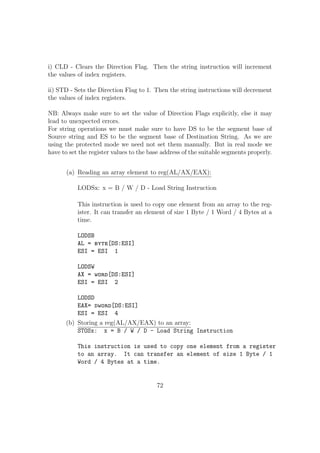
nasm_final

  • 2.
    Introduction to NASM Prepared By: Muhammed Yazar Y Updated By: Sonia V Mathew Govind R B Tech Dept: of CSE NIT Calicut Under The Guidance of: Mr. Jayaraj P B Mr. Saidalavi Kalady Assistant Professors Dept: of CSE NIT Calicut Department Of Computer Science & Engineering NATIONAL INSTITUTE OF TECHNOLOGY CALICUT 2014
  • 3.
    Contents 1 Basicsof Computer Organization 3 2 How to Start 13 3 X86 - Basic Instruction Set 19 4 Basic I/O in NASM 31 5 Subprograms 41 6 Arrays and Strings 53 1
  • 4.
    Acknowledgement I wouldlike to express my gratitude to Saidalavy Kalady Sir and Jayaraj P B Sir (Assistant Professors, Dept: of CSE, NIT Calicut) for guiding me throughout while making this reference material on NASM Assembly language programming. Without their constant support and guidance this work would not have been pos-sible. Thanks to Lyla B Das madam (Associate Professor, Dept: of ECE, NIT Calicut) for encouraging me to bring out an updated version of this work. I would also wish to thank Meera Sudharman, my classmate who helped me in verifying the contents of this document. Special thanks are due to Govind R and Sonia V Mathew (BTech 2011-2015 Batch) for updating the contents and adding more working examples to it. Thanks to all my dear batch mates and juniors who have been supporting me through the work of this and for providing me with their valu-able suggestions. Muhammed Yazar 2
  • 5.
    Chapter 1 Basicsof Computer Organization In order to program in assembly language it is necessary to have basic knowledge of Computer organization and processor architecture. This chapter gives you the basic idea of how a processor works, how it access data from main memory, how it reads or writes information from other I/O (Input / Output) devices etc. The basic operational design of a computer is called architecture. 80X86 series of processors follow Von Newmann Architecture which is based on the stored pro-gram concept. 1. Processor Processor is the brain of the computer. It performs all mathematical, logical and control operations of a computer. It is that component of the computer which executes all the instructions given to it in the form of programs. It interacts with I/O devices, memory (RAM) and secondary storage devices and thus implements the instructions given by the user. 2. Registers Registers are the most immediately accessible memory units for the proces-sor. They are the fastest among all the types of memory. They reside inside the processor and the processor can access the contents of any register in a single clock cycle. It is the working memory for a processor, i.e , if we want the processor to perform any task it needs the data to be present in any of its registers. The series of processors released on or after 80186 like 80186, 80286, 80386, Pentium etc are referred to as x86 or 80x86 processors. The processors released on or after 80386 are called I386 processors. They are 32 bit processors internally and externally. So their register sizes are generally 32 bit. In this section we will go through the I386 registers. Intel maintains 3
  • 6.
    Figure 1.1: BasicOperation of a processor its backward compatibility of instruction sets, i.e, we can run a program de-signed for an old 16 bit machine in a 32bit machine. That is the reason why we can install 32-bit OS in a 64 bit PC. The only problem is that, the pro-gram will not use the complete set of registers and other available resources and thus it will be less ecient. (a) General Purpose Registers There are eight general purpose registers. They are EAX, EBX, ECX, EDX, EBP, ESI, EDI, ESP. We can refer to the lower 8 and 16 bits of these registers (E.g.: AX, AH, AL) separately. This is to maintain the backward compatibility of instruction sets. These registers are also known as scratchpad area as they are used by the processor to store intermediate values in a calculation and also for storing address loca-tions. The General Purpose Registers are used for : EAX: Accumulator Register Contains the value of some operands in some operations (E.g.: multiplication). EBX: Base Register Pointer to some data in Data Segment. ECX: Counter Register Acts as loop counter, used in string oper-ations etc. EDX: Used as pointer to I/O ports. ESI: Source Index Acts as source pointer in string operations. It can also act as a pointer in Data Segment (DS). EDI: Destination Index- Acts as destination pointer in string oper-ations. It can also act as a pointer in Extra Segment (ES) 4
  • 7.
    Figure 1.2: I-386General Purpose Registers ESP: Stack Pointer Always points to the top of system stack. EBP: Base Pointer It points to the starting of system stack (ie. bottom/base of stack). (b) Flags and EIP FLAGS are special purpose registers inside the CPU that contains the status of CPU / the status of last operation executed by the CPU. Some of the bits in FLAGS need special mention: Carry Flag: When a processor do a calculation, if there is a carry then the Carry Flag will be set to 1. Zero Flag: If the result of the last operation was zero, Zero Flag will be set to 1, else it will be zero. Sign Flag : If the result of the last signed operation is negative then the Sign Flag is set to 1, else it will be zero. Parity Flag: If there are odd number of ones in the result of the last operation, parity ag will be set to 1. Interrupt Flag: If interrupt ag is set to 1, then only it will listen to external interrupts. EIP: EIP is the instruction pointer, it points to the next instruction to be executed. In memory there are basically two classes of things stored: (a) Data. (b)Program. When we start a program, it will be copied into the main memory and EIP is the pointer which points to the starting 5
  • 8.
    of this programin memory and execute each instruction sequentially. Branch statements like JMP, RET, CALL, JNZ (we will see this in chapter 3) alter the value of EIP. (c) Segment Registers Figure 1.3: X System Flags, S Status Flags, C Control Flags In x86 processors for accessing the memory basically there are two types of registers used Segment Register and Oset. Segment register con-tains the base address of a particular data section and Oset will contain how many bytes should be displaced from the segment register to access the particular data. CS contains the base address of Code Segment and EIP is the oset. It keeps on updating while executing each instruction. SS or Stack Segment contains the address of top most part of system stack. ESP and EBP will be the oset for that. Stack is a data structure that follows LIFO ie. Last-In-First-Out. There are two main operations associated with stack: push and pop. If we need to insert an element into a stack, we will push it and when we give the pop instruction, we will get the last value which we have pushed. Stack grows downward. So SP will always points to the top of stack and if we push an element, ESP (Stack Pointer) will get reduced by sucient number of bytes and the data to be stored will be pushed over there. DS, ES, FS and GS acts as base registers for a lot of data operations like array addressing, string operations etc. ESI, EDI and EBX can act as osets for them. Unlike other registers, Segment registers are still 16 bit wide in 32-bit processors. 6
  • 9.
    In modern 32bit processor the segment address will be just an en-try into a descriptor table in memory and using the oset it will get the exact memory locations through some manipulations. This is called segmentation. Here in the memory ,the Stack Segment starts from the memory loca-tion 122 and grows downwards. Here the Stack Pointer ESP is pointing to the location 119. Now if we pop 1 byte of data from stack, we will get (01010101)2 and the ESP will get increased by one Now suppose we have (01101100 11001111)2 in the register ax and we execute the push command: push ax Then the ESP will get reduced by two units (because we need two store two bytes of data) and ax will be copied over there: Here we can see that now ESP points to the lower byte of data from the 2 bytes data which we have pushed. In x86 architecture when we push or save some data in memory, the lower bytes of it will be addressed immediately and thus it is said to follow Little Endian Form. MIPS architecture follows Big Endian Form. 3. Bus Bus is a name given to any communication medium, that transfers data between two components. We can classify the buses associated with the processor into three: (a) Data Bus It is the bus used to transfer data between the processor and memory or any other I/O devices (for both reading and writing). As the size of data bus increases, it can transfer more data in a single stretch. The size of data bus in common processors by Intel are given below: Processor Bus size 8088, 80188 8 bit 8086, 80816, 80286, 80386SX 16 bit 80386DX, 80486 32 bit 80586, Pentium Pro and later processors 64 bit 7
  • 10.
    (b) Address Bus RAM or random access memory is the working memory for a com-puter. It is a primary storage device, i.e. the data stored in RAM will be erased when the power is gone. All the instructions and data used by the computer is copied to RAM from other secondary storage devices like Hard Disk, Floppy drive, DVD drive etc. When we power on the PC the booting process will happen, which is the process of copying / loading Operating System from a secondary storage device to the main memory or RAM. When we start a program, the associated instructions and data are copied into RAM. Later on when processor needs the data from RAM it will copy that into its registers. RAM consists of contigu-ous storage units each of which is 8 bit wide (1 byte) and each location in RAM is given a location number starting from 0. When processor wants to read some data from memory (RAM) or write data into some locations in the memory, it will
  • 11.
    rst place thelocation in RAM from where the data is to be copied / written in the address bus. If it is a reading process, the data bus will have the data from that memory location. If it is a writing process, processor will place the data to be written into the data bus. Memory management Unit (MMU) or Memory Control Circuitry (MCC) or Memory Control Unit (MCU) is the set of electronic circuits present in the motherboard which helps the processor in reading or writing the data to or from a location in the RAM. Address bus is also used for addressing the I/O devices as they can also be viewed as a source or destination of data. For these operations 8
  • 12.
    control buses helpa lot. The maximum size of RAM which can be used in a PC is determined by the size of the address bus. If the size of address bus is n bits, it can address a maximum of 2n bytes of RAM. This is the reason why even if we add more than 4 G.B of RAM in a 32 bit PC, we cannot
  • 13.
    nd more than4G.B of available memory. There are also others factors which limit the maximum usable memory size (e.g. some locations are used for I/O addressing). Processor Address Bus Width Maximum addressable RAM size 8088, 8086, 80186, 80286,80188 20 16 KB 80386SX, 80286 24 16 MB 80486, 80386DX, Pentium, Pentium Overdrive 32 4 GB Pentium II, Pentium Pro 36 64 GB (c) Control Bus : Control bus contains information which controls the operations of pro-cessor or any other memory or I/O device. For example, the data bus is used for both reading and writing purpose and how is it that the Memory or MMU knows the data has to be written to a location or has to be read from a location, when it encounters an address in the address bus? This ambiguity is being cleared using read and write bits in the control bus. When the read bit is enabled, the data in the EDB (external data bus or simply data bus) will be written to that location. When the write bit is enabled, MMU will write the data in the EDB into the address location in the address bus. There are also control bits for interrupts, clocking etc. We will see what an interrupt and clocking is in the coming pages. 4. System Clock The basic component of a microprocessor or a microcontroller is logic gates. They are examples of digital circuits (i.e. they work in two voltage levels - high and low or 1 and 0). More speci
  • 14.
    cally they aresynchronous sequential circuits, i.e, their activities are synchronized with a common clock, which 9
  • 15.
    will create squarewave pulses at a constant rate. In the control bus, there is a bit for clocking. The processing cycle is divided into four: Fetch, Decode, Execute, Write. Fetch : At
  • 16.
    rst the processorwill fetch the data and instructions to be manipulated from the EDB(External Data Bus) Decode : It will then decode the binary instruction and decide what ac-tion( arithmetic / logic operation) to be done on the operands. In this stage, the values are read from the source registers. Execute : It will perform the operations on the operands and manipulates the result. Memory Access : The memory is accessed at this stage (read/ write). Write : In this stage result is written back to the destination register. How come the processor knows when to do each of these operations? How can the processor conclude that now the data to be fetched is there in the EDB....? All these issues are solved by clocking. During the
  • 17.
    rst clock pulse the processor knows that it is time to take the data from the EDB. During the next cycle it will decode the binary instruction. In the succeeding cycle it will execute the operations on operands and then it will write the result into the EDB. So a single operation takes minimum of four clock pulses to complete. Some operation (especially decode) will take more than one clock cycle to complete. So we can say that, all the activities of a processor are synchronized by a common clocking. Speed of a processor depends much on its clock speed. It is the maximum speed at which we can make a processor work. But motherboard will al-ways use the processor at a speed lower than or equal to its clock speed and that speed is decided by the system crystals and it is known as System Bus Speed. In earlier days we need to have some jumper settings in motherboard to adjust the system bus speed to clock speed. Modern motherboards will communicate with the processor, get the clock speed and then automatically adjust the System Bus Speed. Nowadays some people use third party soft-ware and make the motherboard to use processor at a higher speed than its speci
  • 18.
    ed clock speed.This is known as overclocking. Clock speed of a processor is the highest clock rate at which it will work safely, without any problems. So if we overclock the processor, still it may work but there is a very high risk for the processor to burn o due to heat dissipation. So never go for overclocking. 10
  • 19.
    5. Interrupts: Interruptsare the most critical routines executed by a processor. Interrupts may be triggered by external sources or due to internal operations. In linux based systems 80h is the interrupt number for OS generated interrupts and in windows based systems it is 21h. The Operating System Interrupt is used for implementing systems calls. Whenever an interrupt occurs, processor will stop its present work, preserve the values in registers into memory and then execute the ISR (Interrupt Service Routine) by referring to an interrupt vector table. ISR is the set of instructions to be executed when an interrupt occurs. By referring to the interrupt vector table, the processor can get which ISR it should execute for the given interrupt. After executing the ISR, processor will restore the registers to its previous state and continue the process that it was executing before. Almost all the I/O devices work by utilizing the interrupt requests. 11
  • 20.
    Figure 1.4: Registersin 64-bit architecture(Source: http://www.tortall.net/) 12
  • 21.
    Chapter 2 Howto Start We can classify the programming languages into three categories : Machine Language : Machine language consists of instructions in the form of 0's and 1's. Every CPU has its own machine language. It is very dicult to write programs using the combination of 0's and 1's. So we rely upon either assembly language or high level language for writing programs. Assembly Language : Assembly language, when compared with machine language is in more human readable form. The general syntax of an assembly language instruction is: mnemonic operand(s) Eg: add eax, ebx mov al, ah inc byte[data1] Corresponding to each assembly language instruction, there will be a machine language instruction (ie. a hardware implementation). An assembler converts an assembly language code into machine language. We will be using the 'Netwide Assembler' (NASM). It is freely available on the internet. It works for both 32bit and 64bit PCs. It can be installed in Linux as well as Windows. Examples of other assemblers are Microsoft Assembler (MASM) and Borland Assembler(TASM). 13
  • 22.
    High Level Languages: They are in more human readable forms when compared to assembly language and machine language. They resemble natural languages like English very much. Eg: C, C++, Java, Perl, Fortan etc. A compiler or an interpreter converts a high level program into machine language. Installing NASM NASM is freely available on internet. You can visit :www.nasm.us . It's documen-tation is also available there. In order to install NASM in windows you can download it as an installation pack-age from the site and install it easily. In Ubuntu Linux you can give the command : sudo apt-get install nasm and in fedora you can use the command: su -c 'yum install nasm' in a terminal and easily install nasm. Why Assembly Language ? When you study assembly language, you will get a better idea of computer organization and how a program executes in a computer. A program written in assembly language will be more ecient than the same program written in a high level language. The code size will also be smaller. So it is preferred to program using assembly language for embedded systems, where memory is a great constraint. Some portions of Linux kernel and some system softwares are written in assembly language. In programming languages like C, C++ we can even embed assembly language instructions into it using functions like asm( ); First Program : Now let us write our
  • 23.
    rst program inNASM to print the message Hello World. 1. Go to the terminal. 2. If you are using gedit as your text editor type the following command: gedit hello.asm This will create a
  • 24.
    le hello.asm inthe present working directory and open it in background. ie. you can still use the terminal for running some other commands, 14
  • 25.
    without closing thegedit which we have opened. This happens since we put an '' sign at the end of our command. 3. Now type the following program into it : ;Program to print Hello World ;Section where we write our program global _start: _start: mov eax, 4 mov ebx, 1 mov ecx, string mov edx, length int 80h ;System Call to exit mov eax, 1 mov ebx, 0 int 80h ;Section to store uninitialized variables section .data string: db 'Hello World', 0Ah length: equ 13 section .bss var: resb 1 We will go through each portion of the above code in the next few chapters. Executing a NASM program 1. Assembling the source
  • 26.
    le nasm -felf filename.asm This creates an object
  • 27.
  • 28.
    lename.o in thecurrent working directory. 2. Creating an executable
  • 29.
    le For a32 bit machine 15
  • 30.
    ld filename.o -ooutput filename For 64 bit machine ld -melf i386 filename This creates an executable
  • 31.
    le of thename output
  • 32.
    lename. 3. Programexecution ./output filename For example, if the program to be run is test.asm nasm -f elf test.asm ld test.o -o output ./output Sections in NASM: A typical NASM Program contain dierent sections. They are mainly: Section .text: This is the part of a NASM Program which contains the exe-cutable code. It is the place from where the execution starts in NASM program, analogous to the main( ) function in C-Programming. section .bss : This is the part of program used to declare variables without initialization section .data : This is the part of program used to declare and initialize the variables in the program. Eg: section .data var1: db 10 str1: db Hello World!.. 16
  • 33.
    section .bss var3:db resb 1 var4: db resq 1 RESx directive is used to reserve just space in memory for a variable without giving any initial values. Dx directive is used for declaring space in the memory for any variable and also providing the initial values at that moment. x Meaning Number of Bytes b BYTE 1 w WORD 2 d DOUBLE WORD 4 q QUAD WORD 8 t TEN BYTE 20 var1: resb 1 ;Reserves 1 byte for storing var1 var2: dw 25 ;Reserve 1 word in memory for storing var2 and initial value ;of var2 = 25 NB: ; Semicolon is used to give comments in NASM. 011101b Represents a number (011101)2 Binary Number. 31h Represents a number (31)16 Hexadecimal Number. 23415o Represents a number (23415)8 Octal Number. Decalring Multiple Elements Together(Arrays) var: db 10,5,8,9 ;Reserves 4 bytes in memory for var and stores the values 10, 5, 8, 9 respectively in that. Strings: 17
  • 34.
    string: db Hello string2: db H, e, l, l, o Here both string and string2 are identical. They are 5 bytes long and stores the String Hello. Each character in the string will be
  • 35.
    rst converted toASCII Code and that numeric value will be stored in each byte location. TIMES: TIMES is used to create and initialize large arrays with a common initial value for all its elements. Eg: var: times 100 db 1 ; Creates an array of 100 bytes and each element will be initialized with the value 1 Dereferencing Mechanism in NASM: In NASM if we have some operands in memory, we need the address of that memory location in some variables or in any of the general purpose registers. Let us assume that we have an address in the variable label. If we need to get the value at that address then we need to use the dereferencing operator [ ] Eg: mov eax, [label] ;Value stored in the address location will be copied to eax mov ebx, label ;The address location will be copied to ebx reg. We need to do the type casting operations to instructions for the operands for which the assembler wont be able to predict the number of memory locations to be dereferenced to get the data(like INC , MOV etc). For other instructions (like ADD, SUB etc) it is not mandatory. The directives used for specifying the data type are: BYTE, WORD, DWORD, QWORD, TWORD. Eg: MOV dword[ebx], 1 INC BYTE[label] ADD eax, dword[label] 18
  • 36.
    Chapter 3 X86- Basic Instruction Set In this chapter we will explore the syntax of basic instructions in NASM. We will see few examples of each instruction. 1. MOV Move/Copy Copy the content of one register/memory to another or change the value or a reg / memory variable to an immediate value. sy: mov dest, src src should be a register / memory operand Both src and dest cannot together be memory operands. Eg: mov eax, ebx ;Copy the content of ebx to eax mov ecx, 109 ;Changes the value of ecx to 109 mov al, bl mov byte[var1], al ;Copy the content of al reg to the variable var in memory mov word[var2], 200 mov eax, dword[var3] 2. MOVZX Move and Extend Copy and extend a variable from a lower spaced memory / reg location to a higher one sy:mov src, dest size of dest should be size of src src should be a register / memory operand 19
  • 37.
    Both src anddest cannot together be memory operands. Works only with signed numbers. Eg: movzx eax, ah movzx cx, al For extending signed numbers we use instructions like CBW (Convert Byte to Word), CWD (Convert Word to Double). CBW extends the AL reg to AX CWD extends the AX reg to DX:AX reg pair 3. ADD Addition sy :add dest, src dest = dest + src; Used to add the values of two reg / memory var and store the result in the
  • 38.
    rst operand. src should be a register / memory operand Both src and dest cannot together be memory operands. Both the operands should have the same size. Eg: add eax, ecx ; eax = eax + ecx add al, ah ; al = al + ah add ax, 5 add edx, 31h 4. SUB - Subtraction sy: sub dest, src dest = dest - src; Used to subtract the values of two reg / memory var and store the result in the
  • 39.
    rst operand. src should be a register / memory operand Both src and dest cannot together be memory operands. Both the operands should have the same size. 20
  • 40.
    Eg: sub eax,ecx ; eax = eax - ecx sub al, ah ; al = al - ah sub ax, 5 sub edx, 31h 5. INC Increment operation Used to increment the value of a reg / memory variable by 1 Eg: INC eax ; eax++ INC byte[var] INC al 6. DEC Decrement operation Used to decrement the value of a reg / memory variable by 1 Eg: DEC eax ; eax-- DEC byte[var] DEC al 7. MUL Multiplication sy: mul src Used to multiply the value of a reg / memory variable with the EAX / AX / AL reg. MUL works according to the following rules. If src is 1 byte then AX = AL * src If src is 1 word (2 bytes) then DX:AX = AX * src (ie. Upper 16 bits of the result will go to DX and the lower 16 bits will go to AX) If src is 2 words long(32 bit) then EDX:EAX = EAX * src (ie. Upper 32 bits of the result will go to EDX and the lower 32 bits will go to EAX) 21
  • 41.
    8. IMUL Multiplicationof signed numbers IMUL instruction works with the multiplication of signed numbers. can be used mainly in three dierent forms. Sy: (a) imul src (b) imul dest, src (c) imul dest, src1, src2 If we use imul as in (a) then its working follows the same rules of MUL If we use that in (b) form then dest = dest * src If we use that in (c) form then dest = src1 * scr2 9. DIV Division Sy:div src Used to divide the value of EDX:EAX / DX:AX / AX reg with reg / memory variable with the. DIV works according to the following rules. If src is 1 byte then AX will be divide by src, remainder will go to AH and quotient will go to AL. If src is 1 word (2 bytes) then DX:AX will be divide by src, remainder will go to DX and quotient will go to AX If src is 2 words long(32 bit) then EDX:EAX will be divide by src, remainder will go to EDX and quotient will go to EAX 10. NEG Negation of Signed numbers. Sy:NEG op1 NEG Instruction negates a given reg / memory variable. 11. CLC - Clear Carry This instruction clears the carry ag bit in CPU FLAGS. 12. ADC Add with Carry sy: ADC dest, src ADC is used for the addition of large numbers. Suppose we want to add two 64 bit numbers. We keep the
  • 42.
    rst number inEDX:EAX (ie. most signi
  • 43.
    cant 32 bitsin EDX and the others in EAX) and the second number in EBX:ECX. Then we perform addition as follows Eg: 22
  • 44.
    clc ; Clearingthe carry FLAG add eax, ecx ; Normal addition of eax with ecx adc edx, ebx ; Adding with carry for the higher bits. 13. SBB Subtract with Borrow sy:SBB dest, src SBB is analogous to ADC and it is used for the subtraction of large numbers. Suppose we want to subtract two 64 bit numbers. We keep the
  • 45.
    rst num-bers inEDX:EAX and the second number in EBX:ECX. Then we perform subtraction as follows Eg: clc ; Clearing the carry FLAG sub eax, ecx ; Normal subtraction of ecx from eax sbb edx, ebx ; Subtracting with carry for the higher bits. Branching In NASM: 14. JMP Unconditionally Jump to label JMP is similar to the goto label statements in C / C++. It is used to jump control to any part of our program without checking any conditions. 15. CMP Compares the Operands sy:CMP op1, op2 When we apply CMP instruction over two operands say op1 and op2 it will perform the operation op1 - op2 and will not store the result. Instead it will aect the CPU FLAGS. It is similar to the SUB operation, without saving the result. For example if op16= op2 then the Zero Flag(ZF) will be set to 1. NB: For generating conditional jumps in NASM we will
  • 46.
    rst perform the CMP operation between two reg / memory operands and then we use the following jump operations which checks the CPU FLAGS. Conditional Jump Instructions: 23
  • 47.
    Instruction Working JZJump If Zero Flag is Set JNZ Jump If Zero Flag is Unset JC Jump If Carry Flag is Set JNC Jump If Carry Flag is Unset JP Jump If Parity Flag is Set JNP Jump If Parity Flag is Unset JO Jump If Over ow Flag is Set JNO Jump If Over ow Flag is Unset Advanced Conditional Jump Instructions: In 80x86 processors Intel has added some enhanced versions of the conditional operations which are much more easier to use compared to traditional Jump instructions. They are easy to perform comparison between two variables. First we need to use CMP op1, op2 before even using these set of Jump instructions. There is separate class for comparing the signed and unsigned numbers. (a) For Unsigned numbers: Instruction Working JE Jump if op1 = op2 JNE Jump if op16= op2 JA (Jump if above) Jump if op1 op2 JNA Jump if op1 op2 JB (Jump if below) Jump if op1 op2 JNB Jump if op1 op2 (b) For Signed numbers: Instruction Working JE Jump if op1 = op2 JNE Jump if op16= op2 JG (Jump if greater) Jump if op1 op2 JNG Jump if op1 op2 JL (Jump if lesser) Jump if op1 op2 JNL Jump if op1 op2 16. LOOP Instruction Sy:loop label When we use Loop instruction ecx register acts as the loop variable. Loop instruction
  • 48.
    rst decrements thevalue of ecx and then check if the new value 24
  • 49.
    of ecx6= 0.If so it will jump to the label following that instruction. Else control jumps to the very next statement. Converting Standard C/C++ Control Structures to NASM: (i) If-Else // If-Else if( eax = 5 ) eax = eax + ebx; else ecx = ecx + ebx; ;NASM Statement cmp eax, 5 ; Comparing ja if else: ; Else Part add ecx, ebx jmp L2 if: ; If Part add eax, ebx L2: (ii) For Loop //For Loop eax = 0; for(ebx = 1 to 10) eax = eax + ebx; ;NASM Code mov eax, 0 mov ebx, 1 for: add eax, ebx cmp ebx, 10 jbe for 25
  • 50.
    -------- -------- (iii)While Loop //While-Loop sum = 0; ecx = n; while( ecx = 0 ) sum = sum + ecx; ;NASM Code mov dword[sum], 0 mov ecx, dword[n] add: add [sum], ecx loop add ; Decrements ecx and checks if ecx is not equal to 0 , Boolean Operators: 17. AND Bitwise Logical AND sy : AND op1, op1 Performs bitwise logical ANDing of op1 and op2 , assign the result to op1. op1 = op1 op2; //Equivalent C Statement Let x = 1010 1001b and y= 10110 010b be two 8-bit binary numbers. Then x y x 1 0 1 0 1 0 0 1 y 1 0 1 1 0 0 1 0 x AND y 1 0 1 0 0 0 0 0 18. OR Bitwise Logical OR sy: OR op1, op1 Performs bitwise logical ORing of op1 and op2 , assign the result to op1. op1 = op1kop2; //Equivalent C Statement Let x = 1010 1001b and y= 10110 010b be two 8-bit binary numbers. Then x ky 26
  • 51.
    x 1 01 0 1 0 0 1 y 1 0 1 1 0 0 1 0 x OR y 1 0 1 1 1 0 1 1 19. XOR Bitwise Logical Exclusive OR sy: XOR op1, op1 Performs bitwise logical XORing of op1 and op2 , assign the result to op1. op1 = op1 ^op2; //Equivalent C Statement Let x = 1010 1001b and y= 10110 010b be two 8-bit binary numbers. Then x ^y x 1 0 1 0 1 0 0 1 y 1 0 1 1 0 0 1 0 x XOR y 0 0 0 1 1 0 1 1 20. NOT Bitwise Logical Negation sy: NOT op1 Performs bitwise logical NOT of op1 and assign the result to op1. op1 = ~op1; //Equivalent C Statement Let x = 1010 1001b and y= 10110 010b be two 8-bit binary numbers. Then op1 = ~op1; x 1 0 1 0 1 0 0 1 ~x 0 1 0 1 0 1 1 0 21. TEST Logical AND, aects only CPU FLAGS sy: TEST op1, op2 It performs the bitwise logical AND of op1 and op2 but it wont save the result to any registers. Instead the result of the operation will aect CPU FLAGs. It is similar to the CMP instruction in usage. 22. SHL Shift Left sy: SHL op1, op2 op1 = op1 op2; //Equivalent C Statement SHL performs the bitwise left shift. op1 should be a reg / memory variable but op2 must be an immediate(constant) value. 27
  • 52.
    It will shiftthe bits of op1, op2 number of times towards the left and put the rightmost op2 number of bits to 0. Eg: shl eax, 5 al 1 0 1 0 1 0 0 1 al 3 0 1 0 0 1 0 0 0 23. SHR Right Shift sy: SHR op1, op2 op1 = op1 op2; //Equivalent C Statement SHR performs the bitwise right shift. op1 should be a reg / memory variable but op2 must be an immediate(constant) value. It will shift the bits of op1, op2 number of times towards the right and put the leftmost op2 number of bits to 0. Eg: shr eax, 5 al 1 0 1 0 1 0 0 1 al 3 0 0 0 1 0 1 0 1 24. ROL Rotate Left sy: ROL op1, op2 ROL performs the bitwise cyclic left shift. op1 could be a reg / memory variable but op2 must be an immediate(constant) value. Eg: rol eax, 5 al 1 0 1 0 1 0 0 1 rol al, 3 0 1 0 0 1 1 0 1 25. ROR Rotate Right sy: ROR op1, op2 ROR performs the bitwise cyclic right shift. op1 could be a reg / mem-ory variable but op2 must be an immediate(constant) value. 28
  • 53.
    Eg: ror eax,5 al 1 0 1 0 1 0 0 1 ror al, 3 0 1 1 0 1 0 1 0 26. RCL Rotate Left with Carry sy: RCL op1, op2 Its working is same as that of rotate left except it will consider the carry bit as its left most extra bit and then perform the left rotation. 27. RCR Rotate Right with Carry sy: RCR op1, op2 Its working is same as that of rotate right except it will consider the carry bit as its left most extra bit and then perform the right rotation. Stack Operations 28. PUSH Pushes a value into system stack PUSH decreases the value of ESP and copies the value of a reg / constant into the system stack sy: PUSH reg/const Eg: PUSH ax ;ESP = ESP 2 and copies value of ax to [EBP] PUSH eax ;ESP = ESP 4 and copies value of ax to [EBP] PUSH ebx PUSH dword 5 PUSH word 258 29. POP Pop o a value from the system stack POP Instruction takes the vale stored in the top os system stack to a reg and then increases the value of ESP Eg: 29
  • 54.
    POP bx ;ESP= ESP + 2 POP ebx ; ESP= ESP + 4 POP eax 30. PUSHA Pushes the value of all general purpose registers PUSHA is used to save the value of general purpose registers especially when calling some subprograms which will modify their values. 31. POPA POP o the value of all general purpose registers which we have pushed before using PUSHA instruction 32. PUSHF Pushes all the CPU FLAGS 33. POPF POP o and restore the values of all CPU Flags which have been pushed before using PUSHF instructions. NB: It is important to pop o the values pushed into the stack properly. Even a minute mistake in any of the PUSH / POP instruction could make the program not working. 34. Pre-processor Directives in NASM In NASM %de
  • 55.
    ne acts similarto the C's preprocessor directive de
  • 56.
    ne. This can be used to declare constants. Eg: %define SIZE 100 30
  • 57.
    Chapter 4 BasicI/O in NASM The input from the standard input device (Keyboard) and Output to the standard output device (monitor) in a NASM Program is implemented using the Operating Systems read and write system call. Interrupt no: 80h is given to the software generated interrupt in Linux Systems. Applications implement the System Calls using this interrupt. When an application triggers int 80h, then OS will understand that it is a request for a system call and it will refer the general purpose registers to
  • 58.
    nd out andexecute the exact Interrupt Service Routine (ie. System Call here).The standard convention to use the software 80h interrupt is, we will put the system call no: in eax register and other parameters needed to implement the system calls in the other general purpose registers. Then we will trigger the 80h interrupt using the instruction INT 80h. Then OS will implement the system call. (a) Exit System Call System call number for exit is 1, so it is copied to eax reg. Output of a program if the exit is successful is 0 and it is being passed as a parameter for exit( ) system call. We need to copy 0 to ebx reg. Then we will trigger INT 80h mov eax, 1 ; System Call Number mov ebx, 0 ; Parameter int 80h ; Triggering OS Interrupt (b) Read System Call Using this we could read only string / character 31
  • 59.
    System Call Numberfor Read is 3. It is copied to eax. The standard Input device(keyboard) is having the reference num-ber 0 and it must be copied to ebx reg. We need to copy the pointer in memory, to which we need to store the input string to ecx reg. We need to copy the number of characters in the string to edx reg. Then we will trigger INT 80h. We will get the string to the location which we copied to ecx reg. mov eax, 3 ; Sys_call number for read mov ebx, 0 ; Source Keyboard mov ecx, var ; Pointer to memory location mov edx, dword[size] ; Size of the string int 80h ; Triggering OS Interrupt This method is also used for reading integers and it is a bit tricky. If we need to read a single digit, we will read it as a single character and then subtract 30h from it(ASCII of 0 = 30h). Then we will get the actual value of that number in that variable. mov eax, 3 mov ebx, 0 mov ecx, digit1 mov edx, 1 int 80h sub byte[digit1], 30h ;Now we have the actual number in [var] Reading a two digit number: ;Reading first digit mov eax, 3 mov ebx, 0 mov ecx, digit1 mov edx, 1 int 80h ;Reading second digit 32
  • 60.
    mov eax, 3 mov ebx, 0 mov ecx, digit2 mov edx, 2 ;Here we put 2 because we need to read and int 80h omit enter key press as well sub byte[digit1], 30h sub byte[digit2], 30h ;Getting the number from ASCII ; num = (10* digit1) + digit2 mov al, byte[digit1] ; Copying first digit to al mov bl, 10 mul bl ; Multiplying al with 10 movzx bx, byte[digit2] ; Copying digit2 to bx add ax, bx mov byte[num], al ; We are sure that no less than 256, so we can omit higher 8 bits of the result. (c) Write System Call Using this we could write only string / character System Call Number for Write is 4. It is copied to eax. The standard Output device(Monitor) is having the reference num-ber 1 and it must be copied to ebx reg. We need to copy the pointer in memory, where the output sting resides to ecx reg. We need to copy the number of characters in the string to edx reg. Then we will trigger INT 80h. Eg: mov eax, 4 ;Sys_call number mov ebx, 1 ;Standard Output device mov ecx, msg1 ;Pointer to output string mov edx, size1 ;Number of characters int 80h ;Triggering interrupt. 33
  • 61.
    This method iseven used to output numbers. If we have a number we will break that into digits. Then we keep each of that digit in a variable of size 1 byte. Then we add 30h (ASCII of 0) to each, doing so we will get the ASCII of character to be print. Sample Programs: 1. Hello World Program section .text ; Code Section global _start: _start: mov eax, 4 ; Using int 80h to implement write() sys_call mov ebx, 1 mov ecx, string mov edx, length int 80h ;Exit System Call mov eax, 1 mov ebx, 0 int 80h section .data ;For Storing Initialized Variables string: db 'Hello World', 0Ah ;String Hello World followed by a newline character length: equ 13 ; Length of the string stored to a constant. NB: Using equ we declare constants, ie. their value wont change during execution. $ -string will return the length of string variables in bytes (ie. number of characters) 2.Program to add two one two digit numbers ;Initialized variables section .data message: db Enter a two digit number : 34
  • 62.
    message _length: equ$-message ;Un-initialized variables section .bss digit1: resb 1 digit2: resb 1 digit3: resb 1 digit4: resb 1 num: resb 1 num1: resb 1 num2: resb 1 sum: resw 1 section .text global _start _start: ;Printing prompt message mov eax, 4 mov ebx, 1 mov ecx, message mov edx, message _length int 80h ;Reding first digit mov eax, 3 mov ebx, 0 mov ecx, digit1 mov edx, 1 int 80h ;Reading second digit mov eax, 3 mov ebx, 1 mov ecx, digit2 mov edx, 2 ;Read and ignore an extra character as the system will int 80h read enter press as well 35
  • 63.
    ;Calculating the numberfrom digits sub byte[digit1], 30h sub byte[digit2], 30h movzx ax, byte[digit1] mov bl, 10 mul bl movzx bx, byte[digit2] add ax, bx mov byte[num], al ; We are sure that no less than 256... mov word[sum], 0 ; Initializing sum to zero movzx ecx, byte[num] ; Initializing loop variable(ecx) to number ;Loop for adding ecx to num adding: add word[sum], cx ; Assuming maxium value in ecx will use only 16 bits Loop adding ;The result could be maximum of 4 digits...... ;In the remaining section of the code, we will break the ;number so as to print each digit one by one ;First splitting the number into two num1, num2 each ;having maximum 2 digits each mov ax, word[sum] mov bl, 100 div bl mov byte[num1], al mov byte[num2], ah ;Copying each digits to digit1, digit2, digit3 and digit4 movzx ax, byte[num1] mov bl, 10 div bl mov byte[digit4], al mov byte[digit3], ah 36
  • 64.
    movzx ax, byte[num2] mov bl, 10 div bl mov byte[digit2], al mov byte[digit1], ah ;Converting the digit to its ASCII by adding 30h add byte[digit1], 30h add byte[digit2], 30h add byte[digit3], 30h add byte[digit4], 30h Printing each digits............. mov eax, 4 mov ebx, 1 mov ecx, digit4 mov edx, 1 int 80h mov eax, 4 mov ebx, 1 mov ecx, digit3 mov edx, 1 int 80h mov eax, 4 mov ebx, 1 mov ecx, digit2 mov edx, 1 int 80h mov eax, 4 mov ebx, 1 mov ecx, digit1 mov edx, 1 int 80h ;Exit code mov eax, 1 37
  • 65.
    mov ebx, 0 int 80h NB: Problem with the above code is we need to give the input as two digits. If we need to input 9 we need to give it as 09 Output will be printed in 4 digits. ie even if the sum is just 45 the output will be : 0045 We can correct this by reading each digits by pushing to a stack and the popping out when new line character is being encountered in the input. In your programs you are expected to use this method for reading and writing numbers. The code snippet given below gives the sample code with subprograms for reading and printing a general 16 bit number stored in memory variable num by splitting the number using stack. This will be the better way for inputting / outputting a number. section .bss num: resw 1 ; For storing a number, to be read of printed.... nod: resb 1 ; For storing the number of digits.... temp: resb 2 section .text global _start _start: call read_num call print_num exit: mov eax, 1 mov ebx, 0 int 80h ;Function to read a number from console and to store that in num read_num: pusha mov word[num], 0 38
  • 66.
    loop_read: mov eax,3 mov ebx, 0 mov ecx, temp mov edx, 1 int 80h cmp byte[temp], 10; ASCII key for newline je end_read mov ax, word[num] mov bx, 10 mul bx mov bl, byte[temp] sub bl, 30h mov bh, 0 add ax, bx mov word[num], ax jmp loop_read end_read: popa ret ;Function to print any number stored in num... print_num: pusha extract_no: cmp word[num], 0 je print_no inc byte[nod] mov dx, 0 mov ax, word[num] mov bx, 10 div bx push dx mov word[num], ax 39
  • 67.
    jmp extract_no print_no: cmp byte[nod], 0 je end_print dec byte[nod] pop dx mov byte[temp], dl add byte[temp], 30h mov eax, 4 mov ebx, 1 mov ecx, temp mov edx, 1 int 80h jmp print_no end_print: popa ret 40
  • 68.
    Chapter 5 Subprograms Subprograms are independent parts of the code which can be called at various parts of the main code. They are called functions in high level languages. They are used to group together redundant code and call them repeatedly. CALL RET Statements: In NASM subprograms are implemented using the CALL and RET instructions. The general systax is like this: ;main code....... ------------- ------------- call funcunderline{ }name ------------- ------------- ;Subunderline{ }Program funcunderline{ }name: ;Label for subprogram ---------- ---------- ---------- ret When we use the CALL instruction, address of the next instruction will be copied to the system stack and it will jump to the subprogram. ie. 41
  • 69.
    ESP will bedecreased by 4 units and address of the next instruction will go over there. When we call the ret towards the end of the sub-program then the address being pushed to the top of the stack will be restored and control will jump to that. Calling Conventions: The set of rules that the calling program and the subprogram should obey to pass parameters are called calling conventions. Calling conventions allow a subprogram to be called at various parts of the code with dierent data to operate on. The data may be passed using system registers / memory variables / system stack. If we are using system stack, parameters should be pushed to system stack before the CALL statement and remember to pop o, preserve and to push back the return address within the sub program which will be in the top of the stack. Example program: Adding 10 numbers using sub-program section .data msg1: db 0Ah,Enter a number size1: equ $-msg1 msg2: db 0Ah,the sum= size2: equ $-msg2 section .bss num: resb 1 sum: resb 1 digit1: resb 1 digit0: resb 1 digit2: resb 1 temp: resb 1 section .text global _start _start: 42
  • 70.
    mov byte[temp],0 movbyte[sum],0 ;using a loop to read 10 numbers read: mov eax,4 mov ebx,1 mov ecx,msg1 mov edx,size1 int 80h ;reading the first digit mov eax,3 mov ebx,0 mov ecx,digit1 mov edx,1 int 80h ;reading the second digit mov eax,3 mov ebx,0 mov ecx,digit0 mov edx,2 int 80h ;converting to numeric value sub byte[digit1],30h sub byte[digit0],30h ;calculating the number as digit1 * 10 +digit0 mov al,byte[digit1] mov bl,10 mul bl add al,byte[digit0] mov byte[num],al ;calling the function add to add the number to the existing sum call add 43
  • 71.
    ;loop condition checking inc byte[temp] cmp byte[temp],10 jl read ;printing the sum ;calculating digit0 as sum modulus 10 movzx ax,byte[sum] mov bl,10 div bl mov byte[temp],al mov byte[digit0],ah ;calculating digit1 as (sum/10) modulus 10 ;calculating digit2 as (sum/10)/10 movzx ax,byte[temp] mov bl,10 div bl mov byte[digit2],al mov byte[digit1],ah ;converting to ascii value add byte[digit2],30h add byte[digit1],30h add byte[digit0],30h mov eax,4 mov ebx,1 mov ecx,msg2 mov edx,size2 int 80h ;printing the number mov eax,4 mov ebx,1 mov ecx,digit2 mov edx,1 int 80h 44
  • 72.
    mov eax,4 movebx,1 mov ecx,digit1 mov edx,1 int 80h mov eax,4 mov ebx,1 mov ecx,digit0 mov edx,1 int 80h ;exit mov eax,1 mov ebx,0 int 80h ;sub-program add to add a number to the existing sum add: mov al,byte[num] add byte[sum],al ret Recursive Sub-routine: A subprogram which calls itself again and again recursively to calculate the return value is called recursive sub-routine. We could implement recursive sub-routine for operations like calculating factorial of a number very easily in NASM. Example program: Printing
  • 73.
    bonacci series upto a number using re- cursive sub-progam section .data msg1: db 0Ah,Enter the number size1: equ $-msg1 45
  • 74.
    msg2: db 0Ah,fibonacciseries = size2: equ $-msg2 space: db section .bss num: resb 1 sum: resb 1 digit1: resb 1 digit0: resb 1 fiboterm1: resb 1 fiboterm2: resb 1 temp: resb 1 section .text global _start _start: ;Reading the number up to which fibonacci series has to be printed mov eax,4 mov ebx,1 mov ecx,msg1 mov edx,size1 int 80h mov eax,3 mov ebx,0 mov ecx,digit1 mov edx,1 int 80h mov eax,3 mov ebx,0 mov ecx,digit0 mov edx,2 int 80h 46
  • 75.
    sub byte[digit1],30h subbyte[digit0],30h mov al,byte[digit1] mov bl,10 mul bl add al,byte[digit0] mov byte[num],al mov byte[fiboterm1],0 ;first fibonacci term mov byte[fiboterm2],1 ;second fibonacci term mov eax,4 mov ebx,1 mov ecx,msg2 mov edx,size2 int 80h ;printing the first fibonacci term movzx ax,byte[fiboterm1] mov bl,10 div bl mov byte[digit1],al mov byte[digit0],ah add byte[digit1],30h add byte[digit0],30h mov eax,4 mov ebx,1 mov ecx,digit1 mov edx,1 int 80h mov eax,4 mov ebx,1 mov ecx,digit0 mov edx,1 int 80h 47
  • 76.
    mov eax,4 movebx,1 mov ecx,space mov edx,1 int 80h ;printing the second fibonacci term movzx ax,byte[fiboterm2] mov bl,10 div bl mov byte[digit1],al mov byte[digit0],ah add byte[digit1],30h add byte[digit0],30h mov eax,4 mov ebx,1 mov ecx,digit1 mov edx,1 int 80h mov eax,4 mov ebx,1 mov ecx,digit0 mov edx,1 int 80h mov eax,4 mov ebx,1 mov ecx,space mov edx,1 int 80h ;calling recursive sub-program fibo to print the series call fibo 48
  • 77.
    ;exit mov eax,1 mov ebx,0 int 80h fibo: ;sub program to print fibonacci series mov al,byte[fiboterm1] mov bl,byte[fiboterm2] add al,bl mov byte[temp],al cmp al,byte[num] jng contd end: ret contd: ;printing the next fibonacci term movzx ax,byte[temp] mov bl,10 div bl mov byte[digit1],al mov byte[digit0],ah add byte[digit1],30h add byte[digit0],30h mov eax,4 mov ebx,1 mov ecx,digit1 mov edx,1 int 80h mov eax,4 mov ebx,1 mov ecx,digit0 49
  • 78.
    mov edx,1 int80h mov eax,4 mov ebx,1 mov ecx,space mov edx,1 int 80h movzx ax,byte[fiboterm2] mov byte[fiboterm1],al movzx bx,byte[temp] mov byte[fiboterm2],bl call fibo jmp end Using C Library functions in NASM: We can embed standard C library functions into our NASM Program especially for I/O operations. If we would like to use that then we have to follow Cs calling conventions given below: parameters are passed to the system stack from left to right order. Eg: printf(%d,x) Here value of x must be pushed to system stack and then the format string. C-Function wont pop out the parameters automatically, so it is our duty to restore the status of stack pointers(ESP and EBP) after the function being called. Eg: Reading an integer using the C-Functions... section .text global main ;Declaring the external functions to be used in the program....... 50
  • 79.
    extern scanf externprintf ;Code to read an integer using the scanf function getint: push ebp ;Steps to store the stack pointers mov ebp , esp ;scanf(%d,x) ;Creating a space of 2 bytes on top of stack to store the int value sub esp , 2 lea eax , [ ebp-2] push eax ; Pushing the address of that location push fmt1 ; Pushing format string call scanf ; Calling scanf function mov ax, word [ebp-2] mov word[num], ax ;Restoring the stack registers. mov esp , ebp pop ebp ret putint: push ebp ; Steps to store the stack pointers mov ebp , esp ;printf(%d,x) sub esp , 2 ; Creating a space of 2 bytes and storing the int value mov ax, word[num] mov word[ebp-2], ax push fmt2 ; Pushing pointer to format string call printf ; Calling printf( ) function mov esp , ebp ; Restoring stack to initial values pop ebp ret main: ; Main( ) Function 51
  • 80.
    mov eax, 4 mov ebx, 1 mov ecx, msg1 mov edx, size1 int 80h call getint mov ax, word[num] mov bx, ax mul bx mov word[num], ax call putint exit: mov ebx , 0 mov eax, 1 int 80h section .data fmt1 db %d,0 fmt2 db Square of the number is : %d,10 msg1: Enter an integer : size1: db $-msg1 section .bss num: resw 1 NB: Assembling and executing the code... First we have to assemble the code to object code with NASM Assem-bler, then we have to use gcc compiler to make the executable code. nasm -f elf o int.o int.asm gcc int.o -o int ./int 52
  • 81.
    Chapter 6 Arraysand Strings An Array is a continuous storage block in memory. Each element of the array have the same size. We access each element of the array using: i) Base address / address of the
  • 82.
    rst element ofthe array. ii) Size of each element of the array. iii) Index of the element we want to access. In NASM there is no array element accessing/dereferencing operator like [ ] in C / C++ / Java using which we can access each element. Here we compute the address of each element using an iterative control structure and traverse though the elements of the array. Declaring / Initializing an array: We can declare and initialize arrays in the data section using the normal nota-tions and listing out each elements. Eg: array1: db 2, 5, 8, 10, 12, 15 ; An array of 6 bytes array2: dw 191, 122, 165, 165 ; An array of 4 words array3: dd 111, 111, 111 ; An array of 4 dwords and each having the same value 53
  • 83.
    We can alsouse TIMES keyword to repeat each element with a given value and thus easily create array elements: Eg: array1: TIMES 100 db 1 ; An array of 100 bytes with each element=1 array2: TIMES 20 dw 2 ; An array of 20 dwords We can declare array in .bss section using RESx keyword.Eg: array1: resb 100 ;An array of 100 bytes array2: resw 20 The label which we use to create array( eg: 'array1' )acts as a pointer to the base address of the array and we can access each element by adding suitable oset to this base address and then dereferencing it. Eg: ;Let array1 have elements of size 1 byte mov al,byte[array1] ; First element of the array copied to al reg mov cl,byte[array1 + 5] ; array1[5], ie. 6th element copied to cl reg ;Let array2 have elements of size 1 word(2bytes) mov ax,word[array2] ; First element of the array copied to ax reg mov dx, word[array2 + 8] ; array2[4], ie 5th element of the array copied to dx reg. The general syntax of using array oset is: [basereg + factor *indexreg + constant ] basereg: It should be general purpose register containing the base address of the array. factor: It can be 1, 2, 4 or 8. 54
  • 84.
    indexreg: It canalso be any of the general purpose registers. constant: It should be an integer. Eg: byte[ebx+12] word[ebp + 4 * esi] dword[ebx - 12] Sample Program - To search an array for an element(Traversal): First we read n, the number of elements. Then we store the base address of array to ebx reg. Iterate n times, read and keep the ith element to [ebx]. Then read the number to be searched. Iterate through the array using the above method. Print success if the element is found. section .bss digit0: resb 1 digit1: resb 1 array: resb 50 ;Array to store 50 elements of 1 byte each. element: resb 1 num: resb 1 pos: resb 1 temp: resb 1 ele: resb 1 section .data msg1: db Enter the number of elements : size1: equ $-msg1 msg2: db Enter a number: size2: equ $-msg2 msg3: db Enter the number to be searched : size3: equ $-msg3 msg_found: db Element found at position : size_found: equ $-msg_found msg_not: db Element not found size_not: equ $-msg_not 55
  • 85.
    section .text global_start _start: ;Printing the message to enter the number mov eax, 4 mov ebx, 1 mov ecx, msg1 mov edx, size1 int 80h ;Reading the number mov eax, 3 mov ebx, 0 mov ecx, digit1 mov edx, 1 int 80h mov eax, 3 mov ebx, 0 mov ecx, digit0 mov edx, 1 int 80h mov eax, 3 mov ebx, 0 mov ecx, temp mov edx, 1 int 80h sub byte[digit1], 30h sub byte[digit0], 30h mov al, byte[digit1] mov dl, 10 mul dl mov byte[num], al mov al, byte[digit0] 56
  • 86.
    add byte[num], al mov al, byte[num] mov byte[temp], al mov ebx, array reading: push ebx ;Preserving The value of ebx in stack ;Printing the message to enter each element mov eax, 4 mov ebx, 1 mov ecx, msg2 mov edx, size2 int 80h ;Reading the number mov eax, 3 mov ebx, 0 mov ecx, digit1 mov edx, 1 int 80h mov eax, 3 mov ebx, 0 mov ecx, digit0 mov edx, 2 int 80h sub byte[digit1], 30h sub byte[digit0], 30h mov al, byte[digit1] mov dl, 10 mul dl add al, byte[digit0] ;al now contains the number pop ebx mov byte[ebx], al add ebx, 1 dec byte[temp] 57
  • 87.
    cmp byte[temp], 0 jg reading ;Comparing loop variable ;Loop using branch statements ;Reading the number to be searched :..... mov eax, 4 mov ebx, 1 mov ecx, msg3 mov edx, size3 int 80h ;Reading the number mov eax, 3 mov ebx, 0 mov ecx, digit1 mov edx, 1 int 80h mov eax, 3 mov ebx, 0 mov ecx, digit0 mov edx, 2 int 80h sub byte[digit1], 30h sub byte[digit0], 30h mov al, byte[digit1] mov dl, 10 mul dl add al, byte[digit0] ;al now contains the number pop ebx mov byte[ebx], al add ebx, 1 dec byte[temp] cmp byte[temp], 0 58
  • 88.
    jg reading ;Comparingloop variable ;Loop using branch statements ;Reading the number to be searched :..... mov eax, 4 mov ebx, 1 mov ecx, msg3 mov edx, size3 int 80h ;Reading the number mov eax, 3 mov ebx, 0 mov ecx, digit1 mov edx, 1 int 80h mov eax, 3 mov ebx, 0 mov ecx, digit0 mov edx, 2 int 80h sub byte[digit1], 30h sub byte[digit0], 30h mov al, byte[digit1] mov dl, 10 mul dl add al, byte[digit0] mov byte[ele], al movzx ecx, byte[num] mov ebx, array mov byte[pos], 1 searching: push ecx mov al , byte[ebx] 59