June, 23 2016
Version 5.1 EN
(OF 3.0.1)
Contact: cyprien.soulaine@stanford.edu
http://web.stanford.edu/~csoulain/
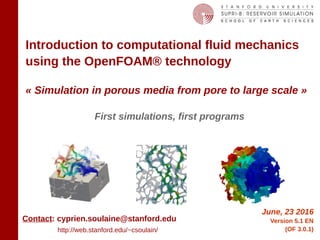
Introduction to computational fluid mechanics
using the OpenFOAM® technology
« Simulation in porous media from pore to large scale »
First simulations, first programs
2cyprien.soulaine@gmail.com
OpenFOAM®initiation
Foreword
I started this document in 2010 when I was discovering OpenFOAM® during
my PhD thesis. The initial idea was to have a document to train people from my
former lab at Institut de Mécanique des Fluides de Toulouse, in particular the
interns that need to be ready to work quickly.
This document has evolved a lot since the first version. It now gathers
numerous tricks I discovered during my personal usage of OpenFOAM®. It can
be seen as a long tutorial about flow and transport in porous media at different
scales. Besides the fact that it corresponds to my research area, this choice
allows the introduction of different OpenFOAM® features with a progressive
and pedagogical approach: it is easier to start understanding how a Darcy
solver works than tackling directly the programing of a PISO algorithm...
Today, I taught this class to more than a hundred of students, researchers,
engineers both in academia and industry. Their feedbacks helped me a lot to
improve this document. Feel free to send me your comments.
Cyprien Soulaine
3cyprien.soulaine@gmail.com
OpenFOAM®initiation
Objectives
• Have an overview of the OpenFOAM® capabilities
• Be able to find help and documentation
• Know how to start and post-treat a simulation from existing tutorials
• Start your own simulation by modifying existing tutorials
• Understand what is behind solvers to identify the most suitable solver
for your specific problem
• Program your own solver by modifying an existing solver
• Join the OpenFOAM® adventure…
4cyprien.soulaine@gmail.com
OpenFOAM®initiation
General introduction to the OpenFOAM® technology
What is OpenFOAM?
First simulations with OpenFOAM®
#1 – Heat diffusion
General structure of an OpenFOAM® case
#2 – Cavity
Where one can find help and documentation?
#3 – Poiseuille flow
#4 – Drainage experiment in a capillary tube
How to mesh complex geometries with OpenFOAM®?
#5 – Mesh a pore-space with snappyHexMesh
snappyHexMesh overview
#6 – Scalar transport in porous media at the pore-scale
Programming equations with OpenFOAM®
Basics of OpenFOAM programming
General structure of an application
Heat transfer in porous media with OpenFOAM®
#8 – Temperature in porous media
#7 – Create a « Darcy » solver
#9 – Customize boundary conditions
How to solve Navier-Stokes equation with OpenFOAM®?
#10 – Two-equations model for heat transfer in porous media
5cyprien.soulaine@gmail.com
OpenFOAM®initiation
1989 : First development at Imperial College London
1996 : First release of FOAM
2004 : OpenFOAM release under GPL licence by OpenCFD Ltd.
2014 : version 3.0.1
= Open Field Operation And Manipulation
- Solve the Partial Differential Equations using the finite volumes method
- Multiphysic simulation platform mainly devoted to fluid flow
- Manage 3D geometries by default
- Open-source software developed in C++ (object-oriented programming)
- Can be freely download at www.openfoam.com
- Designed as a toolbox easily customisable
- Parallel computation implemented at lowest level
- Cross-platform installation (Linux preferred)
What is OpenFOAM® ?
6cyprien.soulaine@gmail.com
OpenFOAM®initiation
The OpenFOAM® toolbox
OpenFOAM® = more than 200 programs (and not only 1 executable)
post-processing:
- Distributed with ParaView (and the famous paraFoam)
- Exportation toward other post-treatment softwares (Fluent, Fieldview, EnSight, Tecplot…)
- « sample » utility for 1D or 2D sampling (export to gnuplot, Grace/xmgr et jPlot)
Solvers:
- incompressible / compressible flow
- multiphase flow
- combustion, electro-magnetism, solid mechanics
- heat transfer
- several turbulence approach (DNS, RANS, LES)
- etc…
Pre-processing:
- Meshing (blockMesh, snappyHexMesh…)
- Mesh conversion (Ansys, Salomé, ideas, CFX, Star-CD, Gambit, Gmsh…)
7cyprien.soulaine@gmail.com
OpenFOAM®initiation
openfoam.com
Simulation examples
Romain Guibert, 2013
Horgueetal.,2011
Horgueetal.,2014openfoam.com
8cyprien.soulaine@gmail.com
OpenFOAM®initiation
Simulation in porous media with OpenFOAM
P. Horgue, C. Soulaine, J. Franc, R. Guibert, G. Debenest, An open-source toolbox for multiphase flow in porous
media, Computer Physics Communications (2014)
L. Orgogozo, N. Renon, C. Soulaine, F. Hénon, S. K. Tomer, D. Labat, O. S. Pokrovsky, M. Sekhar, R. Ababou, M.
Quintard, An open source massively parallel solver for Richards equation: Mechanistic modelling of water fluxes at
the watershed scale, Computer Physics Communications 185 (2014) 3358–3371
http://cpc.cs.qub.ac.uk/summaries/AEUF_v1_0.html
P. Horgue, F. Augier, P. Duru, M. Prat, M. Quintard, Experimental and numerical study of two-phase flows in arrays of
cylinders, Chemical Engineering Science 102 (2013) 335 - 345
C. Soulaine, M. Quintard, H. Allain, B. Baudouy, R. Van Weelderen, A PISO-like algorithm to simulate superfluid
helium flow with the two-fluid model, Computer Physics Communications (2014)
C. Soulaine, P. Horgue, J. Franc, M. Quintard, Gas–Liquid Flow Modeling in Columns Equipped with Structured
Packing, AIChE Journal 60 (2014) 3665-3674
https://github.com/phorgue/porousMultiphaseFoam.git
C. Soulaine, Direct numerical simulation in fully saturated porous media
http://web.stanford.edu/~csoulain/PORE_SCALE/Chap2.pdf
C. Soulaine and H. A. Tchelepi, Micro-continuum approach for pore-scale simulation of subsurface processes,
Transport in Porous Media (2016)
C. Soulaine, F. Gjetvaj, C. Garing, S. Roman, A.Russian, P. Gouze and H. A. Tchelepi, The Impact of Sub-Resolution
Porosity of X-ray Microtomography Images on the Permeability, Transport in Porous Media (2016)
S. Roman, C. Soulaine, M. Abu AlSaud, T. Kovscek and H. A. Tchelepi, Particle velocimetry analysis of immiscible
two-phase flow in micromodels, Advances in Water Resources (2015)
9cyprien.soulaine@gmail.com
OpenFOAM®initiation
How to program equations?
●
The considered field (U) may be scalar, vector or tensor,
●
Operators discretization does not need to be specified at the stage of the solver programming,
●
The syntax is very closed to the mathematical formalism.
10cyprien.soulaine@gmail.com
OpenFOAM®initiation
●
2 official guides provided by OpenCFD (« user guide » and « programmer guide » )
(Most of the time, this documentation is not enough... )
●
Several reference thesis (Hrvoje Jasak 1996, Henrik Rusche 2001, …)
●
A tutorial per solver. Most of the time, it has a value of test-cases. (There is no public
validation..)
●
Direct access to source-code (however, there is very few comments in the code !!)
●
Paying for technical support
An active community !
- A discussion forum (www.cfd-online.com/Forums/openfoam/)
- A community-driven wiki (openfoamwiki.net)
- An annual Workshop (9th edition in 2014) (www.openfoamworkshop.org)
- Social network related to OpenFOAM (www.extend-project.de)
- A lot of tutorials, reports, presentations made by the community (search on Google)
Where can I find help and documentation ?
11cyprien.soulaine@gmail.com
OpenFOAM®initiation
• Completely free (No limitations due to licenses),
• Direct access to source code (not a black-box),
• An additional tool for code-to-code benchmarks,
• Regular updates,
• A lot of out-of-the-box solvers and their tutorials,
• Ease to program partial differential equations,
• A reactive and important community (forum,
conference, summer schools…),
• …..
• Need some time to learn,
• Lack of documentation..
• There is no official GUI,
• Unix command lines and C++
programing,
• Too many forks…
Why should I use OpenFOAM?
12cyprien.soulaine@gmail.com
OpenFOAM®initiation
Some Unix commands
Navigation
pwd Tells you the name of the working directory.
ls List the files in the working directory.
cd Change your working directory.
Manipulation of files
cp To copy a file. Use the -r option to copy a directory.
mkdir Create a directory.
rm Delete a file. Use the -r option to remove a directory.
mv Move or rename a file/folder.
I/O redirection
> To redirect the output of an executable toward a file.
| A pipeline to connect multiple commands together.
grep A filter to output every line that contains a specified pattern of characters.
Visualization
cat Outputs the contents of a specific file.
13cyprien.soulaine@gmail.com
OpenFOAM®initiation
General structure of an OpenFOAM case
Simulation setup (choice of the linear solvers, of the
discretization schemes, of the time steps, the output
files...)
All the information related to the grid
Everything regarding constant values (tranport
properties, thermodynamic properties, turbulence model,
etc...)
One folder per time step. Each folder includes as many
files as computed fields (T, U, p, Yi, k, Omega…)
Initial conditions are specified in the « 0 » directory.
$ cd
$ mkdir -p $FOAM_RUN
14cyprien.soulaine@gmail.com
OpenFOAM®initiation
#1 – Heat diffusion (1/5)
Geometry and grid generated
with Ansys
Solution of the heat transfer
equation
Mesh conversion using the utility
ansysToFoam
Example from tutorials provided
with OpenFOAM
573K
273K
Tini = 273K
Solver : laplacianFoam
15cyprien.soulaine@gmail.com
OpenFOAM®initiation
#1 – Heat diffusion (2/5)
$ run
$ cp –r $FOAM_TUTORIALS/basic/laplacianFoam/flange/ Exo1
$ cd Exo1
$ ls
Initial and boundary conditions for the
temperature field T
Value of the diffusion coefficient (m2
/s)
Simulation parameters (time steps, output
time...)
Discretization of the different operators (div,
laplacian, ddt, grad…)
Set up of the linear solvers
Scripts to automatically start and clean the
tutorial
Grid generated with Ansys
16cyprien.soulaine@gmail.com
OpenFOAM®initiation
#1 – Heat diffusion (3/5)
Convert the mesh from Ansys to OpenFOAM (with a scale factor)
$ ansysToFoam flange.ans -scale 0.001
Visualize the grid with ParaView
$ paraFoam
1 - « apply »
2 - Choose « surface with edge»
$ ls constant
$ ls constant/polyMesh
Look at the change in the directory
polyMesh contains all the
information related to the
grid: list of points, faces,
neighbors, boundaries...
17cyprien.soulaine@gmail.com
OpenFOAM®initiation
#1 – Heat diffusion (4a/5)
Definition of initial and boundary
conditions
Dimensions (units) of the field T
[kg m s K kgmol A cd]
Uniform initial temperature (T=273K) in
the solid bulk
Fixed value (T=273K)
Zero flux
Fixed value (T=573K)
Boundary conditions for t=0s
$ gedit 0/T
18cyprien.soulaine@gmail.com
OpenFOAM®initiation
#1 – Heat diffusion (4b/5)
$ gedit constant/transportProperties
The dimensions of the diffusivity DT are m2
/s
19cyprien.soulaine@gmail.com
OpenFOAM®initiation
#1 – Heat diffusion (4c/5)
$ gedit system/controlDict
20cyprien.soulaine@gmail.com
OpenFOAM®initiation
#1 – Heat diffusion (5/5)
Start the simulation
$ laplacianFoam
View the results with ParaView
$ paraFoam
1 – Choose
the field you
want to load
for viewing
2 - « apply »
3- Choose
« surface »
4 – Choose the
field to display (T)
5 – Press play to
read all the time
steps
Exo1 bis :
DT = 1e-7
m²/s
Until steady state
$ ls
Look at the change in the directories: new folders appeared, they corresponds to the time steps
21cyprien.soulaine@gmail.com
OpenFOAM®initiation
#2 – Cavity (1/6)
Design and meshing of the geometry with the
utility blockMesh
Solution of the laminar incompressible Navier-
Stokes equations with the icoFoam solver
Post-processing with ParaView
$ run
$ cp –r $FOAM_TUTORIALS/incompressible/icoFoam/cavity Exo2
$ cd Exo2
$ ls
Tutorial detailed in the official User Guide
fixedWalls
fixedWalls
fixedWalls
Ux=1m/s
movingWall
x
y
22cyprien.soulaine@gmail.com
OpenFOAM®initiation
#2 – Cavity (2/6)
Geometry and grid are defined in the file blockMeshDict
$ gedit system/blockMeshDict
blockMesh = pre-processing tool to design and mesh simple geometries
The geometry is always defined in 3D since OpenFOAM
only considers 3D geometry
4
5
67
3
2
1
0
x
y
z
The numbering is of great importance !!
Vertices definition
Definition of the hexahedral
block. Pay attention to the
numerotation order
Definition of the grid (Regular
mesh 20x20, only one cell in the
z direction because the
simulation will be 2D)
Definition of boundary of
the domain to apply
boundary conditions.
Faces normal to Oz are
«empty» to specify that
the simulation is 2D
Boundaries may be of different types:
-patch (generic type)
-wall (for solid wall condition, useful for turbulence)
-cyclic (for cyclic simulations)
-symmetryPlane (for symmetry plane)
-empty (to specify that the simulation will be 2D or 1D)
-wedge (for axi-symmetric simulations)
-processor (for parallel computation, automatically defined during
the decomposition domain process)
23cyprien.soulaine@gmail.com
OpenFOAM®initiation
#2 – Cavity (3/6)
Generate the grid mesh: $ blockMesh
Check the mesh quality: $ checkMesh
View the mesh : $ paraFoam
1 – Choose the
elements you want
to visualize
2 – To display
the patch names
on the geometry
3 - « Apply »
65 - « wireframe »
4 – Remove the perspective
Creation of constant/polyMesh and
the files related to the grid.
24cyprien.soulaine@gmail.com
OpenFOAM®initiation
#2 – Cavity (4a/6)
$ gedit constant/transportProperties
The flow is laminar, so it fullfills the
icoFoam assumptions
25cyprien.soulaine@gmail.com
OpenFOAM®initiation
$ gedit 0/U
#2 – Cavity (4b/6)
26cyprien.soulaine@gmail.com
OpenFOAM®initiation
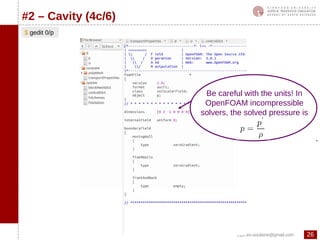
$ gedit 0/p
#2 – Cavity (4c/6)
Be careful with the units! In
OpenFOAM incompressible
solvers, the solved pressure is
27cyprien.soulaine@gmail.com
OpenFOAM®initiation
$ gedit system/controlDict
#2 – Cavity (4d/6)
Management of the time discretization
(start, end, time steps...)
Management of the output files
28cyprien.soulaine@gmail.com
OpenFOAM®initiation
#2 – Cavity (5/6)
Start the simulation :
$ icoFoam
Post-processing with ParaView : $ paraFoam
29cyprien.soulaine@gmail.com
OpenFOAM®initiation
#2 – Cavity (6a/6)
We specify that the values are plotted at the
cell centers with the filter Cell Centers (by
default, ParaView plots the vector at the
face centers whereas OpenFOAM
calculates at the cell centers)
filters>alphabetical>Cell Centers>Apply
To view the velocity vectors
We then apply the Glyph filter to plot the
velocity vector:
Glyph
The vector length is scaled with the
velocity magnitude
Number of vectors
plotted
30cyprien.soulaine@gmail.com
OpenFOAM®initiation
To view the velocity vectors
#2 – Cavity (6b/6)
Display> color by > U
31cyprien.soulaine@gmail.com
OpenFOAM®initiation
#3 – Poiseuille flow (1/4)
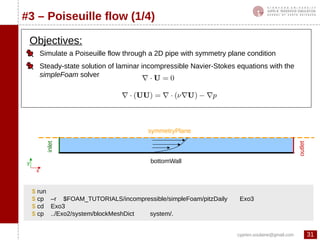
Simulate a Poiseuille flow through a 2D pipe with symmetry plane condition
Steady-state solution of laminar incompressible Navier-Stokes equations with the
simpleFoam solver
$ run
$ cp –r $FOAM_TUTORIALS/incompressible/simpleFoam/pitzDaily Exo3
$ cd Exo3
$ cp ../Exo2/system/blockMeshDict system/.
Objectives:
x
y bottomWall
symmetryPlane
outlet
inlet
32cyprien.soulaine@gmail.com
OpenFOAM®initiation
#3 – Poiseuille flow (2/4)
$ gedit system/blockMeshDict
4
67
3 2
1
0
x
y
z
inlet
bottomWall
outlet
symmetryPlane
$ blockMesh
$ paraFoam
Untick U and p in the fields to view
before you click on « apply »
33cyprien.soulaine@gmail.com
OpenFOAM®initiation
#3 – Poiseuille flow (3a/4)
$ gedit constant/turbulenceProperties $ gedit constant/transportProperties
We specify that the simulation is laminar. All the
references to RANS model are no longer
necessary (discretization schemes, files 0/nut,
0/k ...)
$ rm 0/epsilon
$ rm 0/f
$ rm 0/k
$ rm 0/nut
$ rm 0/nuTilda
$ rm 0/omega
$ rm 0/v2
This step is not mandatory, the files will
be simply not considered during the
simulation
34cyprien.soulaine@gmail.com
OpenFOAM®initiation
#3 – Poiseuille flow (3b/4)
$ gedit 0/U $ gedit 0/p
35cyprien.soulaine@gmail.com
OpenFOAM®initiation
#3 – Poiseuille flow (3c/4)
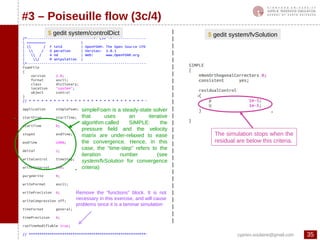
$ gedit system/controlDict
simpleFoam is a steady-state solver
that uses an iterative
algorithm called SIMPLE: the
pressure field and the velocity
matrix are under-relaxed to ease
the convergence. Hence, in this
case, the “time-step” refers to the
iteration number (see
system/fvSolution for convergence
criteria)
Remove the “functions” block. It is not
necessary in this exercise, and will cause
problems since it is a laminar simulation
$ gedit system/fvSolution
The simulation stops when the
residual are below this criteria.
36cyprien.soulaine@gmail.com
OpenFOAM®initiation
#3 – Poiseuille flow (4/4)
To start the simulation: $ simpleFoam
To view the results: $ paraFoam
1 – Filters>Data Analysis>Plot Over Line
2 – We are going to plot the velocity profile
in the vertical cross-section at the middle of
the pipe
3 – Deselect the viewing of
the pressure field p
37cyprien.soulaine@gmail.com
OpenFOAM®initiation
#4 – Drainage in a capillary tube (1/5)
$ run
$ cp –r $FOAM_TUTORIALS/multiphase/interFoam/laminar/damBreak Exo4
$ cd Exo4
$ cp ../Exo3/system/blockMeshDict system/.
Simulate a drainage (a non-wetting fluid pushing
a wetting fluid) experiment in a simple 2D
capillary tube
Use of an interface capturing solver (interFoam,
VoF)
Use of the setFields utility to initialize the phase
distribution
Objectives:
Example adapted fom the damBreak tutorial
detailed in the official user guide
non-wetting fluid
(α=0)
outletinlet
wetting fluid
(α=1)
Contact
angle θ
38cyprien.soulaine@gmail.com
OpenFOAM®initiation
#4 – Drainage in a capillary tube (2/5)
$ gedit system/blockMeshDict
4
67
3 2
10
x
y
z
top (wall)
left (outlet)
right (inlet)
5
$ blockMesh
bottom (wall)
The grid is regular in x and z directions,
but is refined near the walls in the y
direction. 20% of the total length near the
boundaries contain 30 % of the cells
refined with a factor 4 between the
closest to wall and the farthest.
20%20%60%
39cyprien.soulaine@gmail.com
OpenFOAM®initiation
#4 – Drainage in a capillary tube (3a/5)
$ gedit constant/transportProperties
Properties of the “water”
phase
Properties of the “oil” phase
Surface tension
Name of the wetting phase (here « water » ) and of the non-
wetting phase (here « oil »). On the computational grid, the two
phases are differentiated with the phase indicator alpha.water
( =1 for the wetting phase, =0 for the non-wetting phase)
Mind the space between “phases” and “(“ !
40cyprien.soulaine@gmail.com
OpenFOAM®initiation
#4 – Drainage in a capillary tube (3b/5)
$ gedit 0/U $ gedit 0/p_rgh
We use a hydrostatic
pressure
The patches « top » and « bottom »
have the same boundary conditions
41cyprien.soulaine@gmail.com
OpenFOAM®initiation
#4 – Drainage in a capillary tube (3c/5)
$ gedit 0/alpha.water.org
alpha.water represents the wetting/non-
wetting phase distribution in the
computational domain. (alpha=0 for the
non-wetting, alpha=1 for the wetting)
Definition of the contact angle at the solid boundaries.
Here theta=45 degrees
limit gradient to limit the wall-gradient such that alpha
remains bounded on the wall.
42cyprien.soulaine@gmail.com
OpenFOAM®initiation
#4 – Drainage in a capillary tube (3d/5)
$ gedit constant/g $ gedit constant/turbulenceProperties
Specify that the simulation will be without gravity in a laminar flow regime
43cyprien.soulaine@gmail.com
OpenFOAM®initiation
#4 – Drainage in a capillary tube (3e/5)
$ gedit system/controlDict
Set the writeControl parameter to adjustableRunTime
when using an adjustable time step. The output files
will be written every writeInterval seconds.
Switch on the automatic time step management according to
the Courant Numbers value (maxCo for the pressure/velocity
coupling and maxAlphaCo for the explicit transport of alpha).
maxDeltaT restricts the maximum value of the time step.
If yes value, then it means that the controlDict file can
be modified on the fly.
44cyprien.soulaine@gmail.com
OpenFOAM®initiation
#4 – Drainage in a capillary tube (4/5)
BEFORE
Before we start the simulation, we are going to specify the initial phase distribution with setFields
$ cp 0/alpha.water.org 0/alpha.water
$ blockMesh
$ paraFoam
$ gedit system/setFieldsDict
$ setFields
$ paraFoam
AFTER
setFields overwrites 0/alpha.water. It is recommanded to make a backup before using it (that the
purpose of 0/alpha.water.org).
45cyprien.soulaine@gmail.com
OpenFOAM®initiation
#4 – Drainage in a capillary tube (5/5)
$ interFoam
Start the immiscible two-phase flow simulation:
Exo4bis : Same exercise with a contact angle of 20 degrees
t=0.05s
t=0.10s
t=0.15s
t=0.20s
theta=45 degrees theta=20 degrees
46cyprien.soulaine@gmail.com
OpenFOAM®initiation
snappyHexMesh overview (1/2)
openfoam.com
snappyHexMesh is an automatic and robust mesher able to grid any complex geometry
Mesh a region inside or/and around an object described by a surface mesh
It is compatible with a lot of input formats resulting from CAD softwares or tomography
imaging (*.stl, *.obj, *.vtk …)
Maximize the number of hexahedral cells
openfoam.com
47cyprien.soulaine@gmail.com
OpenFOAM®initiation
snappyHexMesh overview (2/2)
openfoam.com
1
1 2
2
22
3
3
48cyprien.soulaine@gmail.com
OpenFOAM®initiation
#5 – Mesh a pore-space (1/6)
Objective:
– Mesh the void space of a porous medium with snappyHexMesh
outlet
inlet
Void space that needs to be
gridded
wall
wall
1
2
3
Solid grains defined by a
surface mesh file
Generate the surface mesh (here the solid grain).
Create a suitable background mesh with blockMesh. It needs to be fine enough to
have at least 10 cells in the pore-throat thickness.
Detect the void space, remove the cells occupied by the solid and snap them to fit
as close as possible the initial surface object with snappyHexMesh.
49cyprien.soulaine@gmail.com
OpenFOAM®initiation
#5 – Mesh a pore-space (2/6)
$ run
$ cp -r $FOAM_TUTORIALS/incompressible/simpleFoam/motorBike/ Exo5
$ cd Exo5
We are going to adapt the motorBike tutorial and use an existing stl file*
http://web.stanford.edu/~csoulain/OF_Training/Exo5/Exo5.stl* This file can be downloaded at:
$ paraview Exo5.stl
Download Exo5.stl and copy it to the folder Exo5. To view the geometry,
50cyprien.soulaine@gmail.com
OpenFOAM®initiation
#5 – Mesh a pore-space (3/6)
The next step consists in creating a background mesh with blockMesh. The size of this background
domain depends on the bounding box of the surface object. It can be obtained using the surfaceCheck
tool,
$ surfaceCheck Exo5.stl | grep –i 'bounding box'
$ gedit system/blockMeshDict
$ blockMesh
$ paraFoam
file>open>Exo5.stl
To superimpose the background grid and the
surface mesh file, in ParaView:
The grid has to be fine enough in order to
capture all the details of the pore-space.
Specify the boundaries top, bottom, left, right, frontAndBack
(see page 32)
51cyprien.soulaine@gmail.com
OpenFOAM®initiation
#5 – Mesh a pore-space (4/6)
$ mv Exo5.stl constant/triSurface/.
$ gedit system/snappyHexMeshDict
Insertion of the surface mesh object. Several objects may be inserted
at the same times.
The solid boundaries will be named “fixedWalls”
The three different stages of the meshing can be performed
separately or simultaneously:
The void space is going to be meshed with snappyHexMesh, based on the background grid.
snappyHexMesh needs an input dictionary located in the system folder and the object file (Exo5.stl)
located in constant/triSurface,
- castellatedMesh: detects the intersections between the surface
object and the background grid. It can eventually refine the
background grid at the vicinity of the object. Then it removes either the
inside or the outside of the object.
- snap: Introduces tetrahedral cells at the object boundary to match
the actual geometry.
- addLayers: Add layers of cells on the boundaries.
52cyprien.soulaine@gmail.com
OpenFOAM®initiation
#5 – Mesh a pore-space (5/6)
$ snappyHexMesh
$ paraFoam
The « castellated mesh » step
Point a location where there is void space. All
cells outside the void space will be removed.
Set up the refinement level at the vicinity of the object. Actually, this
feature only works for 3D geometry.
We can specify zero refinements with level (0 0), i.e. we only rely on
the background grid
The mesh is created in a new time step (« 1 »)
directory. In order to view it, in ParaView, you have
to go to the time « 1 »
53cyprien.soulaine@gmail.com
OpenFOAM®initiation
#5 – Mesh a pore-space (6/6)
$ gedit system/snappyHexMeshDict
The next step « snap » is the snapping stage to fit the STL surface as close as possible.
This stage will introduce some tetrahedral cells into the computational domain.
$ snappyHexMesh
$ paraFoam
Eventually, we could have used the addLayers stage to add layers of cells around the
solid grains.
The mesh is created in another time step (« 2 ») folder.
You have to select the time step « 2 » in ParaView to
view it.
54cyprien.soulaine@gmail.com
OpenFOAM®initiation
#6 – Scalar transport in the pore space (1/8)
Objectives:
– Solve the flow in the void space gridded in the previous exercise (#5)
– Estimate the permeability of the porous medium
– Solve a passive scalar transport in the void space
The flow and the scalar transport are uncoupled. They can therefore be solved one
after the other.
The flow is obtained solving a Stokes problem with simpleFoam. The case can be setup
based on #3 (or $FOAM_TUTORIALS/incompressible/simpleFoam/pitzDaily)
inlet
outlet
$ rm -r constant/polyMesh 83/
$ cp -r ../Exo5/2/polyMesh constant/.
$ transformPoints -scale '(0.01 0.01 0.01)'
$ checkMesh | grep -i 'bounding box'
$ run
$ cp -r Exo3 Exo6a
$ cd Exo6a
The mesh from #3 is replaced by the grid of #5 and scaled to the actual size
0.92 mm
55cyprien.soulaine@gmail.com
OpenFOAM®initiation
#6 – Scalar transport in the pore space (2a/8)
$ gedit 0/U $ gedit 0/p
56cyprien.soulaine@gmail.com
OpenFOAM®initiation
#6 – Scalar transport in the pore space (2b/8)
Switch off the turbulence model
$ gedit constant/turbulenceProperties
Setup the fluid properties
$ gedit constant/transportProperties
$ gedit system/fvSolution
Relaxation factors for the SIMPLE algorithm. The
value 0.9 for U is faster for Stokes flows.
The simulation will stop when these
residuals are reached.
57cyprien.soulaine@gmail.com
OpenFOAM®initiation
#6 – Scalar transport in the pore space (2c/8)
$ gedit system/controlDict
Since we have specified convergence criteria in
system/fvSolution, the simulation may stop before
endTime. In that case, the latest simulated time step
will be automatically written.
58cyprien.soulaine@gmail.com
OpenFOAM®initiation
#6 – Scalar transport in the pore space (3/8)
It might be useful to plot the residuals on-the-fly to check the simulation convergence. This can be
achieved by redirecting the simulation log into a file and extracting the residual values with the
following gnuplot script :
$ gedit plotResiduals
Run the simulation and make it write out a log-file
$ simpleFoam > log &
Plot the residuals convergence with gnuplot
$ gnuplot plotResiduals
(Ctrl + C to quit gnuplot)
59cyprien.soulaine@gmail.com
OpenFOAM®initiation
#6 – Scalar transport in the pore space (4b/8)
$ paraFoam The porosity (ε) is the volume of the mesh (Vvoid
) over
the volume (V) of the bounding box:
$ checkMesh | grep -i 'bounding box'
V=Lx*Ly*Lz=5.15x10⁻¹²
m3
$ checkMesh | grep -i 'volume'
Vvoid
= 2.93x10⁻¹²
m3
ε = 0.57
The permeability Kxx
is defined as:
The velocity can be integrated directly from
ParaView with the filter:
filters>Data Analysis>integrateVariables
Kxx
= 1.6x10⁻¹¹
m2
Exo6a bis : Compare the residual convergence for other relaxation factors: 0.8 and 0.95
60cyprien.soulaine@gmail.com
OpenFOAM®initiation
#6 – Scalar transport in the pore space (5/8)
$ run
$ cp -r $FOAM_TUTORIALS/basic/scalarTransportFoam/pitzDaily Exo6b
$ cd Exo6b
$ rm -r constant/polyMesh
$ cp -r ../Exo6a/constant/polyMesh/ constant/.
$ cp ../Exo6a/latestTime/U 0/U
Once the flow is solved, we can use the velocity profile to transport (advection-diffusion) a
scalar T with the solver scalarTransportFoam,
We retreive the mesh and the resulting velocity profile from the previous simulation #6a
For that purpose, we adapt the tutorial scalarTransportFoam/pitzDaily
61cyprien.soulaine@gmail.com
OpenFOAM®initiation
#6 – Scalar transport in the pore space (6/8)
$ gedit 0/T $ gedit constant/transportProperties
$ gedit system/controlDict
62cyprien.soulaine@gmail.com
OpenFOAM®initiation
#6 – Scalar transport in the pore space (7/8)
t=0.05s
t=0.10s
t=0.15s
t=0.20s
$ scalarTransportFoam
Run the simulation
$ paraFoam
Visualize the results
63cyprien.soulaine@gmail.com
OpenFOAM®initiation
#6 – Scalar transport in the pore space (8/8)
0 1 2 3 4 5 6
0
0,2
0,4
0,6
0,8
1
1,2
D5e-6
D1e-6
D5e-7
time (s)
T
$ patchAverage T right > log.patchAverage
$ cat log.patchAverage | grep -i 'right' | cut -d' ' -f12 > log.breakthrough
To obtain a breakthrough curve (evolution of the concentration at the oulet), we look for
the average value at the outlet boundary for all time steps
Extract the values from the log file with the following command
Plot the breakthrough curve
Exo6bis : Plot the breakthrough curves
for different values of the diffusivity
(D=5x10⁻⁶
m2
/s and D=5x10⁻⁷
m2
/s)
$ gnuplot
gnuplot> plot 'log.breakthrough' with lines lw 4
64cyprien.soulaine@gmail.com
OpenFOAM®initiation
Where are the solvers in OpenFOAM?
For example, laplacianFoam is in /basic
1 solver = 1 program
(for instance, the heat equation is solved using the program laplacianFoam)
The solvers are organized by type (basic, heat transfer, combustion, incompressible,
multiphase….). Note that the tutorials have a similar organisation.
OpenFOAM can be seen as an easily customisable toolbox.
Where is the source code of a solver?
$ cd $FOAM_APP/solvers
$ ls
$ cd basic/laplacianFoam
$ ls
65cyprien.soulaine@gmail.com
OpenFOAM®initiation
Call the OpenFOAM
librairies
Creation of the matrix
fvm:: implicit terms
fvc:: explicit terms
the variable T and DT are
declared in createFields.H
Behind laplacianFoam: laplacianFoam.C
$ gedit laplacianFoam.C
66cyprien.soulaine@gmail.com
OpenFOAM®initiation
The temperature field T is declared as an instance of
the object volScalarField
●
It is a scalar field with values defined at the cell
center
●
It must be read at the initial time step
●
Dimensions (units) are defined in 0/T
●
T will be written at each time step in the
corresponding folder (runTime.timeName())
●
This object also includes boundary conditions
that are specified in 0/T
The dictionary transportProperties is loaded from
the input file constant/transportProperties
Declaration of the variable DT
Its value and dimensions are defined in the input
file constant/transportProperties
Behind laplacianFoam: createFields.H
$ gedit createFields.H
67cyprien.soulaine@gmail.com
OpenFOAM®initiation
General structure of an application
Link towards the OpenFOAM librairies used in this
program
List of files that will be compiled
Source code
The file with the .C extension is the main file
Example of the icoFoam solver
$ cd $FOAM_APP/solvers/incompressible/icoFoam
$ ls
$ mkdir -p $WM_PROJECT_USER_DIR/applications/solvers/
Create the directory for your personnal programs (this stage only needs to be done once)
68cyprien.soulaine@gmail.com
OpenFOAM®initiation
#7 – Program a “Darcy” solver (1a/7)
Objective: develop a program that solves the velocity and pressure in a fully
saturated porous medium using Darcy's law.
How to solve this mathematical problem? The diffusion equation for the pressure field
is obtained by combining equation (1) and (2):
This equation is closed to the heat diffusion equation. Hence, we are going to program
our own solver on the basis of the existing laplacianFoam. To do so, we copy
laplacianFoam in our workspace.
(1)
(2)
$ cd $WM_PROJECT_USER_DIR/applications/solvers/
$ cp -r $FOAM_APP/solvers/basic/laplacianFoam darcyFoam
69cyprien.soulaine@gmail.com
OpenFOAM®initiation
#7 – Program a “Darcy” solver (1b/7)
Once the laplacianFoam solver has been copied into the user directory, we rename the main file
and edit the Make/files:
$ cd darcyFoam
$ mv laplacianFoam.C darcyFoam.C
$ gedit Make/files
List of the files to compile (only the .C files)
Add _USER_ to specify that the new executable will be compiled into
your user directory (without _USER_ your compilation will fail!)
Name of the new program
We can now clean the previous compilation with wclean and compile this new program with wmake.
$ wclean
$ wmake
At this stage, we have a new program called darcyFoam which is exactly a copy of laplacianFoam
(you can run the flange tutorial or #3 with darcyFoam instead of laplacianFoam).
It is recommanded to use wmake as often as possible during the programming stage.
70cyprien.soulaine@gmail.com
OpenFOAM®initiation
#7 – Program a “Darcy” solver (2/7)
Declaration of the fluid viscosity mu and the permeability k.
They will be loaded from « constant/transportProperties »
Declaration of the pressure field p
• It is an instance of the object volScalarField (scalar field
defined at the cells center),
• The file «p» must be read at the frist time step to satisfy the
constructor. The initial values and boundary conditions are
defined during the loading of 0/p.
• The file « p » will be written at every output times.
Declaration of the velocity vector field U
• It is an instance of the object volVectorField (vectpr field
defined at the cells center),
• U is not read from a file (even if 0/U exist)
• To satisfy the constructor of the object volVectorField,
units and initial values are defined with an additional
arguement. By default, the boundary conditions are
zeroGradient,
• The file « U » will be written at every output times.
$ gedit createFields.H
71cyprien.soulaine@gmail.com
OpenFOAM®initiation
#7 – Program a “Darcy” solver (3/7)
The pressure field p is solved implicitly
by a diffusion equation
The velocity vector U is deduced from
the pressure field using the Darcy's
law.
The useless files are removed and the
darcyFoam executable is then compiled.
$ gedit darcyFoam.C
$ rm write.H
$ wclean
$ wmake
72cyprien.soulaine@gmail.com
OpenFOAM®initiation
#7 – Program a “Darcy” solver (4/7)
Tip: The vertices can be
defined using variables
Lx, Ly, Lz. It saves time
to modify the size of the
domain
0
1
2
3
4 5
67
x
y
z
inlet outlet
To prepare this « case » we are going to use the tutorial
laplacianFoam/flange. The setup will be relatively similar since this
latter also solves a diffusion equation.
To save time, we can pick up and modify an existing blockMeshDict
We are going to simulate flow in an 1D porous medium:
Mesh definition (homogeneous grid with a
single cell in the y and z axis since the
simulation is 1D)
Faces orthogonal to y
and z axis are defined as
«empty» to specify that
the simulation is 1D
The grid is generated using blockMesh
10 m
$ run
$ cp -r $FOAM_TUTORIALS/basic/laplacianFoam/flange Exo7
$ cd Exo7
$ rm Allrun Allclean flange.ans
$ cp $FOAM_TUTORIALS/icompressible/icoFoam/cavity/system/
blockMeshDict system/blockMeshDict
$ gedit system/blockMeshDict
$ blockMesh
73cyprien.soulaine@gmail.com
OpenFOAM®initiation
#7 – Program a “Darcy” solver (5a/7)
A pressure drop is imposed between the
inlet and the outlet of the computational
domain
$ mv 0/T 0/p
$ gedit 0/p
$ constant/transportProperties
74cyprien.soulaine@gmail.com
OpenFOAM®initiation
#7 – Program a “Darcy” solver (5b/7)
$ gedit system/controlDict
Since darcyFoam is a steady-state solver
without relaxation factor, only one time step
is necessary.
75cyprien.soulaine@gmail.com
OpenFOAM®initiation
#7 – Program a “Darcy” solver (5c/7)
$ gedit system/fvSchemes $ gedit system/fvSolution
76cyprien.soulaine@gmail.com
OpenFOAM®initiation
#7 – Program a “Darcy” solver (6/7)
$ gnuplot
gnuplot> set xlabel "distance (m)"
gnuplot> set ylabel "Pressure (kg/m/s)"
gnuplot> plot “postProcessing/sets/1/lineX1_p.xy" using 1:2 with
lines lw 4 title "p“
Results will be plotted using the sample utility and the program Gnuplot. As blockMesh, the
program sample requires an input dictionary located in /system :
Run the sample tool:
Plot the pressure field with Gnuplot :
$ sample
Run the simulation : $ darcyFoam
$ cp $FOAM_UTILITIES/postProcessing/sampling/sample/sampleDict system/.
$ gedit system/sampleDict
77cyprien.soulaine@gmail.com
OpenFOAM®initiation
#7 – Program a “Darcy” solver (7/7)
Exo7Bis: Program a new solver for heterogeneous porous media (heterogeneousDarcyFoam) defining
the permeability as a volScalarField and assigning it different values with the utility setFields.
wall
inlet
outlet
10 m
6m
k = 5x10⁻⁹
m2 k = 10-9
m2
k = 5x10⁻¹⁰
m2
k = 2x10⁻⁹
m2
k = 10-10
m2
U
$ cp $FOAM_UTILITIES/preProcessing/setFields/setFieldsDict system/.
We can get setFieldsDict from #4 or:
78cyprien.soulaine@gmail.com
OpenFOAM®initiation
#8 - Heat transfer in porous media (1/7)
Objective 1: Develop a program that solves heat transfer in a porous medium
where the velocity and pressure obey Darcy’s law.
Objective 2: Use probes to plot the temperature evolution vs time at some points of
the domain
Objective 3: Change the discretization schemes
This solver will be based on darcyFoam (#7)
$ cd $WM_PROJECT_USER_DIR/applications/solvers/
$ cp –r darcyFoam darcyTemperatureFoam
$ cd darcyTemperatureFoam
$ mv darcyFoam.C darcyTemperatureFoam.C
$ gedit Make/files
$ wclean
$ wmake
(1)
(2)
(3)
79cyprien.soulaine@gmail.com
OpenFOAM®initiation
#8 - Heat transfer in porous media (2a/7)
$ gedit createFields.H
Declaration of the velocity flux phi.
– It is a surface field (U is projected onto the face of each cell of the grid)
– It is necessary when using the divergence opereator (fvm::div(phi,T) )
– Can also be declared using #include ‘’createPhi.H
Declaration of the temperature field T. (Do not copy everything
manually: copy/paste the declaration of volScalarField p and
replace p by T)
$ wmake
80cyprien.soulaine@gmail.com
OpenFOAM®initiation
#8 - Heat transfer in porous media (2b/7)
$ gedit createFields.H
Beside the viscosity mu and the permeability k of the porous
medium, we also declare the thermal conductivity DT, the
porosity eps and the heat capacities rhoCps and rhoCpf. They
are loaded from the file « constant/transportProperties »
$ wmake
81cyprien.soulaine@gmail.com
OpenFOAM®initiation
#8 - Heat transfer in porous media (3/7)
$ gedit darcyTemperatureFoam.C
The surface flux phi is updated from the new
value of the velocity profile U.
$ wmake
Compilation of darcyTemperatureFoam
Solve the advection/diffusion equation for the
temperature transport
82cyprien.soulaine@gmail.com
OpenFOAM®initiation
#8 - Heat transfer in porous media (4/7)
$ run
$ cp –r Exo7 Exo8
$ cd Exo8
$ rm –r 0.* 1* 2* 3* 4* 5* 6* 7* 8* 9* postProcessing
$ cp 0/p 0/T
$ gedit 0/T
Porous medium with a permeability
k and a porosity eps
P1
P0
Tin
Zero heat flux
at the outlet
To save time, we can adapt the previous exercise (#7) to setup the case
We want to estimate the temperature evolution in a 1D porous medium
10 m
Probe 1 Probe 2
Probe 3
83cyprien.soulaine@gmail.com
OpenFOAM®initiation
#8 - Heat transfer in porous media (5a/7)
$ gedit 0/T $ gedit 0/p
84cyprien.soulaine@gmail.com
OpenFOAM®initiation #8 - Heat transfer in porous media (5b/7)
$ gedit system/fvSchemes
$ gedit system/fvSolution
$ gedit constant/transportProperties
85cyprien.soulaine@gmail.com
OpenFOAM®initiation
#8 - Heat transfer in porous media (5c/7)
$ gedit system/controlDict
The probes are functions that are executed on-the-fly
during the simulation.
They allow to record the temperature evolution vs time
at the probe location.
You can specify as many probes as you want.
86cyprien.soulaine@gmail.com
OpenFOAM®initiation
#8 - Heat transfer in porous media (6/7)
$ gedit plot_probesWe are going to plot the probe results with the following gnuplot script
Run the simulation : $ darcyTemperatureFoam
$ gnuplot –persist plot_probes
87cyprien.soulaine@gmail.com
OpenFOAM®initiation
#8 - Heat transfer in porous media (7/7)
Note in the previous simulation some unphysical oscillations at the temperature front. They are due
to the numerical scheme used to descretize the convection term. To improve the numerical stability,
you can use an upwind scheme or a flux limiter by specifying Gauss upwind or Gauss vanLeer in
system/fvSchemes instead of Gauss linear.
The upwind scheme is better than the linear but also more diffusive. The flux limiter schemes are
more suitable for this kind of simulation.
http://www.holzmann-cfd.de/index.php/en/numerical-schemes
More benchmarks on OpenFOAM numerical schemes :
88cyprien.soulaine@gmail.com
OpenFOAM®initiation
#9 – Customize boundary conditions (1/4)
Objective: Create customized boundary conditions
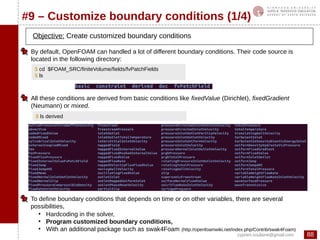
$ cd $FOAM_SRC/finiteVolume/fields/fvPatchFields
$ ls
By default, OpenFOAM can handled a lot of different boundary conditions. Their code source is
located in the following directory:
All these conditions are derived from basic conditions like fixedValue (Dirichlet), fixedGradient
(Neumann) or mixed.
$ ls derived
To define boundary conditions that depends on time or on other variables, there are several
possibilities,
●
Hardcoding in the solver,
●
Program customized boundary conditions,
●
With an additional package such as swak4Foam (http://openfoamwiki.net/index.php/Contrib/swak4Foam)
89cyprien.soulaine@gmail.com
OpenFOAM®initiation
#9 – Customize boundary conditions (2/4)
In the previous exercises(#7 and #8), the flow in porous media is evaluated from solving a partial
differential equation on the pressure. Therefore, boundary conditions for the pressure field have to
be specified. Sometime, however, it is more convenient to define an inlet velocity rather than a
pressure condition. This inlet condition for the velocity can be described in term of boundary
condition for the pressure using the relation:
We are going to create a new boundary condition, inspired by fixedFluxPressure itself derived
from fixedGradient
$ mkdir -p $WM_PROJECT_USER_DIR/boundary/
$ cd $WM_PROJECT_USER_DIR/boundary/
$ cp -r $FOAM_SRC/finiteVolume/fields/fvPatchFields/derived/fixedFluxPressure darcyGradPressure
$ cd darcyGradPressure
$ rename 's/fixedFluxPressure/darcyGradPressure/g' *.*
$ sed -i 's/fixedFluxPressure/darcyGradPressure/g' *.*
$ mkdir Make
$ gedit Make/files $ gedit Make/options
The string « fixedFluxPressure » is replaced by « darcyGradPressure » within all the
files of the directory
$ wclean
$ wmake
90cyprien.soulaine@gmail.com
OpenFOAM®initiation
#9 – Customize boundary conditions (3a/4)
$ gedit darcyGradPressureFvPatchScalarField.H
This boundary condition derives from
the class fixedGradient
Declaration of constructors
Name of the new type of boundary
condition that will be specified in files 0/p
91cyprien.soulaine@gmail.com
OpenFOAM®initiation
#9 – Customize boundary conditions (3b/4)
Declaration of constructors
and constructors of copy.
Declaration of the function updateCoeffs(). It
is in this function that the expression of the
boundary condition is defined.
Declaration of the function write() that
writes the value at the boundaries in
the files timeDirectory/p.
92cyprien.soulaine@gmail.com
OpenFOAM®initiation
#9 – Customize boundary conditions (4a/4)
$ gedit darcyGradPressureFvPatchScalarField.C
Definition of the constructors and copy constructors
93cyprien.soulaine@gmail.com
OpenFOAM®initiation
#9 – Customize boundary conditions (4b/4)
The viscosity and permeability values are
read in the file transportProperties
$ wclean
$ wmake
We recover the value of U at the
boundary
The pressure gradient is evaluated at the
boundary with the formula:
mu.value() allows the access of the value of the
object mu declared as a dimensionedScalar
patch().nf() returns the normal vector to the
patch
The librairy ldarcyGradPressure.so is now
compiled and available for all the solvers.
94cyprien.soulaine@gmail.com
OpenFOAM®initiation
#10 - Two-equations model (1/6)
Objective n°1 : Solve heat transfer in porous media with a two
temperatures model (for the fluid and for the solid),
(1)
(2)
(3)
(4)
Objective n°2 : Use customized boundary conditions
This solver will be based on darcyTemperatureFoam (#8)
$ cd $WM_PROJECT_USER_DIR/applications/solvers/
$ cp –r darcyTemperatureFoam darcyTwoTemperaturesFoam
$ cd darcyTwoTemperaturesFoam
$ mv darcyTemperatureFoam.C darcyTwoTemperaturesFoam.C
$ gedit Make/files
$ wclean
$ wmake
95cyprien.soulaine@gmail.com
OpenFOAM®initiation
#10 - Two-equations model (2/6)
The field U is now
initialized from 0/U, which
allows us to defined
boundary condition for U
phi is created by
calling createPhi.H
$ gedit createFields.H
Declaration of
temperature fields for
the solid and the fluid
(do not write manually
but use copy/paste from
the former block
« volScalarField T ... »)
The model constants are loaded
from the file
constant/transportProperties.
(Again, do not write manually
everything ! use copy/paste!)
96cyprien.soulaine@gmail.com
OpenFOAM®initiation
#10 - Two-equations model (3/6)
Solve the temperature in the fluid.
The laplacian discretization scheme
is specified in system/fvSchemes in
front of the keyword
« laplacian(DT,T) ». A part of the
exchange term is treated implicitly,
the other part explicitly.
Solve the temperature in the solid.
$ gedit darcyTwoTemperaturesFoam.C
$ wclean
$ wmake
The matrix for the pressure pEqn is declared as a fvScalarMatrix and
constructed from the discretization with the finite volume method of the
laplacian operator. This type of declaration offers more flexibility than
solve( fvm::laplacian(…)..). The matrix is inversed with pEqn.solve()
The flux of velocity at the cell face is directly updated
from the new coefficients of the matrix pressure.
U is calculated pointwise with Darcy’s law. The boundary
conditions may have been altered and do not correspond to
what was specified in 0/U. This function means that the
boundary conditions have to be those specified in 0/U.
97cyprien.soulaine@gmail.com
OpenFOAM®initiation
#10 - Two-equations model (4/6)
Porous medium (permeability k
and porosity eps)Inlet velocity Uin
P0
Fluid temperature imposed
at the inlet Tfin
Free heat flux (fluid and
solid) at the oulet
To set up the simulation, we use #8
We want to estimate heat transfer in a 1D porous medium with a two temperatures model.
In this example, a porous medium initially at 573K is cooled down with the injection of a
fluid at 273K
$ run
$ cp –r Exo8 Exo10
$ cd Exo10
$ rm –r 0.* 1* 2* 3* 4* 5* 6* 7* 8* 9* postProcessing
$ mv 0/T 0/Tf
$ cp 0/Tf 0/Ts
$ cp 0/p 0/U
98cyprien.soulaine@gmail.com
OpenFOAM®initiation
#10 - Two-equations model (5a/6)
$ gedit 0/U $ gedit 0/p
A fluid velocity is imposed at the domain inlet. This velocity is used to evaluate the
pressure gradient at the inlet with the boundary condition darcyGradPressure we
have developed in #9. To use this boundary condition, we must specify in
system/controlDict that we load the library, ldarcyGradPressure.so.
99cyprien.soulaine@gmail.com
OpenFOAM®initiation
#10 - Two-equations model (5b/6)
$ gedit 0/Ts $ gedit 0/Tf
100cyprien.soulaine@gmail.com
OpenFOAM®initiation
#10 - Two-equations model (5c/6)
$ gedit constant/transportProperties $ gedit system/controlDict
We specify that we load the library
ldarcyGradPressure.so in order to use the
customized boundary condition darcyGradPressure.
101cyprien.soulaine@gmail.com
OpenFOAM®initiation
#10 - Two-equations model (5g/6)
$ gedit system/fvSolution $ gedit system/fvSchemes
102cyprien.soulaine@gmail.com
OpenFOAM®initiation
#10 - Two-equations model (6/6)
We then post-treat the evolution Ts and Tf with time for the 3 probes
We start the simulation: $ darcyTwoTemperaturesFoam
Exo10Bis: Change the exchange coefficient value and re-do the simulation. For large values, we recover
the solution of #8.
103cyprien.soulaine@gmail.com
OpenFOAM®initiation
Navier-Stokes with icoFoam (1/5)
Navier-Stokes equations are made of a continuity equation and a momentum
equation
(1)
(2)
We look for (U,p) solution of this problem. How can we solve this problem in a
segregated manner ? (one equation after the other) ?
• First, we derive a pressure equation combining (1) and (2),
• Then, we use a predictor/corrector strategy to solve this system (ex : PISO for
transient solutions, SIMPLE for steady-state simulations, PIMPLE which is a mix
of these two algorithms allows larger time steps),
• In this section, we learn how to solve NS with the PISO algorithm implemented in
icoFoam
104cyprien.soulaine@gmail.com
OpenFOAM®initiation
Navier-Stokes with icoFoam (2a/5)
With the finite volume method in OpenFOAM®, the advection velocity in the divergence
operator is defined at the cell faces (phi). Since the fluid density is constant, the solved
pressure is in fact the actual pressure divided by rho:
To derive a pressure equation, we write the former equation is a semi-discretized
formulation :
It can be recast into
Discretization of the convective and
the diffusive terms.
105cyprien.soulaine@gmail.com
OpenFOAM®initiation
Navier-Stokes with icoFoam (2b/5)
Or,
Combining this equation with continuity equation leads to the pressure equation:
Or,
Diagonal coefficients of the
matrix for the velocity U
Contains the off-diagonal coefficients and the source
terms (body forces + half of the discretization of the
transient term)
In this equation, aP et H(U) are evaluated from the velocity field of the previous
iteration or previous time step.
106cyprien.soulaine@gmail.com
OpenFOAM®initiation
Navier-Stokes with icoFoam (3/5)
1 Beginning of the time loop
2 U* is predicted solving implicitly the momentum equation (matrix UEqn) with the
pressure of the previous time step
Construction of the matrix UEqn. The convective
term is linearized with phi evaluated at the previous
time step.
U* is predicted from the pressure field of the previous
time step
$ sol
$ cd incompressible/icoFoam
$ gedit icoFoam.C
107cyprien.soulaine@gmail.com
OpenFOAM®initiation
Navier-Stokes with icoFoam (4a/5)
3 On entre dans la boucle PISO
4 At least 2 iterations are required. Then one exit the PISO loop and go to the next
time step.
Update of aP from U freshly computed
Update of H/ap or “H by A” from the U freshly computed
Projection of H/aP over the cell faces to
calculate the divergence div(HbyA)
Here, we recover the right value of the flux velocity
Velocity corrector stage:
108cyprien.soulaine@gmail.com
OpenFOAM®initiation
Navier-Stokes with icoFoam (4b/5)
If there is no fixedValue among the pressure BCs, then
the value of p at the cell with the reference pRefCell is
fixed to pRefValue.
Insure mass conservation by adjusting the in-coming
and out-coming flux if the boundary conditions are ill-
defined (no fixedValue for p for instance)
At the previous line U has been calculated point-wise
from p. The BCs do no longer correspond to the ones
in 0/U. This function means that the boundary
conditions of U must be the ones precised in 0/U.
Some additional details
109cyprien.soulaine@gmail.com
OpenFOAM®initiation
Navier-Stokes with icoFoam (5/5)
Some variation (exercise):
• Write a PISO algorithm with the actual pressure
• Write a PISO algorithm with a body source term :
• Write a PISO algorithm with a mass source term:
Bibliography:
• Solution of the Implicitly Discretised Fluid Flow Equations by Operator-Splitting, Issa, 1985
• Numerical Heat Transfer and Fluid Flow, Patankar, 1980
• Computational Methods for Fluid Dynamics, Ferziger and Peric, 2002
• Micro-continuum approach for pore-scale simulation of subsurface processes, Soulaine and Tchelepi, 2016
• A PISO-like algorithm to simulate superfluid helium flow with the two-fluid model, Soulaine et al., 2016
• Write a PISO algorithm for a Darcy-Brinkman system:

OpenFOAM Training v5-1-en

  • 1.
    June, 23 2016 Version5.1 EN (OF 3.0.1) Contact: cyprien.soulaine@stanford.edu http://web.stanford.edu/~csoulain/ Introduction to computational fluid mechanics using the OpenFOAM® technology « Simulation in porous media from pore to large scale » First simulations, first programs
  • 2.
    2cyprien.soulaine@gmail.com OpenFOAM®initiation Foreword I started thisdocument in 2010 when I was discovering OpenFOAM® during my PhD thesis. The initial idea was to have a document to train people from my former lab at Institut de Mécanique des Fluides de Toulouse, in particular the interns that need to be ready to work quickly. This document has evolved a lot since the first version. It now gathers numerous tricks I discovered during my personal usage of OpenFOAM®. It can be seen as a long tutorial about flow and transport in porous media at different scales. Besides the fact that it corresponds to my research area, this choice allows the introduction of different OpenFOAM® features with a progressive and pedagogical approach: it is easier to start understanding how a Darcy solver works than tackling directly the programing of a PISO algorithm... Today, I taught this class to more than a hundred of students, researchers, engineers both in academia and industry. Their feedbacks helped me a lot to improve this document. Feel free to send me your comments. Cyprien Soulaine
  • 3.
    3cyprien.soulaine@gmail.com OpenFOAM®initiation Objectives • Have anoverview of the OpenFOAM® capabilities • Be able to find help and documentation • Know how to start and post-treat a simulation from existing tutorials • Start your own simulation by modifying existing tutorials • Understand what is behind solvers to identify the most suitable solver for your specific problem • Program your own solver by modifying an existing solver • Join the OpenFOAM® adventure…
  • 4.
    4cyprien.soulaine@gmail.com OpenFOAM®initiation General introduction tothe OpenFOAM® technology What is OpenFOAM? First simulations with OpenFOAM® #1 – Heat diffusion General structure of an OpenFOAM® case #2 – Cavity Where one can find help and documentation? #3 – Poiseuille flow #4 – Drainage experiment in a capillary tube How to mesh complex geometries with OpenFOAM®? #5 – Mesh a pore-space with snappyHexMesh snappyHexMesh overview #6 – Scalar transport in porous media at the pore-scale Programming equations with OpenFOAM® Basics of OpenFOAM programming General structure of an application Heat transfer in porous media with OpenFOAM® #8 – Temperature in porous media #7 – Create a « Darcy » solver #9 – Customize boundary conditions How to solve Navier-Stokes equation with OpenFOAM®? #10 – Two-equations model for heat transfer in porous media
  • 5.
    5cyprien.soulaine@gmail.com OpenFOAM®initiation 1989 : Firstdevelopment at Imperial College London 1996 : First release of FOAM 2004 : OpenFOAM release under GPL licence by OpenCFD Ltd. 2014 : version 3.0.1 = Open Field Operation And Manipulation - Solve the Partial Differential Equations using the finite volumes method - Multiphysic simulation platform mainly devoted to fluid flow - Manage 3D geometries by default - Open-source software developed in C++ (object-oriented programming) - Can be freely download at www.openfoam.com - Designed as a toolbox easily customisable - Parallel computation implemented at lowest level - Cross-platform installation (Linux preferred) What is OpenFOAM® ?
  • 6.
    6cyprien.soulaine@gmail.com OpenFOAM®initiation The OpenFOAM® toolbox OpenFOAM®= more than 200 programs (and not only 1 executable) post-processing: - Distributed with ParaView (and the famous paraFoam) - Exportation toward other post-treatment softwares (Fluent, Fieldview, EnSight, Tecplot…) - « sample » utility for 1D or 2D sampling (export to gnuplot, Grace/xmgr et jPlot) Solvers: - incompressible / compressible flow - multiphase flow - combustion, electro-magnetism, solid mechanics - heat transfer - several turbulence approach (DNS, RANS, LES) - etc… Pre-processing: - Meshing (blockMesh, snappyHexMesh…) - Mesh conversion (Ansys, Salomé, ideas, CFX, Star-CD, Gambit, Gmsh…)
  • 7.
  • 8.
    8cyprien.soulaine@gmail.com OpenFOAM®initiation Simulation in porousmedia with OpenFOAM P. Horgue, C. Soulaine, J. Franc, R. Guibert, G. Debenest, An open-source toolbox for multiphase flow in porous media, Computer Physics Communications (2014) L. Orgogozo, N. Renon, C. Soulaine, F. Hénon, S. K. Tomer, D. Labat, O. S. Pokrovsky, M. Sekhar, R. Ababou, M. Quintard, An open source massively parallel solver for Richards equation: Mechanistic modelling of water fluxes at the watershed scale, Computer Physics Communications 185 (2014) 3358–3371 http://cpc.cs.qub.ac.uk/summaries/AEUF_v1_0.html P. Horgue, F. Augier, P. Duru, M. Prat, M. Quintard, Experimental and numerical study of two-phase flows in arrays of cylinders, Chemical Engineering Science 102 (2013) 335 - 345 C. Soulaine, M. Quintard, H. Allain, B. Baudouy, R. Van Weelderen, A PISO-like algorithm to simulate superfluid helium flow with the two-fluid model, Computer Physics Communications (2014) C. Soulaine, P. Horgue, J. Franc, M. Quintard, Gas–Liquid Flow Modeling in Columns Equipped with Structured Packing, AIChE Journal 60 (2014) 3665-3674 https://github.com/phorgue/porousMultiphaseFoam.git C. Soulaine, Direct numerical simulation in fully saturated porous media http://web.stanford.edu/~csoulain/PORE_SCALE/Chap2.pdf C. Soulaine and H. A. Tchelepi, Micro-continuum approach for pore-scale simulation of subsurface processes, Transport in Porous Media (2016) C. Soulaine, F. Gjetvaj, C. Garing, S. Roman, A.Russian, P. Gouze and H. A. Tchelepi, The Impact of Sub-Resolution Porosity of X-ray Microtomography Images on the Permeability, Transport in Porous Media (2016) S. Roman, C. Soulaine, M. Abu AlSaud, T. Kovscek and H. A. Tchelepi, Particle velocimetry analysis of immiscible two-phase flow in micromodels, Advances in Water Resources (2015)
  • 9.
    9cyprien.soulaine@gmail.com OpenFOAM®initiation How to programequations? ● The considered field (U) may be scalar, vector or tensor, ● Operators discretization does not need to be specified at the stage of the solver programming, ● The syntax is very closed to the mathematical formalism.
  • 10.
    10cyprien.soulaine@gmail.com OpenFOAM®initiation ● 2 official guidesprovided by OpenCFD (« user guide » and « programmer guide » ) (Most of the time, this documentation is not enough... ) ● Several reference thesis (Hrvoje Jasak 1996, Henrik Rusche 2001, …) ● A tutorial per solver. Most of the time, it has a value of test-cases. (There is no public validation..) ● Direct access to source-code (however, there is very few comments in the code !!) ● Paying for technical support An active community ! - A discussion forum (www.cfd-online.com/Forums/openfoam/) - A community-driven wiki (openfoamwiki.net) - An annual Workshop (9th edition in 2014) (www.openfoamworkshop.org) - Social network related to OpenFOAM (www.extend-project.de) - A lot of tutorials, reports, presentations made by the community (search on Google) Where can I find help and documentation ?
  • 11.
    11cyprien.soulaine@gmail.com OpenFOAM®initiation • Completely free(No limitations due to licenses), • Direct access to source code (not a black-box), • An additional tool for code-to-code benchmarks, • Regular updates, • A lot of out-of-the-box solvers and their tutorials, • Ease to program partial differential equations, • A reactive and important community (forum, conference, summer schools…), • ….. • Need some time to learn, • Lack of documentation.. • There is no official GUI, • Unix command lines and C++ programing, • Too many forks… Why should I use OpenFOAM?
  • 12.
    12cyprien.soulaine@gmail.com OpenFOAM®initiation Some Unix commands Navigation pwdTells you the name of the working directory. ls List the files in the working directory. cd Change your working directory. Manipulation of files cp To copy a file. Use the -r option to copy a directory. mkdir Create a directory. rm Delete a file. Use the -r option to remove a directory. mv Move or rename a file/folder. I/O redirection > To redirect the output of an executable toward a file. | A pipeline to connect multiple commands together. grep A filter to output every line that contains a specified pattern of characters. Visualization cat Outputs the contents of a specific file.
  • 13.
    13cyprien.soulaine@gmail.com OpenFOAM®initiation General structure ofan OpenFOAM case Simulation setup (choice of the linear solvers, of the discretization schemes, of the time steps, the output files...) All the information related to the grid Everything regarding constant values (tranport properties, thermodynamic properties, turbulence model, etc...) One folder per time step. Each folder includes as many files as computed fields (T, U, p, Yi, k, Omega…) Initial conditions are specified in the « 0 » directory. $ cd $ mkdir -p $FOAM_RUN
  • 14.
    14cyprien.soulaine@gmail.com OpenFOAM®initiation #1 – Heatdiffusion (1/5) Geometry and grid generated with Ansys Solution of the heat transfer equation Mesh conversion using the utility ansysToFoam Example from tutorials provided with OpenFOAM 573K 273K Tini = 273K Solver : laplacianFoam
  • 15.
    15cyprien.soulaine@gmail.com OpenFOAM®initiation #1 – Heatdiffusion (2/5) $ run $ cp –r $FOAM_TUTORIALS/basic/laplacianFoam/flange/ Exo1 $ cd Exo1 $ ls Initial and boundary conditions for the temperature field T Value of the diffusion coefficient (m2 /s) Simulation parameters (time steps, output time...) Discretization of the different operators (div, laplacian, ddt, grad…) Set up of the linear solvers Scripts to automatically start and clean the tutorial Grid generated with Ansys
  • 16.
    16cyprien.soulaine@gmail.com OpenFOAM®initiation #1 – Heatdiffusion (3/5) Convert the mesh from Ansys to OpenFOAM (with a scale factor) $ ansysToFoam flange.ans -scale 0.001 Visualize the grid with ParaView $ paraFoam 1 - « apply » 2 - Choose « surface with edge» $ ls constant $ ls constant/polyMesh Look at the change in the directory polyMesh contains all the information related to the grid: list of points, faces, neighbors, boundaries...
  • 17.
    17cyprien.soulaine@gmail.com OpenFOAM®initiation #1 – Heatdiffusion (4a/5) Definition of initial and boundary conditions Dimensions (units) of the field T [kg m s K kgmol A cd] Uniform initial temperature (T=273K) in the solid bulk Fixed value (T=273K) Zero flux Fixed value (T=573K) Boundary conditions for t=0s $ gedit 0/T
  • 18.
    18cyprien.soulaine@gmail.com OpenFOAM®initiation #1 – Heatdiffusion (4b/5) $ gedit constant/transportProperties The dimensions of the diffusivity DT are m2 /s
  • 19.
    19cyprien.soulaine@gmail.com OpenFOAM®initiation #1 – Heatdiffusion (4c/5) $ gedit system/controlDict
  • 20.
    20cyprien.soulaine@gmail.com OpenFOAM®initiation #1 – Heatdiffusion (5/5) Start the simulation $ laplacianFoam View the results with ParaView $ paraFoam 1 – Choose the field you want to load for viewing 2 - « apply » 3- Choose « surface » 4 – Choose the field to display (T) 5 – Press play to read all the time steps Exo1 bis : DT = 1e-7 m²/s Until steady state $ ls Look at the change in the directories: new folders appeared, they corresponds to the time steps
  • 21.
    21cyprien.soulaine@gmail.com OpenFOAM®initiation #2 – Cavity(1/6) Design and meshing of the geometry with the utility blockMesh Solution of the laminar incompressible Navier- Stokes equations with the icoFoam solver Post-processing with ParaView $ run $ cp –r $FOAM_TUTORIALS/incompressible/icoFoam/cavity Exo2 $ cd Exo2 $ ls Tutorial detailed in the official User Guide fixedWalls fixedWalls fixedWalls Ux=1m/s movingWall x y
  • 22.
    22cyprien.soulaine@gmail.com OpenFOAM®initiation #2 – Cavity(2/6) Geometry and grid are defined in the file blockMeshDict $ gedit system/blockMeshDict blockMesh = pre-processing tool to design and mesh simple geometries The geometry is always defined in 3D since OpenFOAM only considers 3D geometry 4 5 67 3 2 1 0 x y z The numbering is of great importance !! Vertices definition Definition of the hexahedral block. Pay attention to the numerotation order Definition of the grid (Regular mesh 20x20, only one cell in the z direction because the simulation will be 2D) Definition of boundary of the domain to apply boundary conditions. Faces normal to Oz are «empty» to specify that the simulation is 2D Boundaries may be of different types: -patch (generic type) -wall (for solid wall condition, useful for turbulence) -cyclic (for cyclic simulations) -symmetryPlane (for symmetry plane) -empty (to specify that the simulation will be 2D or 1D) -wedge (for axi-symmetric simulations) -processor (for parallel computation, automatically defined during the decomposition domain process)
  • 23.
    23cyprien.soulaine@gmail.com OpenFOAM®initiation #2 – Cavity(3/6) Generate the grid mesh: $ blockMesh Check the mesh quality: $ checkMesh View the mesh : $ paraFoam 1 – Choose the elements you want to visualize 2 – To display the patch names on the geometry 3 - « Apply » 65 - « wireframe » 4 – Remove the perspective Creation of constant/polyMesh and the files related to the grid.
  • 24.
    24cyprien.soulaine@gmail.com OpenFOAM®initiation #2 – Cavity(4a/6) $ gedit constant/transportProperties The flow is laminar, so it fullfills the icoFoam assumptions
  • 25.
  • 26.
    26cyprien.soulaine@gmail.com OpenFOAM®initiation $ gedit 0/p #2– Cavity (4c/6) Be careful with the units! In OpenFOAM incompressible solvers, the solved pressure is
  • 27.
    27cyprien.soulaine@gmail.com OpenFOAM®initiation $ gedit system/controlDict #2– Cavity (4d/6) Management of the time discretization (start, end, time steps...) Management of the output files
  • 28.
    28cyprien.soulaine@gmail.com OpenFOAM®initiation #2 – Cavity(5/6) Start the simulation : $ icoFoam Post-processing with ParaView : $ paraFoam
  • 29.
    29cyprien.soulaine@gmail.com OpenFOAM®initiation #2 – Cavity(6a/6) We specify that the values are plotted at the cell centers with the filter Cell Centers (by default, ParaView plots the vector at the face centers whereas OpenFOAM calculates at the cell centers) filters>alphabetical>Cell Centers>Apply To view the velocity vectors We then apply the Glyph filter to plot the velocity vector: Glyph The vector length is scaled with the velocity magnitude Number of vectors plotted
  • 30.
    30cyprien.soulaine@gmail.com OpenFOAM®initiation To view thevelocity vectors #2 – Cavity (6b/6) Display> color by > U
  • 31.
    31cyprien.soulaine@gmail.com OpenFOAM®initiation #3 – Poiseuilleflow (1/4) Simulate a Poiseuille flow through a 2D pipe with symmetry plane condition Steady-state solution of laminar incompressible Navier-Stokes equations with the simpleFoam solver $ run $ cp –r $FOAM_TUTORIALS/incompressible/simpleFoam/pitzDaily Exo3 $ cd Exo3 $ cp ../Exo2/system/blockMeshDict system/. Objectives: x y bottomWall symmetryPlane outlet inlet
  • 32.
    32cyprien.soulaine@gmail.com OpenFOAM®initiation #3 – Poiseuilleflow (2/4) $ gedit system/blockMeshDict 4 67 3 2 1 0 x y z inlet bottomWall outlet symmetryPlane $ blockMesh $ paraFoam Untick U and p in the fields to view before you click on « apply »
  • 33.
    33cyprien.soulaine@gmail.com OpenFOAM®initiation #3 – Poiseuilleflow (3a/4) $ gedit constant/turbulenceProperties $ gedit constant/transportProperties We specify that the simulation is laminar. All the references to RANS model are no longer necessary (discretization schemes, files 0/nut, 0/k ...) $ rm 0/epsilon $ rm 0/f $ rm 0/k $ rm 0/nut $ rm 0/nuTilda $ rm 0/omega $ rm 0/v2 This step is not mandatory, the files will be simply not considered during the simulation
  • 34.
  • 35.
    35cyprien.soulaine@gmail.com OpenFOAM®initiation #3 – Poiseuilleflow (3c/4) $ gedit system/controlDict simpleFoam is a steady-state solver that uses an iterative algorithm called SIMPLE: the pressure field and the velocity matrix are under-relaxed to ease the convergence. Hence, in this case, the “time-step” refers to the iteration number (see system/fvSolution for convergence criteria) Remove the “functions” block. It is not necessary in this exercise, and will cause problems since it is a laminar simulation $ gedit system/fvSolution The simulation stops when the residual are below this criteria.
  • 36.
    36cyprien.soulaine@gmail.com OpenFOAM®initiation #3 – Poiseuilleflow (4/4) To start the simulation: $ simpleFoam To view the results: $ paraFoam 1 – Filters>Data Analysis>Plot Over Line 2 – We are going to plot the velocity profile in the vertical cross-section at the middle of the pipe 3 – Deselect the viewing of the pressure field p
  • 37.
    37cyprien.soulaine@gmail.com OpenFOAM®initiation #4 – Drainagein a capillary tube (1/5) $ run $ cp –r $FOAM_TUTORIALS/multiphase/interFoam/laminar/damBreak Exo4 $ cd Exo4 $ cp ../Exo3/system/blockMeshDict system/. Simulate a drainage (a non-wetting fluid pushing a wetting fluid) experiment in a simple 2D capillary tube Use of an interface capturing solver (interFoam, VoF) Use of the setFields utility to initialize the phase distribution Objectives: Example adapted fom the damBreak tutorial detailed in the official user guide non-wetting fluid (α=0) outletinlet wetting fluid (α=1) Contact angle θ
  • 38.
    38cyprien.soulaine@gmail.com OpenFOAM®initiation #4 – Drainagein a capillary tube (2/5) $ gedit system/blockMeshDict 4 67 3 2 10 x y z top (wall) left (outlet) right (inlet) 5 $ blockMesh bottom (wall) The grid is regular in x and z directions, but is refined near the walls in the y direction. 20% of the total length near the boundaries contain 30 % of the cells refined with a factor 4 between the closest to wall and the farthest. 20%20%60%
  • 39.
    39cyprien.soulaine@gmail.com OpenFOAM®initiation #4 – Drainagein a capillary tube (3a/5) $ gedit constant/transportProperties Properties of the “water” phase Properties of the “oil” phase Surface tension Name of the wetting phase (here « water » ) and of the non- wetting phase (here « oil »). On the computational grid, the two phases are differentiated with the phase indicator alpha.water ( =1 for the wetting phase, =0 for the non-wetting phase) Mind the space between “phases” and “(“ !
  • 40.
    40cyprien.soulaine@gmail.com OpenFOAM®initiation #4 – Drainagein a capillary tube (3b/5) $ gedit 0/U $ gedit 0/p_rgh We use a hydrostatic pressure The patches « top » and « bottom » have the same boundary conditions
  • 41.
    41cyprien.soulaine@gmail.com OpenFOAM®initiation #4 – Drainagein a capillary tube (3c/5) $ gedit 0/alpha.water.org alpha.water represents the wetting/non- wetting phase distribution in the computational domain. (alpha=0 for the non-wetting, alpha=1 for the wetting) Definition of the contact angle at the solid boundaries. Here theta=45 degrees limit gradient to limit the wall-gradient such that alpha remains bounded on the wall.
  • 42.
    42cyprien.soulaine@gmail.com OpenFOAM®initiation #4 – Drainagein a capillary tube (3d/5) $ gedit constant/g $ gedit constant/turbulenceProperties Specify that the simulation will be without gravity in a laminar flow regime
  • 43.
    43cyprien.soulaine@gmail.com OpenFOAM®initiation #4 – Drainagein a capillary tube (3e/5) $ gedit system/controlDict Set the writeControl parameter to adjustableRunTime when using an adjustable time step. The output files will be written every writeInterval seconds. Switch on the automatic time step management according to the Courant Numbers value (maxCo for the pressure/velocity coupling and maxAlphaCo for the explicit transport of alpha). maxDeltaT restricts the maximum value of the time step. If yes value, then it means that the controlDict file can be modified on the fly.
  • 44.
    44cyprien.soulaine@gmail.com OpenFOAM®initiation #4 – Drainagein a capillary tube (4/5) BEFORE Before we start the simulation, we are going to specify the initial phase distribution with setFields $ cp 0/alpha.water.org 0/alpha.water $ blockMesh $ paraFoam $ gedit system/setFieldsDict $ setFields $ paraFoam AFTER setFields overwrites 0/alpha.water. It is recommanded to make a backup before using it (that the purpose of 0/alpha.water.org).
  • 45.
    45cyprien.soulaine@gmail.com OpenFOAM®initiation #4 – Drainagein a capillary tube (5/5) $ interFoam Start the immiscible two-phase flow simulation: Exo4bis : Same exercise with a contact angle of 20 degrees t=0.05s t=0.10s t=0.15s t=0.20s theta=45 degrees theta=20 degrees
  • 46.
    46cyprien.soulaine@gmail.com OpenFOAM®initiation snappyHexMesh overview (1/2) openfoam.com snappyHexMeshis an automatic and robust mesher able to grid any complex geometry Mesh a region inside or/and around an object described by a surface mesh It is compatible with a lot of input formats resulting from CAD softwares or tomography imaging (*.stl, *.obj, *.vtk …) Maximize the number of hexahedral cells openfoam.com
  • 47.
  • 48.
    48cyprien.soulaine@gmail.com OpenFOAM®initiation #5 – Mesha pore-space (1/6) Objective: – Mesh the void space of a porous medium with snappyHexMesh outlet inlet Void space that needs to be gridded wall wall 1 2 3 Solid grains defined by a surface mesh file Generate the surface mesh (here the solid grain). Create a suitable background mesh with blockMesh. It needs to be fine enough to have at least 10 cells in the pore-throat thickness. Detect the void space, remove the cells occupied by the solid and snap them to fit as close as possible the initial surface object with snappyHexMesh.
  • 49.
    49cyprien.soulaine@gmail.com OpenFOAM®initiation #5 – Mesha pore-space (2/6) $ run $ cp -r $FOAM_TUTORIALS/incompressible/simpleFoam/motorBike/ Exo5 $ cd Exo5 We are going to adapt the motorBike tutorial and use an existing stl file* http://web.stanford.edu/~csoulain/OF_Training/Exo5/Exo5.stl* This file can be downloaded at: $ paraview Exo5.stl Download Exo5.stl and copy it to the folder Exo5. To view the geometry,
  • 50.
    50cyprien.soulaine@gmail.com OpenFOAM®initiation #5 – Mesha pore-space (3/6) The next step consists in creating a background mesh with blockMesh. The size of this background domain depends on the bounding box of the surface object. It can be obtained using the surfaceCheck tool, $ surfaceCheck Exo5.stl | grep –i 'bounding box' $ gedit system/blockMeshDict $ blockMesh $ paraFoam file>open>Exo5.stl To superimpose the background grid and the surface mesh file, in ParaView: The grid has to be fine enough in order to capture all the details of the pore-space. Specify the boundaries top, bottom, left, right, frontAndBack (see page 32)
  • 51.
    51cyprien.soulaine@gmail.com OpenFOAM®initiation #5 – Mesha pore-space (4/6) $ mv Exo5.stl constant/triSurface/. $ gedit system/snappyHexMeshDict Insertion of the surface mesh object. Several objects may be inserted at the same times. The solid boundaries will be named “fixedWalls” The three different stages of the meshing can be performed separately or simultaneously: The void space is going to be meshed with snappyHexMesh, based on the background grid. snappyHexMesh needs an input dictionary located in the system folder and the object file (Exo5.stl) located in constant/triSurface, - castellatedMesh: detects the intersections between the surface object and the background grid. It can eventually refine the background grid at the vicinity of the object. Then it removes either the inside or the outside of the object. - snap: Introduces tetrahedral cells at the object boundary to match the actual geometry. - addLayers: Add layers of cells on the boundaries.
  • 52.
    52cyprien.soulaine@gmail.com OpenFOAM®initiation #5 – Mesha pore-space (5/6) $ snappyHexMesh $ paraFoam The « castellated mesh » step Point a location where there is void space. All cells outside the void space will be removed. Set up the refinement level at the vicinity of the object. Actually, this feature only works for 3D geometry. We can specify zero refinements with level (0 0), i.e. we only rely on the background grid The mesh is created in a new time step (« 1 ») directory. In order to view it, in ParaView, you have to go to the time « 1 »
  • 53.
    53cyprien.soulaine@gmail.com OpenFOAM®initiation #5 – Mesha pore-space (6/6) $ gedit system/snappyHexMeshDict The next step « snap » is the snapping stage to fit the STL surface as close as possible. This stage will introduce some tetrahedral cells into the computational domain. $ snappyHexMesh $ paraFoam Eventually, we could have used the addLayers stage to add layers of cells around the solid grains. The mesh is created in another time step (« 2 ») folder. You have to select the time step « 2 » in ParaView to view it.
  • 54.
    54cyprien.soulaine@gmail.com OpenFOAM®initiation #6 – Scalartransport in the pore space (1/8) Objectives: – Solve the flow in the void space gridded in the previous exercise (#5) – Estimate the permeability of the porous medium – Solve a passive scalar transport in the void space The flow and the scalar transport are uncoupled. They can therefore be solved one after the other. The flow is obtained solving a Stokes problem with simpleFoam. The case can be setup based on #3 (or $FOAM_TUTORIALS/incompressible/simpleFoam/pitzDaily) inlet outlet $ rm -r constant/polyMesh 83/ $ cp -r ../Exo5/2/polyMesh constant/. $ transformPoints -scale '(0.01 0.01 0.01)' $ checkMesh | grep -i 'bounding box' $ run $ cp -r Exo3 Exo6a $ cd Exo6a The mesh from #3 is replaced by the grid of #5 and scaled to the actual size 0.92 mm
  • 55.
    55cyprien.soulaine@gmail.com OpenFOAM®initiation #6 – Scalartransport in the pore space (2a/8) $ gedit 0/U $ gedit 0/p
  • 56.
    56cyprien.soulaine@gmail.com OpenFOAM®initiation #6 – Scalartransport in the pore space (2b/8) Switch off the turbulence model $ gedit constant/turbulenceProperties Setup the fluid properties $ gedit constant/transportProperties $ gedit system/fvSolution Relaxation factors for the SIMPLE algorithm. The value 0.9 for U is faster for Stokes flows. The simulation will stop when these residuals are reached.
  • 57.
    57cyprien.soulaine@gmail.com OpenFOAM®initiation #6 – Scalartransport in the pore space (2c/8) $ gedit system/controlDict Since we have specified convergence criteria in system/fvSolution, the simulation may stop before endTime. In that case, the latest simulated time step will be automatically written.
  • 58.
    58cyprien.soulaine@gmail.com OpenFOAM®initiation #6 – Scalartransport in the pore space (3/8) It might be useful to plot the residuals on-the-fly to check the simulation convergence. This can be achieved by redirecting the simulation log into a file and extracting the residual values with the following gnuplot script : $ gedit plotResiduals Run the simulation and make it write out a log-file $ simpleFoam > log & Plot the residuals convergence with gnuplot $ gnuplot plotResiduals (Ctrl + C to quit gnuplot)
  • 59.
    59cyprien.soulaine@gmail.com OpenFOAM®initiation #6 – Scalartransport in the pore space (4b/8) $ paraFoam The porosity (ε) is the volume of the mesh (Vvoid ) over the volume (V) of the bounding box: $ checkMesh | grep -i 'bounding box' V=Lx*Ly*Lz=5.15x10⁻¹² m3 $ checkMesh | grep -i 'volume' Vvoid = 2.93x10⁻¹² m3 ε = 0.57 The permeability Kxx is defined as: The velocity can be integrated directly from ParaView with the filter: filters>Data Analysis>integrateVariables Kxx = 1.6x10⁻¹¹ m2 Exo6a bis : Compare the residual convergence for other relaxation factors: 0.8 and 0.95
  • 60.
    60cyprien.soulaine@gmail.com OpenFOAM®initiation #6 – Scalartransport in the pore space (5/8) $ run $ cp -r $FOAM_TUTORIALS/basic/scalarTransportFoam/pitzDaily Exo6b $ cd Exo6b $ rm -r constant/polyMesh $ cp -r ../Exo6a/constant/polyMesh/ constant/. $ cp ../Exo6a/latestTime/U 0/U Once the flow is solved, we can use the velocity profile to transport (advection-diffusion) a scalar T with the solver scalarTransportFoam, We retreive the mesh and the resulting velocity profile from the previous simulation #6a For that purpose, we adapt the tutorial scalarTransportFoam/pitzDaily
  • 61.
    61cyprien.soulaine@gmail.com OpenFOAM®initiation #6 – Scalartransport in the pore space (6/8) $ gedit 0/T $ gedit constant/transportProperties $ gedit system/controlDict
  • 62.
    62cyprien.soulaine@gmail.com OpenFOAM®initiation #6 – Scalartransport in the pore space (7/8) t=0.05s t=0.10s t=0.15s t=0.20s $ scalarTransportFoam Run the simulation $ paraFoam Visualize the results
  • 63.
    63cyprien.soulaine@gmail.com OpenFOAM®initiation #6 – Scalartransport in the pore space (8/8) 0 1 2 3 4 5 6 0 0,2 0,4 0,6 0,8 1 1,2 D5e-6 D1e-6 D5e-7 time (s) T $ patchAverage T right > log.patchAverage $ cat log.patchAverage | grep -i 'right' | cut -d' ' -f12 > log.breakthrough To obtain a breakthrough curve (evolution of the concentration at the oulet), we look for the average value at the outlet boundary for all time steps Extract the values from the log file with the following command Plot the breakthrough curve Exo6bis : Plot the breakthrough curves for different values of the diffusivity (D=5x10⁻⁶ m2 /s and D=5x10⁻⁷ m2 /s) $ gnuplot gnuplot> plot 'log.breakthrough' with lines lw 4
  • 64.
    64cyprien.soulaine@gmail.com OpenFOAM®initiation Where are thesolvers in OpenFOAM? For example, laplacianFoam is in /basic 1 solver = 1 program (for instance, the heat equation is solved using the program laplacianFoam) The solvers are organized by type (basic, heat transfer, combustion, incompressible, multiphase….). Note that the tutorials have a similar organisation. OpenFOAM can be seen as an easily customisable toolbox. Where is the source code of a solver? $ cd $FOAM_APP/solvers $ ls $ cd basic/laplacianFoam $ ls
  • 65.
    65cyprien.soulaine@gmail.com OpenFOAM®initiation Call the OpenFOAM librairies Creationof the matrix fvm:: implicit terms fvc:: explicit terms the variable T and DT are declared in createFields.H Behind laplacianFoam: laplacianFoam.C $ gedit laplacianFoam.C
  • 66.
    66cyprien.soulaine@gmail.com OpenFOAM®initiation The temperature fieldT is declared as an instance of the object volScalarField ● It is a scalar field with values defined at the cell center ● It must be read at the initial time step ● Dimensions (units) are defined in 0/T ● T will be written at each time step in the corresponding folder (runTime.timeName()) ● This object also includes boundary conditions that are specified in 0/T The dictionary transportProperties is loaded from the input file constant/transportProperties Declaration of the variable DT Its value and dimensions are defined in the input file constant/transportProperties Behind laplacianFoam: createFields.H $ gedit createFields.H
  • 67.
    67cyprien.soulaine@gmail.com OpenFOAM®initiation General structure ofan application Link towards the OpenFOAM librairies used in this program List of files that will be compiled Source code The file with the .C extension is the main file Example of the icoFoam solver $ cd $FOAM_APP/solvers/incompressible/icoFoam $ ls $ mkdir -p $WM_PROJECT_USER_DIR/applications/solvers/ Create the directory for your personnal programs (this stage only needs to be done once)
  • 68.
    68cyprien.soulaine@gmail.com OpenFOAM®initiation #7 – Programa “Darcy” solver (1a/7) Objective: develop a program that solves the velocity and pressure in a fully saturated porous medium using Darcy's law. How to solve this mathematical problem? The diffusion equation for the pressure field is obtained by combining equation (1) and (2): This equation is closed to the heat diffusion equation. Hence, we are going to program our own solver on the basis of the existing laplacianFoam. To do so, we copy laplacianFoam in our workspace. (1) (2) $ cd $WM_PROJECT_USER_DIR/applications/solvers/ $ cp -r $FOAM_APP/solvers/basic/laplacianFoam darcyFoam
  • 69.
    69cyprien.soulaine@gmail.com OpenFOAM®initiation #7 – Programa “Darcy” solver (1b/7) Once the laplacianFoam solver has been copied into the user directory, we rename the main file and edit the Make/files: $ cd darcyFoam $ mv laplacianFoam.C darcyFoam.C $ gedit Make/files List of the files to compile (only the .C files) Add _USER_ to specify that the new executable will be compiled into your user directory (without _USER_ your compilation will fail!) Name of the new program We can now clean the previous compilation with wclean and compile this new program with wmake. $ wclean $ wmake At this stage, we have a new program called darcyFoam which is exactly a copy of laplacianFoam (you can run the flange tutorial or #3 with darcyFoam instead of laplacianFoam). It is recommanded to use wmake as often as possible during the programming stage.
  • 70.
    70cyprien.soulaine@gmail.com OpenFOAM®initiation #7 – Programa “Darcy” solver (2/7) Declaration of the fluid viscosity mu and the permeability k. They will be loaded from « constant/transportProperties » Declaration of the pressure field p • It is an instance of the object volScalarField (scalar field defined at the cells center), • The file «p» must be read at the frist time step to satisfy the constructor. The initial values and boundary conditions are defined during the loading of 0/p. • The file « p » will be written at every output times. Declaration of the velocity vector field U • It is an instance of the object volVectorField (vectpr field defined at the cells center), • U is not read from a file (even if 0/U exist) • To satisfy the constructor of the object volVectorField, units and initial values are defined with an additional arguement. By default, the boundary conditions are zeroGradient, • The file « U » will be written at every output times. $ gedit createFields.H
  • 71.
    71cyprien.soulaine@gmail.com OpenFOAM®initiation #7 – Programa “Darcy” solver (3/7) The pressure field p is solved implicitly by a diffusion equation The velocity vector U is deduced from the pressure field using the Darcy's law. The useless files are removed and the darcyFoam executable is then compiled. $ gedit darcyFoam.C $ rm write.H $ wclean $ wmake
  • 72.
    72cyprien.soulaine@gmail.com OpenFOAM®initiation #7 – Programa “Darcy” solver (4/7) Tip: The vertices can be defined using variables Lx, Ly, Lz. It saves time to modify the size of the domain 0 1 2 3 4 5 67 x y z inlet outlet To prepare this « case » we are going to use the tutorial laplacianFoam/flange. The setup will be relatively similar since this latter also solves a diffusion equation. To save time, we can pick up and modify an existing blockMeshDict We are going to simulate flow in an 1D porous medium: Mesh definition (homogeneous grid with a single cell in the y and z axis since the simulation is 1D) Faces orthogonal to y and z axis are defined as «empty» to specify that the simulation is 1D The grid is generated using blockMesh 10 m $ run $ cp -r $FOAM_TUTORIALS/basic/laplacianFoam/flange Exo7 $ cd Exo7 $ rm Allrun Allclean flange.ans $ cp $FOAM_TUTORIALS/icompressible/icoFoam/cavity/system/ blockMeshDict system/blockMeshDict $ gedit system/blockMeshDict $ blockMesh
  • 73.
    73cyprien.soulaine@gmail.com OpenFOAM®initiation #7 – Programa “Darcy” solver (5a/7) A pressure drop is imposed between the inlet and the outlet of the computational domain $ mv 0/T 0/p $ gedit 0/p $ constant/transportProperties
  • 74.
    74cyprien.soulaine@gmail.com OpenFOAM®initiation #7 – Programa “Darcy” solver (5b/7) $ gedit system/controlDict Since darcyFoam is a steady-state solver without relaxation factor, only one time step is necessary.
  • 75.
    75cyprien.soulaine@gmail.com OpenFOAM®initiation #7 – Programa “Darcy” solver (5c/7) $ gedit system/fvSchemes $ gedit system/fvSolution
  • 76.
    76cyprien.soulaine@gmail.com OpenFOAM®initiation #7 – Programa “Darcy” solver (6/7) $ gnuplot gnuplot> set xlabel "distance (m)" gnuplot> set ylabel "Pressure (kg/m/s)" gnuplot> plot “postProcessing/sets/1/lineX1_p.xy" using 1:2 with lines lw 4 title "p“ Results will be plotted using the sample utility and the program Gnuplot. As blockMesh, the program sample requires an input dictionary located in /system : Run the sample tool: Plot the pressure field with Gnuplot : $ sample Run the simulation : $ darcyFoam $ cp $FOAM_UTILITIES/postProcessing/sampling/sample/sampleDict system/. $ gedit system/sampleDict
  • 77.
    77cyprien.soulaine@gmail.com OpenFOAM®initiation #7 – Programa “Darcy” solver (7/7) Exo7Bis: Program a new solver for heterogeneous porous media (heterogeneousDarcyFoam) defining the permeability as a volScalarField and assigning it different values with the utility setFields. wall inlet outlet 10 m 6m k = 5x10⁻⁹ m2 k = 10-9 m2 k = 5x10⁻¹⁰ m2 k = 2x10⁻⁹ m2 k = 10-10 m2 U $ cp $FOAM_UTILITIES/preProcessing/setFields/setFieldsDict system/. We can get setFieldsDict from #4 or:
  • 78.
    78cyprien.soulaine@gmail.com OpenFOAM®initiation #8 - Heattransfer in porous media (1/7) Objective 1: Develop a program that solves heat transfer in a porous medium where the velocity and pressure obey Darcy’s law. Objective 2: Use probes to plot the temperature evolution vs time at some points of the domain Objective 3: Change the discretization schemes This solver will be based on darcyFoam (#7) $ cd $WM_PROJECT_USER_DIR/applications/solvers/ $ cp –r darcyFoam darcyTemperatureFoam $ cd darcyTemperatureFoam $ mv darcyFoam.C darcyTemperatureFoam.C $ gedit Make/files $ wclean $ wmake (1) (2) (3)
  • 79.
    79cyprien.soulaine@gmail.com OpenFOAM®initiation #8 - Heattransfer in porous media (2a/7) $ gedit createFields.H Declaration of the velocity flux phi. – It is a surface field (U is projected onto the face of each cell of the grid) – It is necessary when using the divergence opereator (fvm::div(phi,T) ) – Can also be declared using #include ‘’createPhi.H Declaration of the temperature field T. (Do not copy everything manually: copy/paste the declaration of volScalarField p and replace p by T) $ wmake
  • 80.
    80cyprien.soulaine@gmail.com OpenFOAM®initiation #8 - Heattransfer in porous media (2b/7) $ gedit createFields.H Beside the viscosity mu and the permeability k of the porous medium, we also declare the thermal conductivity DT, the porosity eps and the heat capacities rhoCps and rhoCpf. They are loaded from the file « constant/transportProperties » $ wmake
  • 81.
    81cyprien.soulaine@gmail.com OpenFOAM®initiation #8 - Heattransfer in porous media (3/7) $ gedit darcyTemperatureFoam.C The surface flux phi is updated from the new value of the velocity profile U. $ wmake Compilation of darcyTemperatureFoam Solve the advection/diffusion equation for the temperature transport
  • 82.
    82cyprien.soulaine@gmail.com OpenFOAM®initiation #8 - Heattransfer in porous media (4/7) $ run $ cp –r Exo7 Exo8 $ cd Exo8 $ rm –r 0.* 1* 2* 3* 4* 5* 6* 7* 8* 9* postProcessing $ cp 0/p 0/T $ gedit 0/T Porous medium with a permeability k and a porosity eps P1 P0 Tin Zero heat flux at the outlet To save time, we can adapt the previous exercise (#7) to setup the case We want to estimate the temperature evolution in a 1D porous medium 10 m Probe 1 Probe 2 Probe 3
  • 83.
    83cyprien.soulaine@gmail.com OpenFOAM®initiation #8 - Heattransfer in porous media (5a/7) $ gedit 0/T $ gedit 0/p
  • 84.
    84cyprien.soulaine@gmail.com OpenFOAM®initiation #8 -Heat transfer in porous media (5b/7) $ gedit system/fvSchemes $ gedit system/fvSolution $ gedit constant/transportProperties
  • 85.
    85cyprien.soulaine@gmail.com OpenFOAM®initiation #8 - Heattransfer in porous media (5c/7) $ gedit system/controlDict The probes are functions that are executed on-the-fly during the simulation. They allow to record the temperature evolution vs time at the probe location. You can specify as many probes as you want.
  • 86.
    86cyprien.soulaine@gmail.com OpenFOAM®initiation #8 - Heattransfer in porous media (6/7) $ gedit plot_probesWe are going to plot the probe results with the following gnuplot script Run the simulation : $ darcyTemperatureFoam $ gnuplot –persist plot_probes
  • 87.
    87cyprien.soulaine@gmail.com OpenFOAM®initiation #8 - Heattransfer in porous media (7/7) Note in the previous simulation some unphysical oscillations at the temperature front. They are due to the numerical scheme used to descretize the convection term. To improve the numerical stability, you can use an upwind scheme or a flux limiter by specifying Gauss upwind or Gauss vanLeer in system/fvSchemes instead of Gauss linear. The upwind scheme is better than the linear but also more diffusive. The flux limiter schemes are more suitable for this kind of simulation. http://www.holzmann-cfd.de/index.php/en/numerical-schemes More benchmarks on OpenFOAM numerical schemes :
  • 88.
    88cyprien.soulaine@gmail.com OpenFOAM®initiation #9 – Customizeboundary conditions (1/4) Objective: Create customized boundary conditions $ cd $FOAM_SRC/finiteVolume/fields/fvPatchFields $ ls By default, OpenFOAM can handled a lot of different boundary conditions. Their code source is located in the following directory: All these conditions are derived from basic conditions like fixedValue (Dirichlet), fixedGradient (Neumann) or mixed. $ ls derived To define boundary conditions that depends on time or on other variables, there are several possibilities, ● Hardcoding in the solver, ● Program customized boundary conditions, ● With an additional package such as swak4Foam (http://openfoamwiki.net/index.php/Contrib/swak4Foam)
  • 89.
    89cyprien.soulaine@gmail.com OpenFOAM®initiation #9 – Customizeboundary conditions (2/4) In the previous exercises(#7 and #8), the flow in porous media is evaluated from solving a partial differential equation on the pressure. Therefore, boundary conditions for the pressure field have to be specified. Sometime, however, it is more convenient to define an inlet velocity rather than a pressure condition. This inlet condition for the velocity can be described in term of boundary condition for the pressure using the relation: We are going to create a new boundary condition, inspired by fixedFluxPressure itself derived from fixedGradient $ mkdir -p $WM_PROJECT_USER_DIR/boundary/ $ cd $WM_PROJECT_USER_DIR/boundary/ $ cp -r $FOAM_SRC/finiteVolume/fields/fvPatchFields/derived/fixedFluxPressure darcyGradPressure $ cd darcyGradPressure $ rename 's/fixedFluxPressure/darcyGradPressure/g' *.* $ sed -i 's/fixedFluxPressure/darcyGradPressure/g' *.* $ mkdir Make $ gedit Make/files $ gedit Make/options The string « fixedFluxPressure » is replaced by « darcyGradPressure » within all the files of the directory $ wclean $ wmake
  • 90.
    90cyprien.soulaine@gmail.com OpenFOAM®initiation #9 – Customizeboundary conditions (3a/4) $ gedit darcyGradPressureFvPatchScalarField.H This boundary condition derives from the class fixedGradient Declaration of constructors Name of the new type of boundary condition that will be specified in files 0/p
  • 91.
    91cyprien.soulaine@gmail.com OpenFOAM®initiation #9 – Customizeboundary conditions (3b/4) Declaration of constructors and constructors of copy. Declaration of the function updateCoeffs(). It is in this function that the expression of the boundary condition is defined. Declaration of the function write() that writes the value at the boundaries in the files timeDirectory/p.
  • 92.
    92cyprien.soulaine@gmail.com OpenFOAM®initiation #9 – Customizeboundary conditions (4a/4) $ gedit darcyGradPressureFvPatchScalarField.C Definition of the constructors and copy constructors
  • 93.
    93cyprien.soulaine@gmail.com OpenFOAM®initiation #9 – Customizeboundary conditions (4b/4) The viscosity and permeability values are read in the file transportProperties $ wclean $ wmake We recover the value of U at the boundary The pressure gradient is evaluated at the boundary with the formula: mu.value() allows the access of the value of the object mu declared as a dimensionedScalar patch().nf() returns the normal vector to the patch The librairy ldarcyGradPressure.so is now compiled and available for all the solvers.
  • 94.
    94cyprien.soulaine@gmail.com OpenFOAM®initiation #10 - Two-equationsmodel (1/6) Objective n°1 : Solve heat transfer in porous media with a two temperatures model (for the fluid and for the solid), (1) (2) (3) (4) Objective n°2 : Use customized boundary conditions This solver will be based on darcyTemperatureFoam (#8) $ cd $WM_PROJECT_USER_DIR/applications/solvers/ $ cp –r darcyTemperatureFoam darcyTwoTemperaturesFoam $ cd darcyTwoTemperaturesFoam $ mv darcyTemperatureFoam.C darcyTwoTemperaturesFoam.C $ gedit Make/files $ wclean $ wmake
  • 95.
    95cyprien.soulaine@gmail.com OpenFOAM®initiation #10 - Two-equationsmodel (2/6) The field U is now initialized from 0/U, which allows us to defined boundary condition for U phi is created by calling createPhi.H $ gedit createFields.H Declaration of temperature fields for the solid and the fluid (do not write manually but use copy/paste from the former block « volScalarField T ... ») The model constants are loaded from the file constant/transportProperties. (Again, do not write manually everything ! use copy/paste!)
  • 96.
    96cyprien.soulaine@gmail.com OpenFOAM®initiation #10 - Two-equationsmodel (3/6) Solve the temperature in the fluid. The laplacian discretization scheme is specified in system/fvSchemes in front of the keyword « laplacian(DT,T) ». A part of the exchange term is treated implicitly, the other part explicitly. Solve the temperature in the solid. $ gedit darcyTwoTemperaturesFoam.C $ wclean $ wmake The matrix for the pressure pEqn is declared as a fvScalarMatrix and constructed from the discretization with the finite volume method of the laplacian operator. This type of declaration offers more flexibility than solve( fvm::laplacian(…)..). The matrix is inversed with pEqn.solve() The flux of velocity at the cell face is directly updated from the new coefficients of the matrix pressure. U is calculated pointwise with Darcy’s law. The boundary conditions may have been altered and do not correspond to what was specified in 0/U. This function means that the boundary conditions have to be those specified in 0/U.
  • 97.
    97cyprien.soulaine@gmail.com OpenFOAM®initiation #10 - Two-equationsmodel (4/6) Porous medium (permeability k and porosity eps)Inlet velocity Uin P0 Fluid temperature imposed at the inlet Tfin Free heat flux (fluid and solid) at the oulet To set up the simulation, we use #8 We want to estimate heat transfer in a 1D porous medium with a two temperatures model. In this example, a porous medium initially at 573K is cooled down with the injection of a fluid at 273K $ run $ cp –r Exo8 Exo10 $ cd Exo10 $ rm –r 0.* 1* 2* 3* 4* 5* 6* 7* 8* 9* postProcessing $ mv 0/T 0/Tf $ cp 0/Tf 0/Ts $ cp 0/p 0/U
  • 98.
    98cyprien.soulaine@gmail.com OpenFOAM®initiation #10 - Two-equationsmodel (5a/6) $ gedit 0/U $ gedit 0/p A fluid velocity is imposed at the domain inlet. This velocity is used to evaluate the pressure gradient at the inlet with the boundary condition darcyGradPressure we have developed in #9. To use this boundary condition, we must specify in system/controlDict that we load the library, ldarcyGradPressure.so.
  • 99.
  • 100.
    100cyprien.soulaine@gmail.com OpenFOAM®initiation #10 - Two-equationsmodel (5c/6) $ gedit constant/transportProperties $ gedit system/controlDict We specify that we load the library ldarcyGradPressure.so in order to use the customized boundary condition darcyGradPressure.
  • 101.
    101cyprien.soulaine@gmail.com OpenFOAM®initiation #10 - Two-equationsmodel (5g/6) $ gedit system/fvSolution $ gedit system/fvSchemes
  • 102.
    102cyprien.soulaine@gmail.com OpenFOAM®initiation #10 - Two-equationsmodel (6/6) We then post-treat the evolution Ts and Tf with time for the 3 probes We start the simulation: $ darcyTwoTemperaturesFoam Exo10Bis: Change the exchange coefficient value and re-do the simulation. For large values, we recover the solution of #8.
  • 103.
    103cyprien.soulaine@gmail.com OpenFOAM®initiation Navier-Stokes with icoFoam(1/5) Navier-Stokes equations are made of a continuity equation and a momentum equation (1) (2) We look for (U,p) solution of this problem. How can we solve this problem in a segregated manner ? (one equation after the other) ? • First, we derive a pressure equation combining (1) and (2), • Then, we use a predictor/corrector strategy to solve this system (ex : PISO for transient solutions, SIMPLE for steady-state simulations, PIMPLE which is a mix of these two algorithms allows larger time steps), • In this section, we learn how to solve NS with the PISO algorithm implemented in icoFoam
  • 104.
    104cyprien.soulaine@gmail.com OpenFOAM®initiation Navier-Stokes with icoFoam(2a/5) With the finite volume method in OpenFOAM®, the advection velocity in the divergence operator is defined at the cell faces (phi). Since the fluid density is constant, the solved pressure is in fact the actual pressure divided by rho: To derive a pressure equation, we write the former equation is a semi-discretized formulation : It can be recast into Discretization of the convective and the diffusive terms.
  • 105.
    105cyprien.soulaine@gmail.com OpenFOAM®initiation Navier-Stokes with icoFoam(2b/5) Or, Combining this equation with continuity equation leads to the pressure equation: Or, Diagonal coefficients of the matrix for the velocity U Contains the off-diagonal coefficients and the source terms (body forces + half of the discretization of the transient term) In this equation, aP et H(U) are evaluated from the velocity field of the previous iteration or previous time step.
  • 106.
    106cyprien.soulaine@gmail.com OpenFOAM®initiation Navier-Stokes with icoFoam(3/5) 1 Beginning of the time loop 2 U* is predicted solving implicitly the momentum equation (matrix UEqn) with the pressure of the previous time step Construction of the matrix UEqn. The convective term is linearized with phi evaluated at the previous time step. U* is predicted from the pressure field of the previous time step $ sol $ cd incompressible/icoFoam $ gedit icoFoam.C
  • 107.
    107cyprien.soulaine@gmail.com OpenFOAM®initiation Navier-Stokes with icoFoam(4a/5) 3 On entre dans la boucle PISO 4 At least 2 iterations are required. Then one exit the PISO loop and go to the next time step. Update of aP from U freshly computed Update of H/ap or “H by A” from the U freshly computed Projection of H/aP over the cell faces to calculate the divergence div(HbyA) Here, we recover the right value of the flux velocity Velocity corrector stage:
  • 108.
    108cyprien.soulaine@gmail.com OpenFOAM®initiation Navier-Stokes with icoFoam(4b/5) If there is no fixedValue among the pressure BCs, then the value of p at the cell with the reference pRefCell is fixed to pRefValue. Insure mass conservation by adjusting the in-coming and out-coming flux if the boundary conditions are ill- defined (no fixedValue for p for instance) At the previous line U has been calculated point-wise from p. The BCs do no longer correspond to the ones in 0/U. This function means that the boundary conditions of U must be the ones precised in 0/U. Some additional details
  • 109.
    109cyprien.soulaine@gmail.com OpenFOAM®initiation Navier-Stokes with icoFoam(5/5) Some variation (exercise): • Write a PISO algorithm with the actual pressure • Write a PISO algorithm with a body source term : • Write a PISO algorithm with a mass source term: Bibliography: • Solution of the Implicitly Discretised Fluid Flow Equations by Operator-Splitting, Issa, 1985 • Numerical Heat Transfer and Fluid Flow, Patankar, 1980 • Computational Methods for Fluid Dynamics, Ferziger and Peric, 2002 • Micro-continuum approach for pore-scale simulation of subsurface processes, Soulaine and Tchelepi, 2016 • A PISO-like algorithm to simulate superfluid helium flow with the two-fluid model, Soulaine et al., 2016 • Write a PISO algorithm for a Darcy-Brinkman system: