Operating System Concepts: 6
OS for different Computing Environments
Prof Neeraj Bhargava
Vaibhav Khanna
Department of Computer Science
School of Engineering and Systems Sciences
Maharishi Dayanand Saraswati University Ajmer
Computing Environments - Traditional
• Stand-alone general purpose machines
• But blurred as most systems interconnect with
others (i.e., the Internet)
• Portals provide web access to internal systems
• Network computers (thin clients) are like Web
terminals
• Mobile computers interconnect via wireless
networks
• Networking becoming ubiquitous – even home
systems use firewalls to protect home computers
from Internet attacks
Computing Environments - Mobile
• Handheld smartphones, tablets, etc
• What is the functional difference between
them and a “traditional” laptop?
• Extra feature – more OS features (GPS,
gyroscope)
• Allows new types of apps like augmented
reality
• Use IEEE 802.11 wireless, or cellular data
networks for connectivity
• Leaders are Apple iOS and Google Android
Computing Environments – Client-Server
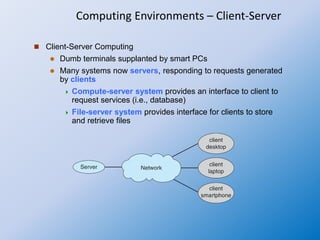
 Client-Server Computing
 Dumb terminals supplanted by smart PCs
 Many systems now servers, responding to requests generated
by clients
 Compute-server system provides an interface to client to
request services (i.e., database)
 File-server system provides interface for clients to store
and retrieve files
Computing Environments - Peer-to-Peer
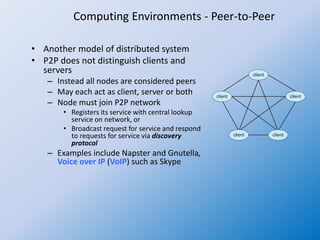
• Another model of distributed system
• P2P does not distinguish clients and
servers
– Instead all nodes are considered peers
– May each act as client, server or both
– Node must join P2P network
• Registers its service with central lookup
service on network, or
• Broadcast request for service and respond
to requests for service via discovery
protocol
– Examples include Napster and Gnutella,
Voice over IP (VoIP) such as Skype
Computing Environments – Cloud Computing
• Delivers computing, storage, even apps as a service across a network
• Logical extension of virtualization because it uses virtualization as the base for it
functionality.
– Amazon EC2 has thousands of servers, millions of virtual machines, petabytes
of storage available across the Internet, pay based on usage
• Many types
– Public cloud – available via Internet to anyone willing to pay
– Private cloud – run by a company for the company’s own use
– Hybrid cloud – includes both public and private cloud components
– Software as a Service (SaaS) – one or more applications available via the
Internet (i.e., word processor)
– Platform as a Service (PaaS) – software stack ready for application use via the
Internet (i.e., a database server)
– Infrastructure as a Service (IaaS) – servers or storage available over Internet
(i.e., storage available for backup use)
Computing Environments – Cloud Computing
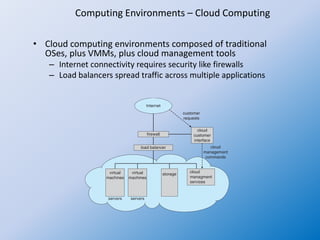
• Cloud computing environments composed of traditional
OSes, plus VMMs, plus cloud management tools
– Internet connectivity requires security like firewalls
– Load balancers spread traffic across multiple applications
Computing Environments – Real-Time Embedded Systems
• Real-time embedded systems most prevalent form
of computers
– Vary considerable, special purpose, limited purpose OS,
real-time OS
– Use expanding
• Many other special computing environments as
well
– Some have OSes, some perform tasks without an OS
• Real-time OS has well-defined fixed time constraints
– Processing must be done within constraint
– Correct operation only if constraints met
Free and Open-Source Operating Systems
• Operating systems made available in source-code format
rather than just binary closed-source and proprietary
• Counter to the copy protection and Digital Rights
Management (DRM) movement
• Started by Free Software Foundation (FSF), which has
“copyleft” GNU Public License (GPL)
• Examples include GNU/Linux and BSD UNIX (including core
of Mac OS X), and many more
• Can use VMM like VMware Player or Virtualbox
– Use to run guest operating systems for exploration

OS concepts 6 OS for various computing environments

  • 1.
    Operating System Concepts:6 OS for different Computing Environments Prof Neeraj Bhargava Vaibhav Khanna Department of Computer Science School of Engineering and Systems Sciences Maharishi Dayanand Saraswati University Ajmer
  • 2.
    Computing Environments -Traditional • Stand-alone general purpose machines • But blurred as most systems interconnect with others (i.e., the Internet) • Portals provide web access to internal systems • Network computers (thin clients) are like Web terminals • Mobile computers interconnect via wireless networks • Networking becoming ubiquitous – even home systems use firewalls to protect home computers from Internet attacks
  • 3.
    Computing Environments -Mobile • Handheld smartphones, tablets, etc • What is the functional difference between them and a “traditional” laptop? • Extra feature – more OS features (GPS, gyroscope) • Allows new types of apps like augmented reality • Use IEEE 802.11 wireless, or cellular data networks for connectivity • Leaders are Apple iOS and Google Android
  • 4.
    Computing Environments –Client-Server  Client-Server Computing  Dumb terminals supplanted by smart PCs  Many systems now servers, responding to requests generated by clients  Compute-server system provides an interface to client to request services (i.e., database)  File-server system provides interface for clients to store and retrieve files
  • 5.
    Computing Environments -Peer-to-Peer • Another model of distributed system • P2P does not distinguish clients and servers – Instead all nodes are considered peers – May each act as client, server or both – Node must join P2P network • Registers its service with central lookup service on network, or • Broadcast request for service and respond to requests for service via discovery protocol – Examples include Napster and Gnutella, Voice over IP (VoIP) such as Skype
  • 6.
    Computing Environments –Cloud Computing • Delivers computing, storage, even apps as a service across a network • Logical extension of virtualization because it uses virtualization as the base for it functionality. – Amazon EC2 has thousands of servers, millions of virtual machines, petabytes of storage available across the Internet, pay based on usage • Many types – Public cloud – available via Internet to anyone willing to pay – Private cloud – run by a company for the company’s own use – Hybrid cloud – includes both public and private cloud components – Software as a Service (SaaS) – one or more applications available via the Internet (i.e., word processor) – Platform as a Service (PaaS) – software stack ready for application use via the Internet (i.e., a database server) – Infrastructure as a Service (IaaS) – servers or storage available over Internet (i.e., storage available for backup use)
  • 7.
    Computing Environments –Cloud Computing • Cloud computing environments composed of traditional OSes, plus VMMs, plus cloud management tools – Internet connectivity requires security like firewalls – Load balancers spread traffic across multiple applications
  • 8.
    Computing Environments –Real-Time Embedded Systems • Real-time embedded systems most prevalent form of computers – Vary considerable, special purpose, limited purpose OS, real-time OS – Use expanding • Many other special computing environments as well – Some have OSes, some perform tasks without an OS • Real-time OS has well-defined fixed time constraints – Processing must be done within constraint – Correct operation only if constraints met
  • 9.
    Free and Open-SourceOperating Systems • Operating systems made available in source-code format rather than just binary closed-source and proprietary • Counter to the copy protection and Digital Rights Management (DRM) movement • Started by Free Software Foundation (FSF), which has “copyleft” GNU Public License (GPL) • Examples include GNU/Linux and BSD UNIX (including core of Mac OS X), and many more • Can use VMM like VMware Player or Virtualbox – Use to run guest operating systems for exploration