OPERATING SYSTEM
NEETHU NARAYANAN
ASSISTANT PROFESSOR
ST. MARY’S COLLEGE,
THRISSUR
SYSTEM SOFTWARE
• System software is a type of computer program that is designed to run a
computer’s hardware and application program. If we think of the computer
system as a layered model, the system software is the interface between the
hardware and user applications.
• The operating system (OS) is the best-known example of system software. The
OS manages all the other programs in a computer.
TYPES OF SYSTEM SOFTWARE
1. OPERATING SYSTEM
2. LANGUAGE PROCESSOR
3. DEVICE DRIVERS
LANGUAGE PROCESSOR
• Assembly language is machine dependent yet mnemonics that are being used to
represent instructions in it are not directly understandable by machine and high Level
language is machine independent.
• A computer understands instructions in machine code, i.e. in the form of 0s and 1s. It
is a tedious task to write a computer program directly in machine code. The programs
are written mostly in high level languages like Java, C++, Python etc. and are
called source code.
• These source code cannot be executed directly by the computer and must be
converted into machine language to be executed. Hence, a special translator system
software is used to translate the program written in high-level language into machine
code is called Language Processor and the program after translated into machine
code (object program / object code).
LANGUAGE PROCESSOR
The language processors can be any of the following three types:
1. Compiler –
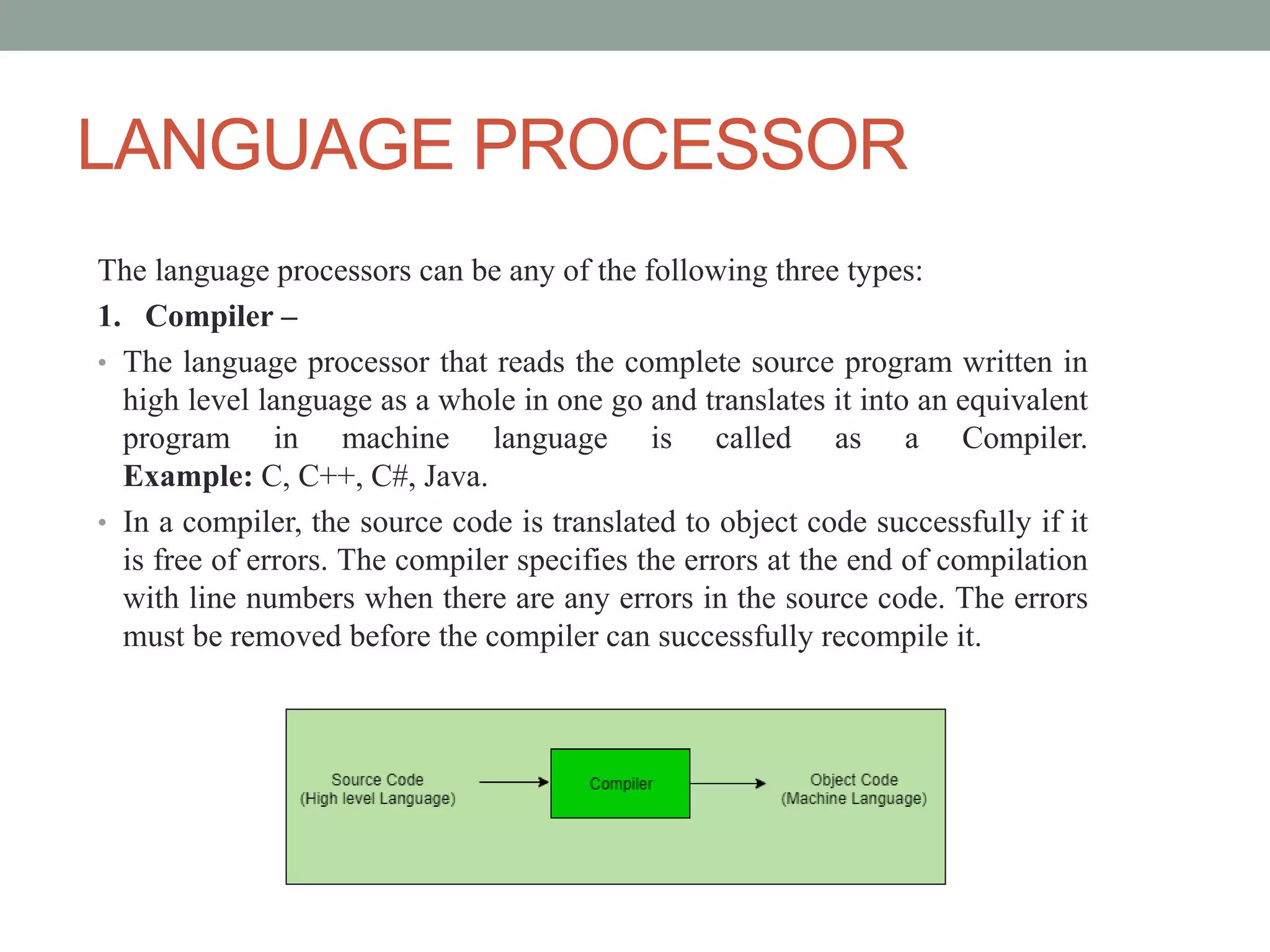
• The language processor that reads the complete source program written in
high level language as a whole in one go and translates it into an equivalent
program in machine language is called as a Compiler.
Example: C, C++, C#, Java.
• In a compiler, the source code is translated to object code successfully if it
is free of errors. The compiler specifies the errors at the end of compilation
with line numbers when there are any errors in the source code. The errors
must be removed before the compiler can successfully recompile it.
LANGUAGE PROCESSOR
2. Assembler –
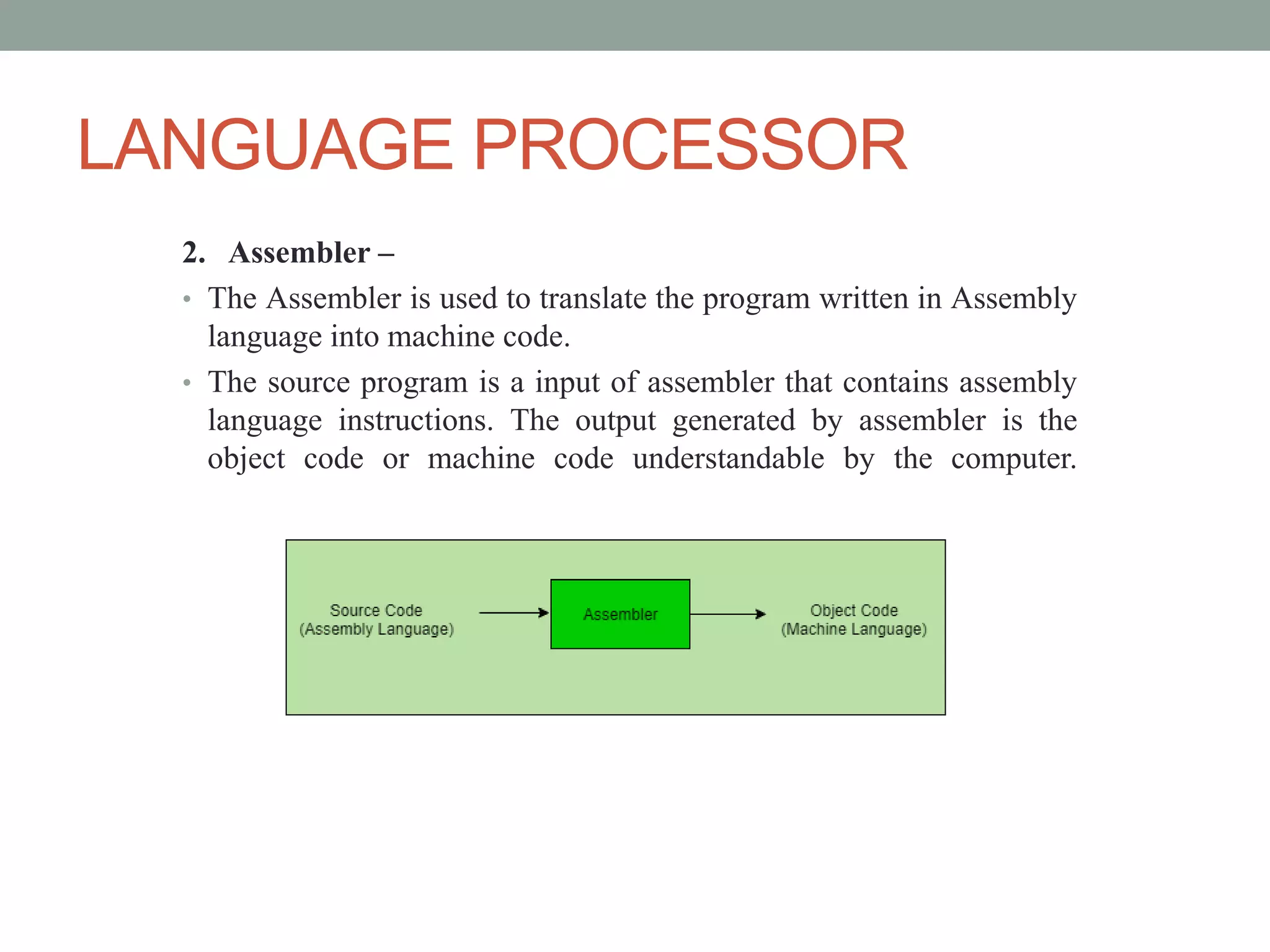
• The Assembler is used to translate the program written in Assembly
language into machine code.
• The source program is a input of assembler that contains assembly
language instructions. The output generated by assembler is the
object code or machine code understandable by the computer.
LANGUAGE PROCESSOR
3. Interpreter –
• The translation of single statement of source program into machine code
is done by language processor and executes it immediately before
moving on to the next line is called an interpreter.
• If there is an error in the statement, the interpreter terminates its
translating process at that statement and displays an error message.
• The interpreter moves on to the next line for execution only after
removal of the error.
• An Interpreter directly executes instructions written in a programming
or scripting language without previously converting them to an object
code/ machine code.
Example: Perl, Python and Matlab.
DEVICE DRIVERS
• A device driver is a particular form of software application that is designed to enable
interaction with hardware devices. Without the required device driver, the corresponding
hardware device fails to work.
• More commonly known as a driver, a device driver or hardware driver is a group
of files that enable one or more hardware devices to communicate with the computer's OS.
Without drivers, the computer would not be able to send and receive data correctly to
hardware devices, such as a Printer
• A device driver usually communicates with the hardware by means of the communications
subsystem or computer bus to which the hardware is connected. Device drivers are
operating system-specific and hardware-dependent. A device driver acts as a translator
between the hardware device and the programs or operating systems that use it.
• A device driver may also be called a software driver.
OPERATING SYSTEM
• The Operating System is a program with the following features −
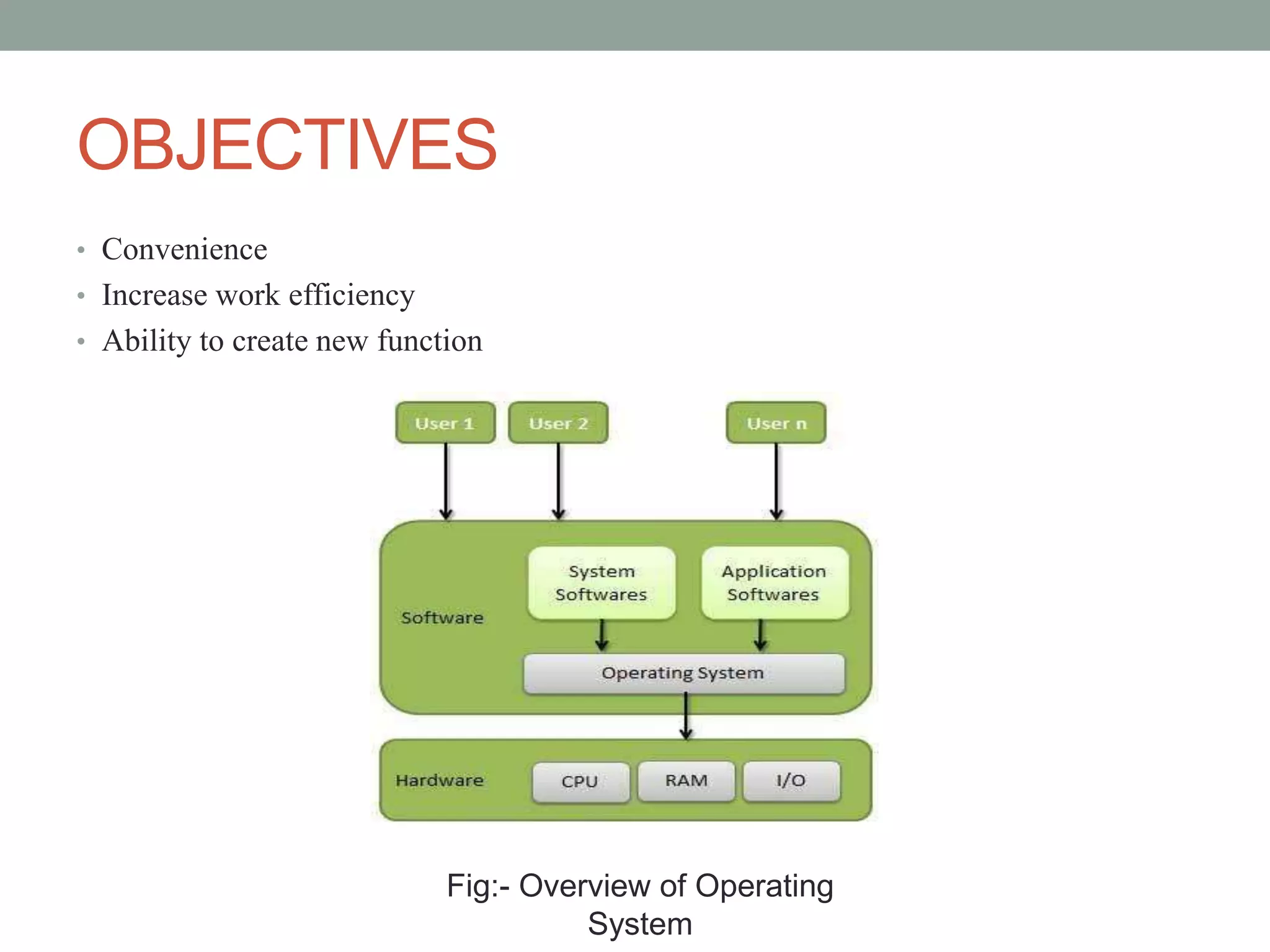
• An operating system is a program that acts as an interface between the software
and the computer hardware.
• It is an integrated set of specialized programs used to manage overall resources
and operations of the computer.
• It is a specialized software that controls and monitors the execution of all other
programs that reside in the computer, including application programs and other
system software.
OBJECTIVES
• Convenience
• Increase work efficiency
• Ability to create new function
Fig:- Overview of Operating
System
FUNCTION OF OPERATING SYSTEM
Process Management:-
• The Process Management means all the Processes those are given by the user or the
Process those are System ‘s own Process are Handled by the Operating System .
• The Operating System will Create the Priorities for the user and also Start or Stops the
Execution of the Process and Also Makes the Child Process after dividing the Large
Processes into the Small Processes.
Memory Management:
• Operating System also Manages the Memory of the Computer System means Provide the
Memory to the Process and Also Deallocate the Memory from the Process. And also
defines that if a Process gets completed then this will deallocate the Memory from the
Processes.
FUNCTION OF OPERATING SYSTEM
Input/output Management :-
• Input devices are used to get information into a computer system, and include
peripheral devices like the keyboard and mouse now found attached to virtually all
computer systems.
• Output devices receive information from a computer, and include devices such as
monitors and printers. Some input and output (I/O) devices can be used for
input and output, including network adapters and secondary storage devices.
Devise Management :-
• Keeps track of all the devices. This is also called I/O controller that decides which
process gets the device, when, and for how much time.
FUNCTION OF OPERATING SYSTEM
Security Management
• The security management function of an operating system helps in implementing
mechanisms that secure and protect the computer system internally as well as externally.
Therefore an operating system is responsible for securing the system at two different levels
which are internal security and external security.
1) Internal security
• Internal security refers to the protection of activities of one process from the activities of
another process. The term internal security may also be regarded as system protection. The
internal security of the computer system also ensures the reliability of the computer
system. There may be a number of process running in the computer systems use the
concept of least privilege to implement internal security.
2) External security
• External security refers to the implementation of a mechanism for securing the data and
programs stored in the computer system as well as the various resources of the computer
system against unauthorized access. The term external security may also be regarded as
system security. External security is particularly required when a computer system is either
on a network or connected to the internet.
TYPES OF OPERATING SYSTEM
• Batch Operating System
• Multitasking OS
• Multiprocessing OS
• Real time OS
• Distributed OS
THANK YOU

Neethu Narayanan- Operating System

  • 1.
    OPERATING SYSTEM NEETHU NARAYANAN ASSISTANTPROFESSOR ST. MARY’S COLLEGE, THRISSUR
  • 2.
    SYSTEM SOFTWARE • Systemsoftware is a type of computer program that is designed to run a computer’s hardware and application program. If we think of the computer system as a layered model, the system software is the interface between the hardware and user applications. • The operating system (OS) is the best-known example of system software. The OS manages all the other programs in a computer.
  • 3.
    TYPES OF SYSTEMSOFTWARE 1. OPERATING SYSTEM 2. LANGUAGE PROCESSOR 3. DEVICE DRIVERS
  • 4.
    LANGUAGE PROCESSOR • Assemblylanguage is machine dependent yet mnemonics that are being used to represent instructions in it are not directly understandable by machine and high Level language is machine independent. • A computer understands instructions in machine code, i.e. in the form of 0s and 1s. It is a tedious task to write a computer program directly in machine code. The programs are written mostly in high level languages like Java, C++, Python etc. and are called source code. • These source code cannot be executed directly by the computer and must be converted into machine language to be executed. Hence, a special translator system software is used to translate the program written in high-level language into machine code is called Language Processor and the program after translated into machine code (object program / object code).
  • 5.
    LANGUAGE PROCESSOR The languageprocessors can be any of the following three types: 1. Compiler – • The language processor that reads the complete source program written in high level language as a whole in one go and translates it into an equivalent program in machine language is called as a Compiler. Example: C, C++, C#, Java. • In a compiler, the source code is translated to object code successfully if it is free of errors. The compiler specifies the errors at the end of compilation with line numbers when there are any errors in the source code. The errors must be removed before the compiler can successfully recompile it.
  • 6.
    LANGUAGE PROCESSOR 2. Assembler– • The Assembler is used to translate the program written in Assembly language into machine code. • The source program is a input of assembler that contains assembly language instructions. The output generated by assembler is the object code or machine code understandable by the computer.
  • 7.
    LANGUAGE PROCESSOR 3. Interpreter– • The translation of single statement of source program into machine code is done by language processor and executes it immediately before moving on to the next line is called an interpreter. • If there is an error in the statement, the interpreter terminates its translating process at that statement and displays an error message. • The interpreter moves on to the next line for execution only after removal of the error. • An Interpreter directly executes instructions written in a programming or scripting language without previously converting them to an object code/ machine code. Example: Perl, Python and Matlab.
  • 8.
    DEVICE DRIVERS • Adevice driver is a particular form of software application that is designed to enable interaction with hardware devices. Without the required device driver, the corresponding hardware device fails to work. • More commonly known as a driver, a device driver or hardware driver is a group of files that enable one or more hardware devices to communicate with the computer's OS. Without drivers, the computer would not be able to send and receive data correctly to hardware devices, such as a Printer • A device driver usually communicates with the hardware by means of the communications subsystem or computer bus to which the hardware is connected. Device drivers are operating system-specific and hardware-dependent. A device driver acts as a translator between the hardware device and the programs or operating systems that use it. • A device driver may also be called a software driver.
  • 9.
    OPERATING SYSTEM • TheOperating System is a program with the following features − • An operating system is a program that acts as an interface between the software and the computer hardware. • It is an integrated set of specialized programs used to manage overall resources and operations of the computer. • It is a specialized software that controls and monitors the execution of all other programs that reside in the computer, including application programs and other system software.
  • 10.
    OBJECTIVES • Convenience • Increasework efficiency • Ability to create new function Fig:- Overview of Operating System
  • 11.
    FUNCTION OF OPERATINGSYSTEM Process Management:- • The Process Management means all the Processes those are given by the user or the Process those are System ‘s own Process are Handled by the Operating System . • The Operating System will Create the Priorities for the user and also Start or Stops the Execution of the Process and Also Makes the Child Process after dividing the Large Processes into the Small Processes. Memory Management: • Operating System also Manages the Memory of the Computer System means Provide the Memory to the Process and Also Deallocate the Memory from the Process. And also defines that if a Process gets completed then this will deallocate the Memory from the Processes.
  • 12.
    FUNCTION OF OPERATINGSYSTEM Input/output Management :- • Input devices are used to get information into a computer system, and include peripheral devices like the keyboard and mouse now found attached to virtually all computer systems. • Output devices receive information from a computer, and include devices such as monitors and printers. Some input and output (I/O) devices can be used for input and output, including network adapters and secondary storage devices. Devise Management :- • Keeps track of all the devices. This is also called I/O controller that decides which process gets the device, when, and for how much time.
  • 13.
    FUNCTION OF OPERATINGSYSTEM Security Management • The security management function of an operating system helps in implementing mechanisms that secure and protect the computer system internally as well as externally. Therefore an operating system is responsible for securing the system at two different levels which are internal security and external security. 1) Internal security • Internal security refers to the protection of activities of one process from the activities of another process. The term internal security may also be regarded as system protection. The internal security of the computer system also ensures the reliability of the computer system. There may be a number of process running in the computer systems use the concept of least privilege to implement internal security. 2) External security • External security refers to the implementation of a mechanism for securing the data and programs stored in the computer system as well as the various resources of the computer system against unauthorized access. The term external security may also be regarded as system security. External security is particularly required when a computer system is either on a network or connected to the internet.
  • 14.
    TYPES OF OPERATINGSYSTEM • Batch Operating System • Multitasking OS • Multiprocessing OS • Real time OS • Distributed OS
  • 15.