
PROGRAMMING FOR PROBLEM
SOLVING (KCS101/201)
Unit-1 Lecture#1
By
Sukhendra Singh
Assistant Professor
JSS Academy of Technical Education Noida
sukhendrasingh@jssaten.ac.in
Topics Covered
• Introduction to Programming: Introduction to
components of a computer system: Memory,
processor, I/O Devices, storage, operating system,
Concept of assembler, compiler, interpreter, loader,
and linker.
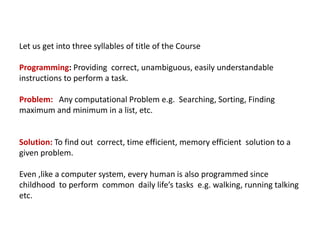
Let us get into three syllables of title of the Course
Programming: Providing correct, unambiguous, easily understandable
instructions to perform a task.
Problem: Any computational Problem e.g. Searching, Sorting, Finding
maximum and minimum in a list, etc.
Solution: To find out correct, time efficient, memory efficient solution to a
given problem.
Even ,like a computer system, every human is also programmed since
childhood to perform common daily life’s tasks e.g. walking, running talking
etc.
Computer System
• A computer is a programmable electronic device designed to provide
various services. It stores retrieves and processes data efficiently. A
computer receives data and instructions through “Input Devices'' that get
processed in the Central Processing Unit (CPU) and the result is displayed
to “Output Devices.”
• The computer is a combination of Hardware and Software. Both Hardware
and Software are equally important for the functioning of Computers.
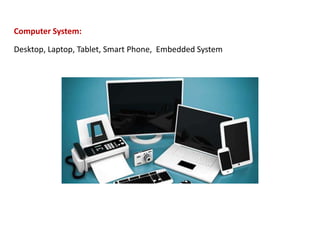
Computer System:
Desktop, Laptop, Tablet, Smart Phone, Embedded System
Hardware
• Hardware is a physical component of a computer like Processor, Memory,
Mouse, Keyboard, Printer, Monitor etc.
Components of Computer are:
• Input Devices
• Output Devices
• Processor / CPU (Central Processing Unit)
• Memory / RAM (Random Access Memory, Non-persistent storage)
• Storage or Auxiliary Memory (Persistent storage)
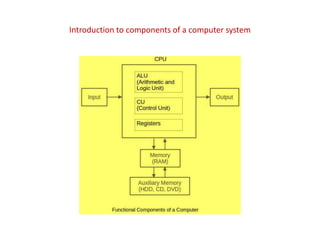
Introduction to components of a computer system
• Input Devices: These devices are used to input data and instructions into
the computer. E.g. Keyboard, Mouse etc.
•
CPU (Central Processing Unit): It is responsible for processing data and
instructions. It receives data from input devices. It processes the data
and stores the output or display to the output devices.
The Central Processing Unit is divided into three sections:
• ALU: It is responsible for performing various arithmetic operations like
addition, subtraction, division, multiplication etc.
• Control Unit : It is responsible for coordinating and controlling data in and
out of the CPU. It controls the ALU, Memory Registers and also Input /
Output Devices.
• Memory Registers: It is Non-persistent / temporary storage in the CPU.
These are used to store data that is directly used by the CPU.
• Output Devices: It is used to display the result to the user. The common
output devices are Monitor, Printer, etc.
• Memory / RAM: It is the memory attached to the CPU and is used to store
data and instructions. When a program is executed its data is loaded into
the internal memory and remains in the memory till the end. Memory is
also referred to as Main Memory, Primary Memory or RAM (Random
access memory).
Storage or Auxiliary Memory: It is the persistent storage of data in which
the data resides even if we switch off the computer. For example: Hard-
drives, CD, DVD etc.
Generation of Programming Language
• A First-generation (programming) language (1GL) is a machine-level
programming language that is used to program first-generation
computers.
• A Second-generation programming language (2GL) is Assembly
languages.
A Third-generation programming language (3GL) is much more machine-
independent and more programmer-friendly. The most popular general-
purpose languages today are 3GL, such as C, C++, C#, Java, BASIC, etc.
•
A Fourth-generation programming language (4GL) is such a language
whose statements are similar to the statements of the English language.
4GL languages are used to solve very specific problems. 4GL languages
may include support for Database management, report generation,
mathematical optimization, GUI development, or web development. E.g.
SQL, R, etc.
• A Fifth-generation programming language (5GL) is any
programming language to solve the problem based on constraints
and logic, rather than using an algorithm written by a
programmer. 5GL is designed to make the computer solve a given
problem without the programmer. E.g. OPS5, Mercury, etc.
Software
• The software consists of various types of programs that control the
operation of computers. The software is further divided into System
Software, Utility Software, and Application Software.
System Software
• System Software is the software that directly controls and utilizes
computer hardware. These programs help in running application
programs. System software directs the computer what to do, when to do
and how to do.
System software can be further categorized into:
• Operating System
• Device Driver
• Language Processors
Operating System
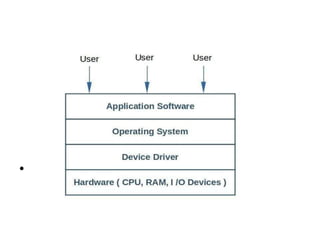
• An Operating system is a software that provides an interface to the user
to use computer hardware. It is a set of programs that control and
supervise the computer hardware, software resources and also provide
services to application software and the users. Process Management,
Memory Management, Device Management, and File management are
key functions of the Operating System. A computer system is of no use
without an Operating System. When a computer is switched on the
Operating System is the first program that is loaded to its memory.
•
Examples of Operating Systems used are Linux, Windows, Unix, etc.
•
Functions of Operating System:
• Processor Management: It deals with the management of the Central
Processing Unit or CPU. The operating system performs the allotment of
CPU time to various processes.
• Memory Management: The operating system loads a program into
memory when it needs to be executed and removes the program from
memory when it is no longer needed.
• Device Management: The operating system helps in communication
between various types of hardware.
• File Management: The operating system manages the files, folders, and
directory structures of the computer. The operating system file manager is
used to create, edit, copy, move, and delete files.
Device Driver
A device driver is a program that controls a particular device. Each device
like a keyboard, mouse, printer, etc. need their driver to work. The device
driver acts as a translator between the operating system and the device
connected to the computer.
Language Processors
The computer can understand only instructions in machine code, i.e. in
the form of 0s and 1s. It is very difficult to write computer programs
directly in machine code. The programs are written mostly in high-level
languages, i.e. C, C++, Python, etc. A program written in any high-level
programming language is called the Source Program or Source Code.
The source code cannot be executed directly by the computer. The source
code must be converted into machine language to be executed.
Language Processors are translator software that is used to translate the
program written in a high-level language (or Assembly language) into
machine level language. The language processors are of three types-
Assembler, Compiler, and Interpreter.
• Assembler
The Assembler is used to translate the program written in Assembly
language into machine level language or machine code. The input of
Assembler is a source program that contains assembly language
instructions. The output generated by the assembler is the machine code
that can be executed by the computer.
Compiler
The compiler is used to translate the high-level languages source program
as a whole into machine level language. Some of the examples are C and
C++ compilers. The source code is translated to object code successfully if
it is free of errors. If there are any errors in the source code, the compiler
specifies the errors at the end of compilation with line numbers. The
errors must be removed before the compiler can successfully recompile
the source code.
•
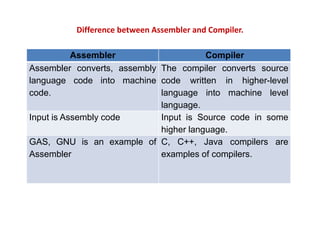
Difference between Assembler and Compiler.
Assembler Compiler
Assembler converts, assembly
language code into machine
code.
The compiler converts source
code written in higher-level
language into machine level
language.
Input is Assembly code Input is Source code in some
higher language.
GAS, GNU is an example of
Assembler
C, C++, Java compilers are
examples of compilers.
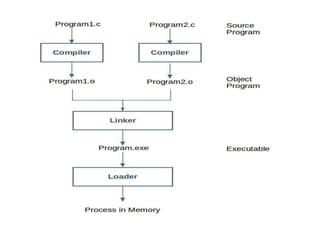
Linker
• A linker combines one or more object files and possibly some
library to create an executable.
Loader
• A loader reads the executable code into memory and tries to run
the program.
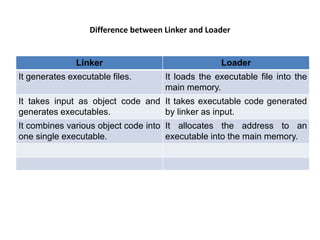
Difference between Linker and Loader
Linker Loader
It generates executable files. It loads the executable file into the
main memory.
It takes input as object code and
generates executables.
It takes executable code generated
by linker as input.
It combines various object code into
one single executable.
It allocates the address to an
executable into the main memory.
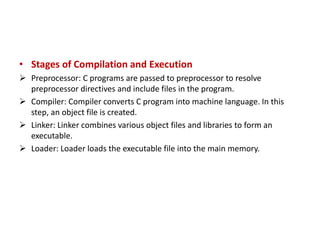
• Stages of Compilation and Execution
 Preprocessor: C programs are passed to preprocessor to resolve
preprocessor directives and include files in the program.
 Compiler: Compiler converts C program into machine language. In this
step, an object file is created.
 Linker: Linker combines various object files and libraries to form an
executable.
 Loader: Loader loads the executable file into the main memory.
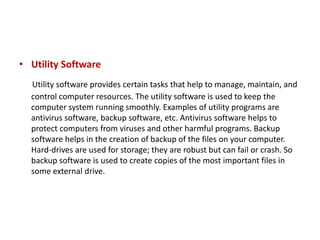
• Utility Software
Utility software provides certain tasks that help to manage, maintain, and
control computer resources. The utility software is used to keep the
computer system running smoothly. Examples of utility programs are
antivirus software, backup software, etc. Antivirus software helps to
protect computers from viruses and other harmful programs. Backup
software helps in the creation of backup of the files on your computer.
Hard-drives are used for storage; they are robust but can fail or crash. So
backup software is used to create copies of the most important files in
some external drive.
Application Software
• Application software is used to solve a particular problem or perform
some specific task.
Few examples of application software:
• Microsoft Office
• Photoshop
• Music Players
• Games
• Thank You

Programming for Problem Solving

  • 1.
    PROGRAMMING FOR PROBLEM SOLVING(KCS101/201) Unit-1 Lecture#1 By Sukhendra Singh Assistant Professor JSS Academy of Technical Education Noida sukhendrasingh@jssaten.ac.in
  • 2.
    Topics Covered • Introductionto Programming: Introduction to components of a computer system: Memory, processor, I/O Devices, storage, operating system, Concept of assembler, compiler, interpreter, loader, and linker.
  • 3.
    Let us getinto three syllables of title of the Course Programming: Providing correct, unambiguous, easily understandable instructions to perform a task. Problem: Any computational Problem e.g. Searching, Sorting, Finding maximum and minimum in a list, etc. Solution: To find out correct, time efficient, memory efficient solution to a given problem. Even ,like a computer system, every human is also programmed since childhood to perform common daily life’s tasks e.g. walking, running talking etc.
  • 4.
    Computer System • Acomputer is a programmable electronic device designed to provide various services. It stores retrieves and processes data efficiently. A computer receives data and instructions through “Input Devices'' that get processed in the Central Processing Unit (CPU) and the result is displayed to “Output Devices.” • The computer is a combination of Hardware and Software. Both Hardware and Software are equally important for the functioning of Computers.
  • 5.
    Computer System: Desktop, Laptop,Tablet, Smart Phone, Embedded System
  • 6.
    Hardware • Hardware isa physical component of a computer like Processor, Memory, Mouse, Keyboard, Printer, Monitor etc. Components of Computer are: • Input Devices • Output Devices • Processor / CPU (Central Processing Unit) • Memory / RAM (Random Access Memory, Non-persistent storage) • Storage or Auxiliary Memory (Persistent storage)
  • 7.
    Introduction to componentsof a computer system
  • 8.
    • Input Devices:These devices are used to input data and instructions into the computer. E.g. Keyboard, Mouse etc. • CPU (Central Processing Unit): It is responsible for processing data and instructions. It receives data from input devices. It processes the data and stores the output or display to the output devices. The Central Processing Unit is divided into three sections: • ALU: It is responsible for performing various arithmetic operations like addition, subtraction, division, multiplication etc. • Control Unit : It is responsible for coordinating and controlling data in and out of the CPU. It controls the ALU, Memory Registers and also Input / Output Devices. • Memory Registers: It is Non-persistent / temporary storage in the CPU. These are used to store data that is directly used by the CPU.
  • 9.
    • Output Devices:It is used to display the result to the user. The common output devices are Monitor, Printer, etc. • Memory / RAM: It is the memory attached to the CPU and is used to store data and instructions. When a program is executed its data is loaded into the internal memory and remains in the memory till the end. Memory is also referred to as Main Memory, Primary Memory or RAM (Random access memory). Storage or Auxiliary Memory: It is the persistent storage of data in which the data resides even if we switch off the computer. For example: Hard- drives, CD, DVD etc.
  • 10.
    Generation of ProgrammingLanguage • A First-generation (programming) language (1GL) is a machine-level programming language that is used to program first-generation computers. • A Second-generation programming language (2GL) is Assembly languages. A Third-generation programming language (3GL) is much more machine- independent and more programmer-friendly. The most popular general- purpose languages today are 3GL, such as C, C++, C#, Java, BASIC, etc. • A Fourth-generation programming language (4GL) is such a language whose statements are similar to the statements of the English language. 4GL languages are used to solve very specific problems. 4GL languages may include support for Database management, report generation, mathematical optimization, GUI development, or web development. E.g. SQL, R, etc.
  • 11.
    • A Fifth-generationprogramming language (5GL) is any programming language to solve the problem based on constraints and logic, rather than using an algorithm written by a programmer. 5GL is designed to make the computer solve a given problem without the programmer. E.g. OPS5, Mercury, etc.
  • 12.
    Software • The softwareconsists of various types of programs that control the operation of computers. The software is further divided into System Software, Utility Software, and Application Software. System Software • System Software is the software that directly controls and utilizes computer hardware. These programs help in running application programs. System software directs the computer what to do, when to do and how to do. System software can be further categorized into: • Operating System • Device Driver • Language Processors
  • 13.
    Operating System • AnOperating system is a software that provides an interface to the user to use computer hardware. It is a set of programs that control and supervise the computer hardware, software resources and also provide services to application software and the users. Process Management, Memory Management, Device Management, and File management are key functions of the Operating System. A computer system is of no use without an Operating System. When a computer is switched on the Operating System is the first program that is loaded to its memory. • Examples of Operating Systems used are Linux, Windows, Unix, etc.
  • 14.
  • 15.
    Functions of OperatingSystem: • Processor Management: It deals with the management of the Central Processing Unit or CPU. The operating system performs the allotment of CPU time to various processes. • Memory Management: The operating system loads a program into memory when it needs to be executed and removes the program from memory when it is no longer needed. • Device Management: The operating system helps in communication between various types of hardware. • File Management: The operating system manages the files, folders, and directory structures of the computer. The operating system file manager is used to create, edit, copy, move, and delete files.
  • 16.
    Device Driver A devicedriver is a program that controls a particular device. Each device like a keyboard, mouse, printer, etc. need their driver to work. The device driver acts as a translator between the operating system and the device connected to the computer. Language Processors The computer can understand only instructions in machine code, i.e. in the form of 0s and 1s. It is very difficult to write computer programs directly in machine code. The programs are written mostly in high-level languages, i.e. C, C++, Python, etc. A program written in any high-level programming language is called the Source Program or Source Code. The source code cannot be executed directly by the computer. The source code must be converted into machine language to be executed. Language Processors are translator software that is used to translate the program written in a high-level language (or Assembly language) into machine level language. The language processors are of three types- Assembler, Compiler, and Interpreter.
  • 17.
    • Assembler The Assembleris used to translate the program written in Assembly language into machine level language or machine code. The input of Assembler is a source program that contains assembly language instructions. The output generated by the assembler is the machine code that can be executed by the computer. Compiler The compiler is used to translate the high-level languages source program as a whole into machine level language. Some of the examples are C and C++ compilers. The source code is translated to object code successfully if it is free of errors. If there are any errors in the source code, the compiler specifies the errors at the end of compilation with line numbers. The errors must be removed before the compiler can successfully recompile the source code. •
  • 18.
    Difference between Assemblerand Compiler. Assembler Compiler Assembler converts, assembly language code into machine code. The compiler converts source code written in higher-level language into machine level language. Input is Assembly code Input is Source code in some higher language. GAS, GNU is an example of Assembler C, C++, Java compilers are examples of compilers.
  • 19.
    Linker • A linkercombines one or more object files and possibly some library to create an executable. Loader • A loader reads the executable code into memory and tries to run the program.
  • 21.
    Difference between Linkerand Loader Linker Loader It generates executable files. It loads the executable file into the main memory. It takes input as object code and generates executables. It takes executable code generated by linker as input. It combines various object code into one single executable. It allocates the address to an executable into the main memory.
  • 22.
    • Stages ofCompilation and Execution  Preprocessor: C programs are passed to preprocessor to resolve preprocessor directives and include files in the program.  Compiler: Compiler converts C program into machine language. In this step, an object file is created.  Linker: Linker combines various object files and libraries to form an executable.  Loader: Loader loads the executable file into the main memory.
  • 23.
    • Utility Software Utilitysoftware provides certain tasks that help to manage, maintain, and control computer resources. The utility software is used to keep the computer system running smoothly. Examples of utility programs are antivirus software, backup software, etc. Antivirus software helps to protect computers from viruses and other harmful programs. Backup software helps in the creation of backup of the files on your computer. Hard-drives are used for storage; they are robust but can fail or crash. So backup software is used to create copies of the most important files in some external drive.
  • 24.
    Application Software • Applicationsoftware is used to solve a particular problem or perform some specific task. Few examples of application software: • Microsoft Office • Photoshop • Music Players • Games
  • 25.