



Semi Final
Instructor: Mark John P. Lado
Introduction to Security and Privacy
Introduction to Operating System
Introduction to Artificial Intelligence
Introduction to Security and Privacy
Introduction to Operating System
Introduction to Artificial Intelligence
 Distinguish the importance of cryptography.
 Analyze decoding and encoding.
 Engage in different Operating System.
 Evaluate the role of Operating System in a device.
 Know about Artificial Intelligence.
 Identify the different types of Artificial Intelligence.
Define security in computer studies.
In computer studies, why we need to be
secure?
Cryptography
Cryptography – the art of writing or
solving codes.
Encryption
Decryption
Encryption – is the process of encoding
a message in such a way that only
authorized parties can access it.
Decryption – is the process of
conversion of encrypted data into its
original form.
Cipher (cypher)
Cipher (cypher) – a secret or
disguised way of writing.
Cipher (cypher) – an algorithm
for performing encryption or
decryption.
Caesar Cipher
Caesar Cipher – is one of the earliest
known and simplest ciphers. It is a
type of substitution cipher in which
each letter in the plaintext is shifted a
certain number of places down the
alphabet.
Caesar Cipher
(Shift of 3)
How to encrypt using Caesar cipher
which is shifted of 3?
Simply take the alphabet and look 3 letters
after.
How to decrypt Caesar cipher code
which is shifted of 3?
Simply take the alphabet and look 3 letters
before.
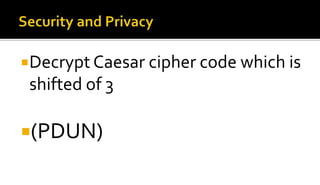
Decrypt Caesar cipher code which is
shifted of 3
(PDUN)
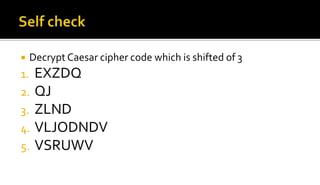
 Decrypt Caesar cipher code which is shifted of 3
1. EXZDQ
2. QJ
3. ZLND
4. VLJODNDV
5. VSRUWV
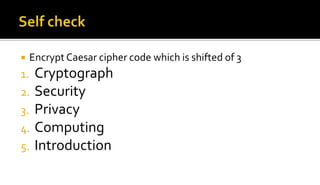
 Encrypt Caesar cipher code which is shifted of 3
1. Cryptograph
2. Security
3. Privacy
4. Computing
5. Introduction
 An operating system acts as an intermediary between the
user of a computer and computer hardware. The purpose of
an operating system is to provide an environment in which a
user can execute programs in a convenient and efficient
manner.
 An operating system is software that manages the
computer hardware. The hardware must provide
appropriate mechanisms to ensure the correct operation of
the computer system and to prevent user programs from
interfering with the proper operation of the system.
 An operating system is a program that controls
the execution of application programs and acts
as an interface between the user of a computer
and the computer hardware.
 A more common definition is that the operating
system is the one program running at all times
on the computer (usually called the kernel), with
all else being application programs.
 An operating system is concerned with the
allocation of resources and services, such as
memory, processors, devices, and information.
The operating system correspondingly includes
programs to manage these resources, such as a
traffic controller, a scheduler, memory
management module, I/O programs, and a file
system.
Operating system performs three functions:
 Convenience: An OS makes a computer more
convenient to use.
Operating system performs three functions:
 Efficiency: An OS allows the computer system
resources to be used in an efficient manner.
Operating system performs three functions:
 Ability to Evolve: An OS should be constructed
in such a way as to permit the effective
development, testing and introduction of new
system functions without at the same time
interfering with service.
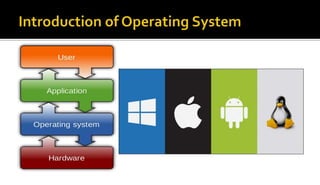
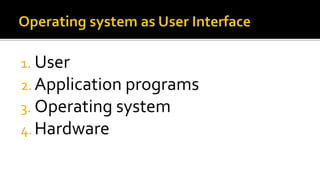
1. User
2. Application programs
3. Operating system
4. Hardware
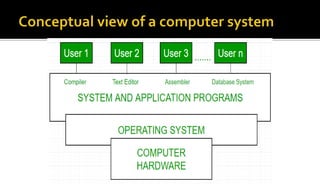
Every general-purpose computer consists of the
hardware, operating system, system programs, and
application programs. The hardware consists of
memory, CPU, ALU, and I/O devices, peripheral device,
and storage device. System program consists of
compilers, loaders, editors, OS, etc. The application
program consists of business programs, database
programs.
Every computer must have an operating system to run
other programs. The operating system coordinates the
use of the hardware among the various system
programs and application programs for various users. It
simply provides an environment within which other
programs can do useful work.
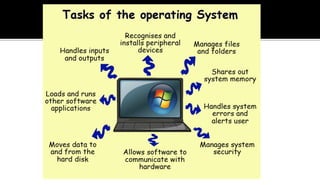
The operating system is a set of special programs that
run on a computer system that allows it to work
properly. It performs basic tasks such as recognizing
input from the keyboard, keeping track of files and
directories on the disk, sending output to the display
screen and controlling peripheral devices.
 It controls the allocation and use of the computing
System’s resources among the various user and tasks.
 It provides an interface between the computer
hardware and the programmer that simplifies and
makes feasible for coding, creation, debugging of
application programs.
The task are:
 Provides the facilities to create, modification of
programs and data files using an editor.
 Access to the compiler for translating the user
program from high level language to machine
language.
The task are:
 Provide a loader program to move the compiled
program code to the computer’s memory for
execution.
 Provide routines that handle the details of I/O
programming.
 The module that keeps track of the status of
devices is called the I/O traffic controller. Each
I/O device has a device handler that resides in a
separate process associated with that device.
The I/O subsystem consists of
1. A memory Management component that includes
buffering caching and spooling.
2. A general device driver interface.
3. Drivers for specific hardware devices.
 The input to an assembler is an assembly language program.
The output is an object program plus information that
enables the loader to prepare the object program for
execution. At one time, the computer programmer had at
his disposal a basic machine that interpreted, through
hardware, certain fundamental instructions. He would
program this computer by writing a series of ones and Zeros
(Machine language), place them into the memory of the
machine.
 The High-level languages- examples are JAVA, C/C++, Dev-
C++, C#, Ruby and Python are processed by compilers and
interpreters. A compiler is a program that accepts a source
program in a “high-level language “and produces a
corresponding object program. An interpreter is a program
that appears to execute a source program as if it was
machine language.
 A Loader is a routine that loads an object
program and prepares it for execution. There are
various loading schemes: absolute, relocating
and direct-linking. In general, the loader must
load, relocate and link the object program.
 The loader is a program that places programs
into memory and prepares them for execution.
In a simple loading scheme, the assembler
outputs the machine language translation of a
program on a secondary device and a loader
places it in the core.
 The loader places into memory the machine
language version of the user’s program and
transfers control to it. Since the loader
program is much smaller than the
assembler, those make more core available
to the user’s program.
1. Batch Operating System
2. Time sharing operating System
3. Distributed operating System
4. Network operating system
5. Real time operating system
Batch Operating System
Sequence of jobs in a program on a
computer without manual interventions.
Time sharing operating System
Allows many users to share the computer
resources.(Max utilization of the
resources).
Distributed operating System
Manages a group of different computers
and make appear to be a single
computer.
Network operating system
Computers running in different operating
system can participate in common
network (It is used for security purpose).
 Real time operating system
Meant applications to fix the deadlines. An
operating system (OS) intended to serve
real-time applications that process data as it
comes in, typically without buffer delays.
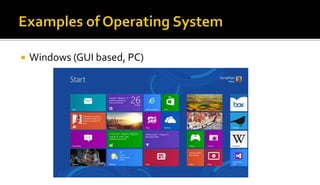
 Windows (GUI based, PC)
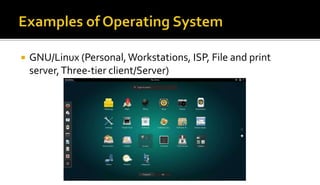
 GNU/Linux (Personal,Workstations, ISP, File and print
server,Three-tier client/Server)
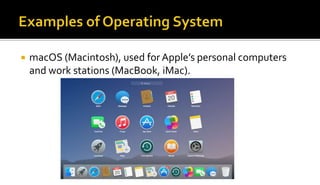
 macOS (Macintosh), used for Apple’s personal computers
and work stations (MacBook, iMac).
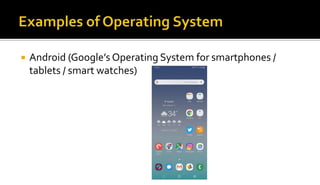
 Android (Google’s Operating System for smartphones /
tablets / smart watches)
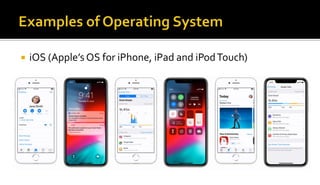
 iOS (Apple’s OS for iPhone, iPad and iPodTouch)
1. Give at least five tasks of Operating System
2. Draw the conceptual view of a computer
system
3. Give the three functions of Operating system
4. Give the five types of Operating System
5. Give the five examples of Operating System
Distinguish assembler in
computing.
Elaborate compiler in
computing.
Give a concise dialog about
loader in computing.
 In today's world, technology is growing very
fast, and we are getting in touch with different
new technologies day by day.
 Here, one of the booming technologies of
computer science is Artificial Intelligence which
is ready to create a new revolution in the world
by making intelligent machines.
 The Artificial Intelligence is now all around us. It
is currently working with a variety of subfields,
ranging from general to specific, such as self-
driving cars, playing chess, proving theorems,
playing music, Painting, etc.
 A.I. is one of the fascinating and universal fields
of Computer science which has a great scope in
future. A.I. holds a tendency to cause a machine
to work as a human.
 Artificial Intelligence is composed of two
words Artificial and Intelligence, where
Artificial defines "man-made," and intelligence
defines "thinking power", hence AI means "a
man-made thinking power."
 "It is a branch of computer science by which we
can create intelligent machines which can
behave like a human, think like humans, and
able to make decisions."
 Artificial Intelligence exists when a machine can
have human based skills such as learning,
reasoning, and solving problems
 With Artificial Intelligence you do not need to
preprogram a machine to do some work,
despite that you can create a machine with
programmed algorithms which can work with
own intelligence, and that is the awesomeness
of A.I.
Why Artificial Intelligence?
 Before Learning about Artificial Intelligence, we
should know that what is the importance of A.I.
and why should we learn it. Following are some
main reasons to learn about A.I.:
 With the help of A.I., you can create such
software or devices which can solve real-world
problems very easily and with accuracy such as
health issues, marketing, traffic issues, etc.
 With the help of A.I., you can create your
personal virtual Assistant, such as Cortana,
Google Assistant, Siri, etc.
 With the help of A.I., you can build such Robots
which can work in an environment where
survival of humans can be at risk.
 A.I. opens a path for other new technologies,
new devices, and new Opportunities.
Following are the main goals of Artificial
Intelligence:
 Replicate human intelligence
 Solve Knowledge-intensive tasks
 An intelligent connection of perception and
action
Following are the main goals of Artificial
Intelligence:
 Building a machine which can perform tasks that requires
human intelligence such as:
 Proving a theorem
 Playing chess
 Plan some surgical operation
 Driving a car in traffic
Following are the main goals of Artificial
Intelligence:
 Creating some system which can exhibit
intelligent behavior, learn new things by itself,
demonstrate, explain, and can advise to its user.
What Comprises to
Artificial Intelligence?
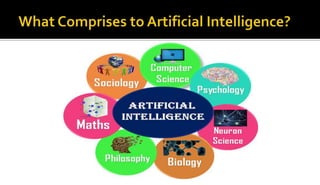
 Artificial Intelligence is not just a part of computer
science even it's so vast and requires lots of other
factors which can contribute to it. To create the A.I.
first we should know that how intelligence is
composed, so the Intelligence is an intangible part
of our brain which is a combination of Reasoning,
learning, problem-solving perception, language
understanding, etc.
 To achieve the above factors for a machine or
software Artificial Intelligence requires the
following discipline:
 Mathematics
 Biology
 Psychology
 To achieve the above factors for a machine or
software Artificial Intelligence requires the
following discipline:
 Sociology
 Computer Science
 Neurons Study
 Statistics
What is the impact of
Artificial Intelligence in
todays era?
Assignment
 Advantages of Artificial Intelligence
 Disadvantages of Artificial Intelligence

Security Privacy Operating System and Artificial Intelligence

  • 1.
    Semi Final Instructor: MarkJohn P. Lado Introduction to Security and Privacy Introduction to Operating System Introduction to Artificial Intelligence
  • 2.
    Introduction to Securityand Privacy Introduction to Operating System Introduction to Artificial Intelligence
  • 3.
     Distinguish theimportance of cryptography.  Analyze decoding and encoding.  Engage in different Operating System.  Evaluate the role of Operating System in a device.  Know about Artificial Intelligence.  Identify the different types of Artificial Intelligence.
  • 4.
    Define security incomputer studies.
  • 5.
    In computer studies,why we need to be secure?
  • 6.
  • 7.
    Cryptography – theart of writing or solving codes.
  • 8.
  • 9.
    Encryption – isthe process of encoding a message in such a way that only authorized parties can access it.
  • 10.
    Decryption – isthe process of conversion of encrypted data into its original form.
  • 11.
  • 12.
    Cipher (cypher) –a secret or disguised way of writing.
  • 13.
    Cipher (cypher) –an algorithm for performing encryption or decryption.
  • 14.
  • 15.
    Caesar Cipher –is one of the earliest known and simplest ciphers. It is a type of substitution cipher in which each letter in the plaintext is shifted a certain number of places down the alphabet.
  • 16.
  • 17.
    How to encryptusing Caesar cipher which is shifted of 3? Simply take the alphabet and look 3 letters after.
  • 18.
    How to decryptCaesar cipher code which is shifted of 3? Simply take the alphabet and look 3 letters before.
  • 19.
    Decrypt Caesar ciphercode which is shifted of 3 (PDUN)
  • 20.
     Decrypt Caesarcipher code which is shifted of 3 1. EXZDQ 2. QJ 3. ZLND 4. VLJODNDV 5. VSRUWV
  • 21.
     Encrypt Caesarcipher code which is shifted of 3 1. Cryptograph 2. Security 3. Privacy 4. Computing 5. Introduction
  • 24.
     An operatingsystem acts as an intermediary between the user of a computer and computer hardware. The purpose of an operating system is to provide an environment in which a user can execute programs in a convenient and efficient manner.
  • 25.
     An operatingsystem is software that manages the computer hardware. The hardware must provide appropriate mechanisms to ensure the correct operation of the computer system and to prevent user programs from interfering with the proper operation of the system.
  • 26.
     An operatingsystem is a program that controls the execution of application programs and acts as an interface between the user of a computer and the computer hardware.
  • 27.
     A morecommon definition is that the operating system is the one program running at all times on the computer (usually called the kernel), with all else being application programs.
  • 28.
     An operatingsystem is concerned with the allocation of resources and services, such as memory, processors, devices, and information. The operating system correspondingly includes programs to manage these resources, such as a traffic controller, a scheduler, memory management module, I/O programs, and a file system.
  • 29.
    Operating system performsthree functions:  Convenience: An OS makes a computer more convenient to use.
  • 30.
    Operating system performsthree functions:  Efficiency: An OS allows the computer system resources to be used in an efficient manner.
  • 31.
    Operating system performsthree functions:  Ability to Evolve: An OS should be constructed in such a way as to permit the effective development, testing and introduction of new system functions without at the same time interfering with service.
  • 32.
    1. User 2. Applicationprograms 3. Operating system 4. Hardware
  • 33.
    Every general-purpose computerconsists of the hardware, operating system, system programs, and application programs. The hardware consists of memory, CPU, ALU, and I/O devices, peripheral device, and storage device. System program consists of compilers, loaders, editors, OS, etc. The application program consists of business programs, database programs.
  • 35.
    Every computer musthave an operating system to run other programs. The operating system coordinates the use of the hardware among the various system programs and application programs for various users. It simply provides an environment within which other programs can do useful work.
  • 36.
    The operating systemis a set of special programs that run on a computer system that allows it to work properly. It performs basic tasks such as recognizing input from the keyboard, keeping track of files and directories on the disk, sending output to the display screen and controlling peripheral devices.
  • 37.
     It controlsthe allocation and use of the computing System’s resources among the various user and tasks.  It provides an interface between the computer hardware and the programmer that simplifies and makes feasible for coding, creation, debugging of application programs.
  • 38.
    The task are: Provides the facilities to create, modification of programs and data files using an editor.  Access to the compiler for translating the user program from high level language to machine language.
  • 39.
    The task are: Provide a loader program to move the compiled program code to the computer’s memory for execution.  Provide routines that handle the details of I/O programming.
  • 40.
     The modulethat keeps track of the status of devices is called the I/O traffic controller. Each I/O device has a device handler that resides in a separate process associated with that device.
  • 41.
    The I/O subsystemconsists of 1. A memory Management component that includes buffering caching and spooling. 2. A general device driver interface. 3. Drivers for specific hardware devices.
  • 42.
     The inputto an assembler is an assembly language program. The output is an object program plus information that enables the loader to prepare the object program for execution. At one time, the computer programmer had at his disposal a basic machine that interpreted, through hardware, certain fundamental instructions. He would program this computer by writing a series of ones and Zeros (Machine language), place them into the memory of the machine.
  • 43.
     The High-levellanguages- examples are JAVA, C/C++, Dev- C++, C#, Ruby and Python are processed by compilers and interpreters. A compiler is a program that accepts a source program in a “high-level language “and produces a corresponding object program. An interpreter is a program that appears to execute a source program as if it was machine language.
  • 44.
     A Loaderis a routine that loads an object program and prepares it for execution. There are various loading schemes: absolute, relocating and direct-linking. In general, the loader must load, relocate and link the object program.
  • 45.
     The loaderis a program that places programs into memory and prepares them for execution. In a simple loading scheme, the assembler outputs the machine language translation of a program on a secondary device and a loader places it in the core.
  • 46.
     The loaderplaces into memory the machine language version of the user’s program and transfers control to it. Since the loader program is much smaller than the assembler, those make more core available to the user’s program.
  • 47.
    1. Batch OperatingSystem 2. Time sharing operating System 3. Distributed operating System 4. Network operating system 5. Real time operating system
  • 48.
    Batch Operating System Sequenceof jobs in a program on a computer without manual interventions.
  • 49.
    Time sharing operatingSystem Allows many users to share the computer resources.(Max utilization of the resources).
  • 50.
    Distributed operating System Managesa group of different computers and make appear to be a single computer.
  • 51.
    Network operating system Computersrunning in different operating system can participate in common network (It is used for security purpose).
  • 52.
     Real timeoperating system Meant applications to fix the deadlines. An operating system (OS) intended to serve real-time applications that process data as it comes in, typically without buffer delays.
  • 53.
     Windows (GUIbased, PC)
  • 54.
     GNU/Linux (Personal,Workstations,ISP, File and print server,Three-tier client/Server)
  • 55.
     macOS (Macintosh),used for Apple’s personal computers and work stations (MacBook, iMac).
  • 56.
     Android (Google’sOperating System for smartphones / tablets / smart watches)
  • 57.
     iOS (Apple’sOS for iPhone, iPad and iPodTouch)
  • 58.
    1. Give atleast five tasks of Operating System 2. Draw the conceptual view of a computer system 3. Give the three functions of Operating system 4. Give the five types of Operating System 5. Give the five examples of Operating System
  • 59.
  • 60.
  • 61.
    Give a concisedialog about loader in computing.
  • 63.
     In today'sworld, technology is growing very fast, and we are getting in touch with different new technologies day by day.
  • 64.
     Here, oneof the booming technologies of computer science is Artificial Intelligence which is ready to create a new revolution in the world by making intelligent machines.
  • 65.
     The ArtificialIntelligence is now all around us. It is currently working with a variety of subfields, ranging from general to specific, such as self- driving cars, playing chess, proving theorems, playing music, Painting, etc.
  • 66.
     A.I. isone of the fascinating and universal fields of Computer science which has a great scope in future. A.I. holds a tendency to cause a machine to work as a human.
  • 67.
     Artificial Intelligenceis composed of two words Artificial and Intelligence, where Artificial defines "man-made," and intelligence defines "thinking power", hence AI means "a man-made thinking power."
  • 68.
     "It isa branch of computer science by which we can create intelligent machines which can behave like a human, think like humans, and able to make decisions."
  • 69.
     Artificial Intelligenceexists when a machine can have human based skills such as learning, reasoning, and solving problems
  • 70.
     With ArtificialIntelligence you do not need to preprogram a machine to do some work, despite that you can create a machine with programmed algorithms which can work with own intelligence, and that is the awesomeness of A.I.
  • 71.
  • 72.
     Before Learningabout Artificial Intelligence, we should know that what is the importance of A.I. and why should we learn it. Following are some main reasons to learn about A.I.:
  • 73.
     With thehelp of A.I., you can create such software or devices which can solve real-world problems very easily and with accuracy such as health issues, marketing, traffic issues, etc.
  • 74.
     With thehelp of A.I., you can create your personal virtual Assistant, such as Cortana, Google Assistant, Siri, etc.
  • 75.
     With thehelp of A.I., you can build such Robots which can work in an environment where survival of humans can be at risk.
  • 76.
     A.I. opensa path for other new technologies, new devices, and new Opportunities.
  • 77.
    Following are themain goals of Artificial Intelligence:  Replicate human intelligence  Solve Knowledge-intensive tasks  An intelligent connection of perception and action
  • 78.
    Following are themain goals of Artificial Intelligence:  Building a machine which can perform tasks that requires human intelligence such as:  Proving a theorem  Playing chess  Plan some surgical operation  Driving a car in traffic
  • 79.
    Following are themain goals of Artificial Intelligence:  Creating some system which can exhibit intelligent behavior, learn new things by itself, demonstrate, explain, and can advise to its user.
  • 80.
  • 81.
     Artificial Intelligenceis not just a part of computer science even it's so vast and requires lots of other factors which can contribute to it. To create the A.I. first we should know that how intelligence is composed, so the Intelligence is an intangible part of our brain which is a combination of Reasoning, learning, problem-solving perception, language understanding, etc.
  • 82.
     To achievethe above factors for a machine or software Artificial Intelligence requires the following discipline:  Mathematics  Biology  Psychology
  • 83.
     To achievethe above factors for a machine or software Artificial Intelligence requires the following discipline:  Sociology  Computer Science  Neurons Study  Statistics
  • 85.
    What is theimpact of Artificial Intelligence in todays era?
  • 86.
    Assignment  Advantages ofArtificial Intelligence  Disadvantages of Artificial Intelligence