ESSENTIAL COMPONENTS
OF COMPUTERS(UNIT 2)
BY:SURBHI SAROHA
SYLLABUS
Hardware
Software
Relationship between hardware and software
System Software: Operating system
Translators
Interpreter
Compiler
Assemblers
Linkers
Overview of operating system
Function of operating system
HARDWARE
Hardware represents the physical and tangible components of a
computer, i.e. the components that can be seen and touched.
Examples of Hardware are the following −
Input devices − keyboard, mouse, etc.
Output devices − printer, monitor, etc.
Secondary storage devices − Hard disk, CD, DVD, etc.
Internal components − CPU, motherboard, RAM, etc.
SOFTWARE
Software is a set of programs, which is designed to perform a well-defined
function. A program is a sequence of instructions written to solve a
particular problem.
There are two types of software −
System Software
Application Software
The system software is a collection of programs designed to operate,
control, and extend the processing capabilities of the computer itself.
System software is generally prepared by the computer manufacturers.
These software products comprise of programs written in low-level
languages, which interact with the hardware at a very basic level. System
software serves as the interface between the hardware and the end users.
Some examples of system software are Operating System, Compilers,
Interpreter, Assemblers, etc.
APPLICATION SOFTWARE
Application software products are designed to satisfy a particular
need of a particular environment. All software applications prepared
in the computer lab can come under the category of Application
software.
Application software may consist of a single program, such as
Microsoft's notepad for writing and editing a simple text. It may also
consist of a collection of programs, often called a software package,
which work together to accomplish a task, such as a spreadsheet
package.
Examples of Application software are the following −
Payroll Software
Student Record Software
Inventory Management Software
CONT….
Income Tax Software
Railways Reservation Software
Microsoft Office Suite Software
Microsoft Word
Microsoft Excel
Microsoft PowerPoint
RELATIONSHIP BETWEEN
HARDWARE AND SOFTWARE
Hardware and software are mutually dependent on each other. Both of them
must work together to make a computer produce a useful output.
Software cannot be utilized without supporting hardware.
Hardware without a set of programs to operate upon cannot be utilized and is
useless.
To get a particular job done on the computer, relevant software should be
loaded into the hardware.
Hardware is a one-time expense.
Software development is very expensive and is a continuing expense.
Different software applications can be loaded on a hardware to run different
jobs.
A software acts as an interface between the user and the hardware.
If the hardware is the 'heart' of a computer system, then the software is its 'soul'.
Both are complementary to each other.
SYSTEM SOFTWARE: OPERATING
SYSTEM
An operating system (OS) is the program that, after being initially
loaded into the computer by a boot program, manages all of the
other application programs in a computer.
The application programs make use of the operating system by
making requests for services through a defined application program
interface (API).
In addition, users can interact directly with the operating system
through a user interface, such as a command-line interface (CLI) or a
graphical UI (GUI).
TRANSLATORS
High-level languages allow programmers to write instructions in a language
that is easier to understand than low-level languages.
Translators are needed to translate programs written in high-level languages
into the machine code that a computer understands.
Any program written in a high-level language is known as source code.
However, computers cannot understand source code. Before it can be run,
source code must first be translated into a form which a computer
understands.
A translator is a program that converts source code into machine code.
Generally, there are three types of translator:
compilers
interpreters
assemblers
INTERPRETER
An interpreter translates source code into machine code
one instruction at a time.
It is similar to a human translator translating what a person says into
another language, sentence by sentence, as they speak.
The resulting machine code is then executed immediately. The
process is called interpretation.
Interpreters have several advantages:
Instructions are executed as soon as they are translated.
Errors can be quickly spotted - once an error is found, the program
stops running and the user is notified at which part of the program
the interpretation has failed. This makes interpreters extremely useful
when developing programs.
COMPILER
A compiler takes the source code as a whole and translates it into
machine code all in one go. Once converted, the object code can be
run unassisted at any time. This process is called compilation.
Compilers have several advantages:
Compiled programs run quickly, since they have already been
translated.
A compiled program can be supplied as an executable file. An
executable file is a file that is ready to run. Since an executable file
cannot be easily modified, programmers prefer to supply executables
rather than source code.
Compilers optimise code. Optimised code can run quicker and take
up less memory space.
ASSEMBLERS
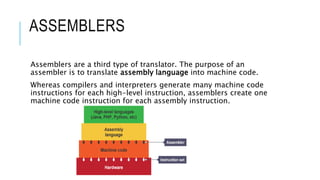
Assemblers are a third type of translator. The purpose of an
assembler is to translate assembly language into machine code.
Whereas compilers and interpreters generate many machine code
instructions for each high-level instruction, assemblers create one
machine code instruction for each assembly instruction.
LINKERS
Linker is a program in a system which helps to link object modules of
a program into a single object file.
It performs the process of linking. Linkers are also called as link
editors.
Linking is a process of collecting and maintaining piece of code and
data into a single file.
Linker also links a particular module into system library. It takes
object modules from assembler as input and forms an executable file
as output for the loader.
Linking is performed at both compile time, when the source code is
translated into machine code and load time, when the program is
loaded into memory by the loader. Linking is performed at the last
OVERVIEW OF OPERATING SYSTEM
An operating system acts as an intermediary between the user of a
computer and computer hardware.
The purpose of an operating system is to provide an environment in
which a user can execute programs conveniently and efficiently.
An operating system is a software that manages computer hardware.
The hardware must provide appropriate mechanisms to ensure the
correct operation of the computer system and to prevent user
programs from interfering with the proper operation of the system.
CONT….
An operating system is a program that controls the execution of
application programs and acts as an interface between the user of a
computer and the computer hardware.
A more common definition is that the operating system is the one
program running at all times on the computer (usually called the
kernel), with all else being application programs.
An operating system is concerned with the allocation of resources
and services, such as memory, processors, devices, and information.
The operating system correspondingly includes programs to manage
these resources, such as a traffic controller, a scheduler, a memory
management module, I/O programs, and a file system.
FUNCTION OF OPERATING SYSTEM
Resource Management: When parallel accessing happens in the OS
means when multiple users are accessing the system the OS works as
Resource Manager, Its responsibility is to provide hardware to the
user. It decreases the load in the system.
Process Management: It includes various tasks like scheduling and
termination of the process. It is done with the help of CPU
Scheduling algorithms.
Storage Management: The file system mechanism used for the
management of the storage. NIFS, CFS, CIFS, NFS, etc. are some file
systems. All the data is stored in various tracks of Hard disks that are
all managed by the storage manager. It included Hard Disk.
CONT….
Memory Management: Refers to the management of primary memory.
The operating system has to keep track of how much memory has
been used and by whom. It has to decide which process needs
memory space and how much. OS also has to allocate and deallocate
the memory space.
Security/Privacy Management: Privacy is also provided by the
Operating system by means of passwords so that unauthorized
applications can’t access programs or data. For example, Windows
uses Kerberos authentication to prevent unauthorized access to data.
THANK YOU

ESSENTIAL COMPONENTS OF COMPUTERS(UNIT 2)

  • 1.
  • 2.
    SYLLABUS Hardware Software Relationship between hardwareand software System Software: Operating system Translators Interpreter Compiler Assemblers Linkers Overview of operating system Function of operating system
  • 3.
    HARDWARE Hardware represents thephysical and tangible components of a computer, i.e. the components that can be seen and touched. Examples of Hardware are the following − Input devices − keyboard, mouse, etc. Output devices − printer, monitor, etc. Secondary storage devices − Hard disk, CD, DVD, etc. Internal components − CPU, motherboard, RAM, etc.
  • 4.
    SOFTWARE Software is aset of programs, which is designed to perform a well-defined function. A program is a sequence of instructions written to solve a particular problem. There are two types of software − System Software Application Software The system software is a collection of programs designed to operate, control, and extend the processing capabilities of the computer itself. System software is generally prepared by the computer manufacturers. These software products comprise of programs written in low-level languages, which interact with the hardware at a very basic level. System software serves as the interface between the hardware and the end users. Some examples of system software are Operating System, Compilers, Interpreter, Assemblers, etc.
  • 5.
    APPLICATION SOFTWARE Application softwareproducts are designed to satisfy a particular need of a particular environment. All software applications prepared in the computer lab can come under the category of Application software. Application software may consist of a single program, such as Microsoft's notepad for writing and editing a simple text. It may also consist of a collection of programs, often called a software package, which work together to accomplish a task, such as a spreadsheet package. Examples of Application software are the following − Payroll Software Student Record Software Inventory Management Software
  • 6.
    CONT…. Income Tax Software RailwaysReservation Software Microsoft Office Suite Software Microsoft Word Microsoft Excel Microsoft PowerPoint
  • 7.
    RELATIONSHIP BETWEEN HARDWARE ANDSOFTWARE Hardware and software are mutually dependent on each other. Both of them must work together to make a computer produce a useful output. Software cannot be utilized without supporting hardware. Hardware without a set of programs to operate upon cannot be utilized and is useless. To get a particular job done on the computer, relevant software should be loaded into the hardware. Hardware is a one-time expense. Software development is very expensive and is a continuing expense. Different software applications can be loaded on a hardware to run different jobs. A software acts as an interface between the user and the hardware. If the hardware is the 'heart' of a computer system, then the software is its 'soul'. Both are complementary to each other.
  • 8.
    SYSTEM SOFTWARE: OPERATING SYSTEM Anoperating system (OS) is the program that, after being initially loaded into the computer by a boot program, manages all of the other application programs in a computer. The application programs make use of the operating system by making requests for services through a defined application program interface (API). In addition, users can interact directly with the operating system through a user interface, such as a command-line interface (CLI) or a graphical UI (GUI).
  • 9.
    TRANSLATORS High-level languages allowprogrammers to write instructions in a language that is easier to understand than low-level languages. Translators are needed to translate programs written in high-level languages into the machine code that a computer understands. Any program written in a high-level language is known as source code. However, computers cannot understand source code. Before it can be run, source code must first be translated into a form which a computer understands. A translator is a program that converts source code into machine code. Generally, there are three types of translator: compilers interpreters assemblers
  • 10.
    INTERPRETER An interpreter translatessource code into machine code one instruction at a time. It is similar to a human translator translating what a person says into another language, sentence by sentence, as they speak. The resulting machine code is then executed immediately. The process is called interpretation. Interpreters have several advantages: Instructions are executed as soon as they are translated. Errors can be quickly spotted - once an error is found, the program stops running and the user is notified at which part of the program the interpretation has failed. This makes interpreters extremely useful when developing programs.
  • 11.
    COMPILER A compiler takesthe source code as a whole and translates it into machine code all in one go. Once converted, the object code can be run unassisted at any time. This process is called compilation. Compilers have several advantages: Compiled programs run quickly, since they have already been translated. A compiled program can be supplied as an executable file. An executable file is a file that is ready to run. Since an executable file cannot be easily modified, programmers prefer to supply executables rather than source code. Compilers optimise code. Optimised code can run quicker and take up less memory space.
  • 12.
    ASSEMBLERS Assemblers are athird type of translator. The purpose of an assembler is to translate assembly language into machine code. Whereas compilers and interpreters generate many machine code instructions for each high-level instruction, assemblers create one machine code instruction for each assembly instruction.
  • 13.
    LINKERS Linker is aprogram in a system which helps to link object modules of a program into a single object file. It performs the process of linking. Linkers are also called as link editors. Linking is a process of collecting and maintaining piece of code and data into a single file. Linker also links a particular module into system library. It takes object modules from assembler as input and forms an executable file as output for the loader. Linking is performed at both compile time, when the source code is translated into machine code and load time, when the program is loaded into memory by the loader. Linking is performed at the last
  • 14.
    OVERVIEW OF OPERATINGSYSTEM An operating system acts as an intermediary between the user of a computer and computer hardware. The purpose of an operating system is to provide an environment in which a user can execute programs conveniently and efficiently. An operating system is a software that manages computer hardware. The hardware must provide appropriate mechanisms to ensure the correct operation of the computer system and to prevent user programs from interfering with the proper operation of the system.
  • 15.
    CONT…. An operating systemis a program that controls the execution of application programs and acts as an interface between the user of a computer and the computer hardware. A more common definition is that the operating system is the one program running at all times on the computer (usually called the kernel), with all else being application programs. An operating system is concerned with the allocation of resources and services, such as memory, processors, devices, and information. The operating system correspondingly includes programs to manage these resources, such as a traffic controller, a scheduler, a memory management module, I/O programs, and a file system.
  • 16.
    FUNCTION OF OPERATINGSYSTEM Resource Management: When parallel accessing happens in the OS means when multiple users are accessing the system the OS works as Resource Manager, Its responsibility is to provide hardware to the user. It decreases the load in the system. Process Management: It includes various tasks like scheduling and termination of the process. It is done with the help of CPU Scheduling algorithms. Storage Management: The file system mechanism used for the management of the storage. NIFS, CFS, CIFS, NFS, etc. are some file systems. All the data is stored in various tracks of Hard disks that are all managed by the storage manager. It included Hard Disk.
  • 17.
    CONT…. Memory Management: Refersto the management of primary memory. The operating system has to keep track of how much memory has been used and by whom. It has to decide which process needs memory space and how much. OS also has to allocate and deallocate the memory space. Security/Privacy Management: Privacy is also provided by the Operating system by means of passwords so that unauthorized applications can’t access programs or data. For example, Windows uses Kerberos authentication to prevent unauthorized access to data.
  • 18.