1 
7622 Rickenbacker Drive, Gaithersburg, MD USA 20879 
Phone 1.301.975.1000 Fax 1.301.869.9293 
http://www.patton.com 
PATTON TECH NOTES 
What are FXS and FXO? 
Introduction__________________________________________ 
The question “What is the difference between FXS and FXO?” is frequently asked by those 
deploying Patton Voice-over-Internet Protocol (VoIP) SmartNode solutions. Foreign eXchange 
Subscriber (FXS) and Foreign eXchange Office (FXO) are the names of the two most common 
interfaces (ports or plugs) found in analog telephony environments. 
Analog telephony, also known as Plain Old Telephone Service (POTS), is the service the local 
phone company typically delivers to your home. Local phone companies deliver POTS from their 
Central Office (CO) to the subscriber’s premises over a circuit consisting of two copper wires. To 
increase the distance over which the signal can be transmitted the two wires are twisted together, 
which also reduces electromagnetic interference. So these two-wire copper cables are commonly 
known as “twisted pairs.” 
Definitions___________________________________________ 
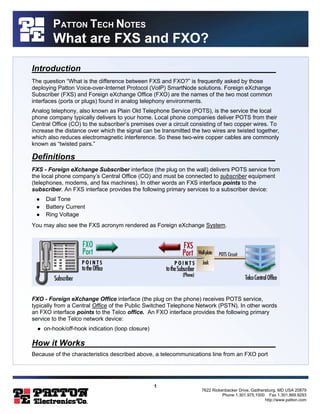
FXS - Foreign eXchange Subscriber interface (the plug on the wall) delivers POTS service from 
the local phone company’s Central Office (CO) and must be connected to subscriber equipment 
(telephones, modems, and fax machines). In other words an FXS interface points to the 
subscriber. An FXS interface provides the following primary services to a subscriber device: 
l Dial Tone 
l Battery Current 
l Ring Voltage 
You may also see the FXS acronym rendered as Foreign eXchange System. 
FXO - Foreign eXchange Office interface (the plug on the phone) receives POTS service, 
typically from a Central Office of the Public Switched Telephone Network (PSTN). In other words 
an FXO interface points to the Telco office. An FXO interface provides the following primary 
service to the Telco network device: 
l on-hook/off-hook indication (loop closure) 
How it Works_________________________________________ 
Because of the characteristics described above, a telecommunications line from an FXO port
2 
7622 Rickenbacker Drive, Gaithersburg, MD USA 20879 
Phone 1.301.975.1000 Fax 1.301.869.9293 
http://www.patton.com 
PATTON TECH NOTES 
What are FXS and FXO? 
must connect to an FXS port in order for the connection to work. Similarly, a line from an FXS 
port must connect to an FXO port in order for the connection to work. When the FXO port on your 
analog telephone is connected to the FXS port in the wall, you receive (FXS) service from the 
telephone company – and you hear a dial tone when you pick up the phone. 
Common Usage 
Within the telephony industry, a device is often referred to by the type of interface it provides 
(“your phone is an FXO device”), or even spoken of as being the interface (“your wall plug is 
FXS”). Now, continuing our discussion in common usage . . . 
What Doesn’t Work 
If you connect an FXS device to another FXS device, the connection will not work. Likewise, if 
you connect an FXO device to another FXO it will not work. So, for example, you can NOT plug a 
standard analog telephone (FXO) directly into a standard analog telephone (FXO) and talk 
phone-to-phone. 
Networking___________________________________________ 
The FXS/FXO scenario becomes a bit more “interesting” when we introduce additional network 
elements, such as a Private Branch Exchange (PBX) or a Voice-over-IP gateway or router. For 
example, you can connect the FXO interface on a phone to the FXS port supplied by a PBX, 
multiplexer, or Voice-over-IP gateway or router. 
PBX Connections 
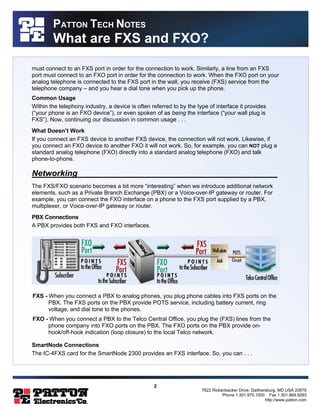
A PBX provides both FXS and FXO interfaces. 
FXS - When you connect a PBX to analog phones, you plug phone cables into FXS ports on the 
PBX. The FXS ports on the PBX provide POTS service, including battery current, ring 
voltage, and dial tone to the phones. 
FXO - When you connect a PBX to the Telco Central Office, you plug the (FXS) lines from the 
phone company into FXO ports on the PBX. The FXO ports on the PBX provide on-hook/ 
off-hook indication (loop closure) to the local Telco network. 
SmartNode Connections 
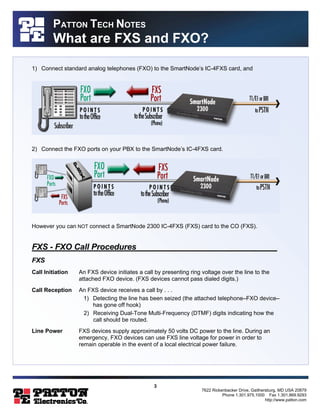
The IC-4FXS card for the SmartNode 2300 provides an FXS interface. So, you can . . .
3 
7622 Rickenbacker Drive, Gaithersburg, MD USA 20879 
Phone 1.301.975.1000 Fax 1.301.869.9293 
http://www.patton.com 
PATTON TECH NOTES 
What are FXS and FXO? 
1) Connect standard analog telephones (FXO) to the SmartNode’s IC-4FXS card, and 
2) Connect the FXO ports on your PBX to the SmartNode’s IC-4FXS card. 
However you can NOT connect a SmartNode 2300 IC-4FXS (FXS) card to the CO (FXS). 
FXS - FXO Call Procedures_______________________________ 
FXS 
Call Initiation An FXS device initiates a call by presenting ring voltage over the line to the 
attached FXO device. (FXS devices cannot pass dialed digits.) 
Call Reception An FXS device receives a call by . . . 
1) Detecting the line has been seized (the attached telephone–FXO device– 
has gone off hook) 
2) Receiving Dual-Tone Multi-Frequency (DTMF) digits indicating how the 
call should be routed. 
Line Power FXS devices supply approximately 50 volts DC power to the line. During an 
emergency, FXO devices can use FXS line voltage for power in order to 
remain operable in the event of a local electrical power failure.
4 
7622 Rickenbacker Drive, Gaithersburg, MD USA 20879 
Phone 1.301.975.1000 Fax 1.301.869.9293 
http://www.patton.com 
PATTON TECH NOTES 
What are FXS and FXO? 
FXO 
Call Initiation An FXO device initiates a call by . . . 
1) Going off-hook to seize the telephone line. 
2) Dialing the Dual-Tone Multi-Frequency (DTMF) digits, which identify the 
destination to be called. 
Call Reception An FXO device receives a call by . . . 
1) Detecting the ring voltage supplied by the FXS device (SmartNode, PBX, 
etc.). 
2) Going off-hook to answer the call. 
FXS - FXO Call Clearing 
Under normal circumstances an FXS device does not initiate call clearing. Instead, FXS devices 
rely on the two parties at each end of the call to recognize the call has ended (by saying goodbye 
or hearing the line go quiet); then the FXO device at each end clears its segment of the call. 
SmartNode 2300 Connectivity Options_____________________ 
As of this writing, an FXO card for the SmartNode 2300 is under development. In the meantime, 
using the SmartNode 2300’s IC-4FXS interface card, you can . . . 
§ Connect the SmartNode 2300 to the PSTN via the T1 card, E1 card, or BRI ports. 
§ Connect to the Telco indirectly through a PBX by connecting the FXS ports on the SmartNode 
to the FXO ports on the PBX. 
§ Implement toll bypass without a PBX by connecting the SmartNode to the Public Switched 
Telephone Network (PSTN) using the SmartNode’s T1/PRI, E1/PRI, or ISDN BRI S/T ports. 
§ Enable a PBX for VoIP by connecting the SmartNode 2300 to the PBX’s T1, T1, ISDN BRI, or 
FXO ports. 
For More Information . . . ________________________________ 
For more information about VoIP and Patton’s IP Telephony solutions visit 
http://www.patton.com/voip or contact sales@patton.com.

Fxs fxo

  • 1.
    1 7622 RickenbackerDrive, Gaithersburg, MD USA 20879 Phone 1.301.975.1000 Fax 1.301.869.9293 http://www.patton.com PATTON TECH NOTES What are FXS and FXO? Introduction__________________________________________ The question “What is the difference between FXS and FXO?” is frequently asked by those deploying Patton Voice-over-Internet Protocol (VoIP) SmartNode solutions. Foreign eXchange Subscriber (FXS) and Foreign eXchange Office (FXO) are the names of the two most common interfaces (ports or plugs) found in analog telephony environments. Analog telephony, also known as Plain Old Telephone Service (POTS), is the service the local phone company typically delivers to your home. Local phone companies deliver POTS from their Central Office (CO) to the subscriber’s premises over a circuit consisting of two copper wires. To increase the distance over which the signal can be transmitted the two wires are twisted together, which also reduces electromagnetic interference. So these two-wire copper cables are commonly known as “twisted pairs.” Definitions___________________________________________ FXS - Foreign eXchange Subscriber interface (the plug on the wall) delivers POTS service from the local phone company’s Central Office (CO) and must be connected to subscriber equipment (telephones, modems, and fax machines). In other words an FXS interface points to the subscriber. An FXS interface provides the following primary services to a subscriber device: l Dial Tone l Battery Current l Ring Voltage You may also see the FXS acronym rendered as Foreign eXchange System. FXO - Foreign eXchange Office interface (the plug on the phone) receives POTS service, typically from a Central Office of the Public Switched Telephone Network (PSTN). In other words an FXO interface points to the Telco office. An FXO interface provides the following primary service to the Telco network device: l on-hook/off-hook indication (loop closure) How it Works_________________________________________ Because of the characteristics described above, a telecommunications line from an FXO port
  • 2.
    2 7622 RickenbackerDrive, Gaithersburg, MD USA 20879 Phone 1.301.975.1000 Fax 1.301.869.9293 http://www.patton.com PATTON TECH NOTES What are FXS and FXO? must connect to an FXS port in order for the connection to work. Similarly, a line from an FXS port must connect to an FXO port in order for the connection to work. When the FXO port on your analog telephone is connected to the FXS port in the wall, you receive (FXS) service from the telephone company – and you hear a dial tone when you pick up the phone. Common Usage Within the telephony industry, a device is often referred to by the type of interface it provides (“your phone is an FXO device”), or even spoken of as being the interface (“your wall plug is FXS”). Now, continuing our discussion in common usage . . . What Doesn’t Work If you connect an FXS device to another FXS device, the connection will not work. Likewise, if you connect an FXO device to another FXO it will not work. So, for example, you can NOT plug a standard analog telephone (FXO) directly into a standard analog telephone (FXO) and talk phone-to-phone. Networking___________________________________________ The FXS/FXO scenario becomes a bit more “interesting” when we introduce additional network elements, such as a Private Branch Exchange (PBX) or a Voice-over-IP gateway or router. For example, you can connect the FXO interface on a phone to the FXS port supplied by a PBX, multiplexer, or Voice-over-IP gateway or router. PBX Connections A PBX provides both FXS and FXO interfaces. FXS - When you connect a PBX to analog phones, you plug phone cables into FXS ports on the PBX. The FXS ports on the PBX provide POTS service, including battery current, ring voltage, and dial tone to the phones. FXO - When you connect a PBX to the Telco Central Office, you plug the (FXS) lines from the phone company into FXO ports on the PBX. The FXO ports on the PBX provide on-hook/ off-hook indication (loop closure) to the local Telco network. SmartNode Connections The IC-4FXS card for the SmartNode 2300 provides an FXS interface. So, you can . . .
  • 3.
    3 7622 RickenbackerDrive, Gaithersburg, MD USA 20879 Phone 1.301.975.1000 Fax 1.301.869.9293 http://www.patton.com PATTON TECH NOTES What are FXS and FXO? 1) Connect standard analog telephones (FXO) to the SmartNode’s IC-4FXS card, and 2) Connect the FXO ports on your PBX to the SmartNode’s IC-4FXS card. However you can NOT connect a SmartNode 2300 IC-4FXS (FXS) card to the CO (FXS). FXS - FXO Call Procedures_______________________________ FXS Call Initiation An FXS device initiates a call by presenting ring voltage over the line to the attached FXO device. (FXS devices cannot pass dialed digits.) Call Reception An FXS device receives a call by . . . 1) Detecting the line has been seized (the attached telephone–FXO device– has gone off hook) 2) Receiving Dual-Tone Multi-Frequency (DTMF) digits indicating how the call should be routed. Line Power FXS devices supply approximately 50 volts DC power to the line. During an emergency, FXO devices can use FXS line voltage for power in order to remain operable in the event of a local electrical power failure.
  • 4.
    4 7622 RickenbackerDrive, Gaithersburg, MD USA 20879 Phone 1.301.975.1000 Fax 1.301.869.9293 http://www.patton.com PATTON TECH NOTES What are FXS and FXO? FXO Call Initiation An FXO device initiates a call by . . . 1) Going off-hook to seize the telephone line. 2) Dialing the Dual-Tone Multi-Frequency (DTMF) digits, which identify the destination to be called. Call Reception An FXO device receives a call by . . . 1) Detecting the ring voltage supplied by the FXS device (SmartNode, PBX, etc.). 2) Going off-hook to answer the call. FXS - FXO Call Clearing Under normal circumstances an FXS device does not initiate call clearing. Instead, FXS devices rely on the two parties at each end of the call to recognize the call has ended (by saying goodbye or hearing the line go quiet); then the FXO device at each end clears its segment of the call. SmartNode 2300 Connectivity Options_____________________ As of this writing, an FXO card for the SmartNode 2300 is under development. In the meantime, using the SmartNode 2300’s IC-4FXS interface card, you can . . . § Connect the SmartNode 2300 to the PSTN via the T1 card, E1 card, or BRI ports. § Connect to the Telco indirectly through a PBX by connecting the FXS ports on the SmartNode to the FXO ports on the PBX. § Implement toll bypass without a PBX by connecting the SmartNode to the Public Switched Telephone Network (PSTN) using the SmartNode’s T1/PRI, E1/PRI, or ISDN BRI S/T ports. § Enable a PBX for VoIP by connecting the SmartNode 2300 to the PBX’s T1, T1, ISDN BRI, or FXO ports. For More Information . . . ________________________________ For more information about VoIP and Patton’s IP Telephony solutions visit http://www.patton.com/voip or contact sales@patton.com.