www.SunilOS.com 1
www.sunilos.com
www.raystec.com
Log4J
03/17/16
03/17/16 www.SunilOS.com 2
Introduction
Use Log4J as a standard approach to log
messages in an application.
Messages can be logged to Console, File,
Network, Database etc.
In other words you can print or store your
application messages to Console or File or
Database or other targets.
It is originally developed by IBM
Now it is Open Source
Logging – Conventional Approach
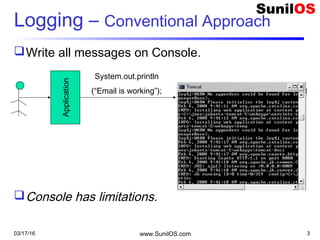
Write all messages on Console.
Console has limitations.
03/17/16 www.SunilOS.com 3
Application
System.out.println
(“Email is working”);
03/17/16 www.SunilOS.com 4
Message Level
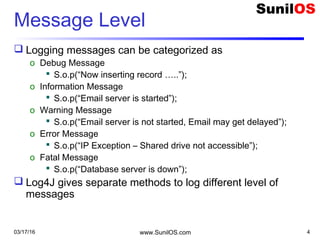
 Logging messages can be categorized as
o Debug Message
 S.o.p(“Now inserting record …..”);
o Information Message
 S.o.p(“Email server is started”);
o Warning Message
 S.o.p(“Email server is not started, Email may get delayed”);
o Error Message
 S.o.p(“IP Exception – Shared drive not accessible”);
o Fatal Message
 S.o.p(“Database server is down”);
 Log4J gives separate methods to log different level of
messages
Log4J : Appenders
Log4J facilitates message logging on
multiple targets
o Console
o File
o Network
o FTP
o Database, etc.
An Appender is configured for each target.
03/17/16 www.SunilOS.com 5
03/17/16 www.SunilOS.com 6
Log Messages
 import org.apache.log4j.Logger;
 public class Test{
 static Logger log = Logger.getLogger(Test.class);//Create Logger
 public static void main(String[] args) {
 log.debug("This is Debug Statement");
 log.info("This is Info Statement");
 log.warn("This is Warn Statement");
 log.error("This is Error Statement");
 log.fatal("This is Fatal Statement");
o int i = 0;
o try {
 int x = 5 / i;
o } catch (RuntimeException e) {
 log.error("Arithmetic Error ",e);
o }
 }
 }
03/17/16 www.SunilOS.com 7
Output
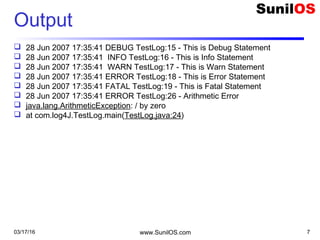
 28 Jun 2007 17:35:41 DEBUG TestLog:15 - This is Debug Statement
 28 Jun 2007 17:35:41 INFO TestLog:16 - This is Info Statement
 28 Jun 2007 17:35:41 WARN TestLog:17 - This is Warn Statement
 28 Jun 2007 17:35:41 ERROR TestLog:18 - This is Error Statement
 28 Jun 2007 17:35:41 FATAL TestLog:19 - This is Fatal Statement
 28 Jun 2007 17:35:41 ERROR TestLog:26 - Arithmetic Error
 java.lang.ArithmeticException: / by zero
 at com.log4J.TestLog.main(TestLog.java:24)
03/17/16 www.SunilOS.com 8
Level Priorities
 Level Priorities
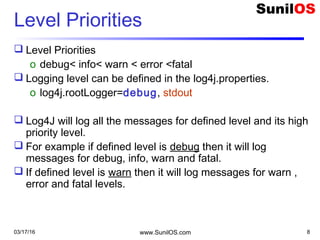
o debug< info< warn < error <fatal
 Logging level can be defined in the log4j.properties.
o log4j.rootLogger=debug, stdout
 Log4J will log all the messages for defined level and its high
priority level.
 For example if defined level is debug then it will log
messages for debug, info, warn and fatal.
 If defined level is warn then it will log messages for warn ,
error and fatal levels.
Configuration File
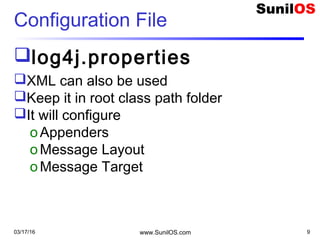
log4j.properties
XML can also be used
Keep it in root class path folder
It will configure
oAppenders
oMessage Layout
oMessage Target
03/17/16 www.SunilOS.com 9
Appender
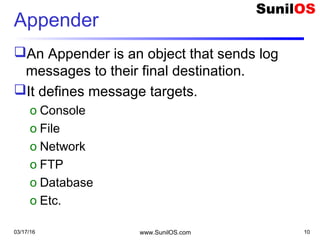
An Appender is an object that sends log
messages to their final destination.
It defines message targets.
o Console
o File
o Network
o FTP
o Database
o Etc.
03/17/16 www.SunilOS.com 10
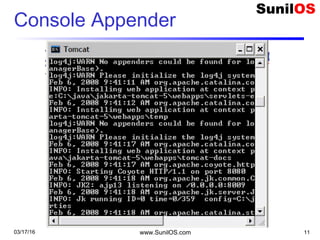
Console Appender
03/17/16 www.SunilOS.com 11
03/17/16 www.SunilOS.com 12
Console Appender
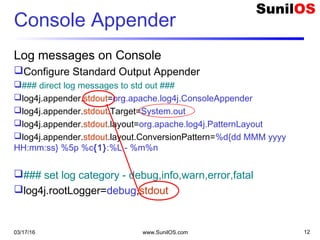
Log messages on Console
Configure Standard Output Appender
### direct log messages to std out ###
log4j.appender.stdout=org.apache.log4j.ConsoleAppender
log4j.appender.stdout.Target=System.out
log4j.appender.stdout.layout=org.apache.log4j.PatternLayout
log4j.appender.stdout.layout.ConversionPattern=%d{dd MMM yyyy
HH:mm:ss} %5p %c{1}:%L - %m%n
### set log category - debug,info,warn,error,fatal
log4j.rootLogger=debug,stdout
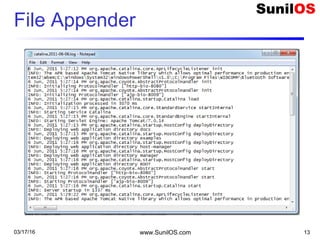
File Appender
03/17/16 www.SunilOS.com 13
03/17/16 www.SunilOS.com 14
File Appender
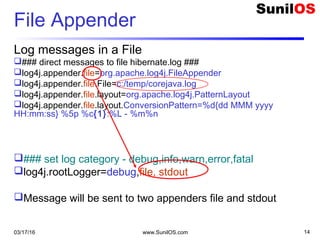
Log messages in a File
### direct messages to file hibernate.log ###
log4j.appender.file=org.apache.log4j.FileAppender
log4j.appender.file.File=c:/temp/corejava.log
log4j.appender.file.layout=org.apache.log4j.PatternLayout
log4j.appender.file.layout.ConversionPattern=%d{dd MMM yyyy
HH:mm:ss} %5p %c{1}:%L - %m%n
### set log category - debug,info,warn,error,fatal
log4j.rootLogger=debug,file, stdout
Message will be sent to two appenders file and stdout
Rolling File Appender
It will roll (create) log files based on size or date or
both depending on configuration.
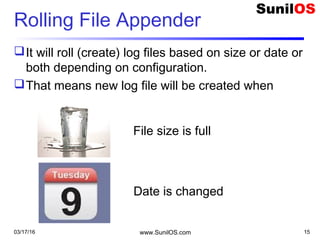
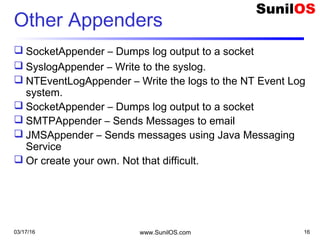
That means new log file will be created when
03/17/16 www.SunilOS.com 15
File size is full
Date is changed
03/17/16 www.SunilOS.com 16
Other Appenders
 SocketAppender – Dumps log output to a socket
 SyslogAppender – Write to the syslog.
 NTEventLogAppender – Write the logs to the NT Event Log
system.
 SocketAppender – Dumps log output to a socket
 SMTPAppender – Sends Messages to email
 JMSAppender – Sends messages using Java Messaging
Service
 Or create your own. Not that difficult.
Message Pattern
log4j.appender.file.layout.ConversionPattern
=%d{dd MMM yyyy HH:mm:ss} %5p %c{1}:
%L - %m%n
Used to customize the layout of a log entry.
The format is closely related to conversion
pattern of the printf function in ‘c’ language.
03/17/16 www.SunilOS.com 17
03/17/16 www.SunilOS.com 18
PatternLayout Options
 c - Used to output the category of the logging event.
 C - Used to output the fully qualified class name of the caller issuing the logging
request.
 d - Used to output the date of the logging event. The date conversion specifier
may be followed by a date format specifier enclosed between braces. For
example, %d{HH:mm:ss,SSS} or %d{dd MMM yyyy HH:mm:ss,SSS}. If no date
format specifier is given then ISO8601 format is assumed
 F - Used to output the file name where the logging request was issued.
 l - Used to output location information of the caller which generated the logging
event. (C+M+L)
 L - Used to output the line number from where the logging request was issued.
03/17/16 www.SunilOS.com 19
PatternLayout ( Contd.)
 n - Outputs the platform dependent line separator character or
characters.
 M - Used to output the method name where the logging request was
issued.
 p - Used to output the priority of the logging event.
 t - Used to output the name of the thread that generated the logging
event.
 x - Used to output the NDC (nested diagnostic context) associated with
the thread that generated the logging event.
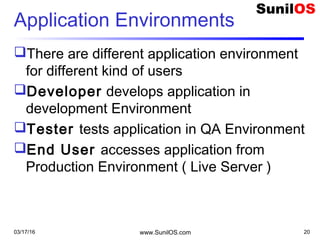
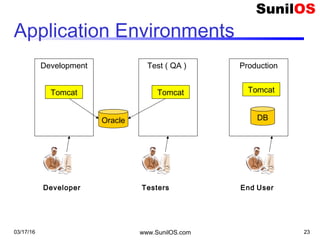
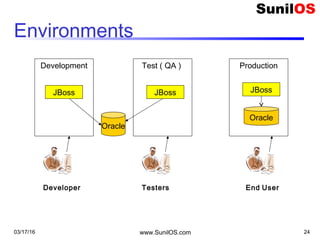
Application Environments
There are different application environment
for different kind of users
Developer develops application in
development Environment
Tester tests application in QA Environment
End User accesses application from
Production Environment ( Live Server )
03/17/16 www.SunilOS.com 20
03/17/16 www.SunilOS.com 21
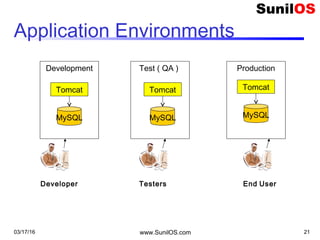
Application Environments
Development
Tomcat
MySQL
Test ( QA )
Tomcat
MySQL
Production
Tomcat
MySQL
Developer Testers End User
03/17/16 www.SunilOS.com 22
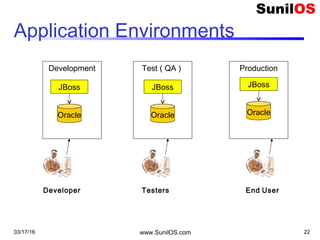
Application Environments
Development
JBoss
Oracle
Test ( QA )
JBoss
Oracle
Production
JBoss
Oracle
Developer Testers End User
03/17/16 www.SunilOS.com 23
Application Environments
Development
Tomcat
Oracle
Test ( QA )
Tomcat
Production
Tomcat
DB
Developer Testers End User
03/17/16 www.SunilOS.com 24
Environments
Development
JBoss
Oracle
Test ( QA )
JBoss
Production
JBoss
Oracle
Developer Testers End User
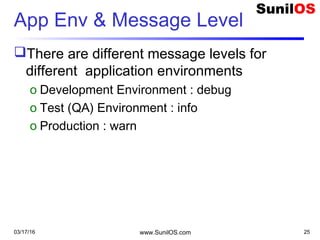
App Env & Message Level
There are different message levels for
different application environments
o Development Environment : debug
o Test (QA) Environment : info
o Production : warn
03/17/16 www.SunilOS.com 25
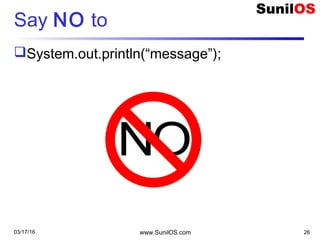
Say NO to
System.out.println(“message”);
03/17/16 www.SunilOS.com 26
Say YES to
Log4J
03/17/16 www.SunilOS.com 27
Dependency
log4j.jar
03/17/16 www.SunilOS.com 28
Disclaimer
This is an educational presentation to enhance the
skill of computer science students.
This presentation is available for free to computer
science students.
Some internet images from different URLs are
used in this presentation to simplify technical
examples and correlate examples with the real
world.
We are grateful to owners of these URLs and
pictures.
www.SunilOS.com 2903/17/16
Thank You!
www.SunilOS.com 30
www.SunilOS.com
03/17/16

Log4 J

  • 1.
  • 2.
    03/17/16 www.SunilOS.com 2 Introduction UseLog4J as a standard approach to log messages in an application. Messages can be logged to Console, File, Network, Database etc. In other words you can print or store your application messages to Console or File or Database or other targets. It is originally developed by IBM Now it is Open Source
  • 3.
    Logging – ConventionalApproach Write all messages on Console. Console has limitations. 03/17/16 www.SunilOS.com 3 Application System.out.println (“Email is working”);
  • 4.
    03/17/16 www.SunilOS.com 4 MessageLevel  Logging messages can be categorized as o Debug Message  S.o.p(“Now inserting record …..”); o Information Message  S.o.p(“Email server is started”); o Warning Message  S.o.p(“Email server is not started, Email may get delayed”); o Error Message  S.o.p(“IP Exception – Shared drive not accessible”); o Fatal Message  S.o.p(“Database server is down”);  Log4J gives separate methods to log different level of messages
  • 5.
    Log4J : Appenders Log4Jfacilitates message logging on multiple targets o Console o File o Network o FTP o Database, etc. An Appender is configured for each target. 03/17/16 www.SunilOS.com 5
  • 6.
    03/17/16 www.SunilOS.com 6 LogMessages  import org.apache.log4j.Logger;  public class Test{  static Logger log = Logger.getLogger(Test.class);//Create Logger  public static void main(String[] args) {  log.debug("This is Debug Statement");  log.info("This is Info Statement");  log.warn("This is Warn Statement");  log.error("This is Error Statement");  log.fatal("This is Fatal Statement"); o int i = 0; o try {  int x = 5 / i; o } catch (RuntimeException e) {  log.error("Arithmetic Error ",e); o }  }  }
  • 7.
    03/17/16 www.SunilOS.com 7 Output 28 Jun 2007 17:35:41 DEBUG TestLog:15 - This is Debug Statement  28 Jun 2007 17:35:41 INFO TestLog:16 - This is Info Statement  28 Jun 2007 17:35:41 WARN TestLog:17 - This is Warn Statement  28 Jun 2007 17:35:41 ERROR TestLog:18 - This is Error Statement  28 Jun 2007 17:35:41 FATAL TestLog:19 - This is Fatal Statement  28 Jun 2007 17:35:41 ERROR TestLog:26 - Arithmetic Error  java.lang.ArithmeticException: / by zero  at com.log4J.TestLog.main(TestLog.java:24)
  • 8.
    03/17/16 www.SunilOS.com 8 LevelPriorities  Level Priorities o debug< info< warn < error <fatal  Logging level can be defined in the log4j.properties. o log4j.rootLogger=debug, stdout  Log4J will log all the messages for defined level and its high priority level.  For example if defined level is debug then it will log messages for debug, info, warn and fatal.  If defined level is warn then it will log messages for warn , error and fatal levels.
  • 9.
    Configuration File log4j.properties XML canalso be used Keep it in root class path folder It will configure oAppenders oMessage Layout oMessage Target 03/17/16 www.SunilOS.com 9
  • 10.
    Appender An Appender isan object that sends log messages to their final destination. It defines message targets. o Console o File o Network o FTP o Database o Etc. 03/17/16 www.SunilOS.com 10
  • 11.
  • 12.
    03/17/16 www.SunilOS.com 12 ConsoleAppender Log messages on Console Configure Standard Output Appender ### direct log messages to std out ### log4j.appender.stdout=org.apache.log4j.ConsoleAppender log4j.appender.stdout.Target=System.out log4j.appender.stdout.layout=org.apache.log4j.PatternLayout log4j.appender.stdout.layout.ConversionPattern=%d{dd MMM yyyy HH:mm:ss} %5p %c{1}:%L - %m%n ### set log category - debug,info,warn,error,fatal log4j.rootLogger=debug,stdout
  • 13.
  • 14.
    03/17/16 www.SunilOS.com 14 FileAppender Log messages in a File ### direct messages to file hibernate.log ### log4j.appender.file=org.apache.log4j.FileAppender log4j.appender.file.File=c:/temp/corejava.log log4j.appender.file.layout=org.apache.log4j.PatternLayout log4j.appender.file.layout.ConversionPattern=%d{dd MMM yyyy HH:mm:ss} %5p %c{1}:%L - %m%n ### set log category - debug,info,warn,error,fatal log4j.rootLogger=debug,file, stdout Message will be sent to two appenders file and stdout
  • 15.
    Rolling File Appender Itwill roll (create) log files based on size or date or both depending on configuration. That means new log file will be created when 03/17/16 www.SunilOS.com 15 File size is full Date is changed
  • 16.
    03/17/16 www.SunilOS.com 16 OtherAppenders  SocketAppender – Dumps log output to a socket  SyslogAppender – Write to the syslog.  NTEventLogAppender – Write the logs to the NT Event Log system.  SocketAppender – Dumps log output to a socket  SMTPAppender – Sends Messages to email  JMSAppender – Sends messages using Java Messaging Service  Or create your own. Not that difficult.
  • 17.
    Message Pattern log4j.appender.file.layout.ConversionPattern =%d{dd MMMyyyy HH:mm:ss} %5p %c{1}: %L - %m%n Used to customize the layout of a log entry. The format is closely related to conversion pattern of the printf function in ‘c’ language. 03/17/16 www.SunilOS.com 17
  • 18.
    03/17/16 www.SunilOS.com 18 PatternLayoutOptions  c - Used to output the category of the logging event.  C - Used to output the fully qualified class name of the caller issuing the logging request.  d - Used to output the date of the logging event. The date conversion specifier may be followed by a date format specifier enclosed between braces. For example, %d{HH:mm:ss,SSS} or %d{dd MMM yyyy HH:mm:ss,SSS}. If no date format specifier is given then ISO8601 format is assumed  F - Used to output the file name where the logging request was issued.  l - Used to output location information of the caller which generated the logging event. (C+M+L)  L - Used to output the line number from where the logging request was issued.
  • 19.
    03/17/16 www.SunilOS.com 19 PatternLayout( Contd.)  n - Outputs the platform dependent line separator character or characters.  M - Used to output the method name where the logging request was issued.  p - Used to output the priority of the logging event.  t - Used to output the name of the thread that generated the logging event.  x - Used to output the NDC (nested diagnostic context) associated with the thread that generated the logging event.
  • 20.
    Application Environments There aredifferent application environment for different kind of users Developer develops application in development Environment Tester tests application in QA Environment End User accesses application from Production Environment ( Live Server ) 03/17/16 www.SunilOS.com 20
  • 21.
    03/17/16 www.SunilOS.com 21 ApplicationEnvironments Development Tomcat MySQL Test ( QA ) Tomcat MySQL Production Tomcat MySQL Developer Testers End User
  • 22.
    03/17/16 www.SunilOS.com 22 ApplicationEnvironments Development JBoss Oracle Test ( QA ) JBoss Oracle Production JBoss Oracle Developer Testers End User
  • 23.
    03/17/16 www.SunilOS.com 23 ApplicationEnvironments Development Tomcat Oracle Test ( QA ) Tomcat Production Tomcat DB Developer Testers End User
  • 24.
    03/17/16 www.SunilOS.com 24 Environments Development JBoss Oracle Test( QA ) JBoss Production JBoss Oracle Developer Testers End User
  • 25.
    App Env &Message Level There are different message levels for different application environments o Development Environment : debug o Test (QA) Environment : info o Production : warn 03/17/16 www.SunilOS.com 25
  • 26.
  • 27.
    Say YES to Log4J 03/17/16www.SunilOS.com 27
  • 28.
  • 29.
    Disclaimer This is aneducational presentation to enhance the skill of computer science students. This presentation is available for free to computer science students. Some internet images from different URLs are used in this presentation to simplify technical examples and correlate examples with the real world. We are grateful to owners of these URLs and pictures. www.SunilOS.com 2903/17/16
  • 30.