Guide to Yacc and Lex
Introduction
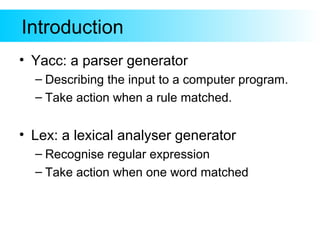
• Yacc: a parser generator
– Describing the input to a computer program.
– Take action when a rule matched.
• Lex: a lexical analyser generator
– Recognise regular expression
– Take action when one word matched
Example
• Configuration file
– e.g. config.ini
ID = 42
Name = EvanJiang
.
.
.
Parsing. v1
• scan file rigidly
better choice ?
if (fscanf(parfile, "ID = %sn", seed) != 1) {
fprintf(stderr, "Error reading 'Seed:'n");
exit(0);
}
Parsing. better choice
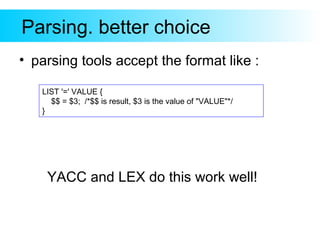
• parsing tools accept the format like :
LIST '=' VALUE {
$$ = $3; /*$$ is result, $3 is the value of "VALUE"*/
}
YACC and LEX do this work well!
Yacc Overview
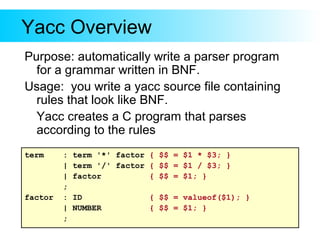
Purpose: automatically write a parser program
for a grammar written in BNF.
Usage: you write a yacc source file containing
rules that look like BNF.
Yacc creates a C program that parses
according to the rules
term : term '*' factor { $$ = $1 * $3; }
| term '/' factor { $$ = $1 / $3; }
| factor { $$ = $1; }
;
factor : ID { $$ = valueof($1); }
| NUMBER { $$ = $1; }
;
Yacc Overview(2)
> yacc myparser.y
myparser.tab.c
parser source code
myparser.y
BNF rules and actions for
your grammar.
yylex.c
tokenizer function in C
> gcc -o myprog myparser.tab.c yylex.c
myprog
executable program
The programmer puts BNF rules and
token rules for the parser he wants in
a bison source file myparser.y
run yacc to create a C program
(*.tab.c) containing a parser function.
The programmer must also supply a
tokenizer named yylex( )
Yacc Overview(3)
input file to be
parsed.
yyparse( )
parser created by bison
In operation:
your main program calls yyparse( ).
yyparse( ) calls yylex() when it
wants a token.
yylex returns the type of the token.
yylex puts the value of the token in
a global variable named yylval
yyparse() call action when one rule
matched
yylex( )
tokenizer returns the type
of the next token
yylval
call action when rule
matched
Yacc source file
/* declarations go here */
%%
/* grammar rules go here */
%%
/* additional C code goes here */
The file has 3 sections, separated by "%%" lines.
Note: format for "yacc" is the same as for bison.
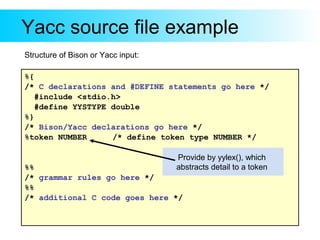
Yacc source file example
%{
/* C declarations and #DEFINE statements go here */
#include <stdio.h>
#define YYSTYPE double
%}
/* Bison/Yacc declarations go here */
%token NUMBER /* define token type NUMBER */
%%
/* grammar rules go here */
%%
/* additional C code goes here */
Structure of Bison or Yacc input:
Provide by yylex(), which
abstracts detail to a token
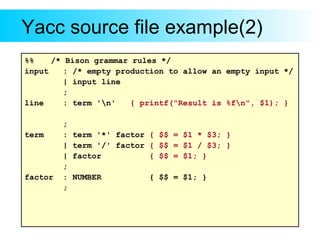
Yacc source file example(2)
%% /* Bison grammar rules */
input : /* empty production to allow an empty input */
| input line
;
line : term 'n' { printf("Result is %fn", $1); }
;
term : term '*' factor { $$ = $1 * $3; }
| term '/' factor { $$ = $1 / $3; }
| factor { $$ = $1; }
;
factor : NUMBER { $$ = $1; }
;
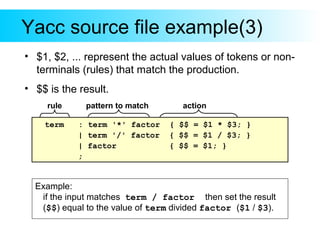
Yacc source file example(3)
• $1, $2, ... represent the actual values of tokens or non-
terminals (rules) that match the production.
• $$ is the result.
term : term '*' factor { $$ = $1 * $3; }
| term '/' factor { $$ = $1 / $3; }
| factor { $$ = $1; }
;
Example:
if the input matches term / factor then set the result
($$) equal to the value of term divided factor ($1 / $3).
pattern to match actionrule
Further studying
• Yacc with ambiguous grammar
Precedence / Association
• Conflicts
– shift/reduce conflict
– reduce/reduce Conflicts
• Debug
Introduction to Lex
/* Bison/Yacc declarations go here */
%token NUMBER /* define token type NUMBER */
factor : NUMBER { $$ = $1; }
;
• NUMBER,is given by Lex.
• Yacc calls yylex() to get the token and vale.
Introduction to Lex. cont.
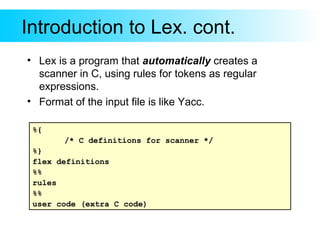
• Lex is a program that automatically creates a
scanner in C, using rules for tokens as regular
expressions.
• Format of the input file is like Yacc.
%{
/* C definitions for scanner */
%}
flex definitions
%%
rules
%%
user code (extra C code)
Regular Expression example
Regular Expression Strings in L(R)
digit = [0-9] “0” “1” “2” “3” …
posint = digit+ “8” “412” …
int = -? posint “-42” “1024” …
[a-zA-Z_][a-zA-Z0-9_]* C identifiers
Lex example
• Read input and describes each token
read.
/* flex definitions */
DIGIT [0-9]
%%
[ tn]+ {}
-?{DIGIT}+ { printf("Number: %sn", yytext);
yylval=atoi(yytext); return NUMBER; }
n printf("End of linen"); return 0;
%%
/* all code is copied to the generated .c file*/
Example explanation
/* flex definitions */
DIGIT [0-9]
%%
[ tn]+ {}
-?{DIGIT}+ { printf("Number: %sn", yytext);
yylval=atoi(yytext); return NUMBER; }
n printf("End of linen"); return 0;
%%
/* all code is copied to the generated .c file*/
Yacc get the value Yacc get the token
Further studying
• Regular expression
• Debug
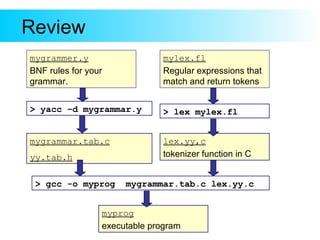
Review
> yacc –d mygrammar.y
mygrammar.tab.c
yy.tab.h
mygrammer.y
BNF rules for your
grammar.
lex.yy,c
tokenizer function in C
> gcc -o myprog mygrammar.tab.c lex.yy.c
myprog
executable program
mylex.fl
Regular expressions that
match and return tokens
> lex mylex.fl
Thanks

Yacc lex

  • 1.
  • 2.
    Introduction • Yacc: aparser generator – Describing the input to a computer program. – Take action when a rule matched. • Lex: a lexical analyser generator – Recognise regular expression – Take action when one word matched
  • 3.
    Example • Configuration file –e.g. config.ini ID = 42 Name = EvanJiang . . .
  • 4.
    Parsing. v1 • scanfile rigidly better choice ? if (fscanf(parfile, "ID = %sn", seed) != 1) { fprintf(stderr, "Error reading 'Seed:'n"); exit(0); }
  • 5.
    Parsing. better choice •parsing tools accept the format like : LIST '=' VALUE { $$ = $3; /*$$ is result, $3 is the value of "VALUE"*/ } YACC and LEX do this work well!
  • 6.
    Yacc Overview Purpose: automaticallywrite a parser program for a grammar written in BNF. Usage: you write a yacc source file containing rules that look like BNF. Yacc creates a C program that parses according to the rules term : term '*' factor { $$ = $1 * $3; } | term '/' factor { $$ = $1 / $3; } | factor { $$ = $1; } ; factor : ID { $$ = valueof($1); } | NUMBER { $$ = $1; } ;
  • 7.
    Yacc Overview(2) > yaccmyparser.y myparser.tab.c parser source code myparser.y BNF rules and actions for your grammar. yylex.c tokenizer function in C > gcc -o myprog myparser.tab.c yylex.c myprog executable program The programmer puts BNF rules and token rules for the parser he wants in a bison source file myparser.y run yacc to create a C program (*.tab.c) containing a parser function. The programmer must also supply a tokenizer named yylex( )
  • 8.
    Yacc Overview(3) input fileto be parsed. yyparse( ) parser created by bison In operation: your main program calls yyparse( ). yyparse( ) calls yylex() when it wants a token. yylex returns the type of the token. yylex puts the value of the token in a global variable named yylval yyparse() call action when one rule matched yylex( ) tokenizer returns the type of the next token yylval call action when rule matched
  • 9.
    Yacc source file /*declarations go here */ %% /* grammar rules go here */ %% /* additional C code goes here */ The file has 3 sections, separated by "%%" lines. Note: format for "yacc" is the same as for bison.
  • 10.
    Yacc source fileexample %{ /* C declarations and #DEFINE statements go here */ #include <stdio.h> #define YYSTYPE double %} /* Bison/Yacc declarations go here */ %token NUMBER /* define token type NUMBER */ %% /* grammar rules go here */ %% /* additional C code goes here */ Structure of Bison or Yacc input: Provide by yylex(), which abstracts detail to a token
  • 11.
    Yacc source fileexample(2) %% /* Bison grammar rules */ input : /* empty production to allow an empty input */ | input line ; line : term 'n' { printf("Result is %fn", $1); } ; term : term '*' factor { $$ = $1 * $3; } | term '/' factor { $$ = $1 / $3; } | factor { $$ = $1; } ; factor : NUMBER { $$ = $1; } ;
  • 12.
    Yacc source fileexample(3) • $1, $2, ... represent the actual values of tokens or non- terminals (rules) that match the production. • $$ is the result. term : term '*' factor { $$ = $1 * $3; } | term '/' factor { $$ = $1 / $3; } | factor { $$ = $1; } ; Example: if the input matches term / factor then set the result ($$) equal to the value of term divided factor ($1 / $3). pattern to match actionrule
  • 13.
    Further studying • Yaccwith ambiguous grammar Precedence / Association • Conflicts – shift/reduce conflict – reduce/reduce Conflicts • Debug
  • 14.
    Introduction to Lex /*Bison/Yacc declarations go here */ %token NUMBER /* define token type NUMBER */ factor : NUMBER { $$ = $1; } ; • NUMBER,is given by Lex. • Yacc calls yylex() to get the token and vale.
  • 15.
    Introduction to Lex.cont. • Lex is a program that automatically creates a scanner in C, using rules for tokens as regular expressions. • Format of the input file is like Yacc. %{ /* C definitions for scanner */ %} flex definitions %% rules %% user code (extra C code)
  • 16.
    Regular Expression example RegularExpression Strings in L(R) digit = [0-9] “0” “1” “2” “3” … posint = digit+ “8” “412” … int = -? posint “-42” “1024” … [a-zA-Z_][a-zA-Z0-9_]* C identifiers
  • 17.
    Lex example • Readinput and describes each token read. /* flex definitions */ DIGIT [0-9] %% [ tn]+ {} -?{DIGIT}+ { printf("Number: %sn", yytext); yylval=atoi(yytext); return NUMBER; } n printf("End of linen"); return 0; %% /* all code is copied to the generated .c file*/
  • 18.
    Example explanation /* flexdefinitions */ DIGIT [0-9] %% [ tn]+ {} -?{DIGIT}+ { printf("Number: %sn", yytext); yylval=atoi(yytext); return NUMBER; } n printf("End of linen"); return 0; %% /* all code is copied to the generated .c file*/ Yacc get the value Yacc get the token
  • 19.
    Further studying • Regularexpression • Debug
  • 20.
    Review > yacc –dmygrammar.y mygrammar.tab.c yy.tab.h mygrammer.y BNF rules for your grammar. lex.yy,c tokenizer function in C > gcc -o myprog mygrammar.tab.c lex.yy.c myprog executable program mylex.fl Regular expressions that match and return tokens > lex mylex.fl
  • 21.