log4jisareliable,fastandflexibleloggingframework(APIs)
writteninJava,whichisdistributedundertheApache
SoftwareLicense.log4jisapopularloggingpackagewrittenin
Java.
• log4j API follows a layered architecture where each layer
provides different objects to perform different tasks. This
layered architecture makes the design flexible and easy to
extend in future.
• Apache Log4j 2 is an upgrade to Log4j that provides significant
improvements over its predecessor, Log4j 1.x, and provides
many of the improvements available in Logback while fixing
some inherent problems in Logback's architecture.
• There are two types of objects available with log4j framework.
• Core Objects: These are mandatory objects of the framework.
They are required to use the framework.
• Support Objects: These are optional objects of the
framework. They support core objects to perform additional
but important tasks.
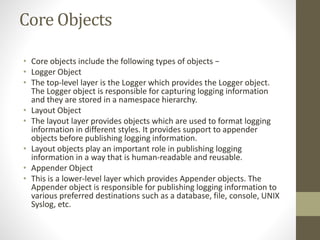
Core Objects
• Core objects include the following types of objects −
• Logger Object
• The top-level layer is the Logger which provides the Logger object.
The Logger object is responsible for capturing logging information
and they are stored in a namespace hierarchy.
• Layout Object
• The layout layer provides objects which are used to format logging
information in different styles. It provides support to appender
objects before publishing logging information.
• Layout objects play an important role in publishing logging
information in a way that is human-readable and reusable.
• Appender Object
• This is a lower-level layer which provides Appender objects. The
Appender object is responsible for publishing logging information to
various preferred destinations such as a database, file, console, UNIX
Syslog, etc.
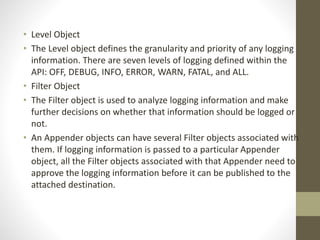
• Level Object
• The Level object defines the granularity and priority of any logging
information. There are seven levels of logging defined within the
API: OFF, DEBUG, INFO, ERROR, WARN, FATAL, and ALL.
• Filter Object
• The Filter object is used to analyze logging information and make
further decisions on whether that information should be logged or
not.
• An Appender objects can have several Filter objects associated with
them. If logging information is passed to a particular Appender
object, all the Filter objects associated with that Appender need to
approve the logging information before it can be published to the
attached destination.
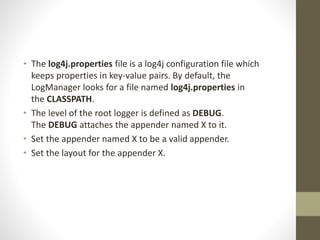
• The log4j.properties file is a log4j configuration file which
keeps properties in key-value pairs. By default, the
LogManager looks for a file named log4j.properties in
the CLASSPATH.
• The level of the root logger is defined as DEBUG.
The DEBUG attaches the appender named X to it.
• Set the appender named X to be a valid appender.
• Set the layout for the appender X.
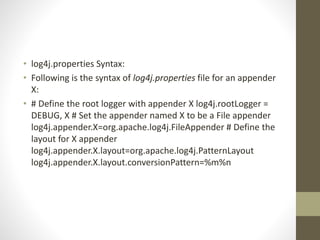
• log4j.properties Syntax:
• Following is the syntax of log4j.properties file for an appender
X:
• # Define the root logger with appender X log4j.rootLogger =
DEBUG, X # Set the appender named X to be a File appender
log4j.appender.X=org.apache.log4j.FileAppender # Define the
layout for X appender
log4j.appender.X.layout=org.apache.log4j.PatternLayout
log4j.appender.X.layout.conversionPattern=%m%n
• log4j.properties Example
• Using the above syntax, we define the following
in log4j.properties file:
• The level of the root logger is defined as DEBUG,
The DEBUG the appender named FILE to it.
• The appender FILE is defined
as org.apache.log4j.FileAppender. It writes to a file
named log.out located in the log directory.
• The layout pattern defined is %m%n, which means the printed
logging message will be followed by a newline character.
•
• # Define the root logger with appender file log4j.rootLogger =
DEBUG, FILE # Define the file appender
log4j.appender.FILE=org.apache.log4j.FileAppender
log4j.appender.FILE.File=${log}/log.out # Define the layout for
file appender
log4j.appender.FILE.layout=org.apache.log4j.PatternLayout
log4j.appender.FILE.layout.conversionPattern=%m%n
• Layout
• We have used PatternLayout with our appender. All the possible
options are:
• DateLayout
• HTMLLayout
• PatternLayout
• SimpleLayout
• XMLLayout
• The level of the root logger is defined as DEBUG and attaches
appender named FILE to it.
• The appender FILE is defined as org.apache.log4j.FileAppender and
writes to a file named log.out located in the log directory.
• The layout pattern defined is %m%n, which means the printed
logging message will be followed by a newline character.
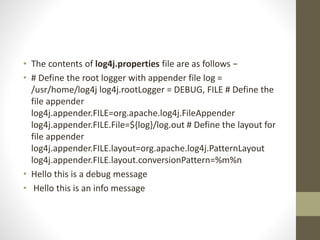
• The contents of log4j.properties file are as follows −
• # Define the root logger with appender file log =
/usr/home/log4j log4j.rootLogger = DEBUG, FILE # Define the
file appender
log4j.appender.FILE=org.apache.log4j.FileAppender
log4j.appender.FILE.File=${log}/log.out # Define the layout for
file appender
log4j.appender.FILE.layout=org.apache.log4j.PatternLayout
log4j.appender.FILE.layout.conversionPattern=%m%n
• Hello this is a debug message
• Hello this is an info message

Log4j is a reliable, fast and flexible

  • 1.
  • 2.
    • log4j APIfollows a layered architecture where each layer provides different objects to perform different tasks. This layered architecture makes the design flexible and easy to extend in future. • Apache Log4j 2 is an upgrade to Log4j that provides significant improvements over its predecessor, Log4j 1.x, and provides many of the improvements available in Logback while fixing some inherent problems in Logback's architecture.
  • 3.
    • There aretwo types of objects available with log4j framework. • Core Objects: These are mandatory objects of the framework. They are required to use the framework. • Support Objects: These are optional objects of the framework. They support core objects to perform additional but important tasks.
  • 4.
    Core Objects • Coreobjects include the following types of objects − • Logger Object • The top-level layer is the Logger which provides the Logger object. The Logger object is responsible for capturing logging information and they are stored in a namespace hierarchy. • Layout Object • The layout layer provides objects which are used to format logging information in different styles. It provides support to appender objects before publishing logging information. • Layout objects play an important role in publishing logging information in a way that is human-readable and reusable. • Appender Object • This is a lower-level layer which provides Appender objects. The Appender object is responsible for publishing logging information to various preferred destinations such as a database, file, console, UNIX Syslog, etc.
  • 5.
    • Level Object •The Level object defines the granularity and priority of any logging information. There are seven levels of logging defined within the API: OFF, DEBUG, INFO, ERROR, WARN, FATAL, and ALL. • Filter Object • The Filter object is used to analyze logging information and make further decisions on whether that information should be logged or not. • An Appender objects can have several Filter objects associated with them. If logging information is passed to a particular Appender object, all the Filter objects associated with that Appender need to approve the logging information before it can be published to the attached destination.
  • 6.
    • The log4j.propertiesfile is a log4j configuration file which keeps properties in key-value pairs. By default, the LogManager looks for a file named log4j.properties in the CLASSPATH. • The level of the root logger is defined as DEBUG. The DEBUG attaches the appender named X to it. • Set the appender named X to be a valid appender. • Set the layout for the appender X.
  • 7.
    • log4j.properties Syntax: •Following is the syntax of log4j.properties file for an appender X: • # Define the root logger with appender X log4j.rootLogger = DEBUG, X # Set the appender named X to be a File appender log4j.appender.X=org.apache.log4j.FileAppender # Define the layout for X appender log4j.appender.X.layout=org.apache.log4j.PatternLayout log4j.appender.X.layout.conversionPattern=%m%n
  • 8.
    • log4j.properties Example •Using the above syntax, we define the following in log4j.properties file: • The level of the root logger is defined as DEBUG, The DEBUG the appender named FILE to it. • The appender FILE is defined as org.apache.log4j.FileAppender. It writes to a file named log.out located in the log directory. • The layout pattern defined is %m%n, which means the printed logging message will be followed by a newline character. •
  • 9.
    • # Definethe root logger with appender file log4j.rootLogger = DEBUG, FILE # Define the file appender log4j.appender.FILE=org.apache.log4j.FileAppender log4j.appender.FILE.File=${log}/log.out # Define the layout for file appender log4j.appender.FILE.layout=org.apache.log4j.PatternLayout log4j.appender.FILE.layout.conversionPattern=%m%n
  • 10.
    • Layout • Wehave used PatternLayout with our appender. All the possible options are: • DateLayout • HTMLLayout • PatternLayout • SimpleLayout • XMLLayout • The level of the root logger is defined as DEBUG and attaches appender named FILE to it. • The appender FILE is defined as org.apache.log4j.FileAppender and writes to a file named log.out located in the log directory. • The layout pattern defined is %m%n, which means the printed logging message will be followed by a newline character.
  • 11.
    • The contentsof log4j.properties file are as follows − • # Define the root logger with appender file log = /usr/home/log4j log4j.rootLogger = DEBUG, FILE # Define the file appender log4j.appender.FILE=org.apache.log4j.FileAppender log4j.appender.FILE.File=${log}/log.out # Define the layout for file appender log4j.appender.FILE.layout=org.apache.log4j.PatternLayout log4j.appender.FILE.layout.conversionPattern=%m%n • Hello this is a debug message • Hello this is an info message