
Build, Logging, and Unit Test
Tools
Allan Huang @ Delta DRC
Agenda
 Build Tool
◦ Maven
 Logging Tool
◦ Log4J 2 and SLF4J
 Unit Test Tool
◦ JUnit 4
Build Tool
What is Maven?
 Aspects of building software
◦ How software is built?
◦ What are its dependencies?
 Convention over Configuration
 Maven
◦ Software project management tool
◦ Build-automation tool
 Manage project’s build, dependency
and documentation
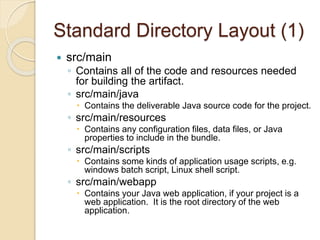
Maven Overview
Standard Directory Layout (1)
 src/main
◦ Contains all of the code and resources needed
for building the artifact.
◦ src/main/java
 Contains the deliverable Java source code for the project.
◦ src/main/resources
 Contains any configuration files, data files, or Java
properties to include in the bundle.
◦ src/main/scripts
 Contains some kinds of application usage scripts, e.g.
windows batch script, Linux shell script.
◦ src/main/webapp
 Contains your Java web application, if your project is a
web application. It is the root directory of the web
application.
Standard Directory Layout (2)
 src/test
◦ Contains all of the code and resources for running unit
tests against the compiled artifact.
◦ src/test/java
 Contains the testing Java source code (JUnit or TestNG test cases,
for example) for the project.
◦ src/test/resources
 Contains resources necessary for testing.
 src/assembly
◦ Contains some assembly descriptors for creating
distributions in the target directory.
 target
◦ It is used to house all output of the build.
 pom.xml
◦ The top level files descriptive of the project.
Dependency Scope
 Compile
◦ Compile dependencies are available in all class-paths of a
project.
 Provided
◦ Indicates you expect the JDK or a container to provide the
dependency at runtime.
 Runtime
◦ Indicates that the dependency is not required for
compilation, but is for execution.
 Test
◦ Indicates that the dependency is only available for the test
compilation and execution phases.
 System
◦ You have to provide the JAR which contains it explicitly.
The artifact is always available and is not looked up in a
repository.
Build Lifecycle
 Clean
◦ Remove all files generated by the
previous build.
 Default
◦ validate → compile → test → package →
integration-test → verify → install →
deploy
 Site
◦ Generates the project's site
documentation.
Default Lifecycle (1)
 Validate
◦ validate the project is correct and all necessary
information is available.
 Compile
◦ Compile the source code of the project.
 Test
◦ Test the compiled source code using a suitable
unit testing framework.
◦ These tests should not require the code be
packaged or deployed.
 Package
◦ Take the compiled code and package it in its
distributable format, such as a JAR.
Default Lifecycle (2)
 Integration-test
◦ Process and deploy the package if necessary
into an environment where integration tests can
be run.
 Verify
◦ Run any checks to verify the package is valid
and meets quality criteria.
 Install
◦ Install the package into the local repository, for
use as a dependency in other projects locally.
 Deploy
◦ Done in an integration or release environment,
copies the final package to the remote repository
for sharing with other developers and projects.
POM
 Project Object Model (POM)
◦ Contains a complete description of how to
build the current project.
◦ pom.xml
 Effective POM
 Parent/Super POM and Sub POM
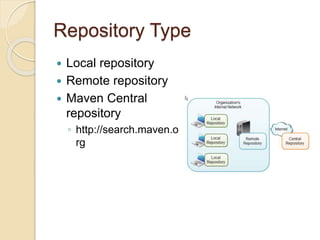
Repository Type
 Local repository
 Remote repository
 Maven Central
repository
◦ http://search.maven.o
rg
Build with Maven
 Environment Setup
◦ Set JAVA_HOME
◦ Set M2_HOME
◦ Add M2_HOME/bin to System PATH
◦ Verify with command line
 mvn –version
 Local Repository Setting
◦ M2_HOME/conf/settings.xml
 localRepository & proxies setting
 Build projects with command line
◦ mvn (default goal)
 Target
◦ Classes, Test-classes, Test reports, JAR, WAR, etc.
Reference
 Apache Maven
 Maven Tutorial
 Introduction to the Standard Directory
Layout
 Maven Directory Structure
 Introduction to the Dependency
Mechanism
 Introduction to the Build Lifecycle
 Maven in 5 Minutes
 Maven - Environment Setup
Logging Tool
What is Log4J 2?
 A fast and flexible framework for
logging application debugging
messages.
 Logging behavior can be controlled by
editing a configuration file, without
touching the application binary.
 Log4j 2 is an upgrade to Log4j.
What is SLF4J?
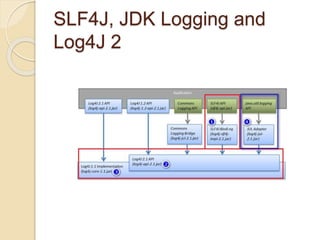
 Simple Logging Facade for Java
◦ Serves as a simple facade or abstraction
for various logging frameworks allowing
the end user to plug in the desired logging
framework at deployment time.
 Well-known logging frameworks
◦ Log4j 2, Log4j
◦ Logback
◦ Java Util Logging
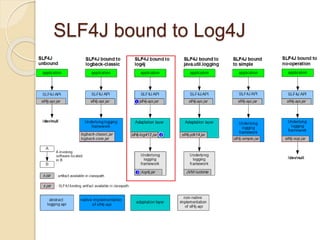
SLF4J bound to Log4J
SLF4J, JDK Logging and
Log4J 2
Log Level
 ERROR (be suited for Production environment)
◦ Something terribly wrong had happened, that must be
investigated immediately.
 e.g. Null pointer, Database unavailable, Mission critical.
 WARN (be suited for Production environment)
◦ The process might be continued, but take extra caution.
 e.g. Database connection lost, Socket reaching to its limit.
 INFO (be suited for Test/QA environment)
◦ Important process has finished. Then quickly find out what
the application is doing.
 e.g. Server has been started, Incoming messages, Outgoing
messages.
 DEBUG (be suited for Development environment)
◦ It is used by the developers to debug the systems.
 ALL, FATAL, TRACE, OFF levels are rarely used.
SLF4J Common API
 private static final Logger log =
LoggerFactory.getLogger(UserServiceImpl.class);
 void debug(String msg)
 void debug(String format, Object... arguments)
 void debug(String msg, Throwable t)
 void info(String msg)
 void info(String format, Object... arguments)
 void info(String msg, Throwable t)
 void warn(String msg)
 void warn(String format, Object... arguments)
 void warn(String msg, Throwable t)
 void error(String msg)
 void error(String format, Object... arguments)
 void error(String msg, Throwable t)
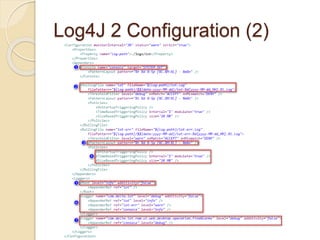
Log4J 2 Configuration (1)
 log4j2.xml
 Appenders
◦ Console Appender
◦ Rolling File Appender
 OnStartup Triggering Policy
 SizeBased Triggering Policy
 TimeBased Triggering Policy
 Loggers
 Root Logger
 Named Logger
 Named Hierarchy
Log4J 2 Configuration (2)
Logging Tips (1)
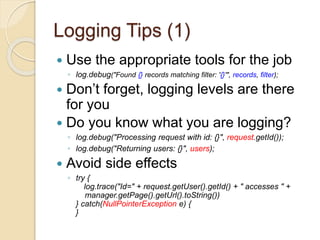
 Use the appropriate tools for the job
◦ log.debug("Found {} records matching filter: '{}'", records, filter);
 Don’t forget, logging levels are there
for you
 Do you know what you are logging?
◦ log.debug("Processing request with id: {}", request.getId());
◦ log.debug("Returning users: {}", users);
 Avoid side effects
◦ try {
log.trace("Id=" + request.getUser().getId() + " accesses " +
manager.getPage().getUrl().toString())
} catch(NullPointerException e) {
}
Logging Tips (2)
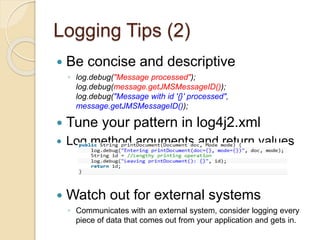
 Be concise and descriptive
◦ log.debug("Message processed");
log.debug(message.getJMSMessageID());
log.debug("Message with id '{}' processed",
message.getJMSMessageID());
 Tune your pattern in log4j2.xml
 Log method arguments and return values
 Watch out for external systems
◦ Communicates with an external system, consider logging every
piece of data that comes out from your application and gets in.
Logging Tips (3)
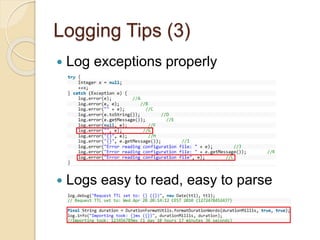
 Log exceptions properly
 Logs easy to read, easy to parse
Reference
 Frequently Asked Questions about
SLF4J
 FAQ about Log4j 2
 SLF4J Logger API
 Log4J 2 Appenders
 log4j2 xml configuration example
 10 Tips for Proper Application Logging
 Logging Anti-Patterns
 Logging in Java with slf4j
Unit Test Tool
What is JUnit 4?
 A simple unit testing framework to
write repeatable tests for Java.
 Test-Driven Development (TDD)
◦ Test-first Development
◦ High Code Coverage
 A static main method vs. Unit test
cases
 JUnit 4 is an upgrade to JUnit 3.
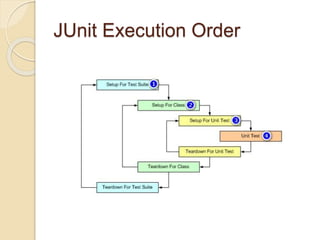
JUnit Execution Order
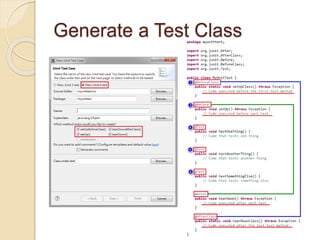
Generate a Test Class
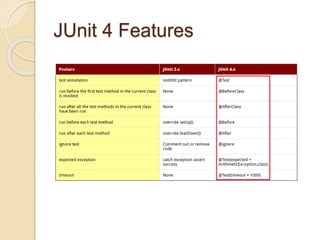
JUnit 4 Features
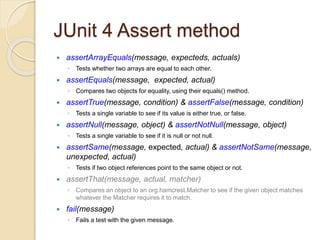
JUnit 4 Assert method
 assertArrayEquals(message, expecteds, actuals)
◦ Tests whether two arrays are equal to each other.
 assertEquals(message, expected, actual)
◦ Compares two objects for equality, using their equals() method.
 assertTrue(message, condition) & assertFalse(message, condition)
◦ Tests a single variable to see if its value is either true, or false.
 assertNull(message, object) & assertNotNull(message, object)
◦ Tests a single variable to see if it is null or not null.
 assertSame(message, expected, actual) & assertNotSame(message,
unexpected, actual)
◦ Tests if two object references point to the same object or not.
 assertThat(message, actual, matcher)
◦ Compares an object to an org.hamcrest.Matcher to see if the given object matches
whatever the Matcher requires it to match.
 fail(message)
◦ Fails a test with the given message.
Reference
 JUnit
 Junit 3 vs Junit 4 Comparison
 Assert Methods
 Assert (JUnit API)
Q & A

Build, logging, and unit test tools

  • 1.
    Build, Logging, andUnit Test Tools Allan Huang @ Delta DRC
  • 2.
    Agenda  Build Tool ◦Maven  Logging Tool ◦ Log4J 2 and SLF4J  Unit Test Tool ◦ JUnit 4
  • 3.
  • 4.
    What is Maven? Aspects of building software ◦ How software is built? ◦ What are its dependencies?  Convention over Configuration  Maven ◦ Software project management tool ◦ Build-automation tool  Manage project’s build, dependency and documentation
  • 5.
  • 6.
    Standard Directory Layout(1)  src/main ◦ Contains all of the code and resources needed for building the artifact. ◦ src/main/java  Contains the deliverable Java source code for the project. ◦ src/main/resources  Contains any configuration files, data files, or Java properties to include in the bundle. ◦ src/main/scripts  Contains some kinds of application usage scripts, e.g. windows batch script, Linux shell script. ◦ src/main/webapp  Contains your Java web application, if your project is a web application. It is the root directory of the web application.
  • 7.
    Standard Directory Layout(2)  src/test ◦ Contains all of the code and resources for running unit tests against the compiled artifact. ◦ src/test/java  Contains the testing Java source code (JUnit or TestNG test cases, for example) for the project. ◦ src/test/resources  Contains resources necessary for testing.  src/assembly ◦ Contains some assembly descriptors for creating distributions in the target directory.  target ◦ It is used to house all output of the build.  pom.xml ◦ The top level files descriptive of the project.
  • 8.
    Dependency Scope  Compile ◦Compile dependencies are available in all class-paths of a project.  Provided ◦ Indicates you expect the JDK or a container to provide the dependency at runtime.  Runtime ◦ Indicates that the dependency is not required for compilation, but is for execution.  Test ◦ Indicates that the dependency is only available for the test compilation and execution phases.  System ◦ You have to provide the JAR which contains it explicitly. The artifact is always available and is not looked up in a repository.
  • 9.
    Build Lifecycle  Clean ◦Remove all files generated by the previous build.  Default ◦ validate → compile → test → package → integration-test → verify → install → deploy  Site ◦ Generates the project's site documentation.
  • 10.
    Default Lifecycle (1) Validate ◦ validate the project is correct and all necessary information is available.  Compile ◦ Compile the source code of the project.  Test ◦ Test the compiled source code using a suitable unit testing framework. ◦ These tests should not require the code be packaged or deployed.  Package ◦ Take the compiled code and package it in its distributable format, such as a JAR.
  • 11.
    Default Lifecycle (2) Integration-test ◦ Process and deploy the package if necessary into an environment where integration tests can be run.  Verify ◦ Run any checks to verify the package is valid and meets quality criteria.  Install ◦ Install the package into the local repository, for use as a dependency in other projects locally.  Deploy ◦ Done in an integration or release environment, copies the final package to the remote repository for sharing with other developers and projects.
  • 12.
    POM  Project ObjectModel (POM) ◦ Contains a complete description of how to build the current project. ◦ pom.xml  Effective POM  Parent/Super POM and Sub POM
  • 13.
    Repository Type  Localrepository  Remote repository  Maven Central repository ◦ http://search.maven.o rg
  • 14.
    Build with Maven Environment Setup ◦ Set JAVA_HOME ◦ Set M2_HOME ◦ Add M2_HOME/bin to System PATH ◦ Verify with command line  mvn –version  Local Repository Setting ◦ M2_HOME/conf/settings.xml  localRepository & proxies setting  Build projects with command line ◦ mvn (default goal)  Target ◦ Classes, Test-classes, Test reports, JAR, WAR, etc.
  • 15.
    Reference  Apache Maven Maven Tutorial  Introduction to the Standard Directory Layout  Maven Directory Structure  Introduction to the Dependency Mechanism  Introduction to the Build Lifecycle  Maven in 5 Minutes  Maven - Environment Setup
  • 16.
  • 17.
    What is Log4J2?  A fast and flexible framework for logging application debugging messages.  Logging behavior can be controlled by editing a configuration file, without touching the application binary.  Log4j 2 is an upgrade to Log4j.
  • 18.
    What is SLF4J? Simple Logging Facade for Java ◦ Serves as a simple facade or abstraction for various logging frameworks allowing the end user to plug in the desired logging framework at deployment time.  Well-known logging frameworks ◦ Log4j 2, Log4j ◦ Logback ◦ Java Util Logging
  • 19.
  • 20.
    SLF4J, JDK Loggingand Log4J 2
  • 21.
    Log Level  ERROR(be suited for Production environment) ◦ Something terribly wrong had happened, that must be investigated immediately.  e.g. Null pointer, Database unavailable, Mission critical.  WARN (be suited for Production environment) ◦ The process might be continued, but take extra caution.  e.g. Database connection lost, Socket reaching to its limit.  INFO (be suited for Test/QA environment) ◦ Important process has finished. Then quickly find out what the application is doing.  e.g. Server has been started, Incoming messages, Outgoing messages.  DEBUG (be suited for Development environment) ◦ It is used by the developers to debug the systems.  ALL, FATAL, TRACE, OFF levels are rarely used.
  • 22.
    SLF4J Common API private static final Logger log = LoggerFactory.getLogger(UserServiceImpl.class);  void debug(String msg)  void debug(String format, Object... arguments)  void debug(String msg, Throwable t)  void info(String msg)  void info(String format, Object... arguments)  void info(String msg, Throwable t)  void warn(String msg)  void warn(String format, Object... arguments)  void warn(String msg, Throwable t)  void error(String msg)  void error(String format, Object... arguments)  void error(String msg, Throwable t)
  • 23.
    Log4J 2 Configuration(1)  log4j2.xml  Appenders ◦ Console Appender ◦ Rolling File Appender  OnStartup Triggering Policy  SizeBased Triggering Policy  TimeBased Triggering Policy  Loggers  Root Logger  Named Logger  Named Hierarchy
  • 24.
  • 25.
    Logging Tips (1) Use the appropriate tools for the job ◦ log.debug("Found {} records matching filter: '{}'", records, filter);  Don’t forget, logging levels are there for you  Do you know what you are logging? ◦ log.debug("Processing request with id: {}", request.getId()); ◦ log.debug("Returning users: {}", users);  Avoid side effects ◦ try { log.trace("Id=" + request.getUser().getId() + " accesses " + manager.getPage().getUrl().toString()) } catch(NullPointerException e) { }
  • 26.
    Logging Tips (2) Be concise and descriptive ◦ log.debug("Message processed"); log.debug(message.getJMSMessageID()); log.debug("Message with id '{}' processed", message.getJMSMessageID());  Tune your pattern in log4j2.xml  Log method arguments and return values  Watch out for external systems ◦ Communicates with an external system, consider logging every piece of data that comes out from your application and gets in.
  • 27.
    Logging Tips (3) Log exceptions properly  Logs easy to read, easy to parse
  • 28.
    Reference  Frequently AskedQuestions about SLF4J  FAQ about Log4j 2  SLF4J Logger API  Log4J 2 Appenders  log4j2 xml configuration example  10 Tips for Proper Application Logging  Logging Anti-Patterns  Logging in Java with slf4j
  • 29.
  • 30.
    What is JUnit4?  A simple unit testing framework to write repeatable tests for Java.  Test-Driven Development (TDD) ◦ Test-first Development ◦ High Code Coverage  A static main method vs. Unit test cases  JUnit 4 is an upgrade to JUnit 3.
  • 31.
  • 32.
  • 33.
  • 34.
    JUnit 4 Assertmethod  assertArrayEquals(message, expecteds, actuals) ◦ Tests whether two arrays are equal to each other.  assertEquals(message, expected, actual) ◦ Compares two objects for equality, using their equals() method.  assertTrue(message, condition) & assertFalse(message, condition) ◦ Tests a single variable to see if its value is either true, or false.  assertNull(message, object) & assertNotNull(message, object) ◦ Tests a single variable to see if it is null or not null.  assertSame(message, expected, actual) & assertNotSame(message, unexpected, actual) ◦ Tests if two object references point to the same object or not.  assertThat(message, actual, matcher) ◦ Compares an object to an org.hamcrest.Matcher to see if the given object matches whatever the Matcher requires it to match.  fail(message) ◦ Fails a test with the given message.
  • 35.
    Reference  JUnit  Junit3 vs Junit 4 Comparison  Assert Methods  Assert (JUnit API)
  • 36.