What is an Engineering Drawing ?
“An Engineering Drawing is a technical (not artistic) drawing which
clearly defines and communicates a design to other interested parties.
Other parties may have an interest in design collaboration, procurement
/ purchasing, costing, manufacturing,
handling / packaging.”
quality control, marketing,
Introduction
Drawing:
• The way of conveying the ideas through the systematic lines on the paper.
The art of representation of an object by systematic lines on a paper.
•
Classification:
1.
The art of representation of an object by the artist by his imagination by keeping the
object before him.
e.g. paintings, cinema posters, advertisement boards, etc.
or
2.
The art of representation of engineering objects.
e.g. buildings, roads, machines, etc.
Artistic Drawing (Free-hand or Model Drawing)
Engineering Drawing (Instrument Drawing)
The art of representation of an object by the artist
keeping the object before him.
by his imagination or by
e.g. paintings, cinema posters, advertisement boards, etc.
Artistic Drawing
e.g. geometrical objects - rectangle, square, cube, cone, cylinder, etc.
Two-dimensional drawing having only length and breadth.
e.g. square, triangle, etc.
Three-dimensional drawing having length, breadth and thickness.
e.g. cube, prism, etc.
e.g. mechanical engineering objects – machines, machine parts, etc.
e.g. civil engineering objects – roads, buildings, bridges, dams, etc.
e.g. electrical and electronics objects – transformers, wiring diagrams.
i. Geometrical Drawing
a. Plain Geometrical Drawing
b. Solid Geometrical Drawing
Types of Engineering Drawing
ii. Mechanical Engineering or Machine Drawing
iii. Civil Engineering Drawing
iv. Electrical & Electronics Engineering Drawing
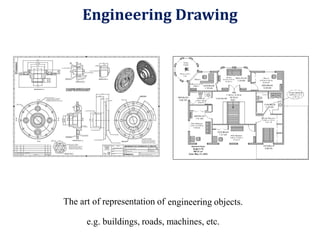
The art of representation of engineering objects.
e.g. buildings, roads, machines, etc.
Engineering Drawing
•
•
•
Visualization
Communication
Documentation
Role of Graphics
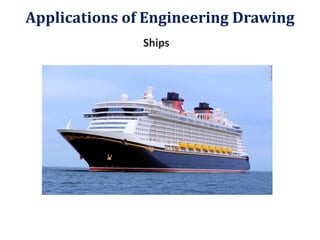
Ships
Applications of Engineering Drawing
Manufacturing of Automobiles
Applications of Engineering Drawing
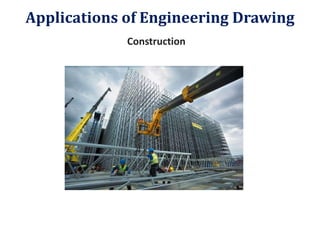
Construction
Applications of Engineering Drawing
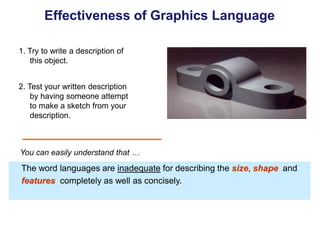
1. Try to write a description of
this object.
2. Test your written description
by having someone attempt
to make a sketch from your
description.
Effectiveness of Graphics Language
The word languages are inadequate for describing the size, shape and
features completely as well as concisely.
You can easily understand that …
Graphic language in “engineering application” use lines to represent
the surfaces, edges and contours of objects.
A drawing can be done using freehand, instruments or computer methods.
Composition of Graphic Language
The language is known as “drawing” or “drafting” .
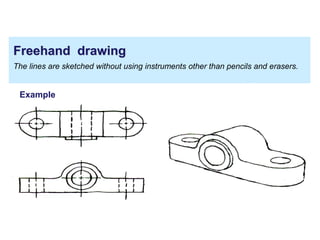
Freehand drawing
The lines are sketched without using instruments other than pencils and erasers.
Example
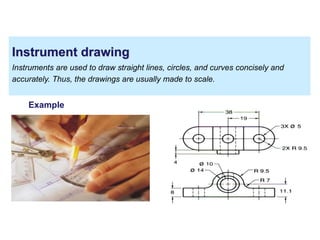
Instrument drawing
Instruments are used to draw straight lines, circles, and curves concisely and
accurately. Thus, the drawings are usually made to scale.
Example
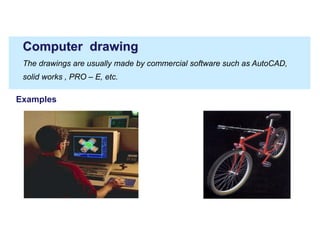
Computer drawing
The drawings are usually made by commercial software such as AutoCAD,
solid works , PRO – E, etc.
Examples
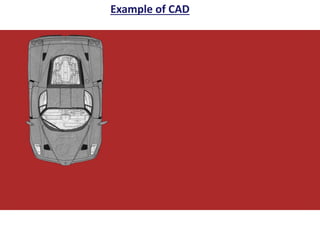
Example of CAD
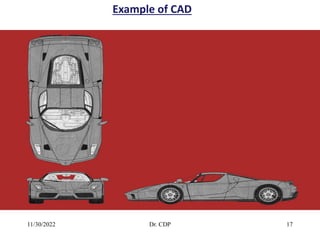
Example of CAD
11/30/2022 Dr. CDP 16
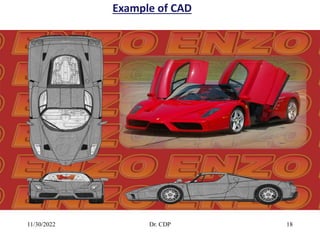
Example of CAD
11/30/2022 Dr. CDP 17
Example of CAD
11/30/2022 Dr. CDP 18
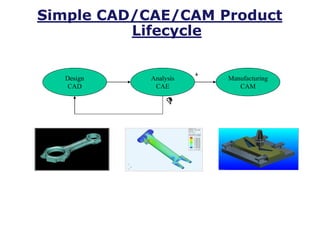
Simple CAD/CAE/CAM Product
Lifecycle
Design
CAD
Analysis
CAE
Manufacturing
CAM
C
D
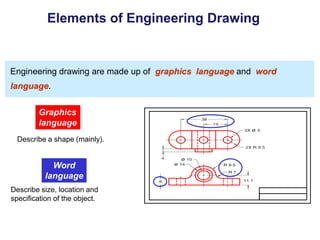
Elements of Engineering Drawing
Engineering drawing are made up of graphics language and word
language.
Graphics
language
Describe a shape (mainly).
Word
language
Describe size, location and
specification of the object.
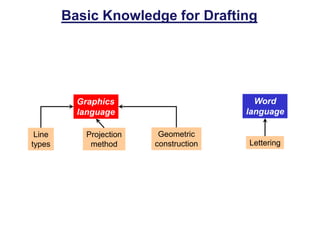
Basic Knowledge for Drafting
Graphics
language
Word
language
Line
types
Geometric
construction Lettering
Projection
method
Traditional Drawing
Tools
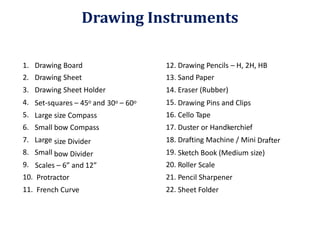
1.
2.
3.
4.
5.
6.
7.
8.
9.
10.
11.
Drawing
Drawing
Drawing
Board
Sheet
Sheet Holder
12.
13.
14.
15.
16.
17.
18.
19.
20.
21.
22.
Drawing Pencils
Sand Paper
Eraser (Rubber)
– H, 2H, HB
Set-squares – 45o and 30o 60o
– Drawing Pins and Clips
Cello Tape
Duster or Handkerchief
Drafting Machine / Mini
Large
Small
Large
Small
size Compass
bow Compass
size Divider
bow Divider
Drafter
Sketch Book (Medium size)
Roller Scale
Pencil Sharpener
Sheet Folder
Scales – 6” and
Protractor
French Curve
12”
Drawing Instruments
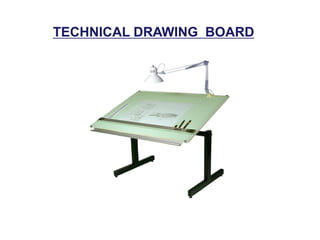
TECHNICAL DRAWING BOARD
1. T-Square 2. Triangles
DRAWING TOOLS
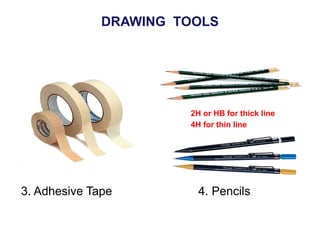
3. Adhesive Tape 4. Pencils
2H or HB for thick line
4H for thin line
DRAWING TOOLS
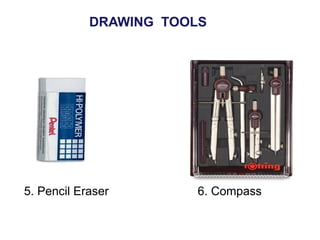
6. Compass
DRAWING TOOLS
5. Pencil Eraser
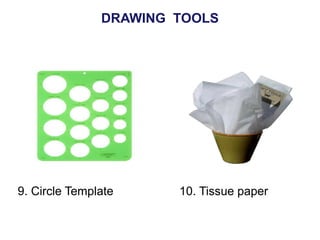
9. Circle Template 10. Tissue paper
DRAWING TOOLS
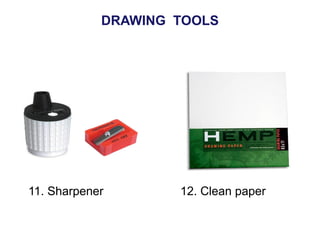
11. Sharpener 12. Clean paper
DRAWING TOOLS
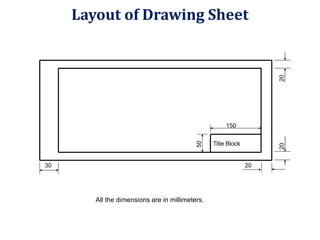
All the dimensions are in millimeters.
30 20
50
20
20
150
Title Block
Layout of Drawing Sheet
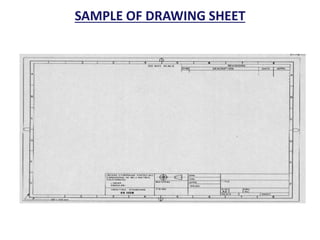
SAMPLE OF DRAWING SHEET
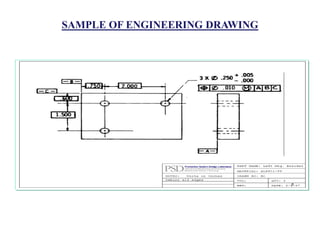
SAMPLE OF ENGINEERING DRAWING
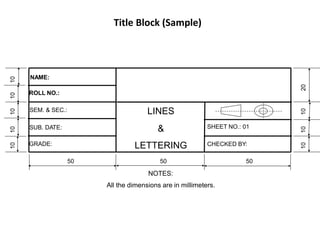
Title Block (Sample)
50 50 50
NOTES:
All the dimensions are in millimeters.
10
10
10
10
10
10
10
10
20
NAME:
ROLL NO.:
SEM. & SEC.: LINES
&
LETTERING
SUB. DATE: SHEET NO.: 01
CHECKED BY:
GRADE:
Sheet Size
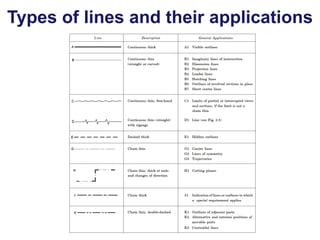
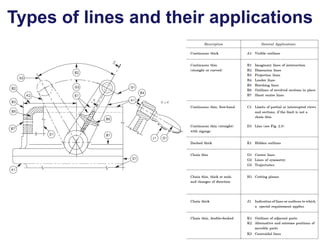
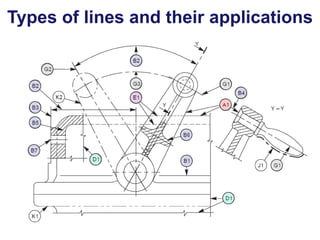
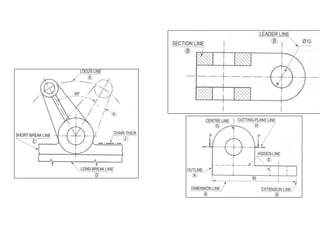
Types of lines and their applications
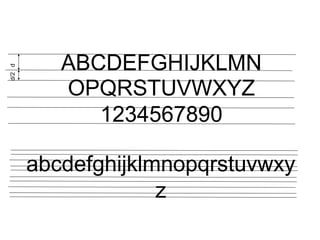
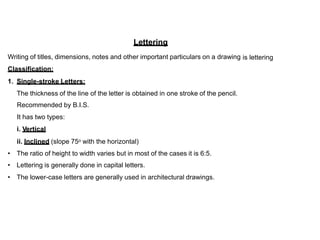
Lettering
Writing of titles, dimensions, notes and other important particulars on a drawing
Classification:
is lettering
1. Single-stroke Letters:
The thickness of the line of the letter is obtained
Recommended by B.I.S.
It has two types:
i. Vertical
ii. Inclined (slope 75o with the horizontal)
in one stroke of the pencil.
•
•
•
The ratio of height to width varies but in most of the cases it is 6:5.
Lettering is generally done in capital letters.
The lower-case letters are generally used in architectural drawings.
•
•
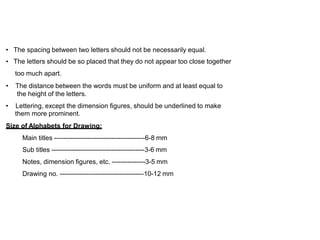
The spacing between two letters should not be necessarily equal.
The letters should be so placed that they do not appear too close together
too much apart.
The distance between the words must be uniform and at least equal to
the height of the letters.
•
• Lettering, except the dimension figures, should be underlined
them more prominent.
to make
Size of Alphabets for Drawing:
Main titles -----------------------------------------6-8 mm
Sub titles ------------------------------------------3-6 mm
Notes, dimension figures, etc. ---------------3-5 mm
Drawing no. --------------------------------------10-12 mm
ABCDEFGHIJKLMN
OPQRSTUVWXYZ
1234567890
abcdefghijklmnopqrstuvwxy
z
d/2
d
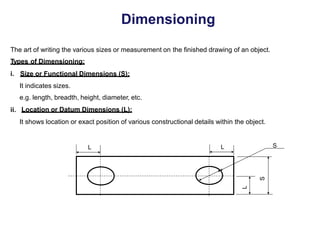
Dimensioning
The art of writing the various sizes or measurement on
Types of Dimensioning:
the finished drawing of an object.
i. Size or Functional Dimensions (S):
It indicates sizes.
e.g. length, breadth, height, diameter, etc.
Location or Datum Dimensions (L):
ii.
It shows location or exact position of various constructional details within the object.
S
L
S
L L
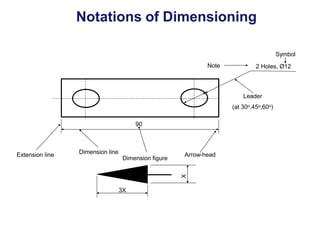
Notations of Dimensioning
Symbol
Note 2 Holes, Ø12
Leader
30o,45o,60o)
(at
90
Dimension line Arrow-head
Extension line
Dimension figure
3X
X
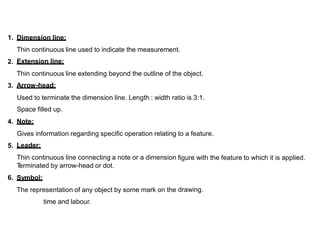
1. Dimension line:
Thin continuous line
Extension line:
used to indicate the measurement.
2.
Thin continuous line
Arrow-head:
extending beyond the outline of the object.
3.
Used to terminate the dimension line. Length : width ratio is 3:1.
Space filled up.
Note:
4.
Gives information regarding specific operation relating
Leader:
Thin continuous line connecting a note or a dimension
T
erminated by arrow-head or dot.
Symbol:
The representation of any object by some mark on the
to a feature.
5.
figure with the feature to which it is applied.
6.
drawing.
time and labour.
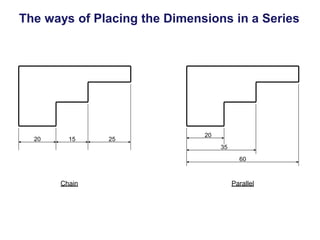
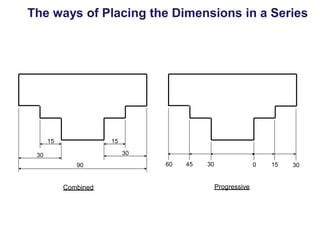
The ways of Placing the Dimensions in a Series
20
20 15 25
35
60
Chain Parallel
The ways of Placing the Dimensions in a Series
15 15
30
30
60 45 30 0 15 30
90
Progressive
Combined
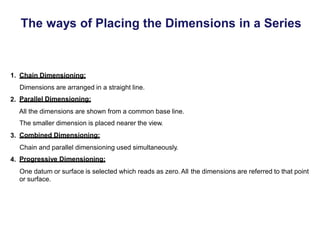
The ways of Placing the Dimensions in a Series
1. Chain Dimensioning:
Dimensions are arranged in a straight line.
Parallel Dimensioning:
2.
All the dimensions are shown from a common base line.
The smaller dimension is placed nearer the view.
Combined Dimensioning:
3.
Chain and parallel dimensioning used simultaneously.
Progressive Dimensioning:
4.
One datum or surface is selected which reads as zero.All
or surface.
the dimensions are referred to that point
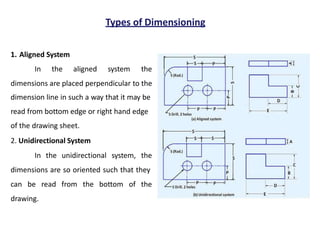
Types of Dimensioning
1. Aligned System
In the aligned system the
dimensions are placed perpendicular to the
dimension line in such a way that it may be
read from bottom edge or right hand edge
of the drawing sheet.
2. Unidirectional System
In the unidirectional system, the
dimensions are so oriented such that they
can be read from the bottom of the
drawing.
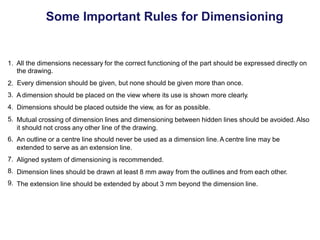
Some Important Rules for Dimensioning
1. All the dimensions necessary for the correct functioning of the part should be expressed directly on
the drawing.
Every dimension should be given, but none should be given more than once.
A dimension should be placed on the view where its use is shown more clearly.
Dimensions should be placed outside the view, as for as possible.
Mutual crossing of dimension lines and dimensioning between hidden lines should be avoided. Also
it should not cross any other line of the drawing.
An outline or a centre line should never be used as a dimension line.A centre line may be
extended to serve as an extension line.
Aligned system of dimensioning is recommended.
Dimension lines should be drawn at least 8 mm away from the outlines and from each other.
The extension line should be extended by about 3 mm beyond the dimension line.
2.
3.
4.
5.
6.
7.
8.
9.
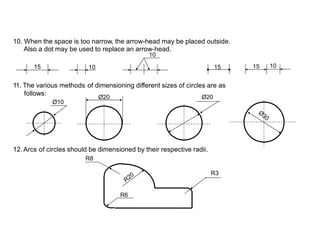
10. When the space is too narrow, the arrow-head may be placed outside.
Also a dot may be used to replace an arrow-head.
10
15
10 15
11. The various methods of dimensioning different sizes of circles are
Ø20
as
follows:
Ø10
12. Arcs of circles should be
R8
dimensioned by their respective radii.
R3
R6
Ø20
10
15
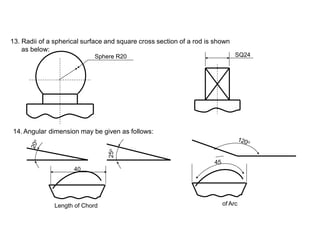
13. Radii of a spherical surface and square cross section of a rod is shown
as below:
Sphere R20
14. Angular dimension may be given as follows:
45
40
of Arc
Length of Chord
25
o
SQ24
15. Method of dimensioning of Chamfer:
2×45o
16. Dimensioning of T
apered Surface:
L
Slope or T
aper = (H-h)/L
h
H
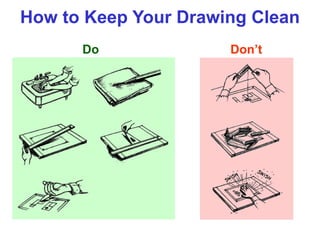
How to Keep Your Drawing Clean
Do Don’t
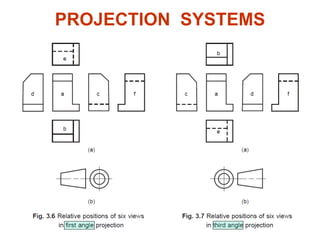
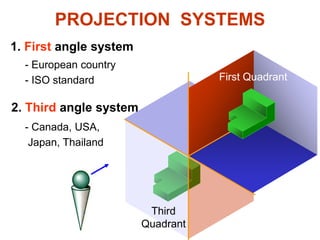
PROJECTION SYSTEMS
PROJECTION SYSTEMS
1. First angle system
2. Third angle system
First Quadrant
Third
Quadrant
- European country
- ISO standard
- Canada, USA,
Japan, Thailand
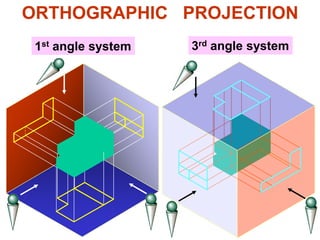
ORTHOGRAPHIC PROJECTION
1st angle system 3rd angle system
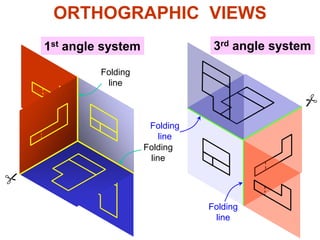
ORTHOGRAPHIC VIEWS
1st angle system 3rd angle system
Folding
line
Folding
line
Folding
line
Folding
line
ORTHOGRAPHIC VIEWS
1st angle system 3rd angle system
Front View
Front View
Right Side View
Right Side View
Top View
Top View
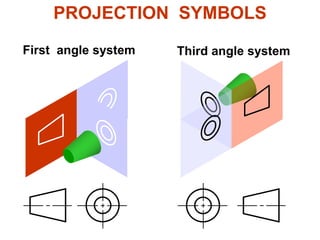
First angle system Third angle system
PROJECTION SYMBOLS
Quick Quiz
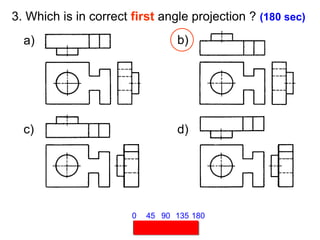
3. Which is in correct first angle projection ? (180 sec)
a) b)
c) d)
45 90 135 180
0
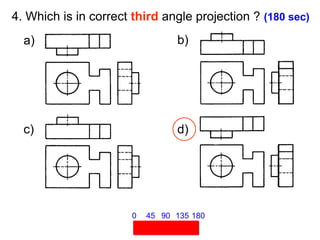
4. Which is in correct third angle projection ? (180 sec)
a) b)
c) d)
45 90 135 180
0
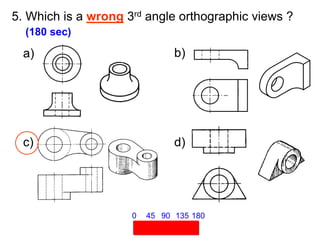
5. Which is a wrong 3rd angle orthographic views ?
(180 sec)
45 90 135 180
0
a) b)
c) d)
VIEW SELECTION STEPS
1. Orient the object to the best position
relative to a glass box.
2. Select the front view.
3. Select adjacent views.
STEP 1 : Orient the Object
The object should be placed in its natural position.
NO !
The object should presents its features in actual
size and shape in orthographic views.
GOOD
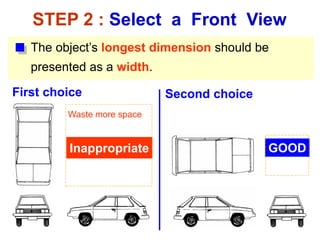
STEP 2 : Select a Front View
The object’s longest dimension should be
presented as a width.
Inappropriate
First choice
GOOD
Second choice
Waste more space
Inappropriate
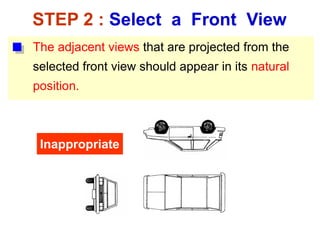
The adjacent views that are projected from the
selected front view should appear in its natural
position.
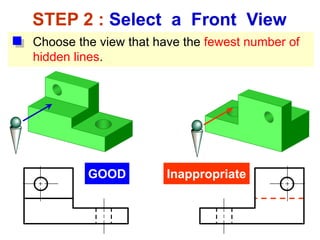
STEP 2 : Select a Front View
Choose the view that have the fewest number of
hidden lines.
GOOD Inappropriate
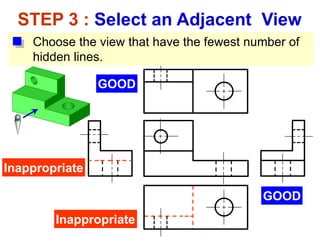
STEP 3 : Select an Adjacent View
GOOD
Inappropriate
Inappropriate
GOOD
Choose the view that have the fewest number of
hidden lines.
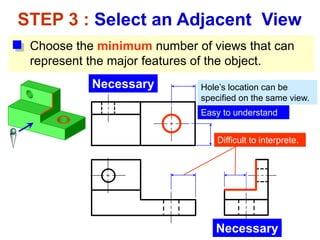
Choose the minimum number of views that can
represent the major features of the object.
STEP 3 : Select an Adjacent View
Necessary
Necessary
Hole’s location can be
specified on the same view.
Difficult to interprete.
Easy to understand
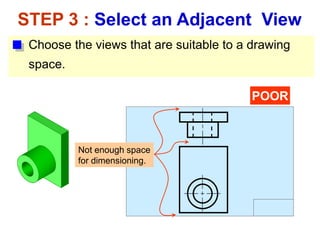
Choose the views that are suitable to a drawing
space.
STEP 3 : Select an Adjacent View
POOR
Not enough space
for dimensioning.
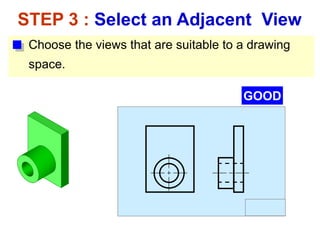
Choose the views that are suitable to a drawing
space.
STEP 3 : Select an Adjacent View
GOOD
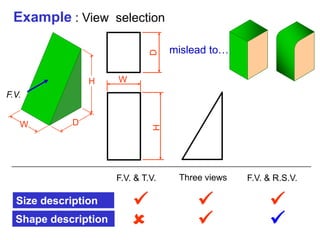
Example : View selection
Shape description
Size description
F.V.
W D
✓
W
H

D
mislead to…
✓
✓
✓
✓
F.V. & T.V. Three views F.V. & R.S.V.
H
ONE-VIEW DRAWING
Flat part having a uniform thickness.
Unnecessary These 2 views provide only information
about the part thickness !
1 Thick
ONE-VIEW DRAWING
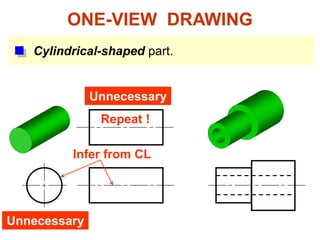
Cylindrical-shaped part.
Unnecessary
Repeat !
Infer from CL
Unnecessary
TWO-VIEW DRAWING
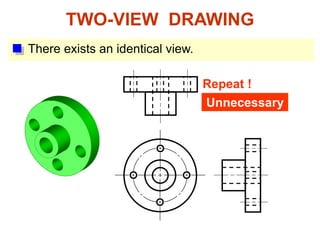
There exists an identical view.
Repeat !
Unnecessary
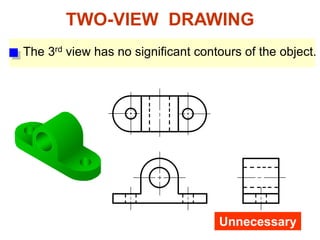
The 3rd view has no significant contours of the object.
TWO-VIEW DRAWING
Unnecessary
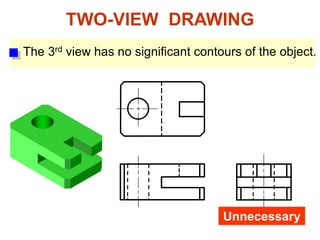
TWO-VIEW DRAWING
Unnecessary
The 3rd view has no significant contours of the object.
Quick Quiz
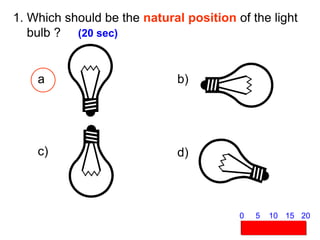
1. Which should be the natural position of the light
bulb ? (20 sec)
c)
b)
a
d)
5 10 15 20
0
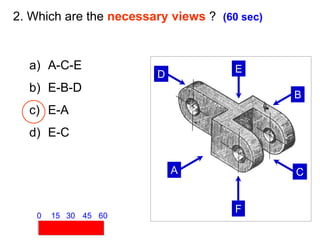
A
B
C
D
E
F
2. Which are the necessary views ? (60 sec)
a) A-C-E
b) E-B-D
c) E-A
d) E-C
15 30 45 60
0
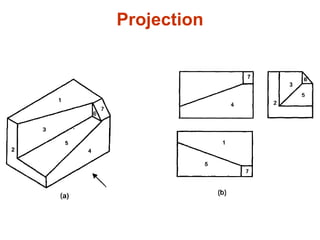
Projection
Projection
Projection
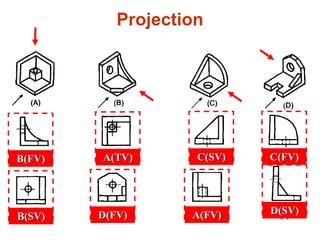
Quick Quiz
Projection
A(FV)
B(FV) C(FV)
D(FV)
A(TV)
B(SV)
C(SV)
D(SV)
Drawing Reading
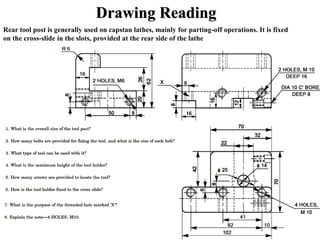
Drawing Reading
Rear tool post is generally used on capstan lathes, mainly for parting-off operations. It is fixed
on the cross-slide in the slots, provided at the rear side of the lathe

Engineering Graphics PPT.pdf

  • 1.
    What is anEngineering Drawing ? “An Engineering Drawing is a technical (not artistic) drawing which clearly defines and communicates a design to other interested parties. Other parties may have an interest in design collaboration, procurement / purchasing, costing, manufacturing, handling / packaging.” quality control, marketing, Introduction
  • 2.
    Drawing: • The wayof conveying the ideas through the systematic lines on the paper. The art of representation of an object by systematic lines on a paper. • Classification: 1. The art of representation of an object by the artist by his imagination by keeping the object before him. e.g. paintings, cinema posters, advertisement boards, etc. or 2. The art of representation of engineering objects. e.g. buildings, roads, machines, etc. Artistic Drawing (Free-hand or Model Drawing) Engineering Drawing (Instrument Drawing)
  • 3.
    The art ofrepresentation of an object by the artist keeping the object before him. by his imagination or by e.g. paintings, cinema posters, advertisement boards, etc. Artistic Drawing
  • 4.
    e.g. geometrical objects- rectangle, square, cube, cone, cylinder, etc. Two-dimensional drawing having only length and breadth. e.g. square, triangle, etc. Three-dimensional drawing having length, breadth and thickness. e.g. cube, prism, etc. e.g. mechanical engineering objects – machines, machine parts, etc. e.g. civil engineering objects – roads, buildings, bridges, dams, etc. e.g. electrical and electronics objects – transformers, wiring diagrams. i. Geometrical Drawing a. Plain Geometrical Drawing b. Solid Geometrical Drawing Types of Engineering Drawing ii. Mechanical Engineering or Machine Drawing iii. Civil Engineering Drawing iv. Electrical & Electronics Engineering Drawing
  • 5.
    The art ofrepresentation of engineering objects. e.g. buildings, roads, machines, etc. Engineering Drawing
  • 6.
  • 7.
  • 8.
  • 9.
  • 10.
    1. Try towrite a description of this object. 2. Test your written description by having someone attempt to make a sketch from your description. Effectiveness of Graphics Language The word languages are inadequate for describing the size, shape and features completely as well as concisely. You can easily understand that …
  • 11.
    Graphic language in“engineering application” use lines to represent the surfaces, edges and contours of objects. A drawing can be done using freehand, instruments or computer methods. Composition of Graphic Language The language is known as “drawing” or “drafting” .
  • 12.
    Freehand drawing The linesare sketched without using instruments other than pencils and erasers. Example
  • 13.
    Instrument drawing Instruments areused to draw straight lines, circles, and curves concisely and accurately. Thus, the drawings are usually made to scale. Example
  • 14.
    Computer drawing The drawingsare usually made by commercial software such as AutoCAD, solid works , PRO – E, etc. Examples
  • 15.
  • 16.
  • 17.
  • 18.
  • 19.
  • 20.
    Elements of EngineeringDrawing Engineering drawing are made up of graphics language and word language. Graphics language Describe a shape (mainly). Word language Describe size, location and specification of the object.
  • 21.
    Basic Knowledge forDrafting Graphics language Word language Line types Geometric construction Lettering Projection method
  • 22.
  • 23.
    1. 2. 3. 4. 5. 6. 7. 8. 9. 10. 11. Drawing Drawing Drawing Board Sheet Sheet Holder 12. 13. 14. 15. 16. 17. 18. 19. 20. 21. 22. Drawing Pencils SandPaper Eraser (Rubber) – H, 2H, HB Set-squares – 45o and 30o 60o – Drawing Pins and Clips Cello Tape Duster or Handkerchief Drafting Machine / Mini Large Small Large Small size Compass bow Compass size Divider bow Divider Drafter Sketch Book (Medium size) Roller Scale Pencil Sharpener Sheet Folder Scales – 6” and Protractor French Curve 12” Drawing Instruments
  • 24.
  • 25.
    1. T-Square 2.Triangles DRAWING TOOLS
  • 26.
    3. Adhesive Tape4. Pencils 2H or HB for thick line 4H for thin line DRAWING TOOLS
  • 27.
  • 28.
    9. Circle Template10. Tissue paper DRAWING TOOLS
  • 29.
    11. Sharpener 12.Clean paper DRAWING TOOLS
  • 30.
    All the dimensionsare in millimeters. 30 20 50 20 20 150 Title Block Layout of Drawing Sheet
  • 31.
  • 32.
  • 33.
    Title Block (Sample) 5050 50 NOTES: All the dimensions are in millimeters. 10 10 10 10 10 10 10 10 20 NAME: ROLL NO.: SEM. & SEC.: LINES & LETTERING SUB. DATE: SHEET NO.: 01 CHECKED BY: GRADE:
  • 34.
  • 35.
    Types of linesand their applications
  • 36.
    Types of linesand their applications
  • 37.
    Types of linesand their applications
  • 39.
    Lettering Writing of titles,dimensions, notes and other important particulars on a drawing Classification: is lettering 1. Single-stroke Letters: The thickness of the line of the letter is obtained Recommended by B.I.S. It has two types: i. Vertical ii. Inclined (slope 75o with the horizontal) in one stroke of the pencil. • • • The ratio of height to width varies but in most of the cases it is 6:5. Lettering is generally done in capital letters. The lower-case letters are generally used in architectural drawings.
  • 40.
    • • The spacing betweentwo letters should not be necessarily equal. The letters should be so placed that they do not appear too close together too much apart. The distance between the words must be uniform and at least equal to the height of the letters. • • Lettering, except the dimension figures, should be underlined them more prominent. to make Size of Alphabets for Drawing: Main titles -----------------------------------------6-8 mm Sub titles ------------------------------------------3-6 mm Notes, dimension figures, etc. ---------------3-5 mm Drawing no. --------------------------------------10-12 mm
  • 41.
  • 42.
    Dimensioning The art ofwriting the various sizes or measurement on Types of Dimensioning: the finished drawing of an object. i. Size or Functional Dimensions (S): It indicates sizes. e.g. length, breadth, height, diameter, etc. Location or Datum Dimensions (L): ii. It shows location or exact position of various constructional details within the object. S L S L L
  • 43.
    Notations of Dimensioning Symbol Note2 Holes, Ø12 Leader 30o,45o,60o) (at 90 Dimension line Arrow-head Extension line Dimension figure 3X X
  • 44.
    1. Dimension line: Thincontinuous line Extension line: used to indicate the measurement. 2. Thin continuous line Arrow-head: extending beyond the outline of the object. 3. Used to terminate the dimension line. Length : width ratio is 3:1. Space filled up. Note: 4. Gives information regarding specific operation relating Leader: Thin continuous line connecting a note or a dimension T erminated by arrow-head or dot. Symbol: The representation of any object by some mark on the to a feature. 5. figure with the feature to which it is applied. 6. drawing. time and labour.
  • 45.
    The ways ofPlacing the Dimensions in a Series 20 20 15 25 35 60 Chain Parallel
  • 46.
    The ways ofPlacing the Dimensions in a Series 15 15 30 30 60 45 30 0 15 30 90 Progressive Combined
  • 47.
    The ways ofPlacing the Dimensions in a Series 1. Chain Dimensioning: Dimensions are arranged in a straight line. Parallel Dimensioning: 2. All the dimensions are shown from a common base line. The smaller dimension is placed nearer the view. Combined Dimensioning: 3. Chain and parallel dimensioning used simultaneously. Progressive Dimensioning: 4. One datum or surface is selected which reads as zero.All or surface. the dimensions are referred to that point
  • 48.
    Types of Dimensioning 1.Aligned System In the aligned system the dimensions are placed perpendicular to the dimension line in such a way that it may be read from bottom edge or right hand edge of the drawing sheet. 2. Unidirectional System In the unidirectional system, the dimensions are so oriented such that they can be read from the bottom of the drawing.
  • 49.
    Some Important Rulesfor Dimensioning 1. All the dimensions necessary for the correct functioning of the part should be expressed directly on the drawing. Every dimension should be given, but none should be given more than once. A dimension should be placed on the view where its use is shown more clearly. Dimensions should be placed outside the view, as for as possible. Mutual crossing of dimension lines and dimensioning between hidden lines should be avoided. Also it should not cross any other line of the drawing. An outline or a centre line should never be used as a dimension line.A centre line may be extended to serve as an extension line. Aligned system of dimensioning is recommended. Dimension lines should be drawn at least 8 mm away from the outlines and from each other. The extension line should be extended by about 3 mm beyond the dimension line. 2. 3. 4. 5. 6. 7. 8. 9.
  • 50.
    10. When thespace is too narrow, the arrow-head may be placed outside. Also a dot may be used to replace an arrow-head. 10 15 10 15 11. The various methods of dimensioning different sizes of circles are Ø20 as follows: Ø10 12. Arcs of circles should be R8 dimensioned by their respective radii. R3 R6 Ø20 10 15
  • 51.
    13. Radii ofa spherical surface and square cross section of a rod is shown as below: Sphere R20 14. Angular dimension may be given as follows: 45 40 of Arc Length of Chord 25 o SQ24
  • 52.
    15. Method ofdimensioning of Chamfer: 2×45o 16. Dimensioning of T apered Surface: L Slope or T aper = (H-h)/L h H
  • 53.
    How to KeepYour Drawing Clean Do Don’t
  • 54.
  • 55.
    PROJECTION SYSTEMS 1. Firstangle system 2. Third angle system First Quadrant Third Quadrant - European country - ISO standard - Canada, USA, Japan, Thailand
  • 56.
    ORTHOGRAPHIC PROJECTION 1st anglesystem 3rd angle system
  • 57.
    ORTHOGRAPHIC VIEWS 1st anglesystem 3rd angle system Folding line Folding line Folding line Folding line
  • 58.
    ORTHOGRAPHIC VIEWS 1st anglesystem 3rd angle system Front View Front View Right Side View Right Side View Top View Top View
  • 59.
    First angle systemThird angle system PROJECTION SYMBOLS
  • 60.
  • 61.
    3. Which isin correct first angle projection ? (180 sec) a) b) c) d) 45 90 135 180 0
  • 62.
    4. Which isin correct third angle projection ? (180 sec) a) b) c) d) 45 90 135 180 0
  • 63.
    5. Which isa wrong 3rd angle orthographic views ? (180 sec) 45 90 135 180 0 a) b) c) d)
  • 64.
    VIEW SELECTION STEPS 1.Orient the object to the best position relative to a glass box. 2. Select the front view. 3. Select adjacent views.
  • 65.
    STEP 1 :Orient the Object The object should be placed in its natural position. NO ! The object should presents its features in actual size and shape in orthographic views. GOOD
  • 66.
    STEP 2 :Select a Front View The object’s longest dimension should be presented as a width. Inappropriate First choice GOOD Second choice Waste more space
  • 67.
    Inappropriate The adjacent viewsthat are projected from the selected front view should appear in its natural position. STEP 2 : Select a Front View
  • 68.
    STEP 2 :Select a Front View Choose the view that have the fewest number of hidden lines. GOOD Inappropriate
  • 69.
    STEP 3 :Select an Adjacent View GOOD Inappropriate Inappropriate GOOD Choose the view that have the fewest number of hidden lines.
  • 70.
    Choose the minimumnumber of views that can represent the major features of the object. STEP 3 : Select an Adjacent View Necessary Necessary Hole’s location can be specified on the same view. Difficult to interprete. Easy to understand
  • 71.
    Choose the viewsthat are suitable to a drawing space. STEP 3 : Select an Adjacent View POOR Not enough space for dimensioning.
  • 72.
    Choose the viewsthat are suitable to a drawing space. STEP 3 : Select an Adjacent View GOOD
  • 73.
    Example : Viewselection Shape description Size description F.V. W D ✓ W H  D mislead to… ✓ ✓ ✓ ✓ F.V. & T.V. Three views F.V. & R.S.V. H
  • 74.
    ONE-VIEW DRAWING Flat parthaving a uniform thickness. Unnecessary These 2 views provide only information about the part thickness ! 1 Thick
  • 75.
  • 76.
    TWO-VIEW DRAWING There existsan identical view. Repeat ! Unnecessary
  • 77.
    The 3rd viewhas no significant contours of the object. TWO-VIEW DRAWING Unnecessary
  • 78.
    TWO-VIEW DRAWING Unnecessary The 3rdview has no significant contours of the object.
  • 79.
  • 80.
    1. Which shouldbe the natural position of the light bulb ? (20 sec) c) b) a d) 5 10 15 20 0
  • 81.
    A B C D E F 2. Which arethe necessary views ? (60 sec) a) A-C-E b) E-B-D c) E-A d) E-C 15 30 45 60 0
  • 82.
  • 83.
  • 84.
  • 85.
  • 86.
  • 87.
  • 88.
    Drawing Reading Rear toolpost is generally used on capstan lathes, mainly for parting-off operations. It is fixed on the cross-slide in the slots, provided at the rear side of the lathe