Expert Systems
1.Expert Systems
2.Architecture of expert system
3.Roles of expert systems
4.Knowledge Acquisition
5.Meta knowledge
6.Typical expert systems-
MYCIN,DART,XOON, Expert systems shell
Topics:
2
Artificial Intelligence
AI
 The ability of computers to
duplicate the functions of
the human brain
3
Interesting Statistics
 It has been estimated that
computers that can exhibit
humanlike intelligence
(including musical and
artistic aptitude, creativity,
physical movement
physically, and emotional
responsiveness) require
processing power of 20
million billion calculations
per second (by the year
2030?).
4
The Difference Between Natural
& Artificial Intelligence
Attributes Human Machine
Use Sensors High Low
Creativity and Imagination High Low
Learn from Experience High Low
Adaptability High Low
Access external information High Low
Make complex calculations Low High
Transfer information Low High
5
The Major Branches of AI(application of AI)
6
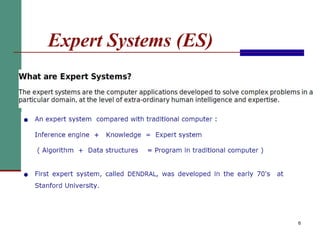
Expert Systems (ES)
7
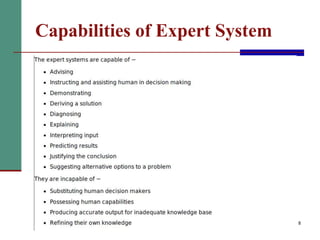
Capabilities of Expert System
8
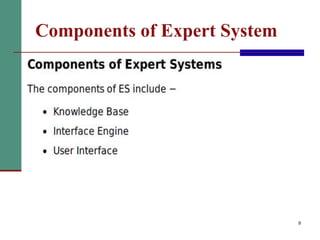
Components of Expert System
9
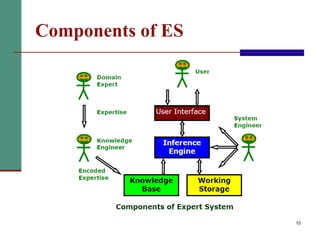
Components of ES
10
11
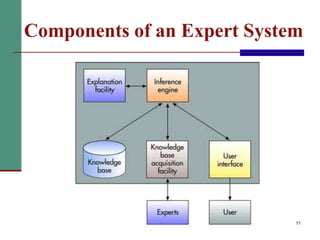
Components of an Expert System
12
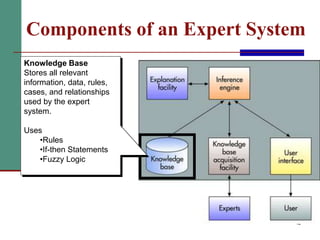
Components of an Expert System
Knowledge Base
Stores all relevant
information, data, rules,
cases, and relationships
used by the expert
system.
Uses
•Rules
•If-then Statements
•Fuzzy Logic
13
The Knowledge Base
 Stores all relevant information, data, rules, cases, and
relationships used by the expert system
 Assembling human experts
 Use of fuzzy logic
 A special research area in computer science that allows
shades of gray and does not require everything to be
simple black/white, yes/no, or true/false
 Use of rules
 Conditional statement that links given conditions to actions
or outcomes
 E.g. if-then statements
 Use of cases
14
15
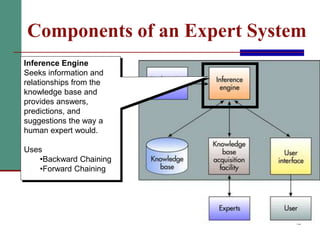
Inference Engine
Seeks information and
relationships from the
knowledge base and
provides answers,
predictions, and
suggestions the way a
human expert would.
Uses
•Backward Chaining
•Forward Chaining
Components of an Expert System
16
The Inference Engine
 Seeks information and relationships from the knowledge
base and provides answers, predictions, and
suggestions the way a human expert would
 Forward chaining(Goal driven Reasoning)
 Starting with the facts and working forwards to the
conclusions
 Backward chaining(Data driven Reasoning )
 Starting with conclusions and working backward to the
supporting facts
17
Figure 7.4: Rules for a Credit Application
The Inference Engine
To recommend a solution, the interface engine
uses the following strategies −
 Forward Chaining
 Backward Chaining
18
19
20
21
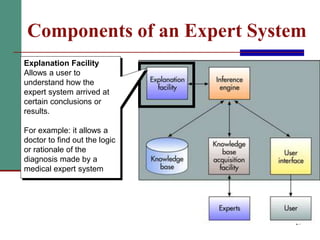
Components of an Expert System
Explanation Facility
Allows a user to
understand how the
expert system arrived at
certain conclusions or
results.
For example: it allows a
doctor to find out the logic
or rationale of the
diagnosis made by a
medical expert system
22
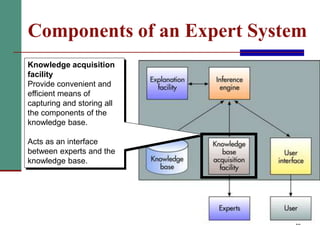
Components of an Expert System
Knowledge acquisition
facility
Provide convenient and
efficient means of
capturing and storing all
the components of the
knowledge base.
Acts as an interface
between experts and the
knowledge base.
23
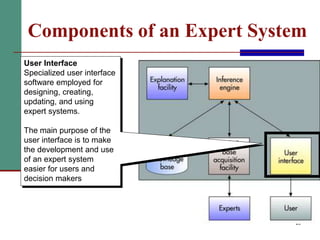
Components of an Expert System
User Interface
Specialized user interface
software employed for
designing, creating,
updating, and using
expert systems.
The main purpose of the
user interface is to make
the development and use
of an expert system
easier for users and
decision makers
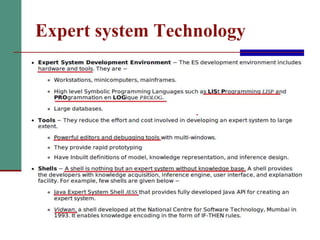
Expert system Technology
24
25
Expert Systems Development
Figure 7.6: Steps in the Expert System Development
Process
26
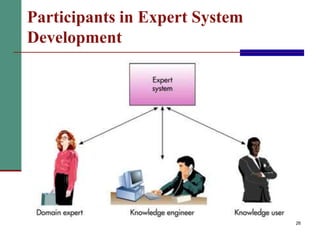
Participants in Expert System
Development
27
Participants in Expert System
Development
 Domain
 The area of knowledge addressed by the expert
system
 Domain Expert
 The individual or group who has the expertise or
knowledge one is trying to capture in the expert system
 Knowledge Engineer
 An individual who has training or expertise in the
design, development, implementation, and
maintenance of an expert system
 Knowledge User
 The individual or group who uses and benefits from the
expert system
Application of ES
28
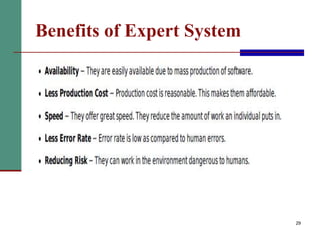
Benefits of Expert System
29
30
Limitations of an Expert System
 Not widely used or tested
 Difficult to use
 Limited to relatively narrow problems
 Possibility of error
 Cannot refine its own knowledge
 Difficult to maintain
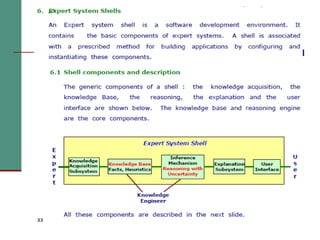
Expert System Shells
31
32
Expert System Shells
 The shell is a piece of software which contains
 the user interface,
 a format for declarative knowledge in the
knowledge base, and
 an inference engine.
 The knowledge engineer uses the shell to build
a system for a particular problem domain.
“A collection of software packages and tools used to
develop expert systems”
33
34
Components of an expert system
User
User
Inter
-
face
Explanation
system
Inference
engine
Knowledge
base editor
Case specific
data: Working
storage
Knowledge base
Expert system shell
Expert System Shells
 In the 1980s, expert system "shells" were introduced
and supported the development of expert systems in a
wide variety of application areas.
 During the work ,a large amount of LISP code was
written for different modules:
 Knowledge base
 Inference engine
 Working memory
 Explanation facility
 End-user interface
.
36
MYCIN
37
MYCIN
 MYCIN was an early expert system that used
artificial intelligence to identify bacteria
causing severe infections.
 recommend antibiotics, with the dosage
adjusted for patient's body weight
 The MYCIN system was also used for the
diagnosis of blood clotting diseases.
 MYCIN was developed over five or six years
in the early 1970s at Stanford University.
 It was written in Lisp 38
 MYCIN was a standalone system that required a user
to enter all relevant information about a patient by
typing in responses to questions MYCIN posed.
 MYCIN operated using a fairly simple inference
engine, and a knowledge base of ~600 rules.
 It would query the physician running the program via
a long series of simple yes/no or textual questions.
39
40
Tasks and Domain
 Disease DIAGNOSIS and Therapy
SELECTION
 Advice for non-expert physicians with time
considerations and incomplete evidence on:
 Bacterial infections of the blood
 Expanded to meningitis and other ailments
 Meet time constraints of the medical field
41
MYCIN Architecture
42
Consultation System
 Performs Diagnosis
and Therapy Selection
 Control Structure
reads Static DB (rules)
and read/writes to
Dynamic DB (patient,
context)
 Linked to Explanations
 Terminal interface to
Physician
43
Consultation “Control
Structure”
 Goal-directed Backward-chaining Depth-first
Tree Search
 High-level Algorithm:
1. Determine if Patient has significant infection
2. Determine likely identity of significant organisms
3. Decide which drugs are potentially useful
4. Select best drug or coverage of drugs
44
Static Database
 Rules
 Meta-Rules
 Templates
 Rule Properties
 Context Properties
 Fed from Knowledge
Acquisition System
45
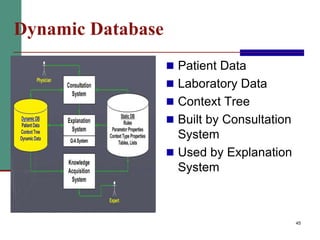
Dynamic Database
 Patient Data
 Laboratory Data
 Context Tree
 Built by Consultation
System
 Used by Explanation
System
46
Explanation System
 Provides reasoning
why a conclusion has
been made, or why a
question is being
asked
 Q-A Module
 Reasoning Status
Checker
DART
 DART is a joint project of the Heuristic Programming Project
and IBM that explores the application of artificial intelligence
techniques to the diagnosis of computer faults.
 The primary goal of the DART Project is to develop programs
that capture the special design knowledge and diagnostic
abilities of these experts and to make them available to field
engineers.
 The practical goal is the construction of an automated
diagnostician capable of pinpointing the functional units
responsible for observed malfunctions in arbitrary system
configurations.
47
 Dynamic Analysis and Replanning Tool
 DART uses intelligent agents to aid decision support system
 Give planners the ability to rapidly evaluate plans for logistical
feasibility.
 DART decreases the cost and time required to implement
decisions.
 The field engineer is familiar with the diagnostic equipment and
software testing.
 Access to information about the specific system hardware and
software configuration of the installation.
48
Xcon
 The R1 (internally called XCON, for eXpert CONfigurer) program was a
production rule based system written in OPS5 by John P. McDermott of
CMU in 1978.
 configuration of DEC VAX computer systems
 ordering of DEC's VAX computer systems by automatically selecting
the computer system components based on the customer's
requirements.
 XCON first went into use in 1980 in DEC's(Digital Equipment
Corporation) plant in Salem, New Hampshire. It eventually had about
2500 rules.
 By 1986, it had processed 80,000 orders, and achieved 9598%
accuracy.
 It was estimated to be saving DEC $25M a year by reducing the need
to give customers free components when technicians made errors, by
speeding the assembly process, and by increasing customer
satisfaction.
49
 XCON interacted with the sales person, asking critical questions before
printing out a coherent and workable system specification/order slip.
 XCON's success led DEC to rewrite XCON as XSELa version of XCON
intended for use by DEC's salesforce to aid a customer in properly
configuring their VAX.
50
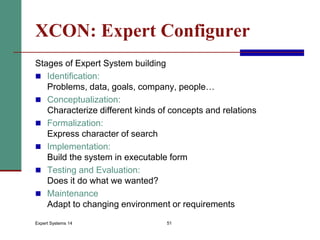
Expert Systems 14 51
XCON: Expert Configurer
Stages of Expert System building
 Identification:
Problems, data, goals, company, people…
 Conceptualization:
Characterize different kinds of concepts and relations
 Formalization:
Express character of search
 Implementation:
Build the system in executable form
 Testing and Evaluation:
Does it do what we wanted?
 Maintenance
Adapt to changing environment or requirements
Expert Systems 14 52
Phase 1: Identification
 DEC, Digital Equipment Corporation
Large computer manufacturer, started 1957
 Catalogue has 40,000 different parts
 Buyer (with Sales Rep) sends order, typically 100 parts
 Delivery and assembly by DEC personnel
 Too often, part collection does not allow installation
 Too often, installed computer does not meet requirements
 Remedy: Completely assemble and test system in factory
 Automate configuration problem;
attempts with procedural languages were unsuccessful
 XS approach started around 1980
Expert Systems 14 53
Phase 2: Conceptualization
Con .. what?
Expert Systems 14 54
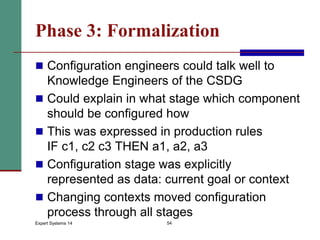
Phase 3: Formalization
 Configuration engineers could talk well to
Knowledge Engineers of the CSDG
 Could explain in what stage which component
should be configured how
 This was expressed in production rules
IF c1, c2 c3 THEN a1, a2, a3
 Configuration stage was explicitly
represented as data: current goal or context
 Changing contexts moved configuration
process through all stages
Expert Systems 14 55
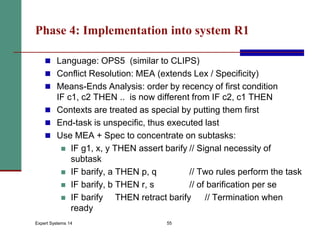
Phase 4: Implementation into system R1
 Language: OPS5 (similar to CLIPS)
 Conflict Resolution: MEA (extends Lex / Specificity)
 Means-Ends Analysis: order by recency of first condition
IF c1, c2 THEN .. is now different from IF c2, c1 THEN
 Contexts are treated as special by putting them first
 End-task is unspecific, thus executed last
 Use MEA + Spec to concentrate on subtasks:
 IF g1, x, y THEN assert barify // Signal necessity of
subtask
 IF barify, a THEN p, q // Two rules perform the task
 IF barify, b THEN r, s // of barification per se
 IF barify THEN retract barify // Termination when
ready
56
57
58
Important questions
PART-B
1.Expert system (ES)?architecture of expert system?
(components of Expert system)********
2.Expert system shell?***
3.MYCIN?**
4.DART?
5.XCON?
6.Knowledge acquisition?
7.Inference Engine? Methods?(forward chaining, back
ward chaining)
59
PART-A (2 marks)
1.Expert system(ES)?
2.Application of ES?
3.List advantage & disadvantage of ES?
4.List out the Components of ES?
5.Define inference engine?
6.What is knowledge base(KB)?
7.What is the role of expert engineer?
8.What is meant by knowledge acquisition?
9.Expert system shell?
10.MYCIN?
11.DART?
12.XCON?
60

Expert System Full Details

  • 1.
    Expert Systems 1.Expert Systems 2.Architectureof expert system 3.Roles of expert systems 4.Knowledge Acquisition 5.Meta knowledge 6.Typical expert systems- MYCIN,DART,XOON, Expert systems shell Topics:
  • 2.
    2 Artificial Intelligence AI  Theability of computers to duplicate the functions of the human brain
  • 3.
    3 Interesting Statistics  Ithas been estimated that computers that can exhibit humanlike intelligence (including musical and artistic aptitude, creativity, physical movement physically, and emotional responsiveness) require processing power of 20 million billion calculations per second (by the year 2030?).
  • 4.
    4 The Difference BetweenNatural & Artificial Intelligence Attributes Human Machine Use Sensors High Low Creativity and Imagination High Low Learn from Experience High Low Adaptability High Low Access external information High Low Make complex calculations Low High Transfer information Low High
  • 5.
    5 The Major Branchesof AI(application of AI)
  • 6.
  • 7.
  • 8.
  • 9.
  • 10.
  • 11.
    11 Components of anExpert System
  • 12.
    12 Components of anExpert System Knowledge Base Stores all relevant information, data, rules, cases, and relationships used by the expert system. Uses •Rules •If-then Statements •Fuzzy Logic
  • 13.
    13 The Knowledge Base Stores all relevant information, data, rules, cases, and relationships used by the expert system  Assembling human experts  Use of fuzzy logic  A special research area in computer science that allows shades of gray and does not require everything to be simple black/white, yes/no, or true/false  Use of rules  Conditional statement that links given conditions to actions or outcomes  E.g. if-then statements  Use of cases
  • 14.
  • 15.
    15 Inference Engine Seeks informationand relationships from the knowledge base and provides answers, predictions, and suggestions the way a human expert would. Uses •Backward Chaining •Forward Chaining Components of an Expert System
  • 16.
    16 The Inference Engine Seeks information and relationships from the knowledge base and provides answers, predictions, and suggestions the way a human expert would  Forward chaining(Goal driven Reasoning)  Starting with the facts and working forwards to the conclusions  Backward chaining(Data driven Reasoning )  Starting with conclusions and working backward to the supporting facts
  • 17.
    17 Figure 7.4: Rulesfor a Credit Application The Inference Engine
  • 18.
    To recommend asolution, the interface engine uses the following strategies −  Forward Chaining  Backward Chaining 18
  • 19.
  • 20.
  • 21.
    21 Components of anExpert System Explanation Facility Allows a user to understand how the expert system arrived at certain conclusions or results. For example: it allows a doctor to find out the logic or rationale of the diagnosis made by a medical expert system
  • 22.
    22 Components of anExpert System Knowledge acquisition facility Provide convenient and efficient means of capturing and storing all the components of the knowledge base. Acts as an interface between experts and the knowledge base.
  • 23.
    23 Components of anExpert System User Interface Specialized user interface software employed for designing, creating, updating, and using expert systems. The main purpose of the user interface is to make the development and use of an expert system easier for users and decision makers
  • 24.
  • 25.
    25 Expert Systems Development Figure7.6: Steps in the Expert System Development Process
  • 26.
    26 Participants in ExpertSystem Development
  • 27.
    27 Participants in ExpertSystem Development  Domain  The area of knowledge addressed by the expert system  Domain Expert  The individual or group who has the expertise or knowledge one is trying to capture in the expert system  Knowledge Engineer  An individual who has training or expertise in the design, development, implementation, and maintenance of an expert system  Knowledge User  The individual or group who uses and benefits from the expert system
  • 28.
  • 29.
  • 30.
    30 Limitations of anExpert System  Not widely used or tested  Difficult to use  Limited to relatively narrow problems  Possibility of error  Cannot refine its own knowledge  Difficult to maintain
  • 31.
  • 32.
    32 Expert System Shells The shell is a piece of software which contains  the user interface,  a format for declarative knowledge in the knowledge base, and  an inference engine.  The knowledge engineer uses the shell to build a system for a particular problem domain. “A collection of software packages and tools used to develop expert systems”
  • 33.
  • 34.
    34 Components of anexpert system User User Inter - face Explanation system Inference engine Knowledge base editor Case specific data: Working storage Knowledge base Expert system shell
  • 35.
    Expert System Shells In the 1980s, expert system "shells" were introduced and supported the development of expert systems in a wide variety of application areas.  During the work ,a large amount of LISP code was written for different modules:  Knowledge base  Inference engine  Working memory  Explanation facility  End-user interface .
  • 36.
  • 37.
  • 38.
    MYCIN  MYCIN wasan early expert system that used artificial intelligence to identify bacteria causing severe infections.  recommend antibiotics, with the dosage adjusted for patient's body weight  The MYCIN system was also used for the diagnosis of blood clotting diseases.  MYCIN was developed over five or six years in the early 1970s at Stanford University.  It was written in Lisp 38
  • 39.
     MYCIN wasa standalone system that required a user to enter all relevant information about a patient by typing in responses to questions MYCIN posed.  MYCIN operated using a fairly simple inference engine, and a knowledge base of ~600 rules.  It would query the physician running the program via a long series of simple yes/no or textual questions. 39
  • 40.
    40 Tasks and Domain Disease DIAGNOSIS and Therapy SELECTION  Advice for non-expert physicians with time considerations and incomplete evidence on:  Bacterial infections of the blood  Expanded to meningitis and other ailments  Meet time constraints of the medical field
  • 41.
  • 42.
    42 Consultation System  PerformsDiagnosis and Therapy Selection  Control Structure reads Static DB (rules) and read/writes to Dynamic DB (patient, context)  Linked to Explanations  Terminal interface to Physician
  • 43.
    43 Consultation “Control Structure”  Goal-directedBackward-chaining Depth-first Tree Search  High-level Algorithm: 1. Determine if Patient has significant infection 2. Determine likely identity of significant organisms 3. Decide which drugs are potentially useful 4. Select best drug or coverage of drugs
  • 44.
    44 Static Database  Rules Meta-Rules  Templates  Rule Properties  Context Properties  Fed from Knowledge Acquisition System
  • 45.
    45 Dynamic Database  PatientData  Laboratory Data  Context Tree  Built by Consultation System  Used by Explanation System
  • 46.
    46 Explanation System  Providesreasoning why a conclusion has been made, or why a question is being asked  Q-A Module  Reasoning Status Checker
  • 47.
    DART  DART isa joint project of the Heuristic Programming Project and IBM that explores the application of artificial intelligence techniques to the diagnosis of computer faults.  The primary goal of the DART Project is to develop programs that capture the special design knowledge and diagnostic abilities of these experts and to make them available to field engineers.  The practical goal is the construction of an automated diagnostician capable of pinpointing the functional units responsible for observed malfunctions in arbitrary system configurations. 47
  • 48.
     Dynamic Analysisand Replanning Tool  DART uses intelligent agents to aid decision support system  Give planners the ability to rapidly evaluate plans for logistical feasibility.  DART decreases the cost and time required to implement decisions.  The field engineer is familiar with the diagnostic equipment and software testing.  Access to information about the specific system hardware and software configuration of the installation. 48
  • 49.
    Xcon  The R1(internally called XCON, for eXpert CONfigurer) program was a production rule based system written in OPS5 by John P. McDermott of CMU in 1978.  configuration of DEC VAX computer systems  ordering of DEC's VAX computer systems by automatically selecting the computer system components based on the customer's requirements.  XCON first went into use in 1980 in DEC's(Digital Equipment Corporation) plant in Salem, New Hampshire. It eventually had about 2500 rules.  By 1986, it had processed 80,000 orders, and achieved 9598% accuracy.  It was estimated to be saving DEC $25M a year by reducing the need to give customers free components when technicians made errors, by speeding the assembly process, and by increasing customer satisfaction. 49
  • 50.
     XCON interactedwith the sales person, asking critical questions before printing out a coherent and workable system specification/order slip.  XCON's success led DEC to rewrite XCON as XSELa version of XCON intended for use by DEC's salesforce to aid a customer in properly configuring their VAX. 50
  • 51.
    Expert Systems 1451 XCON: Expert Configurer Stages of Expert System building  Identification: Problems, data, goals, company, people…  Conceptualization: Characterize different kinds of concepts and relations  Formalization: Express character of search  Implementation: Build the system in executable form  Testing and Evaluation: Does it do what we wanted?  Maintenance Adapt to changing environment or requirements
  • 52.
    Expert Systems 1452 Phase 1: Identification  DEC, Digital Equipment Corporation Large computer manufacturer, started 1957  Catalogue has 40,000 different parts  Buyer (with Sales Rep) sends order, typically 100 parts  Delivery and assembly by DEC personnel  Too often, part collection does not allow installation  Too often, installed computer does not meet requirements  Remedy: Completely assemble and test system in factory  Automate configuration problem; attempts with procedural languages were unsuccessful  XS approach started around 1980
  • 53.
    Expert Systems 1453 Phase 2: Conceptualization Con .. what?
  • 54.
    Expert Systems 1454 Phase 3: Formalization  Configuration engineers could talk well to Knowledge Engineers of the CSDG  Could explain in what stage which component should be configured how  This was expressed in production rules IF c1, c2 c3 THEN a1, a2, a3  Configuration stage was explicitly represented as data: current goal or context  Changing contexts moved configuration process through all stages
  • 55.
    Expert Systems 1455 Phase 4: Implementation into system R1  Language: OPS5 (similar to CLIPS)  Conflict Resolution: MEA (extends Lex / Specificity)  Means-Ends Analysis: order by recency of first condition IF c1, c2 THEN .. is now different from IF c2, c1 THEN  Contexts are treated as special by putting them first  End-task is unspecific, thus executed last  Use MEA + Spec to concentrate on subtasks:  IF g1, x, y THEN assert barify // Signal necessity of subtask  IF barify, a THEN p, q // Two rules perform the task  IF barify, b THEN r, s // of barification per se  IF barify THEN retract barify // Termination when ready
  • 56.
  • 57.
  • 58.
  • 59.
    Important questions PART-B 1.Expert system(ES)?architecture of expert system? (components of Expert system)******** 2.Expert system shell?*** 3.MYCIN?** 4.DART? 5.XCON? 6.Knowledge acquisition? 7.Inference Engine? Methods?(forward chaining, back ward chaining) 59
  • 60.
    PART-A (2 marks) 1.Expertsystem(ES)? 2.Application of ES? 3.List advantage & disadvantage of ES? 4.List out the Components of ES? 5.Define inference engine? 6.What is knowledge base(KB)? 7.What is the role of expert engineer? 8.What is meant by knowledge acquisition? 9.Expert system shell? 10.MYCIN? 11.DART? 12.XCON? 60