Your Business on Facebook®Goals and Strategies Behind Your Facebook Business PageThomas Peroutka  |  The Berry Company  |  2011
2  ::  Facebook and Your BusinessAGENDA____________________________________________________________________________________________________________________________________________What is Facebook?Why should you care?Quick Vocabulary LessonMarketing Goals for Facebook---Personal vs. Business AccountsA Home TourStep by StepPrivate PartsBusiness SetupPromoting Your PageAdvertising on FacebookFB EdgeRank---Measuring SuccessBest Practices
3  ::  Facebook and Your BusinessWhat is Facebook?____________________________________________________________________________________________________________________________________________At this point, you have heard of social media and inbound marketing and how they are increasingly important assets for businesses to get found by and engage with potential buyers on the web. FACEBOOK IS NOT…an evil time-waster,
a community just for younger generations,
irrelevant for marketersIt is a tool for connecting people with those around them. And, as with any social media tool, marketers have an opportunity to use Facebook to expand their online footprint and directly engage with customers and prospects.
4  ::  Facebook and Your BusinessWhat is Facebook?____________________________________________________________________________________________________________________________________________FACEBOOK CAN BE …difficult to navigate
quite a feat to incorporate into a larger media strategy
overwhelming and time consuming---But, armed with the right knowledge and metrics, it is possible. We will walk you through what you need to know to get started with using Facebook for marketing to drive real business results.
5  ::  Facebook and Your BusinessWhat is Facebook?____________________________________________________________________________________________________________________________________________FACEBOOK IS …A social network for connecting people with those around them … friends, family, coworkers, or simply others with similar interests. Now 7 years old. Started in 2004 as a closed community for college students (requiring users to sign up with a valid university email address) but has since expanded beyond that to schools, corporations, and any user across the world. Connecting users and allowing them to share information in a variety of ways.
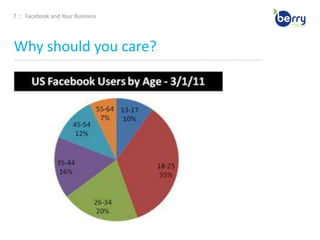
6  ::  Facebook and Your BusinessWhy should you care?____________________________________________________________________________________________________________________________________________FACEBOOK IS …Currently populated by over 750 million active users and growing. The 2nd most popular website in the world (behind Google) in terms of unique visitors, and the most popular social network overall. Tens of thousands of work-related, collegiate, and high school networks. Approximately 2/3’s of U.S. Facebook users are outside of the college demoUsers age 26 - 64 make up more than half of Facebook’s US user base. Expanding far beyond, and you’d be hard-pressed to find a demographic not yet represented among Facebook’s750 million users worldwide.
7  ::  Facebook and Your BusinessWhy should you care?____________________________________________________________________________________________________________________________________________
8  ::  Facebook and Your BusinessCheck Your Vocab____________________________________________________________________________________________________________________________________________Application: a program that allows users to share content and interact with other users EdgeRank – an algorithm used by Facebook to determine what content gets shown in users‟ News Feeds (more on this later) Fan – Facebook users who choose to “Like” and become a “fan” of an organization‟s page Friend – 1.) (n) personal connection on Facebook; 2.) (v) to add a Facebook user as a friend Friend List – organized groupings of friends Like(s) – 1. (v) within Facebook, to like a business Page means you’ve become a fan of that page; 2. (v) within Facebook, to like others or their actions 3. (n) the number of users who have liked your page; 4. (n) outside of Facebook, to like something using that has installed the Facebook like button Group – a collection of Facebook users with a common interest; any Facebook user can create and join a Facebook group Network – an association of Facebook users based on a school or workplace News Feed – an aggregation of one‟s friends‟ wall posts published on a user‟s Facebook homepage Page – official presence to share information and interact with fans on Facebook Profile – presence for individuals to share and interact with friends and organizations on Facebook Wall – the core of a profile or page that aggregates new content, including posted items (e.g. status updates) and recent actions
9  ::  Facebook and Your BusinessWhat are my goals?____________________________________________________________________________________________________________________________________________I WANT TO …Get found by people who are searching for my products or services
Connect and engage with current and potential customers
Create a community around your business
Promote other content you create including webinars, blog articles …
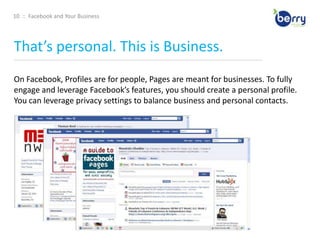
Generate leads for your business 10  ::  Facebook and Your BusinessThat’s personal. This is Business.____________________________________________________________________________________________________________________________________________On Facebook, Profiles are for people, Pages are meant for businesses. To fully engage and leverage Facebook’s features, you should create a personal profile. You can leverage privacy settings to balance business and personal contacts.
11  ::  Facebook and Your BusinessThat’s personal. This is Business.____________________________________________________________________________________________________________________________________________KEY DIFFERENCES …Pages allow you to designate multiple administrators to help manage the account or maintain ultimate ownership control of that page
Pages default to public, and are now ranking in Facebook and public SERPs.
Pages are split into different categories (local businesses, brands, musicians) that help you get listed in more relevant search results.
Personal profiles have friends, which require mutual acceptance, whereas anyone can become a fan of your Page without needing admin approval. 12  ::  Facebook and Your BusinessThat’s personal. This is Business.____________________________________________________________________________________________________________________________________________Worried about privacy? Facebook is very flexible in letting you control your exposure on Facebook. We’ll discuss how to customize your privacy settings to control who sees which parts of your profile so you can safely engage on Facebook with both personal and business contacts.
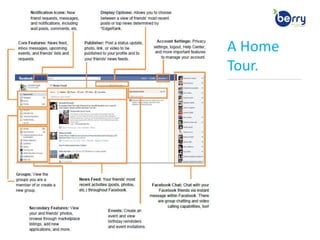
13  ::  Facebook and Your BusinessA Home Tour.__________________________________________
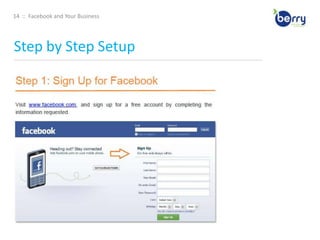
14  ::  Facebook and Your BusinessStep by Step Setup____________________________________________________________________________________________________________________________________________
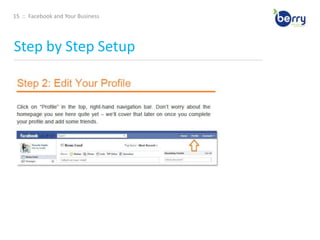
15  ::  Facebook and Your BusinessStep by Step Setup____________________________________________________________________________________________________________________________________________
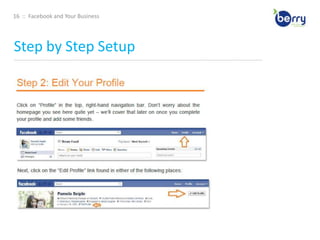
16  ::  Facebook and Your BusinessStep by Step Setup____________________________________________________________________________________________________________________________________________
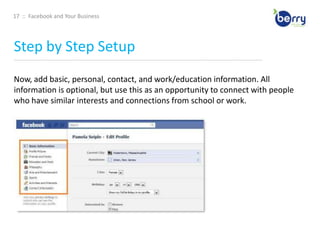
17  ::  Facebook and Your BusinessStep by Step Setup____________________________________________________________________________________________________________________________________________Now, add basic, personal, contact, and work/education information. All information is optional, but use this as an opportunity to connect with people who have similar interests and connections from school or work.
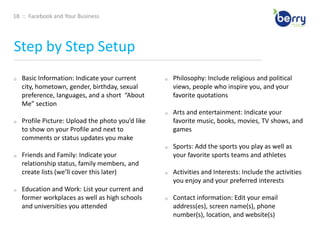
18  ::  Facebook and Your BusinessStep by Step Setup____________________________________________________________________________________________________________________________________________Basic Information: Indicate your current city, hometown, gender, birthday, sexual preference, languages, and a short  “About Me” section
Profile Picture: Upload the photo you’d like to show on your Profile and next to comments or status updates you make
Friends and Family: Indicate your relationship status, family members, and create lists (we’ll cover this later)
Education and Work: List your current and former workplaces as well as high schools and universities you attended
Philosophy: Include religious and political views, people who inspire you, and your favorite quotations
Arts and entertainment: Indicate your favorite music, books, movies, TV shows, and games
Sports: Add the sports you play as well as your favorite sports teams and athletes
Activities and Interests: Include the activities you enjoy and your preferred interests
Contact information: Edit your email address(es), screen name(s), phone number(s), location, and website(s) 19  ::  Facebook and Your BusinessStep by Step Setup____________________________________________________________________________________________________________________________________________
20  ::  Facebook and Your BusinessStep by Step Setup____________________________________________________________________________________________________________________________________________
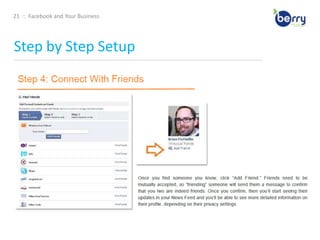
21  ::  Facebook and Your BusinessStep by Step Setup____________________________________________________________________________________________________________________________________________
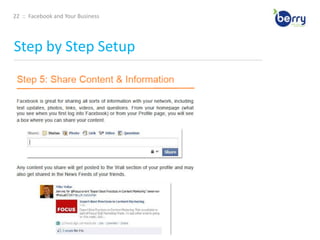
22  ::  Facebook and Your BusinessStep by Step Setup____________________________________________________________________________________________________________________________________________
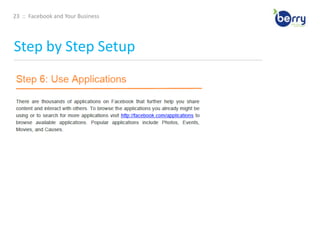
23  ::  Facebook and Your BusinessStep by Step Setup____________________________________________________________________________________________________________________________________________
24  ::  Facebook and Your BusinessPrivate Parts____________________________________________________________________________________________________________________________________________Social media is about establishing and building relationships, whether personal or business. In many cases, you may find some connections blur the lines. It is important to be transparent and authentic when using social media to market a business. People like to connect with people, not faceless brands. Furthermore, it is these personal connections that will lead to business, referrals, and word of mouth marketing for your company.
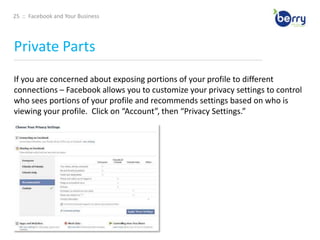
25  ::  Facebook and Your BusinessPrivate Parts____________________________________________________________________________________________________________________________________________If you are concerned about exposing portions of your profile to different connections – Facebook allows you to customize your privacy settings to control who sees portions of your profile and recommends settings based on who is viewing your profile. Click on “Account”, then “Privacy Settings.”
26  ::  Facebook and Your BusinessPrivate Parts____________________________________________________________________________________________________________________________________________Visibility of every aspect of your profile (photos, contact information, education information) can be controlled via the Profile privacy settings. You can set each section to be viewable by:Everyone
Friends of Friends
Friends Only
Custom: Customize who (which networks, friend lists, or specific friends) can or cannot access a portion of your profile. 27  ::  Facebook and Your BusinessSetting Up Your Business ____________________________________________________________________________________________________________________________________________A Page is similar to a Profile except that it is, by default, public, and users can Like and become a “fan” of your Page without first requiring approval from the Page’s administrators. Creating a Page is completely free but will require your time to build and maintain.
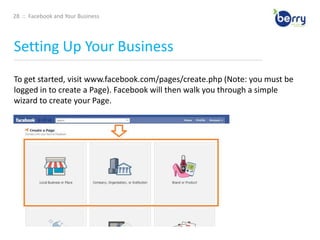
28  ::  Facebook and Your BusinessSetting Up Your Business ____________________________________________________________________________________________________________________________________________To get started, visit www.facebook.com/pages/create.php (Note: you must be logged in to create a Page). Facebook will then walk you through a simple wizard to create your Page.
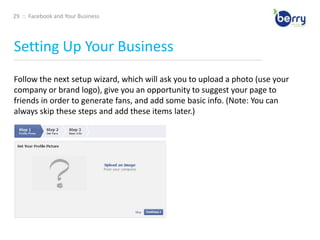
29  ::  Facebook and Your BusinessSetting Up Your Business ____________________________________________________________________________________________________________________________________________Follow the next setup wizard, which will ask you to upload a photo (use your company or brand logo), give you an opportunity to suggest your page to friends in order to generate fans, and add some basic info. (Note: You can always skip these steps and add these items later.)
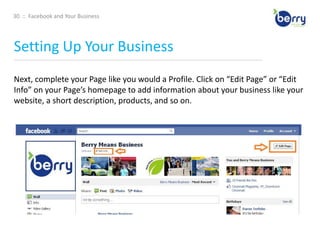
30  ::  Facebook and Your BusinessSetting Up Your Business ____________________________________________________________________________________________________________________________________________Next, complete your Page like you would a Profile. Click on “Edit Page” or “Edit Info” on your Page’s homepage to add information about your business like your website, a short description, products, and so on.
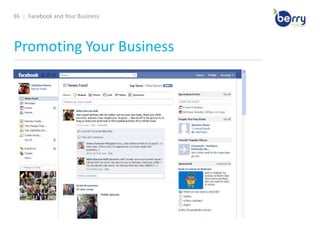
31  ::  Facebook and Your BusinessPromoting Your Business ____________________________________________________________________________________________________________________________________________Now that you’ve built your Page, you need to focus on attracting some fans. Here are a few ideas to get you started. Create an engaging Page Use applications like the discussion board and YouTube video box to add more interesting and engaging content to your Page. Give users a reason to become a fan of your Page and engage with you. More advanced Facebook users can add custom pages to their Page using iFrames. 32  ::  Facebook and Your BusinessPromoting Your Business ____________________________________________________________________________________________________________________________________________Now that you’ve built your Page, you need to focus on attracting some fans. Here are a few ideas to get you started. Leverage the viral nature of Facebook – the News Feed. The added benefit of creating an engaging page is that every time a fan engages with your page – from becoming a fan to posting a comment to attending an event – that activity is published to their “News Feed” which can be seen by friends on Facebook. When a user first logs into Facebook, they see a feed of their friends‟ recent activity, so the activity of your fans on your Page gets shared with a greater network, giving your business more visibility. 33  ::  Facebook and Your BusinessPromoting Your Business ____________________________________________________________________________________________________________________________________________Now that you’ve built your Page, you need to focus on attracting some fans. Here are a few ideas to get you started. Draw on your existing network. You most likely already have email subscribers and blog readers – so make sure they know they can now become a fan of your business on Facebook. Consider emailing your opt-in mailing list, including a link to your page in your email signature, blogging about your Facebook page, and posting a link or badge to your Page on your website or blog. 34  ::  Facebook and Your BusinessPromoting Your Business ____________________________________________________________________________________________________________________________________________Now that you’ve built your Page, you need to focus on attracting some fans. Here are a few ideas to get you started. Make your Page publicly searchable. By default, your Page will be public so it can get indexed by search engines and give you the opportunity to drive organic search traffic to your Page. If you don‟t notice your Page showing up in searches, make sure you have set it to be publicly indexed and searchable. Go to “Edit Page,” click “Manage Permissions” and make sure “Page Visibility” box is un-checked. This will make it publicly visible.35  ::  Facebook and Your BusinessPromoting Your Business ____________________________________________________________________________________________________________________________________________Now that you’ve built your Page, you need to focus on attracting some fans. Here are a few ideas to get you started. Use Facebook Ads for an extra push. Facebook ads allow you to advertise a website or other properties on Facebook, including Pages, Groups, and Events. If you’re familiar with Google AdWords, the system for building and running ads on Facebook is very similar. A later section will dive deeper into how to setup and optimize Facebook Ads. 36  ::  Facebook and Your BusinessPromoting Your Business ____________________________________________________________________________________________________________________________________________
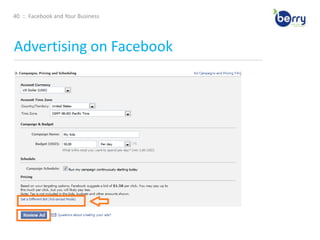
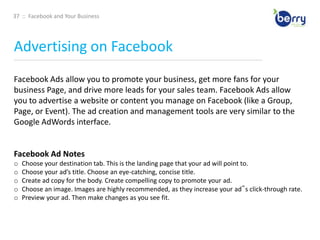
37  ::  Facebook and Your BusinessAdvertising on Facebook____________________________________________________________________________________________________________________________________________Facebook Ads allow you to promote your business, get more fans for your business Page, and drive more leads for your sales team. Facebook Ads allow you to advertise a website or content you manage on Facebook (like a Group, Page, or Event). The ad creation and management tools are very similar to the Google AdWords interface. Facebook Ad NotesChoose your destination tab. This is the landing page that your ad will point to.
Choose your ad’s title. Choose an eye-catching, concise title.
Create ad copy for the body. Create compelling copy to promote your ad.
Choose an image. Images are highly recommended, as they increase your ad‟s click-through rate.
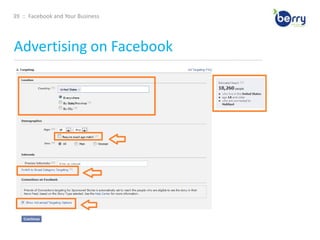
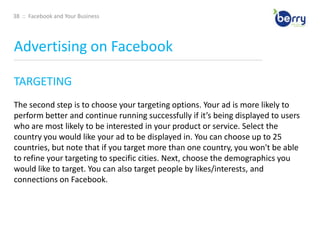
Preview your ad. Then make changes as you see fit. 38  ::  Facebook and Your BusinessAdvertising on Facebook____________________________________________________________________________________________________________________________________________TARGETINGThe second step is to choose your targeting options. Your ad is more likely to perform better and continue running successfully if it’s being displayed to users who are most likely to be interested in your product or service. Select the country you would like your ad to be displayed in. You can choose up to 25 countries, but note that if you target more than one country, you won't be able to refine your targeting to specific cities. Next, choose the demographics you would like to target. You can also target people by likes/interests, and connections on Facebook.

Your Business on Facebook

  • 1.
    Your Business onFacebook®Goals and Strategies Behind Your Facebook Business PageThomas Peroutka | The Berry Company | 2011
  • 2.
    2 :: Facebook and Your BusinessAGENDA____________________________________________________________________________________________________________________________________________What is Facebook?Why should you care?Quick Vocabulary LessonMarketing Goals for Facebook---Personal vs. Business AccountsA Home TourStep by StepPrivate PartsBusiness SetupPromoting Your PageAdvertising on FacebookFB EdgeRank---Measuring SuccessBest Practices
  • 3.
    3 :: Facebook and Your BusinessWhat is Facebook?____________________________________________________________________________________________________________________________________________At this point, you have heard of social media and inbound marketing and how they are increasingly important assets for businesses to get found by and engage with potential buyers on the web. FACEBOOK IS NOT…an evil time-waster,
  • 4.
    a community justfor younger generations,
  • 5.
    irrelevant for marketersItis a tool for connecting people with those around them. And, as with any social media tool, marketers have an opportunity to use Facebook to expand their online footprint and directly engage with customers and prospects.
  • 6.
    4 :: Facebook and Your BusinessWhat is Facebook?____________________________________________________________________________________________________________________________________________FACEBOOK CAN BE …difficult to navigate
  • 7.
    quite a featto incorporate into a larger media strategy
  • 8.
    overwhelming and timeconsuming---But, armed with the right knowledge and metrics, it is possible. We will walk you through what you need to know to get started with using Facebook for marketing to drive real business results.
  • 9.
    5 :: Facebook and Your BusinessWhat is Facebook?____________________________________________________________________________________________________________________________________________FACEBOOK IS …A social network for connecting people with those around them … friends, family, coworkers, or simply others with similar interests. Now 7 years old. Started in 2004 as a closed community for college students (requiring users to sign up with a valid university email address) but has since expanded beyond that to schools, corporations, and any user across the world. Connecting users and allowing them to share information in a variety of ways.
  • 10.
    6 :: Facebook and Your BusinessWhy should you care?____________________________________________________________________________________________________________________________________________FACEBOOK IS …Currently populated by over 750 million active users and growing. The 2nd most popular website in the world (behind Google) in terms of unique visitors, and the most popular social network overall. Tens of thousands of work-related, collegiate, and high school networks. Approximately 2/3’s of U.S. Facebook users are outside of the college demoUsers age 26 - 64 make up more than half of Facebook’s US user base. Expanding far beyond, and you’d be hard-pressed to find a demographic not yet represented among Facebook’s750 million users worldwide.
  • 11.
    7 :: Facebook and Your BusinessWhy should you care?____________________________________________________________________________________________________________________________________________
  • 12.
    8 :: Facebook and Your BusinessCheck Your Vocab____________________________________________________________________________________________________________________________________________Application: a program that allows users to share content and interact with other users EdgeRank – an algorithm used by Facebook to determine what content gets shown in users‟ News Feeds (more on this later) Fan – Facebook users who choose to “Like” and become a “fan” of an organization‟s page Friend – 1.) (n) personal connection on Facebook; 2.) (v) to add a Facebook user as a friend Friend List – organized groupings of friends Like(s) – 1. (v) within Facebook, to like a business Page means you’ve become a fan of that page; 2. (v) within Facebook, to like others or their actions 3. (n) the number of users who have liked your page; 4. (n) outside of Facebook, to like something using that has installed the Facebook like button Group – a collection of Facebook users with a common interest; any Facebook user can create and join a Facebook group Network – an association of Facebook users based on a school or workplace News Feed – an aggregation of one‟s friends‟ wall posts published on a user‟s Facebook homepage Page – official presence to share information and interact with fans on Facebook Profile – presence for individuals to share and interact with friends and organizations on Facebook Wall – the core of a profile or page that aggregates new content, including posted items (e.g. status updates) and recent actions
  • 13.
    9 :: Facebook and Your BusinessWhat are my goals?____________________________________________________________________________________________________________________________________________I WANT TO …Get found by people who are searching for my products or services
  • 14.
    Connect and engagewith current and potential customers
  • 15.
    Create a communityaround your business
  • 16.
    Promote other contentyou create including webinars, blog articles …
  • 17.
    Generate leads foryour business 10 :: Facebook and Your BusinessThat’s personal. This is Business.____________________________________________________________________________________________________________________________________________On Facebook, Profiles are for people, Pages are meant for businesses. To fully engage and leverage Facebook’s features, you should create a personal profile. You can leverage privacy settings to balance business and personal contacts.
  • 18.
    11 :: Facebook and Your BusinessThat’s personal. This is Business.____________________________________________________________________________________________________________________________________________KEY DIFFERENCES …Pages allow you to designate multiple administrators to help manage the account or maintain ultimate ownership control of that page
  • 19.
    Pages default topublic, and are now ranking in Facebook and public SERPs.
  • 20.
    Pages are splitinto different categories (local businesses, brands, musicians) that help you get listed in more relevant search results.
  • 21.
    Personal profiles havefriends, which require mutual acceptance, whereas anyone can become a fan of your Page without needing admin approval. 12 :: Facebook and Your BusinessThat’s personal. This is Business.____________________________________________________________________________________________________________________________________________Worried about privacy? Facebook is very flexible in letting you control your exposure on Facebook. We’ll discuss how to customize your privacy settings to control who sees which parts of your profile so you can safely engage on Facebook with both personal and business contacts.
  • 22.
    13 :: Facebook and Your BusinessA Home Tour.__________________________________________
  • 23.
    14 :: Facebook and Your BusinessStep by Step Setup____________________________________________________________________________________________________________________________________________
  • 24.
    15 :: Facebook and Your BusinessStep by Step Setup____________________________________________________________________________________________________________________________________________
  • 25.
    16 :: Facebook and Your BusinessStep by Step Setup____________________________________________________________________________________________________________________________________________
  • 26.
    17 :: Facebook and Your BusinessStep by Step Setup____________________________________________________________________________________________________________________________________________Now, add basic, personal, contact, and work/education information. All information is optional, but use this as an opportunity to connect with people who have similar interests and connections from school or work.
  • 27.
    18 :: Facebook and Your BusinessStep by Step Setup____________________________________________________________________________________________________________________________________________Basic Information: Indicate your current city, hometown, gender, birthday, sexual preference, languages, and a short “About Me” section
  • 28.
    Profile Picture: Uploadthe photo you’d like to show on your Profile and next to comments or status updates you make
  • 29.
    Friends and Family:Indicate your relationship status, family members, and create lists (we’ll cover this later)
  • 30.
    Education and Work:List your current and former workplaces as well as high schools and universities you attended
  • 31.
    Philosophy: Include religiousand political views, people who inspire you, and your favorite quotations
  • 32.
    Arts and entertainment:Indicate your favorite music, books, movies, TV shows, and games
  • 33.
    Sports: Add thesports you play as well as your favorite sports teams and athletes
  • 34.
    Activities and Interests:Include the activities you enjoy and your preferred interests
  • 35.
    Contact information: Edityour email address(es), screen name(s), phone number(s), location, and website(s) 19 :: Facebook and Your BusinessStep by Step Setup____________________________________________________________________________________________________________________________________________
  • 36.
    20 :: Facebook and Your BusinessStep by Step Setup____________________________________________________________________________________________________________________________________________
  • 37.
    21 :: Facebook and Your BusinessStep by Step Setup____________________________________________________________________________________________________________________________________________
  • 38.
    22 :: Facebook and Your BusinessStep by Step Setup____________________________________________________________________________________________________________________________________________
  • 39.
    23 :: Facebook and Your BusinessStep by Step Setup____________________________________________________________________________________________________________________________________________
  • 40.
    24 :: Facebook and Your BusinessPrivate Parts____________________________________________________________________________________________________________________________________________Social media is about establishing and building relationships, whether personal or business. In many cases, you may find some connections blur the lines. It is important to be transparent and authentic when using social media to market a business. People like to connect with people, not faceless brands. Furthermore, it is these personal connections that will lead to business, referrals, and word of mouth marketing for your company.
  • 41.
    25 :: Facebook and Your BusinessPrivate Parts____________________________________________________________________________________________________________________________________________If you are concerned about exposing portions of your profile to different connections – Facebook allows you to customize your privacy settings to control who sees portions of your profile and recommends settings based on who is viewing your profile. Click on “Account”, then “Privacy Settings.”
  • 42.
    26 :: Facebook and Your BusinessPrivate Parts____________________________________________________________________________________________________________________________________________Visibility of every aspect of your profile (photos, contact information, education information) can be controlled via the Profile privacy settings. You can set each section to be viewable by:Everyone
  • 43.
  • 44.
  • 45.
    Custom: Customize who(which networks, friend lists, or specific friends) can or cannot access a portion of your profile. 27 :: Facebook and Your BusinessSetting Up Your Business ____________________________________________________________________________________________________________________________________________A Page is similar to a Profile except that it is, by default, public, and users can Like and become a “fan” of your Page without first requiring approval from the Page’s administrators. Creating a Page is completely free but will require your time to build and maintain.
  • 46.
    28 :: Facebook and Your BusinessSetting Up Your Business ____________________________________________________________________________________________________________________________________________To get started, visit www.facebook.com/pages/create.php (Note: you must be logged in to create a Page). Facebook will then walk you through a simple wizard to create your Page.
  • 47.
    29 :: Facebook and Your BusinessSetting Up Your Business ____________________________________________________________________________________________________________________________________________Follow the next setup wizard, which will ask you to upload a photo (use your company or brand logo), give you an opportunity to suggest your page to friends in order to generate fans, and add some basic info. (Note: You can always skip these steps and add these items later.)
  • 48.
    30 :: Facebook and Your BusinessSetting Up Your Business ____________________________________________________________________________________________________________________________________________Next, complete your Page like you would a Profile. Click on “Edit Page” or “Edit Info” on your Page’s homepage to add information about your business like your website, a short description, products, and so on.
  • 49.
    31 :: Facebook and Your BusinessPromoting Your Business ____________________________________________________________________________________________________________________________________________Now that you’ve built your Page, you need to focus on attracting some fans. Here are a few ideas to get you started. Create an engaging Page Use applications like the discussion board and YouTube video box to add more interesting and engaging content to your Page. Give users a reason to become a fan of your Page and engage with you. More advanced Facebook users can add custom pages to their Page using iFrames. 32 :: Facebook and Your BusinessPromoting Your Business ____________________________________________________________________________________________________________________________________________Now that you’ve built your Page, you need to focus on attracting some fans. Here are a few ideas to get you started. Leverage the viral nature of Facebook – the News Feed. The added benefit of creating an engaging page is that every time a fan engages with your page – from becoming a fan to posting a comment to attending an event – that activity is published to their “News Feed” which can be seen by friends on Facebook. When a user first logs into Facebook, they see a feed of their friends‟ recent activity, so the activity of your fans on your Page gets shared with a greater network, giving your business more visibility. 33 :: Facebook and Your BusinessPromoting Your Business ____________________________________________________________________________________________________________________________________________Now that you’ve built your Page, you need to focus on attracting some fans. Here are a few ideas to get you started. Draw on your existing network. You most likely already have email subscribers and blog readers – so make sure they know they can now become a fan of your business on Facebook. Consider emailing your opt-in mailing list, including a link to your page in your email signature, blogging about your Facebook page, and posting a link or badge to your Page on your website or blog. 34 :: Facebook and Your BusinessPromoting Your Business ____________________________________________________________________________________________________________________________________________Now that you’ve built your Page, you need to focus on attracting some fans. Here are a few ideas to get you started. Make your Page publicly searchable. By default, your Page will be public so it can get indexed by search engines and give you the opportunity to drive organic search traffic to your Page. If you don‟t notice your Page showing up in searches, make sure you have set it to be publicly indexed and searchable. Go to “Edit Page,” click “Manage Permissions” and make sure “Page Visibility” box is un-checked. This will make it publicly visible.35 :: Facebook and Your BusinessPromoting Your Business ____________________________________________________________________________________________________________________________________________Now that you’ve built your Page, you need to focus on attracting some fans. Here are a few ideas to get you started. Use Facebook Ads for an extra push. Facebook ads allow you to advertise a website or other properties on Facebook, including Pages, Groups, and Events. If you’re familiar with Google AdWords, the system for building and running ads on Facebook is very similar. A later section will dive deeper into how to setup and optimize Facebook Ads. 36 :: Facebook and Your BusinessPromoting Your Business ____________________________________________________________________________________________________________________________________________
  • 50.
    37 :: Facebook and Your BusinessAdvertising on Facebook____________________________________________________________________________________________________________________________________________Facebook Ads allow you to promote your business, get more fans for your business Page, and drive more leads for your sales team. Facebook Ads allow you to advertise a website or content you manage on Facebook (like a Group, Page, or Event). The ad creation and management tools are very similar to the Google AdWords interface. Facebook Ad NotesChoose your destination tab. This is the landing page that your ad will point to.
  • 51.
    Choose your ad’stitle. Choose an eye-catching, concise title.
  • 52.
    Create ad copyfor the body. Create compelling copy to promote your ad.
  • 53.
    Choose an image.Images are highly recommended, as they increase your ad‟s click-through rate.
  • 54.
    Preview your ad.Then make changes as you see fit. 38 :: Facebook and Your BusinessAdvertising on Facebook____________________________________________________________________________________________________________________________________________TARGETINGThe second step is to choose your targeting options. Your ad is more likely to perform better and continue running successfully if it’s being displayed to users who are most likely to be interested in your product or service. Select the country you would like your ad to be displayed in. You can choose up to 25 countries, but note that if you target more than one country, you won't be able to refine your targeting to specific cities. Next, choose the demographics you would like to target. You can also target people by likes/interests, and connections on Facebook.