Facebook for Professionals
Nancy Beth Guptill & Maureen Kerr
Cool Tools for Social Media
Introductions
Agenda
● Introductions and how everyone is currently using
Facebook
● Benefits of using Facebook for business
● How Business Professionals use Facebook
● How to set up a Business Page and a Group –
difference between the two
● Communicating with Potential Clients
● Driving Traffic to Your Website
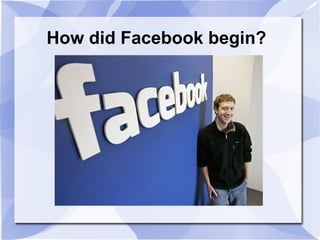
How did Facebook begin?
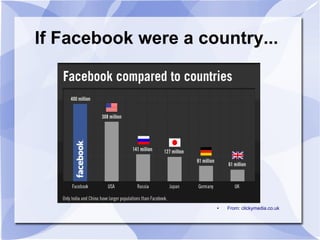
If Facebook were a country...
● From: clickymedia.co.uk
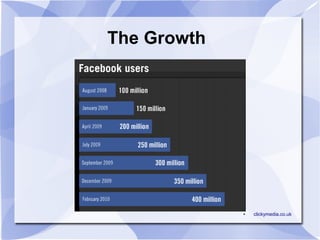
The Growth
● clickymedia.co.uk
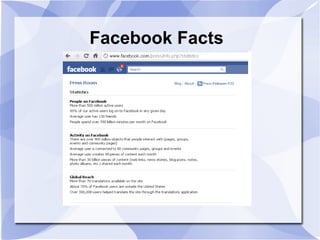
Facebook Facts
Using Facebook for Business
● Most popular social network with over 500 million users
● A tool for connecting people with those around them
● Provides the opportunity for users to experience the
personality of your brand online
● As a marketer, you can use Facebook to expand your
online footprint and engage with customers directly
●
The largest Mall in the world where your Business Page
is your 'store front' – if people like what they see, they'll
stop in
Defining A Facebook Strategy
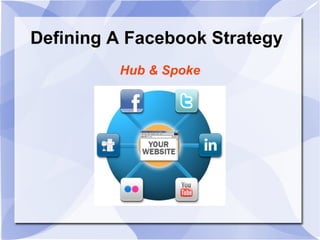
Hub & Spoke
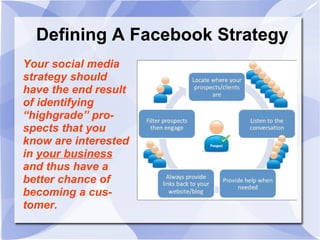
Your social media
strategy should
have the end result
of identifying
“highgrade” pro-
spects that you
know are interested
in your business
and thus have a
better chance of
becoming a cus-
tomer.
Defining A Facebook Strategy
Business Goals for Facebook
1) Get found by people who are searching for your
products or services
2) Connect and engage with current and potential
customers
3) Create a community around your business (a tribe
and hungry crowd)
4) Promote other content you create, including
webinars, blog articles, or other resources
5) ULTIMATE: Drive traffic to your website and blog,
sign up for your e-zine
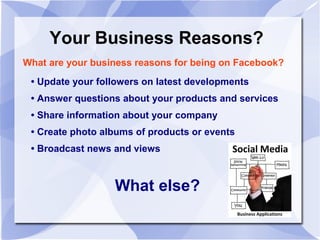
Your Business Reasons?
What are your business reasons for being on Facebook?
• Update your followers on latest developments
• Answer questions about your products and services
• Share information about your company
• Create photo albums of products or events
• Broadcast news and views
What else?
MORE Facebook Facts
● Facebook rules state a business can not set
itself up with a personal account
● You can only have one personal account,
with a limit of 5000 Friends
● You can segment your friends into lists; you
can have 100 lists, with 1000 friends per list
● A business MUST have a business page or
group page
● You can have unlimited business pages and
groups
Using Facebook as a Networking Tool
● Create a Professional Profile
● Create a 'Professional' Friend List
● Use Facebook Groups – join groups of interest,
create your own [Evaluate group based on recent news, wall
postings, member list, discussion boards]
● Post introductions on walls of groups and business
pages with link-backs
● Participate in 'discussions' and 'reviews'
● After meeting someone in person, ask to keep in
touch, find and friend them on Facebook
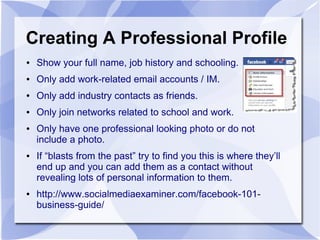
Creating A Professional Profile
● Show your full name, job history and schooling.
● Only add work-related email accounts / IM.
● Only add industry contacts as friends.
● Only join networks related to school and work.
● Only have one professional looking photo or do not
include a photo.
● If “blasts from the past” try to find you this is where they’ll
end up and you can add them as a contact without
revealing lots of personal information to them.
● http://www.socialmediaexaminer.com/facebook-101-
business-guide/
DEMONSTRATION
Need a Volunteer – Who Doesn't Have a
Facebook Account?
● Maureen will walk us through setting up a
professional business profile account
Creating 'Professional' Friend List
List Segmentation
● Go to 'Home' – click on 'Friends'
● Click 'Edit Friends'
● Click 'Create a List'
● Name your list
● Select contacts
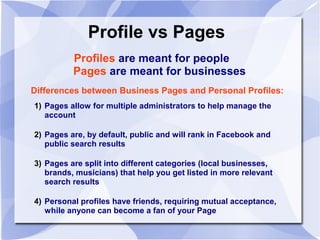
Profile vs Pages
Profiles are meant for people
Pages are meant for businesses
Differences between Business Pages and Personal Profiles:
1) Pages allow for multiple administrators to help manage the
account
2) Pages are, by default, public and will rank in Facebook and
public search results
3) Pages are split into different categories (local businesses,
brands, musicians) that help you get listed in more relevant
search results
4) Personal profiles have friends, requiring mutual acceptance,
while anyone can become a fan of your Page
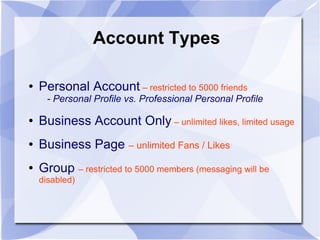
Account Types
● Personal Account – restricted to 5000 friends
- Personal Profile vs. Professional Personal Profile
● Business Account Only – unlimited likes, limited usage
● Business Page – unlimited Fans / Likes
● Group – restricted to 5000 members (messaging will be
disabled)
Business Page vs Group
GROUPS – organizing around ideas and topics
● Groups are for members to connect, share
and collaborate on a given topic or idea
● Groups are effectively used as a tool to
build awareness around various ideas
● Ability to make them 'exclusive' and 'by
invitation only'
Business Page vs Group
Business Page – entities and organizations
can broadcast information
● A tool for companies and public figures to
engage their fans and customers
● Facebook users can interact with
companies and public profiles they wish to
follow
● Build a community
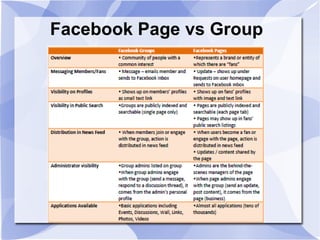
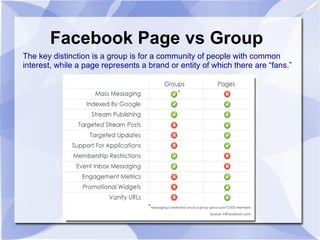
Facebook Page vs Group
The key distinction is a group is for a community of people with common
interest, while a page represents a brand or entity of which there are “fans.”
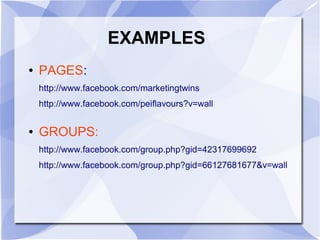
EXAMPLES
● PAGES:
http://www.facebook.com/marketingtwins
http://www.facebook.com/peiflavours?v=wall
● GROUPS:
http://www.facebook.com/group.php?gid=42317699692
http://www.facebook.com/group.php?gid=66127681677&v=wall
Setting Up A Business Page
Need a Volunteer – Who Doesn't have a
Business Page?
● Maureen will walk us through setting up a
Business Page
Page Functionality
- The Power of Sharing
- Creating Photo Albums
- Using ‘Notes
- Creating Events
- Monitor Your Page (analytics)
- Customizing using FBML (facebook
Markup Language)
Attracting Fans
Attracting Fans (Free)
- Suggest to friends
- Use the Power of Sharing
- Add page links everywhere in online and offline
promotions
- Add Facebook social plug-ins on blog and website
- Add FB widgets on Blog and webpage
- Include the Like and Share functionality on your
website and blog
- Include collecting names in offline business processes
Attracting Fans
Attract Fans – Paid Options
- Facebook Ads
- Run competitions and sweepstakes (Facebook has
Rules)
Communicating with Potential Clients
Best Way to Keep Your Page Active and Fans
Engaged:
● Share quality, relevant and meaningful content
● post frequently (2-3 times per day)
● Develop a content and posting strategy
● Have a mixture – links, photo's, questions, text,
video, audio, events, tags, tags (@)
How to Engage & Network
● Ask questions
● Run contests
● Have fans join SMS
● Use the words 'you' 'yours'
● Keep posts short
● Address fans by name
● Respond quickly
● Thank Fans
● Surprise Fans
● Use @ tagging
● Use discussion boards & testimonials
Pre-Workshop Questions
Features of Facebook Pages aside from
the basics
● Customize using FBML
● Custom Tabs
● Enhanced Walls
● Custom Welcome Messages
● Embedding audio, video, images
● Integrating Blog, Twitter, Email Sign up
Pre-Workshop Questions
How to Read Insight
Data and use as
page feedback?
Pre-Workshop Questions
Facebook Insights
● User Insights: records total Likes, active users,
demographics, and page views
● Interactions Insights: shows page activity,
such as posts, mentions, likes and comments.
● Post Insights: shows how many impressions
each story on their Page receives and what
percentage of those impressions result in action
(likes, comments, or clicks)
http://www.facebook.com/help/?page=914
Pre-Workshop Questions
Characteristics of a Great Page
● Content & Posting Mix
● Experiential – integrate audio, video, contests,
blog, twitter, etc.
● We'll email you a 'How To' guide with lots of great
information and tips
Pre-Workshop Questions
The ups and downs of
connecting it to my
twitter
Pre-Workshop Questions
Are there certain times
of the day that are
better to post?
Pre-Workshop Questions
Is there a way to update
your page via mobile
device with it coming
as a page post instead
of a person post?
Facebook  For  Professionals

Facebook For Professionals

  • 1.
    Facebook for Professionals NancyBeth Guptill & Maureen Kerr Cool Tools for Social Media
  • 2.
  • 3.
    Agenda ● Introductions andhow everyone is currently using Facebook ● Benefits of using Facebook for business ● How Business Professionals use Facebook ● How to set up a Business Page and a Group – difference between the two ● Communicating with Potential Clients ● Driving Traffic to Your Website
  • 4.
  • 5.
    If Facebook werea country... ● From: clickymedia.co.uk
  • 6.
  • 7.
  • 8.
    Using Facebook forBusiness ● Most popular social network with over 500 million users ● A tool for connecting people with those around them ● Provides the opportunity for users to experience the personality of your brand online ● As a marketer, you can use Facebook to expand your online footprint and engage with customers directly ● The largest Mall in the world where your Business Page is your 'store front' – if people like what they see, they'll stop in
  • 9.
    Defining A FacebookStrategy Hub & Spoke
  • 10.
    Your social media strategyshould have the end result of identifying “highgrade” pro- spects that you know are interested in your business and thus have a better chance of becoming a cus- tomer. Defining A Facebook Strategy
  • 11.
    Business Goals forFacebook 1) Get found by people who are searching for your products or services 2) Connect and engage with current and potential customers 3) Create a community around your business (a tribe and hungry crowd) 4) Promote other content you create, including webinars, blog articles, or other resources 5) ULTIMATE: Drive traffic to your website and blog, sign up for your e-zine
  • 12.
    Your Business Reasons? Whatare your business reasons for being on Facebook? • Update your followers on latest developments • Answer questions about your products and services • Share information about your company • Create photo albums of products or events • Broadcast news and views What else?
  • 13.
    MORE Facebook Facts ●Facebook rules state a business can not set itself up with a personal account ● You can only have one personal account, with a limit of 5000 Friends ● You can segment your friends into lists; you can have 100 lists, with 1000 friends per list ● A business MUST have a business page or group page ● You can have unlimited business pages and groups
  • 14.
    Using Facebook asa Networking Tool ● Create a Professional Profile ● Create a 'Professional' Friend List ● Use Facebook Groups – join groups of interest, create your own [Evaluate group based on recent news, wall postings, member list, discussion boards] ● Post introductions on walls of groups and business pages with link-backs ● Participate in 'discussions' and 'reviews' ● After meeting someone in person, ask to keep in touch, find and friend them on Facebook
  • 15.
    Creating A ProfessionalProfile ● Show your full name, job history and schooling. ● Only add work-related email accounts / IM. ● Only add industry contacts as friends. ● Only join networks related to school and work. ● Only have one professional looking photo or do not include a photo. ● If “blasts from the past” try to find you this is where they’ll end up and you can add them as a contact without revealing lots of personal information to them. ● http://www.socialmediaexaminer.com/facebook-101- business-guide/
  • 16.
    DEMONSTRATION Need a Volunteer– Who Doesn't Have a Facebook Account? ● Maureen will walk us through setting up a professional business profile account
  • 17.
    Creating 'Professional' FriendList List Segmentation ● Go to 'Home' – click on 'Friends' ● Click 'Edit Friends' ● Click 'Create a List' ● Name your list ● Select contacts
  • 18.
    Profile vs Pages Profilesare meant for people Pages are meant for businesses Differences between Business Pages and Personal Profiles: 1) Pages allow for multiple administrators to help manage the account 2) Pages are, by default, public and will rank in Facebook and public search results 3) Pages are split into different categories (local businesses, brands, musicians) that help you get listed in more relevant search results 4) Personal profiles have friends, requiring mutual acceptance, while anyone can become a fan of your Page
  • 19.
    Account Types ● PersonalAccount – restricted to 5000 friends - Personal Profile vs. Professional Personal Profile ● Business Account Only – unlimited likes, limited usage ● Business Page – unlimited Fans / Likes ● Group – restricted to 5000 members (messaging will be disabled)
  • 20.
    Business Page vsGroup GROUPS – organizing around ideas and topics ● Groups are for members to connect, share and collaborate on a given topic or idea ● Groups are effectively used as a tool to build awareness around various ideas ● Ability to make them 'exclusive' and 'by invitation only'
  • 21.
    Business Page vsGroup Business Page – entities and organizations can broadcast information ● A tool for companies and public figures to engage their fans and customers ● Facebook users can interact with companies and public profiles they wish to follow ● Build a community
  • 22.
  • 23.
    Facebook Page vsGroup The key distinction is a group is for a community of people with common interest, while a page represents a brand or entity of which there are “fans.”
  • 24.
  • 25.
    Setting Up ABusiness Page Need a Volunteer – Who Doesn't have a Business Page? ● Maureen will walk us through setting up a Business Page
  • 26.
    Page Functionality - ThePower of Sharing - Creating Photo Albums - Using ‘Notes - Creating Events - Monitor Your Page (analytics) - Customizing using FBML (facebook Markup Language)
  • 27.
    Attracting Fans Attracting Fans(Free) - Suggest to friends - Use the Power of Sharing - Add page links everywhere in online and offline promotions - Add Facebook social plug-ins on blog and website - Add FB widgets on Blog and webpage - Include the Like and Share functionality on your website and blog - Include collecting names in offline business processes
  • 28.
    Attracting Fans Attract Fans– Paid Options - Facebook Ads - Run competitions and sweepstakes (Facebook has Rules)
  • 29.
    Communicating with PotentialClients Best Way to Keep Your Page Active and Fans Engaged: ● Share quality, relevant and meaningful content ● post frequently (2-3 times per day) ● Develop a content and posting strategy ● Have a mixture – links, photo's, questions, text, video, audio, events, tags, tags (@)
  • 30.
    How to Engage& Network ● Ask questions ● Run contests ● Have fans join SMS ● Use the words 'you' 'yours' ● Keep posts short ● Address fans by name ● Respond quickly ● Thank Fans ● Surprise Fans ● Use @ tagging ● Use discussion boards & testimonials
  • 31.
  • 32.
    Features of FacebookPages aside from the basics ● Customize using FBML ● Custom Tabs ● Enhanced Walls ● Custom Welcome Messages ● Embedding audio, video, images ● Integrating Blog, Twitter, Email Sign up Pre-Workshop Questions
  • 33.
    How to ReadInsight Data and use as page feedback? Pre-Workshop Questions
  • 34.
    Facebook Insights ● UserInsights: records total Likes, active users, demographics, and page views ● Interactions Insights: shows page activity, such as posts, mentions, likes and comments. ● Post Insights: shows how many impressions each story on their Page receives and what percentage of those impressions result in action (likes, comments, or clicks) http://www.facebook.com/help/?page=914
  • 35.
    Pre-Workshop Questions Characteristics ofa Great Page ● Content & Posting Mix ● Experiential – integrate audio, video, contests, blog, twitter, etc. ● We'll email you a 'How To' guide with lots of great information and tips
  • 36.
    Pre-Workshop Questions The upsand downs of connecting it to my twitter
  • 37.
    Pre-Workshop Questions Are therecertain times of the day that are better to post?
  • 38.
    Pre-Workshop Questions Is therea way to update your page via mobile device with it coming as a page post instead of a person post?