Facebook Training Session North Ayrshire Council Dr. Jim Hamill  Alan Stevenson Vincent Hamill www.energise2-0.com March, 2011
Channel Development Facebook – An Overview Channel Set-Up and Terminology Integration Options  The ‘4Cs’ - Content Plan, Customers (Building the Community), Conversations, Conversions  Facebook Tools and Applications Performance Measurement
Facebook Overview
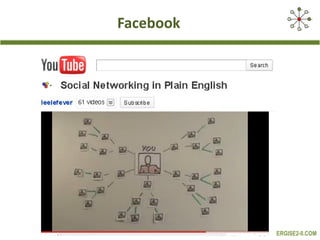
Facebook  –  what is it? Facebook  www.facebook.com  is a social network service and website launched in February 2004 Facebook allows users to do the following:  create profiles with photos, lists of personal interests, contact information, and other personal information. communicate with friends and other users through private or public messages and a chat feature.  Join, “like” or run common interest groups or pages (organized by business or brand) advertise across the platform Source: Wikipedia and The Authors
Facebook
How big is it?
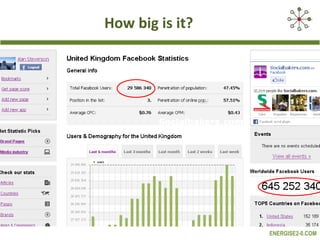
The most important stat is whether your most valuable current and potential ‘customers’ are hanging out on Facebook
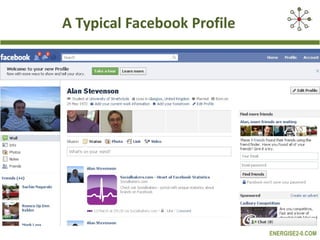
A Typical Facebook Profile
Facebook Exercise 1  If you don’t already have a profile page, please go to  www.facebook.com  and register.   If you do, review your settings
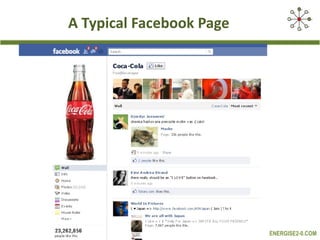
A Typical Facebook Page
Facebook Pages  -Key Features Individuals can ‘Like’ businesses or brands, this action appears on the homepage of their friends. They can post, like, comment, suggest a page.  FB Pages send status updates that appear in a likers’ homepage; FB Pages can “like” other pages FB Pages access in-house analytics, Facebook Insights and can have multiple administrators FB Pages are free to set up and run and are unlimited in terms of likers. They can control the default landing page a user first sees. FB Pages also have SEO benefits because they show up very high in search results for your brand or product.  Source: The Authors and Mokomarketing.com on  Scrbd
Facebook Pages Your Facebook Page should be fully aligned with and supportive of your core marcoms objectives and with other marcoms channels It should deliver real business benefits and ROI – information, awareness, engagement, accountability, feedback, listen, actionable insights, key customer/partner/stakeholder relationships Adopt a ‘customer led’ approach
Facebook Pages - Business Benefits Customer loyalty, repeat business, referral, ‘advocacy’ Increased sales (sales / month) – F-Commerce Improved marketing effectiveness/efficiency Reputation/brand management Improved customer/market knowledge and insight  Others?
Facebook Exercise 2a  What do you want to use it for?  What business benefits do you hope to derive?
Facebook Exercise 2b  Set up a Facebook Page for your business.  Happy with your profile and page design? Understand the basic layout of your Facebook Page e.g. Customised Pages, Landing Page, Events, Facebook Insights, Suggest to Friends
Getting Started Go to Facebook . Click on the “Create a Page" Choose a category . Choose between: “local business or place”, “company, organisation or institution”, “brand or product”, “artist, band or public figure”, “entertainment”, “cause or community”.  Choose a sub-category . And complete business details.  Link to a  Facebook Account . Update your Page across:  Category/ page name; Image; Photo Showcase; Default Filter; Admin View; Settings; Basic Information; and Permissions   Suggest your Page to others See if your contacts are on Facebook . After you fill out basic info, you'll be prompted to look for contacts in your Gmail, Yahoo, MSN, Hotmail or AOL accounts
Features and Functions Posts Comments Likes FBML Pages and Landing Pages Main Navigation Suggest to a Friend Adverts
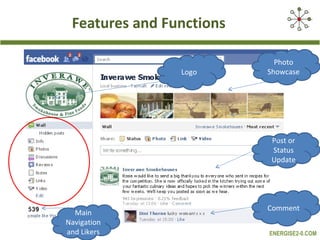
Features and Functions Logo Post or Status Update Main Navigation and Likers Comment Photo Showcase
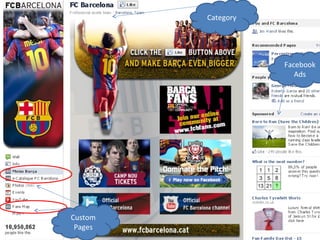
Category Custom Pages Facebook Ads
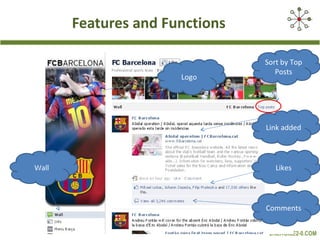
Features and Functions Logo Link added Wall Comments Sort by Top Posts Likes
Integration Options
You can embed/integrate Facebook with your Blog, Website, Twitter and YouTube
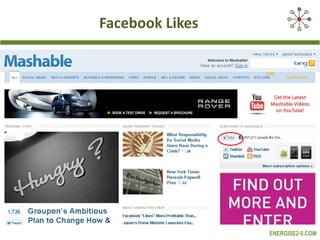
Facebook Likes
Facebook + Websites / Blogs Like buttons (update Facebook profile when clicked) Activity button (show what friends are doing on the site) Add Comments (add comments to any web page) Recommendations (suggestions for web pages) Like box (view Facebook Page stream from website) Website Login / Registration authentication through Facebook
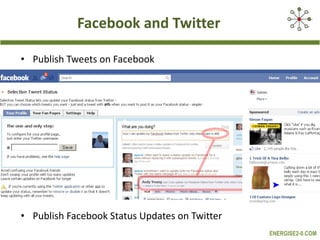
Facebook and Twitter Publish Tweets on Facebook Publish Facebook Status Updates on Twitter
Key Success Factors The 4Cs of Building a  Successful Facebook Channel
The 4Cs Framework Customers engage with the right ‘customers’ and build your community Content be ‘customer led’ and add value Conversations Facebook is not a broadcast channel. It is marketing as a ‘conversation’ Conversions the ‘call-to-action’; core business objectives
Facebook Exercise 3 Start to Build Your Community
Building Your Community Use ‘Friend Finder’/ ‘People You May Know’ to send friend request to five people Use the search facility to join/’like’ three relevant groups/pages Explore the potential Return on Investment from Facebook Advertising Invite friends by email using ‘Invite Friends’ ‘ Suggest to Friends’
Building Your Community Embed Facebook widget/link on your web site/blog Invite your email/ezine subscribers Add social media profiles to your email signature file The potential for running an incentivised Facebook Advert Add page link/badge to your profile page
Building Your Community Actively participate in relevant groups/pages – tagging your post Offline marketing of your Facebook Page Think about the best way of creating a viral campaign Once you reach 25 ‘likers’, register your own unique address – www.facebook.com/username
Facebook Exercise 4 Content, Conversations and Engagement
Facebook Exercise 4 Fill in the  Facebook Content Plan
Content Frequency – how often to post or update Topic – 5 key topics focusing on key customer groups Type (update, video, image) – mix it up, photos and videos can be more engaging Own/Other Peoples Content (OPC) – look for other content to share Tone/theme – friendly, informal, warm, welcoming, advisory, facilitative, authoritative Sources of Inspiration – have some examples of your ideal page Participation in other groups/ pages – comment and interact more widely
Conversations Engage in other relevant FB pages/groups  Look for opportunities to stimulate a discussion and encourage user generated content on your own Page  Encourage shares, likes and comments Create a Response Policy for FB (perhaps a wider initiative across all channels)
Engagement For status updates, try ending with a question. Add your own comments as needed to get the ball rolling. Come back and reply often to your fans’ comments Agree an appropriate Response Policy
Conversion Look for opportunities to make a sale, generate an enquiry, create a referral Be subtle Facebook is not a sales channel
Applications for Managing Facebook
Exercise 5 Facebook Applications can make managing one or more Facebook Pages easy. Choose one of the following applications and become familiar with it, using it to carry out some of the common actions – Post, Delete Post, Like, Comment, and so on. Try the same application on your desktop and your mobile phone Hootsuite  http://hootsuite.com   TweetDeck  http://www.tweetdeck.com   MediaFeedia  http://mediafeedia.com   HyperAlerts  http://www.hyperalerts.no
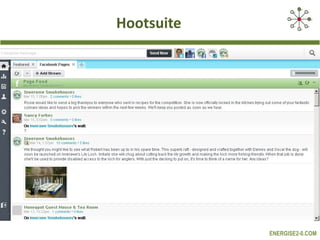
Hootsuite
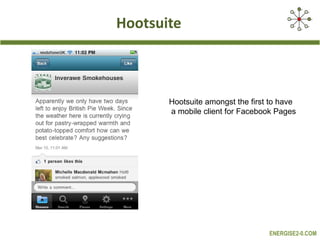
Hootsuite Hootsuite amongst the first to have a mobile client for Facebook Pages
Performance  Measurement
Performance Measurement It is critical to measure the performance of your Facebook activities This can be done in two ways – ‘lag’ and ‘lead’ measures ‘ Lag’ measures are your ultimate ‘business’ objectives e.g. feedback, insights, service awareness, accountability, marcoms effectiveness and efficiency, ROI etc ‘ Lead’ measures are the main ‘drivers’ that help to achieve your core objectives  These could include....
Performance Measurement Involvement – the number and quality of people involved in Facebook Interaction – the number of comments and likes Intimacy – the affection or aversion to Jacobite Cruises on Facebook Influence – recommendation in terms of shares on Facebook Insight – actionable insight on the Facebook Page Impact – sales recorded on GA, enquiries  There are a number of tools available for monitoring your Facebook performance, including:
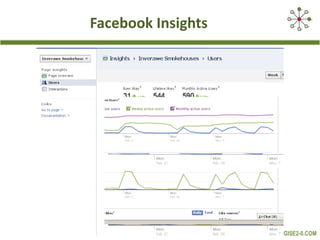
Facebook Insights
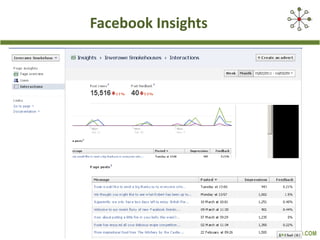
Facebook Insights
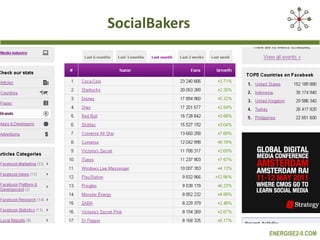
SocialBakers
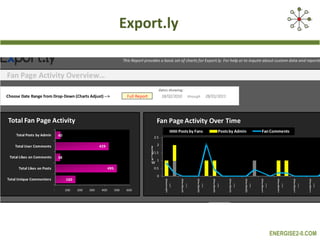
Export.ly
Exercise 6 Use one or more of the following tools to monitor the performance of a Facebook Page of your own choice  Facebook Insights  http://www.facebook.com Social Baker  http://www.socialbakers.com Hootsuite  http://hootsuite.com   Export.ly  http://export.ly
Thank You Questions

North Ayrshire Council Training facebook Session

  • 1.
    Facebook Training SessionNorth Ayrshire Council Dr. Jim Hamill Alan Stevenson Vincent Hamill www.energise2-0.com March, 2011
  • 2.
    Channel Development Facebook– An Overview Channel Set-Up and Terminology Integration Options The ‘4Cs’ - Content Plan, Customers (Building the Community), Conversations, Conversions Facebook Tools and Applications Performance Measurement
  • 3.
  • 4.
    Facebook – what is it? Facebook www.facebook.com is a social network service and website launched in February 2004 Facebook allows users to do the following: create profiles with photos, lists of personal interests, contact information, and other personal information. communicate with friends and other users through private or public messages and a chat feature. Join, “like” or run common interest groups or pages (organized by business or brand) advertise across the platform Source: Wikipedia and The Authors
  • 5.
  • 6.
  • 7.
    The most importantstat is whether your most valuable current and potential ‘customers’ are hanging out on Facebook
  • 8.
  • 9.
    Facebook Exercise 1 If you don’t already have a profile page, please go to www.facebook.com and register. If you do, review your settings
  • 10.
  • 11.
    Facebook Pages -Key Features Individuals can ‘Like’ businesses or brands, this action appears on the homepage of their friends. They can post, like, comment, suggest a page. FB Pages send status updates that appear in a likers’ homepage; FB Pages can “like” other pages FB Pages access in-house analytics, Facebook Insights and can have multiple administrators FB Pages are free to set up and run and are unlimited in terms of likers. They can control the default landing page a user first sees. FB Pages also have SEO benefits because they show up very high in search results for your brand or product. Source: The Authors and Mokomarketing.com on Scrbd
  • 12.
    Facebook Pages YourFacebook Page should be fully aligned with and supportive of your core marcoms objectives and with other marcoms channels It should deliver real business benefits and ROI – information, awareness, engagement, accountability, feedback, listen, actionable insights, key customer/partner/stakeholder relationships Adopt a ‘customer led’ approach
  • 13.
    Facebook Pages -Business Benefits Customer loyalty, repeat business, referral, ‘advocacy’ Increased sales (sales / month) – F-Commerce Improved marketing effectiveness/efficiency Reputation/brand management Improved customer/market knowledge and insight Others?
  • 14.
    Facebook Exercise 2a What do you want to use it for? What business benefits do you hope to derive?
  • 15.
    Facebook Exercise 2b Set up a Facebook Page for your business. Happy with your profile and page design? Understand the basic layout of your Facebook Page e.g. Customised Pages, Landing Page, Events, Facebook Insights, Suggest to Friends
  • 16.
    Getting Started Goto Facebook . Click on the “Create a Page" Choose a category . Choose between: “local business or place”, “company, organisation or institution”, “brand or product”, “artist, band or public figure”, “entertainment”, “cause or community”. Choose a sub-category . And complete business details. Link to a Facebook Account . Update your Page across: Category/ page name; Image; Photo Showcase; Default Filter; Admin View; Settings; Basic Information; and Permissions Suggest your Page to others See if your contacts are on Facebook . After you fill out basic info, you'll be prompted to look for contacts in your Gmail, Yahoo, MSN, Hotmail or AOL accounts
  • 17.
    Features and FunctionsPosts Comments Likes FBML Pages and Landing Pages Main Navigation Suggest to a Friend Adverts
  • 18.
    Features and FunctionsLogo Post or Status Update Main Navigation and Likers Comment Photo Showcase
  • 19.
  • 20.
    Features and FunctionsLogo Link added Wall Comments Sort by Top Posts Likes
  • 21.
  • 22.
    You can embed/integrateFacebook with your Blog, Website, Twitter and YouTube
  • 23.
  • 24.
    Facebook + Websites/ Blogs Like buttons (update Facebook profile when clicked) Activity button (show what friends are doing on the site) Add Comments (add comments to any web page) Recommendations (suggestions for web pages) Like box (view Facebook Page stream from website) Website Login / Registration authentication through Facebook
  • 25.
    Facebook and TwitterPublish Tweets on Facebook Publish Facebook Status Updates on Twitter
  • 26.
    Key Success FactorsThe 4Cs of Building a Successful Facebook Channel
  • 27.
    The 4Cs FrameworkCustomers engage with the right ‘customers’ and build your community Content be ‘customer led’ and add value Conversations Facebook is not a broadcast channel. It is marketing as a ‘conversation’ Conversions the ‘call-to-action’; core business objectives
  • 28.
    Facebook Exercise 3Start to Build Your Community
  • 29.
    Building Your CommunityUse ‘Friend Finder’/ ‘People You May Know’ to send friend request to five people Use the search facility to join/’like’ three relevant groups/pages Explore the potential Return on Investment from Facebook Advertising Invite friends by email using ‘Invite Friends’ ‘ Suggest to Friends’
  • 30.
    Building Your CommunityEmbed Facebook widget/link on your web site/blog Invite your email/ezine subscribers Add social media profiles to your email signature file The potential for running an incentivised Facebook Advert Add page link/badge to your profile page
  • 31.
    Building Your CommunityActively participate in relevant groups/pages – tagging your post Offline marketing of your Facebook Page Think about the best way of creating a viral campaign Once you reach 25 ‘likers’, register your own unique address – www.facebook.com/username
  • 32.
    Facebook Exercise 4Content, Conversations and Engagement
  • 33.
    Facebook Exercise 4Fill in the Facebook Content Plan
  • 34.
    Content Frequency –how often to post or update Topic – 5 key topics focusing on key customer groups Type (update, video, image) – mix it up, photos and videos can be more engaging Own/Other Peoples Content (OPC) – look for other content to share Tone/theme – friendly, informal, warm, welcoming, advisory, facilitative, authoritative Sources of Inspiration – have some examples of your ideal page Participation in other groups/ pages – comment and interact more widely
  • 35.
    Conversations Engage inother relevant FB pages/groups Look for opportunities to stimulate a discussion and encourage user generated content on your own Page Encourage shares, likes and comments Create a Response Policy for FB (perhaps a wider initiative across all channels)
  • 36.
    Engagement For statusupdates, try ending with a question. Add your own comments as needed to get the ball rolling. Come back and reply often to your fans’ comments Agree an appropriate Response Policy
  • 37.
    Conversion Look foropportunities to make a sale, generate an enquiry, create a referral Be subtle Facebook is not a sales channel
  • 38.
  • 39.
    Exercise 5 FacebookApplications can make managing one or more Facebook Pages easy. Choose one of the following applications and become familiar with it, using it to carry out some of the common actions – Post, Delete Post, Like, Comment, and so on. Try the same application on your desktop and your mobile phone Hootsuite http://hootsuite.com TweetDeck http://www.tweetdeck.com MediaFeedia http://mediafeedia.com HyperAlerts http://www.hyperalerts.no
  • 40.
  • 41.
    Hootsuite Hootsuite amongstthe first to have a mobile client for Facebook Pages
  • 42.
  • 43.
    Performance Measurement Itis critical to measure the performance of your Facebook activities This can be done in two ways – ‘lag’ and ‘lead’ measures ‘ Lag’ measures are your ultimate ‘business’ objectives e.g. feedback, insights, service awareness, accountability, marcoms effectiveness and efficiency, ROI etc ‘ Lead’ measures are the main ‘drivers’ that help to achieve your core objectives These could include....
  • 44.
    Performance Measurement Involvement– the number and quality of people involved in Facebook Interaction – the number of comments and likes Intimacy – the affection or aversion to Jacobite Cruises on Facebook Influence – recommendation in terms of shares on Facebook Insight – actionable insight on the Facebook Page Impact – sales recorded on GA, enquiries There are a number of tools available for monitoring your Facebook performance, including:
  • 45.
  • 46.
  • 47.
  • 48.
  • 49.
    Exercise 6 Useone or more of the following tools to monitor the performance of a Facebook Page of your own choice Facebook Insights http://www.facebook.com Social Baker http://www.socialbakers.com Hootsuite http://hootsuite.com Export.ly http://export.ly
  • 50.

Editor's Notes

  • #12 Fans on a Facebook page can post photos, videos, links, discuss topics on the discussion board and comment on the Page wall – all depending on the settings outlined by the Page administrator/owner. Pages send status updates that appear in a fans’ Homepage. Friends can then Comment or ‘Like’ a status update that they find entertaining – which means increased engagement for the Page. When individuals ‘Like’ a Facebook Page the action appears in the news stream and Highlights section of the Homepage of the friends of the fan Pages take advantage of Facebook’s in-house analytics engine, Facebook Insights. Facebook Pages can also have multiple administrators, meaning that the responsibility for uploading, moderating and updating content can be shared between several individuals. It is important to point out that any actions taken from your Facebook account as a Page administrator on your Page will show the Page’s name as the actor and not your personal name. Therefore Pages have the ability to comment on their own posted item or status update using the identity of the Page and not the Page administrator. Additional benefits of Facebook Pages are that they cost nothing to set up and there are no monthly fees for maintaining a Facebook Page. Pages can also become fans of other Pages, thus helping Pages affiliate themselves with other brands in a product line or public figures. Pages also have SEO benefits because they show up very high in search results for your brand or product. One is also able to control the default landing page tab when a user visits your Facebook Page. No limit to the number of fans of a Facebook Page
  • #25 (a) A variety of Like buttons, potentially on each page of the website which will update Facebook Profile of website visitor when clicked. If the site is not going to be content rich this is less useful. If however, there is some killer content on the website that we would like to provide a viral effect, this could be relevant. For example, a Deals page or some such thing. (b) Activity button can show what friends are doing on the site (from the site). This is again more useful for information rich sites where there may be 1200 people and 10 friends that visit or have visited the site which influence how you navigate. (c) Can add a Comments element to any web page which updates a Facebook Profile. Feels less relevant for a site that isn't information intensive or blog style. (d) Recommendations - personalised suggestions for pages on your site they might like. Again geared towards heavy content sites. (e) Like box - like page and view stream directly from website. This is the sort of thing that could tie the website more closely to the FB presence. It is an embeddable Facebook Page. Perhaps more relevant for the Blog, if possible. (f) Other functions are around sites that have Sign ups or Registrations, again less relevant. - Login button - Registration - using FB for authentication Source: http://developers.facebook.com/docs/plugins
  • #26 A. Publish Tweets on Facebook Here is the most popular Twitter Facebook Application. Use the Twitter for Facebook app to: * find and follow your Facebook friends who tweet * post your tweets to your Facebook profile or Facebook page * encourage your Facebook friends to follow you on Twitter http://www.facebook.com/apps/application.php?id=2231777543#!/apps/application.php?id=2231777543&v=info Or be more selective in terms of which tweets are updates http://apps.facebook.com/selectivetwitter/ B. Publish Facebook Status Updates on Twitter Choose which pages and which status updates http://www.facebook.com/twitter/
  • #46 Facebook Insights gives you key metrics such as the number of fans added per day, number of fans lost per day, unique views, page views, total fans, number of wall posts, photo views, video plays, audio plays, number of reviews and total interactions metrics. Facebook Insights is designed to tracks the effects of your Page promotion campaigns and does an adequate job.