Facebook for MarketersBernie BorgesDecember 7th, 2010
GoalsLearn how to use Facebook in productive and measurable ways in business.Learn strategies and tactics to build your audience.Understand the “rules of engagement.” Understand Facebook’s marketing potential.Minimize mistakes.Maximize positive results.
ExpectationsNavigate FacebookHow to develop a content strategy that drives salesLearn the various Facebook channels e.g. advertising, personal profiles, groups, business pages, events, causes…How to build your personal or company brand and build a networkSelect and implement applications that fit your Facebook marketing planUnderstand the “rules of engagement” and community building best practicesExperiential marketing that creates “buzz”How to use Facebook advertising and why you shouldMeasure – review – refine: Facebook analytics
Skills to AcquireThe 2 pillars of social mediaContent-content-contentBuilding relationshipsThe habit of using Facebook daily.How to engage with people and brands.How to build your personal and company brand.How to measure results from Facebook marketing.
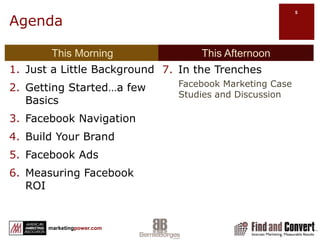
AgendaThis MorningThis AfternoonJust a Little BackgroundGetting Started…a few BasicsFacebook NavigationBuild Your BrandFacebook AdsMeasuring Facebook ROIIn the Trenches Facebook Marketing Case Studies and Discussion
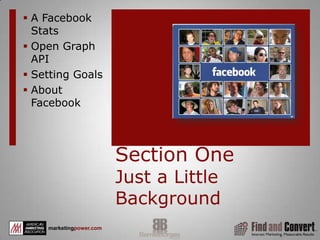
Section OneJust a Little BackgroundA Facebook Stats
Open Graph API
Setting Goals
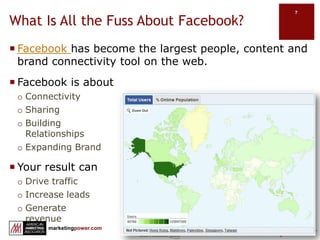
About FacebookWhat Is All the Fuss About Facebook?Facebook has become the largest people, content and brand connectivity tool on the web. Facebook is aboutConnectivitySharingBuilding                                                                              RelationshipsExpanding BrandYour result canDrive trafficIncrease leadsGenerate                                                                                     revenue
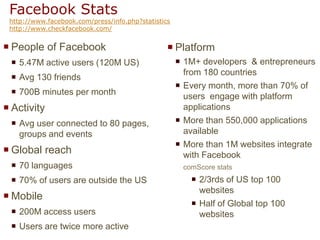
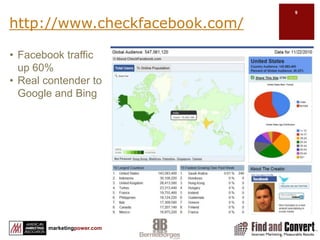
Facebook Statshttp://www.facebook.com/press/info.php?statisticshttp://www.checkfacebook.com/People of Facebook5.47M active users (120M US)Avg 130 friends700B minutes per monthActivityAvg user connected to 80 pages, groups and eventsGlobal reach70 languages70% of users are outside the USMobile200M access usersUsers are twice more activePlatform1M+ developers  & entrepreneurs from 180 countries Every month, more than 70% of users  engage with platform applicationsMore than 550,000 applications available More than 1M websites integrate with FacebookcomScore stats2/3rds of US top 100 websitesHalf of Global top 100 websites
http://www.checkfacebook.com/Facebook traffic up 60%Real contender to Google and Bing
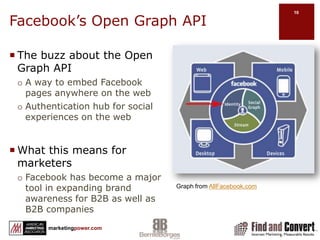
Facebook’s Open Graph APIThe buzz about the Open Graph APIA way to embed Facebook pages anywhere on the webAuthentication hub for social experiences on the webWhat this means for marketersFacebook has become a major tool in expanding brand awareness for B2B as well as B2B companiesGraph from AllFacebook.com
Before We Begin…Understanding how to market with Facebook begins withSetting and measuring goalsUnderstanding Facebook usesUnderstanding Facebook navigationWhat happens when you post content on your wallCustomizing your Facebook marketingFacebook interactivity
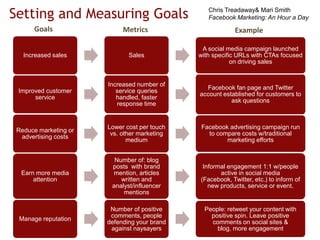
Setting and Measuring GoalsChris Treadaway & Mari SmithFacebook Marketing: An Hour a DayGoalsMetricsExample
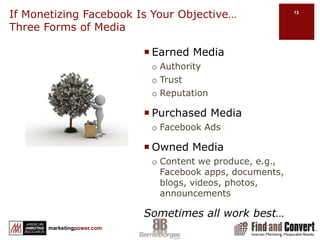
If Monetizing Facebook Is Your Objective…             Three Forms of MediaEarned MediaAuthorityTrustReputationPurchased MediaFacebook AdsOwned MediaContent we produce, e.g., Facebook apps, documents, blogs, videos, photos, announcementsSometimes all work best…
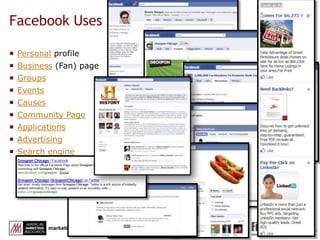
Facebook UsesPersonal profileBusiness (Fan) pageGroupsEventsCausesCommunity PageApplicationsAdvertisingSearch engine
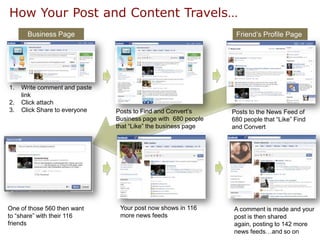
How Your Post and Content Travels…Business Page Friend’s Profile Page Write comment and paste linkClick attachClick Share to everyonePosts to Find and Convert’s Business page with  680 people that “Like” the business pagePosts to the News Feed of 680 people that “Like” Find and ConvertYour post now shows in 116 more news feeds One of those 560 then want to “share” with their 116 friends A comment is made and your post is then shared again, posting to 142 more news feeds…and so on
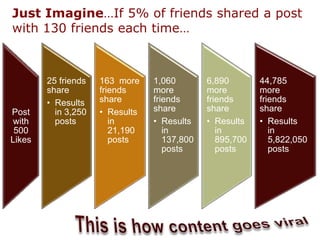
Just Imagine…If 5% of friends shared a post with 130 friends each time…This is how content goes viral
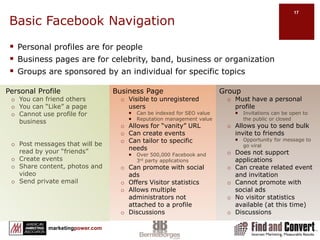
Basic Facebook NavigationGroupMust have a personal profileInvitations can be open to the public or closed Allows you to send bulk invite to friendsOpportunity for message to go viralDoes not support applicationsCan create related event and invitationCannot promote with social adsNo visitor statistics available (at this time)Discussions Personal ProfileYou can friend othersYou can “Like” a pageCannot use profile for businessPost messages that will be read by your “friends”Create eventsShare content, photos and videoSend private emailBusiness PageVisible to unregistered usersCan be indexed for SEO valueReputation management valueAllows for “vanity” URLCan create eventsCan tailor to specific needsOver 500,000 Facebook and 3rd party applicationsCan promote with social adsOffers Visitor statisticsAllows multiple administrators not attached to a profileDiscussionsPersonal profiles are for peopleBusiness pages are for celebrity, band, business or organizationGroups are sponsored by an individual for specific topics
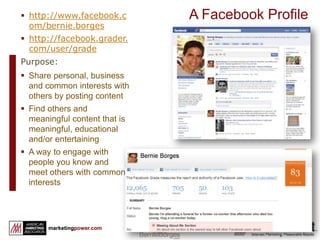
http://www.facebook.com/bernie.borges
http://facebook.grader.com/user/gradePurpose:Share personal, business and common interests with others by posting content
Find others and meaningful content that is meaningful, educational and/or entertaining
A way to engage with people you know and meet others with common interests18A Facebook Profile
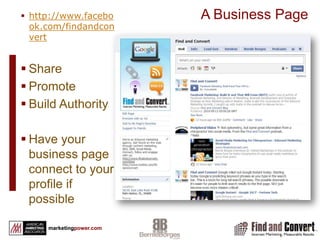
http://www.facebook.com/findandconvert
Share
Promote
Build Authority
Have your business page connect to your profile if possible19A Business Page
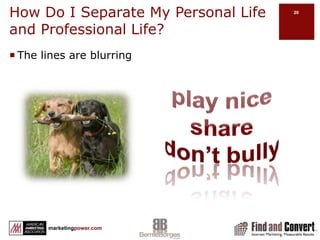
How Do I Separate My Personal Life and Professional Life?The lines are blurringplay nicesharedon’t bully
Section TwoGetting started…Setting Up:Personal ProfileYour SettingsNotificationsMobilizingFind FriendsAccountApplicationsBusiness ProfileApplicationsGroupsHelp Center
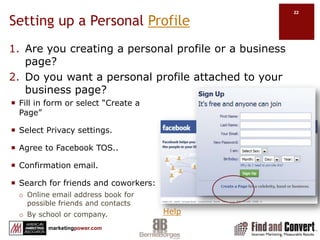
Setting up a Personal ProfileAre you creating a personal profile or a business page? Do you want a personal profile attached to your business page?Fill in form or select “Create a Page”Select Privacy settings. Agree to Facebook TOS..Confirmation email. Search for friends and coworkers:Online email address book for possible friends and contactsBy school or company.Help
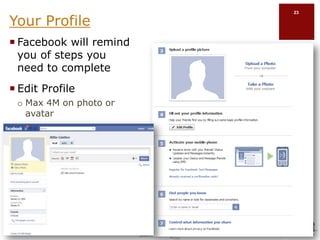
Your ProfileFacebook will remind you of steps you need to completeEdit ProfileMax 4M on photo or avatar
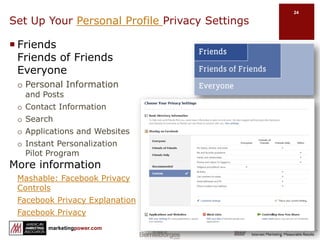
Set Up Your Personal Profile Privacy SettingsFriends                      Friends of Friends  EveryonePersonal Information and PostsContact InformationSearchApplications and WebsitesInstant Personalization Pilot ProgramMore informationMashable: Facebook Privacy ControlsFacebook Privacy ExplanationFacebook Privacy
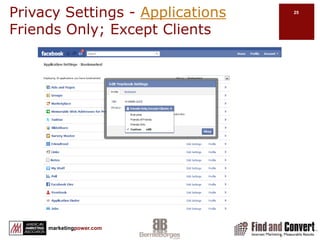
Privacy Settings - ApplicationsFriends Only; Except Clients
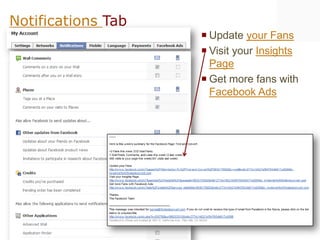
Notifications TabUpdate your FansVisit your Insights PageGet more fans with Facebook Ads
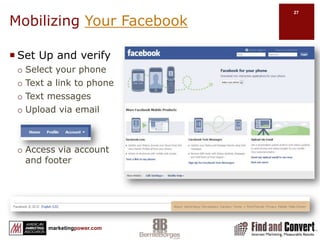
Mobilizing Your FacebookSet Up and verifySelect your phoneText a link to phoneText messagesUpload via emailAccess via account and footer
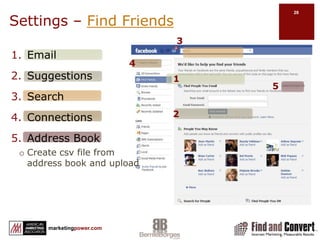
Settings – Find Friends3EmailSuggestionsSearchConnectionsAddress BookCreate csv file from address book and upload4152
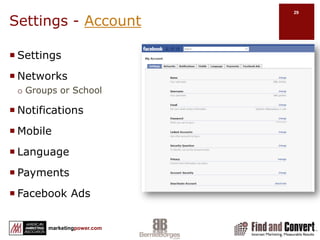
Settings - AccountSettingsNetworksGroups or SchoolNotificationsMobileLanguagePaymentsFacebook Ads
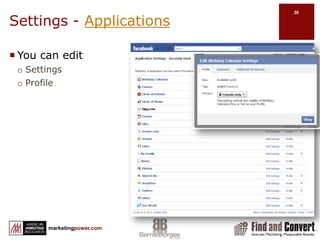
Settings - ApplicationsYou can edit SettingsProfile
Personal Profile TipsUpload a few pictures and fill out your profile completely.Update your status daily.“Like” business (fan) pages and join groups that are of interest to you. Participate in them by commenting on their walls and/or uploading links.Edit settings to exclude apps to lists e.g. Gambling app on your profileEngage with your Facebook friends by commenting on their walls, invite them to join your business page(s)/groups, comment on their videos/pictures, and upload videos/pictures.Post upcoming events or parties you may have and invite your Facebook friends.Listen in on Facebook conversations and get social with your peers and friends as you see fit and get comfortable doing so.
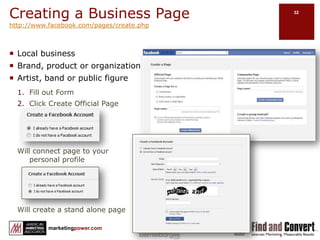
Creating a Business Pagehttp://www.facebook.com/pages/create.phpLocal businessBrand, product or organizationArtist, band or public figureFill out FormClick Create Official PageWill connect page to your personal profileWill create a stand alone page
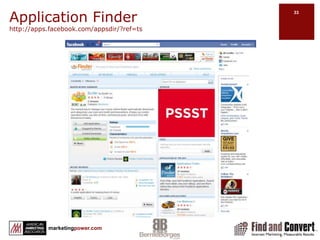
Application Finder http://apps.facebook.com/appsdir/?ref=ts
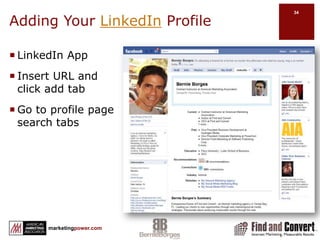
Adding Your LinkedIn ProfileLinkedIn AppInsert URL and click add tabGo to profile page search tabs
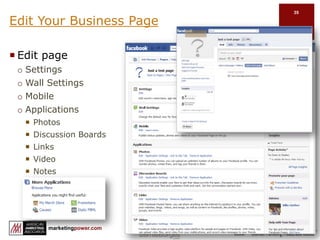
Edit Your Business PageEdit pageSettingsWall SettingsMobileApplicationsPhotosDiscussion BoardsLinksVideoNotesEvents
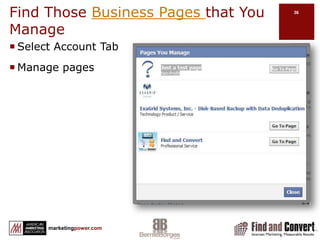
Find Those Business Pages that You ManageSelect Account TabManage pages
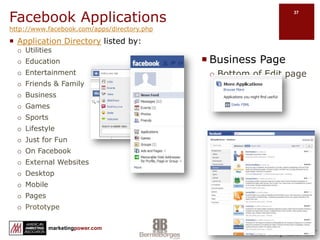
Facebook Applicationshttp://www.facebook.com/apps/directory.phpApplication Directory listed by:UtilitiesEducationEntertainmentFriends & FamilyBusinessGames SportsLifestyleJust for FunOn FacebookExternal WebsitesDesktopMobilePagesPrototypeBusiness PageBottom of Edit page
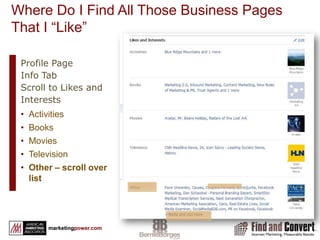
Where Do I Find All Those Business Pages That I “Like”Profile PageInfo TabScroll to Likes and InterestsActivitiesBooksMoviesTelevisionOther – scroll over list
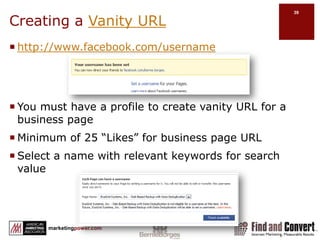
Creating a Vanity URLhttp://www.facebook.com/usernameYou must have a profile to create vanity URL for a business pageMinimum of 25 “Likes” for business page URLSelect a name with relevant keywords for search value
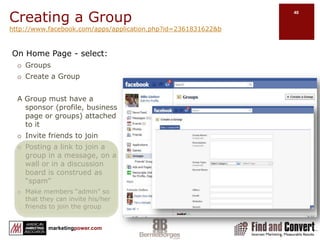
Creating a Grouphttp://www.facebook.com/apps/application.php?id=2361831622&b On Home Page - select:GroupsCreate a GroupA Group must have a sponsor (profile, business page or groups) attached to itInvite friends to joinPosting a link to join a group in a message, on a wall or in a discussion board is construed as “spam” Make members “admin” so that they can invite his/her friends to join the group
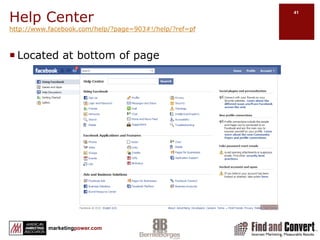
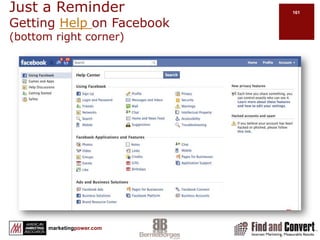
Help Centerhttp://www.facebook.com/help/?page=903#!/help/?ref=pfLocated at bottom of page
Section ThreeNavigating Around Your ProfileHome VS Profile
Messages
Notes
Lists
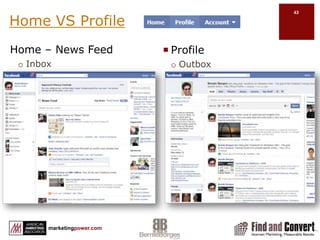
EtiquetteHome VS ProfileHome – News FeedInboxProfileOutbox
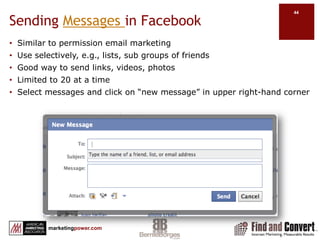
Sending Messages in FacebookSimilar to permission email marketing
Use selectively, e.g., lists, sub groups of friends
Good way to send links, videos, photos
Limited to 20 at a time
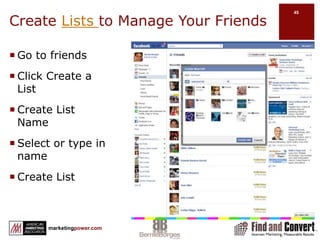
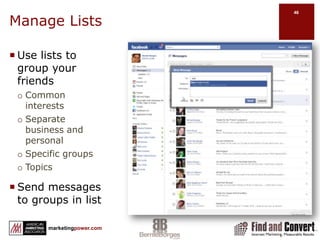
Select messages and click on “new message” in upper right-hand cornerCreate Lists to Manage Your FriendsGo to friendsClick Create a ListCreate List NameSelect or type in nameCreate List
Manage Lists Use lists to group your friendsCommon interestsSeparate business and personalSpecific groupsTopicsSend messages to groups in list
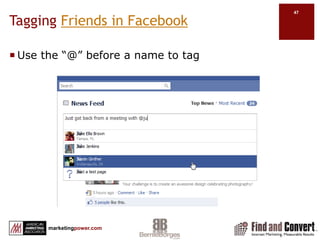
Tagging Friends in FacebookUse the “@” before a name to tag
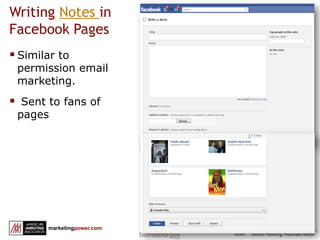
Writing Notes in Facebook PagesSimilar to permission email marketing.
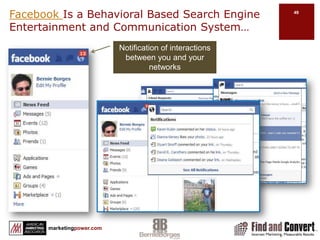
 Sent to fans of pagesFacebook Is a Behavioral Based Search Engine Entertainment and Communication System…Notification of interactions between you and your networks
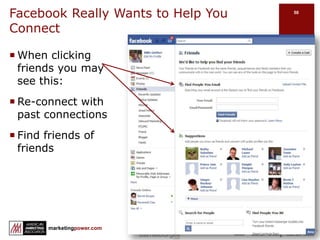
Facebook Really Wants to Help You   ConnectWhen clicking friends you may see this:Re-connect with past connectionsFind friends of friends
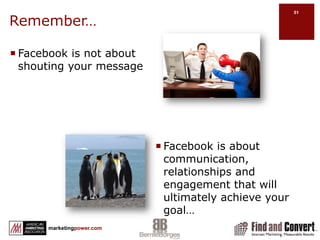
Remember…Facebook is not about shouting your messageFacebook is about communication, relationships and engagement that will ultimately achieve your goal…
The Seven Heavenly Truths About Social Media Networks*Preferred communication of younger generations but not limited to themSocial media is based on the concept of “friends” as a loosely applied term for people connecting with people, companies, brands…People that are active on the Internet are more likely active in social networks & are often influencers within their niche groupsSocial media content is transparent…once it’s posted, it is widely visibleContent is the hub of the Internet, social media is just one spokeThe rules in social media are still being defined. Experiment and tread carefullyWhat motivates people is the key to social media usage…Chris TreadawayMari Smith*Facebook Marketing An Hour a Day
The Seven Deadly Sins Motivators of Social Media Networking*Social Interaction MotivatorsLoveSelf-expression / emotionSharing opinions / influencing friendsShowing Off…the IdFun / escapism / humorMemories and nostalgiaMaking MoneyChris TreadawayMari Smith*Facebook Marketing An Hour a Day
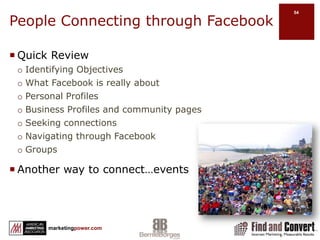
People Connecting through FacebookQuick ReviewIdentifying ObjectivesWhat Facebook is really aboutPersonal ProfilesBusiness Profiles and community pagesSeeking connectionsNavigating through FacebookGroupsAnother way to connect…events
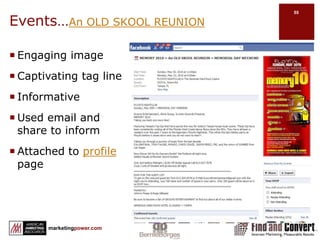
Events…An OLD SKOOL REUNIONEngaging imageCaptivating tag lineInformativeUsed email and share to informAttached to profile page
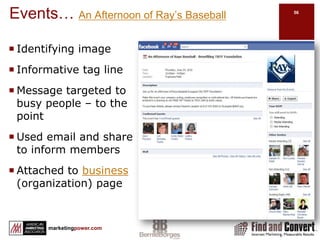
Events… An Afternoon of Ray’s BaseballIdentifying imageInformative tag lineMessage targeted to busy people – to the pointUsed email and share to inform membersAttached to business (organization) page
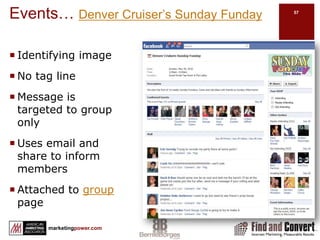
Events… Denver Cruiser’s Sunday FundayIdentifying imageNo tag lineMessage is targeted to group onlyUses email and share to inform membersAttached to group page
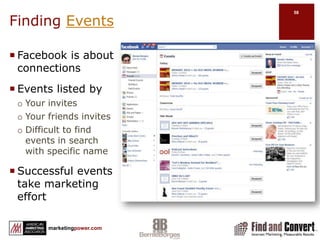
Finding EventsFacebook is about connectionsEvents listed byYour invitesYour friends invitesDifficult to find events in search with specific nameSuccessful events take marketing effort
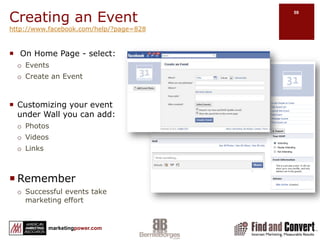
Creating an Eventhttp://www.facebook.com/help/?page=828 On Home Page - select:EventsCreate an EventCustomizing your event under Wall you can add:PhotosVideosLinksRememberSuccessful events take marketing effort
FacebookEtiquette Always have a current photo in your profile.
 Status updates should be interesting.
 Status updates should be spread out, not every 5 minutes.
 Only poke close friends, and don’t over do it.
 Don’t invite all your friends to join every game you play. Be selective.
 Create lists and use them to avoid treating all your friends the same.
 Don’t share too much information.
 Invite friends to pages, groups, events, etc, selectively.
 Don’t repeatedly invite friends to join your page if they’ve ignored.
 Use messaging sparingly. Don’t flood friend’s inboxes.
 Tag friends in photos selectively. Don’t embarrass someone.
Use social etiquette common sense!Section FourBuild Your Brand on Facebook
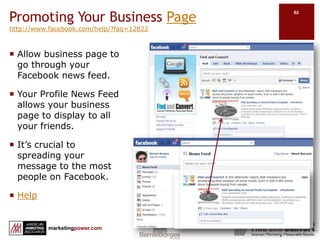
Promoting Your Business Pagehttp://www.facebook.com/help/?faq=12822Allow business page to go through your Facebook news feed.Your Profile News Feed allows your business page to display to all your friends.It’s crucial to spreading your message to the most people on Facebook. HelpScreenshot fnc post + bernie news feed
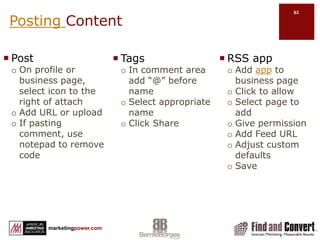
Posting ContentPostOn profile or business page, select icon to the right of attachAdd URL or uploadIf pasting comment, use notepad to remove code RSS appAdd app to business pageClick to allowSelect page to addGive permissionAdd Feed URLAdjust custom defaultsSaveTagsIn comment area add “@” before nameSelect appropriate nameClick Share
Promoting Your Business PageBe social…”Like” other Business pages of interest to youUpload relevant content and leave comments on other people’s business page Not the place for a sales pitch…do not be spammyAffiliate with other brands, businesses, and public figuresBy becoming a fan (Like) of another page, your page will publically support that pageHelp
Using Your Profile to Promote Your Business PageIn order to be visible to search engines, your business page privacy setting must be public.Occasionally invite “friends” to become a fan of your business pageEmail the vanity URL of your business page to people in your address bookDisplay your business page badge on your blogInclude a link in all your communication, auto-signatureDisplay Facebook badge on your website & blog.Invite people to leave comments on your business page.Help
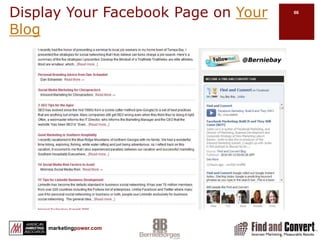
Display Your Facebook Page on Your Blog
Facebook Promoting Do’s & Don’tsDon’tsDon’t over-postDon’t spamDon’t be “me” centricDon’t fly blindDon’t think short termDon’t be roboticDo’sPost dailyConsider your friends’ interestsShare other’s contentMeasure, review, reviseExperiment	Use common senseBe Human
Facebook Moving toward Inter-connected Semantic WebWeb is moving toward convergence of connections between people and things they care aboutApril 2010 Facebook introduced Open Graph Protocol and Graph APIAugust 2010 – Introduction of Facebook PlacesAugust 2010 – Introduction of Facebook Live
Objects Are All Accessed the Same WayPages: https://graph.facebook.com/cocacola           (Coca-Cola page)Events: https://graph.facebook.com/251906384206 (Facebook Developer Garage Austin)Groups: https://graph.facebook.com/2204501798 (Emacs users group)Applications: https://graph.facebook.com/2439131959                (the Graffiti app)
Objects are Connected through RelationshipsObjects in Facebook social graph are connected to each other through relationships (connections)Friends: https://graph.facebook.com/me/friendsMovies: https://graph.facebook.com/me/moviesBooks: https://graph.facebook.com/me/bookshttp://www.infoq.com/news/2010/04/facebook-graph-api
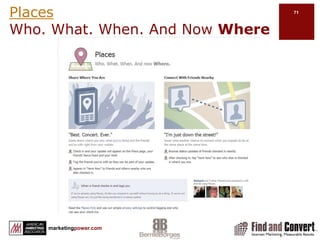
PlacesWho. What. When. And Now Where
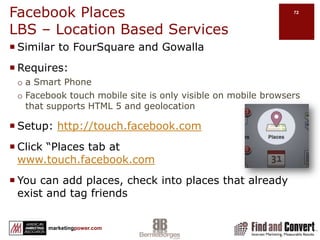
Facebook PlacesLBS – Location Based ServicesSimilar to FourSquare and GowallaRequires:a Smart PhoneFacebook touch mobile site is only visible on mobile browsers that supports HTML 5 and geolocationSetup: http://touch.facebook.comClick “Places tab at                 www.touch.facebook.comYou can add places, check into places that already exist and tag friends
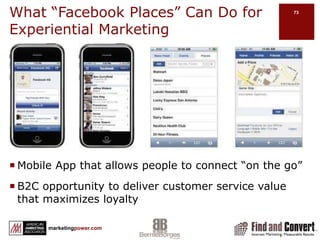
What “Facebook Places” Can Do for Experiential MarketingMobile App that allows people to connect “on the go” B2C opportunity to deliver customer service value that maximizes loyalty
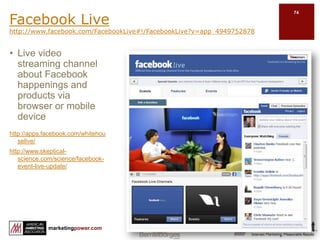
Facebook Livehttp://www.facebook.com/FacebookLive#!/FacebookLive?v=app_4949752878http://apps.facebook.com/whitehouselive/http://www.skeptical-science.com/science/facebook-event-live-update/Live video streaming channel about Facebook happenings and products via browser or mobile device
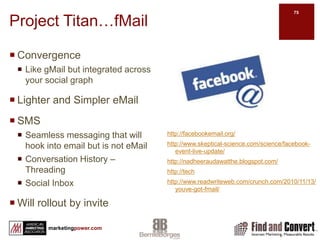
Project Titan…fMailConvergenceLike gMail but integrated across your social graphLighter and Simpler eMailSMSSeamless messaging that will hook into email but is not eMailConversation History – ThreadingSocial InboxWill rollout by invitehttp://facebookemail.org/http://www.skeptical-science.com/science/facebook-event-live-update/http://nadheeraudawatthe.blogspot.com/http://techhttp://www.readwriteweb.com/crunch.com/2010/11/13/youve-got-fmail/
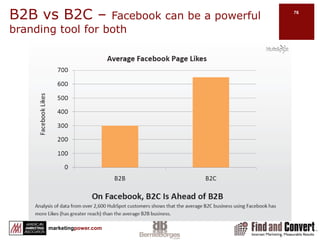
B2B vs B2C – Facebook can be a powerful branding tool for both
Facebook Branding StrategyBuild an active wallEncourage people to Like your pageMonitor and participate in the comments on your WallRe-purpose contentPost useful, interesting content from various sources, regularlyEncourage Experiential MarketingUse Landing or welcome tabsProduct specific interactionDeliver a unique experience!ExperimentUse Calls to ActionWell designed, clear calls to actionMarket Facebook outside FacebookUse photosIf possible, use pictures to show how customers use your productShow customer satisfaction and engagementPost pictures of your team at workUse videoPost recording of team member “experts”Show your product in actionHighlight off-line marketingCompany sponsorships and events
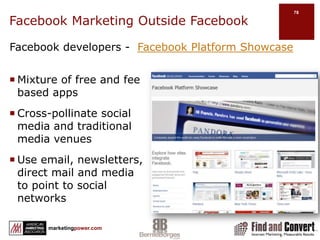
Facebook Marketing Outside FacebookFacebook developers -  Facebook Platform ShowcaseMixture of free and fee based appsCross-pollinate social media and traditional media venuesUse email, newsletters, direct mail and media to point to social networks
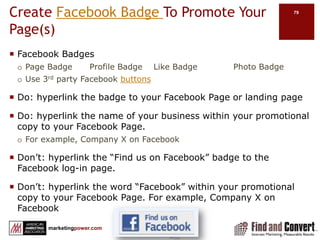
Create Facebook Badge To Promote Your Page(s)Facebook BadgesPage Badge	Profile Badge	Like Badge		Photo BadgeUse 3rd party Facebook buttonsDo: hyperlink the badge to your Facebook Page or landing pageDo: hyperlink the name of your business within your promotional copy to your Facebook Page. For example, Company X on FacebookDon’t: hyperlink the “Find us on Facebook” badge to the Facebook log-in page.Don’t: hyperlink the word “Facebook” within your promotional copy to your Facebook Page. For example, Company X on Facebook
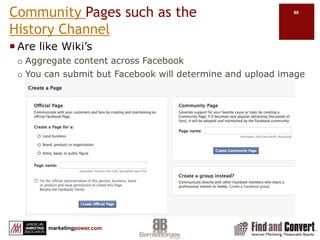
Community Pages such as the           History Channel Are like Wiki’s Aggregate content across FacebookYou can submit but Facebook will determine and upload image
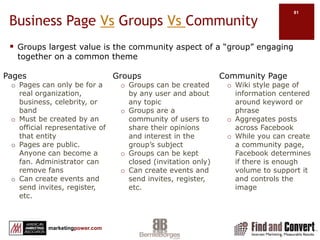
Business Page Vs Groups Vs CommunityGroups largest value is the community aspect of a “group” engaging together on a common themePagesPages can only be for a real organization, business, celebrity, or bandMust be created by an official representative of that entityPages are public. Anyone can become a fan. Administrator can remove fansCan create events and send invites, register, etc.Community PageWiki style page of information centered around keyword or phraseAggregates posts across FacebookWhile you can create a community page, Facebook determines if there is enough  volume to support it and controls the imageGroupsGroups can be created by any user and about any topicGroups are a community of users to share their opinions and interest in the group’s subjectGroups can be kept closed (invitation only)Can create events and send invites, register, etc.
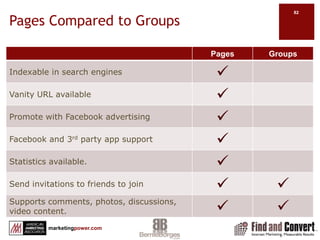
Pages Compared to Groups
Section FiveFacebook Ads
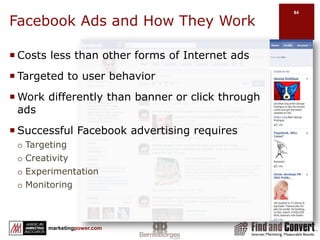
Facebook Ads and How They WorkCosts less than other forms of Internet adsTargeted to user behaviorWork differently than banner or click through adsSuccessful Facebook advertising requiresTargetingCreativityExperimentationMonitoring
Some Notable Differences between Facebook Ads and Google AdwordsThere is more competition on Google than Facebook…  Google Adwords is keyword and geo targeted where as Facebook advertising is demographic, geo targeted and allows targeting according to profile attributesYou can steadily bid up on Google to increase your ad position along top and side whereas Facebook ads only display along one side (currently) Google Adwords are text ads, Facebook ads are text and image. Facebook generally allows more targeted advertising, but is more B2C centric currently.
Before You BeginHave a clear idea of what you want your ad to accomplishCreate more visibility or traffic to your Facebook presenceTest the effectiveness of a changeUse Facebook audience to drive more traffic to your websiteEstablish a baselineKnow how many fans/friends you have before beginning a campaignDownload Facebook insight data before launchLink – Where do you want your visitor to goWhat is your ad message?Have a photo or imageFacebook Ad Guidelines
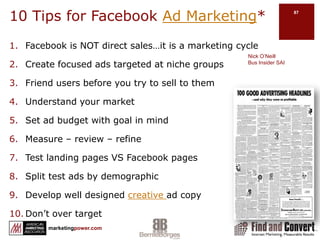
10 Tips for Facebook Ad Marketing*Facebook is NOT direct sales…it is a marketing cycleCreate focused ads targeted at niche groupsFriend users before you try to sell to themUnderstand your marketSet ad budget with goal in mindMeasure – review – refineTest landing pages VS Facebook pagesSplit test ads by demographicDevelop well designed creative ad copyDon’t over targetNick O’NeillBus Insider SAI
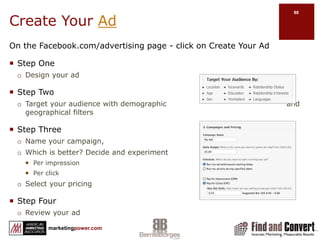
On the Facebook.com/advertising page - click on Create Your AdStep OneDesign your adStep TwoTarget your audience with demographic                                                and geographical filtersStep ThreeName your campaign, Which is better? Decide and experiment	Per impressionPer clickSelect your pricingStep FourReview your adCreate Your Ad
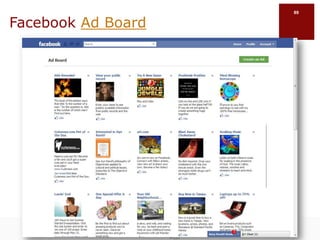
Facebook Ad Board
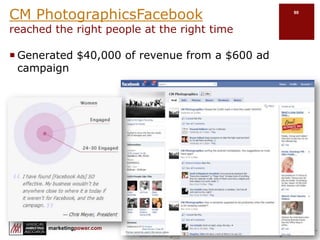
CM PhotographicsFacebook                       reached the right people at the right timeGenerated $40,000 of revenue from a $600 ad campaign
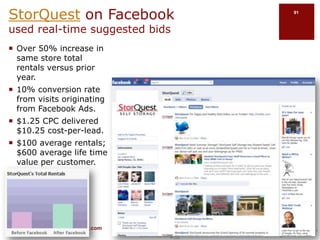
StorQuest on Facebook used real-time suggested bidsOver 50% increase in same store total rentals versus prior year.10% conversion rate from visits originating from Facebook Ads.$1.25 CPC delivered $10.25 cost-per-lead.$100 average rentals; $600 average life time value per customer.
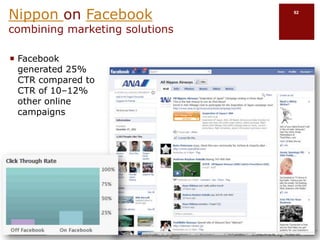
Nippon on Facebook                                combining marketing solutionsFacebook generated 25% CTR compared to CTR of 10–12% other online campaigns
Additional Facebook Advertising    Case StudiesShopLocalWildchildTreaderROTHBURYWiseChoiceWedding Paper DivasPovo.com
Section SixMeasuring Facebook ROI
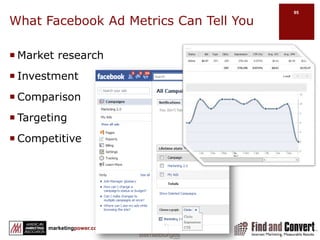
What Facebook Ad Metrics Can Tell YouMarket researchInvestmentComparisonTargetingCompetitive
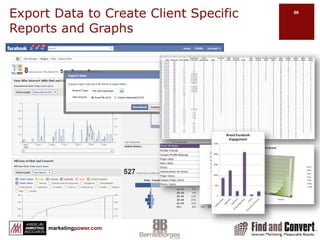
Export Data to Create Client Specific Reports and Graphs
Facebook Ad Metrics Will ProvideAd Name Your descriptive for adStatus Complete – active - pausedBidAcceptable maxTypePay for impressionsPay for clicksCTR(%)Click through rateAverage CPCEffective price of every clickAverage CPMEffective cost per 1,000 impressions (even on cost per click campaigns)Total Spent
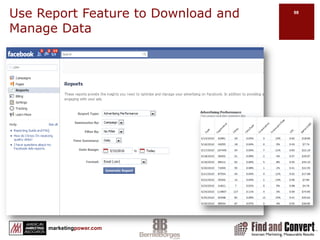
Use Report Feature to Download and Manage Data
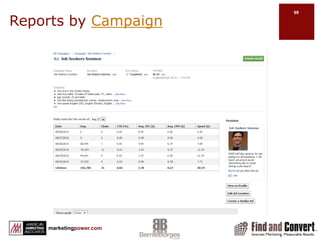
Reports by Campaign
Use Metrics to Refine Your AdsCreate multiple ads of similar themesOrganize them into campaignsRun for 1-2 week period while monitoring statsAnalyze statisticsRetire underperforming ads and run A/B testing on better onesRepeat – repeat – repeatAdjust demographics
The Social Media ROI MindsetTraditional marketing is measured by campaignsSocial Media campaigns have a place as wellSocial media succeeds over the long termShort term metrics are often more fluidSocial media is built on relationships Results are not short-term orientedSocial media is all about “them”Under-promise and over deliverSocial media is not about one hit wonders – build relationshipsWhile the goal is long-termConstantly and consistently measure resultsAnalyze  - Refine - Repeat – repeat - repeat
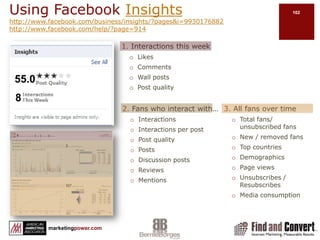
Using Facebook Insightshttp://www.facebook.com/business/insights/?pages&i=9930176882http://www.facebook.com/help/?page=9141. Interactions this weekLikesCommentsWall postsPost quality55.083. All fans over timeTotal fans/ unsubscribed fansNew / removed fansTop countriesDemographicsPage viewsUnsubscribes / ResubscribesMedia consumption2. Fans who interact with…InteractionsInteractions per postPost qualityPosts Discussion postsReviewsMentions
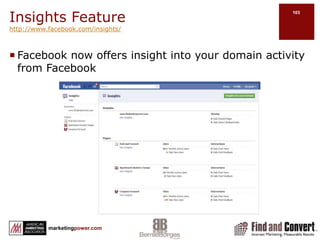
Insights Featurehttp://www.facebook.com/insights/Facebook now offers insight into your domain activity from Facebook
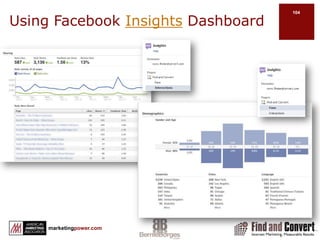
Using Facebook Insights Dashboard
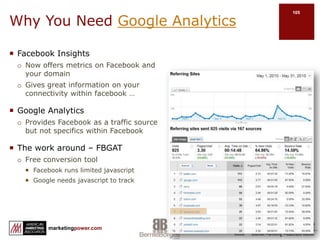
Why You Need Google AnalyticsFacebook InsightsNow offers metrics on Facebook and your domainGives great information on your                                                                                 connectivity within facebook …Google AnalyticsProvides Facebook as a traffic source                                                                          but not specifics within FacebookThe work around – FBGATFree conversion toolFacebook runs limited javascriptGoogle needs javascript to track
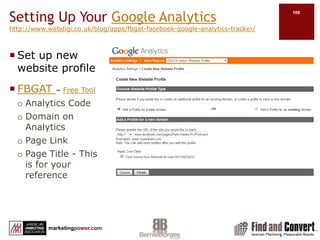
Setting Up Your Google Analyticshttp://www.webdigi.co.uk/blog/apps/fbgat-facebook-google-analytics-tracker/Set up new website profileFBGAT – Free ToolAnalytics Code Domain on AnalyticsPage LinkPage Title - This is for your reference
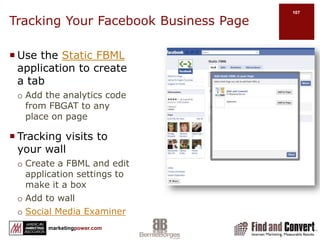
Tracking Your Facebook Business PageUse the Static FBML application to create a tabAdd the analytics code from FBGAT to any place on pageTracking visits to your wallCreate a FBML and edit application settings to make it a boxAdd to wallSocial Media Examiner
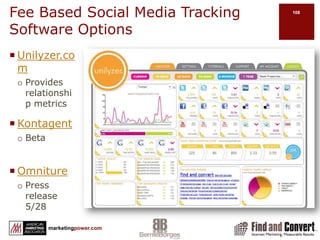
Fee Based Social Media Tracking Software OptionsUnilyzer.com Provides relationship metricsKontagentBetaOmniturePress release 5/28
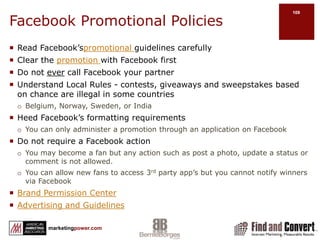
Facebook Promotional PoliciesRead Facebook’spromotional guidelines carefully Clear the promotion with Facebook firstDo not ever call Facebook your partnerUnderstand Local Rules - contests, giveaways and sweepstakes based on chance are illegal in some countries	Belgium, Norway, Sweden, or IndiaHeed Facebook’s formatting requirementsYou can only administer a promotion through an application on FacebookDo not require a Facebook actionYou may become a fan but any action such as post a photo, update a status or comment is not allowed.You can allow new fans to access 3rd party app’s but you cannot notify winners via FacebookBrand Permission CenterAdvertising and Guidelines
Section SevenIn the TrenchesUsing Facebook to Build Relationships and Brand Awareness
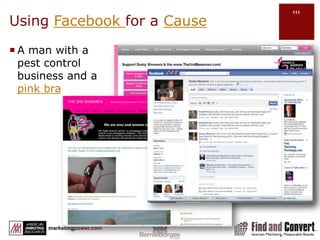
Using Facebook for a CauseA man with a pest control business and a pink bra
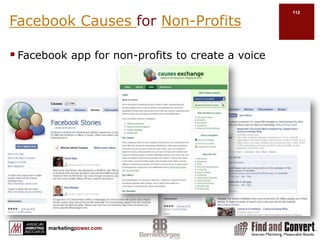
Facebook Causes for Non-ProfitsFacebook app for non-profits to create a voice
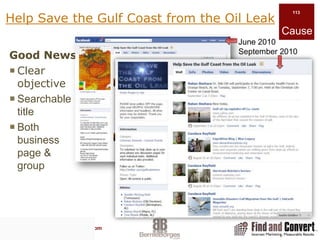
Help Save the Gulf Coast from the Oil LeakCauseJune 2010September 2010Good NewsClear objectiveSearchable titleBoth business page & group
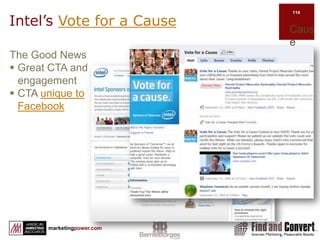
Intel’s Vote for a CauseCauseThe Good NewsGreat CTA and engagement
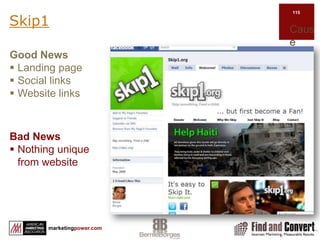
CTA unique to FacebookSkip1CauseBad NewsNothing unique from websiteGood NewsLanding page
Social links
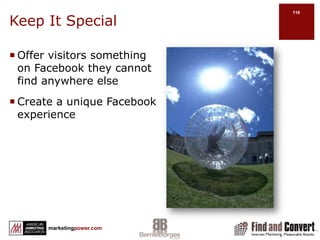
Website linksKeep It SpecialOffer visitors something on Facebook they cannot find anywhere elseCreate a unique Facebook experience
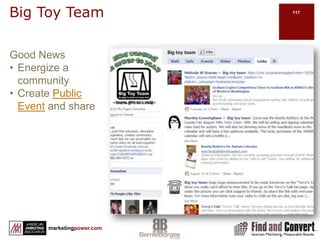
Big Toy TeamGood NewsEnergize a community
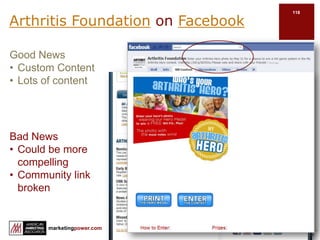
Create Public Event and shareArthritis Foundation on FacebookBad NewsCould be more compelling
Community link brokenGood NewsCustom Content
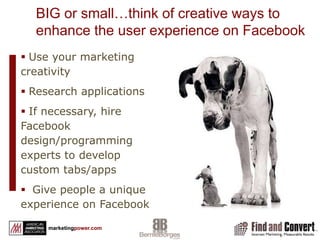
Lots of contentBranding StrategiesWhat do you want to achieve?EngagementExperienceOffersPurchaseSubscribeWhat are your Facebook channels?Facebook AppsCustom Apps
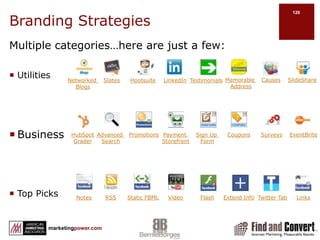
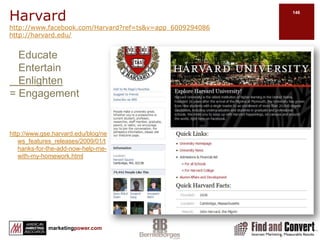
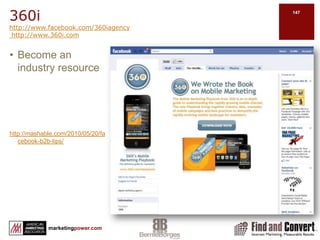
Branding StrategiesMultiple categories…here are just a few:UtilitiesBusinessTop PicksCausesSlideShareMemorable AddressNetworked BlogsLinkedInSlatesTestimonialsHootsuiteCouponsEventBritePayment StorefrontPromotionsSurveysHubSpotGraderSign Up FormAdvanced SearchNotesFlashVideoStatic FBMLRSSExtend InfoTwitter TabLinks
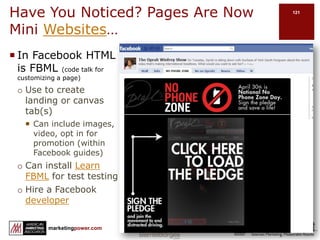
Have You Noticed? Pages Are Now Mini Websites…            In Facebook HTML is FBML (code talk for customizing a page)Use to create landing or canvas tab(s)Can include images, video, opt in for promotion (within Facebook guides)Can install Learn FBML for test testingHire a Facebook developer
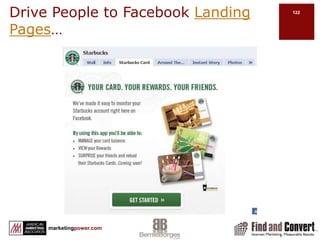
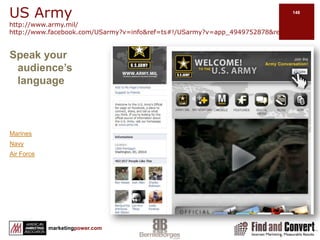
Drive People to Facebook Landing Pages…
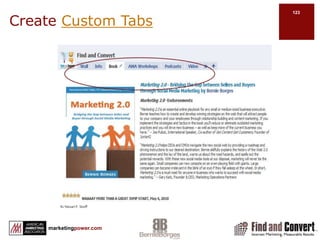
Create Custom Tabs
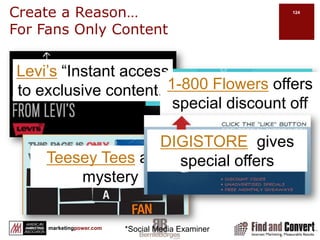
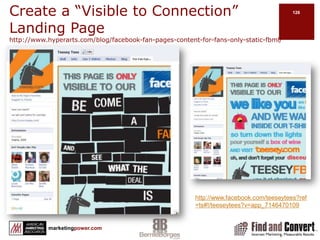
Create a Reason…For Fans Only ContentLevi’s “Instant access to exclusive content.”1-800 Flowers offers special discount off next order.DIGISTORE  gives special offersTeesey Tees adds mystery*Social Media Examiner
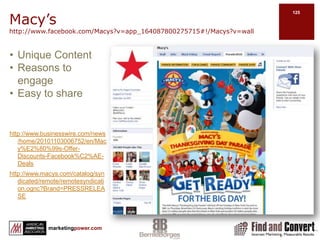
Macy’s http://www.facebook.com/Macys?v=app_164087800275715#!/Macys?v=wallhttp://www.businesswire.com/news/home/20101103006752/en/Macy%E2%80%99s-Offer-Discounts-Facebook%C2%AE-Dealshttp://www.macys.com/catalog/syndicated/remote/remotesyndication.ognc?Brand=PRESSRELEASEUnique Content
Reasons to engage
Easy to shareCreate a “Visible to Connection” Landing Pagehttp://www.hyperarts.com/blog/facebook-fan-pages-content-for-fans-only-static-fbml/http://www.facebook.com/teeseytees?ref=ts#!/teeseytees?v=app_7146470109
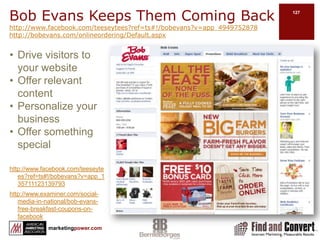
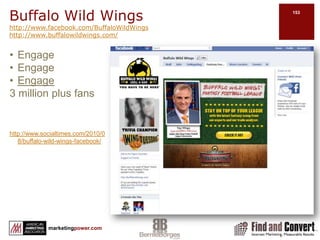
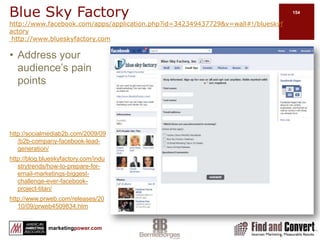
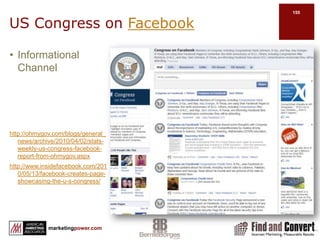
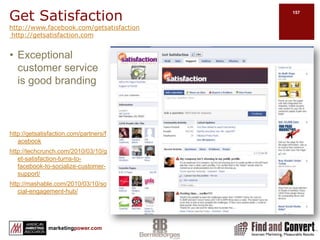
Bob Evans Keeps Them Coming Backhttp://www.facebook.com/teeseytees?ref=ts#!/bobevans?v=app_4949752878http://bobevans.com/onlineordering/Default.aspxhttp://www.facebook.com/teeseytees?ref=ts#!/bobevans?v=app_135711123139793http://www.examiner.com/social-media-in-national/bob-evans-free-breakfast-coupons-on-facebookDrive visitors to your websiteOffer relevant contentPersonalize your businessOffer something special
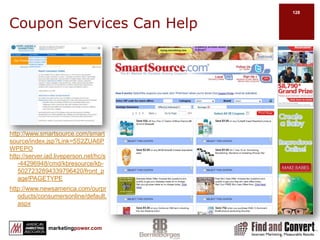
Coupon Services Can Helphttp://www.smartsource.com/smartsource/index.jsp?Link=5S2ZUA6PWPEPOhttp://server.iad.liveperson.net/hc/s-44296948/cmd/kbresource/kb-5027232894339796420/front_page!PAGETYPEhttp://www.newsamerica.com/ourproducts/consumersonline/default.aspx
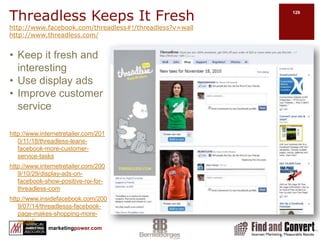
Threadless Keeps It Freshhttp://www.facebook.com/threadless#!/threadless?v=wallhttp://www.threadless.com/http://www.internetretailer.com/2010/11/18/threadless-leans-facebook-more-customer-service-taskshttp://www.internetretailer.com/2009/10/29/display-ads-on-facebook-show-positive-roi-for-threadless-comhttp://www.insidefacebook.com/2009/07/14/threadlesss-facebook-page-makes-shopping-more-social/Keep it fresh and interestingUse display adsImprove customer service
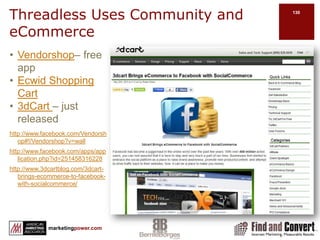
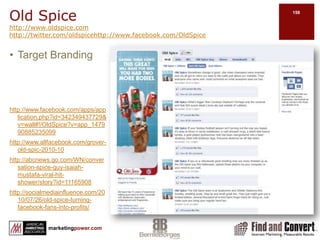
Threadless Uses Community and eCommercehttp://www.facebook.com/Vendorshop#!/Vendorshop?v=wallhttp://www.facebook.com/apps/application.php?id=251458316228http://www.3dcartblog.com/3dcart-brings-ecommerce-to-facebook-with-socialcommerce/Vendorshop– free app Ecwid Shopping Cart3dCart – just released
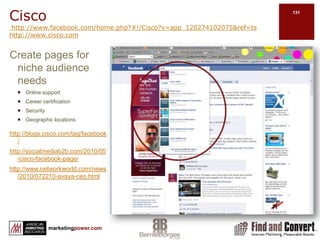
Cisco http://www.facebook.com/home.php?#!/Cisco?v=app_120274102075&ref=ts http://www.cisco.comhttp://blogs.cisco.com/tag/facebook/http://socialmediab2b.com/2010/05/cisco-facebook-page/http://www.networkworld.com/news/2010/072210-avaya-ceo.htmlCreate pages for niche audience needsOnline support Career certificationSecurityGeographic locations
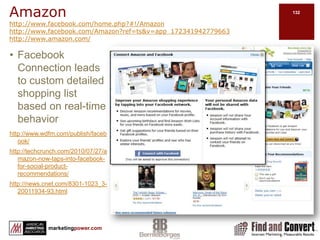
Amazonhttp://www.facebook.com/home.php?#!/Amazonhttp://www.facebook.com/Amazon?ref=ts&v=app_172341942779663http://www.amazon.com/http://www.wdfm.com/publish/facebook/http://techcrunch.com/2010/07/27/amazon-now-taps-into-facebook-for-social-product-recommendations/http://news.cnet.com/8301-1023_3-20011934-93.htmlFacebook Connection leads to custom detailed shopping list based on real-time behavior
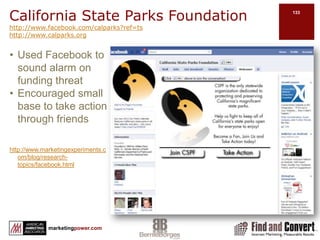
California State Parks Foundationhttp://www.facebook.com/calparks?ref=tshttp://www.calparks.orghttp://www.marketingexperiments.com/blog/research-topics/facebook.htmlUsed Facebook to sound alarm on funding threatEncouraged small base to take action through friends
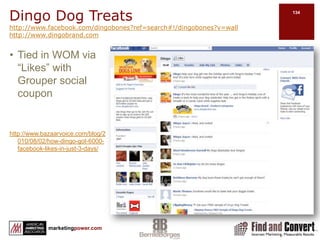
Dingo Dog Treatshttp://www.facebook.com/dingobones?ref=search#!/dingobones?v=wallhttp://www.dingobrand.comhttp://www.bazaarvoice.com/blog/2010/08/02/how-dingo-got-6000-facebook-likes-in-just-3-days/Tied in WOM via “Likes” with Grouper social coupon

AMA Facebook for Marketers 12-7-2010

  • 1.
    Facebook for MarketersBernieBorgesDecember 7th, 2010
  • 2.
    GoalsLearn how touse Facebook in productive and measurable ways in business.Learn strategies and tactics to build your audience.Understand the “rules of engagement.” Understand Facebook’s marketing potential.Minimize mistakes.Maximize positive results.
  • 3.
    ExpectationsNavigate FacebookHow todevelop a content strategy that drives salesLearn the various Facebook channels e.g. advertising, personal profiles, groups, business pages, events, causes…How to build your personal or company brand and build a networkSelect and implement applications that fit your Facebook marketing planUnderstand the “rules of engagement” and community building best practicesExperiential marketing that creates “buzz”How to use Facebook advertising and why you shouldMeasure – review – refine: Facebook analytics
  • 4.
    Skills to AcquireThe2 pillars of social mediaContent-content-contentBuilding relationshipsThe habit of using Facebook daily.How to engage with people and brands.How to build your personal and company brand.How to measure results from Facebook marketing.
  • 5.
    AgendaThis MorningThis AfternoonJusta Little BackgroundGetting Started…a few BasicsFacebook NavigationBuild Your BrandFacebook AdsMeasuring Facebook ROIIn the Trenches Facebook Marketing Case Studies and Discussion
  • 6.
    Section OneJust aLittle BackgroundA Facebook Stats
  • 7.
  • 8.
  • 9.
    About FacebookWhat IsAll the Fuss About Facebook?Facebook has become the largest people, content and brand connectivity tool on the web. Facebook is aboutConnectivitySharingBuilding RelationshipsExpanding BrandYour result canDrive trafficIncrease leadsGenerate revenue
  • 10.
    Facebook Statshttp://www.facebook.com/press/info.php?statisticshttp://www.checkfacebook.com/People ofFacebook5.47M active users (120M US)Avg 130 friends700B minutes per monthActivityAvg user connected to 80 pages, groups and eventsGlobal reach70 languages70% of users are outside the USMobile200M access usersUsers are twice more activePlatform1M+ developers & entrepreneurs from 180 countries Every month, more than 70% of users engage with platform applicationsMore than 550,000 applications available More than 1M websites integrate with FacebookcomScore stats2/3rds of US top 100 websitesHalf of Global top 100 websites
  • 11.
    http://www.checkfacebook.com/Facebook traffic up60%Real contender to Google and Bing
  • 12.
    Facebook’s Open GraphAPIThe buzz about the Open Graph APIA way to embed Facebook pages anywhere on the webAuthentication hub for social experiences on the webWhat this means for marketersFacebook has become a major tool in expanding brand awareness for B2B as well as B2B companiesGraph from AllFacebook.com
  • 13.
    Before We Begin…Understandinghow to market with Facebook begins withSetting and measuring goalsUnderstanding Facebook usesUnderstanding Facebook navigationWhat happens when you post content on your wallCustomizing your Facebook marketingFacebook interactivity
  • 14.
    Setting and MeasuringGoalsChris Treadaway & Mari SmithFacebook Marketing: An Hour a DayGoalsMetricsExample
  • 15.
    If Monetizing FacebookIs Your Objective… Three Forms of MediaEarned MediaAuthorityTrustReputationPurchased MediaFacebook AdsOwned MediaContent we produce, e.g., Facebook apps, documents, blogs, videos, photos, announcementsSometimes all work best…
  • 16.
    Facebook UsesPersonal profileBusiness(Fan) pageGroupsEventsCausesCommunity PageApplicationsAdvertisingSearch engine
  • 17.
    How Your Postand Content Travels…Business Page Friend’s Profile Page Write comment and paste linkClick attachClick Share to everyonePosts to Find and Convert’s Business page with 680 people that “Like” the business pagePosts to the News Feed of 680 people that “Like” Find and ConvertYour post now shows in 116 more news feeds One of those 560 then want to “share” with their 116 friends A comment is made and your post is then shared again, posting to 142 more news feeds…and so on
  • 18.
    Just Imagine…If 5%of friends shared a post with 130 friends each time…This is how content goes viral
  • 19.
    Basic Facebook NavigationGroupMusthave a personal profileInvitations can be open to the public or closed Allows you to send bulk invite to friendsOpportunity for message to go viralDoes not support applicationsCan create related event and invitationCannot promote with social adsNo visitor statistics available (at this time)Discussions Personal ProfileYou can friend othersYou can “Like” a pageCannot use profile for businessPost messages that will be read by your “friends”Create eventsShare content, photos and videoSend private emailBusiness PageVisible to unregistered usersCan be indexed for SEO valueReputation management valueAllows for “vanity” URLCan create eventsCan tailor to specific needsOver 500,000 Facebook and 3rd party applicationsCan promote with social adsOffers Visitor statisticsAllows multiple administrators not attached to a profileDiscussionsPersonal profiles are for peopleBusiness pages are for celebrity, band, business or organizationGroups are sponsored by an individual for specific topics
  • 20.
  • 21.
    http://facebook.grader.com/user/gradePurpose:Share personal, businessand common interests with others by posting content
  • 22.
    Find others andmeaningful content that is meaningful, educational and/or entertaining
  • 23.
    A way toengage with people you know and meet others with common interests18A Facebook Profile
  • 24.
  • 25.
  • 26.
  • 27.
  • 28.
    Have your businesspage connect to your profile if possible19A Business Page
  • 29.
    How Do ISeparate My Personal Life and Professional Life?The lines are blurringplay nicesharedon’t bully
  • 30.
    Section TwoGetting started…SettingUp:Personal ProfileYour SettingsNotificationsMobilizingFind FriendsAccountApplicationsBusiness ProfileApplicationsGroupsHelp Center
  • 31.
    Setting up aPersonal ProfileAre you creating a personal profile or a business page? Do you want a personal profile attached to your business page?Fill in form or select “Create a Page”Select Privacy settings. Agree to Facebook TOS..Confirmation email. Search for friends and coworkers:Online email address book for possible friends and contactsBy school or company.Help
  • 32.
    Your ProfileFacebook willremind you of steps you need to completeEdit ProfileMax 4M on photo or avatar
  • 33.
    Set Up YourPersonal Profile Privacy SettingsFriends Friends of Friends EveryonePersonal Information and PostsContact InformationSearchApplications and WebsitesInstant Personalization Pilot ProgramMore informationMashable: Facebook Privacy ControlsFacebook Privacy ExplanationFacebook Privacy
  • 34.
    Privacy Settings -ApplicationsFriends Only; Except Clients
  • 35.
    Notifications TabUpdate yourFansVisit your Insights PageGet more fans with Facebook Ads
  • 36.
    Mobilizing Your FacebookSetUp and verifySelect your phoneText a link to phoneText messagesUpload via emailAccess via account and footer
  • 37.
    Settings – FindFriends3EmailSuggestionsSearchConnectionsAddress BookCreate csv file from address book and upload4152
  • 38.
    Settings - AccountSettingsNetworksGroupsor SchoolNotificationsMobileLanguagePaymentsFacebook Ads
  • 39.
    Settings - ApplicationsYoucan edit SettingsProfile
  • 40.
    Personal Profile TipsUploada few pictures and fill out your profile completely.Update your status daily.“Like” business (fan) pages and join groups that are of interest to you. Participate in them by commenting on their walls and/or uploading links.Edit settings to exclude apps to lists e.g. Gambling app on your profileEngage with your Facebook friends by commenting on their walls, invite them to join your business page(s)/groups, comment on their videos/pictures, and upload videos/pictures.Post upcoming events or parties you may have and invite your Facebook friends.Listen in on Facebook conversations and get social with your peers and friends as you see fit and get comfortable doing so.
  • 41.
    Creating a BusinessPagehttp://www.facebook.com/pages/create.phpLocal businessBrand, product or organizationArtist, band or public figureFill out FormClick Create Official PageWill connect page to your personal profileWill create a stand alone page
  • 42.
  • 43.
    Adding Your LinkedInProfileLinkedIn AppInsert URL and click add tabGo to profile page search tabs
  • 44.
    Edit Your BusinessPageEdit pageSettingsWall SettingsMobileApplicationsPhotosDiscussion BoardsLinksVideoNotesEvents
  • 45.
    Find Those BusinessPages that You ManageSelect Account TabManage pages
  • 46.
    Facebook Applicationshttp://www.facebook.com/apps/directory.phpApplication Directorylisted by:UtilitiesEducationEntertainmentFriends & FamilyBusinessGames SportsLifestyleJust for FunOn FacebookExternal WebsitesDesktopMobilePagesPrototypeBusiness PageBottom of Edit page
  • 47.
    Where Do IFind All Those Business Pages That I “Like”Profile PageInfo TabScroll to Likes and InterestsActivitiesBooksMoviesTelevisionOther – scroll over list
  • 48.
    Creating a VanityURLhttp://www.facebook.com/usernameYou must have a profile to create vanity URL for a business pageMinimum of 25 “Likes” for business page URLSelect a name with relevant keywords for search value
  • 49.
    Creating a Grouphttp://www.facebook.com/apps/application.php?id=2361831622&bOn Home Page - select:GroupsCreate a GroupA Group must have a sponsor (profile, business page or groups) attached to itInvite friends to joinPosting a link to join a group in a message, on a wall or in a discussion board is construed as “spam” Make members “admin” so that they can invite his/her friends to join the group
  • 50.
  • 51.
    Section ThreeNavigating AroundYour ProfileHome VS Profile
  • 52.
  • 53.
  • 54.
  • 55.
    EtiquetteHome VS ProfileHome– News FeedInboxProfileOutbox
  • 56.
    Sending Messages inFacebookSimilar to permission email marketing
  • 57.
    Use selectively, e.g.,lists, sub groups of friends
  • 58.
    Good way tosend links, videos, photos
  • 59.
    Limited to 20at a time
  • 60.
    Select messages andclick on “new message” in upper right-hand cornerCreate Lists to Manage Your FriendsGo to friendsClick Create a ListCreate List NameSelect or type in nameCreate List
  • 61.
    Manage Lists Uselists to group your friendsCommon interestsSeparate business and personalSpecific groupsTopicsSend messages to groups in list
  • 62.
    Tagging Friends inFacebookUse the “@” before a name to tag
  • 63.
    Writing Notes inFacebook PagesSimilar to permission email marketing.
  • 64.
    Sent tofans of pagesFacebook Is a Behavioral Based Search Engine Entertainment and Communication System…Notification of interactions between you and your networks
  • 65.
    Facebook Really Wantsto Help You ConnectWhen clicking friends you may see this:Re-connect with past connectionsFind friends of friends
  • 66.
    Remember…Facebook is notabout shouting your messageFacebook is about communication, relationships and engagement that will ultimately achieve your goal…
  • 67.
    The Seven HeavenlyTruths About Social Media Networks*Preferred communication of younger generations but not limited to themSocial media is based on the concept of “friends” as a loosely applied term for people connecting with people, companies, brands…People that are active on the Internet are more likely active in social networks & are often influencers within their niche groupsSocial media content is transparent…once it’s posted, it is widely visibleContent is the hub of the Internet, social media is just one spokeThe rules in social media are still being defined. Experiment and tread carefullyWhat motivates people is the key to social media usage…Chris TreadawayMari Smith*Facebook Marketing An Hour a Day
  • 68.
    The Seven DeadlySins Motivators of Social Media Networking*Social Interaction MotivatorsLoveSelf-expression / emotionSharing opinions / influencing friendsShowing Off…the IdFun / escapism / humorMemories and nostalgiaMaking MoneyChris TreadawayMari Smith*Facebook Marketing An Hour a Day
  • 69.
    People Connecting throughFacebookQuick ReviewIdentifying ObjectivesWhat Facebook is really aboutPersonal ProfilesBusiness Profiles and community pagesSeeking connectionsNavigating through FacebookGroupsAnother way to connect…events
  • 70.
    Events…An OLD SKOOLREUNIONEngaging imageCaptivating tag lineInformativeUsed email and share to informAttached to profile page
  • 71.
    Events… An Afternoonof Ray’s BaseballIdentifying imageInformative tag lineMessage targeted to busy people – to the pointUsed email and share to inform membersAttached to business (organization) page
  • 72.
    Events… Denver Cruiser’sSunday FundayIdentifying imageNo tag lineMessage is targeted to group onlyUses email and share to inform membersAttached to group page
  • 73.
    Finding EventsFacebook isabout connectionsEvents listed byYour invitesYour friends invitesDifficult to find events in search with specific nameSuccessful events take marketing effort
  • 74.
    Creating an Eventhttp://www.facebook.com/help/?page=828On Home Page - select:EventsCreate an EventCustomizing your event under Wall you can add:PhotosVideosLinksRememberSuccessful events take marketing effort
  • 75.
    FacebookEtiquette Always havea current photo in your profile.
  • 76.
    Status updatesshould be interesting.
  • 77.
    Status updatesshould be spread out, not every 5 minutes.
  • 78.
    Only pokeclose friends, and don’t over do it.
  • 79.
    Don’t inviteall your friends to join every game you play. Be selective.
  • 80.
    Create listsand use them to avoid treating all your friends the same.
  • 81.
    Don’t sharetoo much information.
  • 82.
    Invite friendsto pages, groups, events, etc, selectively.
  • 83.
    Don’t repeatedlyinvite friends to join your page if they’ve ignored.
  • 84.
    Use messagingsparingly. Don’t flood friend’s inboxes.
  • 85.
    Tag friendsin photos selectively. Don’t embarrass someone.
  • 86.
    Use social etiquettecommon sense!Section FourBuild Your Brand on Facebook
  • 87.
    Promoting Your BusinessPagehttp://www.facebook.com/help/?faq=12822Allow business page to go through your Facebook news feed.Your Profile News Feed allows your business page to display to all your friends.It’s crucial to spreading your message to the most people on Facebook. HelpScreenshot fnc post + bernie news feed
  • 88.
    Posting ContentPostOn profileor business page, select icon to the right of attachAdd URL or uploadIf pasting comment, use notepad to remove code RSS appAdd app to business pageClick to allowSelect page to addGive permissionAdd Feed URLAdjust custom defaultsSaveTagsIn comment area add “@” before nameSelect appropriate nameClick Share
  • 89.
    Promoting Your BusinessPageBe social…”Like” other Business pages of interest to youUpload relevant content and leave comments on other people’s business page Not the place for a sales pitch…do not be spammyAffiliate with other brands, businesses, and public figuresBy becoming a fan (Like) of another page, your page will publically support that pageHelp
  • 90.
    Using Your Profileto Promote Your Business PageIn order to be visible to search engines, your business page privacy setting must be public.Occasionally invite “friends” to become a fan of your business pageEmail the vanity URL of your business page to people in your address bookDisplay your business page badge on your blogInclude a link in all your communication, auto-signatureDisplay Facebook badge on your website & blog.Invite people to leave comments on your business page.Help
  • 91.
    Display Your FacebookPage on Your Blog
  • 92.
    Facebook Promoting Do’s& Don’tsDon’tsDon’t over-postDon’t spamDon’t be “me” centricDon’t fly blindDon’t think short termDon’t be roboticDo’sPost dailyConsider your friends’ interestsShare other’s contentMeasure, review, reviseExperiment Use common senseBe Human
  • 93.
    Facebook Moving towardInter-connected Semantic WebWeb is moving toward convergence of connections between people and things they care aboutApril 2010 Facebook introduced Open Graph Protocol and Graph APIAugust 2010 – Introduction of Facebook PlacesAugust 2010 – Introduction of Facebook Live
  • 94.
    Objects Are AllAccessed the Same WayPages: https://graph.facebook.com/cocacola (Coca-Cola page)Events: https://graph.facebook.com/251906384206 (Facebook Developer Garage Austin)Groups: https://graph.facebook.com/2204501798 (Emacs users group)Applications: https://graph.facebook.com/2439131959 (the Graffiti app)
  • 95.
    Objects are Connectedthrough RelationshipsObjects in Facebook social graph are connected to each other through relationships (connections)Friends: https://graph.facebook.com/me/friendsMovies: https://graph.facebook.com/me/moviesBooks: https://graph.facebook.com/me/bookshttp://www.infoq.com/news/2010/04/facebook-graph-api
  • 96.
  • 97.
    Facebook PlacesLBS –Location Based ServicesSimilar to FourSquare and GowallaRequires:a Smart PhoneFacebook touch mobile site is only visible on mobile browsers that supports HTML 5 and geolocationSetup: http://touch.facebook.comClick “Places tab at www.touch.facebook.comYou can add places, check into places that already exist and tag friends
  • 98.
    What “Facebook Places”Can Do for Experiential MarketingMobile App that allows people to connect “on the go” B2C opportunity to deliver customer service value that maximizes loyalty
  • 99.
  • 100.
    Project Titan…fMailConvergenceLike gMailbut integrated across your social graphLighter and Simpler eMailSMSSeamless messaging that will hook into email but is not eMailConversation History – ThreadingSocial InboxWill rollout by invitehttp://facebookemail.org/http://www.skeptical-science.com/science/facebook-event-live-update/http://nadheeraudawatthe.blogspot.com/http://techhttp://www.readwriteweb.com/crunch.com/2010/11/13/youve-got-fmail/
  • 101.
    B2B vs B2C– Facebook can be a powerful branding tool for both
  • 102.
    Facebook Branding StrategyBuildan active wallEncourage people to Like your pageMonitor and participate in the comments on your WallRe-purpose contentPost useful, interesting content from various sources, regularlyEncourage Experiential MarketingUse Landing or welcome tabsProduct specific interactionDeliver a unique experience!ExperimentUse Calls to ActionWell designed, clear calls to actionMarket Facebook outside FacebookUse photosIf possible, use pictures to show how customers use your productShow customer satisfaction and engagementPost pictures of your team at workUse videoPost recording of team member “experts”Show your product in actionHighlight off-line marketingCompany sponsorships and events
  • 103.
    Facebook Marketing OutsideFacebookFacebook developers - Facebook Platform ShowcaseMixture of free and fee based appsCross-pollinate social media and traditional media venuesUse email, newsletters, direct mail and media to point to social networks
  • 104.
    Create Facebook BadgeTo Promote Your Page(s)Facebook BadgesPage Badge Profile Badge Like Badge Photo BadgeUse 3rd party Facebook buttonsDo: hyperlink the badge to your Facebook Page or landing pageDo: hyperlink the name of your business within your promotional copy to your Facebook Page. For example, Company X on FacebookDon’t: hyperlink the “Find us on Facebook” badge to the Facebook log-in page.Don’t: hyperlink the word “Facebook” within your promotional copy to your Facebook Page. For example, Company X on Facebook
  • 105.
    Community Pages suchas the History Channel Are like Wiki’s Aggregate content across FacebookYou can submit but Facebook will determine and upload image
  • 106.
    Business Page VsGroups Vs CommunityGroups largest value is the community aspect of a “group” engaging together on a common themePagesPages can only be for a real organization, business, celebrity, or bandMust be created by an official representative of that entityPages are public. Anyone can become a fan. Administrator can remove fansCan create events and send invites, register, etc.Community PageWiki style page of information centered around keyword or phraseAggregates posts across FacebookWhile you can create a community page, Facebook determines if there is enough volume to support it and controls the imageGroupsGroups can be created by any user and about any topicGroups are a community of users to share their opinions and interest in the group’s subjectGroups can be kept closed (invitation only)Can create events and send invites, register, etc.
  • 107.
  • 108.
  • 109.
    Facebook Ads andHow They WorkCosts less than other forms of Internet adsTargeted to user behaviorWork differently than banner or click through adsSuccessful Facebook advertising requiresTargetingCreativityExperimentationMonitoring
  • 110.
    Some Notable Differencesbetween Facebook Ads and Google AdwordsThere is more competition on Google than Facebook…  Google Adwords is keyword and geo targeted where as Facebook advertising is demographic, geo targeted and allows targeting according to profile attributesYou can steadily bid up on Google to increase your ad position along top and side whereas Facebook ads only display along one side (currently) Google Adwords are text ads, Facebook ads are text and image. Facebook generally allows more targeted advertising, but is more B2C centric currently.
  • 111.
    Before You BeginHavea clear idea of what you want your ad to accomplishCreate more visibility or traffic to your Facebook presenceTest the effectiveness of a changeUse Facebook audience to drive more traffic to your websiteEstablish a baselineKnow how many fans/friends you have before beginning a campaignDownload Facebook insight data before launchLink – Where do you want your visitor to goWhat is your ad message?Have a photo or imageFacebook Ad Guidelines
  • 112.
    10 Tips forFacebook Ad Marketing*Facebook is NOT direct sales…it is a marketing cycleCreate focused ads targeted at niche groupsFriend users before you try to sell to themUnderstand your marketSet ad budget with goal in mindMeasure – review – refineTest landing pages VS Facebook pagesSplit test ads by demographicDevelop well designed creative ad copyDon’t over targetNick O’NeillBus Insider SAI
  • 113.
    On the Facebook.com/advertisingpage - click on Create Your AdStep OneDesign your adStep TwoTarget your audience with demographic and geographical filtersStep ThreeName your campaign, Which is better? Decide and experiment Per impressionPer clickSelect your pricingStep FourReview your adCreate Your Ad
  • 114.
  • 115.
    CM PhotographicsFacebook reached the right people at the right timeGenerated $40,000 of revenue from a $600 ad campaign
  • 116.
    StorQuest on Facebookused real-time suggested bidsOver 50% increase in same store total rentals versus prior year.10% conversion rate from visits originating from Facebook Ads.$1.25 CPC delivered $10.25 cost-per-lead.$100 average rentals; $600 average life time value per customer.
  • 117.
    Nippon on Facebook combining marketing solutionsFacebook generated 25% CTR compared to CTR of 10–12% other online campaigns
  • 118.
    Additional Facebook Advertising Case StudiesShopLocalWildchildTreaderROTHBURYWiseChoiceWedding Paper DivasPovo.com
  • 119.
  • 120.
    What Facebook AdMetrics Can Tell YouMarket researchInvestmentComparisonTargetingCompetitive
  • 121.
    Export Data toCreate Client Specific Reports and Graphs
  • 122.
    Facebook Ad MetricsWill ProvideAd Name Your descriptive for adStatus Complete – active - pausedBidAcceptable maxTypePay for impressionsPay for clicksCTR(%)Click through rateAverage CPCEffective price of every clickAverage CPMEffective cost per 1,000 impressions (even on cost per click campaigns)Total Spent
  • 123.
    Use Report Featureto Download and Manage Data
  • 124.
  • 125.
    Use Metrics toRefine Your AdsCreate multiple ads of similar themesOrganize them into campaignsRun for 1-2 week period while monitoring statsAnalyze statisticsRetire underperforming ads and run A/B testing on better onesRepeat – repeat – repeatAdjust demographics
  • 126.
    The Social MediaROI MindsetTraditional marketing is measured by campaignsSocial Media campaigns have a place as wellSocial media succeeds over the long termShort term metrics are often more fluidSocial media is built on relationships Results are not short-term orientedSocial media is all about “them”Under-promise and over deliverSocial media is not about one hit wonders – build relationshipsWhile the goal is long-termConstantly and consistently measure resultsAnalyze - Refine - Repeat – repeat - repeat
  • 127.
    Using Facebook Insightshttp://www.facebook.com/business/insights/?pages&i=9930176882http://www.facebook.com/help/?page=9141.Interactions this weekLikesCommentsWall postsPost quality55.083. All fans over timeTotal fans/ unsubscribed fansNew / removed fansTop countriesDemographicsPage viewsUnsubscribes / ResubscribesMedia consumption2. Fans who interact with…InteractionsInteractions per postPost qualityPosts Discussion postsReviewsMentions
  • 128.
    Insights Featurehttp://www.facebook.com/insights/Facebook nowoffers insight into your domain activity from Facebook
  • 129.
  • 130.
    Why You NeedGoogle AnalyticsFacebook InsightsNow offers metrics on Facebook and your domainGives great information on your connectivity within facebook …Google AnalyticsProvides Facebook as a traffic source but not specifics within FacebookThe work around – FBGATFree conversion toolFacebook runs limited javascriptGoogle needs javascript to track
  • 131.
    Setting Up YourGoogle Analyticshttp://www.webdigi.co.uk/blog/apps/fbgat-facebook-google-analytics-tracker/Set up new website profileFBGAT – Free ToolAnalytics Code Domain on AnalyticsPage LinkPage Title - This is for your reference
  • 132.
    Tracking Your FacebookBusiness PageUse the Static FBML application to create a tabAdd the analytics code from FBGAT to any place on pageTracking visits to your wallCreate a FBML and edit application settings to make it a boxAdd to wallSocial Media Examiner
  • 133.
    Fee Based SocialMedia Tracking Software OptionsUnilyzer.com Provides relationship metricsKontagentBetaOmniturePress release 5/28
  • 134.
    Facebook Promotional PoliciesReadFacebook’spromotional guidelines carefully Clear the promotion with Facebook firstDo not ever call Facebook your partnerUnderstand Local Rules - contests, giveaways and sweepstakes based on chance are illegal in some countries Belgium, Norway, Sweden, or IndiaHeed Facebook’s formatting requirementsYou can only administer a promotion through an application on FacebookDo not require a Facebook actionYou may become a fan but any action such as post a photo, update a status or comment is not allowed.You can allow new fans to access 3rd party app’s but you cannot notify winners via FacebookBrand Permission CenterAdvertising and Guidelines
  • 135.
    Section SevenIn theTrenchesUsing Facebook to Build Relationships and Brand Awareness
  • 136.
    Using Facebook fora CauseA man with a pest control business and a pink bra
  • 137.
    Facebook Causes forNon-ProfitsFacebook app for non-profits to create a voice
  • 138.
    Help Save theGulf Coast from the Oil LeakCauseJune 2010September 2010Good NewsClear objectiveSearchable titleBoth business page & group
  • 139.
    Intel’s Vote fora CauseCauseThe Good NewsGreat CTA and engagement
  • 140.
    CTA unique toFacebookSkip1CauseBad NewsNothing unique from websiteGood NewsLanding page
  • 141.
  • 142.
    Website linksKeep ItSpecialOffer visitors something on Facebook they cannot find anywhere elseCreate a unique Facebook experience
  • 143.
    Big Toy TeamGoodNewsEnergize a community
  • 144.
    Create Public Eventand shareArthritis Foundation on FacebookBad NewsCould be more compelling
  • 145.
    Community link brokenGoodNewsCustom Content
  • 146.
    Lots of contentBrandingStrategiesWhat do you want to achieve?EngagementExperienceOffersPurchaseSubscribeWhat are your Facebook channels?Facebook AppsCustom Apps
  • 147.
    Branding StrategiesMultiple categories…hereare just a few:UtilitiesBusinessTop PicksCausesSlideShareMemorable AddressNetworked BlogsLinkedInSlatesTestimonialsHootsuiteCouponsEventBritePayment StorefrontPromotionsSurveysHubSpotGraderSign Up FormAdvanced SearchNotesFlashVideoStatic FBMLRSSExtend InfoTwitter TabLinks
  • 148.
    Have You Noticed?Pages Are Now Mini Websites… In Facebook HTML is FBML (code talk for customizing a page)Use to create landing or canvas tab(s)Can include images, video, opt in for promotion (within Facebook guides)Can install Learn FBML for test testingHire a Facebook developer
  • 149.
    Drive People toFacebook Landing Pages…
  • 150.
  • 151.
    Create a Reason…ForFans Only ContentLevi’s “Instant access to exclusive content.”1-800 Flowers offers special discount off next order.DIGISTORE gives special offersTeesey Tees adds mystery*Social Media Examiner
  • 152.
  • 153.
  • 154.
    Easy to shareCreatea “Visible to Connection” Landing Pagehttp://www.hyperarts.com/blog/facebook-fan-pages-content-for-fans-only-static-fbml/http://www.facebook.com/teeseytees?ref=ts#!/teeseytees?v=app_7146470109
  • 155.
    Bob Evans KeepsThem Coming Backhttp://www.facebook.com/teeseytees?ref=ts#!/bobevans?v=app_4949752878http://bobevans.com/onlineordering/Default.aspxhttp://www.facebook.com/teeseytees?ref=ts#!/bobevans?v=app_135711123139793http://www.examiner.com/social-media-in-national/bob-evans-free-breakfast-coupons-on-facebookDrive visitors to your websiteOffer relevant contentPersonalize your businessOffer something special
  • 156.
    Coupon Services CanHelphttp://www.smartsource.com/smartsource/index.jsp?Link=5S2ZUA6PWPEPOhttp://server.iad.liveperson.net/hc/s-44296948/cmd/kbresource/kb-5027232894339796420/front_page!PAGETYPEhttp://www.newsamerica.com/ourproducts/consumersonline/default.aspx
  • 157.
    Threadless Keeps ItFreshhttp://www.facebook.com/threadless#!/threadless?v=wallhttp://www.threadless.com/http://www.internetretailer.com/2010/11/18/threadless-leans-facebook-more-customer-service-taskshttp://www.internetretailer.com/2009/10/29/display-ads-on-facebook-show-positive-roi-for-threadless-comhttp://www.insidefacebook.com/2009/07/14/threadlesss-facebook-page-makes-shopping-more-social/Keep it fresh and interestingUse display adsImprove customer service
  • 158.
    Threadless Uses Communityand eCommercehttp://www.facebook.com/Vendorshop#!/Vendorshop?v=wallhttp://www.facebook.com/apps/application.php?id=251458316228http://www.3dcartblog.com/3dcart-brings-ecommerce-to-facebook-with-socialcommerce/Vendorshop– free app Ecwid Shopping Cart3dCart – just released
  • 159.
  • 160.
  • 161.
    California State ParksFoundationhttp://www.facebook.com/calparks?ref=tshttp://www.calparks.orghttp://www.marketingexperiments.com/blog/research-topics/facebook.htmlUsed Facebook to sound alarm on funding threatEncouraged small base to take action through friends
  • 162.

Editor's Notes

  • #2 http://www.buttonshut.com/Facebook-Buttons/
  • #3 Insert into twitter
  • #4 ·      Over 500,000 Facebook applications – 1 million developers from 170·   ·       You’ll learn from actual examples of successful Facebook        marketing.·       You’ll conduct hands-on exercises in Facebook.
  • #8 http://www.checkfacebook.com/
  • #9 http://www.facebook.com/press/info.php?statistics
  • #15 Personal Profilehttp://www.facebook.com/bernie.borges Businesshttp://www.facebook.com/findandconvertGrouphttp://www.facebook.com/group.php?gid=234908467596&v=wall&ref=search#!/group.php?gid=383956791997&v=app_2373072738&ref=ts Event http://www.facebook.com/search/?flt=1&q=chicago&o=4&sid=1081028954.3229641054..1&s=60#!/event.php?eid=112523825454549&ref=search&sid=1081028954.3229641054..1Causehttp://www.facebook.com/search/?init=srp&sfxp&q=chicago&o=4&dt&c1=2&s=30#!/event.php?eid=105664296143097&ref=search&sid=1081028954.3229641054..1Community Pagehttp://www.facebook.com/pages/History-Channel/101884379853735Applicationhttp://www.facebook.com/tos.php?api_key=65ad676f9767bf65efa1e24fd25c7c4b&next=http%3A%2F%2Fwww.fansection.com%2Ffb%2Fsports%2Fcollege_football%2Fchi%2F%3F_fb_fromhash%3D3e77bb246fab652f42b5556a84b7e776&display=page&v=1.0&canvas&locale=en_US
  • #16 Animate sequence
  • #23 http://www.facebook.comHelphttp://www.facebook.com/help/?guide=set_up_profile
  • #24 http://www.facebook.com/bernie.borges
  • #25 http://www.facebook.com/bernie.borgeshttp://www.allfacebook.com/2009/02/facebook-privacy/http://www.facebook.com/privacy/explanation.phphttp://mashable.com/2010/05/26/new-facebook-privacy-controls/
  • #26 http://www.facebook.com/editapps.php?v=bookmarkFor yearbook : show bookmarkedEdit YearbookProfile Tab Select Other
  • #27 http://www.facebook.com/editaccount.php?notificationsUpdate your Fans:http://www.facebook.com/home.php?#!/business/insights/?pages&i=9930176882Get more Fans with Facebook Ads:http://www.facebook.com/n/?ads%2Fcreate%2F&src=pg_edit&fbid=9930176882&mid=2774c1dG21bf9476G4b917cdG66&n_m=bernie%40findandconvert.com
  • #28 http://www.facebook.com/mobile/?settingsAlso access via settings
  • #30 https://www.facebook.com/bernieborges
  • #33 http://www.facebook.com/pages/create.php
  • #34 http://apps.facebook.com/appsdir/?ref=ts
  • #35 http://www.facebook.com/apps/application.php?id=6394109615Go to linkedin App PageClick on AppAdd in LinkedIn URL (Facebook may find it for you)Click on Add TabOn Profile, tab will be on bottom, click on it to move up to main display
  • #37 http://www.facebook.com/editaccount.php?notifications#!/bernie.borges?v=info
  • #38 http://www.facebook.com/apps/directory.php - hard to find without searchAlso lists by what apps friends are using and suggestionshttp://www.facebook.com/apps/application.php?id=2411052087&ref=appd&v=wall#!/apps/directory.php?app_type=0&category=100&order=2&seeall=true
  • #40 http://www.facebook.com/bernie.borges
  • #41 http://www.facebook.com/apps/application.php?id=2361831622&b“If you were trying to promote your group by posting a link to join it in a message, on a wall, or in a discussion board, this can be construed as spam. We suggest making your friends administrators of this group so that they can invite their friends using the Invite functionality built into the group. You can do this by clicking on "Edit Group Members" and then on "make admin" next to the users’ names. Each admin can invite his/her own friends to the group.”
  • #42 http://www.facebook.com/help/?page=903#!/help/?ref=pf
  • #44 http://www.facebook.com/bernie.borges
  • #45 http://www.facebook.com/bernie.borges
  • #47 http://www.facebook.com/bernie.borges
  • #48 http://www.facebook.com/bernie.borges
  • #49 http://www.facebook.com/editnote.php?draft&note_id=126825564007477&id=566203510
  • #50 http://www.facebook.com/bernie.borges
  • #56 http://www.facebook.com/home.php?#!/event.php?eid=124532754224778Note: Because Jonny is a promoter…his personal profile privacy settings are set to everyone
  • #57 http://www.facebook.com/home.php?#!/event.php?eid=109806149063131http://www.facebook.com/pages/TBTF-Foundation/316281585249
  • #58 http://www.facebook.com/event.php?eid=130446956967482#!/event.php?eid=130446956967482http://www.facebook.com/#!/group.php?gid=13399129974
  • #60 http://www.facebook.com/help/?page=828
  • #61 http://www.time.com/time/arts/article/0,8599,1892800,00.htmlhttp://www.allfacebook.com/2009/07/facebook-friend-etiquette-2/
  • #63 If you have a profile attached to your business address settingshttp://www.facebook.com/help/?faq=12822
  • #64 Chris Brogan Blog for example http://www.chrisbrogan.com/http://www.facebook.com/RSS.Graffiti?v=wall
  • #65 http://www.facebook.com/help/?faq=13080
  • #66 http://www.facebook.com/help/?faq=12868http://www.facebook.com/home.php?#!/pages/manage/promo_guidelines.php
  • #67 http://www.findandconvert.com/blog/
  • #69 http://en.wikipedia.org/wiki/Semantic_Web
  • #73 Facebook LBS may reignite the privacy uproar that has plagued the company in recent months. With location-based functionality in place, Facebook would be able to make "public" not only what you write in your profile, but also where you were when you wrote it.
  • #75 http://www.facebook.com/FacebookLive http://news.cnet.com/8301-13506_3-20013636-17.html
  • #77 Link to pdf
  • #78 http://www.facebook.com/help/?page=904
  • #79 http://developers.facebook.com/showcase/
  • #80 http://www.facebook.com/facebook-widgets/http://www.facebook.com/pages/manage/promo_guidelines.php#!/images/pages/Facebook_Badge_02_24_2009.epshttp://www.socialmediabuttons.com/facebook-buttons.htmlhttp://www.buttonshut.com/Facebook-Buttons/http://developers.facebook.com/docs/reference/plugins/like
  • #81 http://www.facebook.com/pages/create.phphttp://www.facebook.com/home.php?#!/pages/The-History-Channel/115145681835037?ref=ts
  • #82 http://www.facebook.com/help/?page=904#!/help/?faq=13622http://blog.facebook.com/blog.php?post=382978412130
  • #87 http://www.facebook.com/ad_guidelines.php
  • #88 http://www.businessinsider.com/10-rules-for-advertising-on-facebook-2009-7 http://www.infomarketingblog.com/100-good-advertising-headlines-victor-schwab/
  • #89 http://www.facebook.com/advertising/
  • #90 http://www.facebook.com/settings/?tab=privacy&section=applications&field=learn#!/ads/adboard/
  • #91 http://www.facebook.com/CMPhotographics#!/CMPhotographics?v=wallhttp://ads.ak.facebook.com/ads/FacebookAds/CM_Photographics_FBcasestudy.pdf
  • #92 http://www.facebook.com/pages/Santa-Monica-CA/StorQuest/52490448966http://ads.ak.facebook.com/ads/FacebookAds/G5_StorQuest_FBcasestudy.pdf
  • #93 http://www.facebook.com/pages/All-Nippon-Airways/43613800535http://ads.ak.facebook.com/ads/FacebookAds/AllNippon_FBcasestudy.pdf
  • #94 http://ads.ak.facebook.com/ads/FacebookAds/ShopLocal_FBcasestudy.pdfhttp://ads.ak.facebook.com/ads/FacebookAds/Wildchild_FBcasestudy.pdfhttp://ads.ak.facebook.com/ads/FacebookAds/Threader_FBcasestudy.pdfhttp://ads.ak.facebook.com/ads/FacebookAds/rothbury_FBcasestudy.pdfhttp://ads.ak.facebook.com/ads/FacebookAds/WiseChoice_FBcasestudy.pdfhttp://ads.ak.facebook.com/ads/FacebookAds/WeddingPaper_FBcasestudy.pdfhttp://ads.ak.facebook.com/ads/FacebookAds/povo_FBcasestudy.pdf
  • #100 http://www.facebook.com/ads/manage/adgroup.php?adgroup_id=6002645500628&act=22529551Ad managerClick on Specific campaign, click again, adjust “Daily stats for the week of:” drop down
  • #102 Social media campaigns have a place
  • #103 http://www.facebook.com/business/insights/?pages&i=9930176882http://www.facebook.com/help/?page=914
  • #105 http://www.facebook.com/business/insights/?pages&i=9930176882http://www.facebook.com/help/?page=914
  • #106 https://www.google.com/analytics/reporting/referring_sources?id=2426902&pdr=20100513-20100612&cmp=average#lts=1276484929998
  • #107 http:www.google.comhttp://www.webdigi.co.uk/blog/apps/fbgat-facebook-google-analytics-tracker/
  • #109 http://www.unilyzer.com/http://guest.kontagent.com/dashboard/dashboard/
  • #110 http://www.insidefacebook.com/2010/02/22/facebook-clarifies-minimum-spending-requirements-for-page-promotions/http://www.facebook.com/help/?ref=pf#!/brandpermissions/index.php http://www.facebook.com/help/?ref=pf#!/ad_guidelines.php
  • #112 http://www.facebook.com/home.php?#!/dustyshowers?v=wall&ref=tshttp://www.the3day.org/site/TR/2010/TampaBayEvent2010?px=1473765&pg=personal&fr_id=1472http://www.the2ndbasemen.com/
  • #113 http://www.facebook.com/causes#!/causes?v=app_1http://exchange.causes.com/http://www.facebook.com/causes43615955650480
  • #114 http://www.facebook.com/group.php?gid=121646667846792http://www.facebook.com/group.php?gid=121646667846792#!/group.php?gid=121646667846792&v=app_2344061033Site was designed to get volunteers for oil leak cleanupHave both page and group
  • #115 http://www.intel.com/consumer/tomorrow/index.htm?iid=subhdr+sot
  • #116 http://www.facebook.com/Skip1orgLanding page tied in beautifully to websiteGreat use of influenceProfile skippers of the month tabVideo / YouTube tabUse sense of urgency – Skip Because – emphasize current project or need
  • #118 http://www.facebook.com/VoteforaCause?v=app_2344061033&ref=ts#!/sara.lamrouex1?ref=tshttp://www.facebook.com/sara.lamrouex1?ref=ts#!/event.php?eid=125637667455877&ref=ts A small community and group of kids decided to raise money for playground equipment and used Facebook to spread the wordCreate public event on right side of homepage “what are you planning” or go to events dashboard on left side
  • #119 http://www.facebook.com/Arthritis.org?v=app_6009294086http://www.arthritis.org/
  • #121 http://www.facebook.com/apps/directory.phpExperientialhttp://apps.facebook.com/causes/?m=ed6ae9f3&ref=tshttp://www.circleofmoms.com/import_contacts.php?signup=new_signup&trk=fsusUtilityhttp://apps.facebook.com/blognetworks/index.phphttp://www.facebook.com/apps/directory.php#!/apps/application.php?id=4240867762&ref=appdhttp://www.facebook.com/pages/Hootsuite/177463958820http://www.facebook.com/tos.php?api_key=5dc8f814bec4c0cb1c3fea714209c64e&next=http%3A%2F%2Fwww.protobuilt.com%2Fapplications%2Ffacebook%2Fapps%2Flinkedin%2F%3F_fb_fromhash%3D7747855849e837528053b0ed6f03afdf&display=page&v=1.0&canvas&locale=en_UShttp://www.facebook.com/apps/directory.php?app_type=0&category=100#!/apps/application.php?id=2588290420&ref=appdhttp://www.facebook.com/apps/directory.php#!/webaddresseshttp://www.facebook.com/apps/directory.php#!/apps/application.php?id=2490221586&ref=appdBusinesshttp://apps.facebook.com/facebookgrader/http://www.facebook.com/apps/directory.php#!/advancedsearchhttp://www.facebook.com/apps/directory.php#!/apps/application.php?id=48008362724&ref=appdhttp://www.facebook.com/apps/directory.php#!/payvmenthttp://www.facebook.com/apps/directory.php#!/apps/application.php?id=100986888577&ref=appd http://www.facebook.com/apps/directory.php#!/apps/application.php?id=224396475227&ref=appdhttp://www.facebook.com/apps/directory.php?app_type=0&category=0#!/apps/application.php?id=121963738505&ref=appdhttp://www.facebook.com/apps/directory.php?app_type=0&category=0#!/apps/application.php?id=28218816837&ref=appdTop Pickshttp://www.facebook.com/apps/application.php?id=2347471856http://www.facebook.com/apps/application.php?id=5315590686http://www.facebook.com/apps/application.php?id=2761091815&ref=tshttp://www.facebook.com/apps/application.php?sid=59c8a2bba844922b5153efc9b9eba237&id=4949752878&ref=shttp://www.facebook.com/extendedinfohttp://www.facebook.com/applications/Flash_Player/4863858535http://www.facebook.com/apps/directory.php#!/twittertabhttp://www.facebook.com/apps/directory.php#!/apps/application.php?id=2309869772&ref=appd
  • #122 http://www.facebook.com/oprahwinfreyshow?ref=ts&v=wall#!/oprahwinfreyshow?v=app_7146470109&ref=tshttp://apps.facebook.com/fbmlzone/help.php?auth_token=8fe2a540ad0541dec56ce07533a3ba34&installed=1http://apps.facebook.com/fbmlzone/hire.php
  • #127 http://www.hyperarts.com/blog/facebook-fan-pages-content-for-fans-only-static-fbml/More infohttp://www.facebook.com/sara.lamrouex1?ref=ts#!/search/?q=fb%3Avisible-to-connection&init=quick&sid=0.4013958806173501
  • #128 http://www.facebook.com/bobevans?ref=ts#!/bobevans?v=app_485741210092&ref=ts
  • #129 http://www.smartsource.com/smartsource/index.jsp?Link=5S2ZUA6PWPEPOhttp://server.iad.liveperson.net/hc/s-44296948/cmd/kbresource/kb-5027232894339796420/front_page!PAGETYPEhttp://www.newsamerica.com/ourproducts/consumersonline/default.aspx
  • #131 Do not know software for ecommerceNot robust but free http://www.facebook.com/Vendorshop#!/Vendorshop?v=wallBrand newhttp://www.facebook.com/apps/application.php?id=251458316228
  • #132 http://www.cisco.com/http://www.facebook.com/home.php?#!/Cisco?v=app_120274102075&ref=tshttp://www.facebook.com/Cisco?v=app_257169290416&ref=ts They may have a reason for landing page to be hidden in right dropdown but more interesting than their Flickr
  • #135 6,000 fans in 3 days
  • #136 http://www.wildfireapp.com/
  • #139 Don’t let your Facebook page be a copy of your website
  • #140 http://www.hubspot.com/ http://www.facebook.com/hubspot#!/hubspot?v=app_10442206389
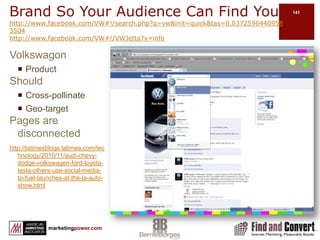
  • #141 http://www.dell.com/us/en/gen/df.aspx?refid=df&s=gen&cs=19http://www.facebook.com/dell?ref=ts#!/dell?v=app_131112203596270&ref=ts
  • #142 http://www.vw.cahttp://www.facebook.com/vwcanada?v=app_10339498918&ref=ts
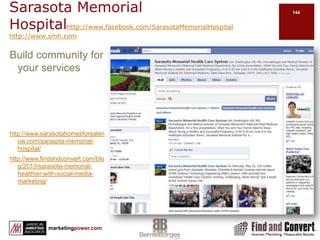
  • #145 http://www.facebook.com/SarasotaMemorialHospitalhttp://www.smh.comActive WallContent & commentsContentDiscussion & Reviews but not seededCommunity, blog, find…ExperientialOutreachEventsCTAsMore engagementPhotosYesVideoYesOutside MarketingCommunity supportOn website
  • #146 Whether you or your client is BIG or small…there are creative ways to add market value through Facebook
  • #147 http://www.facebook.com/Harvard?ref=ts&v=app_6009294086http://harvard.edu/
  • #149 http://www.army.mil/http://www.facebook.com/USarmy?v=info&ref=ts#!/USarmy?v=app_4949752878&ref=tsNote: Army page has over 400,000 likes compared to 100,000+ on other military branches. Links to others abovehttp://www.facebook.com/#!/marines?ref=tshttp://www.facebook.com/#!/USNavy?ref=tshttp://www.facebook.com/USNavy?ref=ts#!/Usairforce
  • #150 Bernie please double check that toilet flush search brings up pagehttp://www.americanstandard-us.com/Est 1875 Tabs not yet as effective as they could be using events RRS bloghttp://www.facebook.com/AmericanStandardBrands?v=wall#!/AmericanStandardBrands?v=wallActive WallContent & commentsContentMostly repurposed contentCommunity, blog, find…ExperientialOutreachEventsCTAsNonePhotosYesVideoYesOutside MarketingCommunity supportOn website
  • #151 http://www.facebook.com/SteelMasterBuildings#!/SteelMasterBuildings?v=app_6009294086http://www.steelmasterusa.com/ http://www.facebook.com/SteelMasterBuildings?v=box_3#!/album.php?aid=380824&id=259640455696http://apps.facebook.com/slideshare/slideshow/2699404?from=tab_to_canvasFind a building is link from WebsiteCall to action is link to landing page form
  • #157 http://www.wholefoodsmarket.com/http://www.facebook.com/wholefoods?ref=ts#!/wholefoods?v=wall&ref=tsWhile Whole Foods has a following…they do little to encourage engagement
  • #158 Uses involver – CRM software for B2B
  • #160 http://www.facebook.com/BigGreenEgghttp://www.biggreenegg.com
  • #162 http://www.facebook.com/home.php?#!/help/?ref=pf
  • #163 http://www.amazon.com/exec/obidos/ASIN/1604942886http://www.wheatmark.com/merchant2/merchant.mvc?Screen=PROD&Store_Code=BS&Product_Code=9781604942880