FACEBOOK
What is Facebook
• A portal for social networking.
• Interact with friends.
• Share photos and/or videos.
• Community organizing.
About Facebook
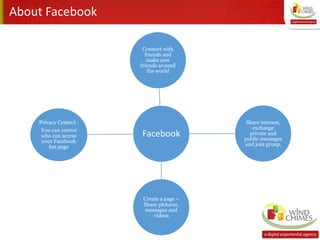
Facebook
Connect with
friends and
make new
friends around
the world
Share interest,
exchange
private and
public messages
and join group.
Create a page –
Share pictures,
messages and
videos
Privacy Control :
You can control
who can access
your Facebook
fan page
History
o Facebook was founded in 2004 by Harvard student Mark E.
Zuckerberg with help from his roommates Dustin Moskovitz and
Chris Hughes.
o Facebook was originally for Harvard students then expanded to
other colleges then to anyone over the age of 18, and now
currently to anyone 13 years of age or older.
o Company Overview:
“Facebook's mission is to give people the power to share and
make the world more open and connected.”
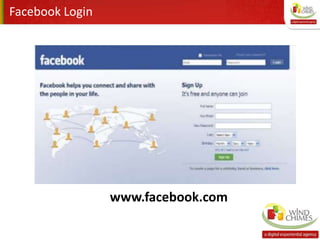
Facebook Login
www.facebook.com
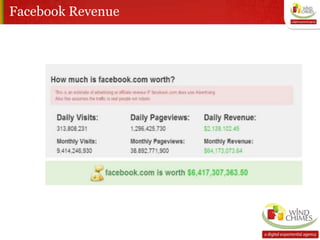
Facebook Revenue
Features
• News Feed – highlights profile changes, birthdays and upcoming
events
• Wall – space on profile page to post messages
• Photos – upload albums, tag friends and comment on photos
• Videos – share videos; maximum length is twenty minutes and
maximum size is 1GB
• Notes – blogging feature
• Gifts – send friends a small icon such as smiley face or little green
patch
• Status – users update what they are currently doing, thinking or
planning Events – a way to let people know about upcoming events
Facebook Marketing
Over 90% of all social marketing is done on Facebook.
Facebook Marketing
1. Four pillars of Facebook marketing:
• Facebook apps
• Facebook pages
• Facebook Ads
• Engagement Ads
2. Five Steps to Building your Facebook Presence:
• Expanding your network of friends
• Joining and participating
• Monitoring
• Creating
• Managing ad campaigns
Facebook Marketing
3. Three Key elements of the Facebook ecosystem.
• Building
• Engaging
• Amplifying
4. Six Facebook starters for beginners.
• Use a fan page not a group page
• Use a vanity URL
• Enable posts by admin and fans
• Leverage custom tabs
• Invite followers via email lists and web pages
• Promote to related Group pages
Creating a Facebook page
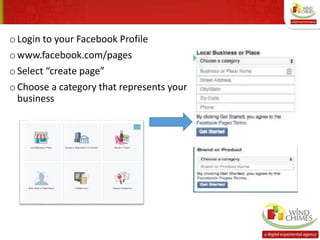
o Login to your Facebook Profile
o www.facebook.com/pages
oSelect “create page”
o Choose a category that represents your
business
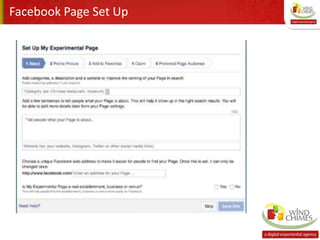
Facebook Page Set Up
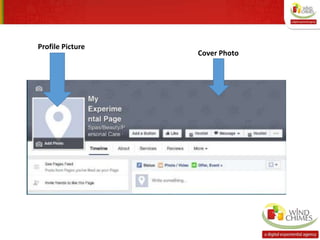
Profile Picture
Cover Photo
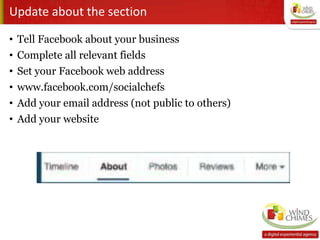
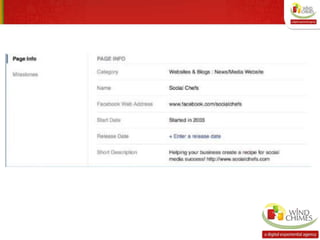
Update about the section
• Tell Facebook about your business
• Complete all relevant fields
• Set your Facebook web address
• www.facebook.com/socialchefs
• Add your email address (not public to others)
• Add your website
Content Strategy Steps
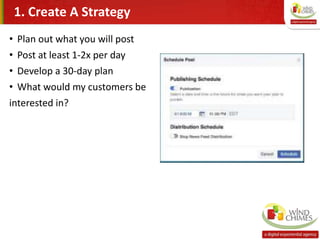
• Plan out what you will post
• Post at least 1-2x per day
• Develop a 30-day plan
• What would my customers be
interested in?
1. Create A Strategy
2. Tell A Story
• Why should your customers care?
• Be a better storyteller
• Look at other related brands (Bench-Marking)
3. Share engaging content
Types of content
• Blog posts
• Videos
• GIF’s
• Cinemagraphs
• Photos
• Facts and Stats
• Infographics
4. Facebook Live Video
• Broadcasting to your audience
• Sharing your first-hand experience
• Available for:
1. Profiles / Pages / Groups / Events
2. Record up to 90 minutes at a time
3. Tools: Facebook Pages App
5. Facebook CTA Buttons
Call-To-Action Buttons
• Highlight something important
• 1 button per Facebook Page
• Recommended buttons:
1. Sign Up (email list)
2. Learn more
3. Call now
6. Add a Shop
Facebook Page Shop
• Sell products to customers
• Check-out on Facebook
• Manage orders
• View clicks and purchases
• Advertise with Facebook Ads
• *Not available everywhere
• Tools: Facebook Page
7. Build your Email List
• Filling the funnel with leads
• Convert leads into customers
• Share valuable content
• Tools:
1. Lead Pages
8. Facebook Groups
• More personalized than a page
• Get to know customers better
• Create groups for anything
• Public (general topic)
• Closed (members only)
• Secret (think-tank)
• Tools:
• Create a group
• Groups mobile app
9. Promoting Your Page
• Share Facebook Page posts to your Profile
• Higher exposure
• Tag friends in comments using the @ sign
• Work with other businesses
• Tag pages using the @ sign
10. Facebook Messenger Codes
• Scannable code
• Let customers message your business
• Make it your page’s photo
• Include in presentations and storefronts
• Tools:
Tutorial
Facebook Messenger
11. Facebook Page Plugin
• Add to blog / website
• Can be customized
• Customers can like your page (off Facebook)
• Message your page
• Tools:
Get the page plugin
12. Facebook Ads
• Who do you want to reach?
• What is your goal?
• Set a budget ($1 - $5)
• Install a Facebook pixel on website (tracking the website traffic)
• Create your ads
• Tools:
Facebook Ads Manager
Pages Manager
Thank You

Facebook training ppt

  • 1.
  • 2.
    What is Facebook •A portal for social networking. • Interact with friends. • Share photos and/or videos. • Community organizing.
  • 3.
    About Facebook Facebook Connect with friendsand make new friends around the world Share interest, exchange private and public messages and join group. Create a page – Share pictures, messages and videos Privacy Control : You can control who can access your Facebook fan page
  • 4.
    History o Facebook wasfounded in 2004 by Harvard student Mark E. Zuckerberg with help from his roommates Dustin Moskovitz and Chris Hughes. o Facebook was originally for Harvard students then expanded to other colleges then to anyone over the age of 18, and now currently to anyone 13 years of age or older. o Company Overview: “Facebook's mission is to give people the power to share and make the world more open and connected.”
  • 5.
  • 6.
  • 7.
    Features • News Feed– highlights profile changes, birthdays and upcoming events • Wall – space on profile page to post messages • Photos – upload albums, tag friends and comment on photos • Videos – share videos; maximum length is twenty minutes and maximum size is 1GB • Notes – blogging feature • Gifts – send friends a small icon such as smiley face or little green patch • Status – users update what they are currently doing, thinking or planning Events – a way to let people know about upcoming events
  • 8.
    Facebook Marketing Over 90%of all social marketing is done on Facebook.
  • 9.
    Facebook Marketing 1. Fourpillars of Facebook marketing: • Facebook apps • Facebook pages • Facebook Ads • Engagement Ads 2. Five Steps to Building your Facebook Presence: • Expanding your network of friends • Joining and participating • Monitoring • Creating • Managing ad campaigns
  • 10.
    Facebook Marketing 3. ThreeKey elements of the Facebook ecosystem. • Building • Engaging • Amplifying 4. Six Facebook starters for beginners. • Use a fan page not a group page • Use a vanity URL • Enable posts by admin and fans • Leverage custom tabs • Invite followers via email lists and web pages • Promote to related Group pages
  • 11.
  • 12.
    o Login toyour Facebook Profile o www.facebook.com/pages oSelect “create page” o Choose a category that represents your business
  • 13.
  • 14.
  • 15.
    Update about thesection • Tell Facebook about your business • Complete all relevant fields • Set your Facebook web address • www.facebook.com/socialchefs • Add your email address (not public to others) • Add your website
  • 17.
  • 18.
    • Plan outwhat you will post • Post at least 1-2x per day • Develop a 30-day plan • What would my customers be interested in? 1. Create A Strategy
  • 19.
    2. Tell AStory • Why should your customers care? • Be a better storyteller • Look at other related brands (Bench-Marking)
  • 20.
    3. Share engagingcontent Types of content • Blog posts • Videos • GIF’s • Cinemagraphs • Photos • Facts and Stats • Infographics
  • 21.
    4. Facebook LiveVideo • Broadcasting to your audience • Sharing your first-hand experience • Available for: 1. Profiles / Pages / Groups / Events 2. Record up to 90 minutes at a time 3. Tools: Facebook Pages App
  • 22.
    5. Facebook CTAButtons Call-To-Action Buttons • Highlight something important • 1 button per Facebook Page • Recommended buttons: 1. Sign Up (email list) 2. Learn more 3. Call now
  • 23.
    6. Add aShop Facebook Page Shop • Sell products to customers • Check-out on Facebook • Manage orders • View clicks and purchases • Advertise with Facebook Ads • *Not available everywhere • Tools: Facebook Page
  • 24.
    7. Build yourEmail List • Filling the funnel with leads • Convert leads into customers • Share valuable content • Tools: 1. Lead Pages
  • 25.
    8. Facebook Groups •More personalized than a page • Get to know customers better • Create groups for anything • Public (general topic) • Closed (members only) • Secret (think-tank) • Tools: • Create a group • Groups mobile app
  • 26.
    9. Promoting YourPage • Share Facebook Page posts to your Profile • Higher exposure • Tag friends in comments using the @ sign • Work with other businesses • Tag pages using the @ sign
  • 27.
    10. Facebook MessengerCodes • Scannable code • Let customers message your business • Make it your page’s photo • Include in presentations and storefronts • Tools: Tutorial Facebook Messenger
  • 28.
    11. Facebook PagePlugin • Add to blog / website • Can be customized • Customers can like your page (off Facebook) • Message your page • Tools: Get the page plugin
  • 29.
    12. Facebook Ads •Who do you want to reach? • What is your goal? • Set a budget ($1 - $5) • Install a Facebook pixel on website (tracking the website traffic) • Create your ads • Tools: Facebook Ads Manager Pages Manager
  • 30.