Citrix® XenServer Webcast 26. März 2010 Advanced Troubleshooting Thomas Krampe Citrix Technology Professional
Agenda 04/19/10 (c) 2009 Thomas Krampe Architecture Troubleshooting Birth and Death of a VM Object modell & CLI Unattended Setup & Configuration Question & Answers
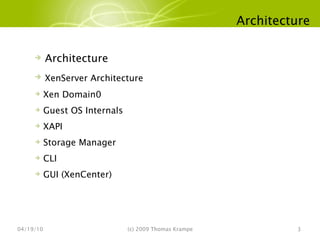
Architecture 04/19/10 (c) 2009 Thomas Krampe Architecture XenServer Architecture Xen Domain0 Guest OS Internals XAPI Storage Manager CLI GUI (XenCenter)
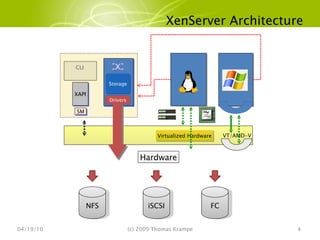
XenServer Architecture 04/19/10 (c) 2009 Thomas Krampe SM Virtualized Hardware Hardware VT/AMD-V XAPI Drivers Storage CLI NFS iSCSI FC
Xen Domain0 04/19/10 (c) 2009 Thomas Krampe Dom0 kernel and initrd passed on start up Dom0 has direct access to HW Bootloader /boot/grub/grub.conf /boot/extlinux.conf [Ctrl-A]  3 times will trap into the Xen debug console
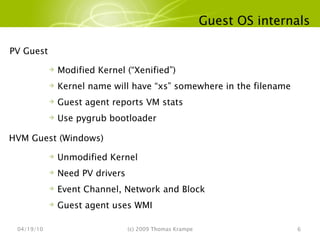
Guest OS internals 04/19/10 (c) 2009 Thomas Krampe PV Guest  Modified Kernel (“Xenified”) Kernel name will have “xs” somewhere in the filename Guest agent reports VM stats Use pygrub bootloader HVM Guest (Windows)  Unmodified Kernel Need PV drivers Event Channel, Network and Block Guest agent uses WMI
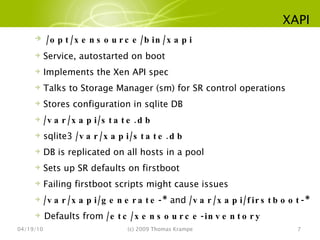
XAPI 04/19/10 (c) 2009 Thomas Krampe /opt/xensource/bin/xapi Service, autostarted on boot Implements the Xen API spec Talks to Storage Manager (sm) for SR control operations Stores configuration in sqlite DB /var/xapi/state.db sqlite3  /var/xapi/state.db DB is replicated on all hosts in a pool Sets up SR defaults on firstboot Failing firstboot scripts might cause issues /var/xapi/generate-*  and  /var/xapi/firstboot-* Defaults from  /etc/xensource-inventory
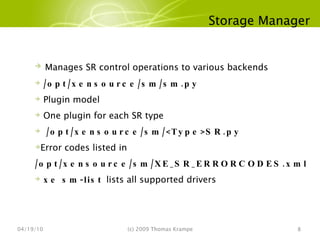
Storage Manager 04/19/10 (c) 2009 Thomas Krampe Manages SR control operations to various backends /opt/xensource/sm/sm.py Plugin model One plugin for each SR type /opt/xensource/sm/<Type>SR.py Error codes listed in  /opt/xensource/sm/XE_SR_ERRORCODES.xml xe sm-list  lists all supported drivers
CLI 04/19/10 (c) 2009 Thomas Krampe Local or Remote Talks to XAPI Bash auto completion xe.exe (for Windows) xe help  or  xe help --all
GUI 04/19/10 (c) 2009 Thomas Krampe Uses Microsoft .NET framework Uses https/xml-rpc to communicate with XAPI VNC Client for guest frame buffer VNC traffic is tunneled over https RDP client for Windows guests
Troubleshooting 04/19/10 (c) 2009 Thomas Krampe Troubleshooting Server Install Useful Linux Commands Server Diagnostics & Inventory Saving System State XS Server Log Files XenSource Agent XenCenter Logging Summery
Server Install 04/19/10 (c) 2009 Thomas Krampe After Product CD Boots Alt-F2  displays Linux login prompt Login: root (no password required) Alt-F3  displays install event log Alt-F1  displays original install menu Support Tarball support.sh (creates /tmp/support.tar.bz2) Support tarball is created in /tmp on install error Support tarball is saved in /root after successful install
Useful Linux Commands 04/19/10 (c) 2009 Thomas Krampe Storage List Disks detected fdisk –l Network Show NIC configuration ifconfig eth0 [eth1 ..] ifup eth0 TCP/IP Tools ping, route -n dhclient eth0
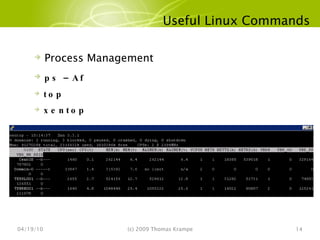
Useful Linux Commands 04/19/10 (c) 2009 Thomas Krampe Process Management ps –Af top  xentop
Server Diagnostics and Inventory 04/19/10 (c) 2009 Thomas Krampe Server Diagnostics xen-bugtool Run on the XS Console Records all log files Writes compressed file for submission to L2 support /var/opt/xen/bug-report/bug-report-xxx.tar.bz2
Server Diagnostics and Inventory 04/19/10 (c) 2009 Thomas Krampe Server Diagnostics Automatic Upload for Support xe host-bugreport-upload Can be run from admin system Runs xen-bugtool and uploads to XS Support Note unique ID of report for support
Server Diagnostics and Inventory 04/19/10 (c) 2009 Thomas Krampe Server Inventory system-info.sh | less Interactive script that captures all non-log state Hardware devices & Device drivers Storage repository and VM configurations
Saving System State 04/19/10 (c) 2009 Thomas Krampe xen-bugtool  archives state and configuration files Network config Install options Install logs Storage Repository metadata VM configs Xenstore
XS Server Log Files 04/19/10 (c) 2009 Thomas Krampe XenSource XAPI Agent /var/log/messages  Contains other system logging /var/log/xensource.log  Xen/Domain 0  Xen Boot Messages  xe host-dmesg Domain 0 Boot Messages dmesg
Debug Logging for XAPI Agent 04/19/10 (c) 2009 Thomas Krampe Enable debug logging for all subsystems xe log-set-output level=debug output=file:/tmp/debug-all Debug for only a certain subsystem xe log-set-output level=debug key=storage output=file:/tmp/storage-debug List Available Subsystems   xe log-get-keys Restore normal logging xe log-set-output level=debug output=nil xe log-set-output level=debug key=storage output=nil
XenSource Agent 04/19/10 (c) 2009 Thomas Krampe XS Agent runs on top Xen Hypervisor API and XenStore Can be restarted without harming VMs or other members of the pool service xapi restart If the UI seems to get stuck or goes into a weird state, restart the agent and reconnect the UI Another simular command is  xe-toolstack-restart
XenCenter Logging 04/19/10 (c) 2009 Thomas Krampe Location {user home}\Application Data\XenSource\XenCenter\logs\XenCenter.log Rolling Log files will get rolled XenCenter.log.# Increase Log Level C:\Program Files\XenSource\XenCenter directory <level value=“DEBUG” />
Summary 04/19/10 (c) 2009 Thomas Krampe xen-bugtool generates XE Server diagnostic file for submission to Technical Support Representative. xe host-bugreport-upload runs xen-bugtool and uploads the result to XenSource support. xe host-bugtool can be used to save Domain 0 state, to assist during emergency recovery Use Linux commands (network, storage, modules) to troubleshoot server install.
Birth and Death of a VM 04/19/10 (c) 2009 Thomas Krampe Birth and Death of a VM VM Installation Internals Behind the Scenes Debugging VMs
VM Installation Internals 04/19/10 (c) 2009 Thomas Krampe Debian Sarge/Etch Root file system is extracted into the VDI Debian Xen kernel RHEL (3.x,4.x,5) / SLES (9.x, 10.x) Uses regular repositories RHEL / SLES Xen kernel Windows (all) Installs from CD/ISO bits Unmodified Windows kernel
Behind the Scenes 04/19/10 (c) 2009 Thomas Krampe Paravirtualized VMs use pygrub Simple python based bootloader for Xen Finds kernel and initrd from VM’s boot device CPU then jumps to this kernel to start this VM HVM VMs use hvmloader hvmloader creates a virtual BIOS and jumps to it. This is like a BIOS in a physical machine qemu-dm does device emulation, provides disks, NICs, serial ports, USB devices etc to this VM Follows standard boot process to boot from disk
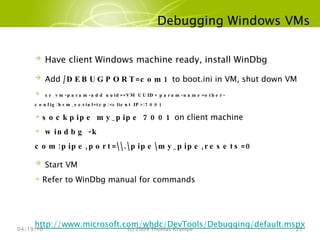
Debugging Windows VMs 04/19/10 (c) 2009 Thomas Krampe Have client Windows machine ready, install WinDbg Add  /DEBUGPORT=com1  to boot.ini in VM, shut down VM xe vm-param-add uuid=<VM UUID> param-name=other-config:hvm_serial=tcp:<client IP>:7001 sockpipe my_pipe 7001  on client machine windbg -k com:pipe,port=\\.\pipe\my_pipe,resets=0 Start VM Refer to WinDbg manual for commands http://www.microsoft.com/whdc/DevTools/Debugging/default.mspx
Object Model and CLI  04/19/10 (c) 2009 Thomas Krampe Object Model and CLI  Object Model CLI Command Format Maps Constarining Information Interesting Commands Looking inside a log file
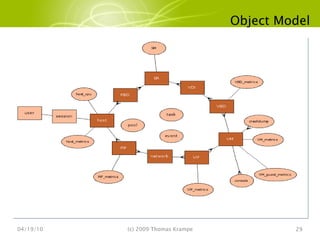
Object Model 04/19/10 (c) 2009 Thomas Krampe
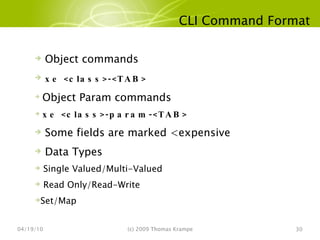
CLI Command Format 04/19/10 (c) 2009 Thomas Krampe Object commands xe <class>-<TAB> Object Param commands xe <class>-param-<TAB>  Some fields are marked <expensive Data Types Single Valued/Multi-Valued Read Only/Read-Write Set/Map
Maps 04/19/10 (c) 2009 Thomas Krampe Setting Map values [root@localhost] xe vm-param-set uuid=VM uuid other-config:foo=baa Getting Map values [root@localhost] xe vm-param-get uuid=VM-uuid param-name=other-config mac_seed: 6fjafhahffhadfbadfad [root@localhost] xe vm-param-get uuid=VM-uuid param-name=other-config param-key=mac_seed 6fjafhahffhadfbadfad
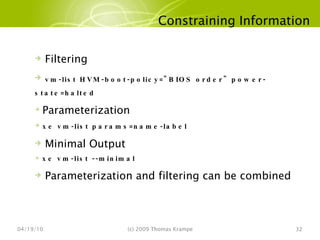
Constraining Information 04/19/10 (c) 2009 Thomas Krampe Filtering vm-list HVM-boot-policy=&quot;BIOS order&quot; power-state=halted Parameterization xe vm-list params=name-label Minimal Output xe vm-list --minimal Parameterization and filtering can be combined
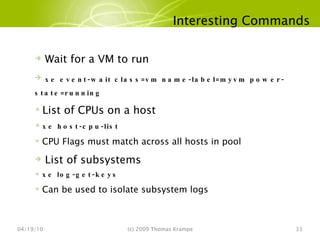
Interesting Commands 04/19/10 (c) 2009 Thomas Krampe Wait for a VM to run xe event-wait class=vm name-label=myvm power-state=running List of CPUs on a host xe host-cpu-list CPU Flags must match across all hosts in pool List of subsystems xe log-get-keys Can be used to isolate subsystem logs
Looking inside a log file 04/19/10 (c) 2009 Thomas Krampe Each Entry looks like [timestamp][hostname][level] [ref-1] [(num-1) unix_rpc] text-1 text2 text3…. [timestamp] Timestamp of log entry [hostname] Host name (in a pool) [level]  Debug level [ref-1] ID of the task on whose behalf this is created num-1 Thread ID, local to the current process unix_rpc Unix Domain Socket (as opposed to inet_rpc=TCP) text-1  Subsystem text2/text3 more information on action performed
Looking inside a log file 04/19/10 (c) 2009 Thomas Krampe xensource.log [20100209 16:58:28.688|debug|localhost|3078703|SR scanner D:dfd9ef0b708d|helpers] login done [20100209 16:58:28.921|debug|localhost|3078706 unix-RPC|SR.scan R:1ac783270499|taskhelper] task destroyed [root@localhost log]# Xenstored-access.log [20100209 16:49:05.381] D35  write  data/meminfo_free 551040 [20100209 16:49:05.381] D35  write  data/meminfo_total 1035760 [20100209 16:49:05.381] D35  write  data/updated 1 messages Feb  9 17:04:58 fragmgrid2001 xapi: [ info|localhost|3078916|SR scanner D:dfd9ef0b708d|dispatcher] spawning a new thread to handle the current task Feb  9 17:04:58 fragmgrid2001 xapi: [ info|localhost|3078917 unix-RPC|session.slave_login D:58b671575b1e|xapi] Session.create trackid=ea252f3e59cc6f0d2d3de1345967d54b pool=true uname= is_local_superuser=true auth_user_sid= Feb  9 17:04:58 fragmgrid2001 xapi: [ info|localhost|3078919 unix-RPC|dispatch:SR.scan D:64e76e160ebc|taskhelper] task SR.scan R:98637b78c34f (uuid:6e8469dc-724d-0260-a584-44d36bca2953) created (trackid=ea252f3e59cc6f0d2d3de1345967d54b) by task D:dfd9ef0b708d
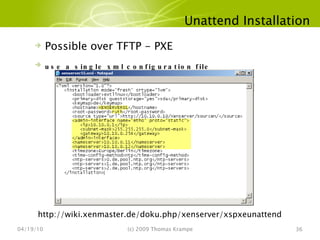
Unattend Installation 04/19/10 (c) 2009 Thomas Krampe Possible over TFTP - PXE use a single xml configuration file http://wiki.xenmaster.de/doku.php/xenserver/xspxeunattend
Questions & Answers 04/19/10 (c) 2009 Thomas Krampe

Citrix XenServer 5.5 Troubleshooting

  • 1.
    Citrix® XenServer Webcast26. März 2010 Advanced Troubleshooting Thomas Krampe Citrix Technology Professional
  • 2.
    Agenda 04/19/10 (c)2009 Thomas Krampe Architecture Troubleshooting Birth and Death of a VM Object modell & CLI Unattended Setup & Configuration Question & Answers
  • 3.
    Architecture 04/19/10 (c)2009 Thomas Krampe Architecture XenServer Architecture Xen Domain0 Guest OS Internals XAPI Storage Manager CLI GUI (XenCenter)
  • 4.
    XenServer Architecture 04/19/10(c) 2009 Thomas Krampe SM Virtualized Hardware Hardware VT/AMD-V XAPI Drivers Storage CLI NFS iSCSI FC
  • 5.
    Xen Domain0 04/19/10(c) 2009 Thomas Krampe Dom0 kernel and initrd passed on start up Dom0 has direct access to HW Bootloader /boot/grub/grub.conf /boot/extlinux.conf [Ctrl-A] 3 times will trap into the Xen debug console
  • 6.
    Guest OS internals04/19/10 (c) 2009 Thomas Krampe PV Guest Modified Kernel (“Xenified”) Kernel name will have “xs” somewhere in the filename Guest agent reports VM stats Use pygrub bootloader HVM Guest (Windows) Unmodified Kernel Need PV drivers Event Channel, Network and Block Guest agent uses WMI
  • 7.
    XAPI 04/19/10 (c)2009 Thomas Krampe /opt/xensource/bin/xapi Service, autostarted on boot Implements the Xen API spec Talks to Storage Manager (sm) for SR control operations Stores configuration in sqlite DB /var/xapi/state.db sqlite3 /var/xapi/state.db DB is replicated on all hosts in a pool Sets up SR defaults on firstboot Failing firstboot scripts might cause issues /var/xapi/generate-* and /var/xapi/firstboot-* Defaults from /etc/xensource-inventory
  • 8.
    Storage Manager 04/19/10(c) 2009 Thomas Krampe Manages SR control operations to various backends /opt/xensource/sm/sm.py Plugin model One plugin for each SR type /opt/xensource/sm/<Type>SR.py Error codes listed in /opt/xensource/sm/XE_SR_ERRORCODES.xml xe sm-list lists all supported drivers
  • 9.
    CLI 04/19/10 (c)2009 Thomas Krampe Local or Remote Talks to XAPI Bash auto completion xe.exe (for Windows) xe help or xe help --all
  • 10.
    GUI 04/19/10 (c)2009 Thomas Krampe Uses Microsoft .NET framework Uses https/xml-rpc to communicate with XAPI VNC Client for guest frame buffer VNC traffic is tunneled over https RDP client for Windows guests
  • 11.
    Troubleshooting 04/19/10 (c)2009 Thomas Krampe Troubleshooting Server Install Useful Linux Commands Server Diagnostics & Inventory Saving System State XS Server Log Files XenSource Agent XenCenter Logging Summery
  • 12.
    Server Install 04/19/10(c) 2009 Thomas Krampe After Product CD Boots Alt-F2 displays Linux login prompt Login: root (no password required) Alt-F3 displays install event log Alt-F1 displays original install menu Support Tarball support.sh (creates /tmp/support.tar.bz2) Support tarball is created in /tmp on install error Support tarball is saved in /root after successful install
  • 13.
    Useful Linux Commands04/19/10 (c) 2009 Thomas Krampe Storage List Disks detected fdisk –l Network Show NIC configuration ifconfig eth0 [eth1 ..] ifup eth0 TCP/IP Tools ping, route -n dhclient eth0
  • 14.
    Useful Linux Commands04/19/10 (c) 2009 Thomas Krampe Process Management ps –Af top xentop
  • 15.
    Server Diagnostics andInventory 04/19/10 (c) 2009 Thomas Krampe Server Diagnostics xen-bugtool Run on the XS Console Records all log files Writes compressed file for submission to L2 support /var/opt/xen/bug-report/bug-report-xxx.tar.bz2
  • 16.
    Server Diagnostics andInventory 04/19/10 (c) 2009 Thomas Krampe Server Diagnostics Automatic Upload for Support xe host-bugreport-upload Can be run from admin system Runs xen-bugtool and uploads to XS Support Note unique ID of report for support
  • 17.
    Server Diagnostics andInventory 04/19/10 (c) 2009 Thomas Krampe Server Inventory system-info.sh | less Interactive script that captures all non-log state Hardware devices & Device drivers Storage repository and VM configurations
  • 18.
    Saving System State04/19/10 (c) 2009 Thomas Krampe xen-bugtool archives state and configuration files Network config Install options Install logs Storage Repository metadata VM configs Xenstore
  • 19.
    XS Server LogFiles 04/19/10 (c) 2009 Thomas Krampe XenSource XAPI Agent /var/log/messages Contains other system logging /var/log/xensource.log Xen/Domain 0 Xen Boot Messages xe host-dmesg Domain 0 Boot Messages dmesg
  • 20.
    Debug Logging forXAPI Agent 04/19/10 (c) 2009 Thomas Krampe Enable debug logging for all subsystems xe log-set-output level=debug output=file:/tmp/debug-all Debug for only a certain subsystem xe log-set-output level=debug key=storage output=file:/tmp/storage-debug List Available Subsystems xe log-get-keys Restore normal logging xe log-set-output level=debug output=nil xe log-set-output level=debug key=storage output=nil
  • 21.
    XenSource Agent 04/19/10(c) 2009 Thomas Krampe XS Agent runs on top Xen Hypervisor API and XenStore Can be restarted without harming VMs or other members of the pool service xapi restart If the UI seems to get stuck or goes into a weird state, restart the agent and reconnect the UI Another simular command is xe-toolstack-restart
  • 22.
    XenCenter Logging 04/19/10(c) 2009 Thomas Krampe Location {user home}\Application Data\XenSource\XenCenter\logs\XenCenter.log Rolling Log files will get rolled XenCenter.log.# Increase Log Level C:\Program Files\XenSource\XenCenter directory <level value=“DEBUG” />
  • 23.
    Summary 04/19/10 (c)2009 Thomas Krampe xen-bugtool generates XE Server diagnostic file for submission to Technical Support Representative. xe host-bugreport-upload runs xen-bugtool and uploads the result to XenSource support. xe host-bugtool can be used to save Domain 0 state, to assist during emergency recovery Use Linux commands (network, storage, modules) to troubleshoot server install.
  • 24.
    Birth and Deathof a VM 04/19/10 (c) 2009 Thomas Krampe Birth and Death of a VM VM Installation Internals Behind the Scenes Debugging VMs
  • 25.
    VM Installation Internals04/19/10 (c) 2009 Thomas Krampe Debian Sarge/Etch Root file system is extracted into the VDI Debian Xen kernel RHEL (3.x,4.x,5) / SLES (9.x, 10.x) Uses regular repositories RHEL / SLES Xen kernel Windows (all) Installs from CD/ISO bits Unmodified Windows kernel
  • 26.
    Behind the Scenes04/19/10 (c) 2009 Thomas Krampe Paravirtualized VMs use pygrub Simple python based bootloader for Xen Finds kernel and initrd from VM’s boot device CPU then jumps to this kernel to start this VM HVM VMs use hvmloader hvmloader creates a virtual BIOS and jumps to it. This is like a BIOS in a physical machine qemu-dm does device emulation, provides disks, NICs, serial ports, USB devices etc to this VM Follows standard boot process to boot from disk
  • 27.
    Debugging Windows VMs04/19/10 (c) 2009 Thomas Krampe Have client Windows machine ready, install WinDbg Add /DEBUGPORT=com1 to boot.ini in VM, shut down VM xe vm-param-add uuid=<VM UUID> param-name=other-config:hvm_serial=tcp:<client IP>:7001 sockpipe my_pipe 7001 on client machine windbg -k com:pipe,port=\\.\pipe\my_pipe,resets=0 Start VM Refer to WinDbg manual for commands http://www.microsoft.com/whdc/DevTools/Debugging/default.mspx
  • 28.
    Object Model andCLI 04/19/10 (c) 2009 Thomas Krampe Object Model and CLI Object Model CLI Command Format Maps Constarining Information Interesting Commands Looking inside a log file
  • 29.
    Object Model 04/19/10(c) 2009 Thomas Krampe
  • 30.
    CLI Command Format04/19/10 (c) 2009 Thomas Krampe Object commands xe <class>-<TAB> Object Param commands xe <class>-param-<TAB> Some fields are marked <expensive Data Types Single Valued/Multi-Valued Read Only/Read-Write Set/Map
  • 31.
    Maps 04/19/10 (c)2009 Thomas Krampe Setting Map values [root@localhost] xe vm-param-set uuid=VM uuid other-config:foo=baa Getting Map values [root@localhost] xe vm-param-get uuid=VM-uuid param-name=other-config mac_seed: 6fjafhahffhadfbadfad [root@localhost] xe vm-param-get uuid=VM-uuid param-name=other-config param-key=mac_seed 6fjafhahffhadfbadfad
  • 32.
    Constraining Information 04/19/10(c) 2009 Thomas Krampe Filtering vm-list HVM-boot-policy=&quot;BIOS order&quot; power-state=halted Parameterization xe vm-list params=name-label Minimal Output xe vm-list --minimal Parameterization and filtering can be combined
  • 33.
    Interesting Commands 04/19/10(c) 2009 Thomas Krampe Wait for a VM to run xe event-wait class=vm name-label=myvm power-state=running List of CPUs on a host xe host-cpu-list CPU Flags must match across all hosts in pool List of subsystems xe log-get-keys Can be used to isolate subsystem logs
  • 34.
    Looking inside alog file 04/19/10 (c) 2009 Thomas Krampe Each Entry looks like [timestamp][hostname][level] [ref-1] [(num-1) unix_rpc] text-1 text2 text3…. [timestamp] Timestamp of log entry [hostname] Host name (in a pool) [level] Debug level [ref-1] ID of the task on whose behalf this is created num-1 Thread ID, local to the current process unix_rpc Unix Domain Socket (as opposed to inet_rpc=TCP) text-1 Subsystem text2/text3 more information on action performed
  • 35.
    Looking inside alog file 04/19/10 (c) 2009 Thomas Krampe xensource.log [20100209 16:58:28.688|debug|localhost|3078703|SR scanner D:dfd9ef0b708d|helpers] login done [20100209 16:58:28.921|debug|localhost|3078706 unix-RPC|SR.scan R:1ac783270499|taskhelper] task destroyed [root@localhost log]# Xenstored-access.log [20100209 16:49:05.381] D35 write data/meminfo_free 551040 [20100209 16:49:05.381] D35 write data/meminfo_total 1035760 [20100209 16:49:05.381] D35 write data/updated 1 messages Feb 9 17:04:58 fragmgrid2001 xapi: [ info|localhost|3078916|SR scanner D:dfd9ef0b708d|dispatcher] spawning a new thread to handle the current task Feb 9 17:04:58 fragmgrid2001 xapi: [ info|localhost|3078917 unix-RPC|session.slave_login D:58b671575b1e|xapi] Session.create trackid=ea252f3e59cc6f0d2d3de1345967d54b pool=true uname= is_local_superuser=true auth_user_sid= Feb 9 17:04:58 fragmgrid2001 xapi: [ info|localhost|3078919 unix-RPC|dispatch:SR.scan D:64e76e160ebc|taskhelper] task SR.scan R:98637b78c34f (uuid:6e8469dc-724d-0260-a584-44d36bca2953) created (trackid=ea252f3e59cc6f0d2d3de1345967d54b) by task D:dfd9ef0b708d
  • 36.
    Unattend Installation 04/19/10(c) 2009 Thomas Krampe Possible over TFTP - PXE use a single xml configuration file http://wiki.xenmaster.de/doku.php/xenserver/xspxeunattend
  • 37.
    Questions & Answers04/19/10 (c) 2009 Thomas Krampe

Editor's Notes

  • #13 The XS installation CD runs a minimal Linux environment, so most standard Linux commands can be used to diagnose install problems. There are three “virtual terminals” available during installation, which display the install program, an interactive console and a detail event log. Use ALT + Function Keys to switch between the virtual terminals. Login to the interactive console with userid ‘root’. Technical Support may request that the command “support.sh” be run to create a diagnostic tarball to be submitted when filing a new case about an installation problem.
  • #14 After logging into the interactive virtual terminal (Alt-F2), here are some example of standard Linux commands that provide information about devices. Fdisk will list all disks that can be seen as a result of the loaded storage device drivers. If a particular device driver did not load (e.g. for a RAID card), then the disks attached to that card will not be visible to “fdisk”. Ifconfig will show the network configuration of physical NICs, e.g. IP address and gateway. By default, the XE Install CD assumes the presence of a DHCP server on the local network. If no DHCP server is present, a static IP address can be configured with the command “ifconfig eth0 ip.ad.dr.es” (replacing ip.ad.dr.es with a valid static IP address on your local network). Ping can be used to verify network connectivity from the XE Server to a remote IP address.
  • #16 Xen-bugtool: This is the most important command when submitting an XE Server problem report to Technical Support. It captures static and runtime state on a XenEnterprise Server, for use in diagnosing a reported problem. The compressed file can be unpacked on a Linux system and manually inspected. The support file may contain sensitive information about the customer’s operational environment and should not be posted to public mailing lists. We have also included a command line option that will run xen-bugtool remotely package up the results and upload them to an incoming support server at XenSource. This removes the need for a user to transfer the xen-bugtool output to another computer and then e-mail in. This command can be run on the XenSource server or run remotely from an administrator system.
  • #19 While xen-bugtool is first and foremost a technical support diagnostic tool, the state that it records can be useful in manual emergency recovery of a critical system failure. Such a manual procedure is beyond the scope of this document or field technical staff, but it is recommended that copies of the xen-bugtool tarball be backed up to a safe location off-host from the XE Server.
  • #20 XE proprietary agent uses syslog for all log messages. Can edit /etc/syslog.conf to send messages to central log server. For diagnosis of specific failures that are not easy to reproduce, Technical Support Representative may request an increase in log level, which is performed using the XE CLI (local or remote). xend.log and xend-debug.log contain messages from the Xen OSS tool stack, which does not use syslog (local logs only). All server log files are captured by the xen-bugtool inventory command (see later slide), for filing a case with Technical Support.
  • #23 Administrator Console log files are used to diagnose: connection problem to XE Servers crash of the admin console Java application functional failure of admin console Java application File locations (logs, log property file, client property file) are different in Windows and Linux. For diagnosis of specific failures that are not easy to reproduce, Technical Support Representative may request an increase in log level, which is performed by editing a text file. Windows XE 3.1 clients have a per-user log file. Windows XE 3.0 clients have a central log file. Linux XE 3.0 and 3.1 clients have a per-user log file. When there is a per-user log file and that user needs to run multiple XE console instances (e.g. 3.0 and 3.1 in parallel), the startup script (Linux) or shortcut (Windows) must be manually edited to specify a per-instance log file, instead of the default per-user log file.
  • #37 http://wiki.xenmaster.de/doku.php/xenserver/xspxeunattend