vSphere Performance Monitoring and TroubleshootingOverviewWhat?CPU, Memory, Disk, NetworkHow?Use available tools and a systematic methodologyWhy?Need to build confidence in virtualizing critical and high demand applications
vSphere Performance Monitoring and TroubleshootingTop IssuesTop Issues:Storage "performance capacity" oversubscriptionMemory oversubscriptionSMP overuseFirmware & driver issues
vSphere Performance Monitoring and TroubleshootingWhat tools do we have at our disposal?Top tools for information collection:vCenter - Performance charts and alarmsGuest OS* - Task Manager/Resource Monitor and PerfMonESX Host - esxtop and vscsiStatsvSpherePowerCLI*Guest based monitoring is subject to inaccuracy
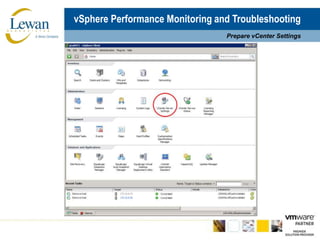
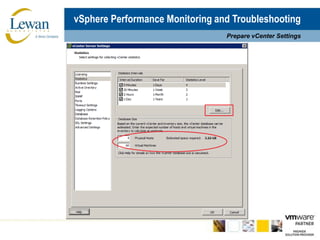
vSphere Performance Monitoring and TroubleshootingPrepare vCenter Settings
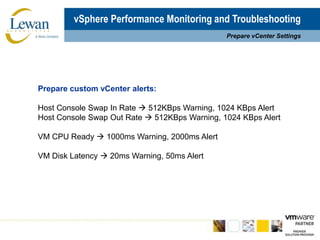
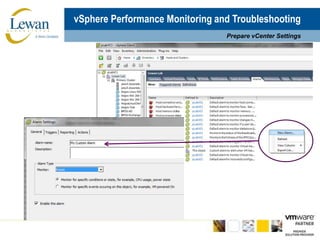
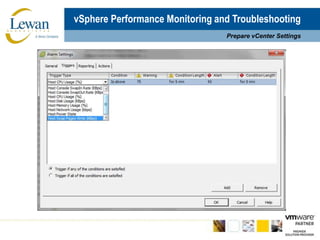
vSphere Performance Monitoring and TroubleshootingPrepare vCenter SettingsPrepare custom vCenter alerts:Host Console Swap In Rate  512KBps Warning, 1024 KBps AlertHost Console Swap Out Rate  512KBps Warning, 1024 KBps AlertVM CPU Ready  1000ms Warning, 2000ms AlertVM Disk Latency  20ms Warning, 50ms Alert
vSphere Performance Monitoring and TroubleshootingPrepare vCenter Settings
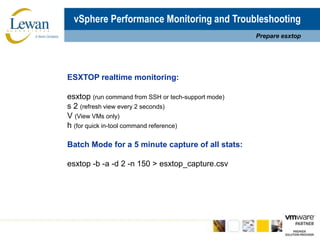
vSphere Performance Monitoring and TroubleshootingPrepare esxtopESXTOP realtime monitoring:esxtop(run command from SSH or tech-support mode)s 2 (refresh view every 2 seconds)V (View VMs only)h(for quick in-tool command reference)Batch Mode for a 5 minute capture of all stats:esxtop-b -a -d 2 -n 150 > esxtop_capture.csv
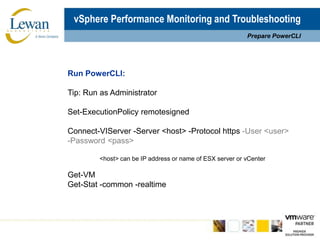
vSphere Performance Monitoring and TroubleshootingPrepare PowerCLIRun PowerCLI:Tip: Run as AdministratorSet-ExecutionPolicyremotesignedConnect-VIServer -Server <host> -Protocol https -User <user> -Password <pass>	<host> can be IP address or name of ESX server or vCenterGet-VMGet-Stat -common -realtime
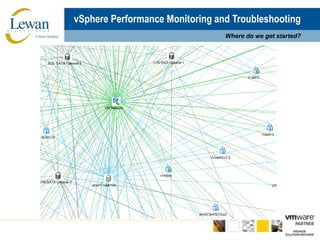
vSphere Performance Monitoring and TroubleshootingWhere do we get started?
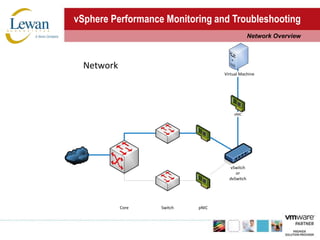
vSphere Performance Monitoring and TroubleshootingNetwork Overview
vSphere Performance Monitoring and TroubleshootingNetworkTroubleshooting Guidance:1.	Physical Issues - A bad cable, a failing switch port or NIC, or an incompatible/flawed firmware or device driver (use VMXNET3 whenever possible)2.	Configuration Issues - Inconsistent configuration of vSwitches, Port Groups, or upstream VLAN trunks3.	Capacity Issues - Too many VMs on a single NIC; inadequate switch backplane or uplink capacity; sharing “unmanaged” network infrastructure for storage and data4.	Thresholds – Bandwidth saturation, dropped packets
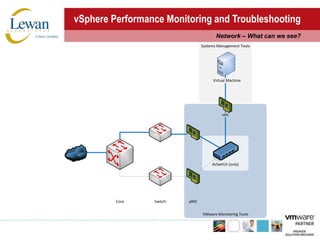
vSphere Performance Monitoring and TroubleshootingNetwork – What can we see?
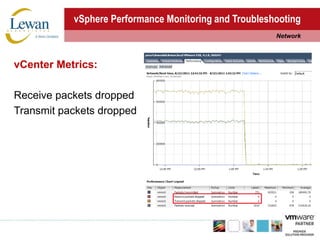
vSphere Performance Monitoring and TroubleshootingNetworkvCenter Metrics: Receive packets droppedTransmit packets dropped
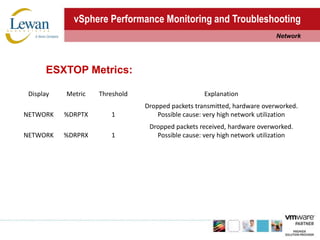
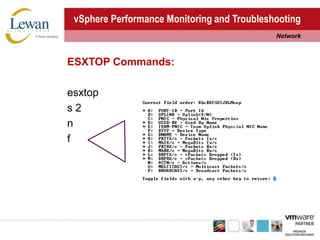
vSphere Performance Monitoring and TroubleshootingNetworkESXTOP Metrics:
vSphere Performance Monitoring and TroubleshootingNetworkESXTOP Commands:esxtops 2nf
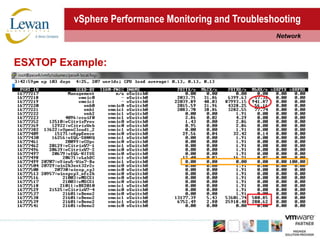
vSphere Performance Monitoring and TroubleshootingNetworkESXTOP Example:
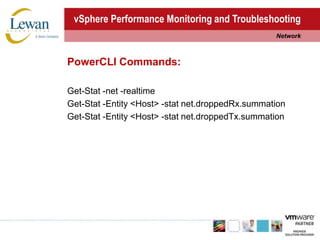
vSphere Performance Monitoring and TroubleshootingNetworkPowerCLI Commands:Get-Stat -net -realtimeGet-Stat -Entity <Host> -stat net.droppedRx.summationGet-Stat -Entity <Host> -stat net.droppedTx.summation
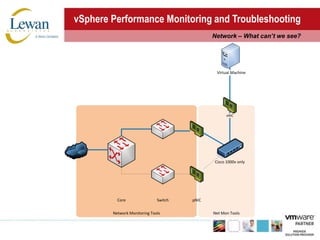
vSphere Performance Monitoring and TroubleshootingNetwork – What can’t we see?
vSphere Performance Monitoring and TroubleshootingNetworkPossible resources for external monitoring:Native Telnet/SSH/HTTP-based interface counters and statsThird-party SNMP, NetFlow and ICMP tools
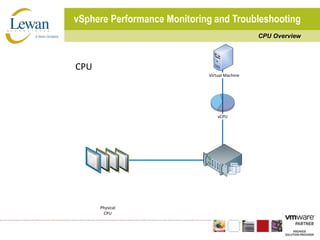
vSphere Performance Monitoring and TroubleshootingCPU Overview
vSphere Performance Monitoring and TroubleshootingCPUTroubleshooting Guidance:1.	Physical Issues - Rare and always catastrophic (e.g. obvious)2.	Configuration Issues - Too many / too few vCPUs per VM; SMP/HAL mismatch; incorrect CPU affinity settings3.	Capacity Issues - CPU saturation at the guest or host level; CPU starvation due to high IO or other system level ops4.	Thresholds – Waiting for CPU cycles (due to co-scheduling, swapping, high IO)
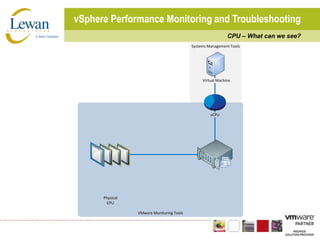
vSphere Performance Monitoring and TroubleshootingCPU – What can we see?
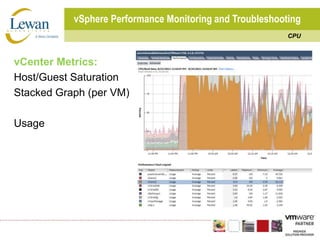
vSphere Performance Monitoring and TroubleshootingCPUvCenter Metrics: Host/Guest SaturationStacked Graph (per VM)Usage
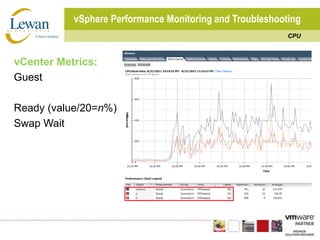
vSphere Performance Monitoring and TroubleshootingCPUvCenter Metrics:GuestReady (value/20=n%)Swap Wait
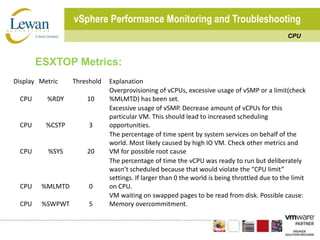
vSphere Performance Monitoring and TroubleshootingCPUESXTOP Metrics:
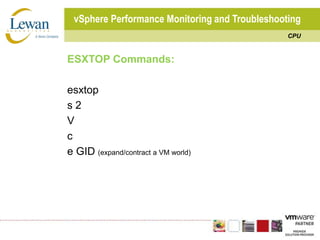
vSphere Performance Monitoring and TroubleshootingCPUESXTOP Commands:esxtops 2Vce GID (expand/contract a VM world)
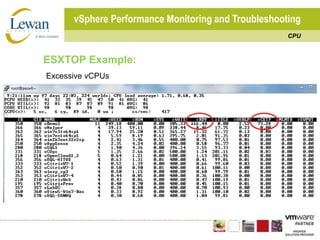
vSphere Performance Monitoring and TroubleshootingCPUESXTOP Example:Excessive vCPUs
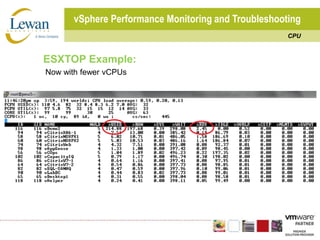
vSphere Performance Monitoring and TroubleshootingCPUESXTOP Example: Now with fewer vCPUs
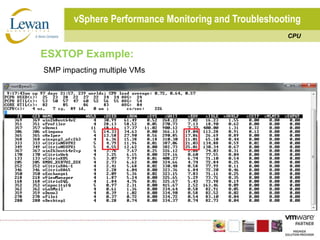
vSphere Performance Monitoring and TroubleshootingCPUESXTOP Example:SMP impacting multiple VMs
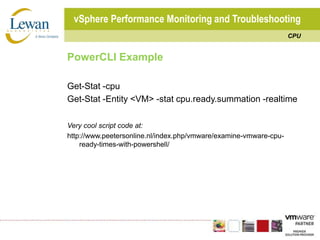
vSphere Performance Monitoring and TroubleshootingCPUPowerCLI ExampleGet-Stat -cpuGet-Stat -Entity <VM> -stat cpu.ready.summation -realtimeVery cool script code at:http://www.peetersonline.nl/index.php/vmware/examine-vmware-cpu-ready-times-with-powershell/
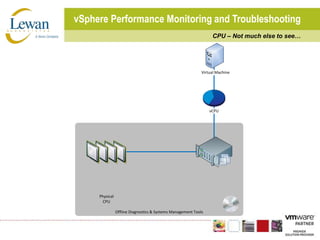
vSphere Performance Monitoring and TroubleshootingCPU – Not much else to see…
vSphere Performance Monitoring and TroubleshootingCPUPossible resources for external monitoring:Vendor specific systems management tools,MS System Center, etc.http://www.peetersonline.nl/index.php/vmware/examine-vmware-cpu-ready-times-with-powershell/
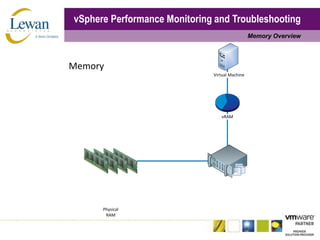
vSphere Performance Monitoring and TroubleshootingMemory Overview
vSphere Performance Monitoring and TroubleshootingMemoryTroubleshooting Guidance:1.	Physical Issues - Rare and usually catastrophic2.	Configuration Issues - Memory overcommit; incorrect configuration of shares, reservations or limits3.	Capacity Issues - Physical memory exhaustion4.	Thresholds – Active memory swapping
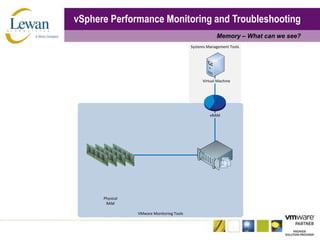
vSphere Performance Monitoring and TroubleshootingMemory – What can we see?
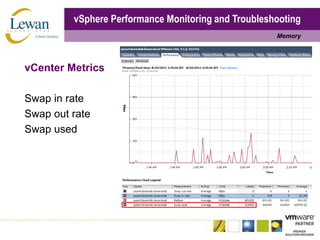
vSphere Performance Monitoring and TroubleshootingMemoryvCenter MetricsSwap in rateSwap out rateSwap used
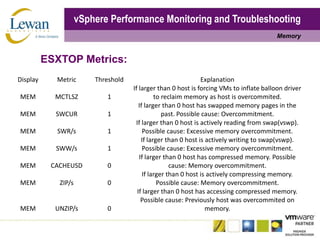
vSphere Performance Monitoring and TroubleshootingMemoryESXTOP Metrics:
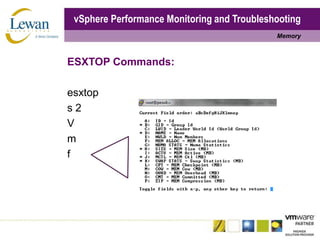
vSphere Performance Monitoring and TroubleshootingMemoryESXTOP Commands:esxtops 2Vmf
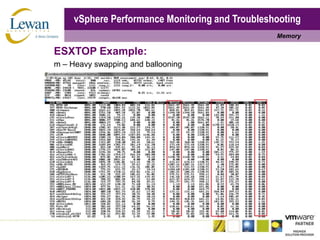
vSphere Performance Monitoring and TroubleshootingMemoryESXTOP Example:m – Heavy swapping and ballooning
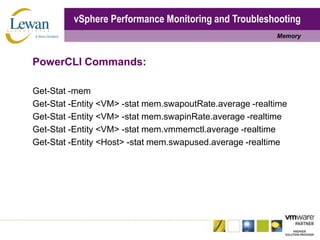
vSphere Performance Monitoring and TroubleshootingMemoryPowerCLI Commands:Get-Stat -memGet-Stat -Entity <VM> -stat mem.swapoutRate.average -realtimeGet-Stat -Entity <VM> -stat mem.swapinRate.average -realtimeGet-Stat -Entity <VM> -stat mem.vmmemctl.average -realtimeGet-Stat -Entity <Host> -stat mem.swapused.average -realtime
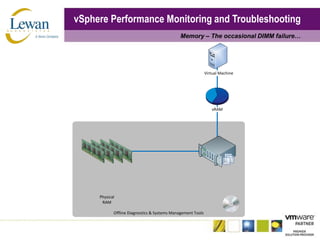
vSphere Performance Monitoring and TroubleshootingMemory – The occasional DIMM failure…
vSphere Performance Monitoring and TroubleshootingMemoryPossible external monitoring options:Vendor specific systems management tools, MS System Center, etc.Don’t forget vCenter ‘Hardware Status’ reporting
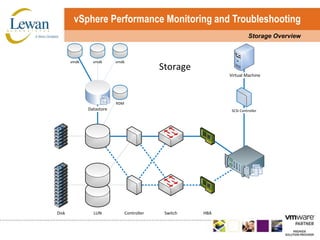
vSphere Performance Monitoring and TroubleshootingStorage Overview
vSphere Performance Monitoring and TroubleshootingStorageTroubleshooting Guidance:1.	Physical Issues - A bad cable, a failing switch port or HBA/NIC, or an incompatible/flawed firmware or device driver (use LSI Logic Parallel/SAS as appropriate)2.	Configuration Issues - Inconsistent or incorrect configuration of LUN masking, zoning, or multi-pathing; inappropriate resource provisioning; aligning queue depth with storage type3.	Capacity Issues - Too many VMs or VMDKs on a LUN; too much IO load for an array or RAID group4.	Thresholds – Latency and queuing
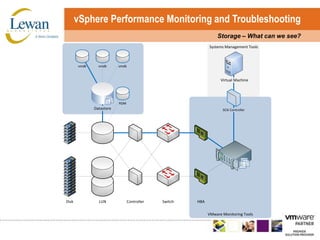
vSphere Performance Monitoring and TroubleshootingStorage – What can we see?
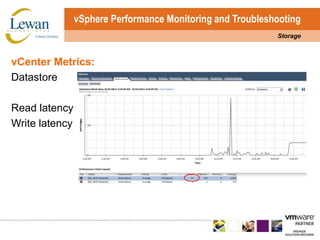
vSphere Performance Monitoring and TroubleshootingStoragevCenter Metrics:DatastoreRead latencyWrite latency
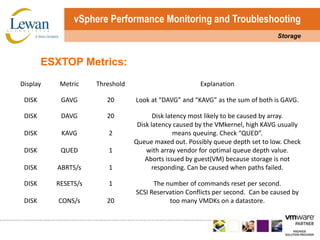
vSphere Performance Monitoring and TroubleshootingStorageESXTOP Metrics:
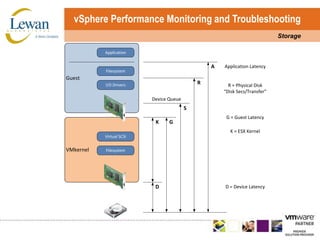
vSphere Performance Monitoring and TroubleshootingStorage
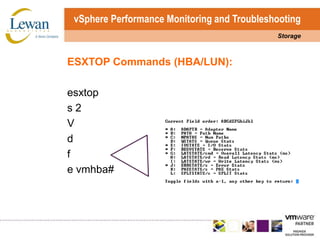
vSphere Performance Monitoring and TroubleshootingStorageESXTOP Commands (HBA/LUN):esxtops 2Vdfe vmhba#
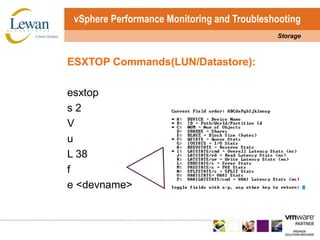
vSphere Performance Monitoring and TroubleshootingStorageESXTOP Commands(LUN/Datastore):esxtops 2VuL 38fe <devname>
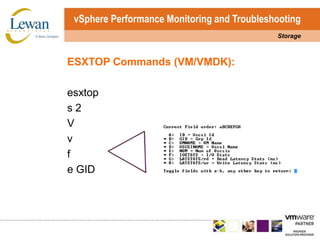
vSphere Performance Monitoring and TroubleshootingStorageESXTOP Commands (VM/VMDK):esxtops 2Vvfe GID
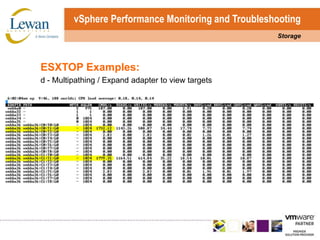
vSphere Performance Monitoring and TroubleshootingStorageESXTOP Examples: d - Multipathing / Expand adapter to view targets
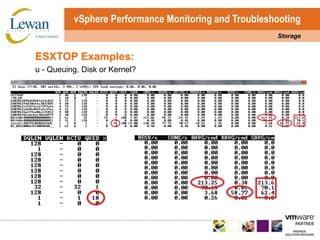
vSphere Performance Monitoring and TroubleshootingStorageESXTOP Examples: u - Queuing, Disk or Kernel?
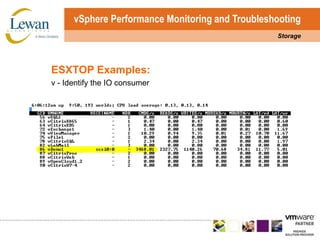
vSphere Performance Monitoring and TroubleshootingStorageESXTOP Examples:v - Identify the IO consumer
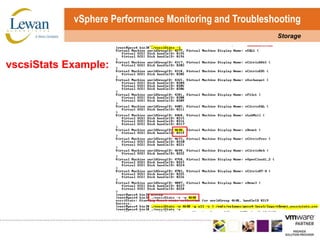
vSphere Performance Monitoring and TroubleshootingStoragevscsiStatsCommand:[root@host ~]# cd /usr/lib/vmware/bin./vscsiStats -l./vscsiStats -s -w <worldid>./vscsiStats -w <worldid> -p all -c > /path/vscsistats.csv./vscsiStats -x
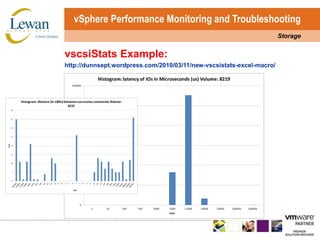
vSphere Performance Monitoring and TroubleshootingStoragevscsiStatsExample:
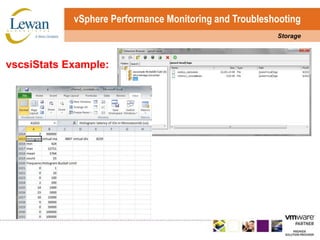
vSphere Performance Monitoring and TroubleshootingStoragevscsiStatsExample:http://dunnsept.wordpress.com/2010/03/11/new-vscsistats-excel-macro/
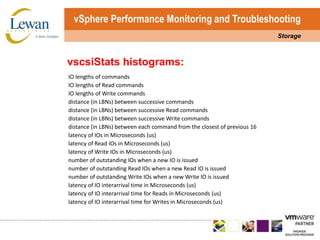
vSphere Performance Monitoring and TroubleshootingStoragevscsiStatshistograms:
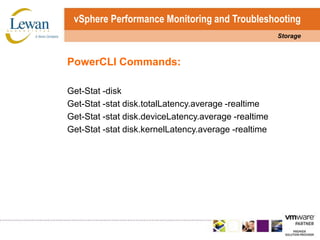
vSphere Performance Monitoring and TroubleshootingStoragePowerCLI Commands:Get-Stat -diskGet-Stat -stat disk.totalLatency.average -realtimeGet-Stat -stat disk.deviceLatency.average -realtimeGet-Stat -stat disk.kernelLatency.average -realtime
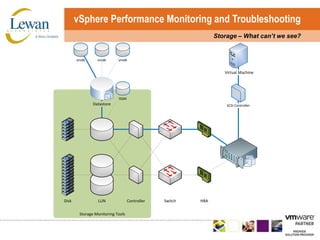
vSphere Performance Monitoring and TroubleshootingStorage – What can’t we see?
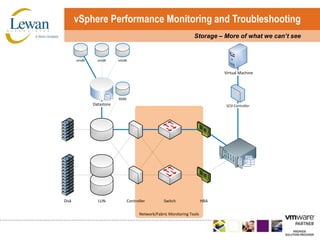
vSphere Performance Monitoring and TroubleshootingStorage – More of what we can’t see
vSphere Performance Monitoring and TroubleshootingStoragePossible external monitoring solutions:Vendor specific SAN and fabric/network tools, native Telnet/SSH/HTTP-based tools for most networks, third-party SNMP-based tools
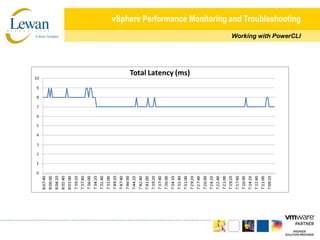
vSphere Performance Monitoring and TroubleshootingWorking with PowerCLIPowerCLI Tips:For a complete list of stat objects:Get-StatType -Entity <Host/VM>Pipe the outputs to a file:Get-Stat -stat <stat> -realtime | ft -autosize > c:\temp\<filename>.csvImport the CSV file data to a spreadsheet with fixed width parametersBuild pretty graphs
vSphere Performance Monitoring and TroubleshootingWorking with PowerCLI
vSphere Performance Monitoring and TroubleshootingWay More InformationESXTOP / vscsiStats / PowerCLI:http://www.yellow-bricks.com/esxtop/     Special thanks to Duncan Epping!http://communities.vmware.com/docs/DOC-3930http://communities.vmware.com/docs/DOC-9279http://communities.vmware.com/docs/DOC-10095http://www.vmware.com/support/developer/PowerCLI/PowerCLI41/html/Get-Stat.htmlhttp://www.lucd.info/2009/12/30/powercli-vsphere-statistics-part-1-the-basics/http://simongreaves.co.uk/blog/esxtop-guidehttp://dunnsept.wordpress.com/2010/03/11/new-vscsistats-excel-macro/
vSphere Performance Monitoring and TroubleshootingEasy button?What is the problem with these tools?Limited alerting mechanisms, no collection automation or historical data for comparison, and no correlation of events!vCenter Operations Standard / Enterprise

VMware vSphere Performance Troubleshooting

  • 1.
    vSphere Performance Monitoringand TroubleshootingOverviewWhat?CPU, Memory, Disk, NetworkHow?Use available tools and a systematic methodologyWhy?Need to build confidence in virtualizing critical and high demand applications
  • 2.
    vSphere Performance Monitoringand TroubleshootingTop IssuesTop Issues:Storage "performance capacity" oversubscriptionMemory oversubscriptionSMP overuseFirmware & driver issues
  • 3.
    vSphere Performance Monitoringand TroubleshootingWhat tools do we have at our disposal?Top tools for information collection:vCenter - Performance charts and alarmsGuest OS* - Task Manager/Resource Monitor and PerfMonESX Host - esxtop and vscsiStatsvSpherePowerCLI*Guest based monitoring is subject to inaccuracy
  • 4.
    vSphere Performance Monitoringand TroubleshootingPrepare vCenter Settings
  • 5.
    vSphere Performance Monitoringand TroubleshootingPrepare vCenter Settings
  • 6.
    vSphere Performance Monitoringand TroubleshootingPrepare vCenter SettingsPrepare custom vCenter alerts:Host Console Swap In Rate  512KBps Warning, 1024 KBps AlertHost Console Swap Out Rate  512KBps Warning, 1024 KBps AlertVM CPU Ready  1000ms Warning, 2000ms AlertVM Disk Latency  20ms Warning, 50ms Alert
  • 7.
    vSphere Performance Monitoringand TroubleshootingPrepare vCenter Settings
  • 8.
    vSphere Performance Monitoringand TroubleshootingPrepare vCenter Settings
  • 9.
    vSphere Performance Monitoringand TroubleshootingPrepare esxtopESXTOP realtime monitoring:esxtop(run command from SSH or tech-support mode)s 2 (refresh view every 2 seconds)V (View VMs only)h(for quick in-tool command reference)Batch Mode for a 5 minute capture of all stats:esxtop-b -a -d 2 -n 150 > esxtop_capture.csv
  • 10.
    vSphere Performance Monitoringand TroubleshootingPrepare PowerCLIRun PowerCLI:Tip: Run as AdministratorSet-ExecutionPolicyremotesignedConnect-VIServer -Server <host> -Protocol https -User <user> -Password <pass> <host> can be IP address or name of ESX server or vCenterGet-VMGet-Stat -common -realtime
  • 11.
    vSphere Performance Monitoringand TroubleshootingWhere do we get started?
  • 12.
    vSphere Performance Monitoringand TroubleshootingNetwork Overview
  • 13.
    vSphere Performance Monitoringand TroubleshootingNetworkTroubleshooting Guidance:1. Physical Issues - A bad cable, a failing switch port or NIC, or an incompatible/flawed firmware or device driver (use VMXNET3 whenever possible)2. Configuration Issues - Inconsistent configuration of vSwitches, Port Groups, or upstream VLAN trunks3. Capacity Issues - Too many VMs on a single NIC; inadequate switch backplane or uplink capacity; sharing “unmanaged” network infrastructure for storage and data4. Thresholds – Bandwidth saturation, dropped packets
  • 14.
    vSphere Performance Monitoringand TroubleshootingNetwork – What can we see?
  • 15.
    vSphere Performance Monitoringand TroubleshootingNetworkvCenter Metrics: Receive packets droppedTransmit packets dropped
  • 16.
    vSphere Performance Monitoringand TroubleshootingNetworkESXTOP Metrics:
  • 17.
    vSphere Performance Monitoringand TroubleshootingNetworkESXTOP Commands:esxtops 2nf
  • 18.
    vSphere Performance Monitoringand TroubleshootingNetworkESXTOP Example:
  • 19.
    vSphere Performance Monitoringand TroubleshootingNetworkPowerCLI Commands:Get-Stat -net -realtimeGet-Stat -Entity <Host> -stat net.droppedRx.summationGet-Stat -Entity <Host> -stat net.droppedTx.summation
  • 20.
    vSphere Performance Monitoringand TroubleshootingNetwork – What can’t we see?
  • 21.
    vSphere Performance Monitoringand TroubleshootingNetworkPossible resources for external monitoring:Native Telnet/SSH/HTTP-based interface counters and statsThird-party SNMP, NetFlow and ICMP tools
  • 22.
    vSphere Performance Monitoringand TroubleshootingCPU Overview
  • 23.
    vSphere Performance Monitoringand TroubleshootingCPUTroubleshooting Guidance:1. Physical Issues - Rare and always catastrophic (e.g. obvious)2. Configuration Issues - Too many / too few vCPUs per VM; SMP/HAL mismatch; incorrect CPU affinity settings3. Capacity Issues - CPU saturation at the guest or host level; CPU starvation due to high IO or other system level ops4. Thresholds – Waiting for CPU cycles (due to co-scheduling, swapping, high IO)
  • 24.
    vSphere Performance Monitoringand TroubleshootingCPU – What can we see?
  • 25.
    vSphere Performance Monitoringand TroubleshootingCPUvCenter Metrics: Host/Guest SaturationStacked Graph (per VM)Usage
  • 26.
    vSphere Performance Monitoringand TroubleshootingCPUvCenter Metrics:GuestReady (value/20=n%)Swap Wait
  • 27.
    vSphere Performance Monitoringand TroubleshootingCPUESXTOP Metrics:
  • 28.
    vSphere Performance Monitoringand TroubleshootingCPUESXTOP Commands:esxtops 2Vce GID (expand/contract a VM world)
  • 29.
    vSphere Performance Monitoringand TroubleshootingCPUESXTOP Example:Excessive vCPUs
  • 30.
    vSphere Performance Monitoringand TroubleshootingCPUESXTOP Example: Now with fewer vCPUs
  • 31.
    vSphere Performance Monitoringand TroubleshootingCPUESXTOP Example:SMP impacting multiple VMs
  • 32.
    vSphere Performance Monitoringand TroubleshootingCPUPowerCLI ExampleGet-Stat -cpuGet-Stat -Entity <VM> -stat cpu.ready.summation -realtimeVery cool script code at:http://www.peetersonline.nl/index.php/vmware/examine-vmware-cpu-ready-times-with-powershell/
  • 33.
    vSphere Performance Monitoringand TroubleshootingCPU – Not much else to see…
  • 34.
    vSphere Performance Monitoringand TroubleshootingCPUPossible resources for external monitoring:Vendor specific systems management tools,MS System Center, etc.http://www.peetersonline.nl/index.php/vmware/examine-vmware-cpu-ready-times-with-powershell/
  • 35.
    vSphere Performance Monitoringand TroubleshootingMemory Overview
  • 36.
    vSphere Performance Monitoringand TroubleshootingMemoryTroubleshooting Guidance:1. Physical Issues - Rare and usually catastrophic2. Configuration Issues - Memory overcommit; incorrect configuration of shares, reservations or limits3. Capacity Issues - Physical memory exhaustion4. Thresholds – Active memory swapping
  • 37.
    vSphere Performance Monitoringand TroubleshootingMemory – What can we see?
  • 38.
    vSphere Performance Monitoringand TroubleshootingMemoryvCenter MetricsSwap in rateSwap out rateSwap used
  • 39.
    vSphere Performance Monitoringand TroubleshootingMemoryESXTOP Metrics:
  • 40.
    vSphere Performance Monitoringand TroubleshootingMemoryESXTOP Commands:esxtops 2Vmf
  • 41.
    vSphere Performance Monitoringand TroubleshootingMemoryESXTOP Example:m – Heavy swapping and ballooning
  • 42.
    vSphere Performance Monitoringand TroubleshootingMemoryPowerCLI Commands:Get-Stat -memGet-Stat -Entity <VM> -stat mem.swapoutRate.average -realtimeGet-Stat -Entity <VM> -stat mem.swapinRate.average -realtimeGet-Stat -Entity <VM> -stat mem.vmmemctl.average -realtimeGet-Stat -Entity <Host> -stat mem.swapused.average -realtime
  • 43.
    vSphere Performance Monitoringand TroubleshootingMemory – The occasional DIMM failure…
  • 44.
    vSphere Performance Monitoringand TroubleshootingMemoryPossible external monitoring options:Vendor specific systems management tools, MS System Center, etc.Don’t forget vCenter ‘Hardware Status’ reporting
  • 45.
    vSphere Performance Monitoringand TroubleshootingStorage Overview
  • 46.
    vSphere Performance Monitoringand TroubleshootingStorageTroubleshooting Guidance:1. Physical Issues - A bad cable, a failing switch port or HBA/NIC, or an incompatible/flawed firmware or device driver (use LSI Logic Parallel/SAS as appropriate)2. Configuration Issues - Inconsistent or incorrect configuration of LUN masking, zoning, or multi-pathing; inappropriate resource provisioning; aligning queue depth with storage type3. Capacity Issues - Too many VMs or VMDKs on a LUN; too much IO load for an array or RAID group4. Thresholds – Latency and queuing
  • 47.
    vSphere Performance Monitoringand TroubleshootingStorage – What can we see?
  • 48.
    vSphere Performance Monitoringand TroubleshootingStoragevCenter Metrics:DatastoreRead latencyWrite latency
  • 49.
    vSphere Performance Monitoringand TroubleshootingStorageESXTOP Metrics:
  • 50.
    vSphere Performance Monitoringand TroubleshootingStorage
  • 51.
    vSphere Performance Monitoringand TroubleshootingStorageESXTOP Commands (HBA/LUN):esxtops 2Vdfe vmhba#
  • 52.
    vSphere Performance Monitoringand TroubleshootingStorageESXTOP Commands(LUN/Datastore):esxtops 2VuL 38fe <devname>
  • 53.
    vSphere Performance Monitoringand TroubleshootingStorageESXTOP Commands (VM/VMDK):esxtops 2Vvfe GID
  • 54.
    vSphere Performance Monitoringand TroubleshootingStorageESXTOP Examples: d - Multipathing / Expand adapter to view targets
  • 55.
    vSphere Performance Monitoringand TroubleshootingStorageESXTOP Examples: u - Queuing, Disk or Kernel?
  • 56.
    vSphere Performance Monitoringand TroubleshootingStorageESXTOP Examples:v - Identify the IO consumer
  • 57.
    vSphere Performance Monitoringand TroubleshootingStoragevscsiStatsCommand:[root@host ~]# cd /usr/lib/vmware/bin./vscsiStats -l./vscsiStats -s -w <worldid>./vscsiStats -w <worldid> -p all -c > /path/vscsistats.csv./vscsiStats -x
  • 58.
    vSphere Performance Monitoringand TroubleshootingStoragevscsiStatsExample:
  • 59.
    vSphere Performance Monitoringand TroubleshootingStoragevscsiStatsExample:
  • 60.
    vSphere Performance Monitoringand TroubleshootingStoragevscsiStatsExample:http://dunnsept.wordpress.com/2010/03/11/new-vscsistats-excel-macro/
  • 61.
    vSphere Performance Monitoringand TroubleshootingStoragevscsiStatshistograms:
  • 62.
    vSphere Performance Monitoringand TroubleshootingStoragePowerCLI Commands:Get-Stat -diskGet-Stat -stat disk.totalLatency.average -realtimeGet-Stat -stat disk.deviceLatency.average -realtimeGet-Stat -stat disk.kernelLatency.average -realtime
  • 63.
    vSphere Performance Monitoringand TroubleshootingStorage – What can’t we see?
  • 64.
    vSphere Performance Monitoringand TroubleshootingStorage – More of what we can’t see
  • 65.
    vSphere Performance Monitoringand TroubleshootingStoragePossible external monitoring solutions:Vendor specific SAN and fabric/network tools, native Telnet/SSH/HTTP-based tools for most networks, third-party SNMP-based tools
  • 66.
    vSphere Performance Monitoringand TroubleshootingWorking with PowerCLIPowerCLI Tips:For a complete list of stat objects:Get-StatType -Entity <Host/VM>Pipe the outputs to a file:Get-Stat -stat <stat> -realtime | ft -autosize > c:\temp\<filename>.csvImport the CSV file data to a spreadsheet with fixed width parametersBuild pretty graphs
  • 67.
    vSphere Performance Monitoringand TroubleshootingWorking with PowerCLI
  • 68.
    vSphere Performance Monitoringand TroubleshootingWay More InformationESXTOP / vscsiStats / PowerCLI:http://www.yellow-bricks.com/esxtop/ Special thanks to Duncan Epping!http://communities.vmware.com/docs/DOC-3930http://communities.vmware.com/docs/DOC-9279http://communities.vmware.com/docs/DOC-10095http://www.vmware.com/support/developer/PowerCLI/PowerCLI41/html/Get-Stat.htmlhttp://www.lucd.info/2009/12/30/powercli-vsphere-statistics-part-1-the-basics/http://simongreaves.co.uk/blog/esxtop-guidehttp://dunnsept.wordpress.com/2010/03/11/new-vscsistats-excel-macro/
  • 69.
    vSphere Performance Monitoringand TroubleshootingEasy button?What is the problem with these tools?Limited alerting mechanisms, no collection automation or historical data for comparison, and no correlation of events!vCenter Operations Standard / Enterprise

Editor's Notes

  • #2 Who uses Resource Pools? How many have reservations or limits?
  • #3 Use a Host CPU stacked (per VM) graph to quickly identify leading consumers
  • #7 Don’t necessary need CPU saturation for overcommit to have an effect on performance
  • #8 Don’t necessary need CPU saturation for overcommit to have an effect on performance
  • #9 Don’t necessary need CPU saturation for overcommit to have an effect on performance