XAML Concepts Dependency Properties, XAML Trees, Routing Doncho Minkov Telerik School Academy schoolacademy.telerik.com   Technical Trainer http://www.minkov.it
Table of Contents Dependency Objects Dependency Properties Attached Properties Trees in XAML Trees in WPF Trees in Silverlight VisualTreeHelper LogicalTreeHelper
Table of Contents (2) Routing Bubbling Tunneling Commanding in XAML Built-in commands ICommand The Relay Command
Dependency Object
Dependency Object The  DependencyObject Represents an object that participates in the dependency property system Enables  WPF  /  SL   property   system  services The property system's functions: Compute the values of properties Provide system notification about values that have changed DependencyObject  as a base class enables objects to use Dependency Properties
Dependency Object (2) DependencyObject  has the following Get ,  Set , and  Clear  methods for values of any dependency properties Metadata, coerce value support, property changed notification Override callbacks for dependency properties or attached properties DependencyObject  class facilitates the  per-owner property metadata for a dependency property
Dependency Properties Dependencies
Dependency Properties Silverlight and WPF provide a set of services that can be used to extend the functionality of a CLR property Collectively, these services are typically referred to as the Silverlight / WPF property system Dependency Property is  A property that is backed by the SL/WPF property system
Dependency Properties (2) Dependency properties are typically exposed as CLR properties At a basic level, you could interact with these properties directly  May never find out they are dependency properties Better to know if a property is Dependency or CLR Can use the advantages of the dependency properties
Dependency Properties (3) The purpose of dependency properties is to provide a way to compute the value of a property based on the value of other inputs Can be implemented to provide callbacks to propagate changes to other properties
Dependency Properties Live Demo
Attached Properties How to set properties from another place
Attached Properties An attached property is intended to be used as a type of global property that is settable on any object In WPF and Silverlight attached properties are defined as dependency properties  They don't have the wrapper property Examples of Attached Properties Grid.Row, Grid.Column, Grid.RowSpan Canvas.Top, Canvas.Left, Canvas.Bottom etc.
Attached Properties Live Demo
Custom Dependency Properties How to make our own Dependency Properties?
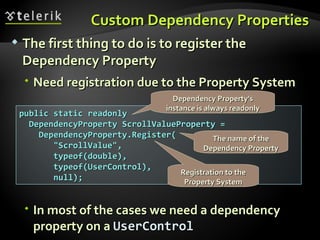
Custom Dependency Properties The first thing to do is to register the Dependency Property Need registration due to the Property System In most of the cases we need a dependency property on a  UserControl public static readonly  DependencyProperty ScrollValueProperty = DependencyProperty.Register( "ScrollValue",  typeof(double),  typeof(UserControl), null); Dependency Property's instance is always readonly The name of the Dependency Property Registration to the Property System
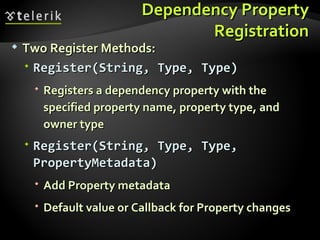
Dependency Property Registration Two Register Methods: Register(String, Type, Type) Registers a dependency property with the specified property name, property type, and owner type Register(String, Type, Type, PropertyMetadata) Add Property metadata Default value or Callback for Property changes
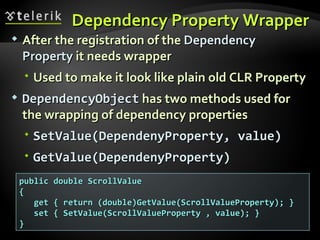
Dependency Property Wrapper After the registration of the  Dependency Property  it needs wrapper Used to make it look like plain old CLR Property DependencyObject  has two methods used for the wrapping of dependency properties SetValue(DependenyProperty, value) GetValue(DependenyProperty) public double ScrollValue { get { return (double)GetValue(ScrollValueProperty); } set { SetValue(ScrollValueProperty , value); } }
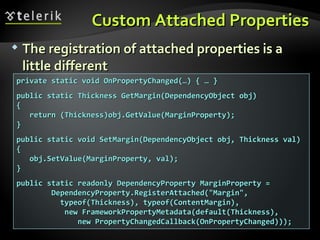
Custom Attached Properties How to make attached properties?
Custom Attached Properties The registration of attached properties is a little different private static void OnPropertyChanged(…) { … } public static Thickness GetMargin(DependencyObject obj) { return (Thickness)obj.GetValue(MarginProperty); } public static void SetMargin(DependencyObject obj, Thickness val) { obj.SetValue(MarginProperty, val); } public static readonly DependencyProperty MarginProperty = DependencyProperty.RegisterAttached("Margin", typeof(Thickness), typeof(ContentMargin),  new FrameworkPropertyMetadata(default(Thickness),  new PropertyChangedCallback(OnPropertyChanged)));
Custom Dependency and Attached Properties Live Demo
Trees in WPF Visual and Logical
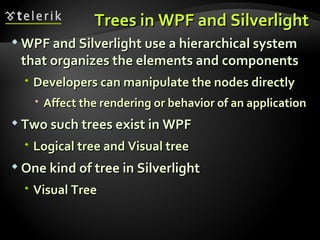
Trees in WPF and Silverlight WPF and Silverlight use a hierarchical system that organizes the elements and components Developers can manipulate the nodes directly Affect the rendering or behavior of an application Two such trees exist in WPF  Logical tree and Visual tree One kind of tree in Silverlight Visual Tree
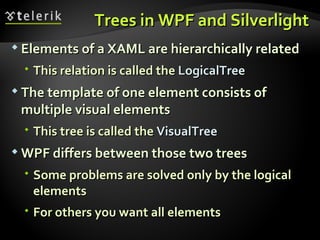
Trees in WPF and Silverlight Elements of a XAML are hierarchically related This relation is called the  LogicalTree The template of one element consists of multiple visual elements This tree is called the  VisualTree WPF differs between those two trees Some problems are solved only by the logical elements  For others you want all elements
Trees in WPF Visual and Logical
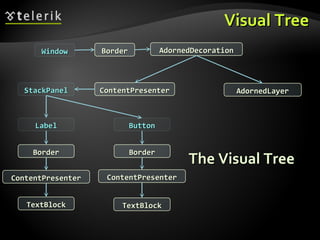
The Trees in WPF WPF supports two kinds of Trees for rendering Logical Tree Describes the structure of control elements Visual Tree Describes the structure of Visual elements Sometimes both trees are used the same way
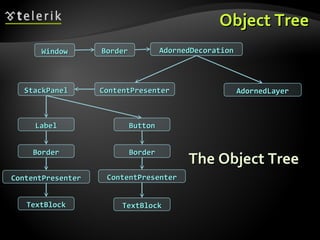
Object Tree The Object Tree Window Border AdornedDecoration AdornedLayer ContentPresenter StackPanel Label Border ContentPresenter TextBlock Button Border ContentPresenter TextBlock
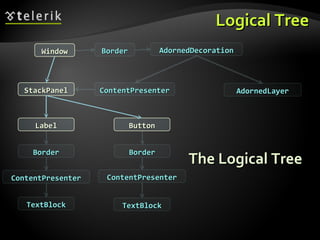
Logical Tree The Logical Tree Window Border AdornedDecoration AdornedLayer ContentPresenter StackPanel Label Border ContentPresenter TextBlock Button Border ContentPresenter TextBlock
Visual Tree The Visual Tree Window Border AdornedDecoration AdornedLayer ContentPresenter StackPanel Label Border ContentPresenter TextBlock Button Border ContentPresenter TextBlock
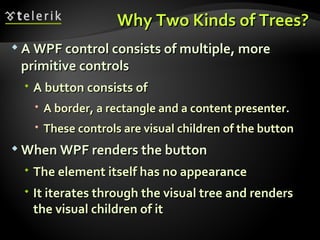
Why Two Kinds of Trees? A WPF control consists of multiple, more primitive controls A button consists of  A border, a rectangle and a content presenter. These controls are visual children of the button When WPF renders the button The element itself has no appearance It iterates through the visual tree and renders the visual children of it
Why Two Kinds of Trees? (2) Sometimes you are not interested in the borders and rectangles of a controls' template You want a more robust tree that only contains the "real" controls  Not all the template parts And that is the eligibility for the logical tree
The Logical Tree The logical tree describes the relations between elements of the user interface The logical tree is responsible for: Inherit  DependencyProperty  values Resolving  DynamicResources  references Looking up element names for bindings Forwarding  RoutedEvents
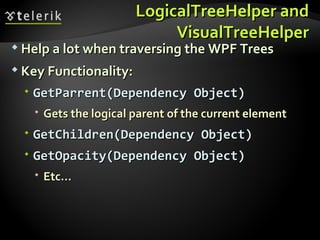
The Visual Tree Contains all logical elements Including all visual elements of the template of each element The visual tree is responsible for: Rendering visual elements Propagate element opacity Propagate  Layout-  and  RenderTransforms Propagate the  IsEnabled  property Do Hit-Testing RelativeSource (FindAncestor)
Traversing Through  Trees in WPF VisualTreeHelper and Logical Tree Helper
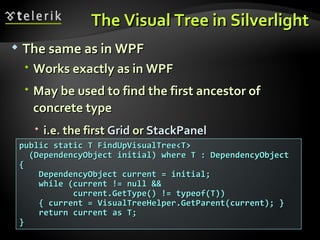
LogicalTreeHelper and VisualTreeHelper Help a lot when traversing the WPF Trees Key Functionality: GetParrent(Dependency Object) Gets the logical parent of the current element GetChildren(Dependency Object) GetOpacity(Dependency Object) Etc…
Traversing Through Trees in WPF Live Demo
Visual Tree in Silverlight Just the Visual
The Visual Tree in Silverlight The same as in WPF Works exactly as in WPF May be used to find the first ancestor of concrete type i.e. the first  Grid  or  StackPanel public static T FindUpVisualTree<T> (DependencyObject initial) where T : DependencyObject { DependencyObject current = initial; while (current != null &&  current.GetType() != typeof(T)) { current = VisualTreeHelper.GetParent(current); } return current as T;  }
Visual Tree in Silverlight Live Demo
Routed Events in WPF/Silverlight Bubbling and Tunneling
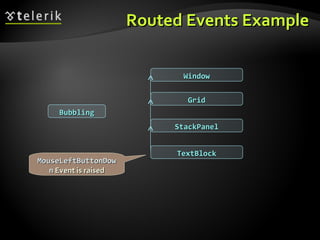
Routed Events What is a routed event? A type of event that can invoke handlers on multiple listeners in an element tree Rather than just on the object that raised it The event route can travel in one of two directions Depending on the event definition Generally the route travels from the source element and then &quot;bubbles&quot; upward through the element tree
Types of Routed Events Three types of routed events in WPF and SL Bubbling Event handlers on the event source are invoked Then routes to successive parent elements until reaching the element tree root Most routed events use bubbling routing strategy Direct Only the source element itself is given the opportunity to invoke handlers in response
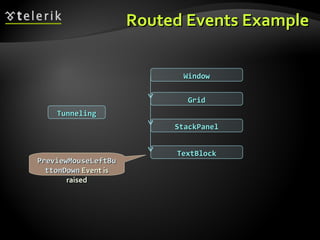
Types of Routed Events (2) Three types of routed events in WPF and SL Tunneling Event handlers at the tree root are invoked first Then travels down the object tree to the node that is the source of the event The element that raised the routed event Not supported in Silverlight Available as Preview events PreviewClick
Routed Events Example Tunneling Window Grid StackPanel TextBlock PreviewMouseLeftButtonDown  Event is raised
Routed Events Example Window Grid StackPanel TextBlock Bubbling MouseLeftButtonDown  Event is raised
Routed Events in WPF/Silverlight Live Demo
Commands in .NET
WPF Commands Commanding is an input mechanism in WPF Provides input handling at a more semantic level than device input Examples of commands are the  Copy ,  Cut , and  Paste  operations
WPF Commands (2) Commands have several purposes Separate the semantics and the objects that invoke a command from the logic that executes the command Allows for multiple and disparate sources to invoke the same command logic Allows the command logic to be customized for different targets
WPF Commands Commands can be used to indicate whether an action is available Example: when trying to cut something, the user should first select something To indicate whether an action is possible  Implement the  CanExecute   method A button can subscribe to the  CanExecuteChanged  event Disabled if  CanExecute  returns false  Enabled if  CanExecute  returns true.
The Four Main Concepts in WPF Commanding The routed command model in WPF consists of four main concepts Command The action to be executed CommandSource The object that invokes the command CommandTarget The object that the command is executed on CommandBinding The object that maps command logic to command
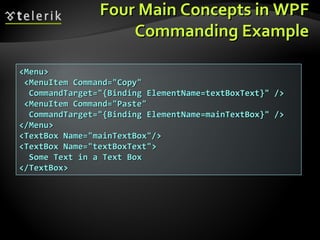
Four Main Concepts in WPF Commanding Example <Menu> <MenuItem Command=&quot;Copy&quot; CommandTarget=&quot;{Binding ElementName=textBoxText}&quot; /> <MenuItem Command=&quot;Paste&quot; CommandTarget=&quot;{Binding ElementName=mainTextBox}&quot; /> </Menu> <TextBox Name=&quot;mainTextBox&quot;/> <TextBox Name=&quot;textBoxText&quot;> Some Text in a Text Box </TextBox>
Commands in .NET Live Demo
The ICommand Interface How to implement our own Commands
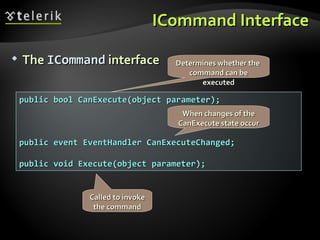
ICommand Interface The  ICommand  interface public bool CanExecute(object parameter); public event EventHandler CanExecuteChanged; public void Execute(object parameter); Determines whether the  command can be executed When changes of the CanExecute state occur Called to invoke the command
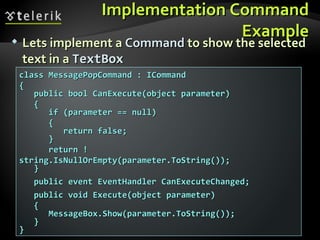
Implementation Command Example Lets implement a  Command  to show the selected text in a  TextBox class MessagePopCommand : ICommand { public bool CanExecute(object parameter) { if (parameter == null) { return false; } return !string.IsNullOrEmpty(parameter.ToString()); } public event EventHandler CanExecuteChanged; public void Execute(object parameter) { MessageBox.Show(parameter.ToString()); } }
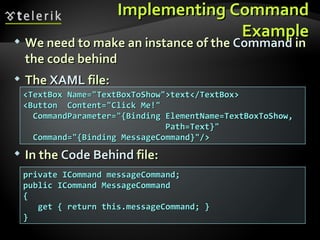
Implementing Command Example We need to make an instance of the  Command  in the code behind The  XAML  file: <TextBox Name=&quot;TextBoxToShow&quot;>text</TextBox> <Button  Content=&quot;Click Me!&quot;  CommandParameter=&quot;{Binding ElementName=TextBoxToShow,  Path=Text}&quot; Command=&quot;{Binding MessageCommand}&quot;/> In the  Code   Behind  file: private ICommand messageCommand; public ICommand MessageCommand { get { return this.messageCommand; } }
How Does it Work? When binding the command of the button to a specific command instance, the  CanExecute  method is invoked If it returns  false  the button is  disabled If  true  is returned the button is  enabled A known problem The order of the  Command   and  CommandParameter   properties matters! The XAML parser works from left to right  The paramerters must be known before binding
The ICommand Interface Live Implementation
Better Commanding Even better than Custom Commands
Better Commanding Most of the times it is not necessary to implement  ICommand   class for every distinct command Since in most of the cases the  ConcreteCommand  has the same interface Can we implement a command and give different behavior then instantiating? Of course – use the so called  RelayCommand
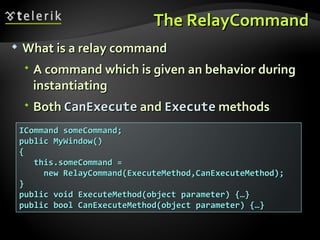
The RelayCommand What is a relay command A command which is given an behavior during instantiating Both  CanExecute  and  Execute  methods ICommand someCommand; public MyWindow() { this.someCommand =  new RelayCommand(ExecuteMethod,CanExecuteMethod); } public void ExecuteMethod(object parameter) {…} public bool CanExecuteMethod(object parameter) {…}
Better Commanding Live Demo
What's the Point of Commands?! Why the hell we need Commands?
The Point of Commands The answer is simple: The Commands can execute without the knowledge of who wants to execute them Commands are: Easily implemented Easily extended Easily replaceable A way to change an object without knowledge of who wants to change it Fundamental part of the MVVM pattern
XAML Concepts
Exercises Extend the VideoPlayer Control from the example: Add a slider that slides with the video length Add a slider that changes the volume Add buttons for Play, Pause, Stop Add key events for volume UP/DOWN Add key events to jump 5 seconds forward/backward in the video

WPF Concepts

  • 1.
    XAML Concepts DependencyProperties, XAML Trees, Routing Doncho Minkov Telerik School Academy schoolacademy.telerik.com Technical Trainer http://www.minkov.it
  • 2.
    Table of ContentsDependency Objects Dependency Properties Attached Properties Trees in XAML Trees in WPF Trees in Silverlight VisualTreeHelper LogicalTreeHelper
  • 3.
    Table of Contents(2) Routing Bubbling Tunneling Commanding in XAML Built-in commands ICommand The Relay Command
  • 4.
  • 5.
    Dependency Object The DependencyObject Represents an object that participates in the dependency property system Enables WPF / SL property system services The property system's functions: Compute the values of properties Provide system notification about values that have changed DependencyObject as a base class enables objects to use Dependency Properties
  • 6.
    Dependency Object (2)DependencyObject has the following Get , Set , and Clear methods for values of any dependency properties Metadata, coerce value support, property changed notification Override callbacks for dependency properties or attached properties DependencyObject class facilitates the per-owner property metadata for a dependency property
  • 7.
  • 8.
    Dependency Properties Silverlightand WPF provide a set of services that can be used to extend the functionality of a CLR property Collectively, these services are typically referred to as the Silverlight / WPF property system Dependency Property is A property that is backed by the SL/WPF property system
  • 9.
    Dependency Properties (2)Dependency properties are typically exposed as CLR properties At a basic level, you could interact with these properties directly May never find out they are dependency properties Better to know if a property is Dependency or CLR Can use the advantages of the dependency properties
  • 10.
    Dependency Properties (3)The purpose of dependency properties is to provide a way to compute the value of a property based on the value of other inputs Can be implemented to provide callbacks to propagate changes to other properties
  • 11.
  • 12.
    Attached Properties Howto set properties from another place
  • 13.
    Attached Properties Anattached property is intended to be used as a type of global property that is settable on any object In WPF and Silverlight attached properties are defined as dependency properties They don't have the wrapper property Examples of Attached Properties Grid.Row, Grid.Column, Grid.RowSpan Canvas.Top, Canvas.Left, Canvas.Bottom etc.
  • 14.
  • 15.
    Custom Dependency PropertiesHow to make our own Dependency Properties?
  • 16.
    Custom Dependency PropertiesThe first thing to do is to register the Dependency Property Need registration due to the Property System In most of the cases we need a dependency property on a UserControl public static readonly DependencyProperty ScrollValueProperty = DependencyProperty.Register( &quot;ScrollValue&quot;, typeof(double), typeof(UserControl), null); Dependency Property's instance is always readonly The name of the Dependency Property Registration to the Property System
  • 17.
    Dependency Property RegistrationTwo Register Methods: Register(String, Type, Type) Registers a dependency property with the specified property name, property type, and owner type Register(String, Type, Type, PropertyMetadata) Add Property metadata Default value or Callback for Property changes
  • 18.
    Dependency Property WrapperAfter the registration of the Dependency Property it needs wrapper Used to make it look like plain old CLR Property DependencyObject has two methods used for the wrapping of dependency properties SetValue(DependenyProperty, value) GetValue(DependenyProperty) public double ScrollValue { get { return (double)GetValue(ScrollValueProperty); } set { SetValue(ScrollValueProperty , value); } }
  • 19.
    Custom Attached PropertiesHow to make attached properties?
  • 20.
    Custom Attached PropertiesThe registration of attached properties is a little different private static void OnPropertyChanged(…) { … } public static Thickness GetMargin(DependencyObject obj) { return (Thickness)obj.GetValue(MarginProperty); } public static void SetMargin(DependencyObject obj, Thickness val) { obj.SetValue(MarginProperty, val); } public static readonly DependencyProperty MarginProperty = DependencyProperty.RegisterAttached(&quot;Margin&quot;, typeof(Thickness), typeof(ContentMargin), new FrameworkPropertyMetadata(default(Thickness), new PropertyChangedCallback(OnPropertyChanged)));
  • 21.
    Custom Dependency andAttached Properties Live Demo
  • 22.
    Trees in WPFVisual and Logical
  • 23.
    Trees in WPFand Silverlight WPF and Silverlight use a hierarchical system that organizes the elements and components Developers can manipulate the nodes directly Affect the rendering or behavior of an application Two such trees exist in WPF Logical tree and Visual tree One kind of tree in Silverlight Visual Tree
  • 24.
    Trees in WPFand Silverlight Elements of a XAML are hierarchically related This relation is called the LogicalTree The template of one element consists of multiple visual elements This tree is called the VisualTree WPF differs between those two trees Some problems are solved only by the logical elements For others you want all elements
  • 25.
    Trees in WPFVisual and Logical
  • 26.
    The Trees inWPF WPF supports two kinds of Trees for rendering Logical Tree Describes the structure of control elements Visual Tree Describes the structure of Visual elements Sometimes both trees are used the same way

  • 27.
    Object Tree TheObject Tree Window Border AdornedDecoration AdornedLayer ContentPresenter StackPanel Label Border ContentPresenter TextBlock Button Border ContentPresenter TextBlock
  • 28.
    Logical Tree TheLogical Tree Window Border AdornedDecoration AdornedLayer ContentPresenter StackPanel Label Border ContentPresenter TextBlock Button Border ContentPresenter TextBlock
  • 29.
    Visual Tree TheVisual Tree Window Border AdornedDecoration AdornedLayer ContentPresenter StackPanel Label Border ContentPresenter TextBlock Button Border ContentPresenter TextBlock
  • 30.
    Why Two Kindsof Trees? A WPF control consists of multiple, more primitive controls A button consists of A border, a rectangle and a content presenter. These controls are visual children of the button When WPF renders the button The element itself has no appearance It iterates through the visual tree and renders the visual children of it
  • 31.
    Why Two Kindsof Trees? (2) Sometimes you are not interested in the borders and rectangles of a controls' template You want a more robust tree that only contains the &quot;real&quot; controls Not all the template parts And that is the eligibility for the logical tree
  • 32.
    The Logical TreeThe logical tree describes the relations between elements of the user interface The logical tree is responsible for: Inherit DependencyProperty values Resolving DynamicResources references Looking up element names for bindings Forwarding RoutedEvents

  • 33.
    The Visual TreeContains all logical elements Including all visual elements of the template of each element The visual tree is responsible for: Rendering visual elements Propagate element opacity Propagate Layout- and RenderTransforms Propagate the IsEnabled property Do Hit-Testing RelativeSource (FindAncestor)
  • 34.
    Traversing Through Trees in WPF VisualTreeHelper and Logical Tree Helper

  • 35.
    LogicalTreeHelper and VisualTreeHelperHelp a lot when traversing the WPF Trees Key Functionality: GetParrent(Dependency Object) Gets the logical parent of the current element GetChildren(Dependency Object) GetOpacity(Dependency Object) Etc…
  • 36.
    Traversing Through Treesin WPF Live Demo
  • 37.
    Visual Tree inSilverlight Just the Visual
  • 38.
    The Visual Treein Silverlight The same as in WPF Works exactly as in WPF May be used to find the first ancestor of concrete type i.e. the first Grid or StackPanel public static T FindUpVisualTree<T> (DependencyObject initial) where T : DependencyObject { DependencyObject current = initial; while (current != null && current.GetType() != typeof(T)) { current = VisualTreeHelper.GetParent(current); } return current as T; }
  • 39.
    Visual Tree inSilverlight Live Demo
  • 40.
    Routed Events inWPF/Silverlight Bubbling and Tunneling
  • 41.
    Routed Events Whatis a routed event? A type of event that can invoke handlers on multiple listeners in an element tree Rather than just on the object that raised it The event route can travel in one of two directions Depending on the event definition Generally the route travels from the source element and then &quot;bubbles&quot; upward through the element tree
  • 42.
    Types of RoutedEvents Three types of routed events in WPF and SL Bubbling Event handlers on the event source are invoked Then routes to successive parent elements until reaching the element tree root Most routed events use bubbling routing strategy Direct Only the source element itself is given the opportunity to invoke handlers in response
  • 43.
    Types of RoutedEvents (2) Three types of routed events in WPF and SL Tunneling Event handlers at the tree root are invoked first Then travels down the object tree to the node that is the source of the event The element that raised the routed event Not supported in Silverlight Available as Preview events PreviewClick
  • 44.
    Routed Events ExampleTunneling Window Grid StackPanel TextBlock PreviewMouseLeftButtonDown Event is raised
  • 45.
    Routed Events ExampleWindow Grid StackPanel TextBlock Bubbling MouseLeftButtonDown Event is raised
  • 46.
    Routed Events inWPF/Silverlight Live Demo
  • 47.
  • 48.
    WPF Commands Commandingis an input mechanism in WPF Provides input handling at a more semantic level than device input Examples of commands are the Copy , Cut , and Paste operations
  • 49.
    WPF Commands (2)Commands have several purposes Separate the semantics and the objects that invoke a command from the logic that executes the command Allows for multiple and disparate sources to invoke the same command logic Allows the command logic to be customized for different targets
  • 50.
    WPF Commands Commandscan be used to indicate whether an action is available Example: when trying to cut something, the user should first select something To indicate whether an action is possible Implement the CanExecute method A button can subscribe to the CanExecuteChanged event Disabled if CanExecute returns false Enabled if CanExecute returns true.
  • 51.
    The Four MainConcepts in WPF Commanding The routed command model in WPF consists of four main concepts Command The action to be executed CommandSource The object that invokes the command CommandTarget The object that the command is executed on CommandBinding The object that maps command logic to command
  • 52.
    Four Main Conceptsin WPF Commanding Example <Menu> <MenuItem Command=&quot;Copy&quot; CommandTarget=&quot;{Binding ElementName=textBoxText}&quot; /> <MenuItem Command=&quot;Paste&quot; CommandTarget=&quot;{Binding ElementName=mainTextBox}&quot; /> </Menu> <TextBox Name=&quot;mainTextBox&quot;/> <TextBox Name=&quot;textBoxText&quot;> Some Text in a Text Box </TextBox>
  • 53.
  • 54.
    The ICommand InterfaceHow to implement our own Commands
  • 55.
    ICommand Interface The ICommand interface public bool CanExecute(object parameter); public event EventHandler CanExecuteChanged; public void Execute(object parameter); Determines whether the command can be executed When changes of the CanExecute state occur Called to invoke the command
  • 56.
    Implementation Command ExampleLets implement a Command to show the selected text in a TextBox class MessagePopCommand : ICommand { public bool CanExecute(object parameter) { if (parameter == null) { return false; } return !string.IsNullOrEmpty(parameter.ToString()); } public event EventHandler CanExecuteChanged; public void Execute(object parameter) { MessageBox.Show(parameter.ToString()); } }
  • 57.
    Implementing Command ExampleWe need to make an instance of the Command in the code behind The XAML file: <TextBox Name=&quot;TextBoxToShow&quot;>text</TextBox> <Button Content=&quot;Click Me!&quot; CommandParameter=&quot;{Binding ElementName=TextBoxToShow, Path=Text}&quot; Command=&quot;{Binding MessageCommand}&quot;/> In the Code Behind file: private ICommand messageCommand; public ICommand MessageCommand { get { return this.messageCommand; } }
  • 58.
    How Does itWork? When binding the command of the button to a specific command instance, the CanExecute method is invoked If it returns false the button is disabled If true is returned the button is enabled A known problem The order of the Command and CommandParameter properties matters! The XAML parser works from left to right The paramerters must be known before binding
  • 59.
    The ICommand InterfaceLive Implementation
  • 60.
    Better Commanding Evenbetter than Custom Commands
  • 61.
    Better Commanding Mostof the times it is not necessary to implement ICommand class for every distinct command Since in most of the cases the ConcreteCommand has the same interface Can we implement a command and give different behavior then instantiating? Of course – use the so called RelayCommand
  • 62.
    The RelayCommand Whatis a relay command A command which is given an behavior during instantiating Both CanExecute and Execute methods ICommand someCommand; public MyWindow() { this.someCommand = new RelayCommand(ExecuteMethod,CanExecuteMethod); } public void ExecuteMethod(object parameter) {…} public bool CanExecuteMethod(object parameter) {…}
  • 63.
  • 64.
    What's the Pointof Commands?! Why the hell we need Commands?
  • 65.
    The Point ofCommands The answer is simple: The Commands can execute without the knowledge of who wants to execute them Commands are: Easily implemented Easily extended Easily replaceable A way to change an object without knowledge of who wants to change it Fundamental part of the MVVM pattern
  • 66.
  • 67.
    Exercises Extend theVideoPlayer Control from the example: Add a slider that slides with the video length Add a slider that changes the volume Add buttons for Play, Pause, Stop Add key events for volume UP/DOWN Add key events to jump 5 seconds forward/backward in the video