jQuery Fundamentals, DOM, Events, AJAX, UI Doncho Minkov Telerik Mobile Development Course mobiledevcourse.telerik.com Technical Trainer http://www.minkov.it
Table of Contents jQuery Fundamentals Selection and DOM Manipulation Events and Chaining AJAX jQuery AJAX Methods Executing AJAX Requests jQuery UI jQuery Widgets Implementing Drag and Drop
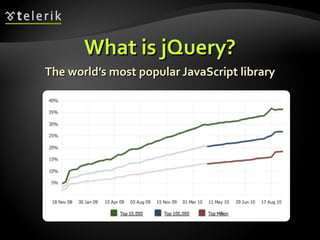
What is jQuery? The world’s most popular JavaScript library
What is jQuery? jQuery is a cross-browser JavaScript library  Designed to simplify the client-side scripting of HTML The most popular JavaScript library in use today Free, open source software jQuery's syntax is designed to make it easier to Navigate a document and select DOM elements  Create animations Handle events Develop AJAX applications
What is jQuery? (2) jQuery also provides capabilities for developers to create plugins for Low-level interaction and animation Advanced effects and high-level, theme-able widgets Creation of powerful and dynamic web pages Microsoft adopted jQuery within Visual Studio Uses in Microsoft's ASP.NET AJAX Framework and ASP.NET MVC Framework
Why jQuery is So Popular? Easy to learn  Fluent programming style Easy to extend You create new jQuery plugins by creating new JavaScript functions Powerful DOM Selection  Powered by CSS 3.0 Lightweight Community Support  Large community of developers and geeks
How to Add jQuery to a Web Site? Download jQuery files from http://www.jquery.com Self hosted You can choose to self host the  .js  file E.g.  jquery-1.5.js  or  jquery-1.5.min.js Use it from CDN (content delivery network) Microsoft, jQuery, Google CDNs e.g.  http://code.jquery.com/jquery-1.5.min.js , http://ajax.microsoft.com/ajax/jquery/jquery-1.5.min.js
Fundamentals of jQuery Selecting, Adding, Removing DOM Elements
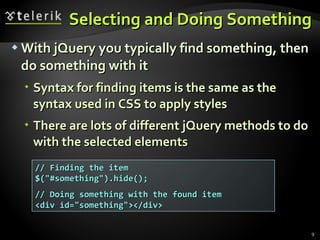
Selecting and Doing Something With jQuery you typically find something, then do something with it Syntax for finding items is the same as the syntax used in CSS to apply styles There are lots of different jQuery methods to do with the selected elements // Finding the item $(&quot;#something&quot;).hide(); // Doing something with the found item <div id=&quot;something&quot;></div>
Show Hide Elements Live Demo
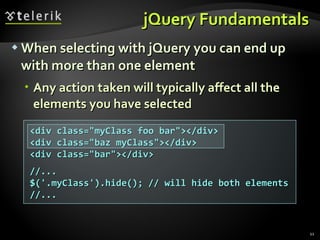
jQuery Fundamentals When selecting with jQuery you can end up with more than one element Any action taken will typically affect all the elements you have selected <div class=&quot;myClass foo bar&quot;></div> <div class=&quot;baz myClass&quot;></div> <div class=&quot;bar&quot;></div> //... $('.myClass').hide(); // will hide both elements //...
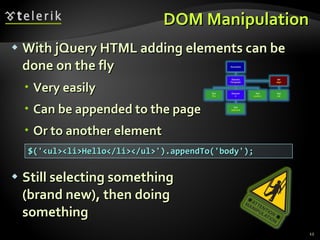
DOM Manipulation With jQuery HTML adding elements can be done on the fly Very easily Can be appended to the page Or to another element Still selecting something  (brand new), then doing  something $('<ul><li>Hello</li></ul>').appendTo('body');
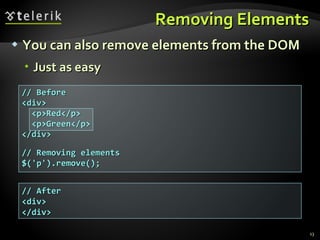
// Before <div> <p>Red</p>  <p>Green</p> </div> // Removing elements $('p').remove(); Removing Elements You can also remove elements from the DOM Just as easy // After <div> </div>
Selecting Multiple Elements Live Demo
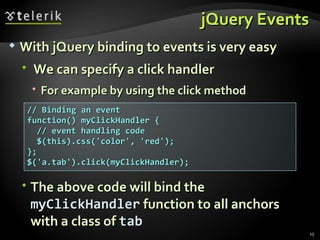
jQuery Events // Binding an event function() myClickHandler {  // event handling code $(this).css('color', 'red'); }; $('a.tab').click(myClickHandler); With jQuery binding to events is very easy We can specify a click handler  For example by using the click method The above code will bind the  myClickHandler  function to all anchors with a class of  tab
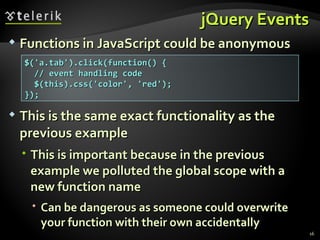
jQuery Events Functions in JavaScript could be anonymous This is the same exact functionality as the previous example This is important because in the previous example we polluted the global scope with a new function name Can be dangerous as someone could overwrite your function with their own accidentally $('a.tab').click(function() {  // event handling code $(this).css('color', 'red'); });
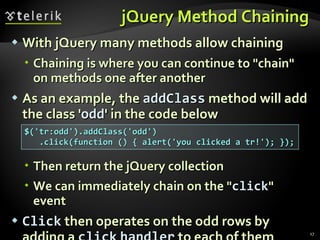
jQuery Method Chaining With jQuery many methods allow chaining Chaining is where you can continue to &quot;chain&quot; on methods one after another As an example, the  addClass   method will add the class ' odd ' in the code below Then return the jQuery collection  We can immediately chain on the &quot; click &quot; event Click  then operates on the odd rows by adding a  click   handler  to each of them $('tr:odd').addClass('odd') .click(function () { alert('you clicked a tr!'); });
Chaining Methods Live Demo
jQuery Stack Architecture Some jQuery methods chain and return a new collection of elements  ' Find ' and ' Filter ' are two examples jQuery holds on to the previous collections, essentially creating a stack set to store them
jQuery Stack Architecture (2) Methods like  Find   and  Filter   create a new collection which is added to the stack Older collections are pushed further ' downward ' on the stack You can get a previous collection back from the stack by using the  end()  method $('body')  // [body] .find('p')  // [p, p, p] > [body] .find('a')  // [a, a] > [p, p, p] > [body] .addClass('foo') .end()  // [p, p, p] > [body] .end()  // [body]
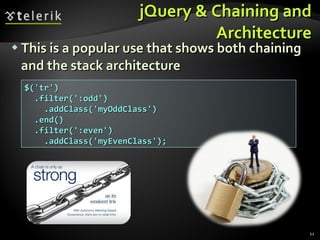
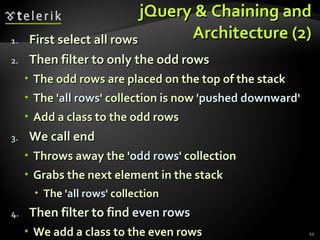
jQuery & Chaining and Architecture This is a popular use that shows both chaining and the stack architecture $('tr') .filter(':odd') .addClass('myOddClass') .end() .filter(':even') .addClass('myEvenClass');
jQuery & Chaining and Architecture (2) First select all rows Then filter to only the odd rows  The odd rows are placed on the top of the stack The ' all rows ' collection is now  'pushed   downward ' Add a class to the odd rows We call end Throws away the ' odd rows ' collection  Grabs the next element in the stack  The ' all rows ' collection Then filter to find  even rows We add a class to the even rows
jQuery Stack Architecture Live Demo
Dynamically Assigning a Class Live Demo
jQuery AJAX
AJAX Fundamentals AJAX is acronym of  Asynchronous JavaScript and XML Technique for background loading of dynamic content and data from the server side Allows dynamic client-side changes Two styles of AJAX Partial page rendering – loading of HTML fragment and showing it in a  <div> JSON service – loading JSON object and client-side processing it with JavaScript / jQuery
jQuery Ajax You can use jQuery Ajax to seamlessly integrate with server side functionality jQuery makes simple the asynchronous server calls jQuery.ajax(…)   The core method for using AJAX functionality The shortcut methods use it 'under the hood' Thus it can do everything $.get(…)  and  $.post(…)   Executes a server-side request and returns a result The HTTP action that will occur  is POST or GET
jQuery Ajax (2) $.getJSON(<url>) Uses the GET HTTP action and inform the server to send back JSON-serialized data $(…).load( <url> ) Gets HTML from the server and loads it into whatever you have selected (e.g. a  <div> ) Note that jQuery AJAX does not use a selection (except for  .load(…)  method) With certain jQuery methods there is not a logical reason to make a selection first  Most AJAX methods fall into that category
jQuery Ajax – $(…).load() Example of dynamically loaded AJAX content: $(…).load(<url>)   Gets an HTML fragment from the server and load it into whatever you have selected Data could come from a PHP script, a static resource or an ASP.NET page Note that the server should return a page fragment If it returns a whole HTML page, then we are going to have some invalid HTML! $('#myContainer').load('home/myHtmlSnippet.html');
jQuery Ajax – Example <button>Perform AJAX Request</button> <script type=&quot;text/javascript&quot;> $(&quot;button&quot;).click(function() { $.ajax({ url: &quot;data.html&quot;, success: function(data){ $('#resultDiv').text(data); } }); }); </script> <div id=&quot;resultDiv&quot;>Result will be shown here</div> Note that  data.html  will not be loaded unless the script comes from a Web server AJAX URL should reside on the same Web server
jQuery AJAX: JSON-Style AJAX and Partial Rendering Live Demo
jQuery UI
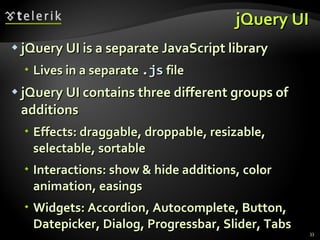
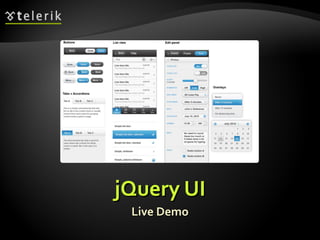
jQuery UI jQuery UI is a separate JavaScript library Lives in a separate  .js  file jQuery UI contains three different groups of additions Effects: draggable, droppable, resizable, selectable, sortable Interactions: show & hide additions, color animation, easings Widgets: Accordion, Autocomplete, Button, Datepicker, Dialog, Progressbar, Slider, Tabs
Widgets jQuery widgets are UI components for the Web All widgets are theme-able! Adding most widgets is very simple in code: $(&quot;input:text.date&quot;).datepicker(); $(&quot;#someDiv&quot;).accordion(); var langs = [&quot;C#&quot;, &quot;Java&quot;, &quot;PHP&quot;, &quot;Python&quot;, &quot;SQL&quot;]; $(&quot;#langBox&quot;).autocomplete({ source: langs }); <div id=&quot;dialog&quot; title=&quot;a title&quot;><p>Some text</p></div> $(&quot;#dialog&quot;).dialog(); $(&quot;#slider&quot;).slider();
jQuery UI Live Demo
jQuery UI Drag-and-Drop Live Demo
jQuery Fundamentals Questions? http://schoolacademy.telerik.com
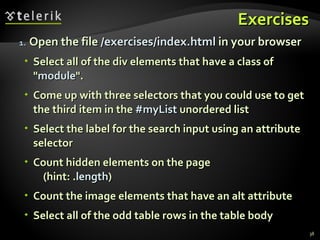
Exercises Open the file  /exercises/index.html  in your browser Select all of the div elements that have a class of &quot; module &quot;. Come up with three selectors that you could use to get the third item in the  #myList  unordered list Select the label for the search input using an attribute selector Count hidden elements on the page  (hint: . length ) Count the image elements that have an alt attribute Select all of the odd table rows in the table body
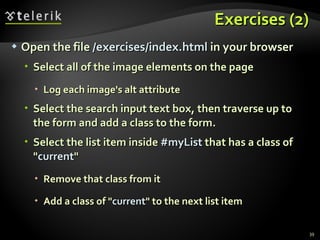
Exercises (2) Open the file  /exercises/index.html  in your browser Select all of the image elements on the page Log each image's alt attribute Select the search input text box, then traverse up to the form and add a class to the form. Select the list item inside  #myList  that has a class of &quot; current &quot; Remove that class from it Add a class of &quot; current &quot; to the next list item
Exercises (3) Open the file  /exercises/index.html  in your browser Select the select element inside  #specials Traverse your way to the submit button. Select the first list item in the  #slidesh ow element Add the class &quot; current &quot; to it, and then add a class of &quot; disabled &quot; to its sibling elements
Exercises (4) Open the file /exercises/index.html in your browser Add five new list items to the end of the unordered list  #myList Remove the odd list items Add another  h2  and another  paragraph  to the last  div.module Add another option to the select element Give the option the value &quot; Wednesday &quot; Add a new  div.module  to the page after the last one Put a copy of one of the existing images inside of it

jQuery Fundamentals

  • 1.
    jQuery Fundamentals, DOM,Events, AJAX, UI Doncho Minkov Telerik Mobile Development Course mobiledevcourse.telerik.com Technical Trainer http://www.minkov.it
  • 2.
    Table of ContentsjQuery Fundamentals Selection and DOM Manipulation Events and Chaining AJAX jQuery AJAX Methods Executing AJAX Requests jQuery UI jQuery Widgets Implementing Drag and Drop
  • 3.
    What is jQuery?The world’s most popular JavaScript library
  • 4.
    What is jQuery?jQuery is a cross-browser JavaScript library  Designed to simplify the client-side scripting of HTML The most popular JavaScript library in use today Free, open source software jQuery's syntax is designed to make it easier to Navigate a document and select DOM elements Create animations Handle events Develop AJAX applications
  • 5.
    What is jQuery?(2) jQuery also provides capabilities for developers to create plugins for Low-level interaction and animation Advanced effects and high-level, theme-able widgets Creation of powerful and dynamic web pages Microsoft adopted jQuery within Visual Studio Uses in Microsoft's ASP.NET AJAX Framework and ASP.NET MVC Framework
  • 6.
    Why jQuery isSo Popular? Easy to learn Fluent programming style Easy to extend You create new jQuery plugins by creating new JavaScript functions Powerful DOM Selection Powered by CSS 3.0 Lightweight Community Support Large community of developers and geeks
  • 7.
    How to AddjQuery to a Web Site? Download jQuery files from http://www.jquery.com Self hosted You can choose to self host the .js file E.g. jquery-1.5.js or jquery-1.5.min.js Use it from CDN (content delivery network) Microsoft, jQuery, Google CDNs e.g. http://code.jquery.com/jquery-1.5.min.js , http://ajax.microsoft.com/ajax/jquery/jquery-1.5.min.js
  • 8.
    Fundamentals of jQuerySelecting, Adding, Removing DOM Elements
  • 9.
    Selecting and DoingSomething With jQuery you typically find something, then do something with it Syntax for finding items is the same as the syntax used in CSS to apply styles There are lots of different jQuery methods to do with the selected elements // Finding the item $(&quot;#something&quot;).hide(); // Doing something with the found item <div id=&quot;something&quot;></div>
  • 10.
  • 11.
    jQuery Fundamentals Whenselecting with jQuery you can end up with more than one element Any action taken will typically affect all the elements you have selected <div class=&quot;myClass foo bar&quot;></div> <div class=&quot;baz myClass&quot;></div> <div class=&quot;bar&quot;></div> //... $('.myClass').hide(); // will hide both elements //...
  • 12.
    DOM Manipulation WithjQuery HTML adding elements can be done on the fly Very easily Can be appended to the page Or to another element Still selecting something (brand new), then doing something $('<ul><li>Hello</li></ul>').appendTo('body');
  • 13.
    // Before <div><p>Red</p> <p>Green</p> </div> // Removing elements $('p').remove(); Removing Elements You can also remove elements from the DOM Just as easy // After <div> </div>
  • 14.
  • 15.
    jQuery Events //Binding an event function() myClickHandler { // event handling code $(this).css('color', 'red'); }; $('a.tab').click(myClickHandler); With jQuery binding to events is very easy We can specify a click handler For example by using the click method The above code will bind the myClickHandler function to all anchors with a class of tab
  • 16.
    jQuery Events Functionsin JavaScript could be anonymous This is the same exact functionality as the previous example This is important because in the previous example we polluted the global scope with a new function name Can be dangerous as someone could overwrite your function with their own accidentally $('a.tab').click(function() { // event handling code $(this).css('color', 'red'); });
  • 17.
    jQuery Method ChainingWith jQuery many methods allow chaining Chaining is where you can continue to &quot;chain&quot; on methods one after another As an example, the addClass method will add the class ' odd ' in the code below Then return the jQuery collection We can immediately chain on the &quot; click &quot; event Click then operates on the odd rows by adding a click handler to each of them $('tr:odd').addClass('odd') .click(function () { alert('you clicked a tr!'); });
  • 18.
  • 19.
    jQuery Stack ArchitectureSome jQuery methods chain and return a new collection of elements ' Find ' and ' Filter ' are two examples jQuery holds on to the previous collections, essentially creating a stack set to store them
  • 20.
    jQuery Stack Architecture(2) Methods like Find and Filter create a new collection which is added to the stack Older collections are pushed further ' downward ' on the stack You can get a previous collection back from the stack by using the end() method $('body') // [body] .find('p') // [p, p, p] > [body] .find('a') // [a, a] > [p, p, p] > [body] .addClass('foo') .end() // [p, p, p] > [body] .end() // [body]
  • 21.
    jQuery & Chainingand Architecture This is a popular use that shows both chaining and the stack architecture $('tr') .filter(':odd') .addClass('myOddClass') .end() .filter(':even') .addClass('myEvenClass');
  • 22.
    jQuery & Chainingand Architecture (2) First select all rows Then filter to only the odd rows The odd rows are placed on the top of the stack The ' all rows ' collection is now 'pushed downward ' Add a class to the odd rows We call end Throws away the ' odd rows ' collection Grabs the next element in the stack The ' all rows ' collection Then filter to find even rows We add a class to the even rows
  • 23.
  • 24.
    Dynamically Assigning aClass Live Demo
  • 25.
  • 26.
    AJAX Fundamentals AJAXis acronym of Asynchronous JavaScript and XML Technique for background loading of dynamic content and data from the server side Allows dynamic client-side changes Two styles of AJAX Partial page rendering – loading of HTML fragment and showing it in a <div> JSON service – loading JSON object and client-side processing it with JavaScript / jQuery
  • 27.
    jQuery Ajax Youcan use jQuery Ajax to seamlessly integrate with server side functionality jQuery makes simple the asynchronous server calls jQuery.ajax(…) The core method for using AJAX functionality The shortcut methods use it 'under the hood' Thus it can do everything $.get(…) and $.post(…) Executes a server-side request and returns a result The HTTP action that will occur is POST or GET
  • 28.
    jQuery Ajax (2)$.getJSON(<url>) Uses the GET HTTP action and inform the server to send back JSON-serialized data $(…).load( <url> ) Gets HTML from the server and loads it into whatever you have selected (e.g. a <div> ) Note that jQuery AJAX does not use a selection (except for .load(…) method) With certain jQuery methods there is not a logical reason to make a selection first Most AJAX methods fall into that category
  • 29.
    jQuery Ajax –$(…).load() Example of dynamically loaded AJAX content: $(…).load(<url>) Gets an HTML fragment from the server and load it into whatever you have selected Data could come from a PHP script, a static resource or an ASP.NET page Note that the server should return a page fragment If it returns a whole HTML page, then we are going to have some invalid HTML! $('#myContainer').load('home/myHtmlSnippet.html');
  • 30.
    jQuery Ajax –Example <button>Perform AJAX Request</button> <script type=&quot;text/javascript&quot;> $(&quot;button&quot;).click(function() { $.ajax({ url: &quot;data.html&quot;, success: function(data){ $('#resultDiv').text(data); } }); }); </script> <div id=&quot;resultDiv&quot;>Result will be shown here</div> Note that data.html will not be loaded unless the script comes from a Web server AJAX URL should reside on the same Web server
  • 31.
    jQuery AJAX: JSON-StyleAJAX and Partial Rendering Live Demo
  • 32.
  • 33.
    jQuery UI jQueryUI is a separate JavaScript library Lives in a separate .js file jQuery UI contains three different groups of additions Effects: draggable, droppable, resizable, selectable, sortable Interactions: show & hide additions, color animation, easings Widgets: Accordion, Autocomplete, Button, Datepicker, Dialog, Progressbar, Slider, Tabs
  • 34.
    Widgets jQuery widgetsare UI components for the Web All widgets are theme-able! Adding most widgets is very simple in code: $(&quot;input:text.date&quot;).datepicker(); $(&quot;#someDiv&quot;).accordion(); var langs = [&quot;C#&quot;, &quot;Java&quot;, &quot;PHP&quot;, &quot;Python&quot;, &quot;SQL&quot;]; $(&quot;#langBox&quot;).autocomplete({ source: langs }); <div id=&quot;dialog&quot; title=&quot;a title&quot;><p>Some text</p></div> $(&quot;#dialog&quot;).dialog(); $(&quot;#slider&quot;).slider();
  • 35.
  • 36.
  • 37.
    jQuery Fundamentals Questions?http://schoolacademy.telerik.com
  • 38.
    Exercises Open thefile /exercises/index.html in your browser Select all of the div elements that have a class of &quot; module &quot;. Come up with three selectors that you could use to get the third item in the #myList unordered list Select the label for the search input using an attribute selector Count hidden elements on the page (hint: . length ) Count the image elements that have an alt attribute Select all of the odd table rows in the table body
  • 39.
    Exercises (2) Openthe file /exercises/index.html in your browser Select all of the image elements on the page Log each image's alt attribute Select the search input text box, then traverse up to the form and add a class to the form. Select the list item inside #myList that has a class of &quot; current &quot; Remove that class from it Add a class of &quot; current &quot; to the next list item
  • 40.
    Exercises (3) Openthe file /exercises/index.html in your browser Select the select element inside #specials Traverse your way to the submit button. Select the first list item in the #slidesh ow element Add the class &quot; current &quot; to it, and then add a class of &quot; disabled &quot; to its sibling elements
  • 41.
    Exercises (4) Openthe file /exercises/index.html in your browser Add five new list items to the end of the unordered list #myList Remove the odd list items Add another h2 and another paragraph to the last div.module Add another option to the select element Give the option the value &quot; Wednesday &quot; Add a new div.module to the page after the last one Put a copy of one of the existing images inside of it

Editor's Notes

  • #8 Talking Points: You can choose to self host files - this is including jQuery in the scripts folder in Visual Studio. Can also just include jQuery from a CDN - simply change the script reference to point to jQuery on the CDN Can be faster loading and client browser may already have jQuery file cached Be careful! If the CDN goes down your site may also go down. Source version is human readable. Always include the minified version for your production code.