Introducing the Composite Application 
Container Framework 
● Bob Balfe | Senior Technical Staff Member – Composite Applications | 
® 
IBM 
AD301 
● Brian O'Gorman | Architect – Composite Application Editor | IBM
Agenda 
 Introduction to Containers 
 Landmarks 101 
 Container Tooling 
 The Browser Container 
 The Notes Containers 
 The Symphony Spreadsheet Container 
 Building your own containers 
 What's next? 
 Q&A 
 

Agenda 
 Introduction to Containers 
 Landmarks 101 
 Container Tooling 
 The Browser Container 
 The Notes Containers 
 The Symphony Spreadsheet Container 
 Building your own containers 
 What's next? 
 Q&A 
 

Composite Application Background 
 A role based application framework where decoupled components 
can communicate through declarative connections (wires) 
 Primarily used to integrate heterogeneous technologies 
 Lotus Notes to SWT, Web to Lotus Notes, SWT to ..., etc 
 Target audience for “application assembly” is technically savvy lines 
of business users 
 Was great on paper :) 
 Provide a clear and consistent component model where all 
components can communicate with well defined properties 
(outputs) and actions (inputs) 
 The primary value add is using existing resources (applications) in 
new context and sharing data from those applications with each 
other 
 

Introduction to Containers – Why a new component type? 
 WSDL is very hard to understand 
 Current component model does not work well for complex 
containers: 
Applications like web applications with more than one page or form 
Host based applications with many screens 
Spreadsheets with more than one sheet 
 Creating new components is cumbersome 
Must create new Java code, new WSDL, deploy feature and plugin 
 
 

What is really wanted/needed 
 The ability to define new components with no programming and no 
WSDL 
 Have new components created from basic XML – ie. extension points 
 These new components need to be 100% compatible with existing 
components 
 Let low level assemblers create new components using plugin.xml 
 Let higher level assemblers create new components with CAE. 

What is a “container”? 
 A container is a new type of view part that can display not only an 
application but applications with many pages (states) and pieces to 
it. 
 For instance, we have a web browser container that exposed general 
actions and properties. 
 Setting the URL 
 Setting the HTML text 
 Publishing the URL 
 Etc. 
 
 These containers can define properties and actions at different 
landmarks within the contained content. 
 For instance, define actions and properties across many pages in a web 
application 

Agenda 
 Introduction to Containers 
 Landmarks 101 
 Container Tooling 
 The Browser Container 
 The Notes Containers 
 The Symphony Spreadsheet Container 
 Building your own containers 
 What's next? 
 Q&A 
 

What is a landmark and a landmark identifier? 
 The term landmark is taken from navigation. 
 Think of what “landmarks” you know that tell where you are at 
 For instance 
 The statue of Liberty tells you are in New York City 
 
 
 The landmarks here are the same concept 
 They tell the container it is in a particular place in the containing 
application. 

What is a landmark and a landmark identifier? 
(cont)  A container definition states what its landmark identifier is. 
 The landmark identifier tells the container what reference to use to identify 
different states (or places) of the component. 
 These states can then have actions applied to them by referencing the value 
returned from the container using the landmark identifier – the returned 
value is the landmark. 
 
 The landmark is the value returned by the container using the 
landmark identifier 
 All landmark values are basic strings 
 Regular expressions and wild-cards are also supported 
– http://www.ibm.com/* 

What is a landmark and a landmark identifier? 
(cont)  A container definition states what its landmark identifier is. 
 The landmark identifier tells the container what reference to use to identify 
different states (or places) of the component. 
 These states can then have actions applied to them by referencing the value 
returned from the container using the landmark identifier – the returned 
value is the landmark. 
 
 The landmark is the value returned by the container using the 
landmark identifier 
 All landmark values are basic strings 
 Regular expressions are also supported 
 
Landmark
Property Name spaces for common containers 
 The new framework introduces the concept of shared property spaces 
 This enables multiple instances of a container type to share the values 
across them 
 You can optionally set the namespace for a specific component using the 
advanced property - “com.ibm.rcp.composite.container.namespace” 
 This name space will be used to store the and retrieve the property for the specific 
component. 
 By default the name space is the perspective ID, so all same types of components 
share properties on a given screen
Agenda 
 Introduction to Containers 
 Landmarks 101 
 Container Tooling 
 The Browser Container 
 The Notes Containers 
 The Symphony Spreadsheet Container 
 Building your own containers 
 What's next? 
 Q&A 
 

Container Tooling 
 Generic Landmark Editor provider by Composite Application Editor 
 Define landmarks & operations 
 Landmark, operation, and field suggestions provided by container
Container Tooling 
 Import / Export landmark definitions 
Exports the extension xml for the landmarks 
 Automatically populated with pre-defined landmarks & operations – 
from plugin.xml 
Configure and distribute a container with some base 
landmarks 
Application assemblers can extend this – e.g. For different 
regions 
 

Agenda 
 Introduction to Containers 
 Landmarks 101 
 Container Tooling 
 The Browser Container 
 The Notes Containers 
 The Symphony Spreadsheet Container 
 Building your own containers 
 What's next? 
 Q&A 
 

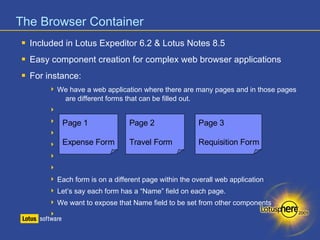
The Browser Container 
 Included in Lotus Expeditor 6.2 & Lotus Notes 8.5 
 Easy component creation for complex web browser applications 
 For instance: 
 We have a web application where there are many pages and in those pages 
are different forms that can be filled out. 
 
 
Page 1 
Page 2 
Page 3 
 
 
Expense Form 
Travel Form 
Requisition Form 
 
 
 Each form is on a different page within the overall web application 
 Let’s say each form has a “Name” field on each page. 
 We want to expose that Name field to be set from other components 

The Browser Container 
 There is a problem though: 
 On Page 1 the field “Name” has the HTML name attribute set to “nameField” 
 On Page 2 the field “Name” has the HTML name attribute set to “Requester” 
 And on Page 3, it is not even a field, it is highlighted text in bold 
 
 What we want to do is expose “Name” as a field that can be set by or 
queried by other components (publish or receive) 
 
 We can handle this by specifying the landmark identifier as the URL 
or the Title of the page 
 This makes the landmark results unique so we can define how “Name” is 
handled on the three different pages. 

The Browser Container 
 There is a problem though: 
 On Page 1 the field “Name” has the HTML name attribute set to “nameField” 
 On Page 2 the field “Name” has the HTML name attribute set to “Requester” 
 And on Page 3, it is not even a field, it is highlighted text in bold 
 
 What we want to do is expose “Name” as a field that can be set by or 
Landmarks 
queried by other components (publish or receive) 
 
 We can handle this by specifying the landmark identifier as the URL 
or the Title of the page 
 This makes the landmark results unique so we can define how “Name” is 
handled on the three different pages. 
 
Name Properties
The Browser Container – sample extension xml 
<landmark expression="Expense Form"> 
<event id="contentComplete"> 
<receive field="name:txtName" property="Name"/> 
</event> 
</landmark> 
<landmark expression="Travel Form"> 
<event id="contentComplete"> 
<receive field="name:name" property="Name"/> 
</event> 
</landmark> 
<landmark expression="Requisition Form"> 
<event id="contentComplete"> 
<publish 
field="xpath://*[@id=‘profileInfo']/attr[@name='cn']/value" 
property="Name"/> 
</event> 
</landmark> 

Demonstration time – The Browser Container! 
®
Agenda 
 Introduction to Containers 
 Landmarks 101 
 Container Tooling 
 The Browser Container 
 The Notes Containers 
 The Symphony Spreadsheet Container 
 Building your own containers 
 What's next? 
 Q&A 
 

The Notes Containers 
 Web Delivery – Notes View Container & PIM View Container 
 Extract data from Notes views as properties, right in CAE 
NO WSDL! 
No database modifications 
 Each property is published individually upon selection 
 Multiple selections are delimited. “00” by default 
Delimiter can be overridden 
 Hide the complexity of Landmarks and the underlying configuration 

The Notes Containers – Notes View Container 
 Based on the re-parent technology 
 Can contain any Notes View 
 “Formula” is supported to extract information from view 
 Uses Java back-end classes to access the data. Document is opened. 
 

The Notes Containers – Notes View Container 
 Inline landmark configuration 
 Define new properties to publish, right in the container in CAE 
Type/Select Property 
Name 
Field Type 
(only formula) Formula Create 
Property 
Create new wire 
Save 
Configuration
The Notes Containers – PIM View Container 
 Based on Notes Java views (CSI Views) 
 Supports both “Formula” and “Columns” to extract data 
 Formula uses Java back-end classes – document is opened 
 Columns use new Java view framework – document not opened, data exists 
 Supports 5 default configurations 
 Inbox, Calendar, Contacts, Todo, Recent Collaborations 
 
 

The Notes Containers – PIM View Container 
 Selecting a configuration generates a new landmark configuration 
 i.e. Default set of properties to extract & publish
The Notes Containers – PIM View Container 
 Inline landmark configuration 
 Define new properties to publish, right in the container in CAE 
 
Type/Select Property 
Name 
Field Type 
(formula/column) Formula Create 
Property 
Create new wire 
Save 
Configuration
Demonstration time – The Notes Container! 
®
Agenda 
 Introduction to Containers 
 Landmarks 101 
 Container Tooling 
 The Browser Container 
 The Notes Containers 
 The Symphony Spreadsheet Container 
 Building your own containers 
 What's next? 
 Q&A 
 

The Symphony Spreadsheet Container 
 Extra information from & publish information to spreadsheets 
 Support cells and cell ranges (and named ranges) 
Publishing data from 
a web application to 
spreadsheet to 
populate a chart!
The Symphony Spreadsheet Container 
 Inline landmark configuration 
 
Type/Select 
Property Name 
Cell 
Range 
Create 
Action 
Create new wire 
Save 
Configuration 
Action 
Publish/Receive Display Fields
?? Demonstration time – 
® 
The Symphony Spreadsheet Container! ??
Agenda 
 Introduction to Containers 
 Landmarks 101 
 Container Tooling 
 The Browser Container 
 The Notes Containers 
 The Symphony Spreadsheet Container 
 Building your own containers 
 What's next? 
 Q&A 
 

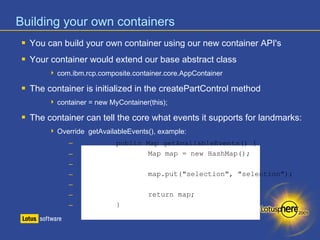
Building your own containers 
 You can build your own container using our new container API's 
 Your container would extend our base abstract class 
 com.ibm.rcp.composite.container.core.AppContainer 
 The container is initialized in the createPartControl method 
 container = new MyContainer(this); 
 The container can tell the core what events it supports for landmarks: 
 Override getAvailableEvents(), example: 
– public Map getAvailableEvents() { 
– Map map = new HashMap(); 
– 
– map.put("selection", "selection"); 
– 
– return map; 
– }
Building your own containers (cont) 
 Even the actions can be completely custom for your container 
 Make them make sense for your container 
 For instance, if you only support a “Publish” action then you could do this: 
 public Map getSuggestedActions() { 
 Map map = new HashMap(); 
 
 map.put(AppContainer.PUBLISH, AppContainer.PUBLISH); 
 
 return map; 
 }
Building your own containers (cont) 
 You can publish and receive data easily 
 No Property Broker API's are needed 
 You would implement the following two methods: 
● public void publish(String name, String field, LandmarkEvent event, 
Object context) 
● public void receive(String name, String field, LandmarkEvent event, 
Object context) 
 
 You would then call the core containers publishProperty() method to publish 
the data to the broker 
 
● publishProperty(name, value.toString()); 
 

Building your own containers (cont) 
 Each area of the composite application editor can be customized by 
your container 
 Components can add their own tabs for editing configuration
Building your own containers (cont) 
 Each area of the composite application editor can be customized by 
your container 
 Components can add their own tabs for editing configuration
Agenda 
 Introduction to Containers 
 Landmarks 101 
 Container Tooling 
 The Browser Container 
 The Notes Containers 
 The Symphony Spreadsheet Container 
 Building your own containers 
 What's next? 
 Q&A 
 

What's next? 
 Lotus Expeditor 6.2.1 
 Symphony Spreadsheet Container 
 Host On Demand (HOD) Container 
 Lotus Notes 8.5.1 (above plus...) 
 Notes View Container 
 PIM View Container 
 Notes Document Container 
 Building your own 
 Ability to provide your own Landmark Editor tab in CAE 
 Ability to provide your own inline landmark configuration UI 

Agenda 
 Introduction to Containers 
 Landmarks 101 
 Container Tooling 
 The Browser Container 
 The Notes Containers 
 The Symphony Spreadsheet Container 
 Building your own containers 
 What's next? 
 Q&A 
 

Further resources 
 IBM Composite Applications wiki 
http://www-10.lotus.com/ldd/compappwiki.nsf 
 Lotus Expeditor Infocenter 
http://publib.boulder.ibm.com/infocenter/ledoc/v6r2 
 Bob's Blog 
http://blog.balfes.net 
 IBM Lotus developerWorks 
http://www.ibm.com/developerworks/lotus 
 IBM Lotus Application Development Overview 
http://www.ibm.com/software/lotus/appdev/ 
 
 Questions 
? 
Thank you for joining us, and please remember to fill out the feedback forms. 
For more demos and information come see us in the Meet The Developers lab.
Legal disclaimer Please delete all instructions (text in red) and insert this information at the end ofexternal publications. 
© IBM Corporation 2008. All Rights Reserved. 
 
The information contained in this publication is provided for informational purposes only. While efforts were made to verify the completeness and accuracy of the information contained in this publication, it is 
provided AS IS without warranty of any kind, express or implied. In addition, this information is based on IBM’s current product plans and strategy, which are subject to change by IBM without notice. IBM shall 
not be responsible for any damages arising out of the use of, or otherwise related to, this publication or any other materials. Nothing contained in this publication is intended to, nor shall have the effect of, 
creating any warranties or representations from IBM or its suppliers or licensors, or altering the terms and conditions of the applicable license agreement governing the use of IBM software. 
References in this presentation to IBM products, programs, or services do not imply that they will be available in all countries in which IBM operates. Product release dates and/or capabilities referenced in 
this presentation may change at any time at IBM’s sole discretion based on market opportunities or other factors, and are not intended to be a commitment to future product or feature availability in any way. 
Nothing contained in these materials is intended to, nor shall have the effect of, stating or implying that any activities undertaken by you will result in any specific sales, revenue growth or other results. 
 
If the text contains performance statistics or references to benchmarks, insert the following language; otherwise delete: 
Performance is based on measurements and projections using standard IBM benchmarks in a controlled environment. The actual throughput or performance that any user will experience will vary depending 
upon many factors, including considerations such as the amount of multiprogramming in the user's job stream, the I/O configuration, the storage configuration, and the workload processed. Therefore, no 
assurance can be given that an individual user will achieve results similar to those stated here. 
 
If the text includes any customer examples, please confirm we have prior written approval from such customer and insert the following language; otherwise delete: 
All customer examples described are presented as illustrations of how those customers have used IBM products and the results they may have achieved. Actual environmental costs and performance 
characteristics may vary by customer. 
 
Please review text for proper trademark attribution of IBM products. At first use, each product name must be the full name and include appropriate trademark symbols (e.g., IBM Lotus® Sametime® 
Unyte™). Subsequent references can drop “IBM” but should include the proper branding (e.g., Lotus Sametime Gateway, or WebSphere Application Server). Please refer to 
http://www.ibm.com/legal/copytrade.shtml for guidance on which trademarks require the ® or ™ symbol. Do not use abbreviations for IBM product names in your presentation. All product names must be 
used as adjectives rather than nouns. Please list all of the trademarks that you use in your presentation as follows; delete any not included in your presentation. 
IBM, the IBM logo, Lotus, Lotus Notes, Notes, Domino, Quickr, Sametime, WebSphere, UC2, PartnerWorld and Lotusphere are trademarks of International Business Machines Corporation in the United 
States, other countries, or both. Unyte is a trademark of WebDialogs, Inc., in the United States, other countries, or both. 
 
If you reference Adobe® in the text, please mark the first use and include the following; otherwise delete: 
Adobe, the Adobe logo, PostScript, and the PostScript logo are either registered trademarks or trademarks of Adobe Systems Incorporated in the United States, and/or other countries. 
If you reference Java™ in the text, please mark the first use and include the following; otherwise delete: 
Java and all Java-based trademarks are trademarks of Sun Microsystems, Inc. in the United States, other countries, or both. 
 
If you reference Microsoft® and/or Windows® in the text, please mark the first use and include the following, as applicable; otherwise delete: 
Microsoft and Windows are trademarks of Microsoft Corporation in the United States, other countries, or both. 
 
If you reference Intel® and/or any of the following Intel products in the text, please mark the first use and include those that you use as follows; otherwise delete: 
Intel, Intel Centrino, Celeron, Intel Xeon, Intel SpeedStep, Itanium, and Pentium are trademarks or registered trademarks of Intel Corporation or its subsidiaries in the United States and other countries. 
If you reference UNIX® in the text, please mark the first use and include the following; otherwise delete: 
UNIX is a registered trademark of The Open Group in the United States and other countries. 
 
If you reference Linux® in your presentation, please mark the first use and include the following; otherwise delete: 
Linux is a registered trademark of Linus Torvalds in the United States, other countries, or both. 
Other company, product, or service names may be trademarks or service marks of others. 
 
If the text/graphics include screenshots, no actual IBM employee names may be used (even your own), if your screenshots include fictitious company names (e.g., Renovations, Zeta Bank, Acme) please 
update and insert the following; otherwise delete: 
All references to [insert fictitious company name] refer to a fictitious company and are used for illustration purposes only.

AD301: Introducing the Composite Application Container Framework - Lotusphere 2009

  • 2.
    Introducing the CompositeApplication Container Framework ● Bob Balfe | Senior Technical Staff Member – Composite Applications | ® IBM AD301 ● Brian O'Gorman | Architect – Composite Application Editor | IBM
  • 3.
    Agenda  Introductionto Containers  Landmarks 101  Container Tooling  The Browser Container  The Notes Containers  The Symphony Spreadsheet Container  Building your own containers  What's next?  Q&A  
  • 4.
    Agenda  Introductionto Containers  Landmarks 101  Container Tooling  The Browser Container  The Notes Containers  The Symphony Spreadsheet Container  Building your own containers  What's next?  Q&A  
  • 5.
    Composite Application Background  A role based application framework where decoupled components can communicate through declarative connections (wires)  Primarily used to integrate heterogeneous technologies  Lotus Notes to SWT, Web to Lotus Notes, SWT to ..., etc  Target audience for “application assembly” is technically savvy lines of business users  Was great on paper :)  Provide a clear and consistent component model where all components can communicate with well defined properties (outputs) and actions (inputs)  The primary value add is using existing resources (applications) in new context and sharing data from those applications with each other  
  • 6.
    Introduction to Containers– Why a new component type?  WSDL is very hard to understand  Current component model does not work well for complex containers: Applications like web applications with more than one page or form Host based applications with many screens Spreadsheets with more than one sheet  Creating new components is cumbersome Must create new Java code, new WSDL, deploy feature and plugin   
  • 7.
    What is reallywanted/needed  The ability to define new components with no programming and no WSDL  Have new components created from basic XML – ie. extension points  These new components need to be 100% compatible with existing components  Let low level assemblers create new components using plugin.xml  Let higher level assemblers create new components with CAE. 
  • 8.
    What is a“container”?  A container is a new type of view part that can display not only an application but applications with many pages (states) and pieces to it.  For instance, we have a web browser container that exposed general actions and properties.  Setting the URL  Setting the HTML text  Publishing the URL  Etc.   These containers can define properties and actions at different landmarks within the contained content.  For instance, define actions and properties across many pages in a web application 
  • 9.
    Agenda  Introductionto Containers  Landmarks 101  Container Tooling  The Browser Container  The Notes Containers  The Symphony Spreadsheet Container  Building your own containers  What's next?  Q&A  
  • 10.
    What is alandmark and a landmark identifier?  The term landmark is taken from navigation.  Think of what “landmarks” you know that tell where you are at  For instance  The statue of Liberty tells you are in New York City    The landmarks here are the same concept  They tell the container it is in a particular place in the containing application. 
  • 11.
    What is alandmark and a landmark identifier? (cont)  A container definition states what its landmark identifier is.  The landmark identifier tells the container what reference to use to identify different states (or places) of the component.  These states can then have actions applied to them by referencing the value returned from the container using the landmark identifier – the returned value is the landmark.   The landmark is the value returned by the container using the landmark identifier  All landmark values are basic strings  Regular expressions and wild-cards are also supported – http://www.ibm.com/* 
  • 12.
    What is alandmark and a landmark identifier? (cont)  A container definition states what its landmark identifier is.  The landmark identifier tells the container what reference to use to identify different states (or places) of the component.  These states can then have actions applied to them by referencing the value returned from the container using the landmark identifier – the returned value is the landmark.   The landmark is the value returned by the container using the landmark identifier  All landmark values are basic strings  Regular expressions are also supported  Landmark
  • 13.
    Property Name spacesfor common containers  The new framework introduces the concept of shared property spaces  This enables multiple instances of a container type to share the values across them  You can optionally set the namespace for a specific component using the advanced property - “com.ibm.rcp.composite.container.namespace”  This name space will be used to store the and retrieve the property for the specific component.  By default the name space is the perspective ID, so all same types of components share properties on a given screen
  • 14.
    Agenda  Introductionto Containers  Landmarks 101  Container Tooling  The Browser Container  The Notes Containers  The Symphony Spreadsheet Container  Building your own containers  What's next?  Q&A  
  • 15.
    Container Tooling Generic Landmark Editor provider by Composite Application Editor  Define landmarks & operations  Landmark, operation, and field suggestions provided by container
  • 16.
    Container Tooling Import / Export landmark definitions Exports the extension xml for the landmarks  Automatically populated with pre-defined landmarks & operations – from plugin.xml Configure and distribute a container with some base landmarks Application assemblers can extend this – e.g. For different regions  
  • 17.
    Agenda  Introductionto Containers  Landmarks 101  Container Tooling  The Browser Container  The Notes Containers  The Symphony Spreadsheet Container  Building your own containers  What's next?  Q&A  
  • 18.
    The Browser Container  Included in Lotus Expeditor 6.2 & Lotus Notes 8.5  Easy component creation for complex web browser applications  For instance:  We have a web application where there are many pages and in those pages are different forms that can be filled out.   Page 1 Page 2 Page 3   Expense Form Travel Form Requisition Form    Each form is on a different page within the overall web application  Let’s say each form has a “Name” field on each page.  We want to expose that Name field to be set from other components 
  • 19.
    The Browser Container  There is a problem though:  On Page 1 the field “Name” has the HTML name attribute set to “nameField”  On Page 2 the field “Name” has the HTML name attribute set to “Requester”  And on Page 3, it is not even a field, it is highlighted text in bold   What we want to do is expose “Name” as a field that can be set by or queried by other components (publish or receive)   We can handle this by specifying the landmark identifier as the URL or the Title of the page  This makes the landmark results unique so we can define how “Name” is handled on the three different pages. 
  • 20.
    The Browser Container  There is a problem though:  On Page 1 the field “Name” has the HTML name attribute set to “nameField”  On Page 2 the field “Name” has the HTML name attribute set to “Requester”  And on Page 3, it is not even a field, it is highlighted text in bold   What we want to do is expose “Name” as a field that can be set by or Landmarks queried by other components (publish or receive)   We can handle this by specifying the landmark identifier as the URL or the Title of the page  This makes the landmark results unique so we can define how “Name” is handled on the three different pages.  Name Properties
  • 21.
    The Browser Container– sample extension xml <landmark expression="Expense Form"> <event id="contentComplete"> <receive field="name:txtName" property="Name"/> </event> </landmark> <landmark expression="Travel Form"> <event id="contentComplete"> <receive field="name:name" property="Name"/> </event> </landmark> <landmark expression="Requisition Form"> <event id="contentComplete"> <publish field="xpath://*[@id=‘profileInfo']/attr[@name='cn']/value" property="Name"/> </event> </landmark> 
  • 22.
    Demonstration time –The Browser Container! ®
  • 23.
    Agenda  Introductionto Containers  Landmarks 101  Container Tooling  The Browser Container  The Notes Containers  The Symphony Spreadsheet Container  Building your own containers  What's next?  Q&A  
  • 24.
    The Notes Containers  Web Delivery – Notes View Container & PIM View Container  Extract data from Notes views as properties, right in CAE NO WSDL! No database modifications  Each property is published individually upon selection  Multiple selections are delimited. “00” by default Delimiter can be overridden  Hide the complexity of Landmarks and the underlying configuration 
  • 25.
    The Notes Containers– Notes View Container  Based on the re-parent technology  Can contain any Notes View  “Formula” is supported to extract information from view  Uses Java back-end classes to access the data. Document is opened.  
  • 26.
    The Notes Containers– Notes View Container  Inline landmark configuration  Define new properties to publish, right in the container in CAE Type/Select Property Name Field Type (only formula) Formula Create Property Create new wire Save Configuration
  • 27.
    The Notes Containers– PIM View Container  Based on Notes Java views (CSI Views)  Supports both “Formula” and “Columns” to extract data  Formula uses Java back-end classes – document is opened  Columns use new Java view framework – document not opened, data exists  Supports 5 default configurations  Inbox, Calendar, Contacts, Todo, Recent Collaborations   
  • 28.
    The Notes Containers– PIM View Container  Selecting a configuration generates a new landmark configuration  i.e. Default set of properties to extract & publish
  • 29.
    The Notes Containers– PIM View Container  Inline landmark configuration  Define new properties to publish, right in the container in CAE  Type/Select Property Name Field Type (formula/column) Formula Create Property Create new wire Save Configuration
  • 30.
    Demonstration time –The Notes Container! ®
  • 31.
    Agenda  Introductionto Containers  Landmarks 101  Container Tooling  The Browser Container  The Notes Containers  The Symphony Spreadsheet Container  Building your own containers  What's next?  Q&A  
  • 32.
    The Symphony SpreadsheetContainer  Extra information from & publish information to spreadsheets  Support cells and cell ranges (and named ranges) Publishing data from a web application to spreadsheet to populate a chart!
  • 33.
    The Symphony SpreadsheetContainer  Inline landmark configuration  Type/Select Property Name Cell Range Create Action Create new wire Save Configuration Action Publish/Receive Display Fields
  • 34.
    ?? Demonstration time– ® The Symphony Spreadsheet Container! ??
  • 35.
    Agenda  Introductionto Containers  Landmarks 101  Container Tooling  The Browser Container  The Notes Containers  The Symphony Spreadsheet Container  Building your own containers  What's next?  Q&A  
  • 36.
    Building your owncontainers  You can build your own container using our new container API's  Your container would extend our base abstract class  com.ibm.rcp.composite.container.core.AppContainer  The container is initialized in the createPartControl method  container = new MyContainer(this);  The container can tell the core what events it supports for landmarks:  Override getAvailableEvents(), example: – public Map getAvailableEvents() { – Map map = new HashMap(); – – map.put("selection", "selection"); – – return map; – }
  • 37.
    Building your owncontainers (cont)  Even the actions can be completely custom for your container  Make them make sense for your container  For instance, if you only support a “Publish” action then you could do this:  public Map getSuggestedActions() {  Map map = new HashMap();   map.put(AppContainer.PUBLISH, AppContainer.PUBLISH);   return map;  }
  • 38.
    Building your owncontainers (cont)  You can publish and receive data easily  No Property Broker API's are needed  You would implement the following two methods: ● public void publish(String name, String field, LandmarkEvent event, Object context) ● public void receive(String name, String field, LandmarkEvent event, Object context)   You would then call the core containers publishProperty() method to publish the data to the broker  ● publishProperty(name, value.toString());  
  • 39.
    Building your owncontainers (cont)  Each area of the composite application editor can be customized by your container  Components can add their own tabs for editing configuration
  • 40.
    Building your owncontainers (cont)  Each area of the composite application editor can be customized by your container  Components can add their own tabs for editing configuration
  • 41.
    Agenda  Introductionto Containers  Landmarks 101  Container Tooling  The Browser Container  The Notes Containers  The Symphony Spreadsheet Container  Building your own containers  What's next?  Q&A  
  • 42.
    What's next? Lotus Expeditor 6.2.1  Symphony Spreadsheet Container  Host On Demand (HOD) Container  Lotus Notes 8.5.1 (above plus...)  Notes View Container  PIM View Container  Notes Document Container  Building your own  Ability to provide your own Landmark Editor tab in CAE  Ability to provide your own inline landmark configuration UI 
  • 43.
    Agenda  Introductionto Containers  Landmarks 101  Container Tooling  The Browser Container  The Notes Containers  The Symphony Spreadsheet Container  Building your own containers  What's next?  Q&A  
  • 44.
    Further resources IBM Composite Applications wiki http://www-10.lotus.com/ldd/compappwiki.nsf  Lotus Expeditor Infocenter http://publib.boulder.ibm.com/infocenter/ledoc/v6r2  Bob's Blog http://blog.balfes.net  IBM Lotus developerWorks http://www.ibm.com/developerworks/lotus  IBM Lotus Application Development Overview http://www.ibm.com/software/lotus/appdev/   Questions ? Thank you for joining us, and please remember to fill out the feedback forms. For more demos and information come see us in the Meet The Developers lab.
  • 45.
    Legal disclaimer Pleasedelete all instructions (text in red) and insert this information at the end ofexternal publications. © IBM Corporation 2008. All Rights Reserved.  The information contained in this publication is provided for informational purposes only. While efforts were made to verify the completeness and accuracy of the information contained in this publication, it is provided AS IS without warranty of any kind, express or implied. In addition, this information is based on IBM’s current product plans and strategy, which are subject to change by IBM without notice. IBM shall not be responsible for any damages arising out of the use of, or otherwise related to, this publication or any other materials. Nothing contained in this publication is intended to, nor shall have the effect of, creating any warranties or representations from IBM or its suppliers or licensors, or altering the terms and conditions of the applicable license agreement governing the use of IBM software. References in this presentation to IBM products, programs, or services do not imply that they will be available in all countries in which IBM operates. Product release dates and/or capabilities referenced in this presentation may change at any time at IBM’s sole discretion based on market opportunities or other factors, and are not intended to be a commitment to future product or feature availability in any way. Nothing contained in these materials is intended to, nor shall have the effect of, stating or implying that any activities undertaken by you will result in any specific sales, revenue growth or other results.  If the text contains performance statistics or references to benchmarks, insert the following language; otherwise delete: Performance is based on measurements and projections using standard IBM benchmarks in a controlled environment. The actual throughput or performance that any user will experience will vary depending upon many factors, including considerations such as the amount of multiprogramming in the user's job stream, the I/O configuration, the storage configuration, and the workload processed. Therefore, no assurance can be given that an individual user will achieve results similar to those stated here.  If the text includes any customer examples, please confirm we have prior written approval from such customer and insert the following language; otherwise delete: All customer examples described are presented as illustrations of how those customers have used IBM products and the results they may have achieved. Actual environmental costs and performance characteristics may vary by customer.  Please review text for proper trademark attribution of IBM products. At first use, each product name must be the full name and include appropriate trademark symbols (e.g., IBM Lotus® Sametime® Unyte™). Subsequent references can drop “IBM” but should include the proper branding (e.g., Lotus Sametime Gateway, or WebSphere Application Server). Please refer to http://www.ibm.com/legal/copytrade.shtml for guidance on which trademarks require the ® or ™ symbol. Do not use abbreviations for IBM product names in your presentation. All product names must be used as adjectives rather than nouns. Please list all of the trademarks that you use in your presentation as follows; delete any not included in your presentation. IBM, the IBM logo, Lotus, Lotus Notes, Notes, Domino, Quickr, Sametime, WebSphere, UC2, PartnerWorld and Lotusphere are trademarks of International Business Machines Corporation in the United States, other countries, or both. Unyte is a trademark of WebDialogs, Inc., in the United States, other countries, or both.  If you reference Adobe® in the text, please mark the first use and include the following; otherwise delete: Adobe, the Adobe logo, PostScript, and the PostScript logo are either registered trademarks or trademarks of Adobe Systems Incorporated in the United States, and/or other countries. If you reference Java™ in the text, please mark the first use and include the following; otherwise delete: Java and all Java-based trademarks are trademarks of Sun Microsystems, Inc. in the United States, other countries, or both.  If you reference Microsoft® and/or Windows® in the text, please mark the first use and include the following, as applicable; otherwise delete: Microsoft and Windows are trademarks of Microsoft Corporation in the United States, other countries, or both.  If you reference Intel® and/or any of the following Intel products in the text, please mark the first use and include those that you use as follows; otherwise delete: Intel, Intel Centrino, Celeron, Intel Xeon, Intel SpeedStep, Itanium, and Pentium are trademarks or registered trademarks of Intel Corporation or its subsidiaries in the United States and other countries. If you reference UNIX® in the text, please mark the first use and include the following; otherwise delete: UNIX is a registered trademark of The Open Group in the United States and other countries.  If you reference Linux® in your presentation, please mark the first use and include the following; otherwise delete: Linux is a registered trademark of Linus Torvalds in the United States, other countries, or both. Other company, product, or service names may be trademarks or service marks of others.  If the text/graphics include screenshots, no actual IBM employee names may be used (even your own), if your screenshots include fictitious company names (e.g., Renovations, Zeta Bank, Acme) please update and insert the following; otherwise delete: All references to [insert fictitious company name] refer to a fictitious company and are used for illustration purposes only.

Editor's Notes

  • #6 Took around 2.5 minutes to get through this.
  • #7 2 minutes
  • #8 2 minutes
  • #9 About 1.5 minutes – need to slow down, speak more about the “current browser”
  • #11 2:05 minutes
  • #12 2 minutes
  • #13 2:20 minutes Mention the type of landmark and give the three examples, Web browser(title and URL), Notes (Selection), Spreadsheets (worksheet)
  • #14 2 minutes