














Presenter Name Title Microsoft Corporation
 
Overview Application Model Property System Events Commands Threading Animation
 
Application Model Application Class Types of Application Windows Application XAML Browser Application
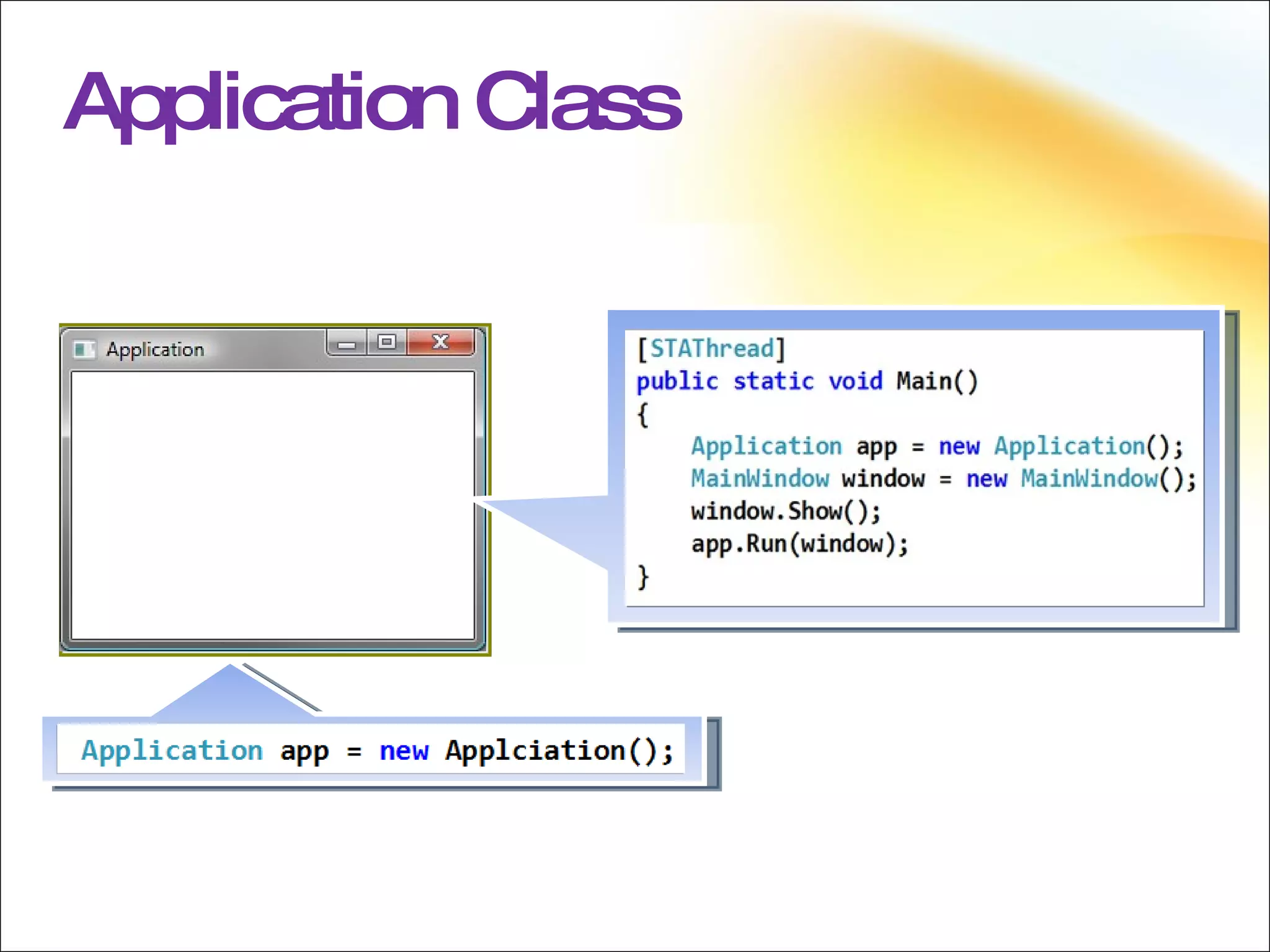
Application Class Core of the WPF Application model Serves as a container for WPF applications Enables data to be shared Provides Application Events Provides Windows Message Dispatching Supports Navigation Between Pages
Application Class WM_PAINT WM_MOUSEMOVE
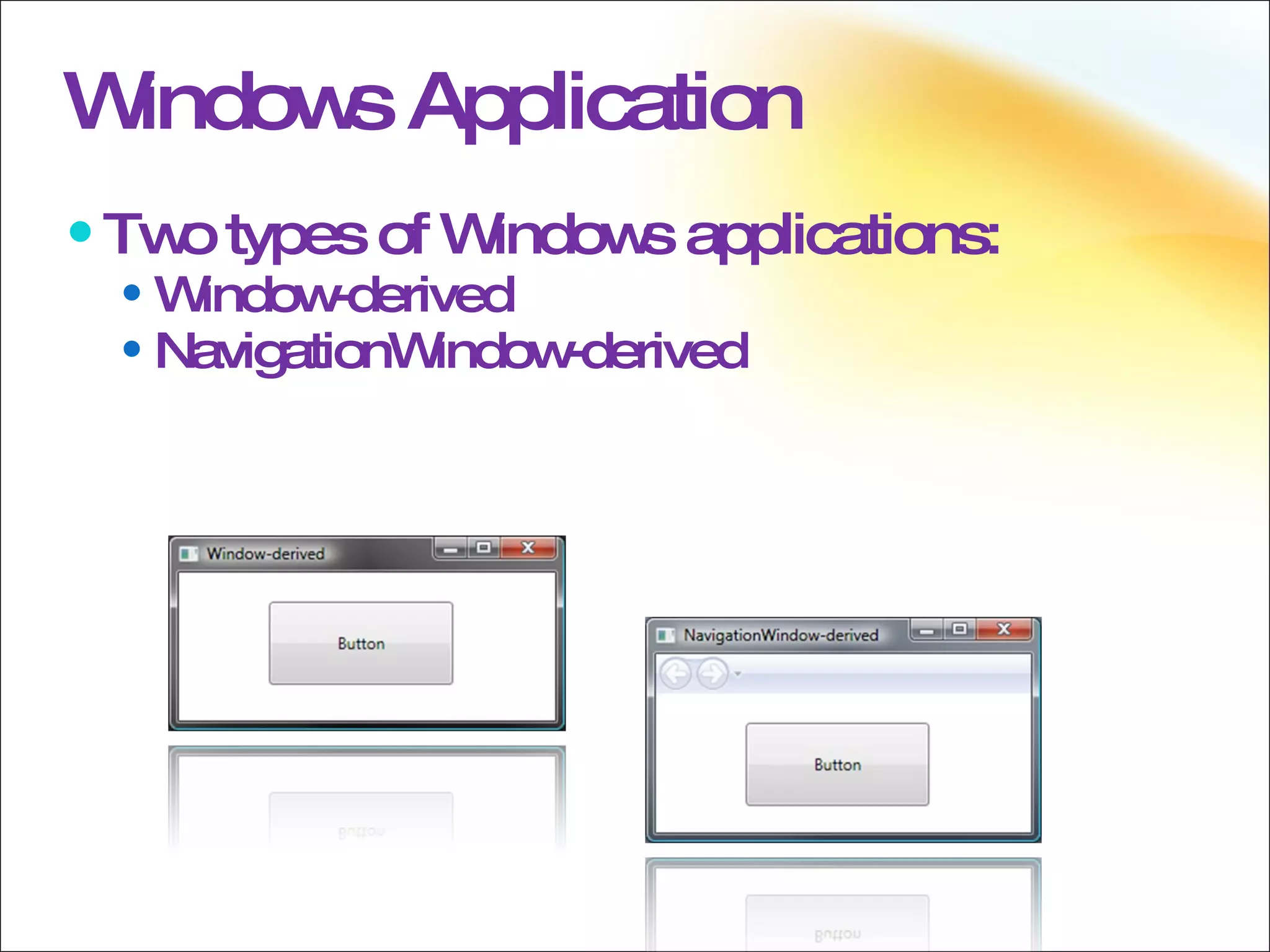
Windows Application Two types of Windows applications: Window-derived NavigationWindow-derived
WPF applications can be hosted within an internet browser Internet Explorer 6.0 & 7.0(.NET 3.0/3.5) Mozilla Firefox (.NET 3.5 only) XAML Browser Application Unified programming model Windowed apps and XBAPs are built using the same programming model Graphics, Media, and Documents are all supported within this single model
XAML Browser Application Partial Trust Available:  Browser window, isolated storage, commands, 2-D and 3-D graphics, animation, media, audio, video, and more Not available: Application-defined windows and dialog boxes, file system access, registry access, WinForms interop, and more Deployment ClickOnce, XCopy or MSI Installed or live running
 
Trees Element Trees Logical Tree Visual Tree
Element Tree Hierarchy The composition of elements creates a couple of hierarchical trees Logical Tree Visual Tree There is an additional tree in WPF called the automation tree, but we won’t cover that in this session
Logical Tree The logical tree is composed of the elements that are explicitly listed in the XAML The leaves of the logical tree may also be non-visual objects (CLR objects) The content of a ContentControl The items of an ItemsControl
Visual Tree The visual tree is composed of the visuals used to represent the logical tree This includes all inflated control and data templates for elements in the logical tree
Visual & Logical Tree
Tree Traversal Logical Tree Traversal The LogicalTreeHelper class provides several methods for traversing the logical tree LogicalTreeHelper is not needed very often in practice because most controls have properties exposing their logical children
Tree Traversal, cont. Visual Tree Traversal The VisualTreeHelper class provides methods needed for traversing the visual tree Although the Windows SDK  indicates you won’t need to use VisualTreeHelper very often, in practice you will probably use it regularly
Resolving via trees Resource resolution favors logical tree Property Inheritance favors logical tree Events route through the visual tree
 
Property System Dependency Properties Dependency Property Value Precedence Creating Dependency Properties Attached Properties Dependency Property Metadata Inherited Dependency Properties
Dependency Properties The heart of the WPF property system Enable most of the WPF features Data Binding Styling Attached Properties Animation Property Invalidation Property Inheritance Default Values Sparse Storage
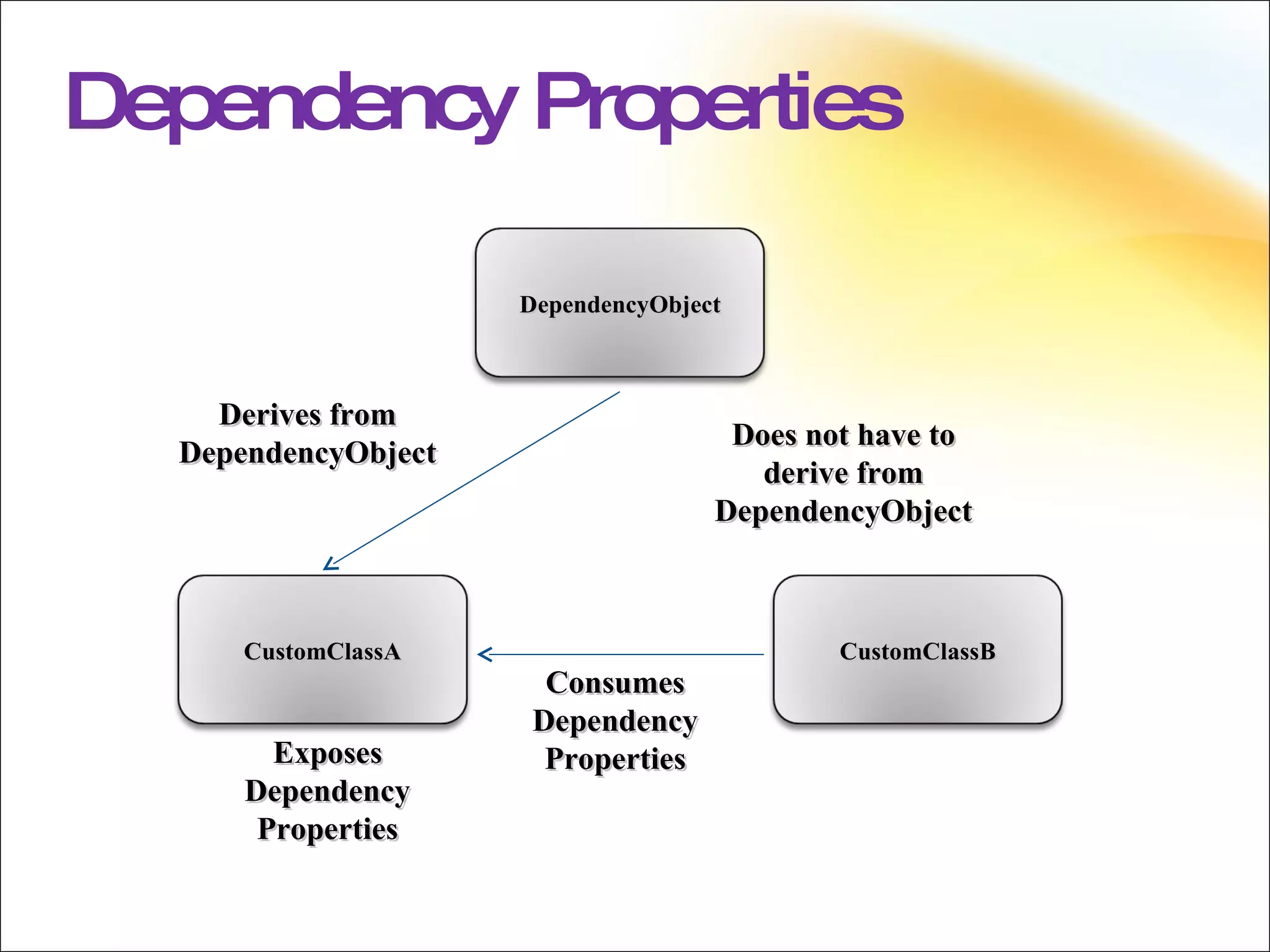
Dependency Properties Exposes Dependency Properties Consumes Dependency Properties Does not have to derive from DependencyObject Derives from DependencyObject DependencyObject CustomClassA CustomClassB
Dependency Property Value Precedence Validation Property coercion Animations Local value Style triggers Template triggers Style setters Theme style triggers Theme style setters Property value inheritance Default value
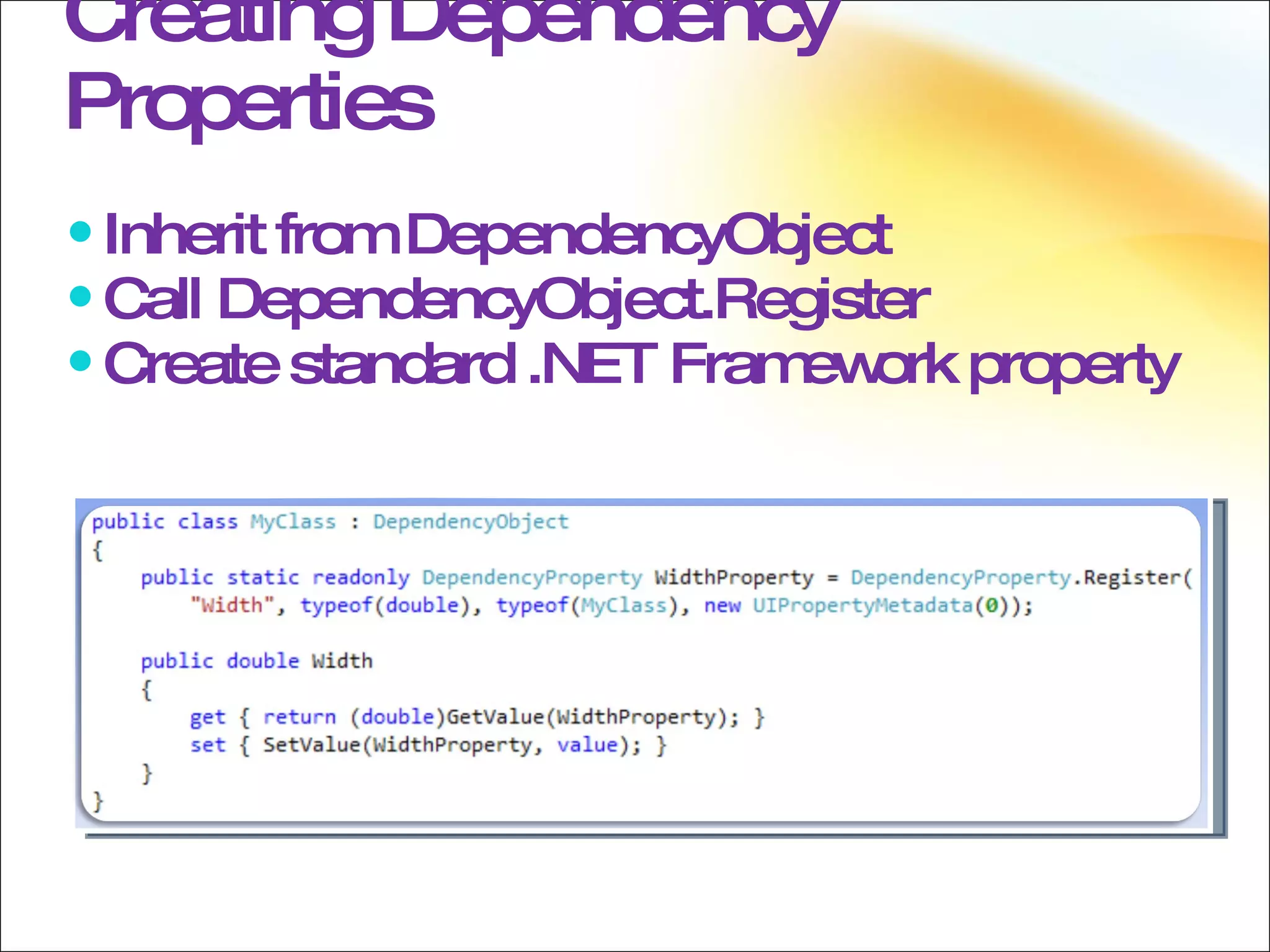
Creating Dependency Properties Inherit from DependencyObject Call DependencyObject.Register Create standard .NET Framework property
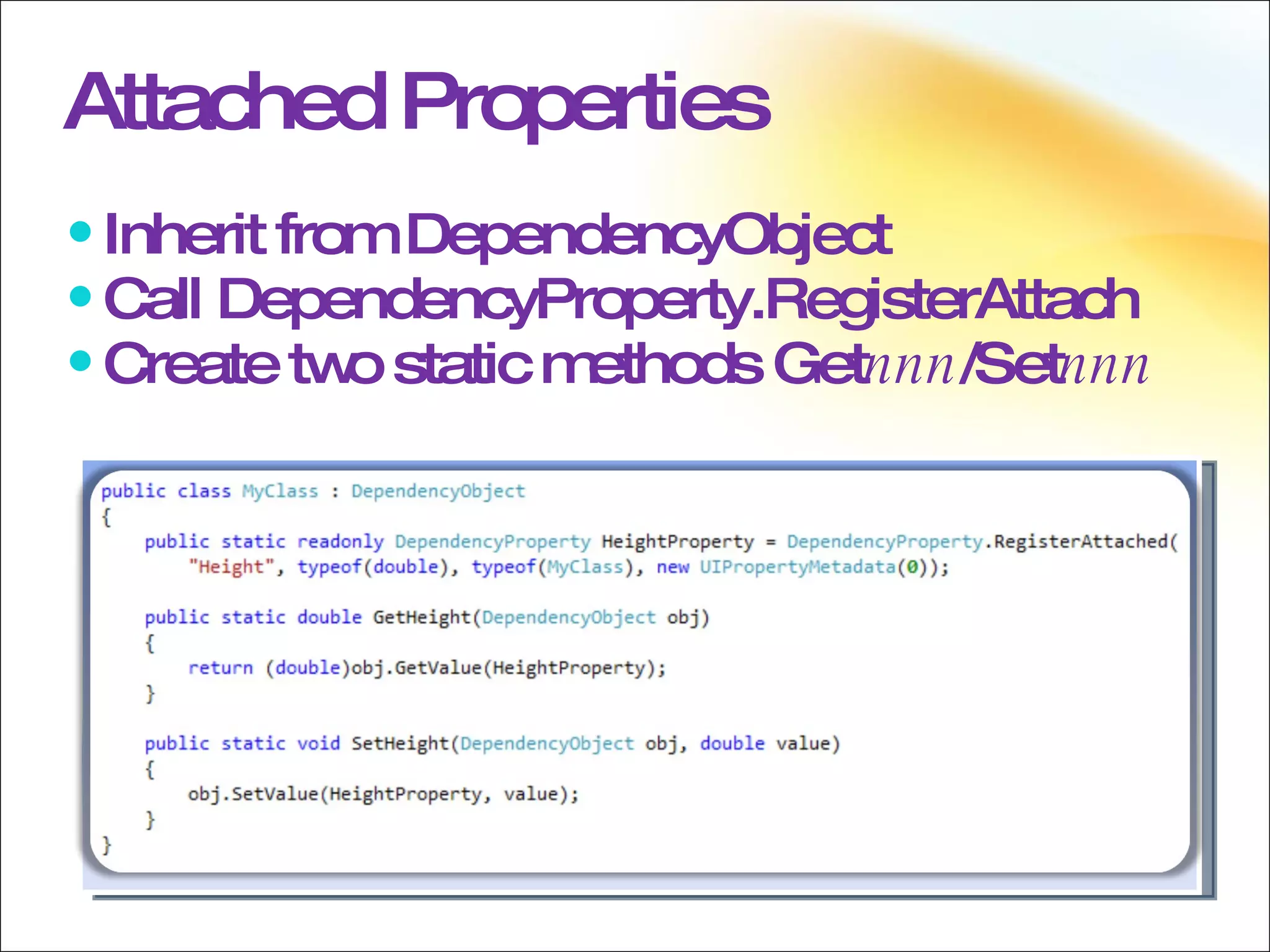
Attached Properties Inherit from DependencyObject Call DependencyProperty.RegisterAttach Create two static methods Get nnn /Set nnn
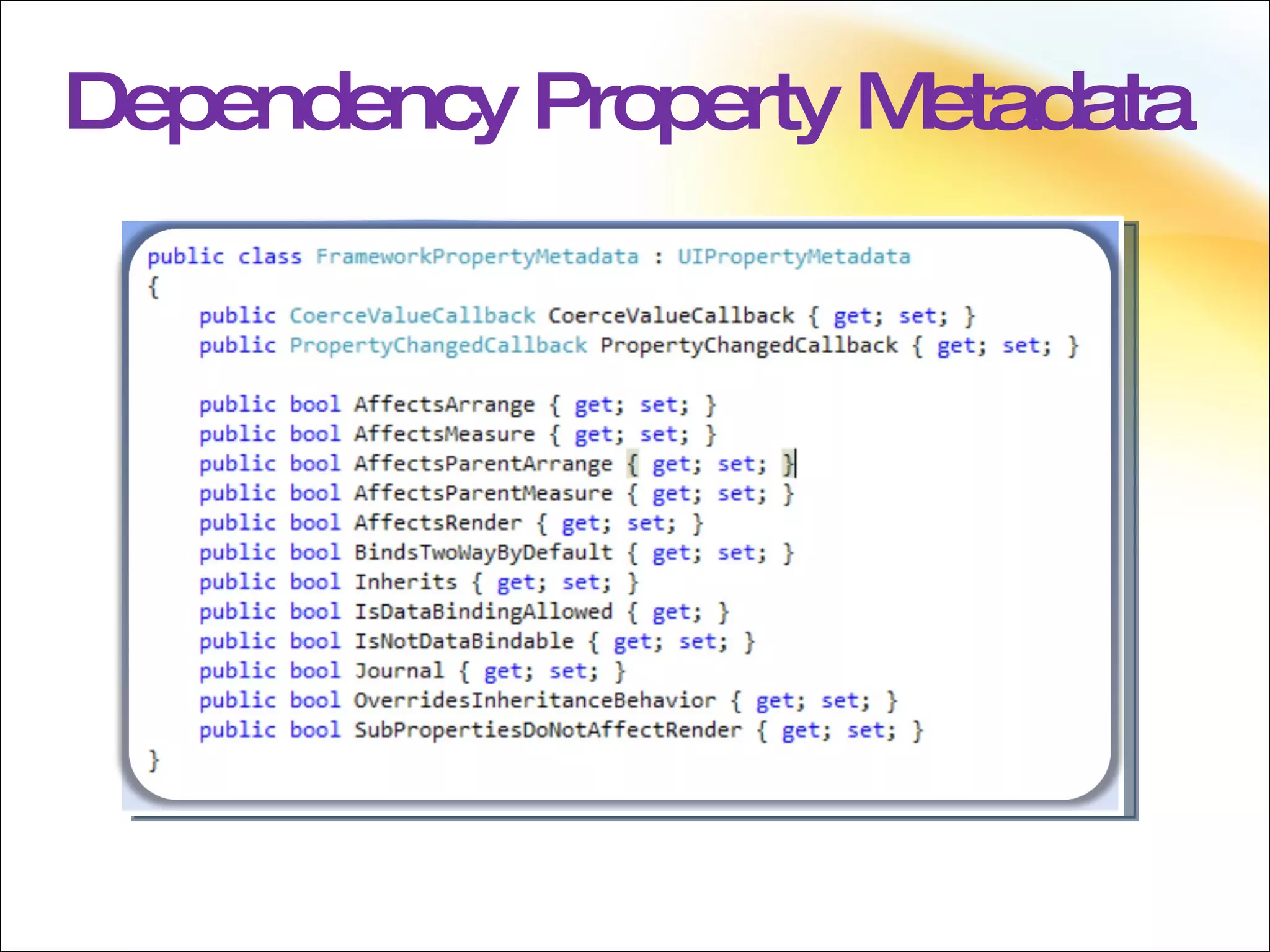
Dependency Property Metadata
Dependency Properties The FrameworkPropertyMetadata class enables the setting of metadata for a property; an instance of this class should be passed when registering the property, be it attached or just a simple dependency property.
Inherited Dependency Properties Inherited by using the logical tree Disabled by default (performance reasons)  Must be an AttachedDependencyProperty Favors the logical tree If an element does not have a logical parent, its properties will be inherited
 
Events Direct Events Tunneling  Events Bubbling Events Routed Events Raising and Handling Events RoutedEventArgs
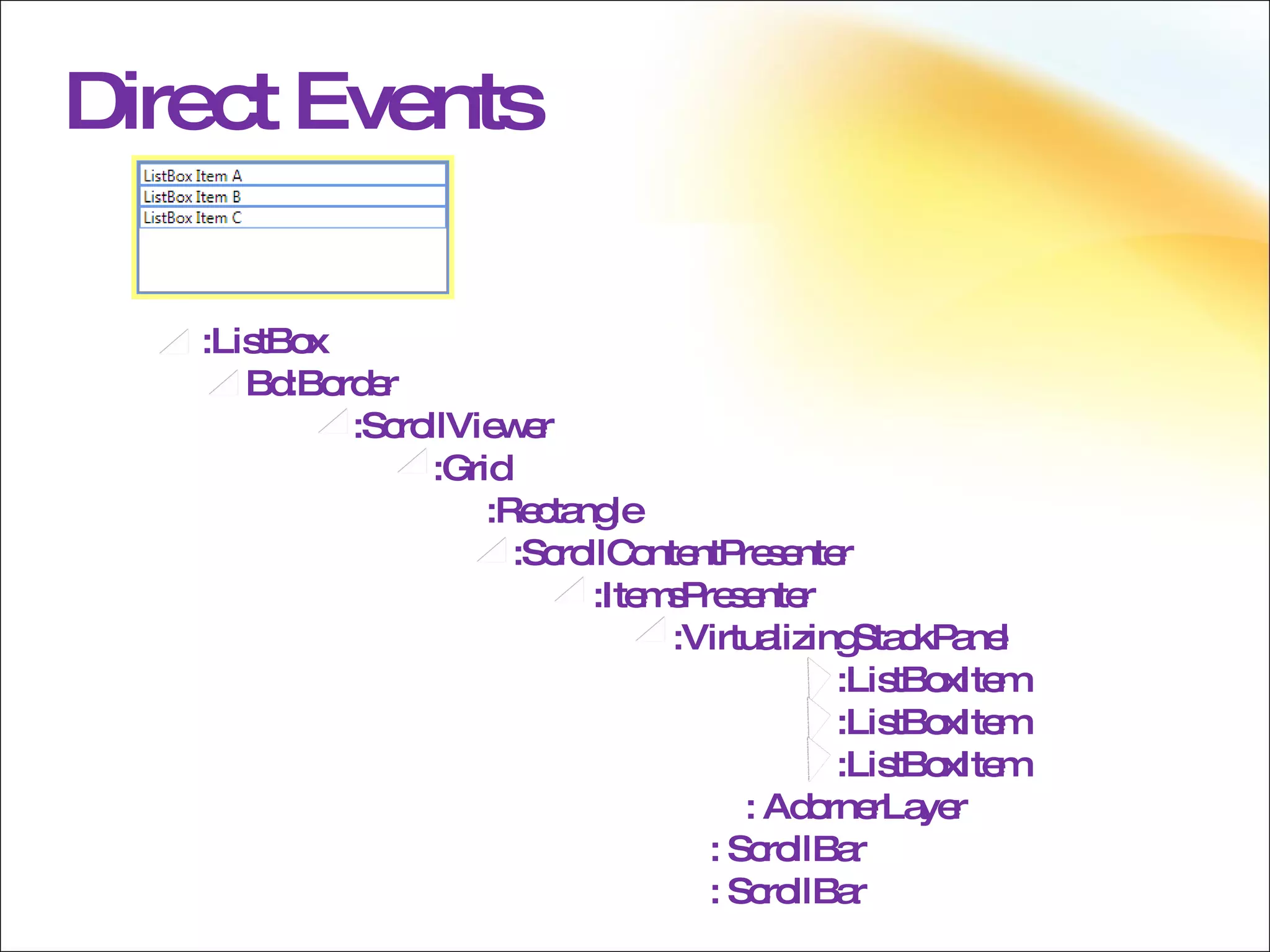
Direct Events Direct events only go to the originating element Direct events behave like standard CLR events The difference is that you can trigger on direct events
Direct Events :ListBox Bd:Border :ScrollViewer :Grid :Rectangle :ScrollContentPresenter :ItemsPresenter :VirtualizingStackPanel :ListBoxItem :ListBoxItem :ListBoxItem   : AdornerLayer : ScrollBar : ScrollBar
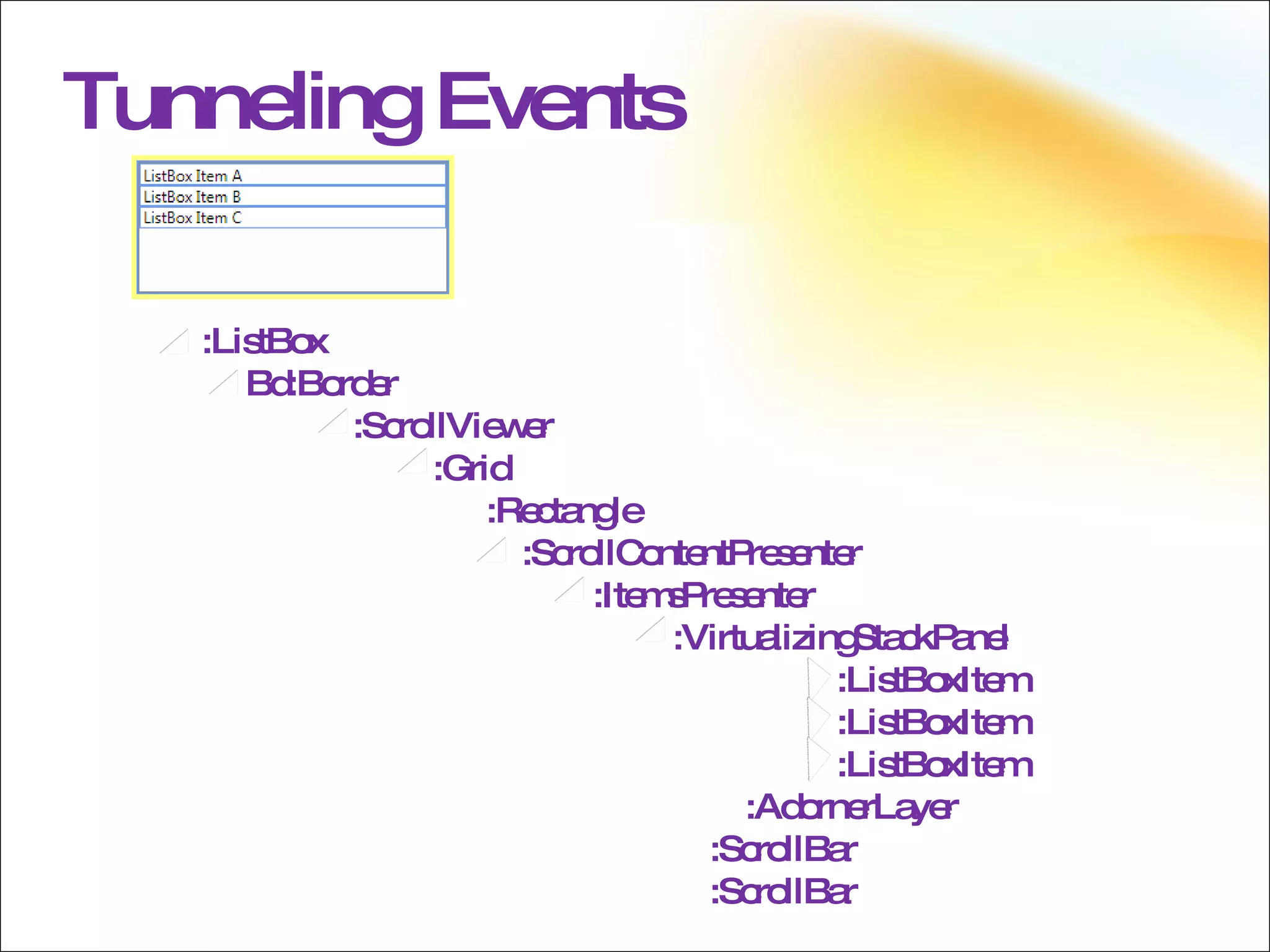
Tunneling  Events Tunneled events begin with the highest visual parent  Moves  down  through the visual tree Tunneling events are, by convention, prefixed with the word “Preview”
Tunneling  Events :ListBox Bd:Border :ScrollViewer :Grid :Rectangle :ScrollContentPresenter :ItemsPresenter :VirtualizingStackPanel :ListBoxItem :ListBoxItem :ListBoxItem   :AdornerLayer :ScrollBar :ScrollBar
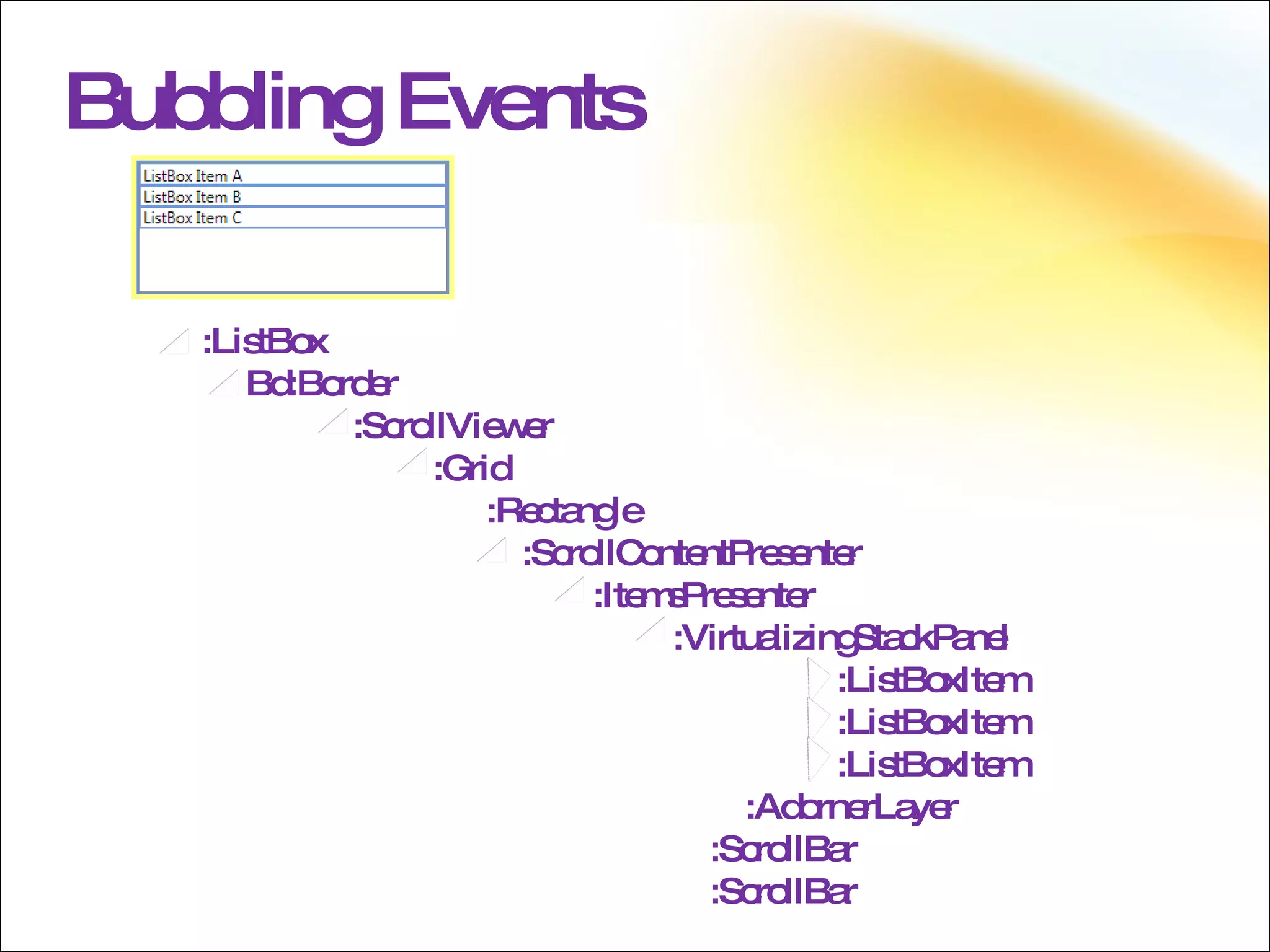
Bubbling Events Bubbled events begin with the source visual element  Moves  up  through the visual tree
Bubbling  Events :ListBox Bd:Border :ScrollViewer :Grid :Rectangle :ScrollContentPresenter :ItemsPresenter :VirtualizingStackPanel :ListBoxItem :ListBoxItem :ListBoxItem   :AdornerLayer :ScrollBar :ScrollBar
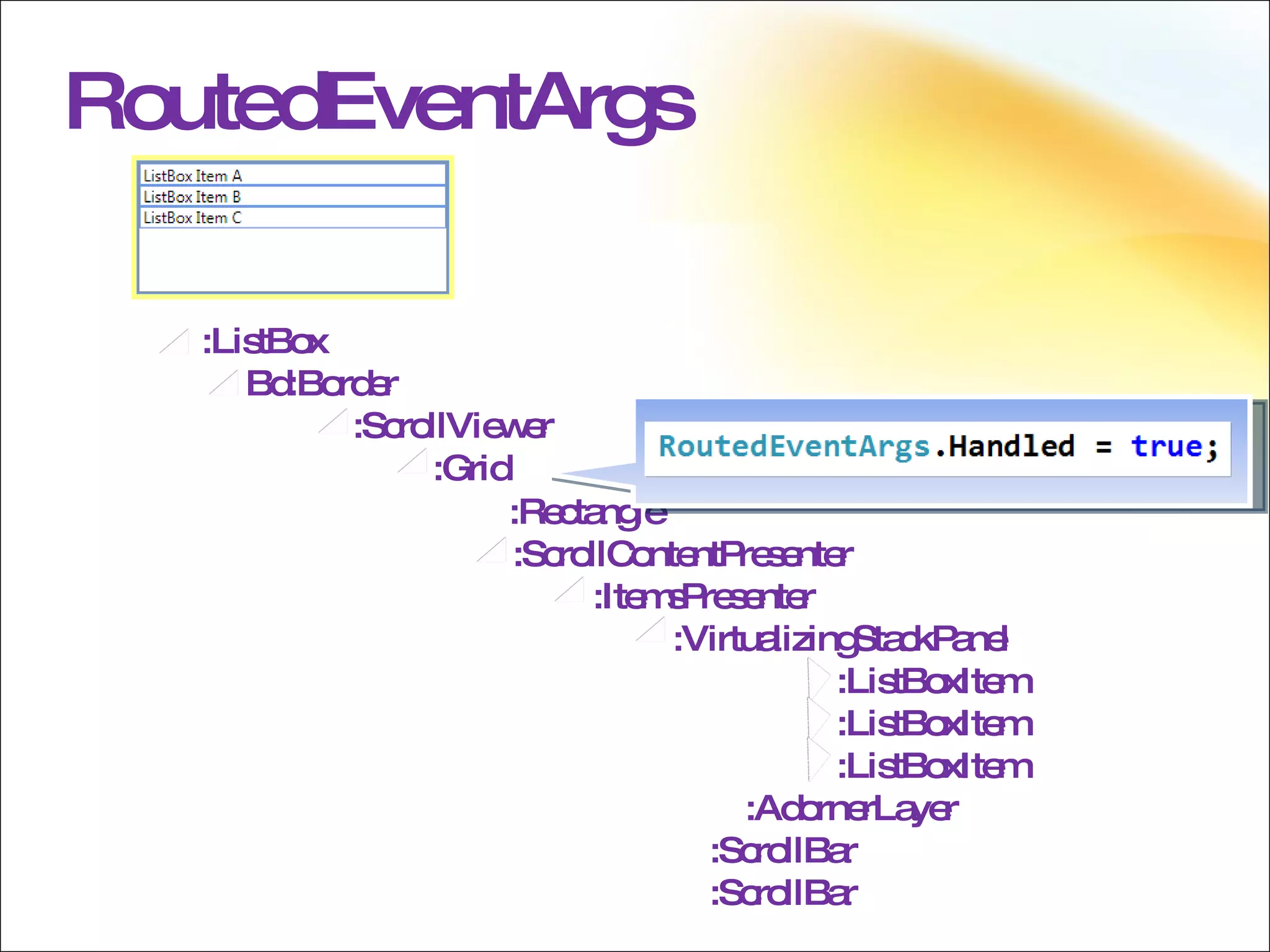
RoutedEventArgs Marking the event as “handled” will generally stop the routing of the event Set the Handled property on RoutedEventArgs to true If the event is a preview event, this will also prevent raising the corresponding bubbling event Handlers can be registered to receive handled events also
RoutedEventArgs :ListBox Bd:Border :ScrollViewer :Grid   :Rectangle :ScrollContentPresenter :ItemsPresenter :VirtualizingStackPanel :ListBoxItem :ListBoxItem :ListBoxItem   :AdornerLayer :ScrollBar :ScrollBar
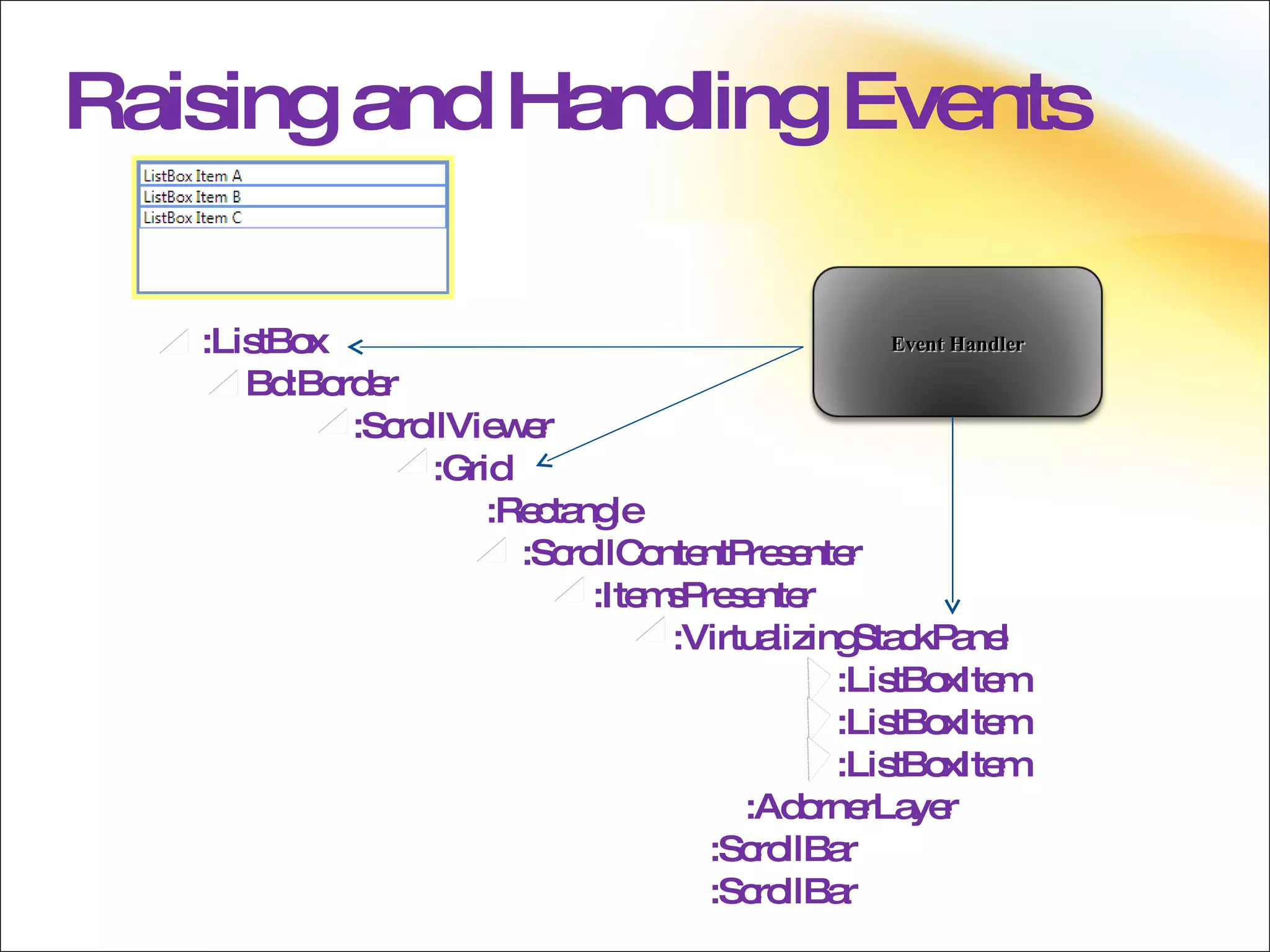
Raising and Handling Events A routed event may be raised on any element within the visual tree A handler for the event may be attached to any element higher in the visual tree Attached Events Neither the element on which it is raised nor the element on which it is handled "own" that event
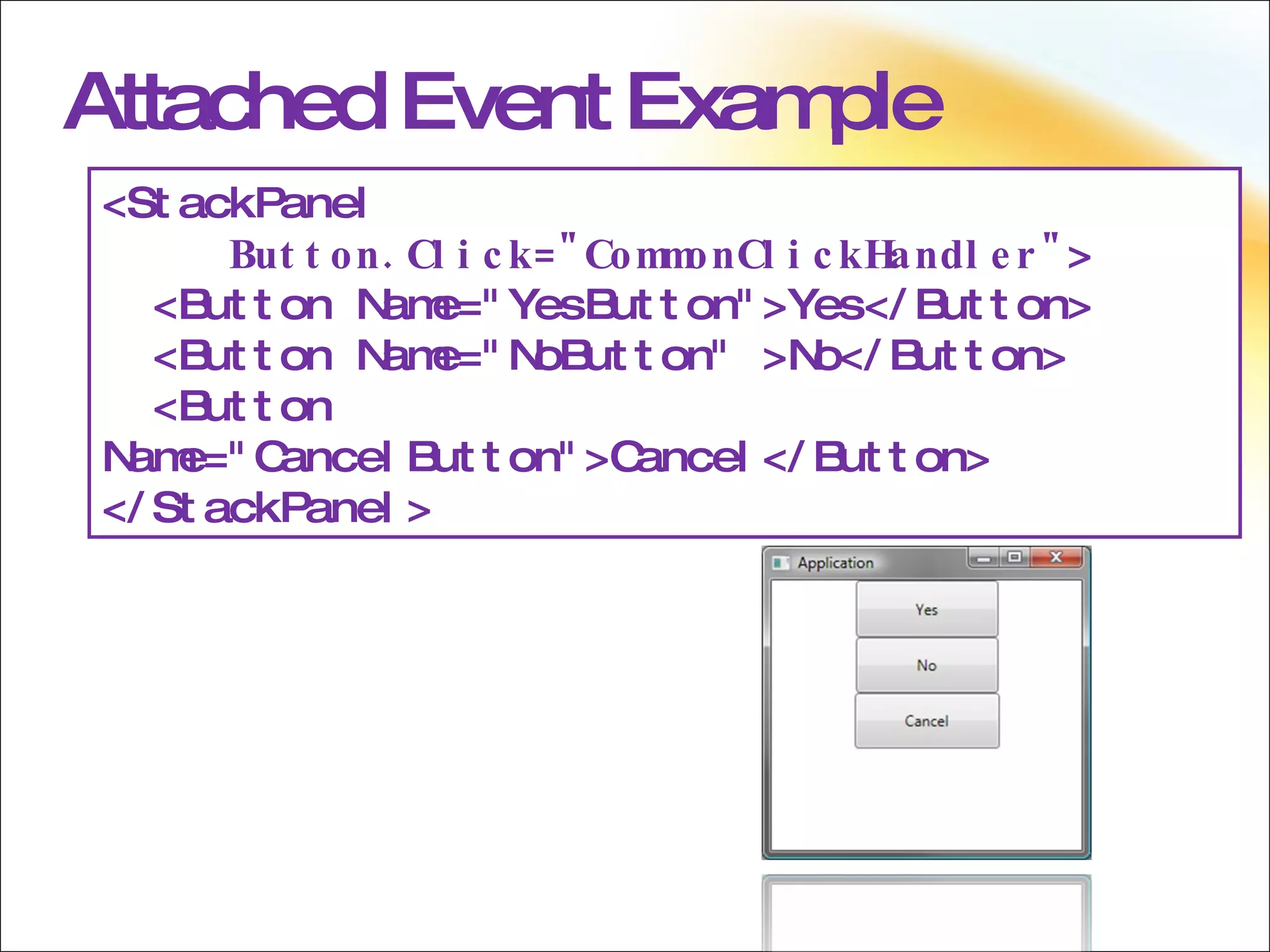
XAML The XAML language also defines a special type of event called an attached event. An attached event enables you to add a handler for a particular event to an arbitrary element. The element handling the event need not define or inherit the attached event, and neither the object potentially raising the event nor the destination handling instance must define or otherwise "own" that event as a class member.  The WPF input system uses attached events extensively. However, nearly all of these attached events are forwarded through base elements. The input events then appear as equivalent non-attached routed events that are members of the base element class. For instance, the underlying attached event Mouse..::.MouseDown can more easily be handled on any given UIElement by using MouseDown on that UIElement rather than dealing with attached event syntax either in XAML or code.
Raising and Handling Events :ListBox Bd:Border :ScrollViewer :Grid :Rectangle :ScrollContentPresenter :ItemsPresenter :VirtualizingStackPanel :ListBoxItem :ListBoxItem :ListBoxItem   :AdornerLayer :ScrollBar :ScrollBar Event Handler
Attached Event Example <StackPanel  Button.Click=&quot;CommonClickHandler&quot; > <Button Name=&quot;YesButton&quot;>Yes</Button> <Button Name=&quot;NoButton&quot; >No</Button> <Button Name=&quot;CancelButton&quot;>Cancel</Button> </StackPanel>
 
Commands Commands Overview RoutedCommand Framework Commands Control Support for Commands Custom Commands
Commands Overview Routed Commands Encapsulate an action as an object Separate the action from the  handling of the action Improved Designer/Developer workflow When controls support commands it enables designers to very easily wire the invoking of those actions to whatever UI element they deem necessary
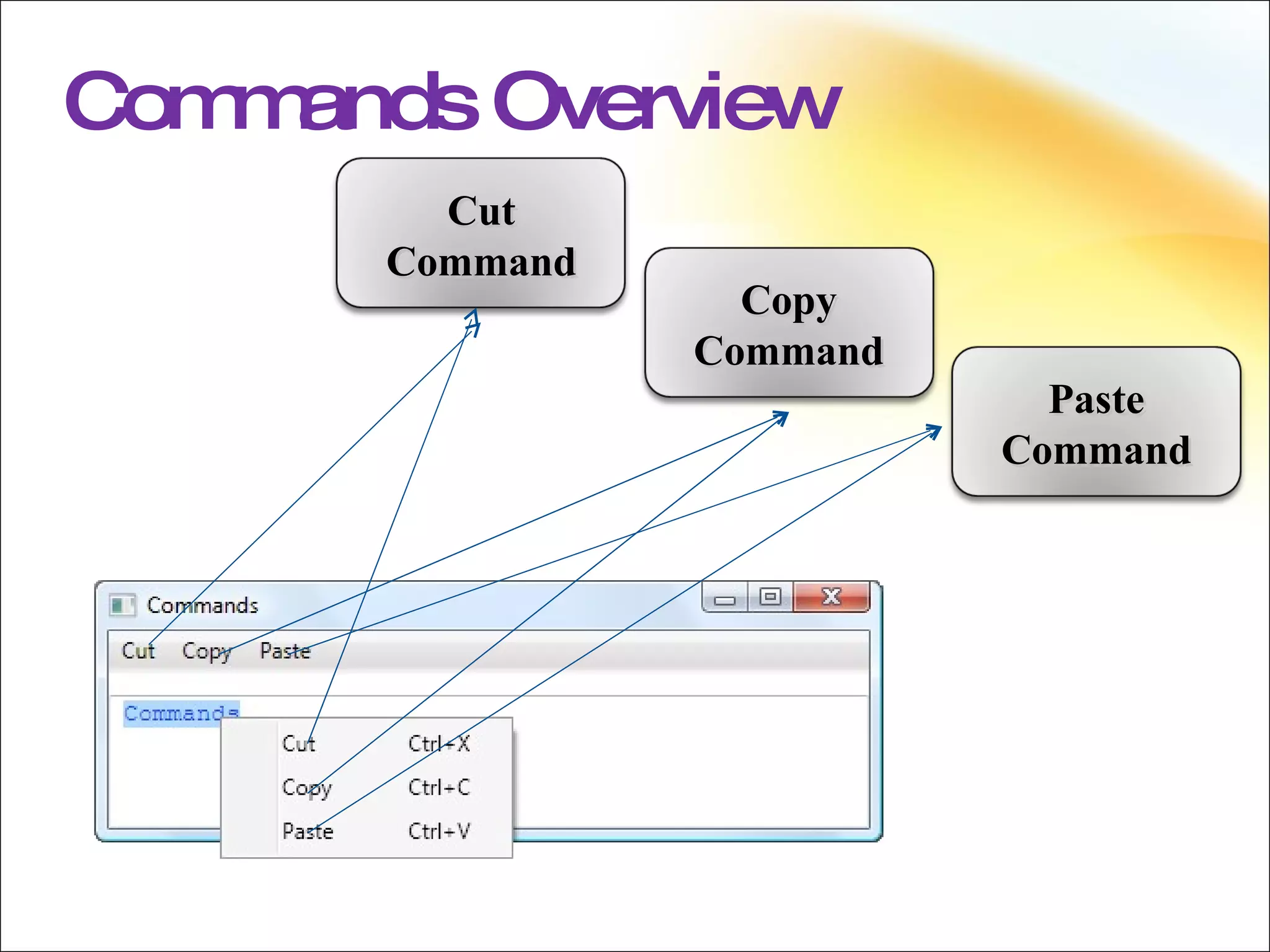
Commands Commands in WPF are a more abstract and loosely-coupled version of routed events. The core concept of commanding in WPF is that the action is separate from both the source and the implementation of the command. An example would be the Cut, Copy, and Paste commands; these commands can be executed from many sources, such as a button, a menu item or a keyboard shortcut, but the implementation for each of the commands could be a single event handler. By abstracting the action, or command, from the object that acts as the source and the implementation improves the designer and developer workflow, as the designer can simply say that they want a specific action to occur and leave it to the developer to actually implement command behaviour. Alternatively a developer can define a behaviour and have the designer easily wire that up in the UI with commands.
Commands Overview Cut Command Copy Command Paste Command
Commands Commands in WPF are a more abstract and loosely-coupled version of routed events. The core concept of commanding in WPF is that the action is separate from both the source and the implementation of the command. An example would be the Cut, Copy, and Paste commands; these commands can be executed from many sources, such as a button, a menu item or a keyboard shortcut, but the implementation for each of the commands could be a single event handler. By abstracting the action, or command, from the object that acts as the source and the implementation improves the designer and developer workflow, as the designer can simply say that they want a specific action to occur and leave it to the developer to actually implement command behaviour. Alternatively a developer can define a behaviour and have the designer easily wire that up in the UI with commands.
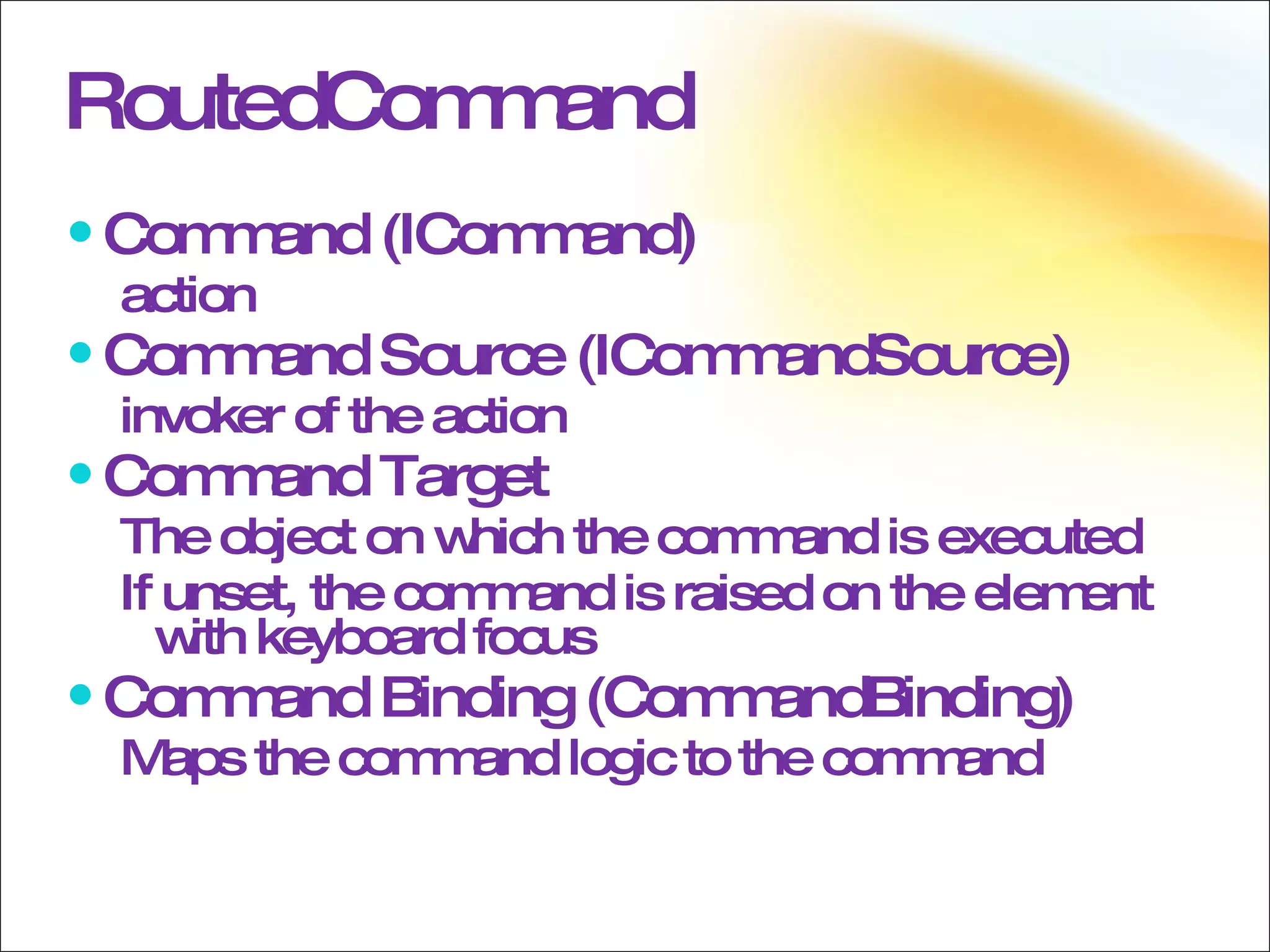
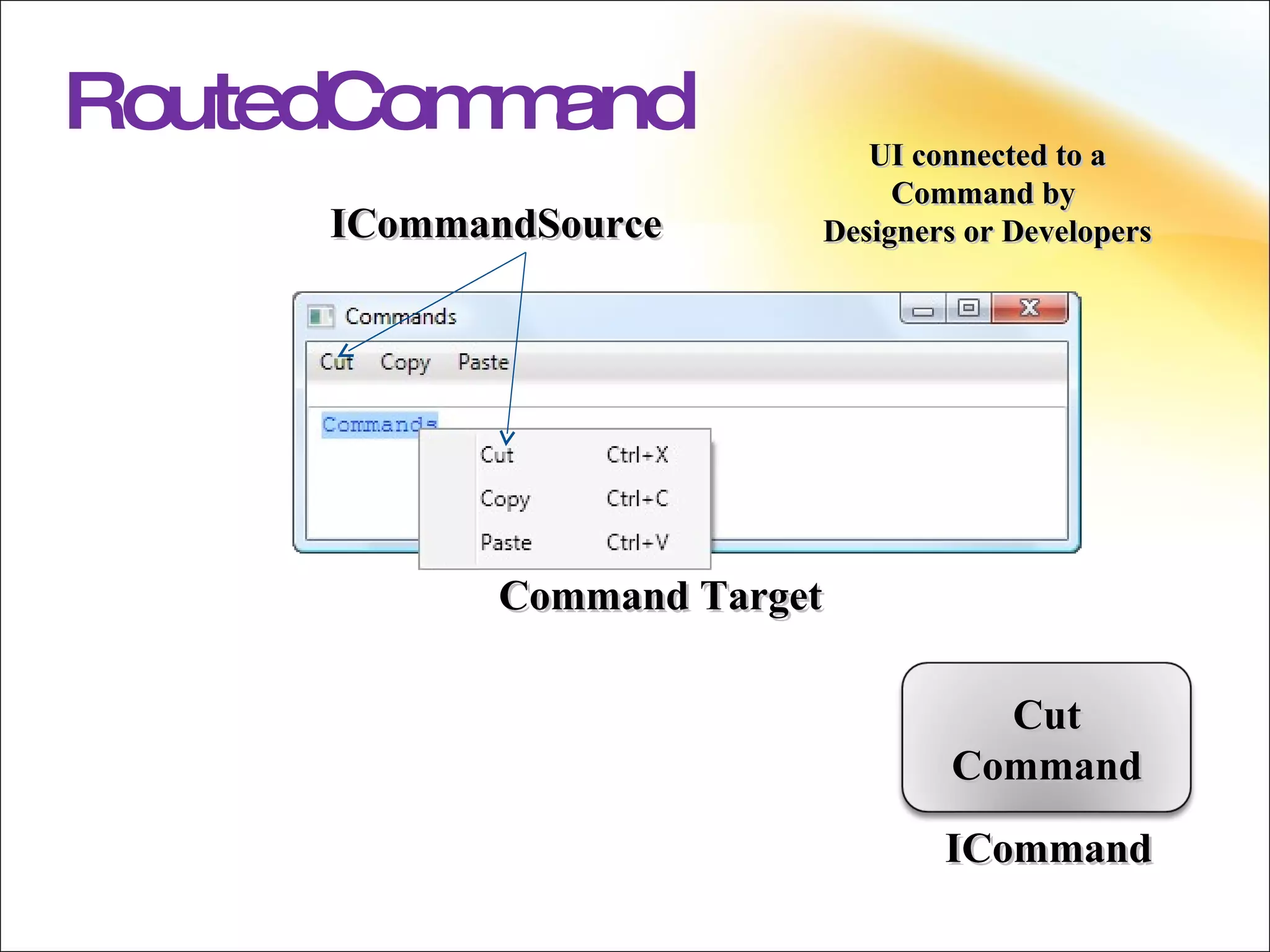
RoutedCommand Command (ICommand) action Command Source (ICommandSource) invoker of the action Command Target The object on which the command is executed If unset, the command is raised on the element with keyboard focus Command Binding (CommandBinding) Maps the command logic to the command
RoutedCommand ICommand ICommandSource Command Target UI connected to a Command by  Designers or Developers Cut Command
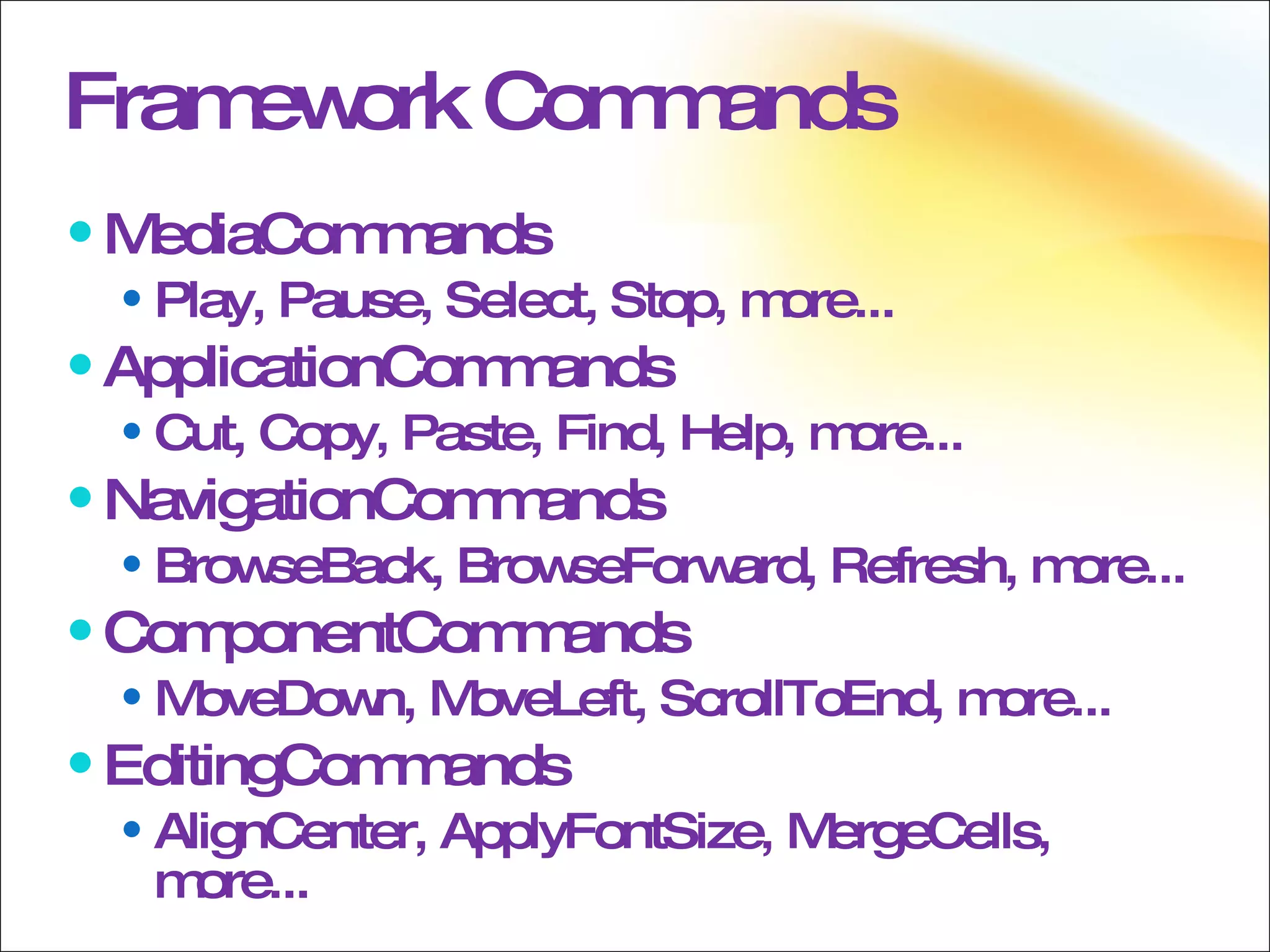
Framework Commands MediaCommands Play, Pause, Select, Stop, more... ApplicationCommands Cut, Copy, Paste, Find, Help, more... NavigationCommands  BrowseBack, BrowseForward, Refresh, more... ComponentCommands MoveDown, MoveLeft, ScrollToEnd, more... EditingCommands AlignCenter, ApplyFontSize, MergeCells, more...
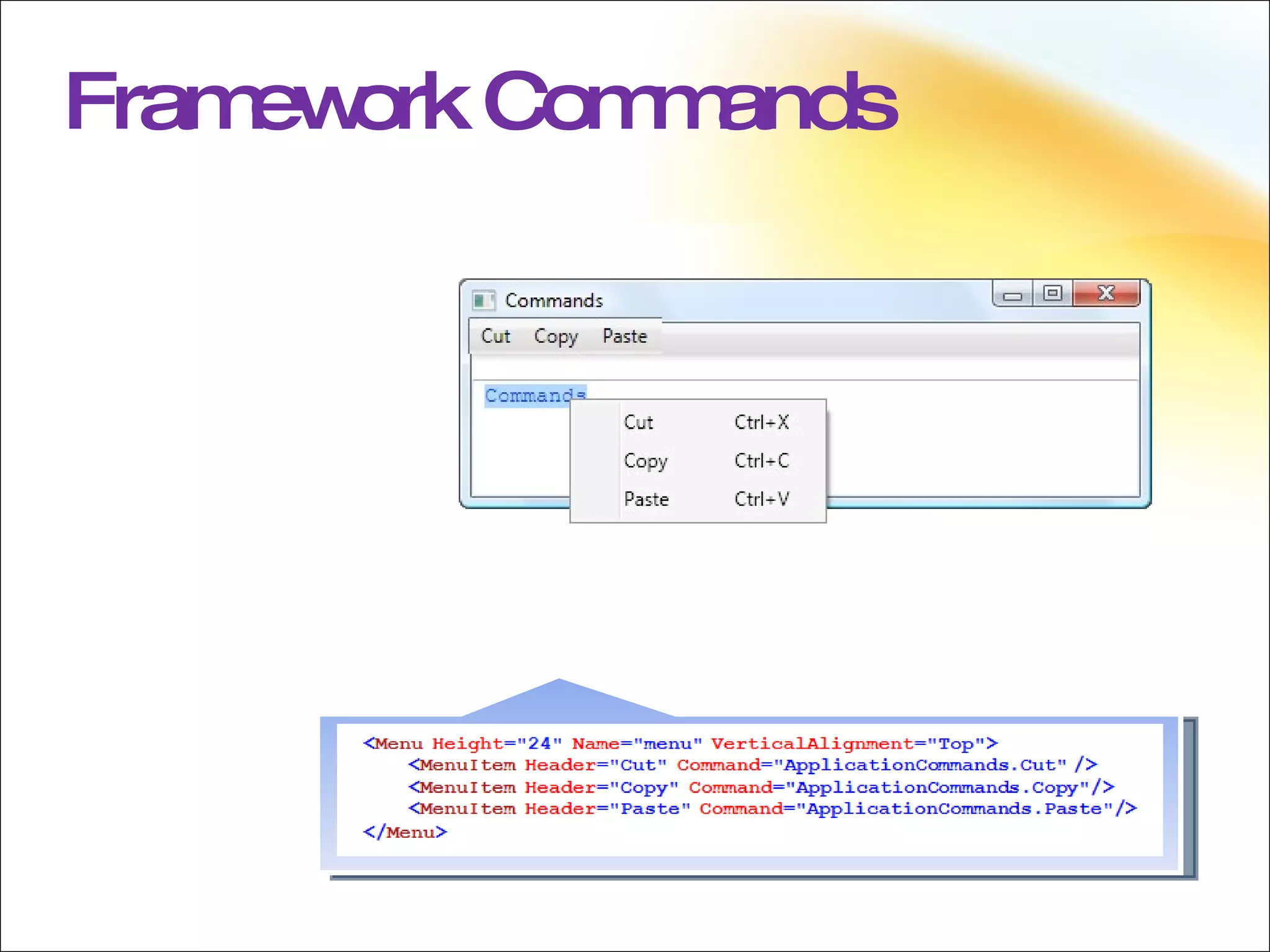
Framework Commands
Framework Commands WPF defines a large number of commands built into five classes. This saves the developer effort as they do not have to write commands for Cut, Copy, and Paste for example. Each command is exposed as a static property on the five command classes.
Control Support for Commands Several WPF classes support easy execution of routed commands: MenuItem Button (by way of ButtonBase) Some WPF classes implement commands out of the box: TextBox RichTextBox By using the Command property on MenuItem or any ButtonBase-derived class commands are automatically executed on the logical click of the element.  Some WPF controls ship with an implementation for some commands, for example the TextBox and RichTextBox controls both have implementations for the Cut, Copy, and Paste commands, by way of the ButtonBase class.
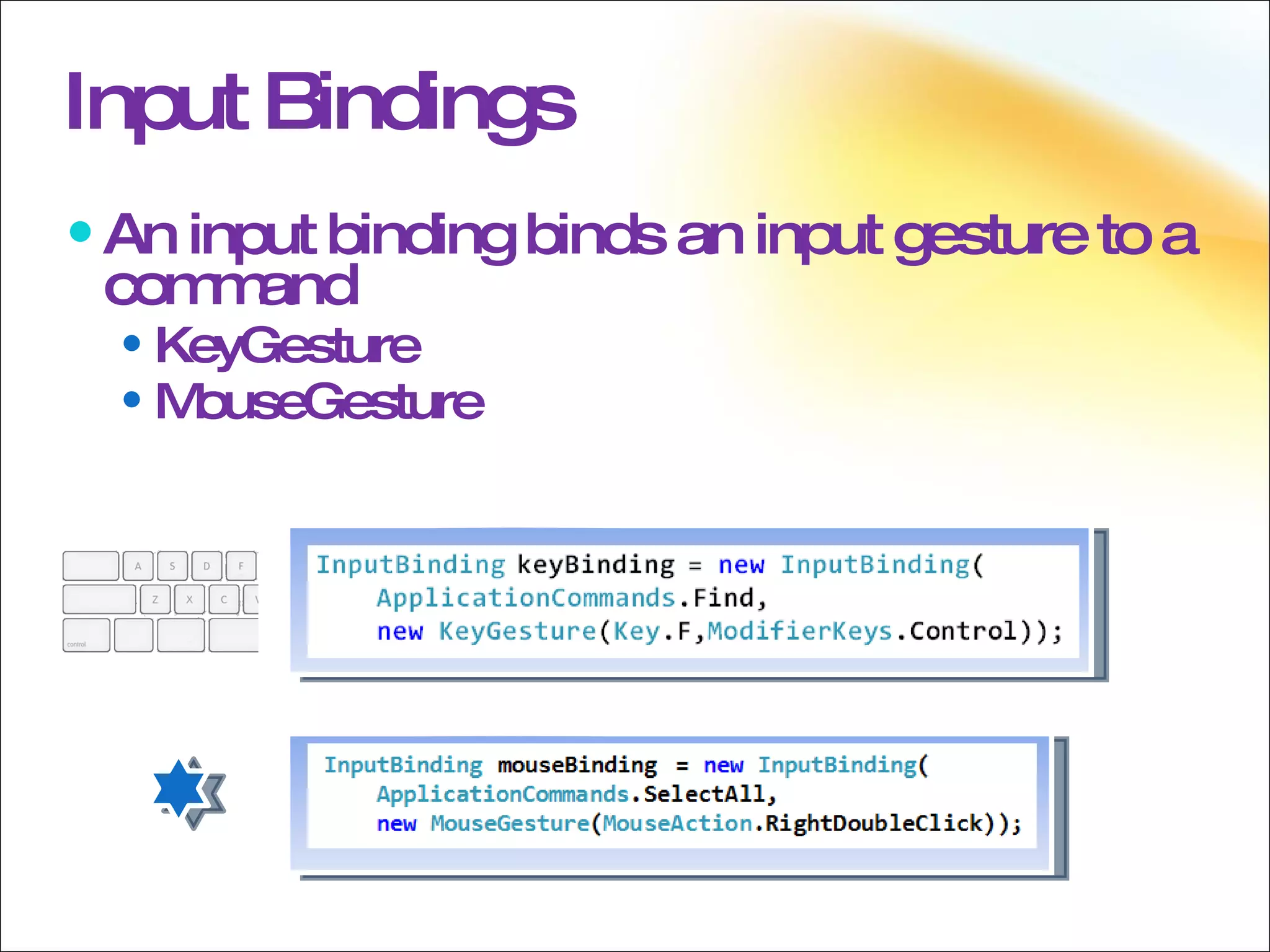
Input Bindings An input binding binds an input gesture to a command KeyGesture MouseGesture
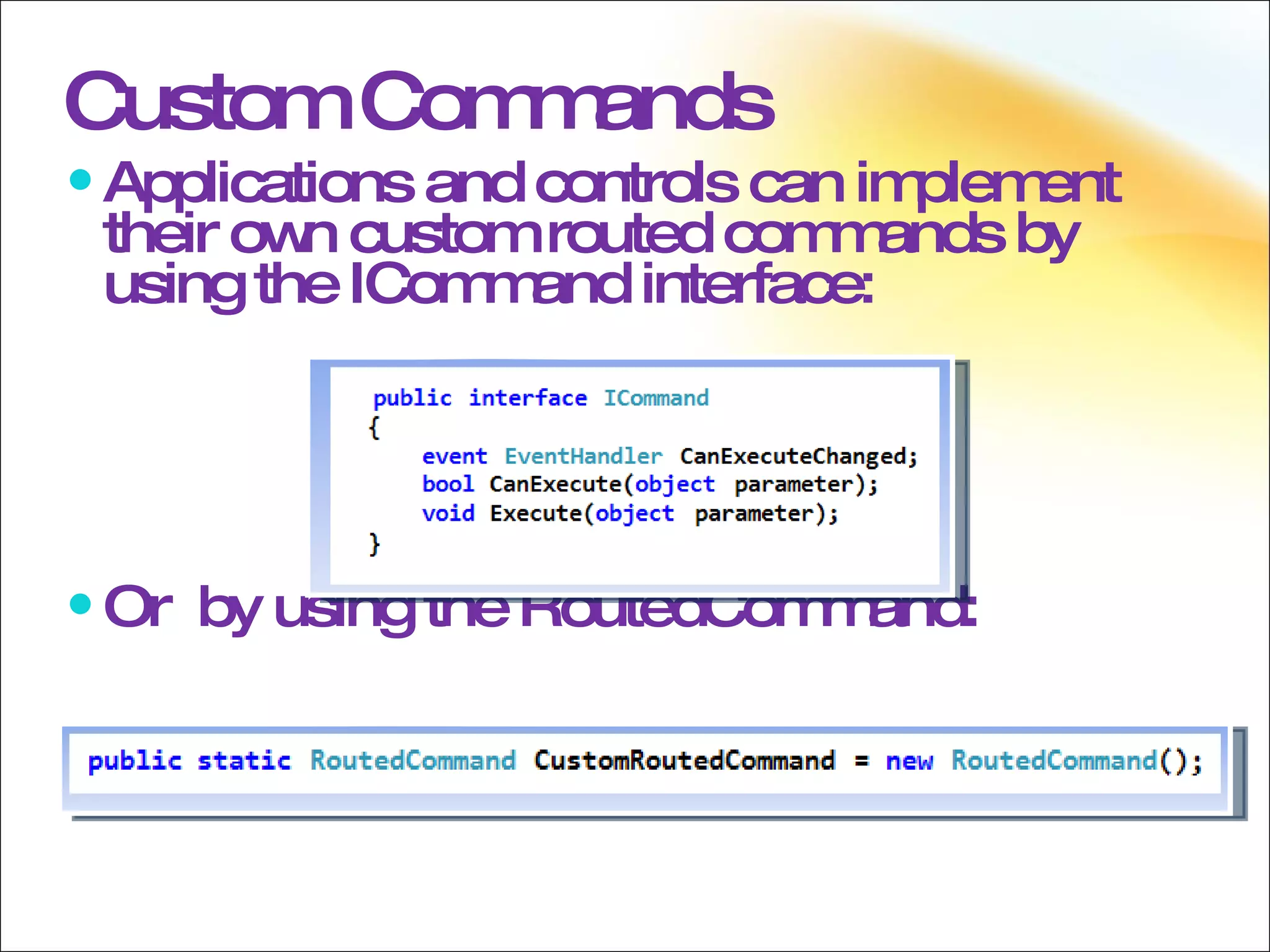
Applications and controls can implement their own custom routed commands by using the ICommand interface: Or  by using the RoutedCommand: Custom Commands
Commanding Commanding in WPF does not assume the use of a RoutedCommand or RoutedUICommand base class. Therefore, creating custom commands simply requires the implementation of the ICommand interface. Or they can simply expose a property of type RoutedCommand or RoutedUICommand.
 
Threading Threading In WPF Dispatcher DispatcherObject Invoke and BeginInvoke Multiple UI Threads Freezables
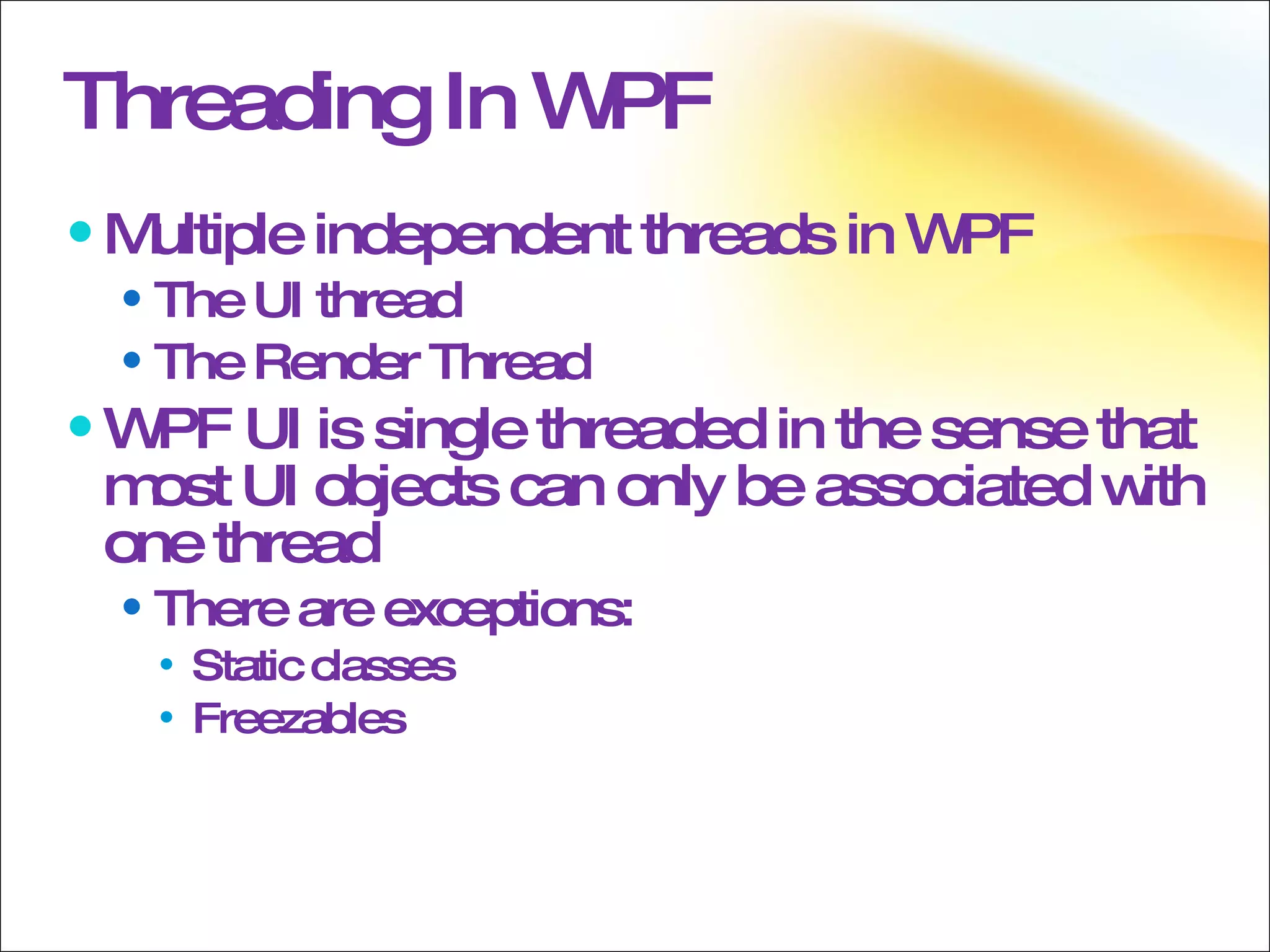
Threading In WPF Multiple independent threads in WPF  The UI thread  The Render Thread  WPF UI is single threaded in the sense that most UI objects can only be associated with one thread There are exceptions:  Static classes Freezables
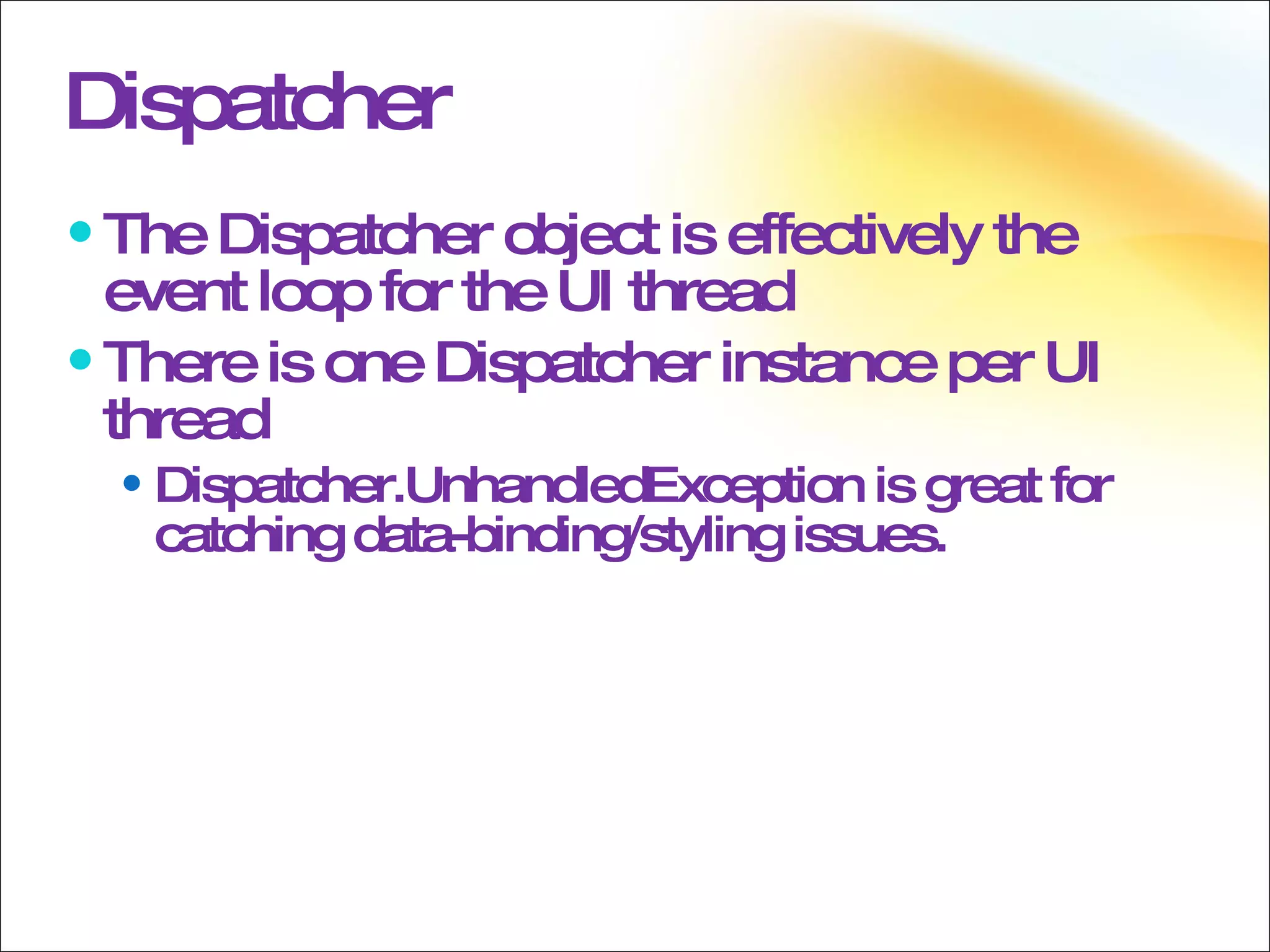
Dispatcher The Dispatcher object is effectively the event loop for the UI thread There is one Dispatcher instance per UI thread Dispatcher.UnhandledException is great for catching data-binding/styling issues.
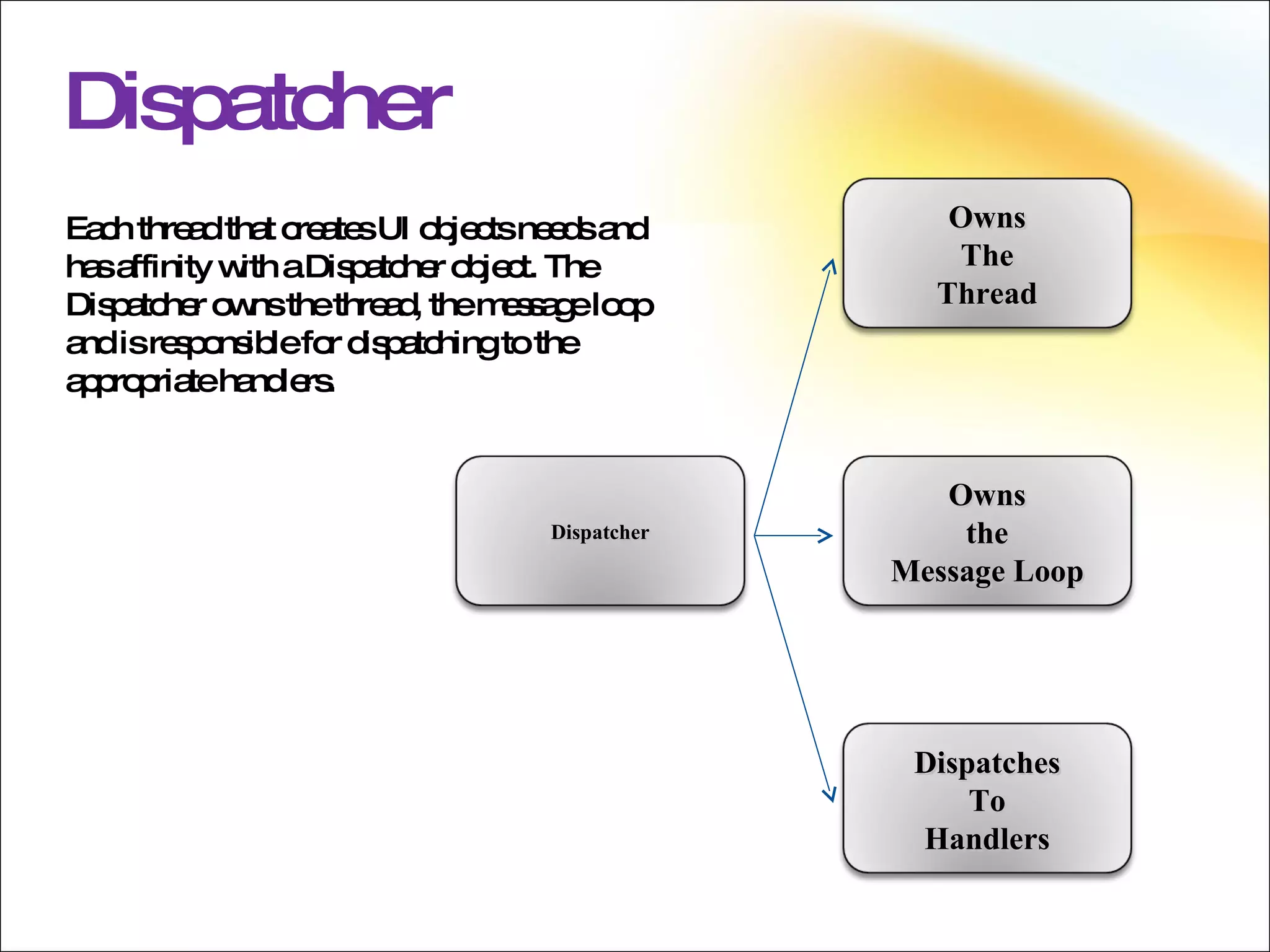
Dispatcher Each thread that creates UI objects needs and has affinity with a Dispatcher object. The Dispatcher owns the thread, the message loop and is responsible for dispatching to the appropriate handlers. Dispatcher Owns The Thread Owns the Message Loop Dispatches To Handlers
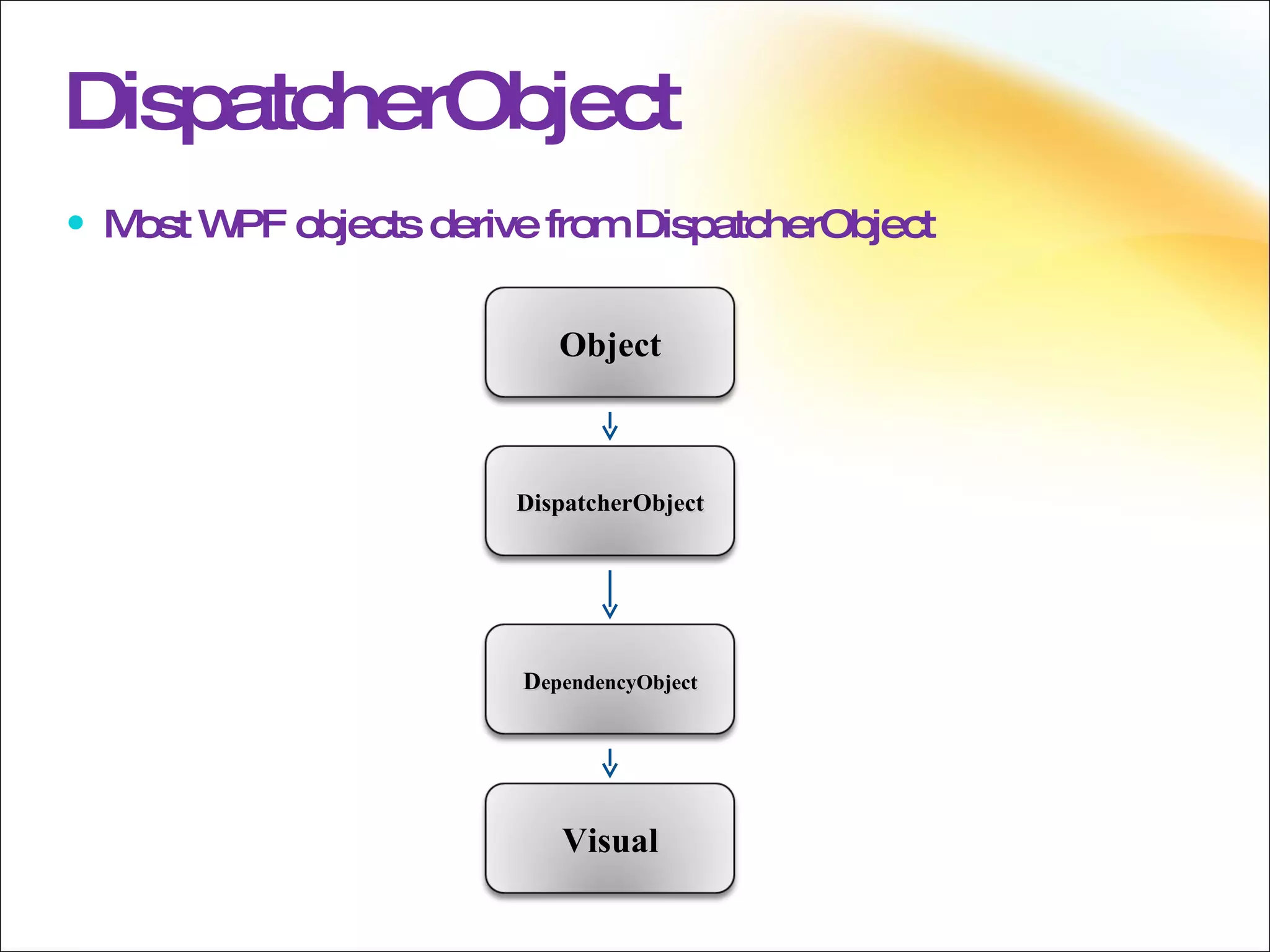
DispatcherObject Most WPF objects derive from DispatcherObject DispatcherObject Object Visual D ependencyObject
DispatcherObject DispatcherObject associates an object with a Dispatcher and gives you methods to ensure that calling threads have access to the object. CheckAccess  method: Returns a bool that indicates if access is allowed VerifyAccess  method: Throws an exception if access is not allowed Custom controls must use the VerifyAccess method in public members to ensure that only UI threads access it. If you use dependency properties you don’t have to worry about doing this yourself in property setters (It is done within DependencyObject.SetValue
Invoke and BeginInvoke Invoke and BeginInvoke are used to push events onto a Dispatcher’s queue The Dispatcher’s event queue is “free-threaded” so any thread can call Invoke and BeginInvoke These methods are typically used by background threads that need to communicate with the UI thread These methods can also be used to queue work on the UI thread from the UI thread itself
Dispatcher Operation BeginInvoke  returns a  DispatcherOperation  object which can be used to interact with the delegate when the delegate is in the event queue The  DispatcherOperation  object can be used in several ways to interact with the specified delegate, such as: Changing the  DispatcherPriority  of the delegate as it is pending execution in the event queue Removing the delegate from the event queue Waiting for the delegate to return Obtaining the value that the delegate returns after it is executed
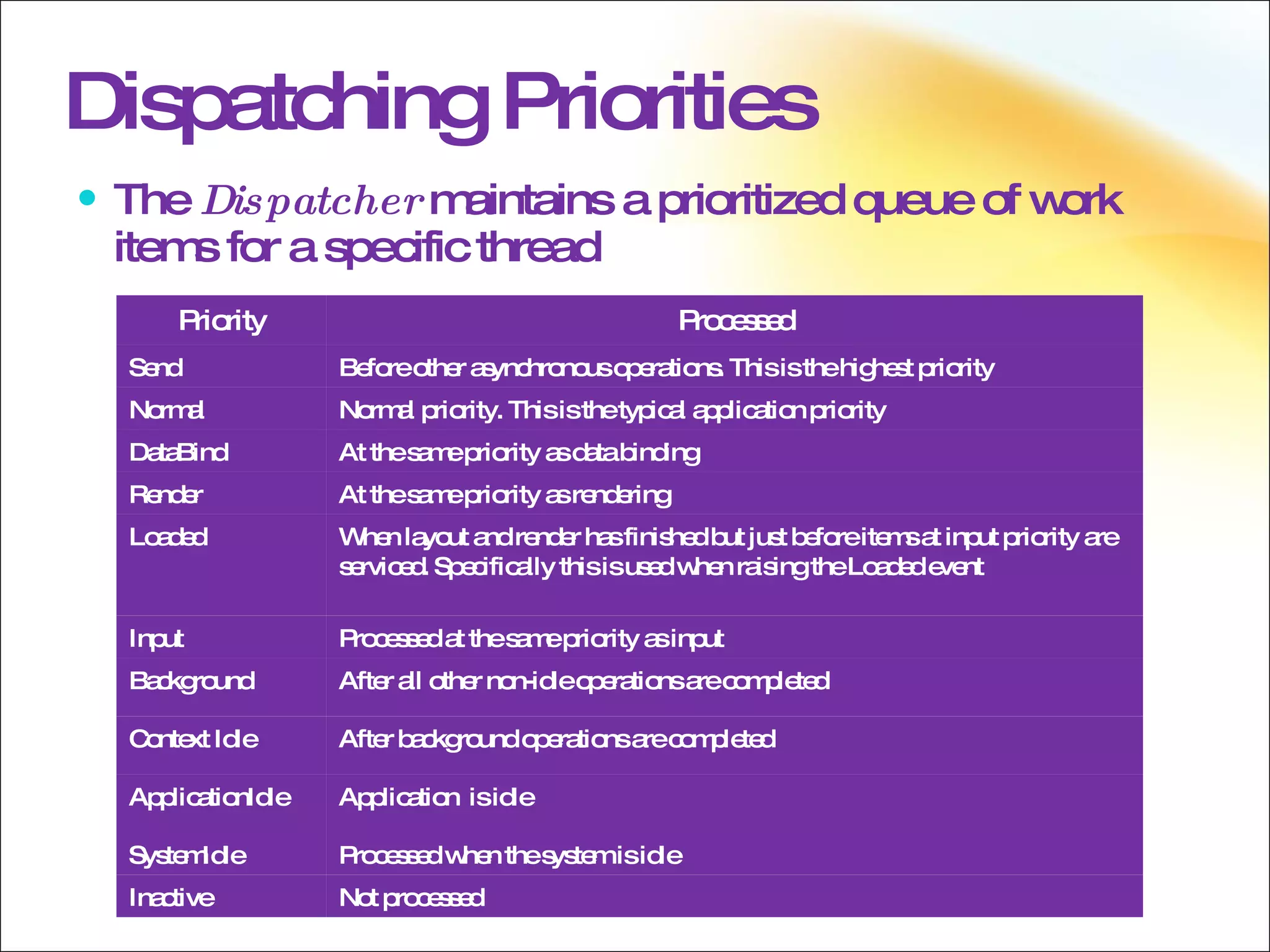
Dispatching Priorities The  Dispatcher  maintains a prioritized queue of work items for a specific thread Priority Processed Send Before other asynchronous operations. This is the highest priority Normal Normal priority. This is the typical application priority DataBind At the same priority as data binding Render At the same priority as rendering Loaded When layout and render has finished but just before items at input priority are serviced. Specifically this is used when raising the Loaded event Input Processed at the same priority as input Background After all other non-idle operations are completed Context Idle After background operations are completed  ApplicationIdle Application  is idle SystemIdle Processed when the system is idle Inactive Not processed
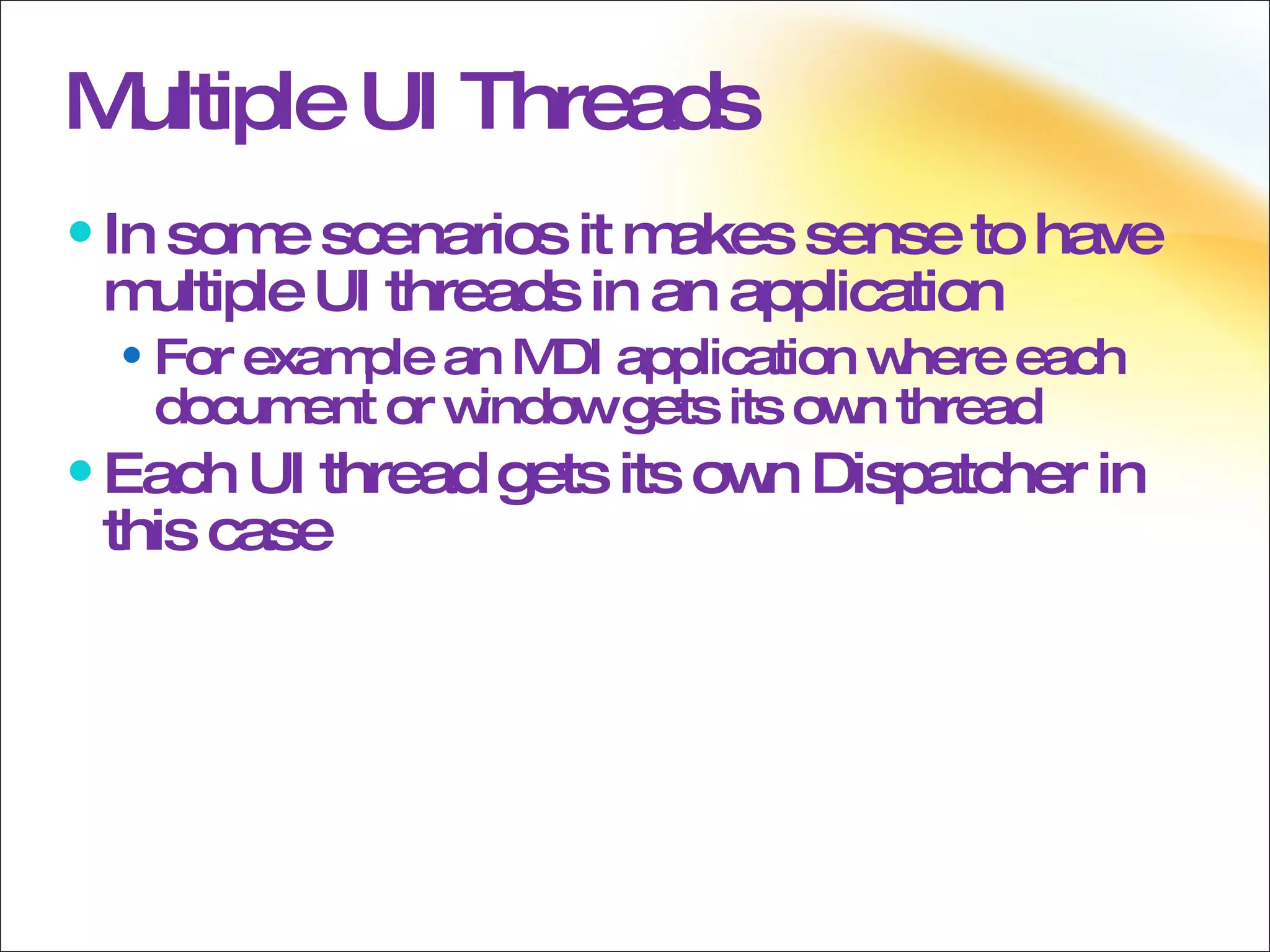
Multiple UI Threads In some scenarios it makes sense to have multiple UI threads in an application For example an MDI application where each document or window gets its own thread Each UI thread gets its own Dispatcher in this case
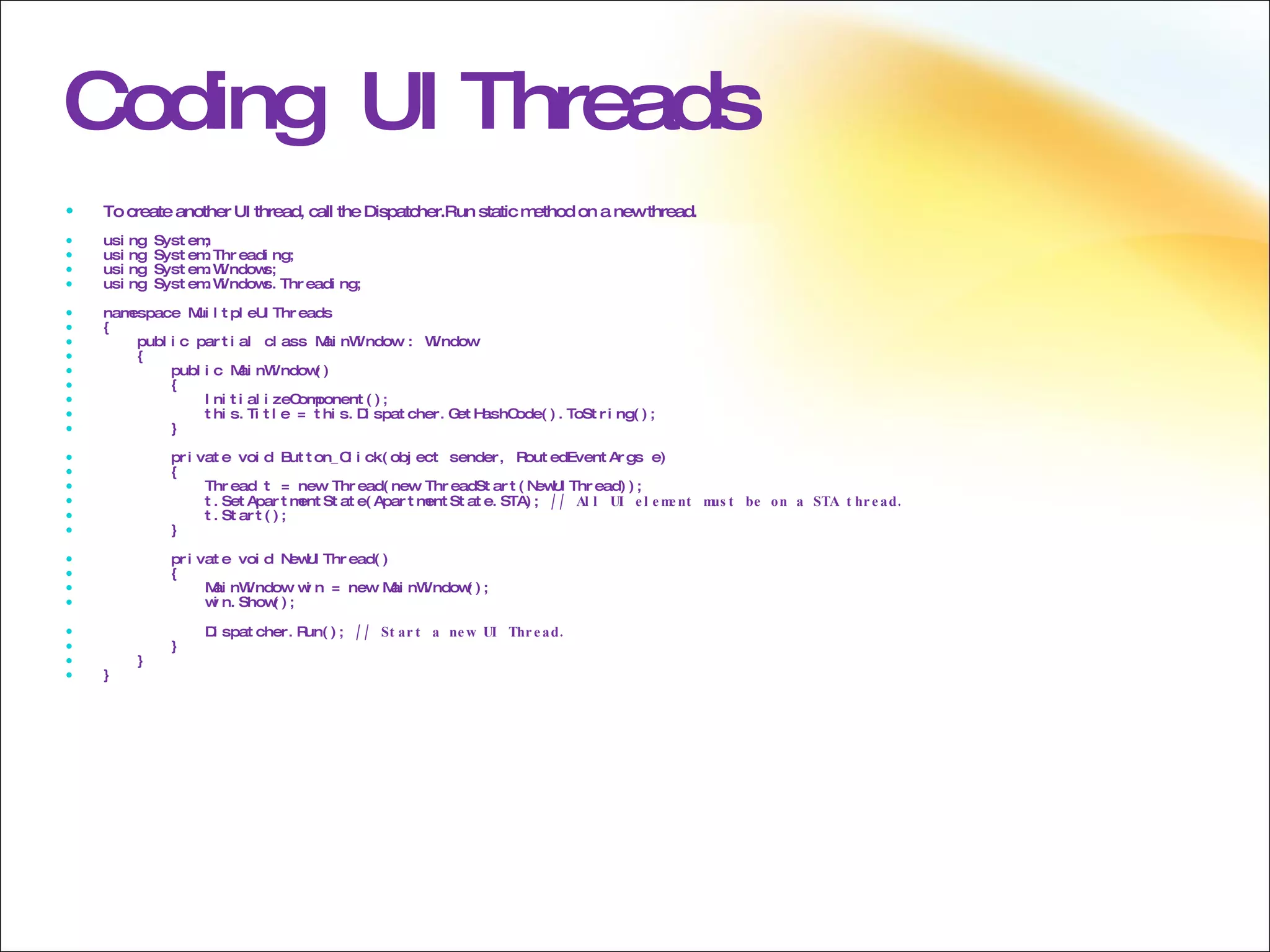
Coding  UI Threads To create another UI thread, call the Dispatcher.Run static method on a new thread. using System; using System.Threading; using System.Windows; using System.Windows.Threading; namespace MuiltpleUIThreads { public partial class MainWindow : Window { public MainWindow() { InitializeComponent(); this.Title = this.Dispatcher.GetHashCode().ToString(); } private void Button_Click(object sender, RoutedEventArgs e) { Thread t = new Thread(new ThreadStart(NewUIThread)); t.SetApartmentState(ApartmentState.STA);  // All UI element must be on a STA thread. t.Start(); } private void NewUIThread() { MainWindow win = new MainWindow(); win.Show(); Dispatcher.Run();  // Start a new UI Thread. } } }
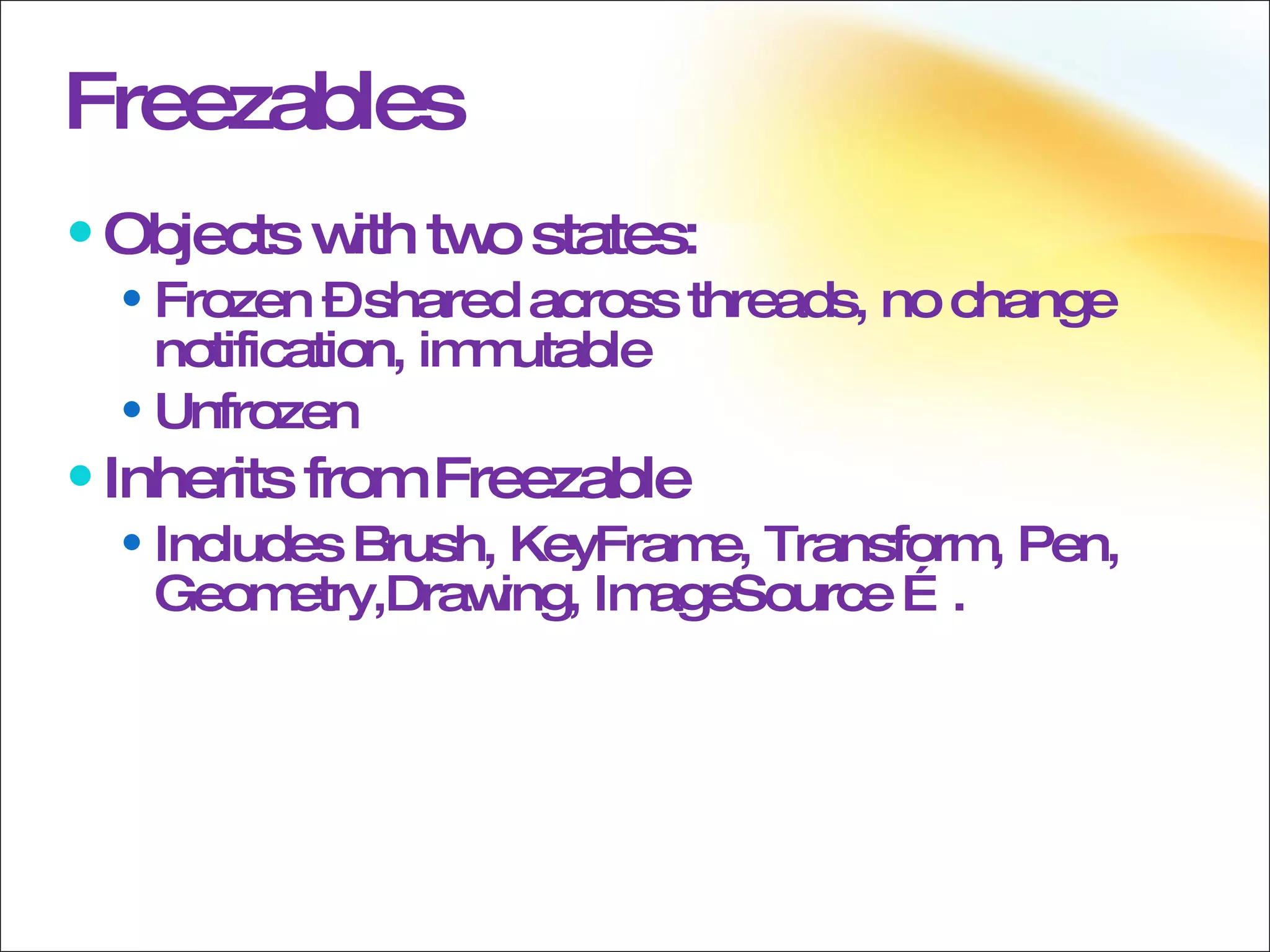
Freezables Objects with two states: Frozen – shared across threads, no change notification, immutable  Unfrozen Inherits from Freezable  Includes Brush, KeyFrame, Transform, Pen, Geometry,Drawing, ImageSource ….
Freezables Freezable defines an object that has a modifiable state and a read-only (frozen) state. Classes that derive from Freezable provide detailed change notification, can be made immutable, and can clone themselves. The Freezable class makes it easier to use certain graphics system objects and can help improve application performance. Examples of types that inherit from Freezable include the Brush, Transform, and Geometry classes; as they contain unmanaged resources, WPF must monitor these objects for modifications, and then update their corresponding unmanaged resources when there is a change. Even if the object is not actually modified, the system must still spend some of its resources monitoring the object, in case it does get changed it. Freezing an object tells WPF to stop monitoring the object for changes, and therefore provides a potential performance boost and removes the thread affinity for the object, so it can be used safely on many threads. If the object subsequently needs to be modified it is possible to then clone the object into a new instance, which will be unfrozen.
 
Triggers There are three types of Triggers in WPF Property Triggers Data Triggers  Event Triggers  Triggers are implemented by using the Style.Triggers property
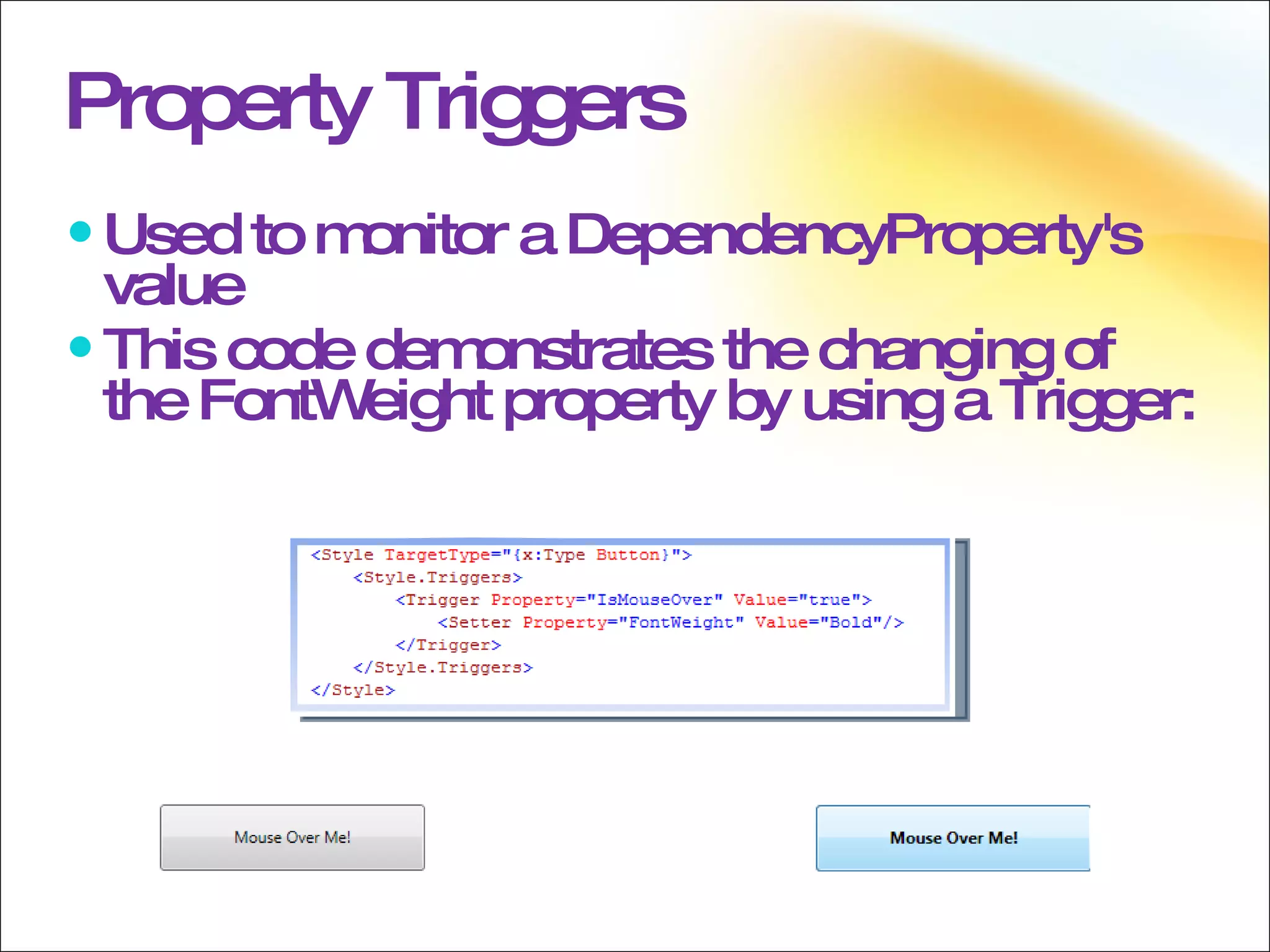
Property Triggers Used to monitor a DependencyProperty's value This code demonstrates the changing of the FontWeight property by using a Trigger:
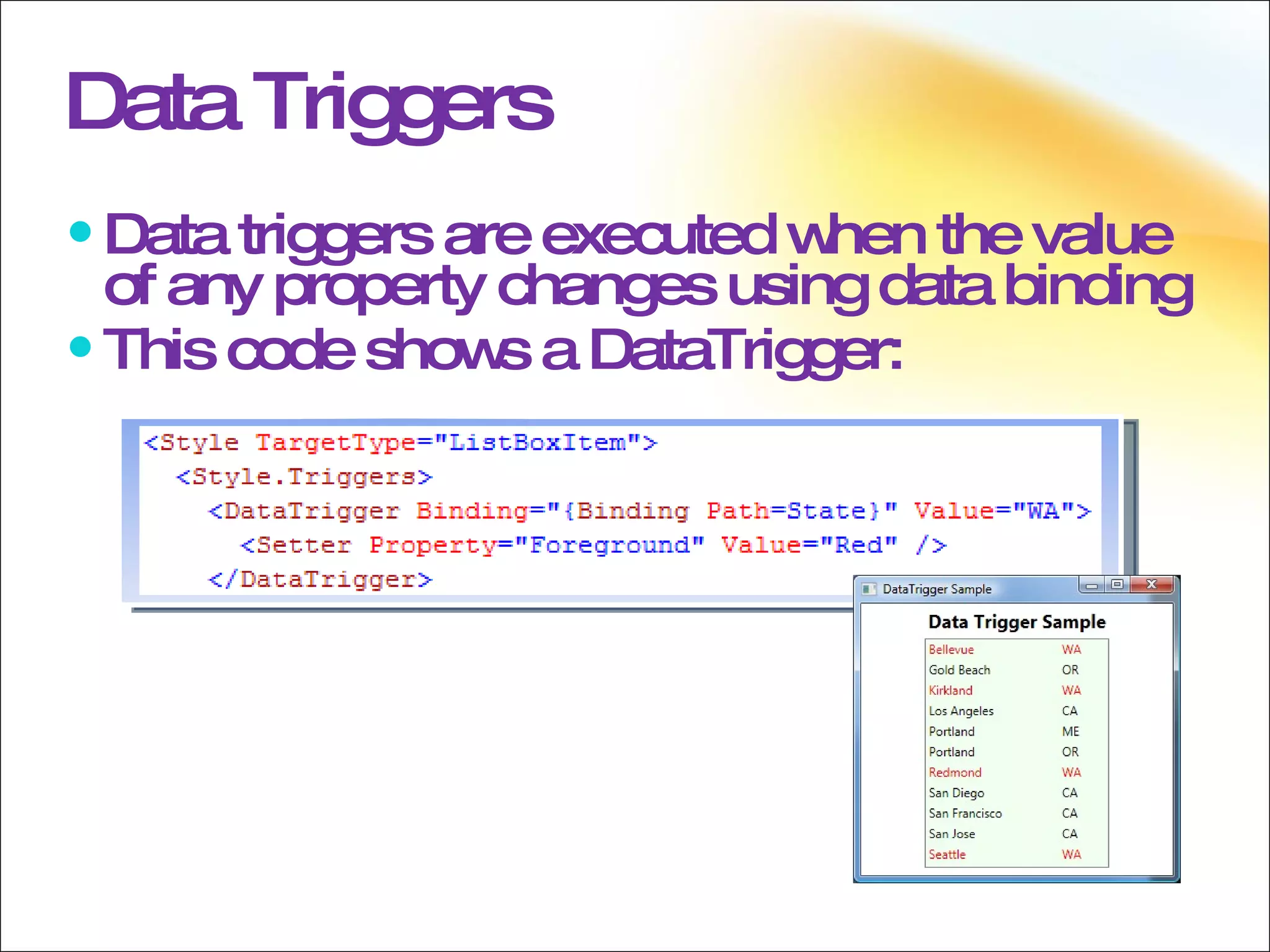
Data Triggers Data triggers are executed when the value of any property changes using data binding This code shows a DataTrigger:
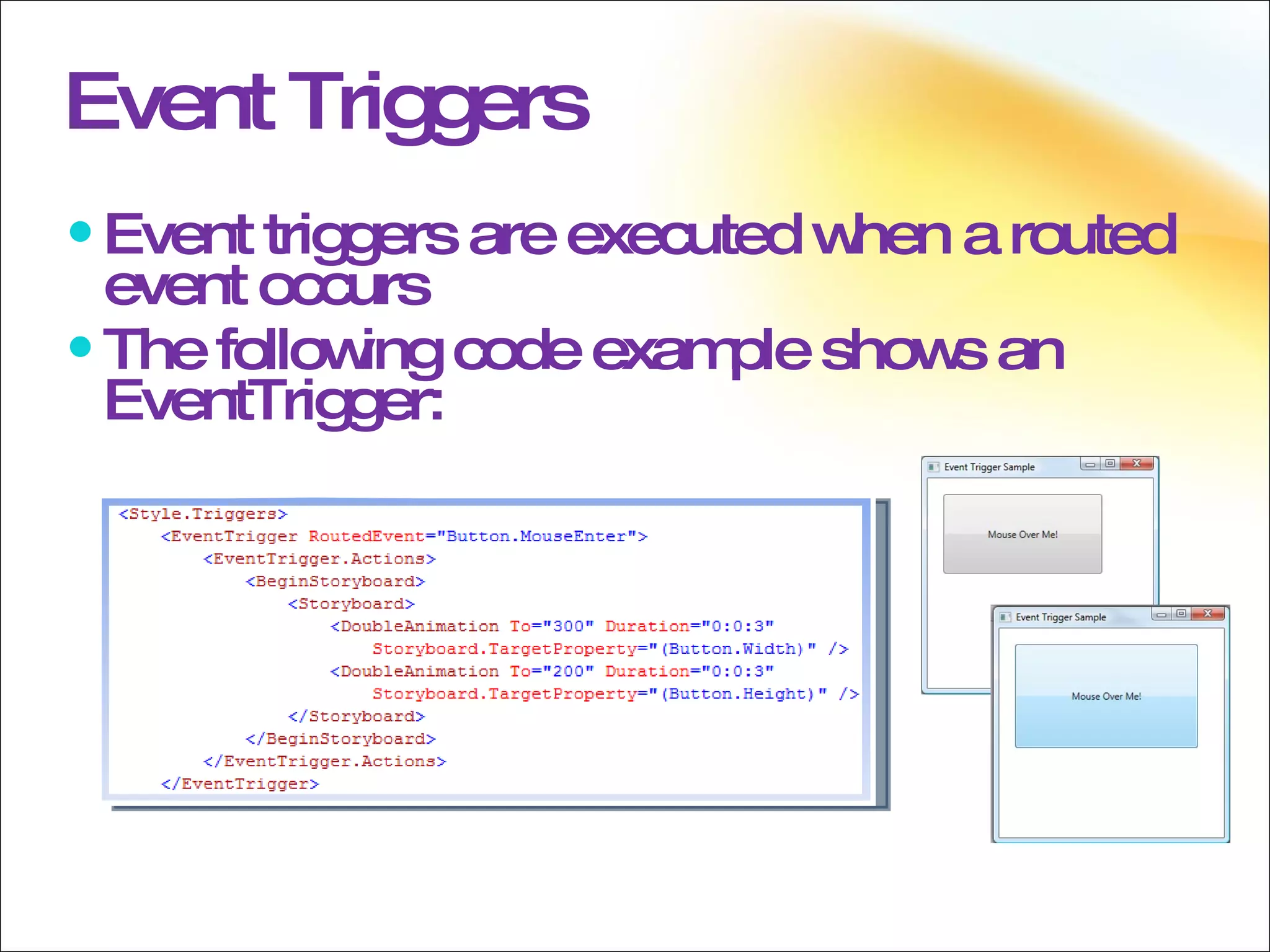
Event Triggers Event triggers are executed when a routed event occurs The following code example shows an EventTrigger:
Presenter Name Title Microsoft Corporation

WPF Fundamentals

  • 1.
    Presenter Name TitleMicrosoft Corporation
  • 2.
  • 3.
    Overview Application ModelProperty System Events Commands Threading Animation
  • 4.
  • 5.
    Application Model ApplicationClass Types of Application Windows Application XAML Browser Application
  • 6.
    Application Class Coreof the WPF Application model Serves as a container for WPF applications Enables data to be shared Provides Application Events Provides Windows Message Dispatching Supports Navigation Between Pages
  • 7.
  • 8.
    Windows Application Twotypes of Windows applications: Window-derived NavigationWindow-derived
  • 9.
    WPF applications canbe hosted within an internet browser Internet Explorer 6.0 & 7.0(.NET 3.0/3.5) Mozilla Firefox (.NET 3.5 only) XAML Browser Application Unified programming model Windowed apps and XBAPs are built using the same programming model Graphics, Media, and Documents are all supported within this single model
  • 10.
    XAML Browser ApplicationPartial Trust Available: Browser window, isolated storage, commands, 2-D and 3-D graphics, animation, media, audio, video, and more Not available: Application-defined windows and dialog boxes, file system access, registry access, WinForms interop, and more Deployment ClickOnce, XCopy or MSI Installed or live running
  • 11.
  • 12.
    Trees Element TreesLogical Tree Visual Tree
  • 13.
    Element Tree HierarchyThe composition of elements creates a couple of hierarchical trees Logical Tree Visual Tree There is an additional tree in WPF called the automation tree, but we won’t cover that in this session
  • 14.
    Logical Tree Thelogical tree is composed of the elements that are explicitly listed in the XAML The leaves of the logical tree may also be non-visual objects (CLR objects) The content of a ContentControl The items of an ItemsControl
  • 15.
    Visual Tree Thevisual tree is composed of the visuals used to represent the logical tree This includes all inflated control and data templates for elements in the logical tree
  • 16.
  • 17.
    Tree Traversal LogicalTree Traversal The LogicalTreeHelper class provides several methods for traversing the logical tree LogicalTreeHelper is not needed very often in practice because most controls have properties exposing their logical children
  • 18.
    Tree Traversal, cont.Visual Tree Traversal The VisualTreeHelper class provides methods needed for traversing the visual tree Although the Windows SDK indicates you won’t need to use VisualTreeHelper very often, in practice you will probably use it regularly
  • 19.
    Resolving via treesResource resolution favors logical tree Property Inheritance favors logical tree Events route through the visual tree
  • 20.
  • 21.
    Property System DependencyProperties Dependency Property Value Precedence Creating Dependency Properties Attached Properties Dependency Property Metadata Inherited Dependency Properties
  • 22.
    Dependency Properties Theheart of the WPF property system Enable most of the WPF features Data Binding Styling Attached Properties Animation Property Invalidation Property Inheritance Default Values Sparse Storage
  • 23.
    Dependency Properties ExposesDependency Properties Consumes Dependency Properties Does not have to derive from DependencyObject Derives from DependencyObject DependencyObject CustomClassA CustomClassB
  • 24.
    Dependency Property ValuePrecedence Validation Property coercion Animations Local value Style triggers Template triggers Style setters Theme style triggers Theme style setters Property value inheritance Default value
  • 25.
    Creating Dependency PropertiesInherit from DependencyObject Call DependencyObject.Register Create standard .NET Framework property
  • 26.
    Attached Properties Inheritfrom DependencyObject Call DependencyProperty.RegisterAttach Create two static methods Get nnn /Set nnn
  • 27.
  • 28.
    Dependency Properties TheFrameworkPropertyMetadata class enables the setting of metadata for a property; an instance of this class should be passed when registering the property, be it attached or just a simple dependency property.
  • 29.
    Inherited Dependency PropertiesInherited by using the logical tree Disabled by default (performance reasons) Must be an AttachedDependencyProperty Favors the logical tree If an element does not have a logical parent, its properties will be inherited
  • 30.
  • 31.
    Events Direct EventsTunneling Events Bubbling Events Routed Events Raising and Handling Events RoutedEventArgs
  • 32.
    Direct Events Directevents only go to the originating element Direct events behave like standard CLR events The difference is that you can trigger on direct events
  • 33.
    Direct Events :ListBoxBd:Border :ScrollViewer :Grid :Rectangle :ScrollContentPresenter :ItemsPresenter :VirtualizingStackPanel :ListBoxItem :ListBoxItem :ListBoxItem : AdornerLayer : ScrollBar : ScrollBar
  • 34.
    Tunneling EventsTunneled events begin with the highest visual parent Moves down through the visual tree Tunneling events are, by convention, prefixed with the word “Preview”
  • 35.
    Tunneling Events:ListBox Bd:Border :ScrollViewer :Grid :Rectangle :ScrollContentPresenter :ItemsPresenter :VirtualizingStackPanel :ListBoxItem :ListBoxItem :ListBoxItem :AdornerLayer :ScrollBar :ScrollBar
  • 36.
    Bubbling Events Bubbledevents begin with the source visual element Moves up through the visual tree
  • 37.
    Bubbling Events:ListBox Bd:Border :ScrollViewer :Grid :Rectangle :ScrollContentPresenter :ItemsPresenter :VirtualizingStackPanel :ListBoxItem :ListBoxItem :ListBoxItem :AdornerLayer :ScrollBar :ScrollBar
  • 38.
    RoutedEventArgs Marking theevent as “handled” will generally stop the routing of the event Set the Handled property on RoutedEventArgs to true If the event is a preview event, this will also prevent raising the corresponding bubbling event Handlers can be registered to receive handled events also
  • 39.
    RoutedEventArgs :ListBox Bd:Border:ScrollViewer :Grid :Rectangle :ScrollContentPresenter :ItemsPresenter :VirtualizingStackPanel :ListBoxItem :ListBoxItem :ListBoxItem :AdornerLayer :ScrollBar :ScrollBar
  • 40.
    Raising and HandlingEvents A routed event may be raised on any element within the visual tree A handler for the event may be attached to any element higher in the visual tree Attached Events Neither the element on which it is raised nor the element on which it is handled &quot;own&quot; that event
  • 41.
    XAML The XAML languagealso defines a special type of event called an attached event. An attached event enables you to add a handler for a particular event to an arbitrary element. The element handling the event need not define or inherit the attached event, and neither the object potentially raising the event nor the destination handling instance must define or otherwise &quot;own&quot; that event as a class member. The WPF input system uses attached events extensively. However, nearly all of these attached events are forwarded through base elements. The input events then appear as equivalent non-attached routed events that are members of the base element class. For instance, the underlying attached event Mouse..::.MouseDown can more easily be handled on any given UIElement by using MouseDown on that UIElement rather than dealing with attached event syntax either in XAML or code.
  • 42.
    Raising and HandlingEvents :ListBox Bd:Border :ScrollViewer :Grid :Rectangle :ScrollContentPresenter :ItemsPresenter :VirtualizingStackPanel :ListBoxItem :ListBoxItem :ListBoxItem :AdornerLayer :ScrollBar :ScrollBar Event Handler
  • 43.
    Attached Event Example<StackPanel Button.Click=&quot;CommonClickHandler&quot; > <Button Name=&quot;YesButton&quot;>Yes</Button> <Button Name=&quot;NoButton&quot; >No</Button> <Button Name=&quot;CancelButton&quot;>Cancel</Button> </StackPanel>
  • 44.
  • 45.
    Commands Commands OverviewRoutedCommand Framework Commands Control Support for Commands Custom Commands
  • 46.
    Commands Overview RoutedCommands Encapsulate an action as an object Separate the action from the handling of the action Improved Designer/Developer workflow When controls support commands it enables designers to very easily wire the invoking of those actions to whatever UI element they deem necessary
  • 47.
    Commands Commands inWPF are a more abstract and loosely-coupled version of routed events. The core concept of commanding in WPF is that the action is separate from both the source and the implementation of the command. An example would be the Cut, Copy, and Paste commands; these commands can be executed from many sources, such as a button, a menu item or a keyboard shortcut, but the implementation for each of the commands could be a single event handler. By abstracting the action, or command, from the object that acts as the source and the implementation improves the designer and developer workflow, as the designer can simply say that they want a specific action to occur and leave it to the developer to actually implement command behaviour. Alternatively a developer can define a behaviour and have the designer easily wire that up in the UI with commands.
  • 48.
    Commands Overview CutCommand Copy Command Paste Command
  • 49.
    Commands Commands inWPF are a more abstract and loosely-coupled version of routed events. The core concept of commanding in WPF is that the action is separate from both the source and the implementation of the command. An example would be the Cut, Copy, and Paste commands; these commands can be executed from many sources, such as a button, a menu item or a keyboard shortcut, but the implementation for each of the commands could be a single event handler. By abstracting the action, or command, from the object that acts as the source and the implementation improves the designer and developer workflow, as the designer can simply say that they want a specific action to occur and leave it to the developer to actually implement command behaviour. Alternatively a developer can define a behaviour and have the designer easily wire that up in the UI with commands.
  • 50.
    RoutedCommand Command (ICommand)action Command Source (ICommandSource) invoker of the action Command Target The object on which the command is executed If unset, the command is raised on the element with keyboard focus Command Binding (CommandBinding) Maps the command logic to the command
  • 51.
    RoutedCommand ICommand ICommandSourceCommand Target UI connected to a Command by Designers or Developers Cut Command
  • 52.
    Framework Commands MediaCommandsPlay, Pause, Select, Stop, more... ApplicationCommands Cut, Copy, Paste, Find, Help, more... NavigationCommands BrowseBack, BrowseForward, Refresh, more... ComponentCommands MoveDown, MoveLeft, ScrollToEnd, more... EditingCommands AlignCenter, ApplyFontSize, MergeCells, more...
  • 53.
  • 54.
    Framework Commands WPFdefines a large number of commands built into five classes. This saves the developer effort as they do not have to write commands for Cut, Copy, and Paste for example. Each command is exposed as a static property on the five command classes.
  • 55.
    Control Support forCommands Several WPF classes support easy execution of routed commands: MenuItem Button (by way of ButtonBase) Some WPF classes implement commands out of the box: TextBox RichTextBox By using the Command property on MenuItem or any ButtonBase-derived class commands are automatically executed on the logical click of the element. Some WPF controls ship with an implementation for some commands, for example the TextBox and RichTextBox controls both have implementations for the Cut, Copy, and Paste commands, by way of the ButtonBase class.
  • 56.
    Input Bindings Aninput binding binds an input gesture to a command KeyGesture MouseGesture
  • 57.
    Applications and controlscan implement their own custom routed commands by using the ICommand interface: Or by using the RoutedCommand: Custom Commands
  • 58.
    Commanding Commanding inWPF does not assume the use of a RoutedCommand or RoutedUICommand base class. Therefore, creating custom commands simply requires the implementation of the ICommand interface. Or they can simply expose a property of type RoutedCommand or RoutedUICommand.
  • 59.
  • 60.
    Threading Threading InWPF Dispatcher DispatcherObject Invoke and BeginInvoke Multiple UI Threads Freezables
  • 61.
    Threading In WPFMultiple independent threads in WPF The UI thread The Render Thread WPF UI is single threaded in the sense that most UI objects can only be associated with one thread There are exceptions: Static classes Freezables
  • 62.
    Dispatcher The Dispatcherobject is effectively the event loop for the UI thread There is one Dispatcher instance per UI thread Dispatcher.UnhandledException is great for catching data-binding/styling issues.
  • 63.
    Dispatcher Each threadthat creates UI objects needs and has affinity with a Dispatcher object. The Dispatcher owns the thread, the message loop and is responsible for dispatching to the appropriate handlers. Dispatcher Owns The Thread Owns the Message Loop Dispatches To Handlers
  • 64.
    DispatcherObject Most WPFobjects derive from DispatcherObject DispatcherObject Object Visual D ependencyObject
  • 65.
    DispatcherObject DispatcherObject associatesan object with a Dispatcher and gives you methods to ensure that calling threads have access to the object. CheckAccess method: Returns a bool that indicates if access is allowed VerifyAccess method: Throws an exception if access is not allowed Custom controls must use the VerifyAccess method in public members to ensure that only UI threads access it. If you use dependency properties you don’t have to worry about doing this yourself in property setters (It is done within DependencyObject.SetValue
  • 66.
    Invoke and BeginInvokeInvoke and BeginInvoke are used to push events onto a Dispatcher’s queue The Dispatcher’s event queue is “free-threaded” so any thread can call Invoke and BeginInvoke These methods are typically used by background threads that need to communicate with the UI thread These methods can also be used to queue work on the UI thread from the UI thread itself
  • 67.
    Dispatcher Operation BeginInvoke returns a DispatcherOperation object which can be used to interact with the delegate when the delegate is in the event queue The DispatcherOperation object can be used in several ways to interact with the specified delegate, such as: Changing the DispatcherPriority of the delegate as it is pending execution in the event queue Removing the delegate from the event queue Waiting for the delegate to return Obtaining the value that the delegate returns after it is executed
  • 68.
    Dispatching Priorities The Dispatcher maintains a prioritized queue of work items for a specific thread Priority Processed Send Before other asynchronous operations. This is the highest priority Normal Normal priority. This is the typical application priority DataBind At the same priority as data binding Render At the same priority as rendering Loaded When layout and render has finished but just before items at input priority are serviced. Specifically this is used when raising the Loaded event Input Processed at the same priority as input Background After all other non-idle operations are completed Context Idle After background operations are completed ApplicationIdle Application is idle SystemIdle Processed when the system is idle Inactive Not processed
  • 69.
    Multiple UI ThreadsIn some scenarios it makes sense to have multiple UI threads in an application For example an MDI application where each document or window gets its own thread Each UI thread gets its own Dispatcher in this case
  • 70.
    Coding UIThreads To create another UI thread, call the Dispatcher.Run static method on a new thread. using System; using System.Threading; using System.Windows; using System.Windows.Threading; namespace MuiltpleUIThreads { public partial class MainWindow : Window { public MainWindow() { InitializeComponent(); this.Title = this.Dispatcher.GetHashCode().ToString(); } private void Button_Click(object sender, RoutedEventArgs e) { Thread t = new Thread(new ThreadStart(NewUIThread)); t.SetApartmentState(ApartmentState.STA); // All UI element must be on a STA thread. t.Start(); } private void NewUIThread() { MainWindow win = new MainWindow(); win.Show(); Dispatcher.Run(); // Start a new UI Thread. } } }
  • 71.
    Freezables Objects withtwo states: Frozen – shared across threads, no change notification, immutable Unfrozen Inherits from Freezable Includes Brush, KeyFrame, Transform, Pen, Geometry,Drawing, ImageSource ….
  • 72.
    Freezables Freezable definesan object that has a modifiable state and a read-only (frozen) state. Classes that derive from Freezable provide detailed change notification, can be made immutable, and can clone themselves. The Freezable class makes it easier to use certain graphics system objects and can help improve application performance. Examples of types that inherit from Freezable include the Brush, Transform, and Geometry classes; as they contain unmanaged resources, WPF must monitor these objects for modifications, and then update their corresponding unmanaged resources when there is a change. Even if the object is not actually modified, the system must still spend some of its resources monitoring the object, in case it does get changed it. Freezing an object tells WPF to stop monitoring the object for changes, and therefore provides a potential performance boost and removes the thread affinity for the object, so it can be used safely on many threads. If the object subsequently needs to be modified it is possible to then clone the object into a new instance, which will be unfrozen.
  • 73.
  • 74.
    Triggers There arethree types of Triggers in WPF Property Triggers Data Triggers Event Triggers Triggers are implemented by using the Style.Triggers property
  • 75.
    Property Triggers Usedto monitor a DependencyProperty's value This code demonstrates the changing of the FontWeight property by using a Trigger:
  • 76.
    Data Triggers Datatriggers are executed when the value of any property changes using data binding This code shows a DataTrigger:
  • 77.
    Event Triggers Eventtriggers are executed when a routed event occurs The following code example shows an EventTrigger:
  • 78.
    Presenter Name TitleMicrosoft Corporation

Editor's Notes

  • #2 06/10/09 15:24 © 2007 Microsoft Corporation. All rights reserved. Microsoft, Windows, Windows Vista and other product names are or may be registered trademarks and/or trademarks in the U.S. and/or other countries. The information herein is for informational purposes only and represents the current view of Microsoft Corporation as of the date of this presentation. Because Microsoft must respond to changing market conditions, it should not be interpreted to be a commitment on the part of Microsoft, and Microsoft cannot guarantee the accuracy of any information provided after the date of this presentation. MICROSOFT MAKES NO WARRANTIES, EXPRESS, IMPLIED OR STATUTORY, AS TO THE INFORMATION IN THIS PRESENTATION.