HTML Basics HTML, Text, Images, Tables, Forms Doncho Minkov Telerik Mobile Development Course mobiledevcourse.telerik.com Technical Trainer http://www.minkov.it
Table of Contents Introduction to HTML How the Web Works? What is a Web Page? My First HTML Page Basic Tags: Hyperlinks, Images, Formatting Headings and Paragraphs HTML in Details The <!DOCTYPE> Declaration The <head> Section: Title, Meta, Script, Style
Table of Contents (2) The <body> Section Text Styling and Formatting Tags Hyperlinks: <a> Hyperlinks and Sections Images: < img > Lists: < ol >, < ul > and <dl> HTML Special Characters The <div> and <span> elements
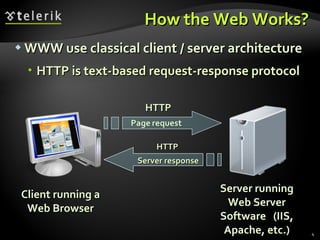
How the Web Works? WWW use classical client / server architecture HTTP is text-based request-response protocol Client running a Web Browser Server running Web Server Software  (IIS, Apache, etc.) HTTP HTTP Server response
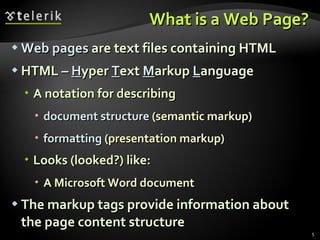
What is a Web Page? Web pages  are text files containing HTML HTML –  H yper  T ext  M arkup  L anguage A notation for describing document structure  (semantic markup) formatting  (presentation markup) Looks (looked?) like: A Microsoft Word document The markup tags provide information about the page content structure
Creating HTML Pages An HTML file must have an  . htm  or  .html  file extension HTML files can be created with text editors: NotePad, NotePad ++, PSPad Or HTML editors (WYSIWYG Editors): Microsoft FrontPage Macromedia Dreamweaver Netscape Composer Expression Web
HTML Basics Text, Images, Tables, Forms
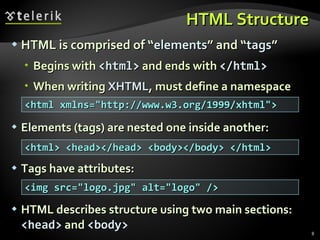
HTML Structure HTML is comprised of “ elements ” and “ tags ” Begins with  <html>  and ends with  </html> When writing  XHTML , must define a namespace Elements (tags) are nested one inside another: Tags have attributes: HTML describes structure using two main sections:  <head>  and  <body> <html xmlns=&quot;http://www.w3.org/1999/xhtml&quot;> <html> <head></head> <body></body> </html> <img src=&quot;logo.jpg&quot; alt=&quot;logo&quot; />
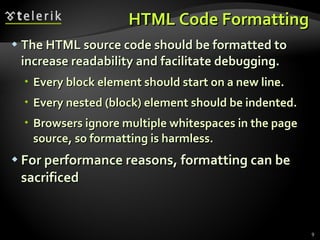
HTML Code Formatting The HTML source code should be formatted to increase readability and facilitate debugging. Every block element should start on a new line. Every nested (block) element should be indented. Browsers ignore multiple whitespaces in the page source, so formatting is harmless. For performance reasons, formatting can be sacrificed
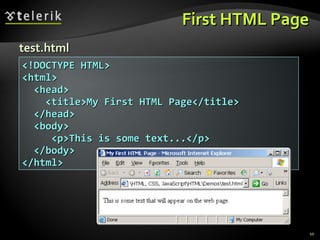
First HTML Page <!DOCTYPE HTML> <html> <head> <title>My First HTML Page</title> </head> <body> <p>This is some text...</p> </body> </html> test.html
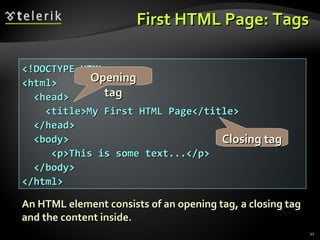
First HTML Page: Tags <!DOCTYPE HTML> <html> <head> <title>My First HTML Page</title> </head> <body> <p>This is some text...</p> </body> </html> Opening tag Closing tag An HTML element consists of an opening tag, a closing tag and the content inside.
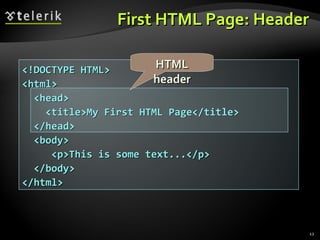
First HTML Page: Header <!DOCTYPE HTML> <html> <head> <title>My First HTML Page</title> </head> <body> <p>This is some text...</p> </body> </html> HTML header
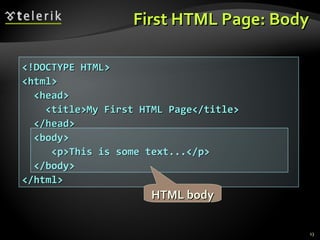
First HTML Page: Body <!DOCTYPE HTML> <html> <head> <title>My First HTML Page</title> </head> <body> <p>This is some text...</p> </body> </html> HTML body
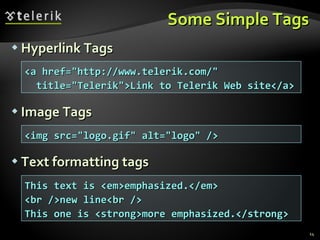
Some Simple Tags Hyperlink Tags Image Tags Text formatting tags <a href=&quot;http://www.telerik.com/&quot; title=&quot;Telerik&quot;>Link to Telerik Web site</a> <img src=&quot;logo.gif&quot; alt=&quot;logo&quot; /> This text is <em>emphasized.</em> <br />new line<br /> This one is <strong>more emphasized.</strong>
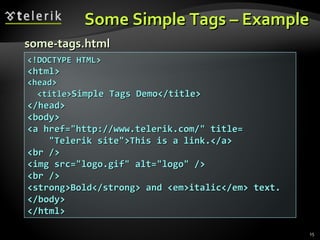
Some Simple Tags – Example <!DOCTYPE HTML> <html> <head> <title> Simple Tags Demo</title> </head> <body> <a href=&quot;http://www.telerik.com/&quot; title= &quot;Telerik site&quot;>This is a link.</a> <br /> <img src=&quot;logo.gif&quot; alt=&quot;logo&quot; /> <br /> <strong>Bold</strong> and <em>italic</em> text. </body> </html> some-tags.html
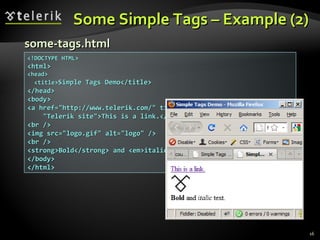
Some Simple Tags – Example (2) <!DOCTYPE HTML> <html> <head> <title> Simple Tags Demo</title> </head> <body> <a href=&quot;http://www.telerik.com/&quot; title= &quot;Telerik site&quot;>This is a link.</a> <br /> <img src=&quot;logo.gif&quot; alt=&quot;logo&quot; /> <br /> <strong>Bold</strong> and <em>italic</em> text. </body> </html> some-tags.html
Some HTML Tags Live Demo
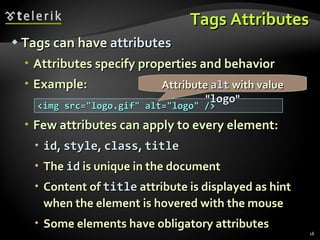
Tags Attributes Tags can have  attributes Attributes specify properties and behavior Example: Few attributes can apply to every element: id ,  style ,  class ,  title The  id  is unique in the document Content of  title  attribute is displayed as hint when the element is hovered with the mouse Some elements have obligatory attributes <img src=&quot;logo.gif&quot; alt=&quot;logo&quot; /> Attribute  alt  with value &quot; logo &quot;
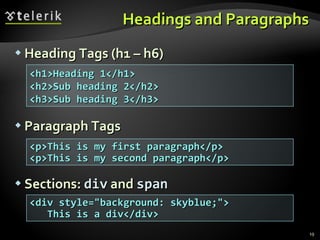
Headings and Paragraphs Heading Tags (h1 – h6) Paragraph Tags Sections:  div  and  span <p>This is my first paragraph</p> <p>This is my second paragraph</p> <h1>Heading 1</h1> <h2>Sub heading 2</h2> <h3>Sub heading 3</h3> <div style=&quot;background: skyblue;&quot;> This is a div</div>
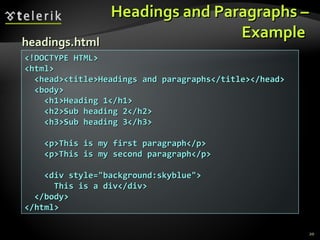
Headings and Paragraphs – Example  <!DOCTYPE HTML> <html> <head><title>Headings and paragraphs</title></head> <body> <h1>Heading 1</h1> <h2>Sub heading 2</h2> <h3>Sub heading 3</h3> <p>This is my first paragraph</p> <p>This is my second paragraph</p> <div style=&quot;background:skyblue&quot;> This is a div</div> </body> </html> headings.html
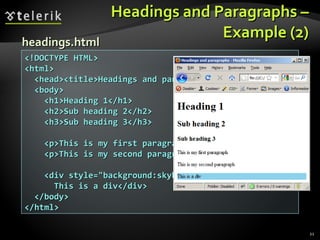
Headings and Paragraphs – Example (2) <!DOCTYPE HTML> <html> <head><title>Headings and paragraphs</title></head> <body> <h1>Heading 1</h1> <h2>Sub heading 2</h2> <h3>Sub heading 3</h3> <p>This is my first paragraph</p> <p>This is my second paragraph</p> <div style=&quot;background:skyblue&quot;> This is a div</div> </body> </html> headings.html
Headings and Paragraphs Live Demo
Introduction to HTML HTML Document Structure in Depth
Preface It is important to have the correct vision and attitude towards HTML HTML is only about structure, not appearance Browsers tolerate invalid HTML code and parse errors – you should not Always think about semantics
The  < ! DOCTYPE>  Declaration HTML documents must start with a document type definition (DTD) It tells web browsers what type is the served code Possible versions: HTML 4.01, XHTML 1.0 (Transitional or Strict), XHTML 1.1, HTML 5 Example: See  http://w3.org/QA/2002/04/valid-dtd-list.html   for a list of possible  doctypes <!DOCTYPE html PUBLIC &quot;-//W3C//DTD XHTML 1.0 Transitional//EN&quot; &quot;http://www.w3.org/TR/xhtml1/DTD/xhtml1-transitional.dtd&quot;>
HTML vs. XHTML XHTML is more strict than HTML Tags and attribute names must be in lowercase All tags must be closed ( < br /> ,  < img /> ) while HTML allows  < br >  and  <img>  and implies missing closing tags  (<p>par1 <p>par2 ) XHTML allows only one root  <html>  element (HTML allows more than one)
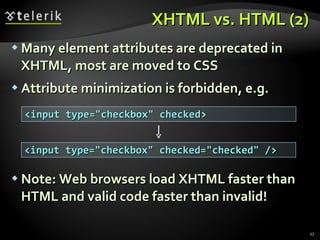
XHTML vs. HTML (2) Many element attributes are deprecated in XHTML, most are moved to CSS  Attribute minimization is forbidden, e.g. Note: Web browsers load XHTML faster than HTML and valid code faster than invalid! <input type=&quot;checkbox&quot; checked> <input type=&quot;checkbox&quot; checked=&quot;checked&quot; />
The  <head>  Section Contains information that doesn’t show directly on the viewable page Starts after the  <! doctype >  declaration Begins with  <head>  and ends with  </head> Contains mandatory single  <title>  tag Can contain some other tags, e.g. <meta> <script> <style> <!–- comments -->
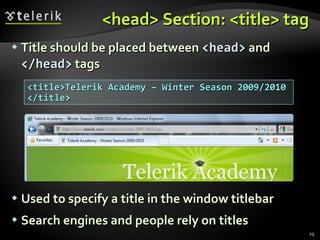
<head> Section: <title> tag Title should be placed between  <head>  and  </head>  tags Used to specify a title in the window titlebar Search engines and people rely on titles <title>Telerik Academy – Winter Season 2009/2010 </title>
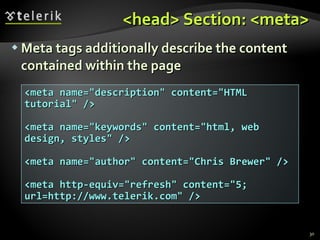
<head> Section: <meta> Meta tags additionally describe the content contained within the page <meta name=&quot;description&quot; content=&quot;HTML tutorial&quot; /> <meta name=&quot;keywords&quot; content=&quot;html, web design, styles&quot; /> <meta name=&quot;author&quot; content=&quot;Chris Brewer&quot; />  <meta http-equiv=&quot;refresh&quot; content=&quot;5; url=http://www.telerik.com&quot; />
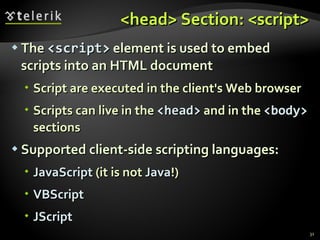
<head> Section: <script> The  <script>   element is used to embed scripts into an HTML document Script are executed in the client's Web browser Scripts can live in the  <head>  and in the  <body>  sections Supported client-side scripting languages: JavaScript  (it is not  Java !) VBScript JScript
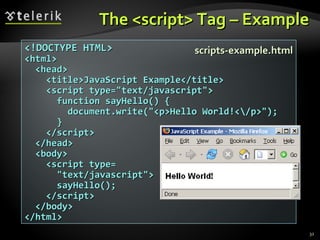
The <script> Tag – Example <!DOCTYPE HTML> <html> <head> <title>JavaScript Example</title> <script type=&quot;text/javascript&quot;> function sayHello() { document.write(&quot;<p>Hello World!<\/p>&quot;); } </script> </head> <body> <script type= &quot;text/javascript&quot;> sayHello(); </script> </body> </html> scripts-example.html
Using Scripts Live Demo
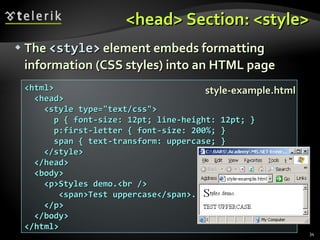
<head> Section: <style> The  <style>  element embeds formatting information (CSS styles) into an HTML page <html> <head> <style type=&quot;text/css&quot;> p { font-size: 12pt; line-height: 12pt; } p:first-letter { font-size: 200%; } span { text-transform: uppercase; } </style> </head> <body> <p>Styles demo.<br /> <span>Test uppercase</span>. </p> </body> </html> style-example.html
Embedding CSS Styles Live Demo
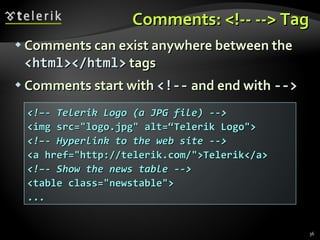
Comments: <!-- --> Tag Comments can exist anywhere between the  <html></html>   tags Comments start with  <!--  and end with  --> <!–- Telerik Logo (a JPG file) --> <img src=&quot;logo.jpg&quot; alt=“Telerik Logo&quot;> <!–- Hyperlink to the web site --> <a href=&quot;http://telerik.com/&quot;>Telerik</a> <!–- Show the news table --> <table class=&quot;newstable&quot;> ...
<body> Section: Introduction The  <body>  section describes the viewable portion of the page Starts after the  <head>   </head>  section Begins with  <body>  and ends with  </body> <html> <head><title>Test page</title></head> <body> <!-- This is the Web page body --> </body> </html>
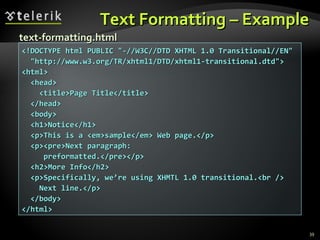
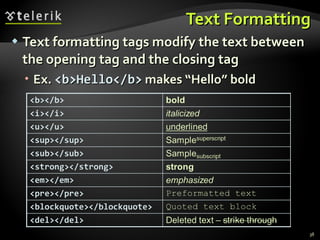
Text Formatting Text formatting tags modify the text between the opening tag and the closing tag Ex.  <b>Hello</b>  makes “Hello” bold
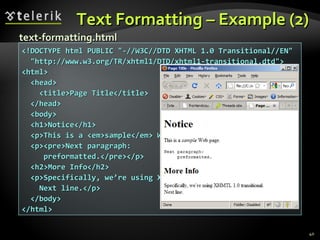
Text Formatting – Example <!DOCTYPE html PUBLIC &quot;-//W3C//DTD XHTML 1.0 Transitional//EN&quot; &quot;http://www.w3.org/TR/xhtml1/DTD/xhtml1-transitional.dtd&quot;> <html> <head> <title>Page Title</title> </head> <body> <h1>Notice</h1> <p>This is a <em>sample</em> Web page.</p> <p><pre>Next paragraph: preformatted.</pre></p> <h2>More Info</h2> <p>Specifically, we’re using XHMTL 1.0 transitional.<br /> Next line.</p> </body> </html> text-formatting.html
Text Formatting – Example (2) <!DOCTYPE html PUBLIC &quot;-//W3C//DTD XHTML 1.0 Transitional//EN&quot; &quot;http://www.w3.org/TR/xhtml1/DTD/xhtml1-transitional.dtd&quot;> <html> <head> <title>Page Title</title> </head> <body> <h1>Notice</h1> <p>This is a <em>sample</em> Web page.</p> <p><pre>Next paragraph: preformatted.</pre></p> <h2>More Info</h2> <p>Specifically, we’re using XHMTL 1.0 transitional.<br /> Next line.</p> </body> </html> text-formatting.html
Text Formatting Live Demo
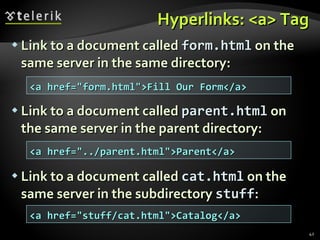
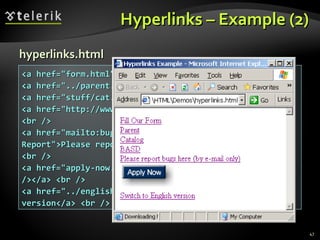
Hyperlinks: <a> Tag Link to a document called  form.html  on the same server in the same directory: Link to a document called  parent.html  on the same server in the parent directory: Link to a document called  cat.html  on the same server in the subdirectory  stuff : <a href=&quot;form.html&quot;>Fill Our Form</a> <a href=&quot;../parent.html&quot;>Parent</a> <a href=&quot;stuff/cat.html&quot;>Catalog</a>
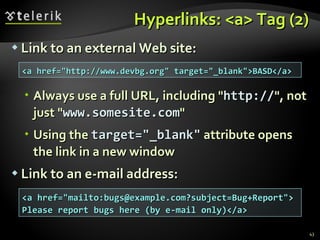
Hyperlinks: <a> Tag (2) Link to an external Web site: Always use a full URL, including &quot; http:// &quot;, not just &quot; www.somesite.com &quot; Using the  target=&quot;_blank&quot;  attribute opens the link in a new window Link to an e-mail address: <a href=&quot;http://www.devbg.org&quot; target=&quot;_blank&quot;>BASD</a> <a href=&quot;mailto:bugs@example.com?subject=Bug+Report&quot;> Please report bugs here (by e-mail only)</a>
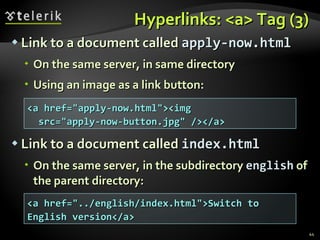
Hyperlinks: <a> Tag (3) Link to a document called  apply-now.html On the same server, in same directory Using an image as a link button: Link to a document called  index.html On the same server ,  in the subdirectory  english  of the parent directory: <a href=&quot;apply-now.html&quot;><img src=&quot;apply-now-button.jpg&quot; /></a> <a href=&quot;../english/index.html&quot;>Switch to English version</a>
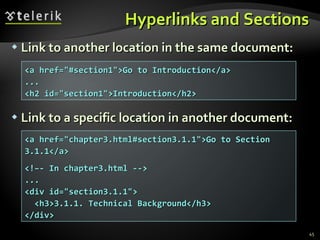
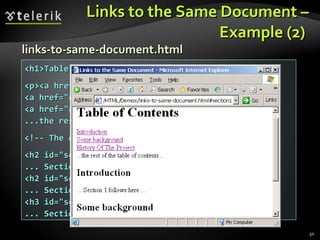
Hyperlinks and Sections Link to another location in the same document: Link to a specific location in another document: <a href=&quot;#section1&quot;>Go to Introduction</a> ... <h2 id=&quot;section1&quot;>Introduction</h2> <a href=&quot;chapter3.html#section3.1.1&quot;>Go to Section 3.1.1</a> <!–- In chapter3.html --> ... <div id=&quot;section3.1.1&quot;> <h3>3.1.1. Technical Background</h3> </div>
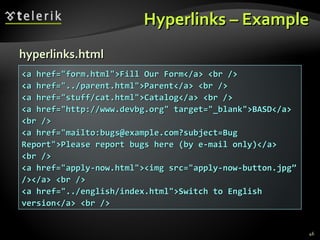
Hyperlinks – Example <a href=&quot;form.html&quot;>Fill Our Form</a> <br /> <a href=&quot;../parent.html&quot;>Parent</a> <br /> <a href=&quot;stuff/cat.html&quot;>Catalog</a> <br /> <a href=&quot;http://www.devbg.org&quot; target=&quot;_blank&quot;>BASD</a> <br /> <a href=&quot;mailto:bugs@example.com?subject=Bug Report&quot;>Please report bugs here (by e-mail only)</a> <br /> <a href=&quot;apply-now.html&quot;><img src=&quot;apply-now-button.jpg” /></a> <br /> <a href=&quot;../english/index.html&quot;>Switch to English version</a> <br /> hyperlinks.html
Hyperlinks – Example (2) <a href=&quot;form.html&quot;>Fill Our Form</a> <br /> <a href=&quot;../parent.html&quot;>Parent</a> <br /> <a href=&quot;stuff/cat.html&quot;>Catalog</a> <br /> <a href=&quot;http://www.devbg.org&quot; target=&quot;_blank&quot;>BASD</a> <br /> <a href=&quot;mailto:bugs@example.com?subject=Bug Report&quot;>Please report bugs here (by e-mail only)</a> <br /> <a href=&quot;apply-now.html&quot;><img src=&quot;apply-now-button.jpg” /></a> <br /> <a href=&quot;../english/index.html&quot;>Switch to English version</a> <br /> hyperlinks.html
Hyperlinks Live Demo
Links to the Same Document – Example  <h1>Table of Contents</h1> <p><a href=&quot;#section1&quot;>Introduction</a><br /> <a href=&quot;#section2&quot;>Some background</A><br /> <a href=&quot;#section2.1&quot;>Project History</a><br /> ...the rest of the table of contents... <!-- The document text follows here --> <h2 id=&quot;section1&quot;>Introduction</h2> ... Section 1 follows here ... <h2 id=&quot;section2&quot;>Some background</h2> ... Section 2 follows here ... <h3 id=&quot;section2.1&quot;>Project History</h3> ... Section 2.1 follows here ... links-to-same-document.html
Links to the Same Document – Example (2)  <h1>Table of Contents</h1> <p><a href=&quot;#section1&quot;>Introduction</a><br /> <a href=&quot;#section2&quot;>Some background</A><br /> <a href=&quot;#section2.1&quot;>Project History</a><br /> ...the rest of the table of contents... <!-- The document text follows here --> <h2 id=&quot;section1&quot;>Introduction</h2> ... Section 1 follows here ... <h2 id=&quot;section2&quot;>Some background</h2> ... Section 2 follows here ... <h3 id=&quot;section2.1&quot;>Project History</h3> ... Section 2.1 follows here ... links-to-same-document.html
Links to the Same Document Live Demo
Images:  <img>  tag Inserting an image with  <img>  tag: Image attributes: Example: <img src=&quot;/img/basd-logo.png&quot;> <img src=&quot;./php.png&quot; alt=&quot;PHP Logo&quot; /> src  Location of image file  (relative or absolute) alt Substitute text for display  (e.g. in text mode) height  Number of pixels of the height width  Number of pixels of the width border  Size of border, 0 for no border
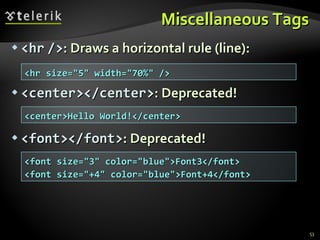
Miscellaneous Tags <hr   /> : Draws a horizontal rule (line): <center></center> : Deprecated! <font></font> : Deprecated! <hr size=&quot;5&quot; width=&quot;70%&quot; /> <center>Hello World!</center> <font size=&quot;3&quot; color=&quot;blue&quot;>Font3</font> <font size=&quot;+4&quot; color=&quot;blue&quot;>Font+4</font>
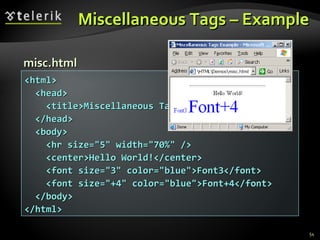
Miscellaneous Tags – Example <html> <head> <title>Miscellaneous Tags Example</title> </head> <body> <hr size=&quot;5&quot; width=&quot;70%&quot; /> <center>Hello World!</center> <font size=&quot;3&quot; color=&quot;blue&quot;>Font3</font> <font size=&quot;+4&quot; color=&quot;blue&quot;>Font+4</font> </body> </html> misc.html
Miscellaneous Tags Live Demo
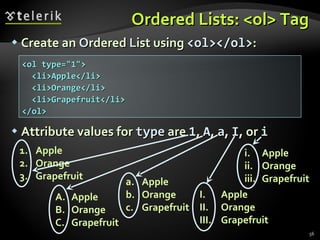
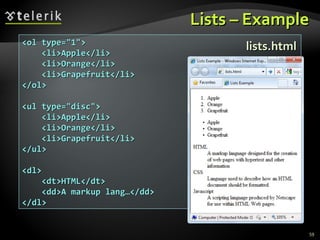
Ordered Lists:  <ol>  Tag Create an  O rdered  L ist using  <ol></ol> : Attribute values for  type  are  1 ,  A ,  a ,  I , or  i Apple Orange Grapefruit Apple Orange Grapefruit Apple Orange Grapefruit Apple Orange Grapefruit Apple Orange Grapefruit <ol type=&quot;1&quot;> <li>Apple</li> <li>Orange</li> <li>Grapefruit</li> </ol>
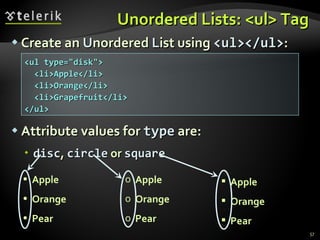
Unordered Lists:  < u l>  Tag Create an  U nordered  L ist using  <ul></ul> : Attribute values for  type  are: disc ,  circle  or  square Apple Orange Pear Apple Orange Pear Apple Orange Pear <ul type=&quot;disk&quot;> <li>Apple</li> <li>Orange</li> <li>Grapefruit</li> </ul>
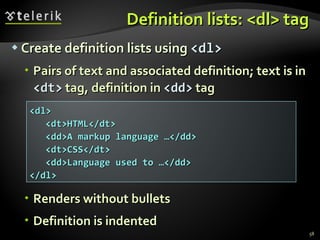
Definition lists: <dl> tag Create definition lists using  <dl> Pairs of text and associated definition; text is in  <dt>  tag, definition in  <dd>  tag Renders without bullets Definition is indented <dl> <dt>HTML</dt> <dd>A markup language …</dd> <dt>CSS</dt> <dd>Language used to …</dd> </dl>
Lists – Example <ol type=&quot;1&quot;> <li>Apple</li> <li>Orange</li> <li>Grapefruit</li> </ol> <ul type=&quot;disc&quot;> <li>Apple</li> <li>Orange</li> <li>Grapefruit</li> </ul> <dl> <dt>HTML</dt> <dd>A markup lang…</dd> </dl> lists.html
Creating Lists Live Demo
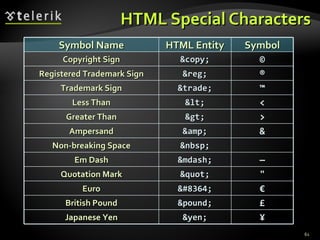
HTML Special Characters £ &pound; British Pound € &#8364; Euro &quot; &quot; Quotation Mark ¥ &yen; Japanese Yen — &mdash; Em Dash &nbsp; Non-breaking Space & &amp; Ampersand > &gt; Greater Than < &lt; Less Than ™ &trade; Trademark Sign ® &reg; Registered Trademark Sign © &copy; Copyright Sign Symbol HTML Entity Symbol Name
Special Characters – Example <p>[&gt;&gt;&nbsp;&nbsp;Welcome &nbsp;&nbsp;&lt;&lt;]</p> <p>&#9658;I have following cards: A&#9827;, K&#9830; and 9&#9829;.</p> <p>&#9658;I prefer hard rock &#9835; music &#9835;</p> <p>&copy; 2006 by Svetlin Nakov &amp; his team</p> <p>Telerik Academy™</p> special-chars.html
Special Chars – Example (2) <p>[&gt;&gt;&nbsp;&nbsp;Welcome &nbsp;&nbsp;&lt;&lt;]</p> <p>&#9658;I have following cards: A&#9827;, K&#9830; and 9&#9829;.</p> <p>&#9658;I prefer hard rock &#9835; music &#9835;</p> <p>&copy; 2006 by Svetlin Nakov &amp; his team</p> <p>Telerik Academy™</p> special-chars.html
HTML Special Characters Live Demo
Using  <DIV>  and  <SPAN>  Block and Inline Elements
Block and Inline Elements Block elements  add a line break before and after them, and expand to 100% width <div>, <p>, <h1>, <ul>  are block elements Inline elements  don’t break the text before and after them <span>, <a>, <em>  are inline elements http://www.w3.org/TR/CSS2/visuren.html#block-boxes
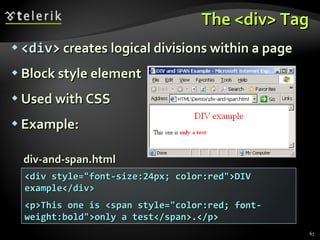
The <div> Tag <div>  creates logical divisions within a page Block style element Used with CSS Example: <div style=&quot;font-size:24px; color:red&quot;>DIV example</div> <p>This one is <span style=&quot;color:red; font-weight:bold&quot;>only a test</span>.</p> div-and-span.html
<DIV> Live Demo
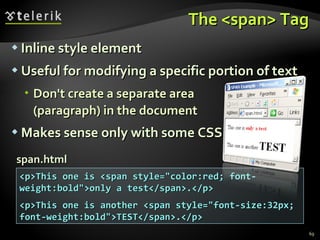
The <span> Tag Inline style element Useful for modifying a specific portion of text  Don't create a separate area  (paragraph) in the document Makes sense only with some CSS <p>This one is <span style=&quot;color:red; font-weight:bold&quot;>only a test</span>.</p> <p>This one is another <span style=&quot;font-size:32px; font-weight:bold&quot;>TEST</span>.</p> span.html
<SPAN> Live Demo
HTML Tags Index http://www.w3.org/TR/html4/index/elements.html http://www.htmldog.com/reference/htmltags/
HTML Basics Questions? http://academy.telerik.com
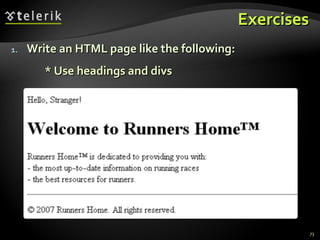
Exercises Write an HTML page like the following: * Use headings and divs
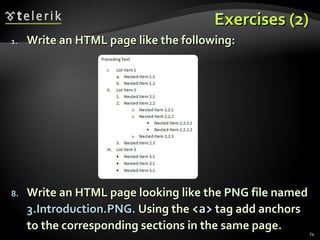
Exercises (2) Write an HTML page like the following: Write an HTML page looking like the PNG file named  3.Introduction.PNG.  Using the  <a>  tag add anchors to the corresponding sections in the same page.
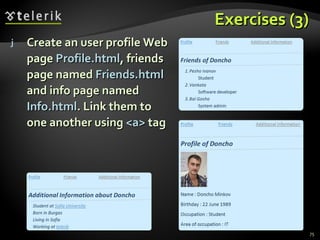
Exercises (3) Create an user profile Web page  Profile.html , friends page named  Friends.html  and info page named  Info.html . Link them to one another using  <a>  tag
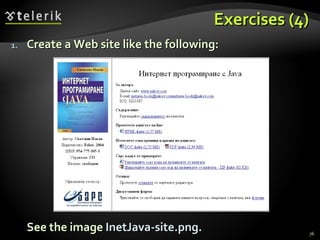
Exercises (4) Create a Web site like the following: See the image  InetJava-site.png .

HTML Fundamentals

  • 1.
    HTML Basics HTML,Text, Images, Tables, Forms Doncho Minkov Telerik Mobile Development Course mobiledevcourse.telerik.com Technical Trainer http://www.minkov.it
  • 2.
    Table of ContentsIntroduction to HTML How the Web Works? What is a Web Page? My First HTML Page Basic Tags: Hyperlinks, Images, Formatting Headings and Paragraphs HTML in Details The <!DOCTYPE> Declaration The <head> Section: Title, Meta, Script, Style
  • 3.
    Table of Contents(2) The <body> Section Text Styling and Formatting Tags Hyperlinks: <a> Hyperlinks and Sections Images: < img > Lists: < ol >, < ul > and <dl> HTML Special Characters The <div> and <span> elements
  • 4.
    How the WebWorks? WWW use classical client / server architecture HTTP is text-based request-response protocol Client running a Web Browser Server running Web Server Software (IIS, Apache, etc.) HTTP HTTP Server response
  • 5.
    What is aWeb Page? Web pages are text files containing HTML HTML – H yper T ext M arkup L anguage A notation for describing document structure (semantic markup) formatting (presentation markup) Looks (looked?) like: A Microsoft Word document The markup tags provide information about the page content structure
  • 6.
    Creating HTML PagesAn HTML file must have an . htm or .html file extension HTML files can be created with text editors: NotePad, NotePad ++, PSPad Or HTML editors (WYSIWYG Editors): Microsoft FrontPage Macromedia Dreamweaver Netscape Composer Expression Web
  • 7.
    HTML Basics Text,Images, Tables, Forms
  • 8.
    HTML Structure HTMLis comprised of “ elements ” and “ tags ” Begins with <html> and ends with </html> When writing XHTML , must define a namespace Elements (tags) are nested one inside another: Tags have attributes: HTML describes structure using two main sections: <head> and <body> <html xmlns=&quot;http://www.w3.org/1999/xhtml&quot;> <html> <head></head> <body></body> </html> <img src=&quot;logo.jpg&quot; alt=&quot;logo&quot; />
  • 9.
    HTML Code FormattingThe HTML source code should be formatted to increase readability and facilitate debugging. Every block element should start on a new line. Every nested (block) element should be indented. Browsers ignore multiple whitespaces in the page source, so formatting is harmless. For performance reasons, formatting can be sacrificed
  • 10.
    First HTML Page<!DOCTYPE HTML> <html> <head> <title>My First HTML Page</title> </head> <body> <p>This is some text...</p> </body> </html> test.html
  • 11.
    First HTML Page:Tags <!DOCTYPE HTML> <html> <head> <title>My First HTML Page</title> </head> <body> <p>This is some text...</p> </body> </html> Opening tag Closing tag An HTML element consists of an opening tag, a closing tag and the content inside.
  • 12.
    First HTML Page:Header <!DOCTYPE HTML> <html> <head> <title>My First HTML Page</title> </head> <body> <p>This is some text...</p> </body> </html> HTML header
  • 13.
    First HTML Page:Body <!DOCTYPE HTML> <html> <head> <title>My First HTML Page</title> </head> <body> <p>This is some text...</p> </body> </html> HTML body
  • 14.
    Some Simple TagsHyperlink Tags Image Tags Text formatting tags <a href=&quot;http://www.telerik.com/&quot; title=&quot;Telerik&quot;>Link to Telerik Web site</a> <img src=&quot;logo.gif&quot; alt=&quot;logo&quot; /> This text is <em>emphasized.</em> <br />new line<br /> This one is <strong>more emphasized.</strong>
  • 15.
    Some Simple Tags– Example <!DOCTYPE HTML> <html> <head> <title> Simple Tags Demo</title> </head> <body> <a href=&quot;http://www.telerik.com/&quot; title= &quot;Telerik site&quot;>This is a link.</a> <br /> <img src=&quot;logo.gif&quot; alt=&quot;logo&quot; /> <br /> <strong>Bold</strong> and <em>italic</em> text. </body> </html> some-tags.html
  • 16.
    Some Simple Tags– Example (2) <!DOCTYPE HTML> <html> <head> <title> Simple Tags Demo</title> </head> <body> <a href=&quot;http://www.telerik.com/&quot; title= &quot;Telerik site&quot;>This is a link.</a> <br /> <img src=&quot;logo.gif&quot; alt=&quot;logo&quot; /> <br /> <strong>Bold</strong> and <em>italic</em> text. </body> </html> some-tags.html
  • 17.
    Some HTML TagsLive Demo
  • 18.
    Tags Attributes Tagscan have attributes Attributes specify properties and behavior Example: Few attributes can apply to every element: id , style , class , title The id is unique in the document Content of title attribute is displayed as hint when the element is hovered with the mouse Some elements have obligatory attributes <img src=&quot;logo.gif&quot; alt=&quot;logo&quot; /> Attribute alt with value &quot; logo &quot;
  • 19.
    Headings and ParagraphsHeading Tags (h1 – h6) Paragraph Tags Sections: div and span <p>This is my first paragraph</p> <p>This is my second paragraph</p> <h1>Heading 1</h1> <h2>Sub heading 2</h2> <h3>Sub heading 3</h3> <div style=&quot;background: skyblue;&quot;> This is a div</div>
  • 20.
    Headings and Paragraphs– Example <!DOCTYPE HTML> <html> <head><title>Headings and paragraphs</title></head> <body> <h1>Heading 1</h1> <h2>Sub heading 2</h2> <h3>Sub heading 3</h3> <p>This is my first paragraph</p> <p>This is my second paragraph</p> <div style=&quot;background:skyblue&quot;> This is a div</div> </body> </html> headings.html
  • 21.
    Headings and Paragraphs– Example (2) <!DOCTYPE HTML> <html> <head><title>Headings and paragraphs</title></head> <body> <h1>Heading 1</h1> <h2>Sub heading 2</h2> <h3>Sub heading 3</h3> <p>This is my first paragraph</p> <p>This is my second paragraph</p> <div style=&quot;background:skyblue&quot;> This is a div</div> </body> </html> headings.html
  • 22.
  • 23.
    Introduction to HTMLHTML Document Structure in Depth
  • 24.
    Preface It isimportant to have the correct vision and attitude towards HTML HTML is only about structure, not appearance Browsers tolerate invalid HTML code and parse errors – you should not Always think about semantics
  • 25.
    The <! DOCTYPE> Declaration HTML documents must start with a document type definition (DTD) It tells web browsers what type is the served code Possible versions: HTML 4.01, XHTML 1.0 (Transitional or Strict), XHTML 1.1, HTML 5 Example: See http://w3.org/QA/2002/04/valid-dtd-list.html for a list of possible doctypes <!DOCTYPE html PUBLIC &quot;-//W3C//DTD XHTML 1.0 Transitional//EN&quot; &quot;http://www.w3.org/TR/xhtml1/DTD/xhtml1-transitional.dtd&quot;>
  • 26.
    HTML vs. XHTMLXHTML is more strict than HTML Tags and attribute names must be in lowercase All tags must be closed ( < br /> , < img /> ) while HTML allows < br > and <img> and implies missing closing tags (<p>par1 <p>par2 ) XHTML allows only one root <html> element (HTML allows more than one)
  • 27.
    XHTML vs. HTML(2) Many element attributes are deprecated in XHTML, most are moved to CSS Attribute minimization is forbidden, e.g. Note: Web browsers load XHTML faster than HTML and valid code faster than invalid! <input type=&quot;checkbox&quot; checked> <input type=&quot;checkbox&quot; checked=&quot;checked&quot; />
  • 28.
    The <head> Section Contains information that doesn’t show directly on the viewable page Starts after the <! doctype > declaration Begins with <head> and ends with </head> Contains mandatory single <title> tag Can contain some other tags, e.g. <meta> <script> <style> <!–- comments -->
  • 29.
    <head> Section: <title>tag Title should be placed between <head> and </head> tags Used to specify a title in the window titlebar Search engines and people rely on titles <title>Telerik Academy – Winter Season 2009/2010 </title>
  • 30.
    <head> Section: <meta>Meta tags additionally describe the content contained within the page <meta name=&quot;description&quot; content=&quot;HTML tutorial&quot; /> <meta name=&quot;keywords&quot; content=&quot;html, web design, styles&quot; /> <meta name=&quot;author&quot; content=&quot;Chris Brewer&quot; /> <meta http-equiv=&quot;refresh&quot; content=&quot;5; url=http://www.telerik.com&quot; />
  • 31.
    <head> Section: <script>The <script> element is used to embed scripts into an HTML document Script are executed in the client's Web browser Scripts can live in the <head> and in the <body> sections Supported client-side scripting languages: JavaScript (it is not Java !) VBScript JScript
  • 32.
    The <script> Tag– Example <!DOCTYPE HTML> <html> <head> <title>JavaScript Example</title> <script type=&quot;text/javascript&quot;> function sayHello() { document.write(&quot;<p>Hello World!<\/p>&quot;); } </script> </head> <body> <script type= &quot;text/javascript&quot;> sayHello(); </script> </body> </html> scripts-example.html
  • 33.
  • 34.
    <head> Section: <style>The <style> element embeds formatting information (CSS styles) into an HTML page <html> <head> <style type=&quot;text/css&quot;> p { font-size: 12pt; line-height: 12pt; } p:first-letter { font-size: 200%; } span { text-transform: uppercase; } </style> </head> <body> <p>Styles demo.<br /> <span>Test uppercase</span>. </p> </body> </html> style-example.html
  • 35.
  • 36.
    Comments: <!-- -->Tag Comments can exist anywhere between the <html></html> tags Comments start with <!-- and end with --> <!–- Telerik Logo (a JPG file) --> <img src=&quot;logo.jpg&quot; alt=“Telerik Logo&quot;> <!–- Hyperlink to the web site --> <a href=&quot;http://telerik.com/&quot;>Telerik</a> <!–- Show the news table --> <table class=&quot;newstable&quot;> ...
  • 37.
    <body> Section: IntroductionThe <body> section describes the viewable portion of the page Starts after the <head> </head> section Begins with <body> and ends with </body> <html> <head><title>Test page</title></head> <body> <!-- This is the Web page body --> </body> </html>
  • 38.
    Text Formatting Textformatting tags modify the text between the opening tag and the closing tag Ex. <b>Hello</b> makes “Hello” bold
  • 39.
    Text Formatting –Example <!DOCTYPE html PUBLIC &quot;-//W3C//DTD XHTML 1.0 Transitional//EN&quot; &quot;http://www.w3.org/TR/xhtml1/DTD/xhtml1-transitional.dtd&quot;> <html> <head> <title>Page Title</title> </head> <body> <h1>Notice</h1> <p>This is a <em>sample</em> Web page.</p> <p><pre>Next paragraph: preformatted.</pre></p> <h2>More Info</h2> <p>Specifically, we’re using XHMTL 1.0 transitional.<br /> Next line.</p> </body> </html> text-formatting.html
  • 40.
    Text Formatting –Example (2) <!DOCTYPE html PUBLIC &quot;-//W3C//DTD XHTML 1.0 Transitional//EN&quot; &quot;http://www.w3.org/TR/xhtml1/DTD/xhtml1-transitional.dtd&quot;> <html> <head> <title>Page Title</title> </head> <body> <h1>Notice</h1> <p>This is a <em>sample</em> Web page.</p> <p><pre>Next paragraph: preformatted.</pre></p> <h2>More Info</h2> <p>Specifically, we’re using XHMTL 1.0 transitional.<br /> Next line.</p> </body> </html> text-formatting.html
  • 41.
  • 42.
    Hyperlinks: <a> TagLink to a document called form.html on the same server in the same directory: Link to a document called parent.html on the same server in the parent directory: Link to a document called cat.html on the same server in the subdirectory stuff : <a href=&quot;form.html&quot;>Fill Our Form</a> <a href=&quot;../parent.html&quot;>Parent</a> <a href=&quot;stuff/cat.html&quot;>Catalog</a>
  • 43.
    Hyperlinks: <a> Tag(2) Link to an external Web site: Always use a full URL, including &quot; http:// &quot;, not just &quot; www.somesite.com &quot; Using the target=&quot;_blank&quot; attribute opens the link in a new window Link to an e-mail address: <a href=&quot;http://www.devbg.org&quot; target=&quot;_blank&quot;>BASD</a> <a href=&quot;mailto:bugs@example.com?subject=Bug+Report&quot;> Please report bugs here (by e-mail only)</a>
  • 44.
    Hyperlinks: <a> Tag(3) Link to a document called apply-now.html On the same server, in same directory Using an image as a link button: Link to a document called index.html On the same server , in the subdirectory english of the parent directory: <a href=&quot;apply-now.html&quot;><img src=&quot;apply-now-button.jpg&quot; /></a> <a href=&quot;../english/index.html&quot;>Switch to English version</a>
  • 45.
    Hyperlinks and SectionsLink to another location in the same document: Link to a specific location in another document: <a href=&quot;#section1&quot;>Go to Introduction</a> ... <h2 id=&quot;section1&quot;>Introduction</h2> <a href=&quot;chapter3.html#section3.1.1&quot;>Go to Section 3.1.1</a> <!–- In chapter3.html --> ... <div id=&quot;section3.1.1&quot;> <h3>3.1.1. Technical Background</h3> </div>
  • 46.
    Hyperlinks – Example<a href=&quot;form.html&quot;>Fill Our Form</a> <br /> <a href=&quot;../parent.html&quot;>Parent</a> <br /> <a href=&quot;stuff/cat.html&quot;>Catalog</a> <br /> <a href=&quot;http://www.devbg.org&quot; target=&quot;_blank&quot;>BASD</a> <br /> <a href=&quot;mailto:bugs@example.com?subject=Bug Report&quot;>Please report bugs here (by e-mail only)</a> <br /> <a href=&quot;apply-now.html&quot;><img src=&quot;apply-now-button.jpg” /></a> <br /> <a href=&quot;../english/index.html&quot;>Switch to English version</a> <br /> hyperlinks.html
  • 47.
    Hyperlinks – Example(2) <a href=&quot;form.html&quot;>Fill Our Form</a> <br /> <a href=&quot;../parent.html&quot;>Parent</a> <br /> <a href=&quot;stuff/cat.html&quot;>Catalog</a> <br /> <a href=&quot;http://www.devbg.org&quot; target=&quot;_blank&quot;>BASD</a> <br /> <a href=&quot;mailto:bugs@example.com?subject=Bug Report&quot;>Please report bugs here (by e-mail only)</a> <br /> <a href=&quot;apply-now.html&quot;><img src=&quot;apply-now-button.jpg” /></a> <br /> <a href=&quot;../english/index.html&quot;>Switch to English version</a> <br /> hyperlinks.html
  • 48.
  • 49.
    Links to theSame Document – Example <h1>Table of Contents</h1> <p><a href=&quot;#section1&quot;>Introduction</a><br /> <a href=&quot;#section2&quot;>Some background</A><br /> <a href=&quot;#section2.1&quot;>Project History</a><br /> ...the rest of the table of contents... <!-- The document text follows here --> <h2 id=&quot;section1&quot;>Introduction</h2> ... Section 1 follows here ... <h2 id=&quot;section2&quot;>Some background</h2> ... Section 2 follows here ... <h3 id=&quot;section2.1&quot;>Project History</h3> ... Section 2.1 follows here ... links-to-same-document.html
  • 50.
    Links to theSame Document – Example (2) <h1>Table of Contents</h1> <p><a href=&quot;#section1&quot;>Introduction</a><br /> <a href=&quot;#section2&quot;>Some background</A><br /> <a href=&quot;#section2.1&quot;>Project History</a><br /> ...the rest of the table of contents... <!-- The document text follows here --> <h2 id=&quot;section1&quot;>Introduction</h2> ... Section 1 follows here ... <h2 id=&quot;section2&quot;>Some background</h2> ... Section 2 follows here ... <h3 id=&quot;section2.1&quot;>Project History</h3> ... Section 2.1 follows here ... links-to-same-document.html
  • 51.
    Links to theSame Document Live Demo
  • 52.
    Images: <img> tag Inserting an image with <img> tag: Image attributes: Example: <img src=&quot;/img/basd-logo.png&quot;> <img src=&quot;./php.png&quot; alt=&quot;PHP Logo&quot; /> src Location of image file (relative or absolute) alt Substitute text for display (e.g. in text mode) height Number of pixels of the height width Number of pixels of the width border Size of border, 0 for no border
  • 53.
    Miscellaneous Tags <hr /> : Draws a horizontal rule (line): <center></center> : Deprecated! <font></font> : Deprecated! <hr size=&quot;5&quot; width=&quot;70%&quot; /> <center>Hello World!</center> <font size=&quot;3&quot; color=&quot;blue&quot;>Font3</font> <font size=&quot;+4&quot; color=&quot;blue&quot;>Font+4</font>
  • 54.
    Miscellaneous Tags –Example <html> <head> <title>Miscellaneous Tags Example</title> </head> <body> <hr size=&quot;5&quot; width=&quot;70%&quot; /> <center>Hello World!</center> <font size=&quot;3&quot; color=&quot;blue&quot;>Font3</font> <font size=&quot;+4&quot; color=&quot;blue&quot;>Font+4</font> </body> </html> misc.html
  • 55.
  • 56.
    Ordered Lists: <ol> Tag Create an O rdered L ist using <ol></ol> : Attribute values for type are 1 , A , a , I , or i Apple Orange Grapefruit Apple Orange Grapefruit Apple Orange Grapefruit Apple Orange Grapefruit Apple Orange Grapefruit <ol type=&quot;1&quot;> <li>Apple</li> <li>Orange</li> <li>Grapefruit</li> </ol>
  • 57.
    Unordered Lists: < u l> Tag Create an U nordered L ist using <ul></ul> : Attribute values for type are: disc , circle or square Apple Orange Pear Apple Orange Pear Apple Orange Pear <ul type=&quot;disk&quot;> <li>Apple</li> <li>Orange</li> <li>Grapefruit</li> </ul>
  • 58.
    Definition lists: <dl>tag Create definition lists using <dl> Pairs of text and associated definition; text is in <dt> tag, definition in <dd> tag Renders without bullets Definition is indented <dl> <dt>HTML</dt> <dd>A markup language …</dd> <dt>CSS</dt> <dd>Language used to …</dd> </dl>
  • 59.
    Lists – Example<ol type=&quot;1&quot;> <li>Apple</li> <li>Orange</li> <li>Grapefruit</li> </ol> <ul type=&quot;disc&quot;> <li>Apple</li> <li>Orange</li> <li>Grapefruit</li> </ul> <dl> <dt>HTML</dt> <dd>A markup lang…</dd> </dl> lists.html
  • 60.
  • 61.
    HTML Special Characters£ &pound; British Pound € &#8364; Euro &quot; &quot; Quotation Mark ¥ &yen; Japanese Yen — &mdash; Em Dash &nbsp; Non-breaking Space & &amp; Ampersand > &gt; Greater Than < &lt; Less Than ™ &trade; Trademark Sign ® &reg; Registered Trademark Sign © &copy; Copyright Sign Symbol HTML Entity Symbol Name
  • 62.
    Special Characters –Example <p>[&gt;&gt;&nbsp;&nbsp;Welcome &nbsp;&nbsp;&lt;&lt;]</p> <p>&#9658;I have following cards: A&#9827;, K&#9830; and 9&#9829;.</p> <p>&#9658;I prefer hard rock &#9835; music &#9835;</p> <p>&copy; 2006 by Svetlin Nakov &amp; his team</p> <p>Telerik Academy™</p> special-chars.html
  • 63.
    Special Chars –Example (2) <p>[&gt;&gt;&nbsp;&nbsp;Welcome &nbsp;&nbsp;&lt;&lt;]</p> <p>&#9658;I have following cards: A&#9827;, K&#9830; and 9&#9829;.</p> <p>&#9658;I prefer hard rock &#9835; music &#9835;</p> <p>&copy; 2006 by Svetlin Nakov &amp; his team</p> <p>Telerik Academy™</p> special-chars.html
  • 64.
  • 65.
    Using <DIV> and <SPAN> Block and Inline Elements
  • 66.
    Block and InlineElements Block elements add a line break before and after them, and expand to 100% width <div>, <p>, <h1>, <ul> are block elements Inline elements don’t break the text before and after them <span>, <a>, <em> are inline elements http://www.w3.org/TR/CSS2/visuren.html#block-boxes
  • 67.
    The <div> Tag<div> creates logical divisions within a page Block style element Used with CSS Example: <div style=&quot;font-size:24px; color:red&quot;>DIV example</div> <p>This one is <span style=&quot;color:red; font-weight:bold&quot;>only a test</span>.</p> div-and-span.html
  • 68.
  • 69.
    The <span> TagInline style element Useful for modifying a specific portion of text Don't create a separate area (paragraph) in the document Makes sense only with some CSS <p>This one is <span style=&quot;color:red; font-weight:bold&quot;>only a test</span>.</p> <p>This one is another <span style=&quot;font-size:32px; font-weight:bold&quot;>TEST</span>.</p> span.html
  • 70.
  • 71.
    HTML Tags Indexhttp://www.w3.org/TR/html4/index/elements.html http://www.htmldog.com/reference/htmltags/
  • 72.
    HTML Basics Questions?http://academy.telerik.com
  • 73.
    Exercises Write anHTML page like the following: * Use headings and divs
  • 74.
    Exercises (2) Writean HTML page like the following: Write an HTML page looking like the PNG file named 3.Introduction.PNG. Using the <a> tag add anchors to the corresponding sections in the same page.
  • 75.
    Exercises (3) Createan user profile Web page Profile.html , friends page named Friends.html and info page named Info.html . Link them to one another using <a> tag
  • 76.
    Exercises (4) Createa Web site like the following: See the image InetJava-site.png .

Editor's Notes

  • #5 * 07/16/96 (c) 2007 National Academy for Software Development - http://academy.devbg.org. All rights reserved. Unauthorized copying or re-distribution is strictly prohibited.* ##
  • #6 * 07/16/96 (c) 2007 National Academy for Software Development - http://academy.devbg.org. All rights reserved. Unauthorized copying or re-distribution is strictly prohibited.* ##
  • #7 * 07/16/96 (c) 2007 National Academy for Software Development - http://academy.devbg.org. All rights reserved. Unauthorized copying or re-distribution is strictly prohibited.* ##
  • #9 * 07/16/96 (c) 2007 National Academy for Software Development - http://academy.devbg.org. All rights reserved. Unauthorized copying or re-distribution is strictly prohibited.* ##
  • #10 * 07/16/96 (c) 2007 National Academy for Software Development - http://academy.devbg.org. All rights reserved. Unauthorized copying or re-distribution is strictly prohibited.* ##
  • #11 * 07/16/96 (c) 2007 National Academy for Software Development - http://academy.devbg.org. All rights reserved. Unauthorized copying or re-distribution is strictly prohibited.* ##
  • #12 * 07/16/96 (c) 2007 National Academy for Software Development - http://academy.devbg.org. All rights reserved. Unauthorized copying or re-distribution is strictly prohibited.* ##
  • #13 * 07/16/96 (c) 2007 National Academy for Software Development - http://academy.devbg.org. All rights reserved. Unauthorized copying or re-distribution is strictly prohibited.* ##
  • #14 * 07/16/96 (c) 2007 National Academy for Software Development - http://academy.devbg.org. All rights reserved. Unauthorized copying or re-distribution is strictly prohibited.* ##
  • #15 * 07/16/96 (c) 2007 National Academy for Software Development - http://academy.devbg.org. All rights reserved. Unauthorized copying or re-distribution is strictly prohibited.* ##
  • #16 * 07/16/96 (c) 2007 National Academy for Software Development - http://academy.devbg.org. All rights reserved. Unauthorized copying or re-distribution is strictly prohibited.* ##
  • #17 * 07/16/96 (c) 2007 National Academy for Software Development - http://academy.devbg.org. All rights reserved. Unauthorized copying or re-distribution is strictly prohibited.* ##
  • #18 * 07/16/96 (c) 2007 National Academy for Software Development - http://academy.devbg.org. All rights reserved. Unauthorized copying or re-distribution is strictly prohibited.* ##
  • #20 * 07/16/96 (c) 2007 National Academy for Software Development - http://academy.devbg.org. All rights reserved. Unauthorized copying or re-distribution is strictly prohibited.* ##
  • #23 * 07/16/96 (c) 2007 National Academy for Software Development - http://academy.devbg.org. All rights reserved. Unauthorized copying or re-distribution is strictly prohibited.* ##
  • #24 * 07/16/96 (c) 2007 National Academy for Software Development - http://academy.devbg.org. All rights reserved. Unauthorized copying or re-distribution is strictly prohibited.* ##
  • #26 * 07/16/96 (c) 2007 National Academy for Software Development - http://academy.devbg.org. All rights reserved. Unauthorized copying or re-distribution is strictly prohibited.* ##
  • #29 * 07/16/96 (c) 2007 National Academy for Software Development - http://academy.devbg.org. All rights reserved. Unauthorized copying or re-distribution is strictly prohibited.* ##
  • #30 * 07/16/96 (c) 2007 National Academy for Software Development - http://academy.devbg.org. All rights reserved. Unauthorized copying or re-distribution is strictly prohibited.* ##
  • #31 * 07/16/96 (c) 2007 National Academy for Software Development - http://academy.devbg.org. All rights reserved. Unauthorized copying or re-distribution is strictly prohibited.* ##
  • #32 * 07/16/96 (c) 2007 National Academy for Software Development - http://academy.devbg.org. All rights reserved. Unauthorized copying or re-distribution is strictly prohibited.* ##
  • #34 * 07/16/96 (c) 2007 National Academy for Software Development - http://academy.devbg.org. All rights reserved. Unauthorized copying or re-distribution is strictly prohibited.* ##
  • #35 * 07/16/96 (c) 2007 National Academy for Software Development - http://academy.devbg.org. All rights reserved. Unauthorized copying or re-distribution is strictly prohibited.* ##
  • #36 * 07/16/96 (c) 2007 National Academy for Software Development - http://academy.devbg.org. All rights reserved. Unauthorized copying or re-distribution is strictly prohibited.* ##
  • #37 * 07/16/96 (c) 2007 National Academy for Software Development - http://academy.devbg.org. All rights reserved. Unauthorized copying or re-distribution is strictly prohibited.* ##
  • #38 * 07/16/96 (c) 2007 National Academy for Software Development - http://academy.devbg.org. All rights reserved. Unauthorized copying or re-distribution is strictly prohibited.* ##
  • #39 * 07/16/96 (c) 2007 National Academy for Software Development - http://academy.devbg.org. All rights reserved. Unauthorized copying or re-distribution is strictly prohibited.* ##
  • #40 * 07/16/96 (c) 2007 National Academy for Software Development - http://academy.devbg.org. All rights reserved. Unauthorized copying or re-distribution is strictly prohibited.* ##
  • #41 * 07/16/96 (c) 2007 National Academy for Software Development - http://academy.devbg.org. All rights reserved. Unauthorized copying or re-distribution is strictly prohibited.* ##
  • #42 * 07/16/96 (c) 2007 National Academy for Software Development - http://academy.devbg.org. All rights reserved. Unauthorized copying or re-distribution is strictly prohibited.* ##
  • #43 * 07/16/96 (c) 2007 National Academy for Software Development - http://academy.devbg.org. All rights reserved. Unauthorized copying or re-distribution is strictly prohibited.* ##
  • #44 * 07/16/96 (c) 2007 National Academy for Software Development - http://academy.devbg.org. All rights reserved. Unauthorized copying or re-distribution is strictly prohibited.* ##
  • #45 * 07/16/96 (c) 2007 National Academy for Software Development - http://academy.devbg.org. All rights reserved. Unauthorized copying or re-distribution is strictly prohibited.* ##
  • #49 * 07/16/96 (c) 2007 National Academy for Software Development - http://academy.devbg.org. All rights reserved. Unauthorized copying or re-distribution is strictly prohibited.* ##
  • #52 * 07/16/96 (c) 2007 National Academy for Software Development - http://academy.devbg.org. All rights reserved. Unauthorized copying or re-distribution is strictly prohibited.* ##
  • #53 * 07/16/96 (c) 2007 National Academy for Software Development - http://academy.devbg.org. All rights reserved. Unauthorized copying or re-distribution is strictly prohibited.* ##
  • #54 * 07/16/96 (c) 2007 National Academy for Software Development - http://academy.devbg.org. All rights reserved. Unauthorized copying or re-distribution is strictly prohibited.* ##
  • #56 * 07/16/96 (c) 2007 National Academy for Software Development - http://academy.devbg.org. All rights reserved. Unauthorized copying or re-distribution is strictly prohibited.* ##
  • #57 * 07/16/96 (c) 2007 National Academy for Software Development - http://academy.devbg.org. All rights reserved. Unauthorized copying or re-distribution is strictly prohibited.* ##
  • #58 * 07/16/96 (c) 2007 National Academy for Software Development - http://academy.devbg.org. All rights reserved. Unauthorized copying or re-distribution is strictly prohibited.* ##
  • #61 * 07/16/96 (c) 2007 National Academy for Software Development - http://academy.devbg.org. All rights reserved. Unauthorized copying or re-distribution is strictly prohibited.* ##
  • #62 * 07/16/96 (c) 2007 National Academy for Software Development - http://academy.devbg.org. All rights reserved. Unauthorized copying or re-distribution is strictly prohibited.* ##
  • #65 * 07/16/96 (c) 2007 National Academy for Software Development - http://academy.devbg.org. All rights reserved. Unauthorized copying or re-distribution is strictly prohibited.* ##
  • #66 * 07/16/96 (c) 2007 National Academy for Software Development - http://academy.devbg.org. All rights reserved. Unauthorized copying or re-distribution is strictly prohibited.* ##
  • #68 * 07/16/96 (c) 2007 National Academy for Software Development - http://academy.devbg.org. All rights reserved. Unauthorized copying or re-distribution is strictly prohibited.* ##
  • #69 * 07/16/96 (c) 2007 National Academy for Software Development - http://academy.devbg.org. All rights reserved. Unauthorized copying or re-distribution is strictly prohibited.* ##
  • #70 * 07/16/96 (c) 2007 National Academy for Software Development - http://academy.devbg.org. All rights reserved. Unauthorized copying or re-distribution is strictly prohibited.* ##
  • #71 * 07/16/96 (c) 2007 National Academy for Software Development - http://academy.devbg.org. All rights reserved. Unauthorized copying or re-distribution is strictly prohibited.* ##
  • #72 * 07/16/96 (c) 2007 National Academy for Software Development - http://academy.devbg.org. All rights reserved. Unauthorized copying or re-distribution is strictly prohibited.* ##