TANVI WADEKAR
WRO:0479933
SUBJECT : WORLD WIDE WEB (WWW)
THE INSTITUTE OF CHARTERED ACCOUNTANTS
OF INDIA
CERTIFICATE
This is to certify that
Miss : Tanvi wadekar
WRO : 0479933
Has successfully completed the 100 hours of I.T.T Training
and a project on “World Wide Web”
Chairman
C.A. Anand Zawar
OBJECTIVES
 What is WWW?
 History
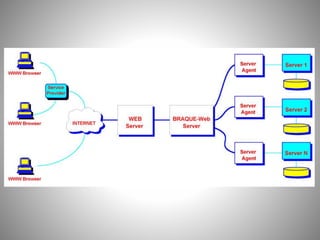
 Working of WWW
 Components of WWW
 Web page, Bookmarks
 Web directory, Web site
 Uniform Resource Locator(URL)
 Statistics
 Difference between Internet and WWW
 Speed issues
A way of exchanging information
between computers on the
INTERNET.
What is WWW
• The World Wide Web (WWW, W3) is an information
system of interlinked hypertext documents and
other digital resources that are accessed via the
internet.
• It has become known simply as the Web. Hypertext
documents are commonly called webpages, which
are primarily text documents formatted with the
Hypertext Markup Language (HTML).
• The network of pages of images, texts and sounds
on the internet which can be viewed using browser
software.
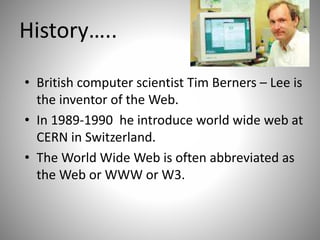
History…..
• British computer scientist Tim Berners – Lee is
the inventor of the Web.
• In 1989-1990 he introduce world wide web at
CERN in Switzerland.
• The World Wide Web is often abbreviated as
the Web or WWW or W3.
Continued…
• Berners-Lee, In his book Weaving the web he
developed three essential technologies:
– a system of globally unique identifiers for
resources on the Web and elsewhere, the
Universal Document Identifier (UDI), later known
as Uniform Resource Locator (URL) and Uniform
Resource Identifier (URI);
– the publishing language Hyper text Markup
Language (HTML);
– the Hypertext Transfer Protocol(HTTP).
HOW WWW WORKS??
• Four basic phases
– Connections
– Request
– Response
– Close
Working of WWW.
• First, the user can use the browser to connect
with the server. The browser works by using a
special protocol known as HTTP to request a
specially encoded text from the web server.
• The text written in HTML , which tells the
browser how to response on user’s request.
• Lastly, the user can close the window in the
front of him after his required working.
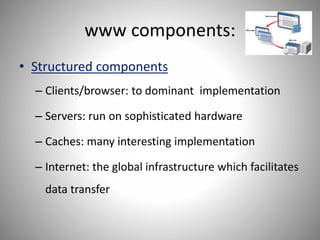
www components:
• Structured components
– Clients/browser: to dominant implementation
– Servers: run on sophisticated hardware
– Caches: many interesting implementation
– Internet: the global infrastructure which facilitates
data transfer
Components (cntd..)
• Semantic components
– Hyper Text Transfer Protocol (HTTP)
– Hyper Text Markup Language (HTML)
• Extensible Markup Language (XML)
– Uniform Resource Identifiers (URIs)
WEB PAGES
• Web page is a document on the Web. It is a
formatted text document that a Web browser
can display.
BOOKMARKS
• Internet Bookmarks are stored Uniform
Resource Locators (URLs) that can be
retrieved. In internet explorer bookmarks are
saved link and also called as Favorites.
WEB DIRECTORY
• A web directory specializes in linking to other
web sites. It is not a search engine and does
not display lists of web pages based on
keywords. Instead, it lists web sites by
category and subcategory.
WEB SITE
• Web site is one or more Web pages that
reside on a single server.
Web Site (cntd..)
• It is collection of web pages, images, videos
that is hosted on one or more web servers,
usually accessible via the internet.
• All publically accessible websites are seen
collectively as constituting the “World Wide
Web”.
• The pages of a websites can usually be
accessed from a common root URL called
homepage.
Types of Web sites
• Classification according to:
Style
Function
content
Classification of Web sites
• Style
I. Static website: A Static Website is one that has web
pages stored on the server in the same form as the user
will view them. It is primarily coded in HTML and it
simply presents pre-defined information to the user.
II. Dynamic Website: A Dynamic Website is one that
does not have web pages stored on the server in the
same form as the user will view them. Instead, the web
page content changes automatically
Classification of Web sites
• Functions
I. personal website
II. a commercial website
III. a government website
IV. a non-profit organization website
Classification of Web sites
• Contents
1. Personal web site
2. Flash web site
3. E-commerce web sites
4. Affiliate web sites
• Affiliate agencies
• Advertises (ebay)
• Consumers (yahoo)
5. Archive web site
6. Blog web site
7. Community web site
8. Development web site
9. Download web site
10.Employment web site
11.Game web site
12.Search engine web site
Uniform Resource Locator(URL)
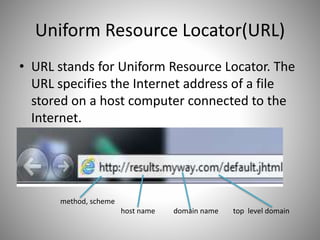
• URL stands for Uniform Resource Locator. The
URL specifies the Internet address of a file
stored on a host computer connected to the
Internet.
method, scheme
host name domain name top level domain
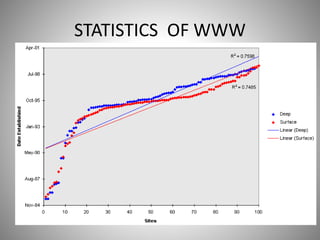
STATISTICS OF WWW
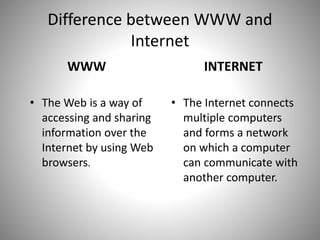
Difference between WWW and
Internet
WWW
• The Web is a way of
accessing and sharing
information over the
Internet by using Web
browsers.
INTERNET
• The Internet connects
multiple computers
and forms a network
on which a computer
can communicate with
another computer.
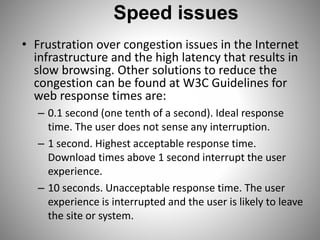
Speed issues
• Frustration over congestion issues in the Internet
infrastructure and the high latency that results in
slow browsing. Other solutions to reduce the
congestion can be found at W3C Guidelines for
web response times are:
– 0.1 second (one tenth of a second). Ideal response
time. The user does not sense any interruption.
– 1 second. Highest acceptable response time.
Download times above 1 second interrupt the user
experience.
– 10 seconds. Unacceptable response time. The user
experience is interrupted and the user is likely to leave
the site or system.
Conclusion
• WWW is a way of exchanging information. It
is a wider concept.
• Internet and WWW has different meaning.
• Whole world is connected to each other
through World Wide Web
• Establishment chart of WWW shows upward
trend.
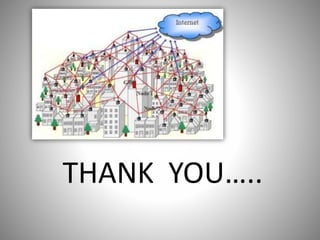
THANK YOU…..

world wide web

  • 1.
  • 2.
    THE INSTITUTE OFCHARTERED ACCOUNTANTS OF INDIA CERTIFICATE This is to certify that Miss : Tanvi wadekar WRO : 0479933 Has successfully completed the 100 hours of I.T.T Training and a project on “World Wide Web” Chairman C.A. Anand Zawar
  • 3.
    OBJECTIVES  What isWWW?  History  Working of WWW  Components of WWW  Web page, Bookmarks  Web directory, Web site  Uniform Resource Locator(URL)  Statistics  Difference between Internet and WWW  Speed issues
  • 4.
    A way ofexchanging information between computers on the INTERNET.
  • 5.
    What is WWW •The World Wide Web (WWW, W3) is an information system of interlinked hypertext documents and other digital resources that are accessed via the internet. • It has become known simply as the Web. Hypertext documents are commonly called webpages, which are primarily text documents formatted with the Hypertext Markup Language (HTML). • The network of pages of images, texts and sounds on the internet which can be viewed using browser software.
  • 6.
    History….. • British computerscientist Tim Berners – Lee is the inventor of the Web. • In 1989-1990 he introduce world wide web at CERN in Switzerland. • The World Wide Web is often abbreviated as the Web or WWW or W3.
  • 7.
    Continued… • Berners-Lee, Inhis book Weaving the web he developed three essential technologies: – a system of globally unique identifiers for resources on the Web and elsewhere, the Universal Document Identifier (UDI), later known as Uniform Resource Locator (URL) and Uniform Resource Identifier (URI); – the publishing language Hyper text Markup Language (HTML); – the Hypertext Transfer Protocol(HTTP).
  • 8.
    HOW WWW WORKS?? •Four basic phases – Connections – Request – Response – Close
  • 9.
    Working of WWW. •First, the user can use the browser to connect with the server. The browser works by using a special protocol known as HTTP to request a specially encoded text from the web server. • The text written in HTML , which tells the browser how to response on user’s request. • Lastly, the user can close the window in the front of him after his required working.
  • 11.
    www components: • Structuredcomponents – Clients/browser: to dominant implementation – Servers: run on sophisticated hardware – Caches: many interesting implementation – Internet: the global infrastructure which facilitates data transfer
  • 12.
    Components (cntd..) • Semanticcomponents – Hyper Text Transfer Protocol (HTTP) – Hyper Text Markup Language (HTML) • Extensible Markup Language (XML) – Uniform Resource Identifiers (URIs)
  • 13.
    WEB PAGES • Webpage is a document on the Web. It is a formatted text document that a Web browser can display. BOOKMARKS • Internet Bookmarks are stored Uniform Resource Locators (URLs) that can be retrieved. In internet explorer bookmarks are saved link and also called as Favorites.
  • 14.
    WEB DIRECTORY • Aweb directory specializes in linking to other web sites. It is not a search engine and does not display lists of web pages based on keywords. Instead, it lists web sites by category and subcategory. WEB SITE • Web site is one or more Web pages that reside on a single server.
  • 15.
    Web Site (cntd..) •It is collection of web pages, images, videos that is hosted on one or more web servers, usually accessible via the internet. • All publically accessible websites are seen collectively as constituting the “World Wide Web”. • The pages of a websites can usually be accessed from a common root URL called homepage.
  • 16.
    Types of Websites • Classification according to: Style Function content
  • 17.
    Classification of Websites • Style I. Static website: A Static Website is one that has web pages stored on the server in the same form as the user will view them. It is primarily coded in HTML and it simply presents pre-defined information to the user. II. Dynamic Website: A Dynamic Website is one that does not have web pages stored on the server in the same form as the user will view them. Instead, the web page content changes automatically
  • 18.
    Classification of Websites • Functions I. personal website II. a commercial website III. a government website IV. a non-profit organization website
  • 19.
    Classification of Websites • Contents 1. Personal web site 2. Flash web site 3. E-commerce web sites 4. Affiliate web sites • Affiliate agencies • Advertises (ebay) • Consumers (yahoo)
  • 20.
    5. Archive website 6. Blog web site 7. Community web site 8. Development web site 9. Download web site 10.Employment web site 11.Game web site 12.Search engine web site
  • 21.
    Uniform Resource Locator(URL) •URL stands for Uniform Resource Locator. The URL specifies the Internet address of a file stored on a host computer connected to the Internet. method, scheme host name domain name top level domain
  • 22.
  • 23.
    Difference between WWWand Internet WWW • The Web is a way of accessing and sharing information over the Internet by using Web browsers. INTERNET • The Internet connects multiple computers and forms a network on which a computer can communicate with another computer.
  • 24.
    Speed issues • Frustrationover congestion issues in the Internet infrastructure and the high latency that results in slow browsing. Other solutions to reduce the congestion can be found at W3C Guidelines for web response times are: – 0.1 second (one tenth of a second). Ideal response time. The user does not sense any interruption. – 1 second. Highest acceptable response time. Download times above 1 second interrupt the user experience. – 10 seconds. Unacceptable response time. The user experience is interrupted and the user is likely to leave the site or system.
  • 25.
    Conclusion • WWW isa way of exchanging information. It is a wider concept. • Internet and WWW has different meaning. • Whole world is connected to each other through World Wide Web • Establishment chart of WWW shows upward trend.
  • 26.