A collaboration of:
Work Clearance Management
Operational Switching Achieves Greater
Safety and Best Practice Compliance
Wendy Underhill
State of California – Department of Water Resources
●Who Are We?
●SAP at DWR
●What is Operational Switching?
●WCM at DWR
●Key points to Take Home
●Questions
What I’ll Cover
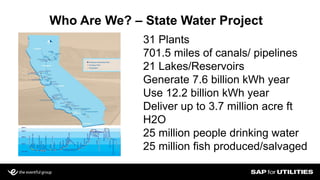
Who Are We? – State Water Project
31 Plants
701.5 miles of canals/ pipelines
21 Lakes/Reservoirs
Generate 7.6 billion kWh year
Use 12.2 billion kWh year
Deliver up to 3.7 million acre ft
H2O
25 million people drinking water
25 million fish produced/salvaged
Slide 4
• 1999 First implementation of HR, MM and basic PM
orders on 4.5B
• 2000 Full implementation of PM, FI, FM, CO, PP and
BW
• 2003 Added PM>Impress>Microsoft Project Interface
• 2006 Migration to ECC 6.0 Public Sector (complete PM
data migration)
– added Fleet Management and Work Clearance
Management
– configured custom Operational Logging/Unit Status
section
• 2012 Went live with WCM Operational Switching and
Interface to new Fueling system.
SAP History at DWR
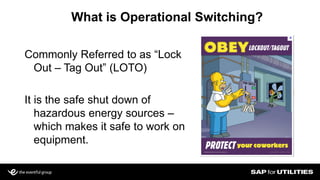
What is Operational Switching?
Commonly Referred to as “Lock
Out – Tag Out” (LOTO)
It is the safe shut down of
hazardous energy sources –
which makes it safe to work on
equipment.
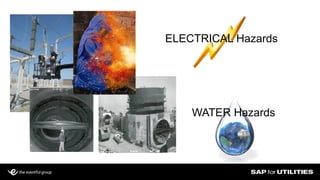
ELECTRICAL Hazards
WATER Hazards
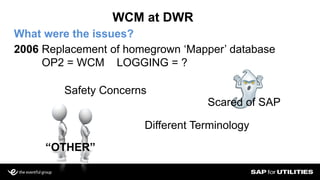
WCM at DWR
What were the issues?
2006 Replacement of homegrown ‘Mapper’ database
OP2 = WCM LOGGING = ?
Scared of SAP
“OTHER”
Safety Concerns
Different Terminology
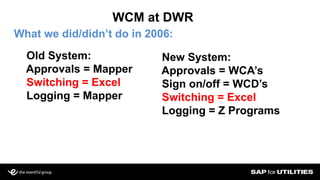
WCM at DWR
What we did/didn’t do in 2006:
Old System:
Approvals = Mapper
Switching = Excel
Logging = Mapper
New System:
Approvals = WCA’s
Sign on/off = WCD’s
Switching = Excel
Logging = Z Programs
Slide 9
Icon connections
Multi or Single line
ALV Functionality
Traffic Light Status
Work Clearance Application and Document Reporting
Slide 10
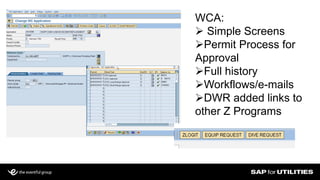
WCA:
 Simple Screens
Permit Process for
Approval
Full history
Workflows/e-mails
DWR added links to
other Z Programs
Slide 11
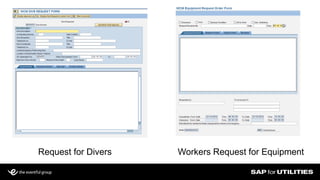
Request for Divers Workers Request for Equipment
Slide 12
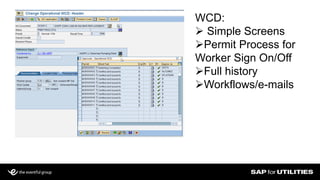
WCD:
 Simple Screens
Permit Process for
Worker Sign On/Off
Full history
Workflows/e-mails
Slide 13
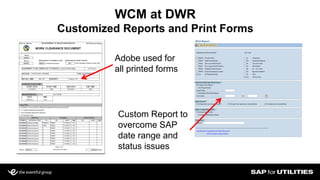
WCM at DWR
Customized Reports and Print Forms
Adobe used for
all printed forms
Custom Report to
overcome SAP
date range and
status issues
Slide 14
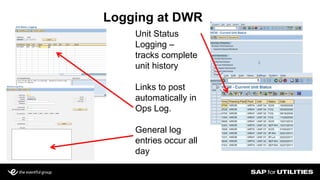
Logging at DWR
Unit Status
Logging –
tracks complete
unit history
Links to post
automatically in
Ops Log.
General log
entries occur all
day
Slide 15
Operational Log
 Midnight Reporting from SAP
Portal/Adobe Interactive Forms
All Unit Status Entries
All Operational Log Entries
List of Active Clearances (WCD’s)
List of Current Unit Statuses
WCA’s and WCD’s
Operations staff GUI mapped to
client with no time out
This is our LEGAL document
Slide 16
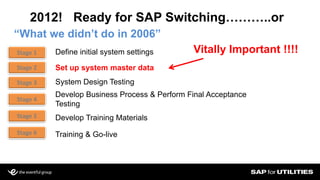
2012! Ready for SAP Switching………..or
“What we didn’t do in 2006”
Stage 1
Stage 2
Stage 3
Stage 4
Stage 5
Stage 6
Define initial system settings
Set up system master data
System Design Testing
Develop Business Process & Perform Final Acceptance
Testing
Develop Training Materials
Training & Go-live
Vitally Important !!!!
Slide 17
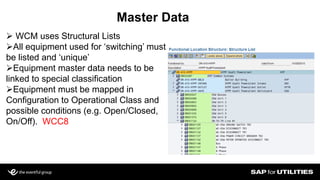
Master Data
 WCM uses Structural Lists
All equipment used for ‘switching’ must
be listed and ‘unique’
Equipment master data needs to be
linked to special classification
Equipment must be mapped in
Configuration to Operational Class and
possible conditions (e.g. Open/Closed,
On/Off). WCC8
Slide 18
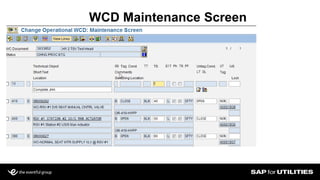
WCD Maintenance Screen
Slide 19
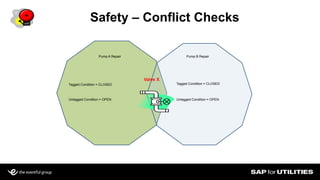
Safety – Conflict Checks
Pump A Repair Pump B Repair
Tagged Condition = CLOSED Tagged Condition = CLOSED
Untagged Condition = OPEN Untagged Condition = OPEN
Valve X
Slide 20
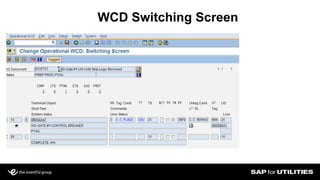
WCD Switching Screen
Slide 21
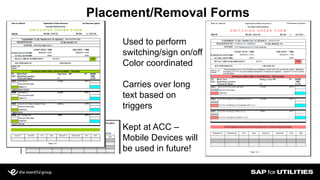
Placement/Removal Forms
Used to perform
switching/sign on/off
Color coordinated
Carries over long
text based on
triggers
Kept at ACC –
Mobile Devices will
be used in future!
.
Slide 22
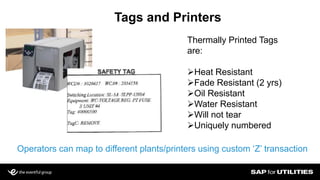
Tags and Printers
Thermally Printed Tags
are:
Heat Resistant
Fade Resistant (2 yrs)
Oil Resistant
Water Resistant
Will not tear
Uniquely numbered
Operators can map to different plants/printers using custom ‘Z’ transaction
Slide 23
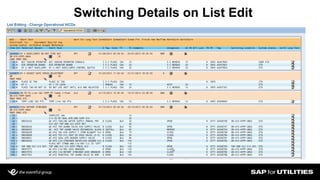
Switching Details on List Edit
Slide 24
Key Points
o Since October – less than 5 issues with system statewide (all user error)
and no Operational near miss or miss issues due to switching!
oWCM Can be implemented in stages and/or Plant by Plant
oPlants can be configured differently
oSystem can be customized – lots of user exits
oProject relies on master data – Dev/QA must be refreshed from Prod
oMust be tested extensively in development
Slide 25
Key Points
oMaster Data needs to be updated in Production before testing in Dev
oMaster data has to be mapped in SPRO separately in each client
oTerminology is learned in a few days
o2 Day Training Sessions with 6 month access to sandbox
oEnhancement Packs add ability to customize screens
oWould I do it over again – YOU BET – ONLY MUCH SOONER!
Slide 26
QUESTIONS
A collaboration of:
Wendy Underhill
State of California – Department of Water Resources
wunderhi@water.ca.gov

Work clearance management operational switching

  • 1.
    A collaboration of: WorkClearance Management Operational Switching Achieves Greater Safety and Best Practice Compliance Wendy Underhill State of California – Department of Water Resources
  • 2.
    ●Who Are We? ●SAPat DWR ●What is Operational Switching? ●WCM at DWR ●Key points to Take Home ●Questions What I’ll Cover
  • 3.
    Who Are We?– State Water Project 31 Plants 701.5 miles of canals/ pipelines 21 Lakes/Reservoirs Generate 7.6 billion kWh year Use 12.2 billion kWh year Deliver up to 3.7 million acre ft H2O 25 million people drinking water 25 million fish produced/salvaged
  • 4.
    Slide 4 • 1999First implementation of HR, MM and basic PM orders on 4.5B • 2000 Full implementation of PM, FI, FM, CO, PP and BW • 2003 Added PM>Impress>Microsoft Project Interface • 2006 Migration to ECC 6.0 Public Sector (complete PM data migration) – added Fleet Management and Work Clearance Management – configured custom Operational Logging/Unit Status section • 2012 Went live with WCM Operational Switching and Interface to new Fueling system. SAP History at DWR
  • 5.
    What is OperationalSwitching? Commonly Referred to as “Lock Out – Tag Out” (LOTO) It is the safe shut down of hazardous energy sources – which makes it safe to work on equipment.
  • 6.
  • 7.
    WCM at DWR Whatwere the issues? 2006 Replacement of homegrown ‘Mapper’ database OP2 = WCM LOGGING = ? Scared of SAP “OTHER” Safety Concerns Different Terminology
  • 8.
    WCM at DWR Whatwe did/didn’t do in 2006: Old System: Approvals = Mapper Switching = Excel Logging = Mapper New System: Approvals = WCA’s Sign on/off = WCD’s Switching = Excel Logging = Z Programs
  • 9.
    Slide 9 Icon connections Multior Single line ALV Functionality Traffic Light Status Work Clearance Application and Document Reporting
  • 10.
    Slide 10 WCA:  SimpleScreens Permit Process for Approval Full history Workflows/e-mails DWR added links to other Z Programs
  • 11.
    Slide 11 Request forDivers Workers Request for Equipment
  • 12.
    Slide 12 WCD:  SimpleScreens Permit Process for Worker Sign On/Off Full history Workflows/e-mails
  • 13.
    Slide 13 WCM atDWR Customized Reports and Print Forms Adobe used for all printed forms Custom Report to overcome SAP date range and status issues
  • 14.
    Slide 14 Logging atDWR Unit Status Logging – tracks complete unit history Links to post automatically in Ops Log. General log entries occur all day
  • 15.
    Slide 15 Operational Log Midnight Reporting from SAP Portal/Adobe Interactive Forms All Unit Status Entries All Operational Log Entries List of Active Clearances (WCD’s) List of Current Unit Statuses WCA’s and WCD’s Operations staff GUI mapped to client with no time out This is our LEGAL document
  • 16.
    Slide 16 2012! Readyfor SAP Switching………..or “What we didn’t do in 2006” Stage 1 Stage 2 Stage 3 Stage 4 Stage 5 Stage 6 Define initial system settings Set up system master data System Design Testing Develop Business Process & Perform Final Acceptance Testing Develop Training Materials Training & Go-live Vitally Important !!!!
  • 17.
    Slide 17 Master Data WCM uses Structural Lists All equipment used for ‘switching’ must be listed and ‘unique’ Equipment master data needs to be linked to special classification Equipment must be mapped in Configuration to Operational Class and possible conditions (e.g. Open/Closed, On/Off). WCC8
  • 18.
  • 19.
    Slide 19 Safety –Conflict Checks Pump A Repair Pump B Repair Tagged Condition = CLOSED Tagged Condition = CLOSED Untagged Condition = OPEN Untagged Condition = OPEN Valve X
  • 20.
  • 21.
    Slide 21 Placement/Removal Forms Usedto perform switching/sign on/off Color coordinated Carries over long text based on triggers Kept at ACC – Mobile Devices will be used in future! .
  • 22.
    Slide 22 Tags andPrinters Thermally Printed Tags are: Heat Resistant Fade Resistant (2 yrs) Oil Resistant Water Resistant Will not tear Uniquely numbered Operators can map to different plants/printers using custom ‘Z’ transaction
  • 23.
  • 24.
    Slide 24 Key Points oSince October – less than 5 issues with system statewide (all user error) and no Operational near miss or miss issues due to switching! oWCM Can be implemented in stages and/or Plant by Plant oPlants can be configured differently oSystem can be customized – lots of user exits oProject relies on master data – Dev/QA must be refreshed from Prod oMust be tested extensively in development
  • 25.
    Slide 25 Key Points oMasterData needs to be updated in Production before testing in Dev oMaster data has to be mapped in SPRO separately in each client oTerminology is learned in a few days o2 Day Training Sessions with 6 month access to sandbox oEnhancement Packs add ability to customize screens oWould I do it over again – YOU BET – ONLY MUCH SOONER!
  • 26.
  • 27.
    A collaboration of: WendyUnderhill State of California – Department of Water Resources wunderhi@water.ca.gov