
Ware House Management System
What is a WMS?
An IT and management system for storage centers, which is designed to
solve the physical and document management of the flow of goods, from their
entry in the warehouse until their final exit. The whole process must be based
on continuous planning, and provide global tracking of activities and stock
control in real time.
WMS: Warehouse Management System
LEVEL 2: Radiofrequency Management
WAREHOUSE MANAGEMENT SYSTEM
 Operations performed in a warehouse

 Warehouse management tools: WMS
 Choice of WMS

 Implementation of a WMS
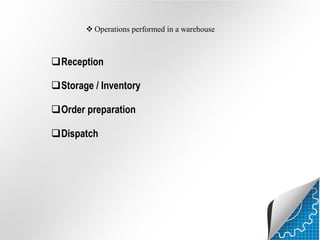
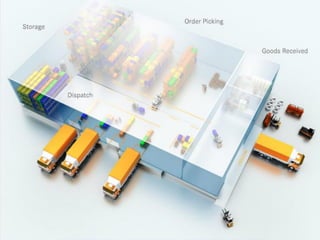
 Operations performed in a warehouse

Reception
Storage / Inventory
Order preparation

Dispatch
Reception



Registration of vehicle entry.
Instruction to unload vehicle.




Opening and closing gates.
Checking documents.







Unloading goods.
Labeling materials, products and pallets.
Palletising and consolidating.
Signing delivery documents.
Entering material received in the information system
Storage



Obtaining instructions on location.
Moving to location and finding positions.




Transporting and organising pallets.
Storing material or products in their locations.







Consolidating incomplete pallets.
Obtaining restocking instructions.
Replenishing picking area.
Reporting and eliminating damaged products.
Registering the locations used.
Preparation of orders










Collecting picking documents.
Adapting equipment for transport.
Locating the first picking position.
Checking and collecting the correct quantity of the product.
Moving to the next picking positions.
Correcting anomalies in goods.
Revising variations in stock.
Notifying discrepancies and/or damage to products.





Moving to areas of classification, consolidation, packaging and dispatch.

Notifying replenishment needs.

Completing and transmitting documents.
Dispatch


Preparing documents.




Clients details
Labeling dispatches.




Confirming loads and documents.
Loading the vehicle by order.





Permitting the movement of the vehicle.
Opening and closing gates.
Documenting dispatch
WAREHOUSE MANAGEMENT FEATURES
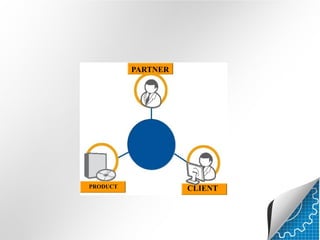
PARTNER

PRODUCT

CLIENT
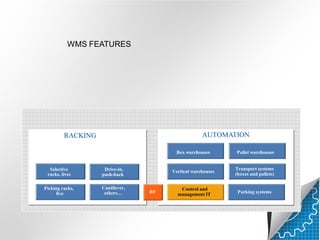
WMS FEATURES

AUTOMATION

RACKING

Box warehouses

Selective
racks, lives
Picking racks,
live

Cantilever,
others…

Vertical warehouses

Drive-in,
push-back

RF

Pallet warehouses
Transport systems
(boxes and pallets)

Control and
management IT

Parking systems
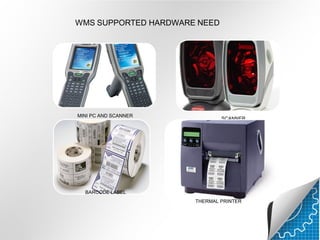
WMS SUPPORTED HARDWARE NEED

MINI PC AND SCANNER

SCANNER

BARCODE LABEL
THERMAL PRINTER
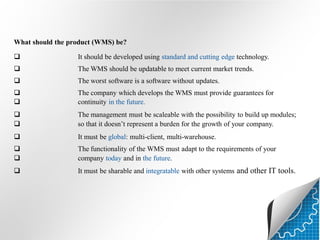
What should the product (WMS) be?


It should be developed using standard and cutting edge technology.



The WMS should be updatable to meet current market trends.



The worst software is a software without updates.




The company which develops the WMS must provide guarantees for
continuity in the future.




The management must be scaleable with the possibility to build up modules;
so that it doesn’t represent a burden for the growth of your company.



It must be global: multi-client, multi-warehouse.




The functionality of the WMS must adapt to the requirements of your
company today and in the future.



It must be sharable and integratable with other systems and other IT tools.
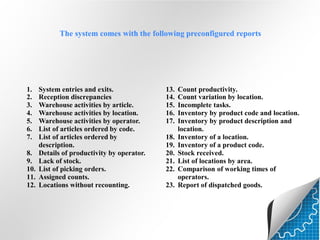
The system comes with the following preconfigured reports

1.
2.
3.
4.
5.
6.
7.
8.
9.
10.
11.
12.

System entries and exits.
Reception discrepancies
Warehouse activities by article.
Warehouse activities by location.
Warehouse activities by operator.
List of articles ordered by code.
List of articles ordered by
description.
Details of productivity by operator.
Lack of stock.
List of picking orders.
Assigned counts.
Locations without recounting.

13.
14.
15.
16.
17.
18.
19.
20.
21.
22.
23.

Count productivity.
Count variation by location.
Incomplete tasks.
Inventory by product code and location.
Inventory by product description and
location.
Inventory of a location.
Inventory of a product code.
Stock received.
List of locations by area.
Comparison of working times of
operators.
Report of dispatched goods.
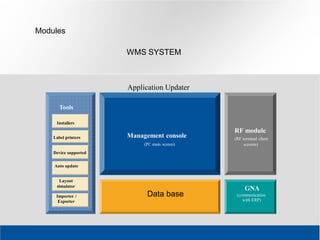
Modules
WMS SYSTEM

Application Updater
Tools
Installers
Label printers

Management console
(PC main screen)

RF module
(RF terminal client
screens)

Device supported
Auto update
Layout
simulator
Importer /
Exporter

Data base

GNA
(communication
with ERP)
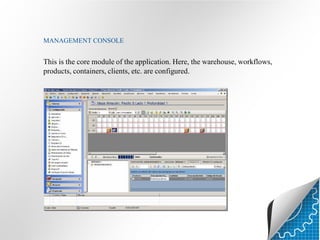
MANAGEMENT CONSOLE

This is the core module of the application. Here, the warehouse, workflows,
products, containers, clients, etc. are configured.
RADIOFREQUENCY MODULE

This is the RF module of the application. It contains all the functionalities
needed by the operator to carry out any job inside the warehouse.
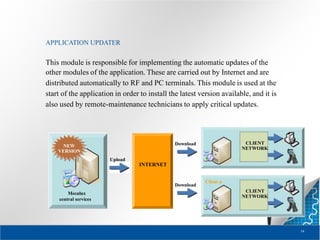
APPLICATION UPDATER

This module is responsible for implementing the automatic updates of the
other modules of the application. These are carried out by Internet and are
distributed automatically to RF and PC terminals. This module is used at the
start of the application in order to install the latest version available, and it is
also used by remote-maintenance technicians to apply critical updates.

Client 1
CLIENT
NETWORK

Download

NEW
VERSION
Upload

INTERNET

Download

Mecalux
central services

Client n

CLIENT
NETWORK

54
Head office (Spain):
+34 932 616 913

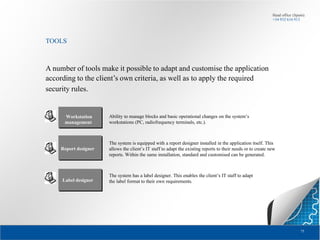
TOOLS

A number of tools make it possible to adapt and customise the application
according to the client’s own criteria, as well as to apply the required
security rules.

Workstation
management

Report designer

Label designer

Ability to manage blocks and basic operational changes on the system’s
workstations (PC, radiofrequency terminals, etc.).

The system is equipped with a report designer installed in the application itself. This
allows the client’s IT staff to adapt the existing reports to their needs or to create new
reports. Within the same installation, standard and customised can be generated.

The system has a label designer. This enables the client’s IT staff to adapt
the label format to their own requirements.

75
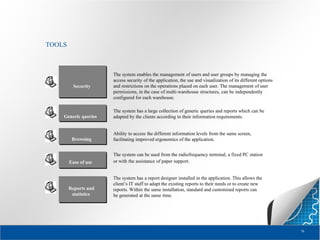
TOOLS

Security

Generic queries

Browsing

The system enables the management of users and user groups by managing the
access security of the application, the use and visualization of its different options
and restrictions on the operations placed on each user. The management of user
permissions, in the case of multi-warehouse structures, can be independently
configured for each warehouse.
The system has a large collection of generic queries and reports which can be
adapted by the clients according to their information requirements.

Ability to access the different information levels from the same screen,
facilitating improved ergonomics of the application.

Ease of use

The system can be used from the radiofrequency terminal, a fixed PC station
or with the assistance of paper support.

Reports and
statistics

The system has a report designer installed in the application. This allows the
client’s IT staff to adapt the existing reports to their needs or to create new
reports. Within the same installation, standard and customised reports can
be generated at the same time.

76
WHY USE A WMS?

It knows where the stock is at all times.
It optimises the work involved in searching for locations and preparing
orders.
It performs statistics on the work in the warehouse (order reception,
location, preparation times, etc.).
Information can be obtained instantaneously on products, containers,
locations and the tasks being performed by the operator.
Tasks can be performed in other information systems.
THIS INVOLVES

Higher efficiency in warehouse work.
Increased control over warehouse stock.
Increased control over warehouse staff.
Staff can rotate around areas without problems.
94
THANK YOU

Ware house management software presentation

  • 1.
  • 2.
    What is aWMS? An IT and management system for storage centers, which is designed to solve the physical and document management of the flow of goods, from their entry in the warehouse until their final exit. The whole process must be based on continuous planning, and provide global tracking of activities and stock control in real time.
  • 3.
    WMS: Warehouse ManagementSystem LEVEL 2: Radiofrequency Management
  • 4.
    WAREHOUSE MANAGEMENT SYSTEM Operations performed in a warehouse  Warehouse management tools: WMS  Choice of WMS  Implementation of a WMS
  • 5.
     Operations performedin a warehouse Reception Storage / Inventory Order preparation Dispatch
  • 7.
    Reception   Registration of vehicleentry. Instruction to unload vehicle.   Opening and closing gates. Checking documents.      Unloading goods. Labeling materials, products and pallets. Palletising and consolidating. Signing delivery documents. Entering material received in the information system
  • 9.
    Storage   Obtaining instructions onlocation. Moving to location and finding positions.   Transporting and organising pallets. Storing material or products in their locations.      Consolidating incomplete pallets. Obtaining restocking instructions. Replenishing picking area. Reporting and eliminating damaged products. Registering the locations used.
  • 10.
    Preparation of orders         Collectingpicking documents. Adapting equipment for transport. Locating the first picking position. Checking and collecting the correct quantity of the product. Moving to the next picking positions. Correcting anomalies in goods. Revising variations in stock. Notifying discrepancies and/or damage to products.    Moving to areas of classification, consolidation, packaging and dispatch. Notifying replenishment needs. Completing and transmitting documents.
  • 11.
    Dispatch  Preparing documents.   Clients details Labelingdispatches.   Confirming loads and documents. Loading the vehicle by order.    Permitting the movement of the vehicle. Opening and closing gates. Documenting dispatch
  • 12.
  • 13.
  • 14.
    WMS FEATURES AUTOMATION RACKING Box warehouses Selective racks,lives Picking racks, live Cantilever, others… Vertical warehouses Drive-in, push-back RF Pallet warehouses Transport systems (boxes and pallets) Control and management IT Parking systems
  • 15.
    WMS SUPPORTED HARDWARENEED MINI PC AND SCANNER SCANNER BARCODE LABEL THERMAL PRINTER
  • 16.
    What should theproduct (WMS) be?  It should be developed using standard and cutting edge technology.  The WMS should be updatable to meet current market trends.  The worst software is a software without updates.   The company which develops the WMS must provide guarantees for continuity in the future.   The management must be scaleable with the possibility to build up modules; so that it doesn’t represent a burden for the growth of your company.  It must be global: multi-client, multi-warehouse.   The functionality of the WMS must adapt to the requirements of your company today and in the future.  It must be sharable and integratable with other systems and other IT tools.
  • 17.
    The system comeswith the following preconfigured reports 1. 2. 3. 4. 5. 6. 7. 8. 9. 10. 11. 12. System entries and exits. Reception discrepancies Warehouse activities by article. Warehouse activities by location. Warehouse activities by operator. List of articles ordered by code. List of articles ordered by description. Details of productivity by operator. Lack of stock. List of picking orders. Assigned counts. Locations without recounting. 13. 14. 15. 16. 17. 18. 19. 20. 21. 22. 23. Count productivity. Count variation by location. Incomplete tasks. Inventory by product code and location. Inventory by product description and location. Inventory of a location. Inventory of a product code. Stock received. List of locations by area. Comparison of working times of operators. Report of dispatched goods.
  • 18.
    Modules WMS SYSTEM Application Updater Tools Installers Labelprinters Management console (PC main screen) RF module (RF terminal client screens) Device supported Auto update Layout simulator Importer / Exporter Data base GNA (communication with ERP)
  • 19.
    MANAGEMENT CONSOLE This isthe core module of the application. Here, the warehouse, workflows, products, containers, clients, etc. are configured.
  • 20.
    RADIOFREQUENCY MODULE This isthe RF module of the application. It contains all the functionalities needed by the operator to carry out any job inside the warehouse.
  • 21.
    APPLICATION UPDATER This moduleis responsible for implementing the automatic updates of the other modules of the application. These are carried out by Internet and are distributed automatically to RF and PC terminals. This module is used at the start of the application in order to install the latest version available, and it is also used by remote-maintenance technicians to apply critical updates. Client 1 CLIENT NETWORK Download NEW VERSION Upload INTERNET Download Mecalux central services Client n CLIENT NETWORK 54
  • 22.
    Head office (Spain): +34932 616 913 TOOLS A number of tools make it possible to adapt and customise the application according to the client’s own criteria, as well as to apply the required security rules. Workstation management Report designer Label designer Ability to manage blocks and basic operational changes on the system’s workstations (PC, radiofrequency terminals, etc.). The system is equipped with a report designer installed in the application itself. This allows the client’s IT staff to adapt the existing reports to their needs or to create new reports. Within the same installation, standard and customised can be generated. The system has a label designer. This enables the client’s IT staff to adapt the label format to their own requirements. 75
  • 23.
    TOOLS Security Generic queries Browsing The systemenables the management of users and user groups by managing the access security of the application, the use and visualization of its different options and restrictions on the operations placed on each user. The management of user permissions, in the case of multi-warehouse structures, can be independently configured for each warehouse. The system has a large collection of generic queries and reports which can be adapted by the clients according to their information requirements. Ability to access the different information levels from the same screen, facilitating improved ergonomics of the application. Ease of use The system can be used from the radiofrequency terminal, a fixed PC station or with the assistance of paper support. Reports and statistics The system has a report designer installed in the application. This allows the client’s IT staff to adapt the existing reports to their needs or to create new reports. Within the same installation, standard and customised reports can be generated at the same time. 76
  • 24.
    WHY USE AWMS? It knows where the stock is at all times. It optimises the work involved in searching for locations and preparing orders. It performs statistics on the work in the warehouse (order reception, location, preparation times, etc.). Information can be obtained instantaneously on products, containers, locations and the tasks being performed by the operator. Tasks can be performed in other information systems. THIS INVOLVES Higher efficiency in warehouse work. Increased control over warehouse stock. Increased control over warehouse staff. Staff can rotate around areas without problems. 94
  • 25.