




#wpewebinar
Improve Your Workflows via SSH Gateway
Jose De La Rosa and Scott Amerman, WP Engine
April 18, 2018
Developers, Be a Bada$$ with WP-CLI
#wpewebinar
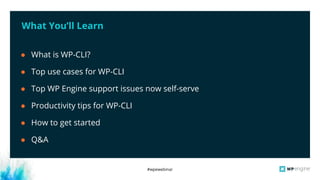
What You’ll Learn
● What is WP-CLI?
● Top use cases for WP-CLI
● Top WP Engine support issues now self-serve
● Productivity tips for WP-CLI
● How to get started
● Q&A
#wpewebinar
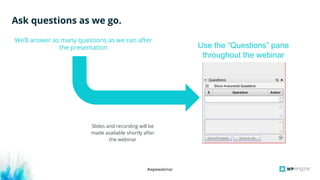
Ask questions as we go.
We’ll answer as many questions as we can after
the presentation
Slides and recording will be
made available shortly after
the webinar
Use the “Questions” pane
throughout the webinar
#wpewebinar
Level 2 Customer Support, Sr.
WP Engine
Jose De La Rosa
● Plays the trumpet
● Studied biochemistry in college
● Big fan of cold brew coffee
Sr. Product Marketing Manager
WP Engine
Scott Amerman
● Minor villain in movie Spare Parts
● Worked in neuroprosthetics
● Brews hard cider
#wpewebinar
Poll: Have you ever used
WP-CLI?
#wpewebinar
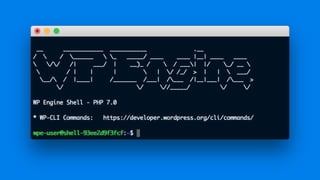
What is WP-CLI?
#wpewebinar
Available tools
#wpewebinar
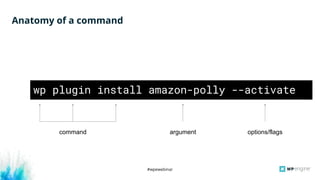
Anatomy of a command
wp plugin install amazon-polly --activate
argument options/flagscommand
#wpewebinar
Top Use Cases
#wpewebinar
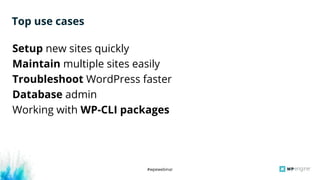
Setup new sites quickly
Maintain multiple sites easily
Troubleshoot WordPress faster
Database admin
Working with WP-CLI packages
Top use cases
#wpewebinar
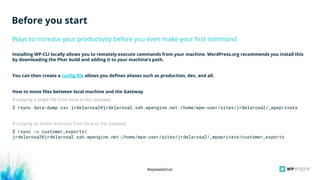
Installing WP-CLI locally allows you to remotely execute commands from your machine. WordPress.org recommends you install this
by downloading the Phar build and adding it to your machine’s path.
You can then create a config file allows you defines aliases such as production, dev, and all.
How to move files between local machine and the Gateway
# copying a single file from local to the Gateway
$ rsync data-dump.csv jrdelarosa2@jrdelarosa2.ssh.wpengine.net:/home/wpe-user/sites/jrdelarosa2/_wpeprivate
# copying an entire directory from local to the Gateway
$ rsync -v customer_exports/
jrdelarosa2@jrdelarosa2.ssh.wpengine.net:/home/wpe-user/sites/jrdelarosa2/_wpeprivate/customer_exports
Ways to increase your productivity before you even make your first command
Before you start
#wpewebinar
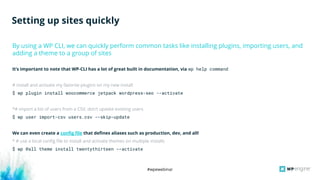
It’s important to note that WP-CLI has a lot of great built in documentation, via wp help command
# install and activate my favorite plugins on my new install
$ wp plugin install woocommerce jetpack wordpress-seo --activate
*# import a list of users from a CSV, don’t update existing users
$ wp user import-csv users.csv --skip-update
We can even create a config file that defines aliases such as production, dev, and all!
* # use a local config file to install and activate themes on multiple installs
$ wp @all theme install twentythirteen --activate
By using a WP CLI, we can quickly perform common tasks like installing plugins, importing users, and
adding a theme to a group of sites
Setting up sites quickly
#wpewebinar
Poll: How many sites are you
managing at any point in
time?
#wpewebinar
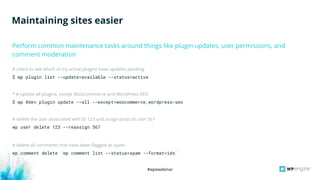
# check to see which of my active plugins have updates pending
$ wp plugin list --update=available --status=active
* # update all plugins, except WooCommerce and WordPress SEO
$ wp @dev plugin update --all --except=woocommerce,wordpress-seo
# delete the user associated with ID 123 and assign posts to user 567
wp user delete 123 --reassign 567
# delete all comments that have been flagged as spam
wp comment delete `wp comment list --status=spam --format=ids`
Maintaining sites easier
Perform common maintenance tasks around things like plugin updates, user permissions, and
comment moderation
#wpewebinar
Use WordPress debug statements to generate and actively
monitor a log file
Luckily WordPress has some built in debug tools that facilitate troubleshooting. The following two statements, when added to your
wp-config.php will generate a useful debug log!
define( 'WP_DEBUG', true );
define('WP_DEBUG_LOG', true);
Now, as errors come in they will be added to the debug.log file which can be found in your wp-content directory. You would expect to
see something like:
[13-Apr-2018 18:34:23 UTC] PHP Warning: include(fake.php): failed to open stream: No such file or directory
in /nas/content/live/jrdelarosa2/index.php on line 18
[13-Apr-2018 18:34:23 UTC] PHP Warning: include(): Failed opening 'fake.php' for inclusion
(include_path='.:/usr/share/pear/php:/usr/share/php:/usr/share/pear') in
/nas/content/live/jrdelarosa2/index.php on line 18
Troubleshooting sites
#wpewebinar
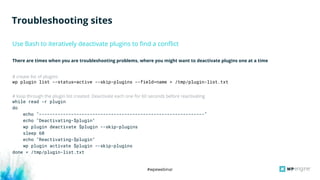
There are times when you are troubleshooting problems, where you might want to deactivate plugins one at a time
# create list of plugins
wp plugin list --status=active --skip-plugins --field=name > /tmp/plugin-list.txt
# loop through the plugin list created. Deactivate each one for 60 seconds before reactivating
while read -r plugin
do
echo "--------------------------------------------------------------"
echo "Deactivating-$plugin"
wp plugin deactivate $plugin --skip-plugins
sleep 60
echo "Reactivating-$plugin"
wp plugin activate $plugin --skip-plugins
done < /tmp/plugin-list.txt
Use Bash to iteratively deactivate plugins to find a conflict
Troubleshooting sites
#wpewebinar
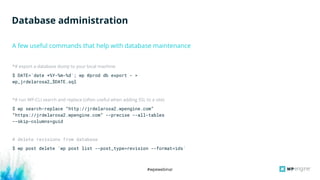
*# export a database dump to your local machine
$ DATE=`date +%Y-%m-%d`; wp @prod db export - >
wp_jrdelarosa2_$DATE.sql
*# run WP-CLI search and replace (often useful when adding SSL to a site)
$ wp search-replace “http://jrdelarosa2.wpengine.com”
“https://jrdelarosa2.wpengine.com” --precise --all-tables
--skip-columns=guid
# delete revisions from database
$ wp post delete `wp post list --post_type=revision --format=ids`
A few useful commands that help with database maintenance
Database administration
#wpewebinar
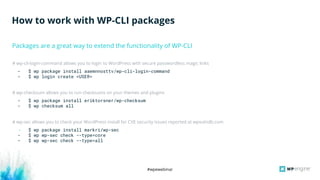
# wp-cli-login-command allows you to login to WordPress with secure passwordless magic links
- $ wp package install aaemnnosttv/wp-cli-login-command
- $ wp login create <USER>
# wp-checksum allows you to run checksums on your themes and plugins
- $ wp package install eriktorsner/wp-checksum
- $ wp checksum all
# wp-sec allows you to check your WordPress install for CVE security issues reported at wpvulndb.com
- $ wp package install markri/wp-sec
- $ wp wp-sec check --type=core
- $ wp wp-sec check --type=all
How to work with WP-CLI packages
Packages are a great way to extend the functionality of WP-CLI
#wpewebinar
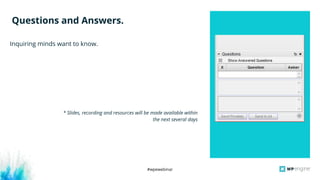
Inquiring minds want to know.
Questions and Answers.
* Slides, recording and resources will be made available within
the next several days
#wpewebinar
YAML Config File
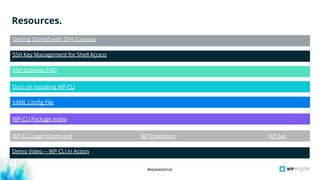
Resources.
Getting Started with SSH Gateway
SSH Key Management for Shell Access
SSH Gateway FAQ
Docs on Installing WP-CLI
WP-CLI Package Index
WP-CLI Login Command WP Checksum WP Sec
Demo Video -- WP-CLI in Action
#wpewebinar
Next Up.
Register Now:
http://wpeng.in/
pretty
Wednesday, May 2
11:00 a.m. CDT,
12:00 p.m. EDT,
9:00 a.m. PDT,
16:00 UTC/GMT
#wpewebinar
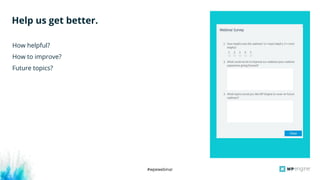
How helpful?
How to improve?
Future topics?
Help us get better.
How helpful?
How to improve?
Future topics?
#wpewebinar
Thank You.

Developers, Be a Bada$$ with WP-CLI

  • 1.
    #wpewebinar Improve Your Workflowsvia SSH Gateway Jose De La Rosa and Scott Amerman, WP Engine April 18, 2018 Developers, Be a Bada$$ with WP-CLI
  • 2.
    #wpewebinar What You’ll Learn ●What is WP-CLI? ● Top use cases for WP-CLI ● Top WP Engine support issues now self-serve ● Productivity tips for WP-CLI ● How to get started ● Q&A
  • 3.
    #wpewebinar Ask questions aswe go. We’ll answer as many questions as we can after the presentation Slides and recording will be made available shortly after the webinar Use the “Questions” pane throughout the webinar
  • 4.
    #wpewebinar Level 2 CustomerSupport, Sr. WP Engine Jose De La Rosa ● Plays the trumpet ● Studied biochemistry in college ● Big fan of cold brew coffee Sr. Product Marketing Manager WP Engine Scott Amerman ● Minor villain in movie Spare Parts ● Worked in neuroprosthetics ● Brews hard cider
  • 5.
    #wpewebinar Poll: Have youever used WP-CLI?
  • 6.
  • 10.
  • 11.
    #wpewebinar Anatomy of acommand wp plugin install amazon-polly --activate argument options/flagscommand
  • 12.
  • 13.
    #wpewebinar Setup new sitesquickly Maintain multiple sites easily Troubleshoot WordPress faster Database admin Working with WP-CLI packages Top use cases
  • 14.
    #wpewebinar Installing WP-CLI locallyallows you to remotely execute commands from your machine. WordPress.org recommends you install this by downloading the Phar build and adding it to your machine’s path. You can then create a config file allows you defines aliases such as production, dev, and all. How to move files between local machine and the Gateway # copying a single file from local to the Gateway $ rsync data-dump.csv jrdelarosa2@jrdelarosa2.ssh.wpengine.net:/home/wpe-user/sites/jrdelarosa2/_wpeprivate # copying an entire directory from local to the Gateway $ rsync -v customer_exports/ jrdelarosa2@jrdelarosa2.ssh.wpengine.net:/home/wpe-user/sites/jrdelarosa2/_wpeprivate/customer_exports Ways to increase your productivity before you even make your first command Before you start
  • 15.
    #wpewebinar It’s important tonote that WP-CLI has a lot of great built in documentation, via wp help command # install and activate my favorite plugins on my new install $ wp plugin install woocommerce jetpack wordpress-seo --activate *# import a list of users from a CSV, don’t update existing users $ wp user import-csv users.csv --skip-update We can even create a config file that defines aliases such as production, dev, and all! * # use a local config file to install and activate themes on multiple installs $ wp @all theme install twentythirteen --activate By using a WP CLI, we can quickly perform common tasks like installing plugins, importing users, and adding a theme to a group of sites Setting up sites quickly
  • 16.
    #wpewebinar Poll: How manysites are you managing at any point in time?
  • 17.
    #wpewebinar # check tosee which of my active plugins have updates pending $ wp plugin list --update=available --status=active * # update all plugins, except WooCommerce and WordPress SEO $ wp @dev plugin update --all --except=woocommerce,wordpress-seo # delete the user associated with ID 123 and assign posts to user 567 wp user delete 123 --reassign 567 # delete all comments that have been flagged as spam wp comment delete `wp comment list --status=spam --format=ids` Maintaining sites easier Perform common maintenance tasks around things like plugin updates, user permissions, and comment moderation
  • 18.
    #wpewebinar Use WordPress debugstatements to generate and actively monitor a log file Luckily WordPress has some built in debug tools that facilitate troubleshooting. The following two statements, when added to your wp-config.php will generate a useful debug log! define( 'WP_DEBUG', true ); define('WP_DEBUG_LOG', true); Now, as errors come in they will be added to the debug.log file which can be found in your wp-content directory. You would expect to see something like: [13-Apr-2018 18:34:23 UTC] PHP Warning: include(fake.php): failed to open stream: No such file or directory in /nas/content/live/jrdelarosa2/index.php on line 18 [13-Apr-2018 18:34:23 UTC] PHP Warning: include(): Failed opening 'fake.php' for inclusion (include_path='.:/usr/share/pear/php:/usr/share/php:/usr/share/pear') in /nas/content/live/jrdelarosa2/index.php on line 18 Troubleshooting sites
  • 19.
    #wpewebinar There are timeswhen you are troubleshooting problems, where you might want to deactivate plugins one at a time # create list of plugins wp plugin list --status=active --skip-plugins --field=name > /tmp/plugin-list.txt # loop through the plugin list created. Deactivate each one for 60 seconds before reactivating while read -r plugin do echo "--------------------------------------------------------------" echo "Deactivating-$plugin" wp plugin deactivate $plugin --skip-plugins sleep 60 echo "Reactivating-$plugin" wp plugin activate $plugin --skip-plugins done < /tmp/plugin-list.txt Use Bash to iteratively deactivate plugins to find a conflict Troubleshooting sites
  • 20.
    #wpewebinar *# export adatabase dump to your local machine $ DATE=`date +%Y-%m-%d`; wp @prod db export - > wp_jrdelarosa2_$DATE.sql *# run WP-CLI search and replace (often useful when adding SSL to a site) $ wp search-replace “http://jrdelarosa2.wpengine.com” “https://jrdelarosa2.wpengine.com” --precise --all-tables --skip-columns=guid # delete revisions from database $ wp post delete `wp post list --post_type=revision --format=ids` A few useful commands that help with database maintenance Database administration
  • 21.
    #wpewebinar # wp-cli-login-command allowsyou to login to WordPress with secure passwordless magic links - $ wp package install aaemnnosttv/wp-cli-login-command - $ wp login create <USER> # wp-checksum allows you to run checksums on your themes and plugins - $ wp package install eriktorsner/wp-checksum - $ wp checksum all # wp-sec allows you to check your WordPress install for CVE security issues reported at wpvulndb.com - $ wp package install markri/wp-sec - $ wp wp-sec check --type=core - $ wp wp-sec check --type=all How to work with WP-CLI packages Packages are a great way to extend the functionality of WP-CLI
  • 22.
    #wpewebinar Inquiring minds wantto know. Questions and Answers. * Slides, recording and resources will be made available within the next several days
  • 23.
    #wpewebinar YAML Config File Resources. GettingStarted with SSH Gateway SSH Key Management for Shell Access SSH Gateway FAQ Docs on Installing WP-CLI WP-CLI Package Index WP-CLI Login Command WP Checksum WP Sec Demo Video -- WP-CLI in Action
  • 24.
    #wpewebinar Next Up. Register Now: http://wpeng.in/ pretty Wednesday,May 2 11:00 a.m. CDT, 12:00 p.m. EDT, 9:00 a.m. PDT, 16:00 UTC/GMT
  • 25.
    #wpewebinar How helpful? How toimprove? Future topics? Help us get better. How helpful? How to improve? Future topics?
  • 26.