














Bastian Grimm, Peak Ace AG | @basgr
Successfully relaunching your website // The tech edition
Migration Best Practices
Get well soon, Theresa!
I am just the replacement…
#1 Never change a running system!
pa.ag@peakaceag4
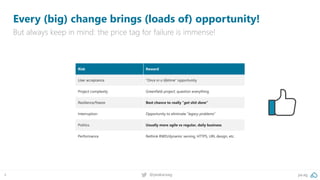
Every (big) change brings (loads of) opportunity!
But always keep in mind: the price tag for failure is immense!
Risk Reward
User acceptance “Once in a lifetime” opportunity
Project complexity Greenfield project: question everything
Resilience/freeze Best chance to really “get shit done”
Interruption Opportunity to eliminate “legacy problems”
Politics Usually more agile vs regular, daily business
Performance Rethink RWD/dynamic serving, HTTPS, URL design, etc.
pa.ag@peakaceag5
What is your goal for the migration?
The right mindset is super, super important!
I want to lose as little as
possible!” – isn’t really the
right goal for a migration!
Thorough documentation, in-depth definition of requirements
and ongoing testing are essential!
Be crazy about details
…from someone who has successfully
done this type of work before.
Ask for help…
#2 A lot of preparation
What should go, what can stay? Complete vs partial site move?
Define your migration strategy
pa.ag@peakaceag10
Pre-migration site health check & clean-up
A properly optimised domain migrates easier and more efficiently.
Getting your house in order before the move minimises the risk of losing rankings.
▪ Google Search Console: manual actions,
server errors (DNS, 5XX response codes),
mark-up validation errors (AMP, schema.org,
rich cards), robots.txt
▪ Web crawl: internal redirects as well as
redirect chains, broken URLs, and internal links
▪ Log files: broken URLs, suspicious status
codes, crawler traps
▪ Algo issues? Relocating with Panda,
Penguin & Co. makes very little sense
pa.ag@peakaceag11
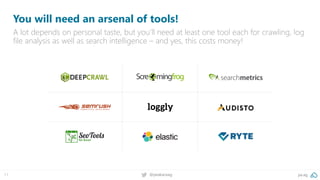
You will need an arsenal of tools!
A lot depends on personal taste, but you’ll need at least one tool each for crawling, log
file analysis as well as search intelligence – and yes, this costs money!
pa.ag@peakaceag12
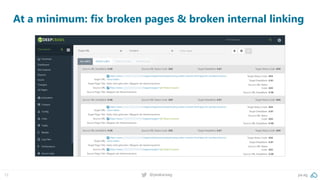
At a minimum: fix broken pages & broken internal linking
Figure out well in advance how to get access to all relevant server
access logs, e.g., native access or using a SaaS solution.
Get access to server logs
pa.ag@peakaceag14
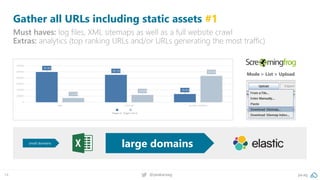
Gather all URLs including static assets #1
Must haves: log files, XML sitemaps as well as a full website crawl
Extras: analytics (top ranking URLs and/or URLs generating the most traffic)
Mode > List > Upload
small domains
large domains
pa.ag@peakaceag15
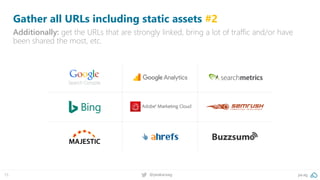
Gather all URLs including static assets #2
Additionally: get the URLs that are strongly linked, bring a lot of traffic and/or have
been shared the most, etc.
pa.ag@peakaceag16
Switch to monitor your keyword rankings daily
Check critical keywords daily to ensure you are only working with the most recent data.
pa.ag@peakaceag17
Establishing a status quo performance benchmark
Lighthouse (via Chrome DevTools) or webpagetest.org provide relevant metrics.
Important: don’t just test the homepage, but also category/product pages.
As a rule of thumb: 1-to-1 redirects from old to new!
Prepare URL redirect mapping
pa.ag@peakaceag19
Provide staging/test server
Make sure the server is locked-down properly to ensure your content doesn’t get
indexed in advance (i.a. duplicate content problems).
Methodology Pros Cons
noindex (meta tag/header)
▪ External tools can access without
separate access rules
▪ URLs are definitely not indexed
▪ Indexing rules cannot fully be tested
(all noindex)
▪ Waste of crawl budget
robots.txt
▪ External tools can access without
separate access rules
▪ No crawl budget is wasted
▪ Indexing rules cannot fully be tested
(only with robots.txt override)
▪ If linked, test URLs may appear in the index
(without title/metas).
password secured (.htaccess)
▪ No crawl budget is wasted
▪ URLs are definitely not indexed
▪ Everything can be tested properly
▪ External tools must be able to handle
password authentication.
IP-based access
▪ No crawl budget is wasted
▪ URLs are definitely not indexed
▪ Everything can be tested properly
▪ External tools must be able to handle IP-based
authentication.
VPN ▪ Absolutely safe! ▪ So safe, only a few tools can handle it!
#3 Implement necessary changes
pa.ag@peakaceag21
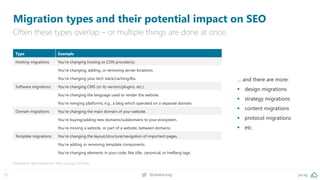
Migration types and their potential impact on SEO
Often these types overlap – or multiple things are done at once.
Inspired by @jonoalderson: http://pa.ag/2xUCMnJ
Type Example
Hosting migrations You’re changing hosting or CDN provider(s).
You’re changing, adding, or removing server locations.
You’re changing your tech stack/caching/lbs.
Software migrations You’re changing CMS (or its version/plugins, etc.).
You’re changing the language used to render the website.
You’re merging platforms; e.g., a blog which operated on a separate domain.
Domain migrations You’re changing the main domain of your website.
You’re buying/adding new domains/subdomains to your ecosystem.
You’re moving a website, or part of a website, between domains.
Template migrations You’re changing the layout/structure/navigation of important pages.
You’re adding or removing template components.
You’re changing elements in your code, like title, canonical, or hreflang tags.
… and there are more:
▪ design migrations
▪ strategy migrations
▪ content migrations
▪ protocol migrations
▪ etc.
pa.ag@peakaceag22
Make it a granular, multi-step approach
Doing everything at once will make debugging & rolling back an almost impossible
task!
Source: http://pa.ag/2yJqT1N
pa.ag@peakaceag23
Build your very own migration Q&A check-list
Depending on what type of changes you’re undergoing, this needs to be adapted.
Use Aleyda’s template for more inspiration: https://pa.ag/2H6bOLH
Canonical tags & other rel-alternate annotations
Remember to annotate your dedicated mobile site and
to adapt your RSS feeds
Stage: Pre-migration Who? Bastian When? 23.05.18
Multilingual setup: customise hreflang target URLs
Keep in mind: Various locations can be affected
(e.g. head section, server headers, xml sitemaps)
Stage: Pre-migration Who? Bastian When? 23.05.18
Update pel=next/prev pagination annotations
Are you using Google´s recommendation for pagination?
Stage: Pre-migration Who? Bastian When? 23.05.18
Update XML sitemaps
Sitemap index file needs to be changed also,
if you reference it in robots.txt
Stage: Pre-migration Who? Bastian When? 23.05.18
Structured data update (schema.org)
Update your schema.org mark-up references.
Short annotations like “//schema.org“ don´t validate!
Stage: Pre-migration Who? Bastian When? 23.05.18
Update CDN settings and resource hints
Update requests for assets to CDNs & any resource hints
(preconnect, dns-prefetch)
Stage: Pre-migration Who? Bastian When? 23.05.18
Update HTTP header & customise cookie settings
If applicable, customise X-Robots header tags.
Use Chrome DevTools!
Stage: Pre-migration Who? Bastian When? 23.05.18
pa.ag@peakaceag24
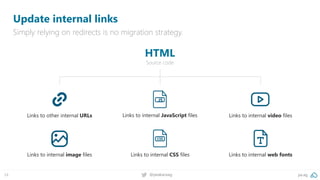
Update internal links
Simply relying on redirects is no migration strategy.
Links to other internal URLs Links to internal video filesLinks to internal JavaScript files
JS
HTML
Source code
Links to internal image files Links to internal CSS files Links to internal web fonts
pa.ag@peakaceag25
Update internal links (within JavaScript files)
Simply relying on redirects is no migration strategy.
JAVASCRIPT
Files
Links to other internal URLs Links to internal image files Links to internal CSS files
pa.ag@peakaceag26
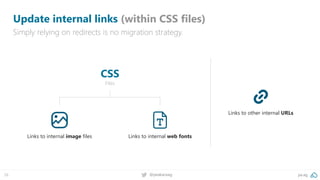
Update internal links (within CSS files)
Simply relying on redirects is no migration strategy.
CSS
Files
Links to internal web fontsLinks to internal image files
Links to other internal URLs
pa.ag@peakaceag27
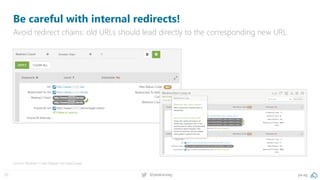
Be careful with internal redirects!
Avoid redirect chains: old URLs should lead directly to the corresponding new URL.
Source: Redirect Chain Report via DeepCrawl
pa.ag@peakaceag28
Tricky: don‘t miss “invisible“ HTTP headers!
If in use: update X-Robots header tags accordingly. Use Chrome Dev. Tools to visualise!
X-Robots rel-canonical using Apaches‘ .htaccess
<Files theRequestedFile.pdf >
Header add Link 'https://www.example.com/ebook.html; rel="canonical"'
</Files>
Other HTTP header variants:
▪ Link: <https://www.example.com/de/>; rel="alternate"; hreflang="de"
▪ Link: <https://www.example.com/someurl>; rel="canonical"
▪ Link: <https://cdn.example.com>; rel="dns-prefetch"
pa.ag@peakaceag29
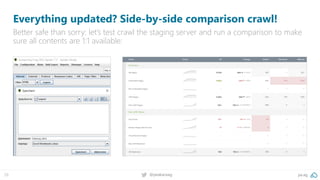
Everything updated? Side-by-side comparison crawl!
Better safe than sorry: let’s test crawl the staging server and run a comparison to make
sure all contents are 1:1 available:
#4 Work your search console
pa.ag@peakaceag31
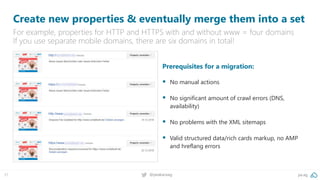
Create new properties & eventually merge them into a set
For example, properties for HTTP and HTTPS with and without www = four domains
If you use separate mobile domains, there are six domains in total!
Prerequisites for a migration:
▪ No manual actions
▪ No significant amount of crawl errors (DNS,
availability)
▪ No problems with the XML sitemaps
▪ Valid structured data/rich cards markup, no AMP
and hreflang errors
pa.ag@peakaceag32
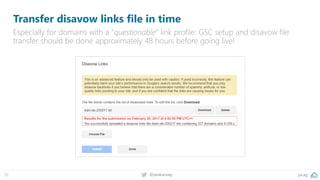
Transfer disavow links file in time
Especially for domains with a “questionable” link profile: GSC setup and disavow file
transfer should be done approximately 48 hours before going live!
pa.ag@peakaceag33
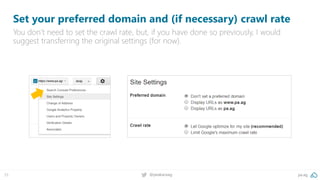
Set your preferred domain and (if necessary) crawl rate
You don’t need to set the crawl rate, but, if you have done so previously, I would
suggest transferring the original settings (for now).
pa.ag@peakaceag34
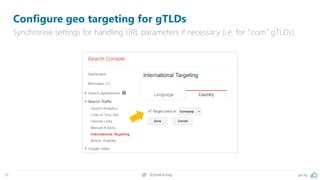
Configure geo targeting for gTLDs
Synchronise settings for handling URL parameters if necessary (i.e. for “.com” gTLDs).
pa.ag@peakaceag35
Before you send to the index: test GSCs fetch & render
Make sure Google includes and displays all requested components properly!
pa.ag@peakaceag36
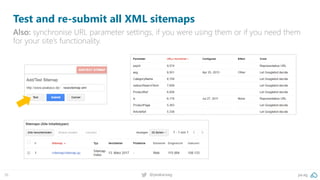
Test and re-submit all XML sitemaps
Also: synchronise URL parameter settings, if you were using them or if you need them
for your site’s functionality.
After all this preparation, all you need to do now
is to "just" redirect URLs.
301 redirects all the things!
pa.ag@peakaceag38
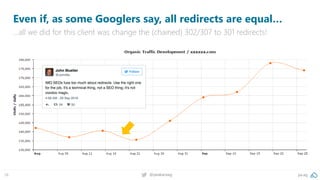
Even if, as some Googlers say, all redirects are equal…
…all we did for this client was change the (chained) 302/307 to 301 redirects!
Note: it only works for domain migrations!
Use the GSC “site move” feature
e.g. domain.at to domain.com/at/ won‘t work!
The destination can‘t be a gTLD folder!
pa.ag@peakaceag41
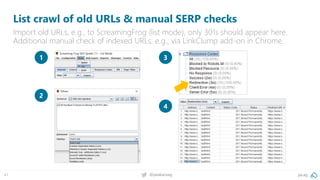
List crawl of old URLs & manual SERP checks
Import old URLs, e.g., to ScreamingFrog (list mode), only 301s should appear here.
Additional manual check of indexed URLs, e.g., via LinkClump add-on in Chrome.
1
2
3
4
The most common problem with migrations gone wrong?
Missing or wrong redirects!
Seriously: check your redirects
#5 Post migration to-do‘s
Focus on 4XX and 5XX status codes first, tackle those “live”!
Log file, GSC & GA error monitoring
Re-test: no broken URLs (4/5XXer), tracking in place,
correct metadata & other tags, indexing rules, etc.
Complete crawl of the new domain
pa.ag@peakaceag46
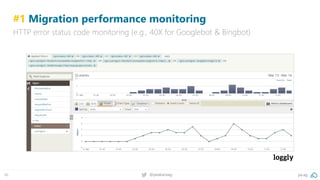
#1 Migration performance monitoring
HTTP error status code monitoring (e.g., 40X for Googlebot & Bingbot)
pa.ag@peakaceag47
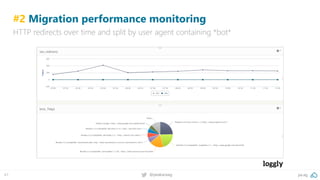
#2 Migration performance monitoring
HTTP redirects over time and split by user agent containing *bot*
pa.ag@peakaceag48
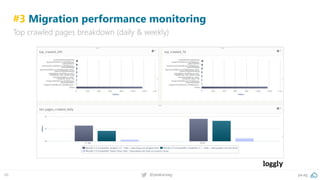
#3 Migration performance monitoring
Top crawled pages breakdown (daily & weekly)
pa.ag@peakaceag49
All you need to know about log file auditing
In case you just missed my session, here are the slides:
More on SlideShare: https://pa.ag/seok18logs
pa.ag@peakaceag50
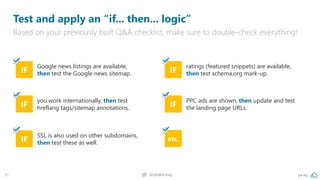
Test and apply an “if... then... logic”
Based on your previously built Q&A checklist, make sure to double-check everything!
IF
you work internationally, then test
hreflang tags/sitemap annotations. IF
PPC ads are shown, then update and test
the landing page URLs.
IF
Google news listings are available,
then test the Google news sitemap. IF
ratings (featured snippets) are available,
then test schema.org mark-up.
IF
SSL is also used on other subdomains,
then test these as well.
etc.
pa.ag@peakaceag51
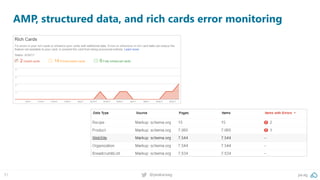
AMP, structured data, and rich cards error monitoring
Google needs to recrawl ALL the relations, that takes time!
Consider hreflang to be broken
Short-term peaks are completely normal, dramatic drops rather not!
Keep an eye on the crawl frequency
pa.ag@peakaceag54
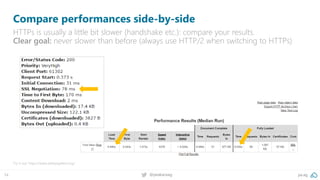
Compare performances side-by-side
HTTPs is usually a little bit slower (handshake etc.): compare your results.
Clear goal: never slower than before (always use HTTP/2 when switching to HTTPs)
Try it out: https://www.webpagetest.org/
pa.ag@peakaceag55
Adjusting/revising external linking
Not every link source needs to be updated; focus on the strongest domains (e.g. via
LRT Power*Trust or Majestic Trust Flow).
Source: Majestic
Re-crawling, recalculation & the inheritance of
„trust“ may take a few weeks…
First and foremost: be patient!
pa.ag@peakaceag57
Especially for new URLs, two weeks are not enough:
Source: http://pa.ag/2htz26D
[…] it can take two
weeks for some sites
but for larger sites,
it is more like three
months, not even
close to two weeks.
#6 Some tips to make your life easier
pa.ag@peakaceag59
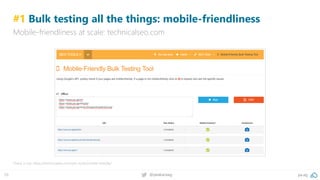
#1 Bulk testing all the things: mobile-friendliness
Mobile-friendliness at scale: technicalseo.com
Check it out: https://technicalseo.com/seo-tools/mobile-friendly/
pa.ag@peakaceag60
#2 Bulk testing all the things: hreflang tags
Hreflang tags (in sitemaps) at scale: technicalseo.com
Check it out: https://technicalseo.com/seo-tools/hreflang/
pa.ag@peakaceag61
#3 Bulk testing all the things: redirects & other headers
HTTP status codes (errors, redirects, etc.) at scale: httpstatus.io
Check it out: https://httpstatus.io/
pa.ag@peakaceag62
#4 Simulate Googlebot for smartphones with JS-rendering
ScreamingFrog can do that easily at scale; pay close attention to rendered output!
Also pretty cool: Extract > Xpath > //head/link[@rel="amphtml"]/@href
pa.ag@peakaceag63
#5 Don’t forget to redirect your images as well!
When changing URLs/domains, make sure to implement redirect rules for images.
Read the entire post: http://pa.ag/2yJtTLz
pa.ag@peakaceag64
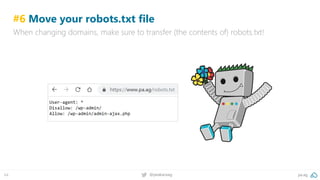
#6 Move your robots.txt file
When changing domains, make sure to transfer (the contents of) robots.txt!
pa.ag@peakaceag65
#7 HTTP 503 is your friend
Combine with “revisit-after” to throttle crawling; never use “noindex”/4XX instead!
Source: http://pa.ag/2xRiA5T
Webmasters should return a 503 HTTP header for all
the URLs participating in the blackout […] Googlebot's
crawling rate will drop when it sees a spike in 503 […]
as Googlebot is currently configured, it will halt all
crawling of the site if the site’s robots.txt file returns a
503 status code for robots.txt.”
pa.ag@peakaceag66
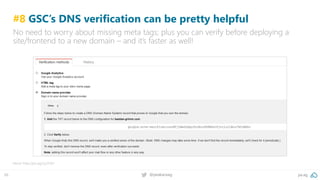
#8 GSC’s DNS verification can be pretty helpful
No need to worry about missing meta tags; plus you can verify before deploying a
site/frontend to a new domain – and it’s faster as well!
More: http://pa.ag/2yJ7xtH
pa.ag@peakaceag67
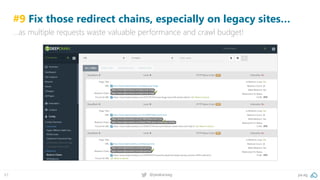
#9 Fix those redirect chains, especially on legacy sites…
…as multiple requests waste valuable performance and crawl budget!
pa.ag@peakaceag68
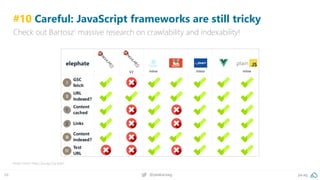
#10 Careful: JavaScript frameworks are still tricky
Check out Bartosz‘ massive research on crawlability and indexability!
Read more: http://pa.ag/2qLqlqH
pa.ag@peakaceag69
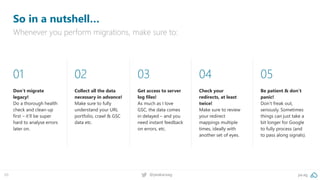
So in a nutshell…
Whenever you perform migrations, make sure to:
01
Don‘t migrate
legacy!
Do a thorough health
check and clean-up
first – it‘ll be super
hard to analyse errors
later on.
02
Collect all the data
necessary in advance!
Make sure to fully
understand your URL
portfolio, crawl & GSC
data etc.
03
Get access to server
log files!
As much as I love
GSC, the data comes
in delayed – and you
need instant feedback
on errors, etc.
04
Check your
redirects, at least
twice!
Make sure to review
your redirect
mappings multiple
times, ideally with
another set of eyes.
05
Be patient & don‘t
panic!
Don‘t freak out,
seriously. Sometimes
things can just take a
bit longer for Google
to fully process (and
to pass along signals).
pa.ag@peakaceag70
We’re hiring! 30+ performance marketing jobs in Berlin!
Come and say “hello” or apply via jobs.pa.ag. We look forward to talking to you!
Always looking for talent!
Check out jobs.pa.ag
twitter.com/peakaceag
facebook.com/peakaceag
www.pa.ag
ALWAYS LOOKING FOR TALENT! CHECK OUT JOBS.PA.AG
WINNER
Bastian Grimm
bg@pa.ag
Slides? No problem:
https://pa.ag/seok18mig
You want our migration checklist?
e-mail us > seokomm@pa.ag

Migration Best Practices - SEOkomm 2018

  • 1.
    Bastian Grimm, PeakAce AG | @basgr Successfully relaunching your website // The tech edition Migration Best Practices
  • 2.
    Get well soon,Theresa! I am just the replacement…
  • 3.
    #1 Never changea running system!
  • 4.
    pa.ag@peakaceag4 Every (big) changebrings (loads of) opportunity! But always keep in mind: the price tag for failure is immense! Risk Reward User acceptance “Once in a lifetime” opportunity Project complexity Greenfield project: question everything Resilience/freeze Best chance to really “get shit done” Interruption Opportunity to eliminate “legacy problems” Politics Usually more agile vs regular, daily business Performance Rethink RWD/dynamic serving, HTTPS, URL design, etc.
  • 5.
    pa.ag@peakaceag5 What is yourgoal for the migration? The right mindset is super, super important! I want to lose as little as possible!” – isn’t really the right goal for a migration!
  • 6.
    Thorough documentation, in-depthdefinition of requirements and ongoing testing are essential! Be crazy about details
  • 7.
    …from someone whohas successfully done this type of work before. Ask for help…
  • 8.
    #2 A lotof preparation
  • 9.
    What should go,what can stay? Complete vs partial site move? Define your migration strategy
  • 10.
    pa.ag@peakaceag10 Pre-migration site healthcheck & clean-up A properly optimised domain migrates easier and more efficiently. Getting your house in order before the move minimises the risk of losing rankings. ▪ Google Search Console: manual actions, server errors (DNS, 5XX response codes), mark-up validation errors (AMP, schema.org, rich cards), robots.txt ▪ Web crawl: internal redirects as well as redirect chains, broken URLs, and internal links ▪ Log files: broken URLs, suspicious status codes, crawler traps ▪ Algo issues? Relocating with Panda, Penguin & Co. makes very little sense
  • 11.
    pa.ag@peakaceag11 You will needan arsenal of tools! A lot depends on personal taste, but you’ll need at least one tool each for crawling, log file analysis as well as search intelligence – and yes, this costs money!
  • 12.
    pa.ag@peakaceag12 At a minimum:fix broken pages & broken internal linking
  • 13.
    Figure out wellin advance how to get access to all relevant server access logs, e.g., native access or using a SaaS solution. Get access to server logs
  • 14.
    pa.ag@peakaceag14 Gather all URLsincluding static assets #1 Must haves: log files, XML sitemaps as well as a full website crawl Extras: analytics (top ranking URLs and/or URLs generating the most traffic) Mode > List > Upload small domains large domains
  • 15.
    pa.ag@peakaceag15 Gather all URLsincluding static assets #2 Additionally: get the URLs that are strongly linked, bring a lot of traffic and/or have been shared the most, etc.
  • 16.
    pa.ag@peakaceag16 Switch to monitoryour keyword rankings daily Check critical keywords daily to ensure you are only working with the most recent data.
  • 17.
    pa.ag@peakaceag17 Establishing a statusquo performance benchmark Lighthouse (via Chrome DevTools) or webpagetest.org provide relevant metrics. Important: don’t just test the homepage, but also category/product pages.
  • 18.
    As a ruleof thumb: 1-to-1 redirects from old to new! Prepare URL redirect mapping
  • 19.
    pa.ag@peakaceag19 Provide staging/test server Makesure the server is locked-down properly to ensure your content doesn’t get indexed in advance (i.a. duplicate content problems). Methodology Pros Cons noindex (meta tag/header) ▪ External tools can access without separate access rules ▪ URLs are definitely not indexed ▪ Indexing rules cannot fully be tested (all noindex) ▪ Waste of crawl budget robots.txt ▪ External tools can access without separate access rules ▪ No crawl budget is wasted ▪ Indexing rules cannot fully be tested (only with robots.txt override) ▪ If linked, test URLs may appear in the index (without title/metas). password secured (.htaccess) ▪ No crawl budget is wasted ▪ URLs are definitely not indexed ▪ Everything can be tested properly ▪ External tools must be able to handle password authentication. IP-based access ▪ No crawl budget is wasted ▪ URLs are definitely not indexed ▪ Everything can be tested properly ▪ External tools must be able to handle IP-based authentication. VPN ▪ Absolutely safe! ▪ So safe, only a few tools can handle it!
  • 20.
  • 21.
    pa.ag@peakaceag21 Migration types andtheir potential impact on SEO Often these types overlap – or multiple things are done at once. Inspired by @jonoalderson: http://pa.ag/2xUCMnJ Type Example Hosting migrations You’re changing hosting or CDN provider(s). You’re changing, adding, or removing server locations. You’re changing your tech stack/caching/lbs. Software migrations You’re changing CMS (or its version/plugins, etc.). You’re changing the language used to render the website. You’re merging platforms; e.g., a blog which operated on a separate domain. Domain migrations You’re changing the main domain of your website. You’re buying/adding new domains/subdomains to your ecosystem. You’re moving a website, or part of a website, between domains. Template migrations You’re changing the layout/structure/navigation of important pages. You’re adding or removing template components. You’re changing elements in your code, like title, canonical, or hreflang tags. … and there are more: ▪ design migrations ▪ strategy migrations ▪ content migrations ▪ protocol migrations ▪ etc.
  • 22.
    pa.ag@peakaceag22 Make it agranular, multi-step approach Doing everything at once will make debugging & rolling back an almost impossible task! Source: http://pa.ag/2yJqT1N
  • 23.
    pa.ag@peakaceag23 Build your veryown migration Q&A check-list Depending on what type of changes you’re undergoing, this needs to be adapted. Use Aleyda’s template for more inspiration: https://pa.ag/2H6bOLH Canonical tags & other rel-alternate annotations Remember to annotate your dedicated mobile site and to adapt your RSS feeds Stage: Pre-migration Who? Bastian When? 23.05.18 Multilingual setup: customise hreflang target URLs Keep in mind: Various locations can be affected (e.g. head section, server headers, xml sitemaps) Stage: Pre-migration Who? Bastian When? 23.05.18 Update pel=next/prev pagination annotations Are you using Google´s recommendation for pagination? Stage: Pre-migration Who? Bastian When? 23.05.18 Update XML sitemaps Sitemap index file needs to be changed also, if you reference it in robots.txt Stage: Pre-migration Who? Bastian When? 23.05.18 Structured data update (schema.org) Update your schema.org mark-up references. Short annotations like “//schema.org“ don´t validate! Stage: Pre-migration Who? Bastian When? 23.05.18 Update CDN settings and resource hints Update requests for assets to CDNs & any resource hints (preconnect, dns-prefetch) Stage: Pre-migration Who? Bastian When? 23.05.18 Update HTTP header & customise cookie settings If applicable, customise X-Robots header tags. Use Chrome DevTools! Stage: Pre-migration Who? Bastian When? 23.05.18
  • 24.
    pa.ag@peakaceag24 Update internal links Simplyrelying on redirects is no migration strategy. Links to other internal URLs Links to internal video filesLinks to internal JavaScript files JS HTML Source code Links to internal image files Links to internal CSS files Links to internal web fonts
  • 25.
    pa.ag@peakaceag25 Update internal links(within JavaScript files) Simply relying on redirects is no migration strategy. JAVASCRIPT Files Links to other internal URLs Links to internal image files Links to internal CSS files
  • 26.
    pa.ag@peakaceag26 Update internal links(within CSS files) Simply relying on redirects is no migration strategy. CSS Files Links to internal web fontsLinks to internal image files Links to other internal URLs
  • 27.
    pa.ag@peakaceag27 Be careful withinternal redirects! Avoid redirect chains: old URLs should lead directly to the corresponding new URL. Source: Redirect Chain Report via DeepCrawl
  • 28.
    pa.ag@peakaceag28 Tricky: don‘t miss“invisible“ HTTP headers! If in use: update X-Robots header tags accordingly. Use Chrome Dev. Tools to visualise! X-Robots rel-canonical using Apaches‘ .htaccess <Files theRequestedFile.pdf > Header add Link 'https://www.example.com/ebook.html; rel="canonical"' </Files> Other HTTP header variants: ▪ Link: <https://www.example.com/de/>; rel="alternate"; hreflang="de" ▪ Link: <https://www.example.com/someurl>; rel="canonical" ▪ Link: <https://cdn.example.com>; rel="dns-prefetch"
  • 29.
    pa.ag@peakaceag29 Everything updated? Side-by-sidecomparison crawl! Better safe than sorry: let’s test crawl the staging server and run a comparison to make sure all contents are 1:1 available:
  • 30.
    #4 Work yoursearch console
  • 31.
    pa.ag@peakaceag31 Create new properties& eventually merge them into a set For example, properties for HTTP and HTTPS with and without www = four domains If you use separate mobile domains, there are six domains in total! Prerequisites for a migration: ▪ No manual actions ▪ No significant amount of crawl errors (DNS, availability) ▪ No problems with the XML sitemaps ▪ Valid structured data/rich cards markup, no AMP and hreflang errors
  • 32.
    pa.ag@peakaceag32 Transfer disavow linksfile in time Especially for domains with a “questionable” link profile: GSC setup and disavow file transfer should be done approximately 48 hours before going live!
  • 33.
    pa.ag@peakaceag33 Set your preferreddomain and (if necessary) crawl rate You don’t need to set the crawl rate, but, if you have done so previously, I would suggest transferring the original settings (for now).
  • 34.
    pa.ag@peakaceag34 Configure geo targetingfor gTLDs Synchronise settings for handling URL parameters if necessary (i.e. for “.com” gTLDs).
  • 35.
    pa.ag@peakaceag35 Before you sendto the index: test GSCs fetch & render Make sure Google includes and displays all requested components properly!
  • 36.
    pa.ag@peakaceag36 Test and re-submitall XML sitemaps Also: synchronise URL parameter settings, if you were using them or if you need them for your site’s functionality.
  • 37.
    After all thispreparation, all you need to do now is to "just" redirect URLs. 301 redirects all the things!
  • 38.
    pa.ag@peakaceag38 Even if, assome Googlers say, all redirects are equal… …all we did for this client was change the (chained) 302/307 to 301 redirects!
  • 39.
    Note: it onlyworks for domain migrations! Use the GSC “site move” feature
  • 40.
    e.g. domain.at todomain.com/at/ won‘t work! The destination can‘t be a gTLD folder!
  • 41.
    pa.ag@peakaceag41 List crawl ofold URLs & manual SERP checks Import old URLs, e.g., to ScreamingFrog (list mode), only 301s should appear here. Additional manual check of indexed URLs, e.g., via LinkClump add-on in Chrome. 1 2 3 4
  • 42.
    The most commonproblem with migrations gone wrong? Missing or wrong redirects! Seriously: check your redirects
  • 43.
  • 44.
    Focus on 4XXand 5XX status codes first, tackle those “live”! Log file, GSC & GA error monitoring
  • 45.
    Re-test: no brokenURLs (4/5XXer), tracking in place, correct metadata & other tags, indexing rules, etc. Complete crawl of the new domain
  • 46.
    pa.ag@peakaceag46 #1 Migration performancemonitoring HTTP error status code monitoring (e.g., 40X for Googlebot & Bingbot)
  • 47.
    pa.ag@peakaceag47 #2 Migration performancemonitoring HTTP redirects over time and split by user agent containing *bot*
  • 48.
    pa.ag@peakaceag48 #3 Migration performancemonitoring Top crawled pages breakdown (daily & weekly)
  • 49.
    pa.ag@peakaceag49 All you needto know about log file auditing In case you just missed my session, here are the slides: More on SlideShare: https://pa.ag/seok18logs
  • 50.
    pa.ag@peakaceag50 Test and applyan “if... then... logic” Based on your previously built Q&A checklist, make sure to double-check everything! IF you work internationally, then test hreflang tags/sitemap annotations. IF PPC ads are shown, then update and test the landing page URLs. IF Google news listings are available, then test the Google news sitemap. IF ratings (featured snippets) are available, then test schema.org mark-up. IF SSL is also used on other subdomains, then test these as well. etc.
  • 51.
    pa.ag@peakaceag51 AMP, structured data,and rich cards error monitoring
  • 52.
    Google needs torecrawl ALL the relations, that takes time! Consider hreflang to be broken
  • 53.
    Short-term peaks arecompletely normal, dramatic drops rather not! Keep an eye on the crawl frequency
  • 54.
    pa.ag@peakaceag54 Compare performances side-by-side HTTPsis usually a little bit slower (handshake etc.): compare your results. Clear goal: never slower than before (always use HTTP/2 when switching to HTTPs) Try it out: https://www.webpagetest.org/
  • 55.
    pa.ag@peakaceag55 Adjusting/revising external linking Notevery link source needs to be updated; focus on the strongest domains (e.g. via LRT Power*Trust or Majestic Trust Flow). Source: Majestic
  • 56.
    Re-crawling, recalculation &the inheritance of „trust“ may take a few weeks… First and foremost: be patient!
  • 57.
    pa.ag@peakaceag57 Especially for newURLs, two weeks are not enough: Source: http://pa.ag/2htz26D […] it can take two weeks for some sites but for larger sites, it is more like three months, not even close to two weeks.
  • 58.
    #6 Some tipsto make your life easier
  • 59.
    pa.ag@peakaceag59 #1 Bulk testingall the things: mobile-friendliness Mobile-friendliness at scale: technicalseo.com Check it out: https://technicalseo.com/seo-tools/mobile-friendly/
  • 60.
    pa.ag@peakaceag60 #2 Bulk testingall the things: hreflang tags Hreflang tags (in sitemaps) at scale: technicalseo.com Check it out: https://technicalseo.com/seo-tools/hreflang/
  • 61.
    pa.ag@peakaceag61 #3 Bulk testingall the things: redirects & other headers HTTP status codes (errors, redirects, etc.) at scale: httpstatus.io Check it out: https://httpstatus.io/
  • 62.
    pa.ag@peakaceag62 #4 Simulate Googlebotfor smartphones with JS-rendering ScreamingFrog can do that easily at scale; pay close attention to rendered output! Also pretty cool: Extract > Xpath > //head/link[@rel="amphtml"]/@href
  • 63.
    pa.ag@peakaceag63 #5 Don’t forgetto redirect your images as well! When changing URLs/domains, make sure to implement redirect rules for images. Read the entire post: http://pa.ag/2yJtTLz
  • 64.
    pa.ag@peakaceag64 #6 Move yourrobots.txt file When changing domains, make sure to transfer (the contents of) robots.txt!
  • 65.
    pa.ag@peakaceag65 #7 HTTP 503is your friend Combine with “revisit-after” to throttle crawling; never use “noindex”/4XX instead! Source: http://pa.ag/2xRiA5T Webmasters should return a 503 HTTP header for all the URLs participating in the blackout […] Googlebot's crawling rate will drop when it sees a spike in 503 […] as Googlebot is currently configured, it will halt all crawling of the site if the site’s robots.txt file returns a 503 status code for robots.txt.”
  • 66.
    pa.ag@peakaceag66 #8 GSC’s DNSverification can be pretty helpful No need to worry about missing meta tags; plus you can verify before deploying a site/frontend to a new domain – and it’s faster as well! More: http://pa.ag/2yJ7xtH
  • 67.
    pa.ag@peakaceag67 #9 Fix thoseredirect chains, especially on legacy sites… …as multiple requests waste valuable performance and crawl budget!
  • 68.
    pa.ag@peakaceag68 #10 Careful: JavaScriptframeworks are still tricky Check out Bartosz‘ massive research on crawlability and indexability! Read more: http://pa.ag/2qLqlqH
  • 69.
    pa.ag@peakaceag69 So in anutshell… Whenever you perform migrations, make sure to: 01 Don‘t migrate legacy! Do a thorough health check and clean-up first – it‘ll be super hard to analyse errors later on. 02 Collect all the data necessary in advance! Make sure to fully understand your URL portfolio, crawl & GSC data etc. 03 Get access to server log files! As much as I love GSC, the data comes in delayed – and you need instant feedback on errors, etc. 04 Check your redirects, at least twice! Make sure to review your redirect mappings multiple times, ideally with another set of eyes. 05 Be patient & don‘t panic! Don‘t freak out, seriously. Sometimes things can just take a bit longer for Google to fully process (and to pass along signals).
  • 70.
    pa.ag@peakaceag70 We’re hiring! 30+performance marketing jobs in Berlin! Come and say “hello” or apply via jobs.pa.ag. We look forward to talking to you! Always looking for talent! Check out jobs.pa.ag
  • 71.
    twitter.com/peakaceag facebook.com/peakaceag www.pa.ag ALWAYS LOOKING FORTALENT! CHECK OUT JOBS.PA.AG WINNER Bastian Grimm bg@pa.ag Slides? No problem: https://pa.ag/seok18mig You want our migration checklist? e-mail us > seokomm@pa.ag