
Bastian Grimm
Peak Ace AG
Web Performance Madness:
Critical Rendering Path Optimisation
@basgr
http://www.slideshare.net/bastiangrimm
2 pa.ag@peakaceag
No need to take notes:
https://pa.ag/brgh18spd
Because the PageSpeed Insights score is not enough!
#1 Better measurement
4 @peakaceag pa.ag
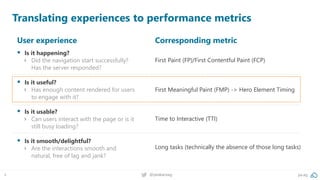
Translating experiences to performance metrics
User experience
▪ Is it happening?
› Did the navigation start successfully?
Has the server responded?
▪ Is it useful?
› Has enough content rendered for users
to engage with it?
▪ Is it usable?
› Can users interact with the page or is it
still busy loading?
▪ Is it smooth/delightful?
› Are the interactions smooth and
natural, free of lag and jank?
Corresponding metric
First Paint (FP)/First Contentful Paint (FCP)
First Meaningful Paint (FMP) -> Hero Element Timing
Time to Interactive (TTI)
Long tasks (technically the absence of those long tasks)
5 @peakaceag pa.ag
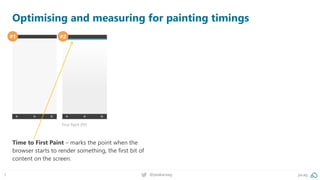
Optimising and measuring for painting timings
#1 #2
First Paint (FP)
Time to First Paint – marks the point when the
browser starts to render something, the first bit of
content on the screen.
6 @peakaceag pa.ag
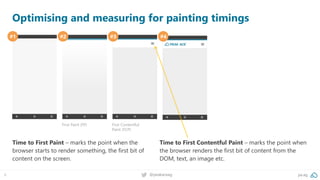
Optimising and measuring for painting timings
#1 #2 #3 #4
First Paint (FP) First Contentful
Paint (FCP)
Time to First Paint – marks the point when the
browser starts to render something, the first bit of
content on the screen.
Time to First Contentful Paint – marks the point when
the browser renders the first bit of content from the
DOM, text, an image etc.
7 @peakaceag pa.ag
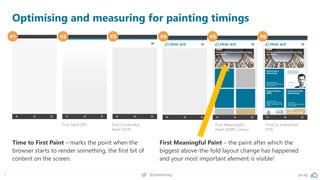
Optimising and measuring for painting timings
#1 #2 #3 #4 #5 #6
First Paint (FP) First Contentful
Paint (FCP)
First Meaningful
Paint (FMP) / Hero!
Time to Interactive
(TTI)
Time to First Paint – marks the point when the
browser starts to render something, the first bit of
content on the screen.
First Meaningful Paint – the paint after which the
biggest above-the-fold layout change has happened
and your most important element is visible!
8 @peakaceag pa.ag
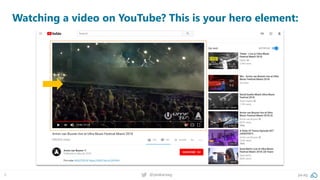
Watching a video on YouTube? This is your hero element:
9 @peakaceag pa.ag
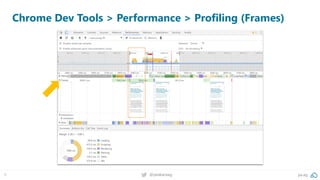
Chrome Dev Tools > Performance > Profiling (Frames)
10 @peakaceag pa.ag
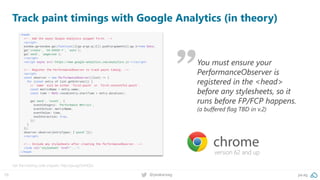
Track paint timings with Google Analytics (in theory)
Get the tracking code snippets: http://pa.ag/2viHQSz
version 62 and up
You must ensure your
PerformanceObserver is
registered in the <head>
before any stylesheets, so it
runs before FP/FCP happens.
(a buffered flag TBD in v.2)
11 @peakaceag pa.ag
This is how it looks like in Google Analytics
Behavior > events > pages: performance metrics [first-contentful-paint]
Source: Google Analytics
12 @peakaceag pa.ag
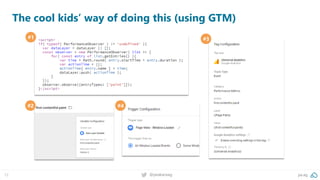
The cool kids’ way of doing this (using GTM)
#1 #3
#2 #4
13 @peakaceag pa.ag
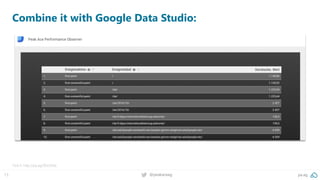
Combine it with Google Data Studio:
Test it: http://pa.ag/2Ee550q
The code and resources required to render the initial view of a web page
#2 Critical rendering path
15 @peakaceag pa.ag
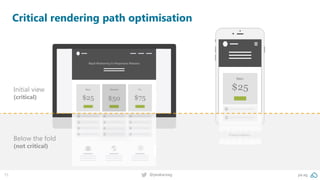
Critical rendering path optimisation
Initial view
(critical)
Below the fold
(not critical)
Some brief, technical background:
17 @peakaceag pa.ag
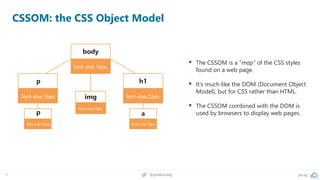
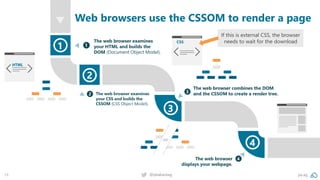
CSSOM: the CSS Object Model
▪ The CSSOM is a “map” of the CSS styles
found on a web page.
▪ It’s much like the DOM (Document Object
Model), but for CSS rather than HTML.
▪ The CSSOM combined with the DOM is
used by browsers to display web pages.
body
font-size:16px;
h1
font-size:22px;
p
font-size:16px;
p
font-size:12px;
a
font-size:12px;
img
font-size:16px;
18 @peakaceag pa.ag
Web browsers use the CSSOM to render a page
If this is external CSS, the browser
needs to wait for the download
19 @peakaceag pa.ag
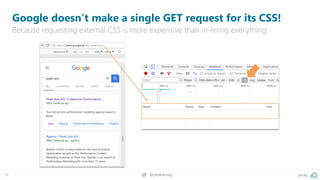
Google doesn’t make a single GET request for its CSS!
Because requesting external CSS is more expensive than in-lining everything.
20 @peakaceag pa.ag
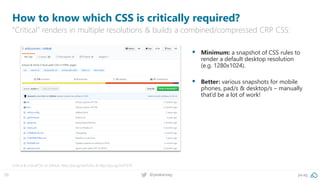
How to know which CSS is critically required?
“Critical” renders in multiple resolutions & builds a combined/compressed CRP CSS:
Critical & criticalCSS on GitHub: http://pa.ag/2wJTZAu & http://pa.ag/2wT1ST9
▪ Minimum: a snapshot of CSS rules to
render a default desktop resolution
(e.g. 1280x1024).
▪ Better: various snapshots for mobile
phones, pad/s & desktop/s – manually
that’d be a lot of work!
21 @peakaceag pa.ag
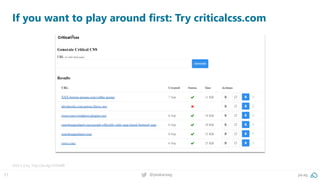
If you want to play around first: Try criticalcss.com
Give it a try: http://pa.ag/2nVIwXB
22 @peakaceag pa.ag
<!DOCTYPE html>
<html>
<head>
<meta charset="utf-8">
<meta name="viewport" content="width=device-width">
<title>CRP loading demo</title>
<!-- critical CSS goes here -->
<style> h1 { colour: green; } </style>
<!-- use async preload // no IE, Edge & some other unimportant ones (http://caniuse.com/#search=preload) -->
<link rel="preload" href="non-critical.css" as="style" onload="this.rel='stylesheet'" />
<!--noscript for req. without JS -->
<noscript><link rel="stylesheet" href="non-critical.css"></noscript>
<!-- include polyfill for shitty browsers -->
<script>
*! loadCSS. [c]2017 Filament Group, Inc. MIT License */
(function(){ ... } ());
/*! loadCSS rel=preload polyfill. [c] 2017 Filament Group, Inc. MIT License */
(function(){ ... } ());
</script>
</head>
<body>
</body>
</html>
<!-- use async preload // no IE, Edge & some other unimportant ones
(http://caniuse.com/#search=preload) -->
<link rel="preload" href="non-critical.css" as="style" onload="this.rel='stylesheet'" />
<!-- critical CSS goes here -->
<style> h1 { colour: green; } </style>
<!-- use async preload // no IE, Edge & some other unimportant ones
(http://caniuse.com/#search=preload) -->
<link rel="preload" href="non-critical.css" as="style" onload="this.rel='stylesheet'" />
<!--noscript for req. without JS -->
<noscript><link rel="stylesheet" href="non-critical.css"></noscript>
*! loadCSS. [c]2017 Filament Group, Inc. MIT License */
(function(){ ... } ());
/*! loadCSS rel=preload polyfill. [c] 2017 Filament Group, Inc. MIT License */
(function(){ ... } ());
Putting it all together
Fit the HTML, CSS & JS that’s necessary for “Start Render” into that first 14 kB round trip!
Inline your critical CSS.
1
Loading non-critical CSS
async using rel=“preload“.
2
Apply the CSS once it has
finished loading via “onload“.
3
Fallback for non-JS requests.
4
Implement loadCSS script for
older browsers.
5
Let’s look at an implementation…
Is it worth the effort?
24 @peakaceag pa.ag
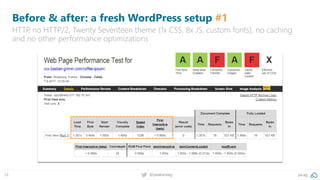
Before & after: a fresh WordPress setup #1
HTTP, no HTTP/2, Twenty Seventeen theme (1x CSS, 8x JS, custom fonts), no caching
and no other performance optimizations
25 @peakaceag pa.ag
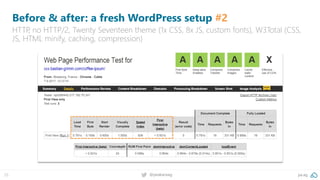
Before & after: a fresh WordPress setup #2
HTTP, no HTTP/2, Twenty Seventeen theme (1x CSS, 8x JS, custom fonts), W3Total (CSS,
JS, HTML minify, caching, compression)
26 @peakaceag pa.ag
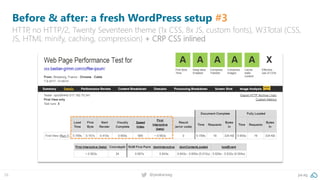
Before & after: a fresh WordPress setup #3
HTTP, no HTTP/2, Twenty Seventeen theme (1x CSS, 8x JS, custom fonts), W3Total (CSS,
JS, HTML minify, caching, compression) + CRP CSS inlined
27 @peakaceag pa.ag
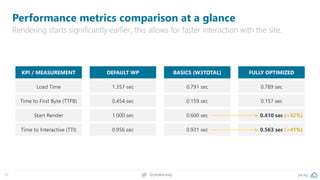
Performance metrics comparison at a glance
Rendering starts significantly earlier; this allows for faster interaction with the site.
KPI / MEASUREMENT
Load Time
Time to First Byte (TTFB)
Start Render
Time to Interactive (TTI)
DEFAULT WP
1.357 sec
0.454 sec
1.000 sec
0.956 sec
BASICS (W3TOTAL)
0.791 sec
0.159 sec
0.600 sec
0.931 sec
FULLY OPTIMIZED
0.789 sec
0.157 sec
0.410 sec
0.563 sec
(+32%)
(+41%)
28 @peakaceag pa.ag
TL;DR
Implement proper tracking, measure “First Meaningful Paint” (Hero Element delivery).
Audit, clean and (afterwards) split CSS into two parts: “initial view” and “below the fold”.
Use “critical” to generate and inline your critical path CSS.
Use rel=“preload“ and “loadCSS” to async load below the fold / site-wide CSS.
Off-load all overhead (JS, etc.) to stay within 14kB for faster, initial paint.
Highest quality, (more) efficient data compression & smaller files.
#3 New image formats
30 @peakaceag pa.ag
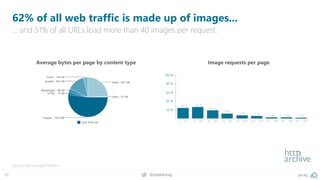
62% of all web traffic is made up of images...
… and 51% of all URLs load more than 40 images per request.
Source: http://pa.ag/1SGDOEo
Average bytes per page by content type Image requests per page
31 @peakaceag pa.ag
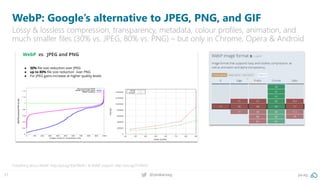
WebP: Google’s alternative to JPEG, PNG, and GIF
Lossy & lossless compression, transparency, metadata, colour profiles, animation, and
much smaller files (30% vs. JPEG, 80% vs. PNG) – but only in Chrome, Opera & Android
Everything about WebP: http://pa.ag/1EpFWeN / & WebP support: http://pa.ag/2FZK4XS
32 @peakaceag pa.ag
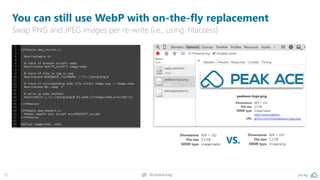
You can still use WebP with on-the-fly replacement
Swap PNG and JPEG images per re-write (i.e., using .htaccess)
VS.
33 @peakaceag pa.ag
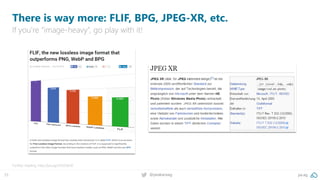
There is way more: FLIF, BPG, JPEG-XR, etc.
If you’re “image-heavy”, go play with it!
Further reading: http://pa.ag/1S5OQmX
34 @peakaceag pa.ag
SEMrush (blog) could save 80-90% of it’s image traffic
Better compression combined with modern image formats (i.e. WebP & JPEG-XR)
35 @peakaceag pa.ag
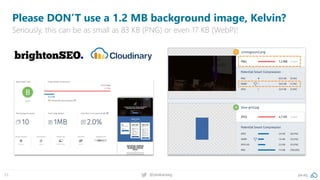
Please DON’T use a 1.2 MB background image, Kelvin?
Seriously, this can be as small as 83 KB (PNG) or even 17 KB (WebP)!
Pretty, varied, colourful, and often very slow!
#4 Custom web fonts
37 @peakaceag pa.ag
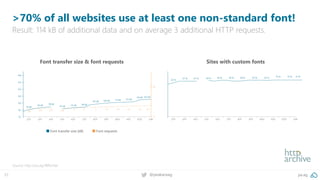
>70% of all websites use at least one non-standard font!
Result: 114 kB of additional data and on average 3 additional HTTP requests.
Source: http://pa.ag/1BRUnbe
Font transfer size & font requests Sites with custom fonts
Font transfer size (kB) Font requests
38 @peakaceag pa.ag
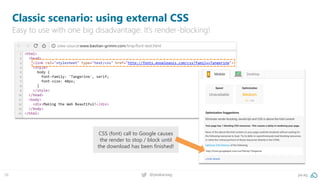
Classic scenario: using external CSS
Easy to use with one big disadvantage: It’s render-blocking!
CSS (font) call to Google causes
the render to stop / block until
the download has been finished!
FOIT (flash of invisible text) or FOUT (flash of unstyled text)
can cause annoying flickering
Asynchronous?
40 @peakaceag pa.ag
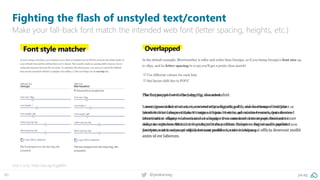
Fighting the flash of unstyled text/content
Make your fall-back font match the intended web font (letter spacing, heights, etc.)
Give it a try: https://pa.ag/2qgE8EH
41 @peakaceag pa.ag
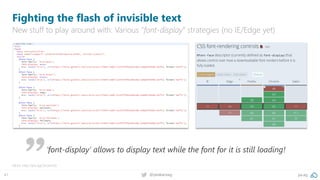
Fighting the flash of invisible text
New stuff to play around with: Various “font-display” strategies (no IE/Edge yet)
More: http://pa.ag/2eUwVob
‘font-display’ allows to display text while the font for it is still loading!
42 @peakaceag pa.ag
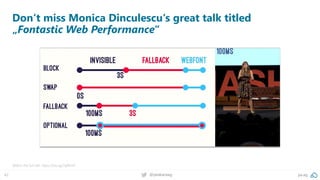
Don‘t miss Monica Dinculescu‘s great talk titled
„Fontastic Web Performance“
Watch the full talk: https://pa.ag/2qf6hvK
43 pa.ag@peakaceag
If you can only do one thing, I’d recommend doing this:
Go to your CSS file, look for @font-face
and add `font-display:optional` -
there hasn’t been a safer & easier gain
in #webperf in a long time!
44 pa.ag@peakaceag
We’re hiring! 25+ Performance Marketing jobs in Berlin!
Come and say “hello” or apply via jobs.pa.ag. Looking forward to speaking to you!
Always looking for talent!
Check out jobs.pa.ag
45 @peakaceag pa.ag
http://pa.ag/brgh18spd
Always looking for talent! Check out jobs.pa.ag
Bastian Grimm
bg@pa.ag
twitter.com/peakaceag
facebook.com/peakaceag
www.pa.ag
Liked the deck? Here you go:

Web Performance Madness - brightonSEO 2018

  • 1.
    Bastian Grimm Peak AceAG Web Performance Madness: Critical Rendering Path Optimisation @basgr http://www.slideshare.net/bastiangrimm
  • 2.
    2 pa.ag@peakaceag No needto take notes: https://pa.ag/brgh18spd
  • 3.
    Because the PageSpeedInsights score is not enough! #1 Better measurement
  • 4.
    4 @peakaceag pa.ag Translatingexperiences to performance metrics User experience ▪ Is it happening? › Did the navigation start successfully? Has the server responded? ▪ Is it useful? › Has enough content rendered for users to engage with it? ▪ Is it usable? › Can users interact with the page or is it still busy loading? ▪ Is it smooth/delightful? › Are the interactions smooth and natural, free of lag and jank? Corresponding metric First Paint (FP)/First Contentful Paint (FCP) First Meaningful Paint (FMP) -> Hero Element Timing Time to Interactive (TTI) Long tasks (technically the absence of those long tasks)
  • 5.
    5 @peakaceag pa.ag Optimisingand measuring for painting timings #1 #2 First Paint (FP) Time to First Paint – marks the point when the browser starts to render something, the first bit of content on the screen.
  • 6.
    6 @peakaceag pa.ag Optimisingand measuring for painting timings #1 #2 #3 #4 First Paint (FP) First Contentful Paint (FCP) Time to First Paint – marks the point when the browser starts to render something, the first bit of content on the screen. Time to First Contentful Paint – marks the point when the browser renders the first bit of content from the DOM, text, an image etc.
  • 7.
    7 @peakaceag pa.ag Optimisingand measuring for painting timings #1 #2 #3 #4 #5 #6 First Paint (FP) First Contentful Paint (FCP) First Meaningful Paint (FMP) / Hero! Time to Interactive (TTI) Time to First Paint – marks the point when the browser starts to render something, the first bit of content on the screen. First Meaningful Paint – the paint after which the biggest above-the-fold layout change has happened and your most important element is visible!
  • 8.
    8 @peakaceag pa.ag Watchinga video on YouTube? This is your hero element:
  • 9.
    9 @peakaceag pa.ag ChromeDev Tools > Performance > Profiling (Frames)
  • 10.
    10 @peakaceag pa.ag Trackpaint timings with Google Analytics (in theory) Get the tracking code snippets: http://pa.ag/2viHQSz version 62 and up You must ensure your PerformanceObserver is registered in the <head> before any stylesheets, so it runs before FP/FCP happens. (a buffered flag TBD in v.2)
  • 11.
    11 @peakaceag pa.ag Thisis how it looks like in Google Analytics Behavior > events > pages: performance metrics [first-contentful-paint] Source: Google Analytics
  • 12.
    12 @peakaceag pa.ag Thecool kids’ way of doing this (using GTM) #1 #3 #2 #4
  • 13.
    13 @peakaceag pa.ag Combineit with Google Data Studio: Test it: http://pa.ag/2Ee550q
  • 14.
    The code andresources required to render the initial view of a web page #2 Critical rendering path
  • 15.
    15 @peakaceag pa.ag Criticalrendering path optimisation Initial view (critical) Below the fold (not critical)
  • 16.
  • 17.
    17 @peakaceag pa.ag CSSOM:the CSS Object Model ▪ The CSSOM is a “map” of the CSS styles found on a web page. ▪ It’s much like the DOM (Document Object Model), but for CSS rather than HTML. ▪ The CSSOM combined with the DOM is used by browsers to display web pages. body font-size:16px; h1 font-size:22px; p font-size:16px; p font-size:12px; a font-size:12px; img font-size:16px;
  • 18.
    18 @peakaceag pa.ag Webbrowsers use the CSSOM to render a page If this is external CSS, the browser needs to wait for the download
  • 19.
    19 @peakaceag pa.ag Googledoesn’t make a single GET request for its CSS! Because requesting external CSS is more expensive than in-lining everything.
  • 20.
    20 @peakaceag pa.ag Howto know which CSS is critically required? “Critical” renders in multiple resolutions & builds a combined/compressed CRP CSS: Critical & criticalCSS on GitHub: http://pa.ag/2wJTZAu & http://pa.ag/2wT1ST9 ▪ Minimum: a snapshot of CSS rules to render a default desktop resolution (e.g. 1280x1024). ▪ Better: various snapshots for mobile phones, pad/s & desktop/s – manually that’d be a lot of work!
  • 21.
    21 @peakaceag pa.ag Ifyou want to play around first: Try criticalcss.com Give it a try: http://pa.ag/2nVIwXB
  • 22.
    22 @peakaceag pa.ag <!DOCTYPEhtml> <html> <head> <meta charset="utf-8"> <meta name="viewport" content="width=device-width"> <title>CRP loading demo</title> <!-- critical CSS goes here --> <style> h1 { colour: green; } </style> <!-- use async preload // no IE, Edge & some other unimportant ones (http://caniuse.com/#search=preload) --> <link rel="preload" href="non-critical.css" as="style" onload="this.rel='stylesheet'" /> <!--noscript for req. without JS --> <noscript><link rel="stylesheet" href="non-critical.css"></noscript> <!-- include polyfill for shitty browsers --> <script> *! loadCSS. [c]2017 Filament Group, Inc. MIT License */ (function(){ ... } ()); /*! loadCSS rel=preload polyfill. [c] 2017 Filament Group, Inc. MIT License */ (function(){ ... } ()); </script> </head> <body> </body> </html> <!-- use async preload // no IE, Edge & some other unimportant ones (http://caniuse.com/#search=preload) --> <link rel="preload" href="non-critical.css" as="style" onload="this.rel='stylesheet'" /> <!-- critical CSS goes here --> <style> h1 { colour: green; } </style> <!-- use async preload // no IE, Edge & some other unimportant ones (http://caniuse.com/#search=preload) --> <link rel="preload" href="non-critical.css" as="style" onload="this.rel='stylesheet'" /> <!--noscript for req. without JS --> <noscript><link rel="stylesheet" href="non-critical.css"></noscript> *! loadCSS. [c]2017 Filament Group, Inc. MIT License */ (function(){ ... } ()); /*! loadCSS rel=preload polyfill. [c] 2017 Filament Group, Inc. MIT License */ (function(){ ... } ()); Putting it all together Fit the HTML, CSS & JS that’s necessary for “Start Render” into that first 14 kB round trip! Inline your critical CSS. 1 Loading non-critical CSS async using rel=“preload“. 2 Apply the CSS once it has finished loading via “onload“. 3 Fallback for non-JS requests. 4 Implement loadCSS script for older browsers. 5
  • 23.
    Let’s look atan implementation… Is it worth the effort?
  • 24.
    24 @peakaceag pa.ag Before& after: a fresh WordPress setup #1 HTTP, no HTTP/2, Twenty Seventeen theme (1x CSS, 8x JS, custom fonts), no caching and no other performance optimizations
  • 25.
    25 @peakaceag pa.ag Before& after: a fresh WordPress setup #2 HTTP, no HTTP/2, Twenty Seventeen theme (1x CSS, 8x JS, custom fonts), W3Total (CSS, JS, HTML minify, caching, compression)
  • 26.
    26 @peakaceag pa.ag Before& after: a fresh WordPress setup #3 HTTP, no HTTP/2, Twenty Seventeen theme (1x CSS, 8x JS, custom fonts), W3Total (CSS, JS, HTML minify, caching, compression) + CRP CSS inlined
  • 27.
    27 @peakaceag pa.ag Performancemetrics comparison at a glance Rendering starts significantly earlier; this allows for faster interaction with the site. KPI / MEASUREMENT Load Time Time to First Byte (TTFB) Start Render Time to Interactive (TTI) DEFAULT WP 1.357 sec 0.454 sec 1.000 sec 0.956 sec BASICS (W3TOTAL) 0.791 sec 0.159 sec 0.600 sec 0.931 sec FULLY OPTIMIZED 0.789 sec 0.157 sec 0.410 sec 0.563 sec (+32%) (+41%)
  • 28.
    28 @peakaceag pa.ag TL;DR Implementproper tracking, measure “First Meaningful Paint” (Hero Element delivery). Audit, clean and (afterwards) split CSS into two parts: “initial view” and “below the fold”. Use “critical” to generate and inline your critical path CSS. Use rel=“preload“ and “loadCSS” to async load below the fold / site-wide CSS. Off-load all overhead (JS, etc.) to stay within 14kB for faster, initial paint.
  • 29.
    Highest quality, (more)efficient data compression & smaller files. #3 New image formats
  • 30.
    30 @peakaceag pa.ag 62%of all web traffic is made up of images... … and 51% of all URLs load more than 40 images per request. Source: http://pa.ag/1SGDOEo Average bytes per page by content type Image requests per page
  • 31.
    31 @peakaceag pa.ag WebP:Google’s alternative to JPEG, PNG, and GIF Lossy & lossless compression, transparency, metadata, colour profiles, animation, and much smaller files (30% vs. JPEG, 80% vs. PNG) – but only in Chrome, Opera & Android Everything about WebP: http://pa.ag/1EpFWeN / & WebP support: http://pa.ag/2FZK4XS
  • 32.
    32 @peakaceag pa.ag Youcan still use WebP with on-the-fly replacement Swap PNG and JPEG images per re-write (i.e., using .htaccess) VS.
  • 33.
    33 @peakaceag pa.ag Thereis way more: FLIF, BPG, JPEG-XR, etc. If you’re “image-heavy”, go play with it! Further reading: http://pa.ag/1S5OQmX
  • 34.
    34 @peakaceag pa.ag SEMrush(blog) could save 80-90% of it’s image traffic Better compression combined with modern image formats (i.e. WebP & JPEG-XR)
  • 35.
    35 @peakaceag pa.ag PleaseDON’T use a 1.2 MB background image, Kelvin? Seriously, this can be as small as 83 KB (PNG) or even 17 KB (WebP)!
  • 36.
    Pretty, varied, colourful,and often very slow! #4 Custom web fonts
  • 37.
    37 @peakaceag pa.ag >70%of all websites use at least one non-standard font! Result: 114 kB of additional data and on average 3 additional HTTP requests. Source: http://pa.ag/1BRUnbe Font transfer size & font requests Sites with custom fonts Font transfer size (kB) Font requests
  • 38.
    38 @peakaceag pa.ag Classicscenario: using external CSS Easy to use with one big disadvantage: It’s render-blocking! CSS (font) call to Google causes the render to stop / block until the download has been finished!
  • 39.
    FOIT (flash ofinvisible text) or FOUT (flash of unstyled text) can cause annoying flickering Asynchronous?
  • 40.
    40 @peakaceag pa.ag Fightingthe flash of unstyled text/content Make your fall-back font match the intended web font (letter spacing, heights, etc.) Give it a try: https://pa.ag/2qgE8EH
  • 41.
    41 @peakaceag pa.ag Fightingthe flash of invisible text New stuff to play around with: Various “font-display” strategies (no IE/Edge yet) More: http://pa.ag/2eUwVob ‘font-display’ allows to display text while the font for it is still loading!
  • 42.
    42 @peakaceag pa.ag Don‘tmiss Monica Dinculescu‘s great talk titled „Fontastic Web Performance“ Watch the full talk: https://pa.ag/2qf6hvK
  • 43.
    43 pa.ag@peakaceag If youcan only do one thing, I’d recommend doing this: Go to your CSS file, look for @font-face and add `font-display:optional` - there hasn’t been a safer & easier gain in #webperf in a long time!
  • 44.
    44 pa.ag@peakaceag We’re hiring!25+ Performance Marketing jobs in Berlin! Come and say “hello” or apply via jobs.pa.ag. Looking forward to speaking to you! Always looking for talent! Check out jobs.pa.ag
  • 45.
    45 @peakaceag pa.ag http://pa.ag/brgh18spd Alwayslooking for talent! Check out jobs.pa.ag Bastian Grimm bg@pa.ag twitter.com/peakaceag facebook.com/peakaceag www.pa.ag Liked the deck? Here you go: