A presentation given to the WordPressInsider meetup on
                        April 4, 2012
                                      Connect With Me:
                                      Email: Michelle@CastilloMediaGroup.com
                                      LinkedIn
                                      Twitter
                                      Facebook ( Feel Free to Like us  )

                                      Website: WordPressInsider.org


This presentation can be found here: http://tinyurl.com/wordpress90
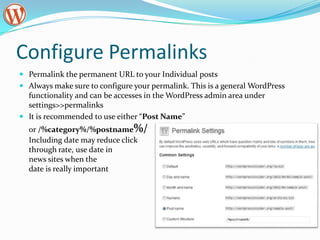
Configure Permalinks
 Permalink the permanent URL to your Individual posts
 Always make sure to configure your permalink. This is a general WordPress
  functionality and can be accesses in the WordPress admin area under
  settings>>permalinks
 It is recommended to use either “Post Name”
  or /%category%/%postname%/
  Including date may reduce click
  through rate, use date in
  news sites when the
  date is really important
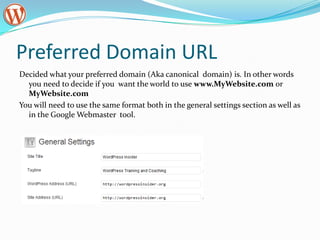
Preferred Domain URL
Decided what your preferred domain (Aka canonical domain) is. In other words
  you need to decide if you want the world to use www.MyWebsite.com or
  MyWebsite.com
You will need to use the same format both in the general settings section as well as
  in the Google Webmaster tool.
Preferred Domain URL Cont.
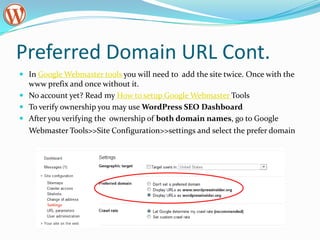
 In Google Webmaster tools you will need to add the site twice. Once with the
  www prefix and once without it.
 No account yet? Read my How to setup Google Webmaster Tools
 To verify ownership you may use WordPress SEO Dashboard
 After you verifying the ownership of both domain names, go to Google
  Webmaster Tools>>Site Configuration>>settings and select the prefer domain
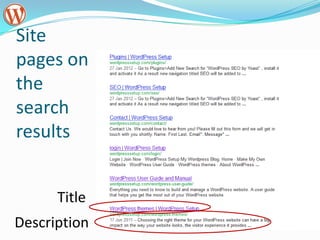
Your site on the web
 If you type into the Google search box
  “site:YourDomain.com” you will be able to see:
1. What pages of your site are indexed by Google -
    You will probably find that not all indexed page need
    to be indexed.
2. The way the pages are represented at the search
    results. Is this the way you want the search results to
    look? Is the text displayed going to entice potential
    visitor to click and come visit your site?
Site
pages on
the
search
results


      Title
Description
About Titles
Used for search engine ranking –
 must include the key words
Shown on the browser tab
Is the first line people see in the
 search results
Controlling titles
 Define global default rules in WordPress SEO >>
  Titles menu
 Overwrite the default at a post, page, category or tag
  level
 Guidelines for creating good titles:
   They should always contain the focus keyword ;
    preferably be at the beginning of the title.
   They should always contain your brand, preferably at the
    end, so people may recognize you in consecutive
    searches.
   The title should entice people to click.
About Indexation
 When you install WordPress SEO, your admin
  pages and search result pages are by default not
  indexed
 Disable date based archives indexation – Unless
  your site is a news site.
 At a page level , under WordPress SEO >>
  Advanced you can set a page to be “Nonindex” .
  Pages such as “Terms and Conditions” , shopping
  cart and are examples for pages you do not want
  indexed.
Descriptions
 An accurate description communicates to prospective
  visitors the make-up and content relevancy of the
  page, and compels (or not) that visitor to click through
  and visit your site page.
 If you fail to include a description of the page, search
  engines are likely going to fabricate a description of
  their choosing by returning a snippet of text from your
  page.
 You can control the description at the page, post
  , category and tag level using WordPress SEO interface
XML Site maps
 To enable the creation of XML site maps by WordPress
  SEO plugin, all you have to is check the box and save
  the settings
 The xml sitemap should be submitted to Google
  Webmaster Tools in the Configuration>>Sitemaps
  panel.

 WordPress SEO pings Google and Bing every time you
 have a new post
WordPress SEO –Permalinks menu
 The only option I use: Strip the category base
 (usually /category/) from the category URL.

 Beware - Other options may break some plugins
Resources
 Video - WordPress SEO with Yoast, Joost de Valk
 Yoast: WordPress SEO Article
 WordPressInsider – WordPress SEO
Connect With Me:
                                      Email: Michelle@CastilloMediaGroup.com
                                      LinkedIn
                                      Twitter
                                      Facebook ( Feel Free to Like us  )

                                      Website: WordPressInsider.org


This presentation can be found here: http://tinyurl.com/wordpress90

WordPress SEO

  • 1.
    A presentation givento the WordPressInsider meetup on April 4, 2012 Connect With Me: Email: Michelle@CastilloMediaGroup.com LinkedIn Twitter Facebook ( Feel Free to Like us  ) Website: WordPressInsider.org This presentation can be found here: http://tinyurl.com/wordpress90
  • 2.
    Configure Permalinks  Permalinkthe permanent URL to your Individual posts  Always make sure to configure your permalink. This is a general WordPress functionality and can be accesses in the WordPress admin area under settings>>permalinks  It is recommended to use either “Post Name” or /%category%/%postname%/ Including date may reduce click through rate, use date in news sites when the date is really important
  • 3.
    Preferred Domain URL Decidedwhat your preferred domain (Aka canonical domain) is. In other words you need to decide if you want the world to use www.MyWebsite.com or MyWebsite.com You will need to use the same format both in the general settings section as well as in the Google Webmaster tool.
  • 4.
    Preferred Domain URLCont.  In Google Webmaster tools you will need to add the site twice. Once with the www prefix and once without it.  No account yet? Read my How to setup Google Webmaster Tools  To verify ownership you may use WordPress SEO Dashboard  After you verifying the ownership of both domain names, go to Google Webmaster Tools>>Site Configuration>>settings and select the prefer domain
  • 5.
    Your site onthe web  If you type into the Google search box “site:YourDomain.com” you will be able to see: 1. What pages of your site are indexed by Google - You will probably find that not all indexed page need to be indexed. 2. The way the pages are represented at the search results. Is this the way you want the search results to look? Is the text displayed going to entice potential visitor to click and come visit your site?
  • 6.
  • 7.
    About Titles Used forsearch engine ranking – must include the key words Shown on the browser tab Is the first line people see in the search results
  • 8.
    Controlling titles  Defineglobal default rules in WordPress SEO >> Titles menu  Overwrite the default at a post, page, category or tag level  Guidelines for creating good titles:  They should always contain the focus keyword ; preferably be at the beginning of the title.  They should always contain your brand, preferably at the end, so people may recognize you in consecutive searches.  The title should entice people to click.
  • 9.
    About Indexation  Whenyou install WordPress SEO, your admin pages and search result pages are by default not indexed  Disable date based archives indexation – Unless your site is a news site.  At a page level , under WordPress SEO >> Advanced you can set a page to be “Nonindex” . Pages such as “Terms and Conditions” , shopping cart and are examples for pages you do not want indexed.
  • 10.
    Descriptions  An accuratedescription communicates to prospective visitors the make-up and content relevancy of the page, and compels (or not) that visitor to click through and visit your site page.  If you fail to include a description of the page, search engines are likely going to fabricate a description of their choosing by returning a snippet of text from your page.  You can control the description at the page, post , category and tag level using WordPress SEO interface
  • 11.
    XML Site maps To enable the creation of XML site maps by WordPress SEO plugin, all you have to is check the box and save the settings  The xml sitemap should be submitted to Google Webmaster Tools in the Configuration>>Sitemaps panel.  WordPress SEO pings Google and Bing every time you have a new post
  • 12.
    WordPress SEO –Permalinksmenu  The only option I use: Strip the category base (usually /category/) from the category URL.  Beware - Other options may break some plugins
  • 13.
    Resources  Video -WordPress SEO with Yoast, Joost de Valk  Yoast: WordPress SEO Article  WordPressInsider – WordPress SEO
  • 14.
    Connect With Me: Email: Michelle@CastilloMediaGroup.com LinkedIn Twitter Facebook ( Feel Free to Like us  ) Website: WordPressInsider.org This presentation can be found here: http://tinyurl.com/wordpress90