#WordPressInsider @MichelleCasti
fabook.com/WordPressInsider
http://tinyurl.com/wpi-Nov13
Why sell digital products online
Generate excellent passive
income
They build your brand and
establish you as an expert
leading to further opportunities
and revenues.
#WordPressInsider @MichelleCasti
What is your master plan?
 WHO Will You Target?
 WHAT Solution Will You Offer?
 Frequency – Will you be providing new content
every day? Every week? Every Month?
 Format – Will the content be articles? PDF
Downloads? Videos? Audio Interviews?
Combination?
#WordPressInsider @MichelleCasti
What is the structure of your course?
 Publisher module - Publish new content
on a regular basis, much like an online
“magazine”.
 Everything available at once
 Modular Course - A course with several
modules. Members move from one module
to the next based on a set schedule (ex. 1
module per week).
#WordPressInsider @MichelleCasti
What is your product?
 eBook
Examples
 Free eBook offered as an incentive for joining your email list
 eBook sold for an $xx
 Video
Examples
 Access to the videos of a recorder seminar
 Set of training videos
 Recorded webinars
 Audio
Examples
 Accesses to past interviews
#WordPressInsider @MichelleCasti
What will be your promotion strategy?
Free memberships level
Free trial access to the
paid membership
material
Free eBook
#WordPressInsider @MichelleCasti
What are Email Marketing needs
What emails are sent as a result of a
purchase
Would you like to automatically subscribe
customers to a specific list based on what
they purchased?
Will you need to use auto responders in
conjunction with content delivery
#WordPressInsider @MichelleCasti
How
 There tens of tools and solutions that work together
with WordPress
 And several none WordPress solutions:
 OntraPort
 InfusionSoft
 Kajabi
 Udemy
 Many more
#WordPressInsider @MichelleCasti
Why use WordPress
You are in control
 One time upfront
investment, no monthly fees
Very flexible
#WordPressInsider @MichelleCasti
Tools : Plugins
 WishListMemeber – Very mature, has been around for long
 MemberPress – incredibly mature and powerful, without
regular eCommerce
 iThemes Exchange – offers upgrades & downgrades, Stripe
integration & eCommerce
 Paid Memberships Pro – free plugin with tons of additional
free add-ons
 Restrict Content Pro – simple to learn & use, with powerful
integration to Easy Digital Downloads
 WooCommerce – a powerful platform for memberships if you
also need full eCommerce
source: chrislema.com
#WordPressInsider @MichelleCasti
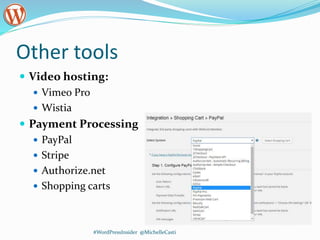
Other tools
 Video hosting:
 Vimeo Pro
 Wistia
 Payment Processing
 PayPal
 Stripe
 Authorize.net
 Shopping carts
#WordPressInsider @MichelleCasti
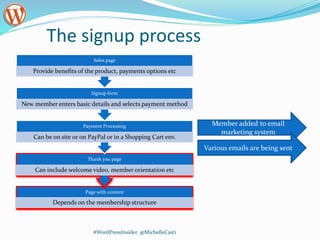
The signup process
Page with content
Depends on the membership structure
Thank you page
Can include welcome video, member orientation etc
Payment Processing
Can be on site or on PayPal or in a Shopping Cart env.
Signup form
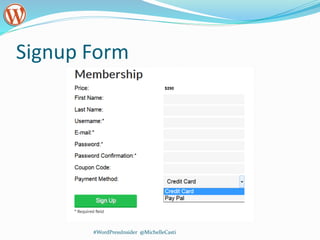
New member enters basic details and selects payment method
Sales page
Provide benefits of the product, payments options etc
#WordPressInsider @MichelleCasti
Member added to email
marketing system
Various emails are being sent
Step for building your website
Basic settings
Define membership
packages/levels or product
Add content and apply
protection rules
#WordPressInsider @MichelleCasti
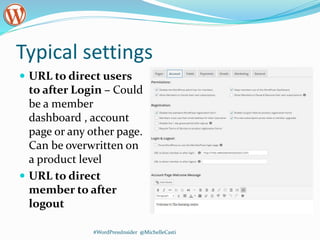
Typical settings
 URL to direct users
to after Login – Could
be a member
dashboard , account
page or any other page.
Can be overwritten on
a product level
 URL to direct
member to after
logout
#WordPressInsider @MichelleCasti
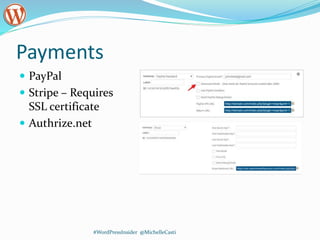
Payments
 PayPal
 Stripe – Requires
SSL certificate
 Authrize.net
#WordPressInsider @MichelleCasti
Typical settings
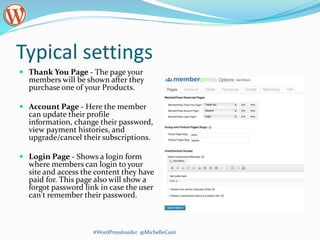
 Thank You Page - The page your
members will be shown after they
purchase one of your Products.
 Account Page - Here the member
can update their profile
information, change their password,
view payment histories, and
upgrade/cancel their subscriptions.
 Login Page - Shows a login form
where members can login to your
site and access the content they have
paid for. This page also will show a
forgot password link in case the user
can't remember their password.
#WordPressInsider @MichelleCasti
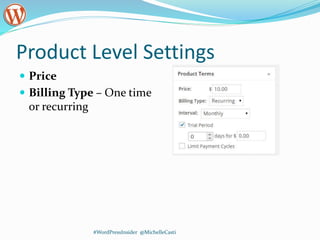
Product Level Settings
 Price
 Billing Type – One time
or recurring
#WordPressInsider @MichelleCasti
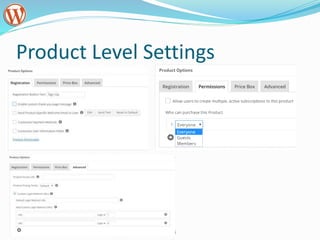
Product Level Settings
#WordPressInsider @MichelleCasti
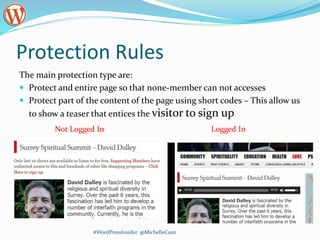
Protection Rules
The main protection type are:
 Protect and entire page so that none-member can not accesses
 Protect part of the content of the page using short codes – This allow us
to show a teaser that entices the visitor to sign up
#WordPressInsider @MichelleCasti
Logged InNot Logged In
Signup Form
#WordPressInsider @MichelleCasti
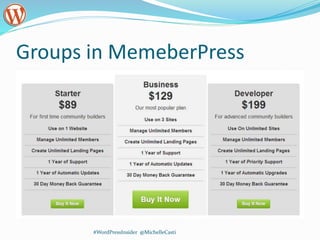
Groups in MemeberPress
#WordPressInsider @MichelleCasti
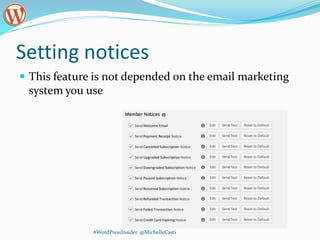
Setting notices
#WordPressInsider @MichelleCasti
 This feature is not depended on the email marketing
system you use
Payment processing
 PayPal only
 Direct processing of credit cards - requires a merchant
account and a gateway.
 What currency are you going to use?
 Do you need to charge reoccurring fees?
 Cancelation handling?
 Do you want to offer discounts? Coupons? Trials
#WordPressInsider @MichelleCasti
Other considerations
 What happens if somebody tries to access a page that
he/she does not have access to?
 Hiding content methods
#WordPressInsider @MichelleCasti
Resources Summary
 MemberPress
#WordPressInsider @MichelleCasti
Connect With Me:
Email: Michelle@CastilloMediaGroup.com
LinkedIn
Twitter
Facebook ( Feel Free to Like us  )
Website: WordPressInsider.org

Using WordPress Membership Websites to Sell and deliver information products

  • 1.
  • 2.
    Why sell digitalproducts online Generate excellent passive income They build your brand and establish you as an expert leading to further opportunities and revenues. #WordPressInsider @MichelleCasti
  • 3.
    What is yourmaster plan?  WHO Will You Target?  WHAT Solution Will You Offer?  Frequency – Will you be providing new content every day? Every week? Every Month?  Format – Will the content be articles? PDF Downloads? Videos? Audio Interviews? Combination? #WordPressInsider @MichelleCasti
  • 4.
    What is thestructure of your course?  Publisher module - Publish new content on a regular basis, much like an online “magazine”.  Everything available at once  Modular Course - A course with several modules. Members move from one module to the next based on a set schedule (ex. 1 module per week). #WordPressInsider @MichelleCasti
  • 5.
    What is yourproduct?  eBook Examples  Free eBook offered as an incentive for joining your email list  eBook sold for an $xx  Video Examples  Access to the videos of a recorder seminar  Set of training videos  Recorded webinars  Audio Examples  Accesses to past interviews #WordPressInsider @MichelleCasti
  • 6.
    What will beyour promotion strategy? Free memberships level Free trial access to the paid membership material Free eBook #WordPressInsider @MichelleCasti
  • 7.
    What are EmailMarketing needs What emails are sent as a result of a purchase Would you like to automatically subscribe customers to a specific list based on what they purchased? Will you need to use auto responders in conjunction with content delivery #WordPressInsider @MichelleCasti
  • 8.
    How  There tensof tools and solutions that work together with WordPress  And several none WordPress solutions:  OntraPort  InfusionSoft  Kajabi  Udemy  Many more #WordPressInsider @MichelleCasti
  • 9.
    Why use WordPress Youare in control  One time upfront investment, no monthly fees Very flexible #WordPressInsider @MichelleCasti
  • 10.
    Tools : Plugins WishListMemeber – Very mature, has been around for long  MemberPress – incredibly mature and powerful, without regular eCommerce  iThemes Exchange – offers upgrades & downgrades, Stripe integration & eCommerce  Paid Memberships Pro – free plugin with tons of additional free add-ons  Restrict Content Pro – simple to learn & use, with powerful integration to Easy Digital Downloads  WooCommerce – a powerful platform for memberships if you also need full eCommerce source: chrislema.com #WordPressInsider @MichelleCasti
  • 11.
    Other tools  Videohosting:  Vimeo Pro  Wistia  Payment Processing  PayPal  Stripe  Authorize.net  Shopping carts #WordPressInsider @MichelleCasti
  • 12.
    The signup process Pagewith content Depends on the membership structure Thank you page Can include welcome video, member orientation etc Payment Processing Can be on site or on PayPal or in a Shopping Cart env. Signup form New member enters basic details and selects payment method Sales page Provide benefits of the product, payments options etc #WordPressInsider @MichelleCasti Member added to email marketing system Various emails are being sent
  • 13.
    Step for buildingyour website Basic settings Define membership packages/levels or product Add content and apply protection rules #WordPressInsider @MichelleCasti
  • 14.
    Typical settings  URLto direct users to after Login – Could be a member dashboard , account page or any other page. Can be overwritten on a product level  URL to direct member to after logout #WordPressInsider @MichelleCasti
  • 15.
    Payments  PayPal  Stripe– Requires SSL certificate  Authrize.net #WordPressInsider @MichelleCasti
  • 16.
    Typical settings  ThankYou Page - The page your members will be shown after they purchase one of your Products.  Account Page - Here the member can update their profile information, change their password, view payment histories, and upgrade/cancel their subscriptions.  Login Page - Shows a login form where members can login to your site and access the content they have paid for. This page also will show a forgot password link in case the user can't remember their password. #WordPressInsider @MichelleCasti
  • 17.
    Product Level Settings Price  Billing Type – One time or recurring #WordPressInsider @MichelleCasti
  • 18.
  • 19.
    Protection Rules The mainprotection type are:  Protect and entire page so that none-member can not accesses  Protect part of the content of the page using short codes – This allow us to show a teaser that entices the visitor to sign up #WordPressInsider @MichelleCasti Logged InNot Logged In
  • 20.
  • 21.
  • 22.
    Setting notices #WordPressInsider @MichelleCasti This feature is not depended on the email marketing system you use
  • 23.
    Payment processing  PayPalonly  Direct processing of credit cards - requires a merchant account and a gateway.  What currency are you going to use?  Do you need to charge reoccurring fees?  Cancelation handling?  Do you want to offer discounts? Coupons? Trials #WordPressInsider @MichelleCasti
  • 24.
    Other considerations  Whathappens if somebody tries to access a page that he/she does not have access to?  Hiding content methods #WordPressInsider @MichelleCasti
  • 25.
  • 26.
    Connect With Me: Email:Michelle@CastilloMediaGroup.com LinkedIn Twitter Facebook ( Feel Free to Like us  ) Website: WordPressInsider.org

Editor's Notes

  • #4 The amount of time it will take you to setup your membership will be dramatically reduced knowing this information BEFORE you start setting everything up.