WordPress Beirut 9th Meetup - March
7:00 - Mingle/Networking/coffee/Hello
7:15 - Introduction to Security
7:50 - WordPress Security
8:15 - Break
8:30 - Make it secure
9:00 - Closing
fb.com/wpbeirut
wpbeirut.org
How did you heard about the
meetup
● Previous WP Meetup
● Facebook
● Friend
● WordPress admin widget
Ali Basheer
Developer
@ Strategies dC
Fadi Zahhar
Modern Full-
Stack Developer
WordPress Beirut
● One of 500 WP Meetups
● Contribution
● Every 1st Tuesday/Month
● Started July 2017
“I Heard It’s Insecure…” Is
WordPress Secure?
The Real Threat to
WordPress: Botnets!
● Forwarding traffic to their own site(s)
● Taking over your SEO
● Drive-by-downloads — making visitors to
your site download malware, etc
● To gain access to your site data — user lists,
purchase history, etc
● Sending spam emails
● To use your server resources (CPU mostly)
to do useful computation, most likely
mining crypto-coins like Bitcoin
Why WordPress
Sites Get Hacked
Threats And
Security In
WordPress
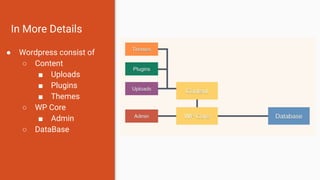
In More Details
● Wordpress consist of
○ Content
■ Uploads
■ Plugins
■ Themes
○ WP Core
■ Admin
○ DataBase
Points of WP Attack
● The database
● The admin area
● WP core files
● Theme and plugin files
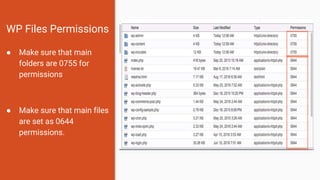
WP Files Permissions
● Make sure that main
folders are 0755 for
permissions
● Make sure that main files
are set as 0644
permissions.
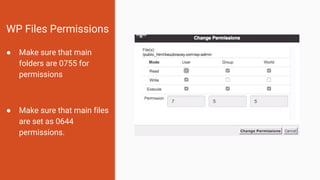
WP Files Permissions
● Make sure that main
folders are 0755 for
permissions
● Make sure that main files
are set as 0644
permissions.
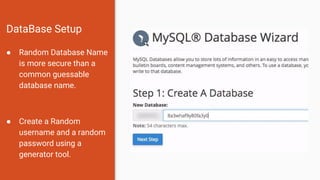
DataBase Setup
● Random Database Name
is more secure than a
common guessable
database name.
● Create a Random
username and a random
password using a
generator tool.
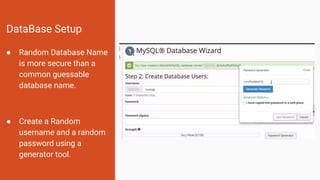
DataBase Setup
● Random Database Name
is more secure than a
common guessable
database name.
● Create a Random
username and a random
password using a
generator tool.
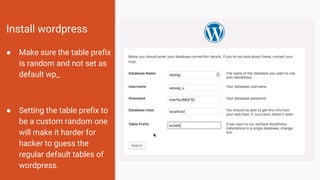
Install wordpress
● Make sure the table prefix
is random and not set as
default wp_
● Setting the table prefix to
be a custom random one
will make it harder for
hacker to guess the
regular default tables of
wordpress.
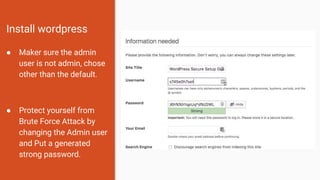
Install wordpress
● Maker sure the admin
user is not admin, chose
other than the default.
● Protect yourself from
Brute Force Attack by
changing the Admin user
and Put a generated
strong password.
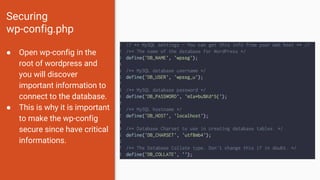
Securing
wp-config.php
● Open wp-config in the
root of wordpress and
you will discover
important information to
connect to the database.
● This is why it is important
to make the wp-config
secure since have critical
informations.
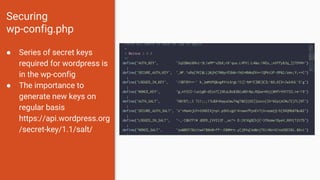
Securing
wp-config.php
● Series of secret keys
required for wordpress is
in the wp-config
● The importance to
generate new keys on
regular basis
https://api.wordpress.org
/secret-key/1.1/salt/
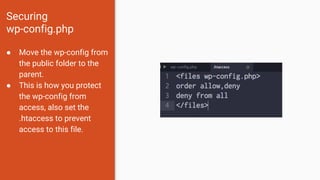
Securing
wp-config.php
● Move the wp-config from
the public folder to the
parent.
● This is how you protect
the wp-config from
access, also set the
.htaccess to prevent
access to this file.
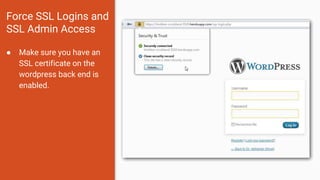
Force SSL Logins and
SSL Admin Access
● Make sure you have an
SSL certificate on the
wordpress back end is
enabled.
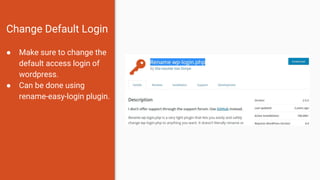
Change Default Login
● Make sure to change the
default access login of
wordpress.
● Can be done using
rename-easy-login plugin.
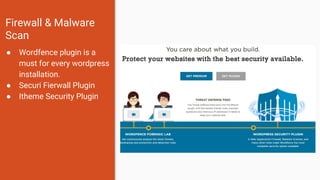
Firewall & Malware
Scan
● Wordfence plugin is a
must for every wordpress
installation.
● Securi Fierwall Plugin
● Itheme Security Plugin
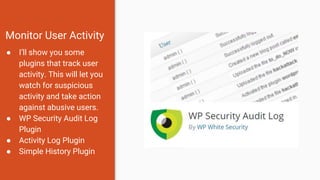
Monitor User Activity
● I’ll show you some
plugins that track user
activity. This will let you
watch for suspicious
activity and take action
against abusive users.
● WP Security Audit Log
Plugin
● Activity Log Plugin
● Simple History Plugin
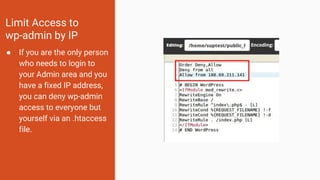
Limit Access to
wp-admin by IP
● If you are the only person
who needs to login to
your Admin area and you
have a fixed IP address,
you can deny wp-admin
access to everyone but
yourself via an .htaccess
file.
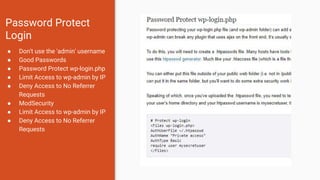
Password Protect
Login
● Don't use the 'admin' username
● Good Passwords
● Password Protect wp-login.php
● Limit Access to wp-admin by IP
● Deny Access to No Referrer
Requests
● ModSecurity
● Limit Access to wp-admin by IP
● Deny Access to No Referrer
Requests
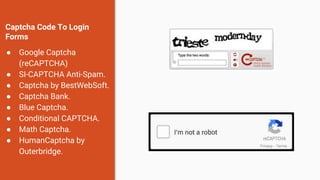
Captcha Code To Login
Forms
● Google Captcha
(reCAPTCHA)
● SI-CAPTCHA Anti-Spam.
● Captcha by BestWebSoft.
● Captcha Bank.
● Blue Captcha.
● Conditional CAPTCHA.
● Math Captcha.
● HumanCaptcha by
Outerbridge.
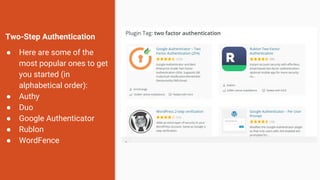
Two-Step Authentication
● Here are some of the
most popular ones to get
you started (in
alphabetical order):
● Authy
● Duo
● Google Authenticator
● Rublon
● WordFence
Additional Security
● Hide wordpress server
(checked by wordfence)
● Block bad queries plugin
● Bad behavior
● Really simple SSL
● ## Disable Editing in
Dashboard
● define('DISALLOW_FILE_E
DIT', true);
Themes and trusted sources
● Make sure that you installed a
theme from trusted source.
● Remove unwanted themes from
wordpress.
● Make sure that the bought theme
is from an original trusted market
and the owner of the theme is an
original.
● There are developers who modiy
themes and sell them half the
price so you wan’t get update
and support.
Set you settings
● Put the correct settings of your
theme and plugins
● General
● Writing
● Reading
● Discussion
● Media
● Permalink
● Users -> Profile
● Menus
Optimize for Speed
● Ensuring your site runs as
smoothly and quickly as possible
is essential for both happy
visitors and performance in
search engines.
Maintenance Plan
● Even though by hardening the
security of your site you
decrease the chances of being
hacked, it’s not possible to make
a site 100% invincible. You need
to make sure you have a
maintenance plan that includes
regular site, theme and plugin
updates. There’s also always the
chance of unpredictable things
happening ,and for that reason,
it’s super important to know how
to back up your site, and to make
a plan to do so regularly.
Security Tips for Admins
● I’ll share some of the most
important security tips that every
administrator should use to
secure their site. From keeping
your site up to date to backing up
and controlling permissions,
these tips are fundamental to
website security.
● Updraft Backup Plugin
● Email Login Plugin
● WPS Hide Login Plugin
● Loginizer Plugin
Thank You.

Word press beirut 9th meetup march

  • 1.
    WordPress Beirut 9thMeetup - March 7:00 - Mingle/Networking/coffee/Hello 7:15 - Introduction to Security 7:50 - WordPress Security 8:15 - Break 8:30 - Make it secure 9:00 - Closing fb.com/wpbeirut wpbeirut.org
  • 2.
    How did youheard about the meetup ● Previous WP Meetup ● Facebook ● Friend ● WordPress admin widget
  • 3.
  • 4.
  • 5.
    WordPress Beirut ● Oneof 500 WP Meetups ● Contribution ● Every 1st Tuesday/Month ● Started July 2017
  • 6.
    “I Heard It’sInsecure…” Is WordPress Secure?
  • 7.
    The Real Threatto WordPress: Botnets!
  • 8.
    ● Forwarding trafficto their own site(s) ● Taking over your SEO ● Drive-by-downloads — making visitors to your site download malware, etc ● To gain access to your site data — user lists, purchase history, etc ● Sending spam emails ● To use your server resources (CPU mostly) to do useful computation, most likely mining crypto-coins like Bitcoin Why WordPress Sites Get Hacked
  • 9.
  • 10.
    In More Details ●Wordpress consist of ○ Content ■ Uploads ■ Plugins ■ Themes ○ WP Core ■ Admin ○ DataBase
  • 11.
    Points of WPAttack ● The database ● The admin area ● WP core files ● Theme and plugin files
  • 12.
    WP Files Permissions ●Make sure that main folders are 0755 for permissions ● Make sure that main files are set as 0644 permissions.
  • 13.
    WP Files Permissions ●Make sure that main folders are 0755 for permissions ● Make sure that main files are set as 0644 permissions.
  • 14.
    DataBase Setup ● RandomDatabase Name is more secure than a common guessable database name. ● Create a Random username and a random password using a generator tool.
  • 15.
    DataBase Setup ● RandomDatabase Name is more secure than a common guessable database name. ● Create a Random username and a random password using a generator tool.
  • 16.
    Install wordpress ● Makesure the table prefix is random and not set as default wp_ ● Setting the table prefix to be a custom random one will make it harder for hacker to guess the regular default tables of wordpress.
  • 17.
    Install wordpress ● Makersure the admin user is not admin, chose other than the default. ● Protect yourself from Brute Force Attack by changing the Admin user and Put a generated strong password.
  • 18.
    Securing wp-config.php ● Open wp-configin the root of wordpress and you will discover important information to connect to the database. ● This is why it is important to make the wp-config secure since have critical informations.
  • 19.
    Securing wp-config.php ● Series ofsecret keys required for wordpress is in the wp-config ● The importance to generate new keys on regular basis https://api.wordpress.org /secret-key/1.1/salt/
  • 20.
    Securing wp-config.php ● Move thewp-config from the public folder to the parent. ● This is how you protect the wp-config from access, also set the .htaccess to prevent access to this file.
  • 21.
    Force SSL Loginsand SSL Admin Access ● Make sure you have an SSL certificate on the wordpress back end is enabled.
  • 22.
    Change Default Login ●Make sure to change the default access login of wordpress. ● Can be done using rename-easy-login plugin.
  • 23.
    Firewall & Malware Scan ●Wordfence plugin is a must for every wordpress installation. ● Securi Fierwall Plugin ● Itheme Security Plugin
  • 24.
    Monitor User Activity ●I’ll show you some plugins that track user activity. This will let you watch for suspicious activity and take action against abusive users. ● WP Security Audit Log Plugin ● Activity Log Plugin ● Simple History Plugin
  • 25.
    Limit Access to wp-adminby IP ● If you are the only person who needs to login to your Admin area and you have a fixed IP address, you can deny wp-admin access to everyone but yourself via an .htaccess file.
  • 26.
    Password Protect Login ● Don'tuse the 'admin' username ● Good Passwords ● Password Protect wp-login.php ● Limit Access to wp-admin by IP ● Deny Access to No Referrer Requests ● ModSecurity ● Limit Access to wp-admin by IP ● Deny Access to No Referrer Requests
  • 27.
    Captcha Code ToLogin Forms ● Google Captcha (reCAPTCHA) ● SI-CAPTCHA Anti-Spam. ● Captcha by BestWebSoft. ● Captcha Bank. ● Blue Captcha. ● Conditional CAPTCHA. ● Math Captcha. ● HumanCaptcha by Outerbridge.
  • 28.
    Two-Step Authentication ● Hereare some of the most popular ones to get you started (in alphabetical order): ● Authy ● Duo ● Google Authenticator ● Rublon ● WordFence
  • 29.
    Additional Security ● Hidewordpress server (checked by wordfence) ● Block bad queries plugin ● Bad behavior ● Really simple SSL ● ## Disable Editing in Dashboard ● define('DISALLOW_FILE_E DIT', true);
  • 30.
    Themes and trustedsources ● Make sure that you installed a theme from trusted source. ● Remove unwanted themes from wordpress. ● Make sure that the bought theme is from an original trusted market and the owner of the theme is an original. ● There are developers who modiy themes and sell them half the price so you wan’t get update and support.
  • 31.
    Set you settings ●Put the correct settings of your theme and plugins ● General ● Writing ● Reading ● Discussion ● Media ● Permalink ● Users -> Profile ● Menus
  • 32.
    Optimize for Speed ●Ensuring your site runs as smoothly and quickly as possible is essential for both happy visitors and performance in search engines.
  • 33.
    Maintenance Plan ● Eventhough by hardening the security of your site you decrease the chances of being hacked, it’s not possible to make a site 100% invincible. You need to make sure you have a maintenance plan that includes regular site, theme and plugin updates. There’s also always the chance of unpredictable things happening ,and for that reason, it’s super important to know how to back up your site, and to make a plan to do so regularly.
  • 34.
    Security Tips forAdmins ● I’ll share some of the most important security tips that every administrator should use to secure their site. From keeping your site up to date to backing up and controlling permissions, these tips are fundamental to website security. ● Updraft Backup Plugin ● Email Login Plugin ● WPS Hide Login Plugin ● Loginizer Plugin
  • 35.