Wordpress Deployment on
AWS
Nicolas El Khoury
nicolas.kh4@gmail.com
+961 70 146 509
Background Information
● BE Computer Engineering - Lebanese American University
● Masc Information Systems Security - Concordia University
○ Publications in the areas of cloud computing, NFV, SDN.
● Lead DevOps Engineer - Designer-24
● Community Lead - Amazon Web Services Beirut User Group
2
Outline
● Introduction to Cloud Computing.
● Deploying Wordpress on Amazon LightSail.
● Deploying Wordpress on a Linux Server.
● Designing a Secure, Robust, and Scalable architecture for WordPress
applications on AWS. 3
Introduction to Cloud Computing.
4
5
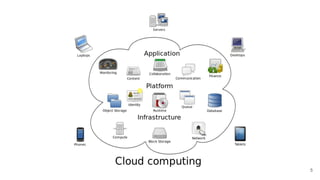
Types of Cloud Computing Services
● Infrastructure as a Service: Storage Space, Virtual Machines, Bandwidth.
● Platform as a Service: Operating Systems, Programming Languages, etc.
● Software as a Services: Any Software you access online (iTunes, Google
Sheets, booking.com, uber, Designer-24, cheapoair).
6
Advantages of Cloud Computing
● Less Cost: The services are free from capital expenditure.
● 24 X 7 Availability: Servers are always running.
● Automated Updates on Software
● Flexibility in Capacity (Scalability)
● Pay for what you use only
7
Deploying Wordpress on Amazon
Lightsail
8
AWS Lightsail
● AWS Service offering a ready-made environment for multiple applications
(Wordpress, Joomla, Magento, etc).
● Targets users with no knowledge in system administration or people who don’t
want to worry about servers.
● Configures all the environment automatically.
● Inexpensive!
9
Lightsail in the Background
● Launch a Virtual Machine.
● Attach a Disk.
● Manage Permissions (IAM).
● Create a Security Group.
● Setup DNS.
● Create Static IP.
● Install all the components for wordpress (Web server, Database, PHP,
Wordpress app).
10
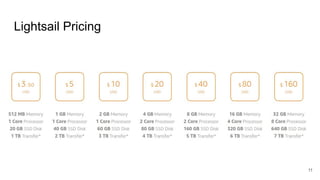
Lightsail Pricing
11
Setup Wordpress on Lightsail Demo
12
Advantages of Lightsail
● Simplified UI: runs through preinstalled software with the server.
● Speed: Ability to spin up a server in minutes.
● Affordability: Ability to run a server for $3.5/month.
● Reliability: Deployed on a leading cloud platform. Chances of downtime are
very small.
13
Disadvantages of Lightsail
● Predefined Configuration: Inability to choose different components
(webserver, database, etc).
● SPOF: Single point of failure.
● One application per server.
● Not suitable for enterprise grade applications.
14
Deploying Wordpress on a Linux Server
15
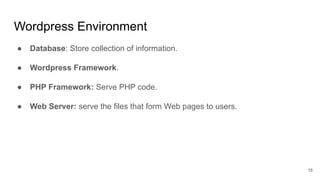
Wordpress Environment
● Database: Store collection of information.
● Wordpress Framework.
● PHP Framework: Serve PHP code.
● Web Server: serve the files that form Web pages to users.
16
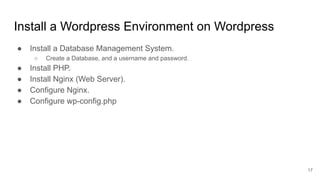
Install a Wordpress Environment on Wordpress
● Install a Database Management System.
○ Create a Database, and a username and password.
● Install PHP.
● Install Nginx (Web Server).
● Configure Nginx.
● Configure wp-config.php
17
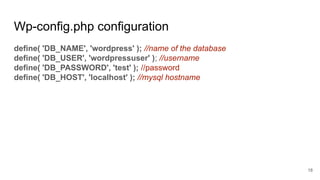
Wp-config.php configuration
define( 'DB_NAME', 'wordpress' ); //name of the database
define( 'DB_USER', 'wordpressuser' ); //username
define( 'DB_PASSWORD', 'test' ); //password
define( 'DB_HOST', 'localhost' ); //mysql hostname
18
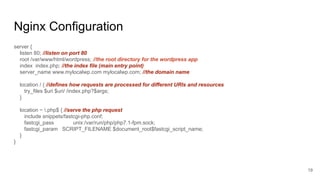
Nginx Configuration
server {
listen 80; //listen on port 80
root /var/www/html/wordpress; //the root directory for the wordpress app
index index.php; //the index file (main entry point)
server_name www.mylocalwp.com mylocalwp.com; //the domain name
location / { //defines how requests are processed for different URIs and resources
try_files $uri $uri/ /index.php?$args;
}
location ~ .php$ { //serve the php request
include snippets/fastcgi-php.conf;
fastcgi_pass unix:/var/run/php/php7.1-fpm.sock;
fastcgi_param SCRIPT_FILENAME $document_root$fastcgi_script_name;
}
}
19
Demo
20
Custom Deployment Advantages
● Custom components.
● Better Design flexibility.
● Multiple applications on one server.
21
Custom Deployment Disadvantages
● Not suitable for production.
● Unscalable.
● Single point of failure.
● Improper environment isolation.
22
Building the Infrastructure on AWS
23
Architecture Considerations
● Security.
● Availability (fault Tolerance).
● Scalability.
● Visibility: Logging, monitoring, tracing.
24
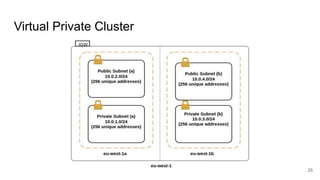
Virtual Private Cluster
25
Launch the Instances
26
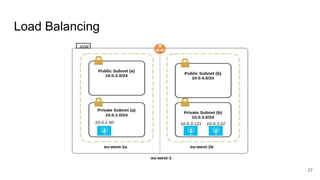
Load Balancing
27
Architecture Considerations
● Security.
● Availability (fault Tolerance).
● Scalability.
● Visibility: Logging, monitoring, tracing.
28
Security
● VPC Level:
○ Ingress Traffic Control: Network traffic originating from outside of the VPC
○ Egress Traffic Control: Network traffic leaving a VPC
● Load Balancer Level:
○ Security Groups: A security group acts as a virtual stateful firewall that controls the
traffic
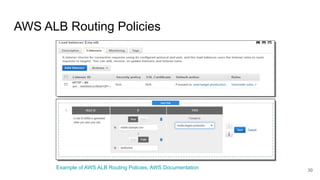
○ Host/Path/Port based Routing
● Instances Level:
○ Security Groups
○ Deployed in private subnets
29
AWS ALB Routing Policies
30
Example of AWS ALB Routing Policies, AWS Documentation
Availability
● Instance Level: Launching replicas
● Load Balancer Level: managed by AWS
● Availability Zone: Spreading instances across multiple availability zones
31
Scalability
● Ability to scale instances on demand, automatically, with a few clicks of
a button.
32
Visibility
● Logging: AWSLogs driver
● Monitoring:
○ Instances: CPU Utilization, Network in, Network Out, etc.
○ Load Balancer: Target Response Time, 4XX Count, 5XX Count, etc.
● Tracing:
○ The load balancer saves important information of each request.
33
Cost Estimation
AWS Cost Calculator
34
Published Articles
● Proposed Infrastructure Setup on AWS for a Microservices
Architecture.
○ Chapter 1: Introduction and Design Considerations
○ Chapter 2: Overview of the Infrastructure and Components
○ Chapter 3: Deployment Strategy for Microservices
35

Wordpress deployment on aws

  • 1.
    Wordpress Deployment on AWS NicolasEl Khoury nicolas.kh4@gmail.com +961 70 146 509
  • 2.
    Background Information ● BEComputer Engineering - Lebanese American University ● Masc Information Systems Security - Concordia University ○ Publications in the areas of cloud computing, NFV, SDN. ● Lead DevOps Engineer - Designer-24 ● Community Lead - Amazon Web Services Beirut User Group 2
  • 3.
    Outline ● Introduction toCloud Computing. ● Deploying Wordpress on Amazon LightSail. ● Deploying Wordpress on a Linux Server. ● Designing a Secure, Robust, and Scalable architecture for WordPress applications on AWS. 3
  • 4.
  • 5.
  • 6.
    Types of CloudComputing Services ● Infrastructure as a Service: Storage Space, Virtual Machines, Bandwidth. ● Platform as a Service: Operating Systems, Programming Languages, etc. ● Software as a Services: Any Software you access online (iTunes, Google Sheets, booking.com, uber, Designer-24, cheapoair). 6
  • 7.
    Advantages of CloudComputing ● Less Cost: The services are free from capital expenditure. ● 24 X 7 Availability: Servers are always running. ● Automated Updates on Software ● Flexibility in Capacity (Scalability) ● Pay for what you use only 7
  • 8.
    Deploying Wordpress onAmazon Lightsail 8
  • 9.
    AWS Lightsail ● AWSService offering a ready-made environment for multiple applications (Wordpress, Joomla, Magento, etc). ● Targets users with no knowledge in system administration or people who don’t want to worry about servers. ● Configures all the environment automatically. ● Inexpensive! 9
  • 10.
    Lightsail in theBackground ● Launch a Virtual Machine. ● Attach a Disk. ● Manage Permissions (IAM). ● Create a Security Group. ● Setup DNS. ● Create Static IP. ● Install all the components for wordpress (Web server, Database, PHP, Wordpress app). 10
  • 11.
  • 12.
    Setup Wordpress onLightsail Demo 12
  • 13.
    Advantages of Lightsail ●Simplified UI: runs through preinstalled software with the server. ● Speed: Ability to spin up a server in minutes. ● Affordability: Ability to run a server for $3.5/month. ● Reliability: Deployed on a leading cloud platform. Chances of downtime are very small. 13
  • 14.
    Disadvantages of Lightsail ●Predefined Configuration: Inability to choose different components (webserver, database, etc). ● SPOF: Single point of failure. ● One application per server. ● Not suitable for enterprise grade applications. 14
  • 15.
    Deploying Wordpress ona Linux Server 15
  • 16.
    Wordpress Environment ● Database:Store collection of information. ● Wordpress Framework. ● PHP Framework: Serve PHP code. ● Web Server: serve the files that form Web pages to users. 16
  • 17.
    Install a WordpressEnvironment on Wordpress ● Install a Database Management System. ○ Create a Database, and a username and password. ● Install PHP. ● Install Nginx (Web Server). ● Configure Nginx. ● Configure wp-config.php 17
  • 18.
    Wp-config.php configuration define( 'DB_NAME','wordpress' ); //name of the database define( 'DB_USER', 'wordpressuser' ); //username define( 'DB_PASSWORD', 'test' ); //password define( 'DB_HOST', 'localhost' ); //mysql hostname 18
  • 19.
    Nginx Configuration server { listen80; //listen on port 80 root /var/www/html/wordpress; //the root directory for the wordpress app index index.php; //the index file (main entry point) server_name www.mylocalwp.com mylocalwp.com; //the domain name location / { //defines how requests are processed for different URIs and resources try_files $uri $uri/ /index.php?$args; } location ~ .php$ { //serve the php request include snippets/fastcgi-php.conf; fastcgi_pass unix:/var/run/php/php7.1-fpm.sock; fastcgi_param SCRIPT_FILENAME $document_root$fastcgi_script_name; } } 19
  • 20.
  • 21.
    Custom Deployment Advantages ●Custom components. ● Better Design flexibility. ● Multiple applications on one server. 21
  • 22.
    Custom Deployment Disadvantages ●Not suitable for production. ● Unscalable. ● Single point of failure. ● Improper environment isolation. 22
  • 23.
  • 24.
    Architecture Considerations ● Security. ●Availability (fault Tolerance). ● Scalability. ● Visibility: Logging, monitoring, tracing. 24
  • 25.
  • 26.
  • 27.
  • 28.
    Architecture Considerations ● Security. ●Availability (fault Tolerance). ● Scalability. ● Visibility: Logging, monitoring, tracing. 28
  • 29.
    Security ● VPC Level: ○Ingress Traffic Control: Network traffic originating from outside of the VPC ○ Egress Traffic Control: Network traffic leaving a VPC ● Load Balancer Level: ○ Security Groups: A security group acts as a virtual stateful firewall that controls the traffic ○ Host/Path/Port based Routing ● Instances Level: ○ Security Groups ○ Deployed in private subnets 29
  • 30.
    AWS ALB RoutingPolicies 30 Example of AWS ALB Routing Policies, AWS Documentation
  • 31.
    Availability ● Instance Level:Launching replicas ● Load Balancer Level: managed by AWS ● Availability Zone: Spreading instances across multiple availability zones 31
  • 32.
    Scalability ● Ability toscale instances on demand, automatically, with a few clicks of a button. 32
  • 33.
    Visibility ● Logging: AWSLogsdriver ● Monitoring: ○ Instances: CPU Utilization, Network in, Network Out, etc. ○ Load Balancer: Target Response Time, 4XX Count, 5XX Count, etc. ● Tracing: ○ The load balancer saves important information of each request. 33
  • 34.
  • 35.
    Published Articles ● ProposedInfrastructure Setup on AWS for a Microservices Architecture. ○ Chapter 1: Introduction and Design Considerations ○ Chapter 2: Overview of the Infrastructure and Components ○ Chapter 3: Deployment Strategy for Microservices 35