How to secure your WordPress
Powered Website
PRATIK JAGDISHWALA
About me
Why are we here today?
● Most of you are web hosters, web pro’s or web site designers
● Internet is like the Wild West
● Most serious hosters have encountered attack on their website
● Recovering a website is at times more painful than building a new one
● Can I make my site Hacker Proof?
What you should expect?
● Insights on what’s the real internet like to websites
● Bust Myths about website security
● Learn from our experience
○ What are the do’s and don'ts when hosting a website
○ What to do before you deliver the website to a client
○ Long term maintenance strategy
○ What is the quickest way to recover from a hacking
Let’s Begin
Who uses CMS’s?
● WordPress
○ Forbes, BBC, Sony, Bloomberg Professional, Nasa
● Joomla
○ Harvard University, Linux, The HILL
● Drupal
○ The White House, Warner Brothers
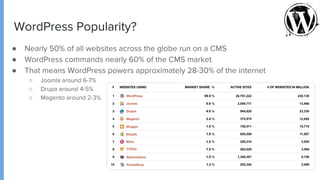
WordPress Popularity?
● Nearly 50% of all websites across the globe run on a CMS
● WordPress commands nearly 60% of the CMS market
● That means WordPress powers approximately 28-30% of the internet
○ Joomla around 6-7%
○ Drupa around 4-5%
○ Magento around 2-3%
Is WordPress really secure?
● Depends
● Not everyone is careful or security conscious with their website
● If a hacker can find a way into 1 WP powered site, they can scan other websites
for the same vulnerability
● WordPress security vulnerabilities extend beyond WordPress code
● According to a wpscan.org report of 3972 WP security vulnerabilities
○ 52% are from WordPress plugins
○ 37% are from core WordPress
○ 11% are from WordPress themes
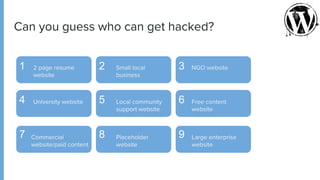
Can you guess who can get hacked?
1 2 3
4 5 6
7 8 9
2 page resume
website
Small local
business
NGO website
University website Local community
support website
Free content
website
Commercial
website/paid content
Placeholder
website
Large enterprise
website
● Search engine rankings on google and other search engines
● Drop in organic search results
○ 45% saw search traffic impacted by hack
○ 9% saw a traffic drop of almost 75%
● Loss of
○ Goodwill / Brand Reputation
○ Confidential information
○ Intellectual property
○ Customer data
○ Actual money
Impact of Security Compromise
Myth of a
Hacker proof
website
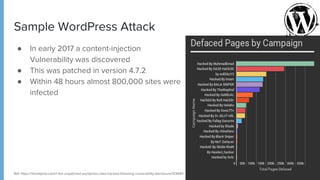
Sample WordPress Attack
● In early 2017 a content-injection
Vulnerability was discovered
● This was patched in version 4.7.2
● Within 48 hours almost 800,000 sites were
infected
Ref: https://threatpost.com/1-5m-unpatched-wordpress-sites-hacked-following-vulnerability-disclosure/123691/
Securing your
WordPress Site
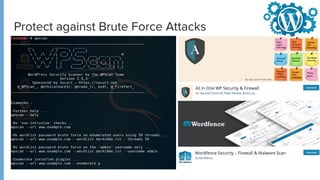
Protect against Brute Force Attacks
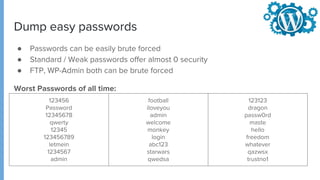
Dump easy passwords
● Passwords can be easily brute forced
● Standard / Weak passwords offer almost 0 security
● FTP, WP-Admin both can be brute forced
Worst Passwords of all time:
123456
Password
12345678
qwerty
12345
123456789
letmein
1234567
admin
football
iloveyou
admin
welcome
monkey
login
abc123
starwars
qwedsa
123123
dragon
passw0rd
maste
hello
freedom
whatever
qazwsx
trustno1
FTP vs SFTP
● Avoid using FTP
○ Easily sniffable by applications/trojans
○ Stored password is easily recovered
○ Communication happens in plain text
● Use SFTP or FTPES
○ Communication happens over Encrypted channel
○ Communication even if sniffed cannot be read in clear text
○ Encrypted key cannot be used for establishing connection
Change default wp-admin username
● Don’t use default ‘admin’ user
● This can be easily brute forced
● More complex usernames are better
● Use alphanumeric usernames
● Change passwords every 3 months
Protect wp-admin
● Disable http://website/wp-admin
● Use a plugin or modify the location manually
● Password protect wp-admin directory
User Enumeration
● If you have deleted admin user, other available users can be easily fetched
using tools
● Once the username is available, hackers can start brute forcing the installation
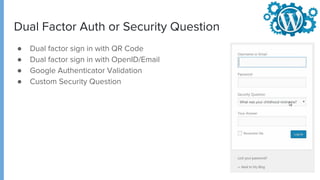
Dual Factor Auth or Security Question
● Dual factor sign in with QR Code
● Dual factor sign in with OpenID/Email
● Google Authenticator Validation
● Custom Security Question
Database Security
● Disable DB access from remote location
● Rename tables and add a prefix to the table names
● Set complex username & password for DB access
.htaccess
● .htaccess is configuration extension for apache web server
● If you add .htaccess file to the root directory everything under that package
will get affected
● If you place it only in the content directory, only that directory is affected
.htaccess Uses
● Deny access from specific IP address/range
● Protect your site with a password
● Redirect users
● Prevent directory listing
● Override server/PHP parameters
● Rewrite URL’s
● And more
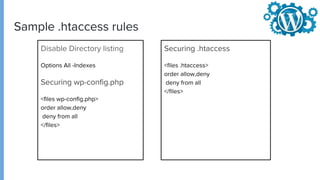
Sample .htaccess rules
Disable Directory listing
Options All -Indexes
Securing wp-config.php
<files wp-config.php>
order allow,deny
deny from all
</files>
Securing .htaccess
<files .htaccess>
order allow,deny
deny from all
</files>
Sample .htaccess rules
Protect from Script Injection
Options +FollowSymLinks
RewriteEngine On
RewriteCond %{QUERY_STRING} (<|%3C).*script.*(>|%3E) [NC,OR]
RewriteCond %{QUERY_STRING} GLOBALS(=|[|%[0-9A-Z]{0,2}) [OR]
RewriteCond %{QUERY_STRING} _REQUEST(=|[|%[0-9A-Z]{0,2})
RewriteRule ^(.*)$ index.php [F,L]
Password Protection with htaccess
AuthType Basic
AuthName "Password Protected Area" AuthUserFile /path/to file
Require valid-user
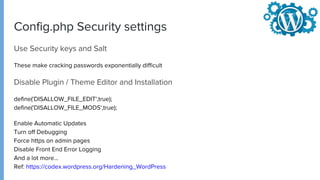
Config.php Security settings
Use Security keys and Salt
These make cracking passwords exponentially difficult
Disable Plugin / Theme Editor and Installation
define('DISALLOW_FILE_EDIT',true);
define('DISALLOW_FILE_MODS',true);
Enable Automatic Updates
Turn off Debugging
Force https on admin pages
Disable Front End Error Logging
And a lot more...
Ref: https://codex.wordpress.org/Hardening_WordPress
Can your site
still get
hacked?
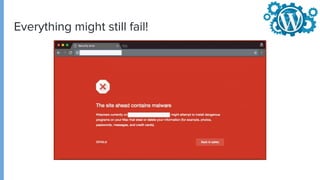
Everything might still fail!
● Stay Calm!
● Document all you are seeing
● Scan your Website
○ Via Plugin (WordFence, Sucuri, etc.)
○ Via remote Crawlers (Sitecheck, SiteLock, VirusTotal, etc.)
● Scan your local environment
○ Is your local machine infected?
○ Are you transmitting over FTP and the password is compromised?
○ Update Password
● Contact your Hosting Provider and let them know & ask them for help
● Reset all access (iThemes Security)
How should you try and recover
● Force Strong Passwords
● Improve access controls (Duo, Two-Factor, etc.)
● Create a backup plan
● Find and remove hack
(https://codex.wordpress.org/FAQ_My_site_was_hacked)
● Update
● Take help from the community (WordPress.org, Hacked or Malware Forum)
● Change Passwords again after recovery
● Harden WordPress (https://codex.wordpress.org/Hardening_WordPress)
● Update!!!
How should you try and recover
Can’t log into WP-Admin?
● Are you locked out?
● Your user/pass is not recognized?
○ Reset password via DB Command Line or phpMyAdmin
(https://codex.wordpress.org/Resetting_Your_Password)
● Get your site removed from SEO blacklists
○ https://developers.google.com/webmasters/hacked
Buy
WebSite
Insurance
Backup
● Everything said and done
● Your site can still be hacked
○ Your service provider
○ Some other user on your server
○ Unpatched vulnerabilities
● Recovery is possible, but very painful
● You need a strong backup plan
● Free or Paid Solutions
○ CodeGuard
○ UpdraftPlus
○ JetPack, etc
● GIT / Subversioning or Staging Setup
Bonus
Performance
Optimizations
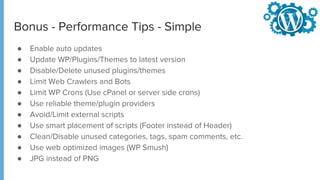
Bonus - Performance Tips - Simple
● Enable auto updates
● Update WP/Plugins/Themes to latest version
● Disable/Delete unused plugins/themes
● Limit Web Crawlers and Bots
● Limit WP Crons (Use cPanel or server side crons)
● Use reliable theme/plugin providers
● Avoid/Limit external scripts
● Use smart placement of scripts (Footer instead of Header)
● Clean/Disable unused categories, tags, spam comments, etc.
● Use web optimized images (WP Smush)
● JPG instead of PNG
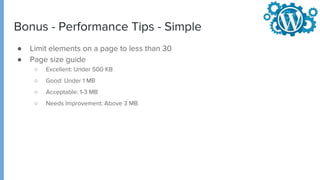
Bonus - Performance Tips - Simple
● Limit elements on a page to less than 30
● Page size guide
○ Excellent: Under 500 KB
○ Good: Under 1 MB
○ Acceptable: 1-3 MB
○ Needs Improvement: Above 3 MB
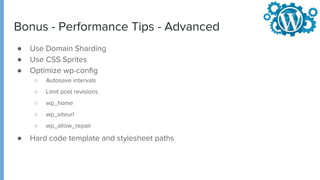
Bonus - Performance Tips - Advanced
● Use Domain Sharding
● Use CSS Sprites
● Optimize wp-config
○ Autosave intervals
○ Limit post revisions
○ wp_home
○ wp_siteurl
○ wp_allow_repair
● Hard code template and stylesheet paths
Thank you!
Questions???
pratik.j@endurance.com
https://twitter.com/pjagdishwala

ResellerClub Ctrl+F5 - WordPress Security session

  • 1.
    How to secureyour WordPress Powered Website PRATIK JAGDISHWALA
  • 2.
  • 3.
    Why are wehere today? ● Most of you are web hosters, web pro’s or web site designers ● Internet is like the Wild West ● Most serious hosters have encountered attack on their website ● Recovering a website is at times more painful than building a new one ● Can I make my site Hacker Proof?
  • 4.
    What you shouldexpect? ● Insights on what’s the real internet like to websites ● Bust Myths about website security ● Learn from our experience ○ What are the do’s and don'ts when hosting a website ○ What to do before you deliver the website to a client ○ Long term maintenance strategy ○ What is the quickest way to recover from a hacking
  • 5.
  • 6.
    Who uses CMS’s? ●WordPress ○ Forbes, BBC, Sony, Bloomberg Professional, Nasa ● Joomla ○ Harvard University, Linux, The HILL ● Drupal ○ The White House, Warner Brothers
  • 7.
    WordPress Popularity? ● Nearly50% of all websites across the globe run on a CMS ● WordPress commands nearly 60% of the CMS market ● That means WordPress powers approximately 28-30% of the internet ○ Joomla around 6-7% ○ Drupa around 4-5% ○ Magento around 2-3%
  • 8.
    Is WordPress reallysecure? ● Depends ● Not everyone is careful or security conscious with their website ● If a hacker can find a way into 1 WP powered site, they can scan other websites for the same vulnerability ● WordPress security vulnerabilities extend beyond WordPress code ● According to a wpscan.org report of 3972 WP security vulnerabilities ○ 52% are from WordPress plugins ○ 37% are from core WordPress ○ 11% are from WordPress themes
  • 9.
    Can you guesswho can get hacked? 1 2 3 4 5 6 7 8 9 2 page resume website Small local business NGO website University website Local community support website Free content website Commercial website/paid content Placeholder website Large enterprise website
  • 10.
    ● Search enginerankings on google and other search engines ● Drop in organic search results ○ 45% saw search traffic impacted by hack ○ 9% saw a traffic drop of almost 75% ● Loss of ○ Goodwill / Brand Reputation ○ Confidential information ○ Intellectual property ○ Customer data ○ Actual money Impact of Security Compromise
  • 11.
    Myth of a Hackerproof website
  • 12.
    Sample WordPress Attack ●In early 2017 a content-injection Vulnerability was discovered ● This was patched in version 4.7.2 ● Within 48 hours almost 800,000 sites were infected Ref: https://threatpost.com/1-5m-unpatched-wordpress-sites-hacked-following-vulnerability-disclosure/123691/
  • 13.
  • 14.
    Protect against BruteForce Attacks
  • 15.
    Dump easy passwords ●Passwords can be easily brute forced ● Standard / Weak passwords offer almost 0 security ● FTP, WP-Admin both can be brute forced Worst Passwords of all time: 123456 Password 12345678 qwerty 12345 123456789 letmein 1234567 admin football iloveyou admin welcome monkey login abc123 starwars qwedsa 123123 dragon passw0rd maste hello freedom whatever qazwsx trustno1
  • 16.
    FTP vs SFTP ●Avoid using FTP ○ Easily sniffable by applications/trojans ○ Stored password is easily recovered ○ Communication happens in plain text ● Use SFTP or FTPES ○ Communication happens over Encrypted channel ○ Communication even if sniffed cannot be read in clear text ○ Encrypted key cannot be used for establishing connection
  • 17.
    Change default wp-adminusername ● Don’t use default ‘admin’ user ● This can be easily brute forced ● More complex usernames are better ● Use alphanumeric usernames ● Change passwords every 3 months
  • 18.
    Protect wp-admin ● Disablehttp://website/wp-admin ● Use a plugin or modify the location manually ● Password protect wp-admin directory
  • 19.
    User Enumeration ● Ifyou have deleted admin user, other available users can be easily fetched using tools ● Once the username is available, hackers can start brute forcing the installation
  • 20.
    Dual Factor Author Security Question ● Dual factor sign in with QR Code ● Dual factor sign in with OpenID/Email ● Google Authenticator Validation ● Custom Security Question
  • 21.
    Database Security ● DisableDB access from remote location ● Rename tables and add a prefix to the table names ● Set complex username & password for DB access
  • 22.
    .htaccess ● .htaccess isconfiguration extension for apache web server ● If you add .htaccess file to the root directory everything under that package will get affected ● If you place it only in the content directory, only that directory is affected
  • 23.
    .htaccess Uses ● Denyaccess from specific IP address/range ● Protect your site with a password ● Redirect users ● Prevent directory listing ● Override server/PHP parameters ● Rewrite URL’s ● And more
  • 24.
    Sample .htaccess rules DisableDirectory listing Options All -Indexes Securing wp-config.php <files wp-config.php> order allow,deny deny from all </files> Securing .htaccess <files .htaccess> order allow,deny deny from all </files>
  • 25.
    Sample .htaccess rules Protectfrom Script Injection Options +FollowSymLinks RewriteEngine On RewriteCond %{QUERY_STRING} (<|%3C).*script.*(>|%3E) [NC,OR] RewriteCond %{QUERY_STRING} GLOBALS(=|[|%[0-9A-Z]{0,2}) [OR] RewriteCond %{QUERY_STRING} _REQUEST(=|[|%[0-9A-Z]{0,2}) RewriteRule ^(.*)$ index.php [F,L] Password Protection with htaccess AuthType Basic AuthName "Password Protected Area" AuthUserFile /path/to file Require valid-user
  • 26.
    Config.php Security settings UseSecurity keys and Salt These make cracking passwords exponentially difficult Disable Plugin / Theme Editor and Installation define('DISALLOW_FILE_EDIT',true); define('DISALLOW_FILE_MODS',true); Enable Automatic Updates Turn off Debugging Force https on admin pages Disable Front End Error Logging And a lot more... Ref: https://codex.wordpress.org/Hardening_WordPress
  • 27.
  • 28.
  • 29.
    ● Stay Calm! ●Document all you are seeing ● Scan your Website ○ Via Plugin (WordFence, Sucuri, etc.) ○ Via remote Crawlers (Sitecheck, SiteLock, VirusTotal, etc.) ● Scan your local environment ○ Is your local machine infected? ○ Are you transmitting over FTP and the password is compromised? ○ Update Password ● Contact your Hosting Provider and let them know & ask them for help ● Reset all access (iThemes Security) How should you try and recover
  • 30.
    ● Force StrongPasswords ● Improve access controls (Duo, Two-Factor, etc.) ● Create a backup plan ● Find and remove hack (https://codex.wordpress.org/FAQ_My_site_was_hacked) ● Update ● Take help from the community (WordPress.org, Hacked or Malware Forum) ● Change Passwords again after recovery ● Harden WordPress (https://codex.wordpress.org/Hardening_WordPress) ● Update!!! How should you try and recover
  • 31.
    Can’t log intoWP-Admin? ● Are you locked out? ● Your user/pass is not recognized? ○ Reset password via DB Command Line or phpMyAdmin (https://codex.wordpress.org/Resetting_Your_Password) ● Get your site removed from SEO blacklists ○ https://developers.google.com/webmasters/hacked
  • 32.
  • 33.
    Backup ● Everything saidand done ● Your site can still be hacked ○ Your service provider ○ Some other user on your server ○ Unpatched vulnerabilities ● Recovery is possible, but very painful ● You need a strong backup plan ● Free or Paid Solutions ○ CodeGuard ○ UpdraftPlus ○ JetPack, etc ● GIT / Subversioning or Staging Setup
  • 34.
  • 35.
    Bonus - PerformanceTips - Simple ● Enable auto updates ● Update WP/Plugins/Themes to latest version ● Disable/Delete unused plugins/themes ● Limit Web Crawlers and Bots ● Limit WP Crons (Use cPanel or server side crons) ● Use reliable theme/plugin providers ● Avoid/Limit external scripts ● Use smart placement of scripts (Footer instead of Header) ● Clean/Disable unused categories, tags, spam comments, etc. ● Use web optimized images (WP Smush) ● JPG instead of PNG
  • 36.
    Bonus - PerformanceTips - Simple ● Limit elements on a page to less than 30 ● Page size guide ○ Excellent: Under 500 KB ○ Good: Under 1 MB ○ Acceptable: 1-3 MB ○ Needs Improvement: Above 3 MB
  • 37.
    Bonus - PerformanceTips - Advanced ● Use Domain Sharding ● Use CSS Sprites ● Optimize wp-config ○ Autosave intervals ○ Limit post revisions ○ wp_home ○ wp_siteurl ○ wp_allow_repair ● Hard code template and stylesheet paths
  • 38.
  • 39.