















HOW TO SPEED UP YOUR
JOOMLA SITE?
Daniel Kanchev

Performance Guru
Before We Begin – Who’s That Guy Daniel?
✓ 7+ years of Joomla! experience
✓ 5 years with SiteGround
✓ Love travelling the world
✓ Addicted to extreme sports
✓ Site speed affects your Google Rankings!
✓ Keep readers/customers happy & paying
✓ Be able to handle more visitors
✓ Go green and save $$$ from servers
WHY BOTHER DOING IT?
Faster Joomla = Optimizations
!
!
KEEP
CALMIT’S NOT
ROCKET
SCIENCE
✓ Keep your Joomla! updated
✓ Choose extensions wisely
✓ Deactivate unused extensions, upgrade used
✓ Simplify your templates as much as possible
GENERAL GUIDELINES
Simple Front Page Is Better
✓ Fancy stuff – only if you really need it
✓ Remove unnecessary large images
✓ Use fewer internal/external links – add sitemap
✓ Avoid loading content from remote servers
APPLICATION LEVEL OPTIMIZATIONS
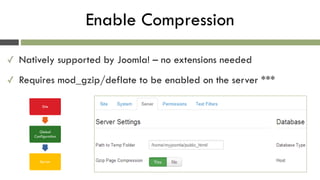
Enable Compression
✓ Natively supported by Joomla! – no extensions needed
✓ Requires mod_gzip/deflate to be enabled on the server ***
Site
Global
Configuration
Server
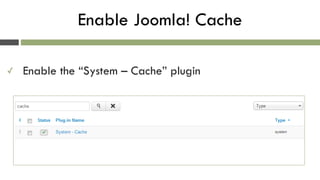
Enable Joomla! Cache
✓ Enable the “System – Cache” plugin
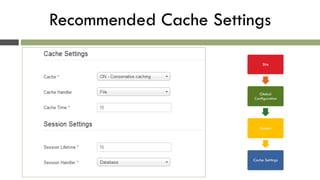
Recommended Cache Settings
Site
Global
Configuration
System
Cache Settings
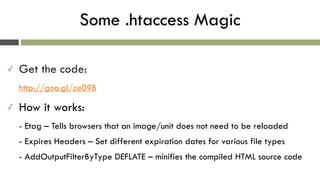
Some .htaccess Magic
✓ Get the code:

http://goo.gl/ze09B
✓ How it works:

- Etag – Tells browsers that an image/unit does not need to be reloaded

- Expires Headers – Set different expiration dates for various file types

- AddOutputFilterByType DEFLATE – minifies the compiled HTML source code
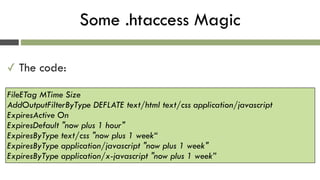
Some .htaccess Magic
✓ The code:
FileETag MTime Size 

AddOutputFilterByType DEFLATE text/html text/css application/javascript

ExpiresActive On

ExpiresDefault "now plus 1 hour" 

ExpiresByType text/css "now plus 1 week“

ExpiresByType application/javascript "now plus 1 week" 

ExpiresByType application/x-javascript "now plus 1 week”
More Optimizations: Images, CSS & JS
✓ Resize images – never upload 2560x1600 pictures
✓ Smush your images
✓ Minify and combine CSS and JS files
✓ Use image sprites
Sounds Nice, How Do I Begin?
✓ Use smush.it
✓ Photoshop/Fireworks
✓ Joomla! Extensions
Some Highly Rated Extensions
✓ JCH Optimize – Combines JS and CSS, Combines
images in sprites, Minify and Compress
✓ Jbetolo – same as above but + CDN support
✓ JotCache – improves the Joomla! built in Core
Cache
✓ Cache Cleaner – easily clean the cache from the
Joomla! admin panel
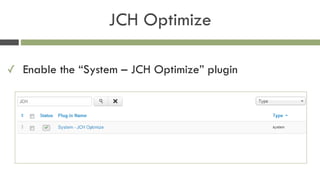
JCH Optimize
✓ Enable the “System – JCH Optimize” plugin
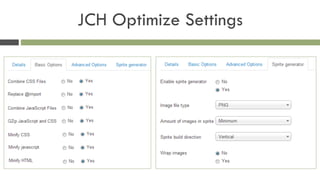
JCH Optimize Settings
Google mod_pagespeed
✓ An open-source Apache module - compress, combine and
cache
✓ Needs to be installed/configured by a System Administrator
✓ Available on SiteGround servers *
Check How’s Your Website Doing
✓ Google Page Speed Insights - http://goo.gl/zPkxx
✓ YSlow - http://goo.gl/qIios
✓ GTmetrix - http://gtmetrix.com/
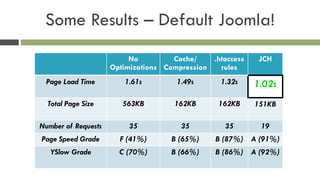
Some Results – Default Joomla!
No
Optimizations
Cache/
Compression
.htaccess
rules
JCH
Page Load Time 1.61s 1.49s 1.32s 1.02s
Total Page Size 563KB 162KB 162KB 151KB
Number of Requests 35 35 35 19
Page Speed Grade F (41%) B (65%) B (87%) A (91%)
YSlow Grade C (70%) B (66%) B (86%) A (92%)
SERVER LEVEL OPTIMIZATIONS
Use CDN
!
YOUR VISITORS
LOCATION
MATTERS!
CDN Features
✓ CDN will make your website faster
✓ CDN will help avoid unneeded I/O on your hard drives
✓ CDN will appeal to both Google and your visitors
Software Tweaks
✓ Use fast and secure PHP like FastCGI
✓ Move PHP binaries to RAM
✓ Move TMP to RAM
✓ Move MySQL to a separate hard drive: RAID & SSD
✓ Enable MySQL query cache
✓ Use TMPFS for MySQL’s tmpdir
Opcode/Object Caching
✓ FastCGI + APC PHP extension
✓ Memcached and PHP/MySQL
✓ eAccelerator 
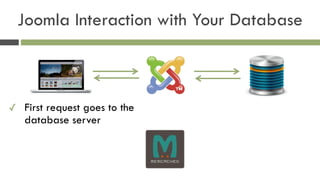
Joomla Interaction with Your Database
✓ First request goes to the
database server


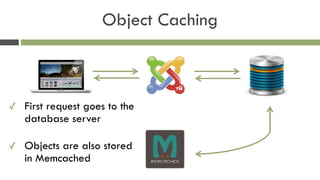
Object Caching
✓ First request goes to the
database server

✓ Objects are also stored
in Memcached
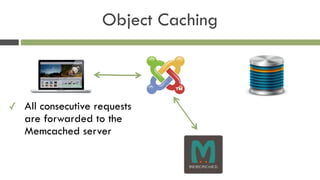
Object Caching
✓ All consecutive requests
are forwarded to the
Memcached server
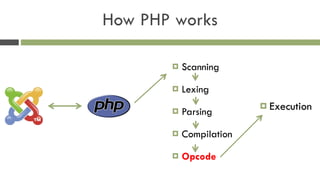
How PHP works
! Scanning
! Lexing
! Parsing
! Compilation
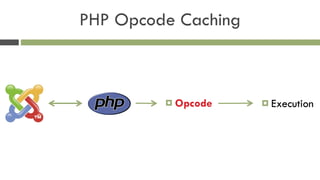
! Opcode
! Execution
! Opcode ! Execution
PHP Opcode Caching
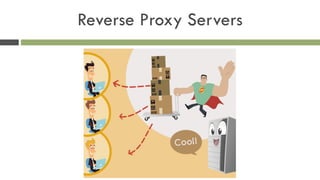
Reverse Proxy Servers
✓ Custom PHP/MySQL configuration
✓ Memcached/PHP APC
✓ Joomla! friendly reverse proxy setup
Our Own Solution: The SUPERCACHER
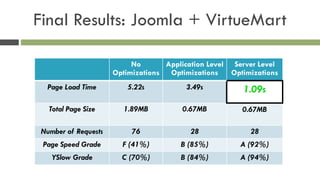
Final Results: Joomla + VirtueMart
No
Optimizations
Application Level
Optimizations
Server Level
Optimizations
Page Load Time 5.22s 3.49s 1.09s
Total Page Size 1.89MB 0.67MB 0.67MB
Number of Requests 76 28 28
Page Speed Grade F (41%) B (85%) A (92%)
YSlow Grade C (70%) B (84%) A (94%)
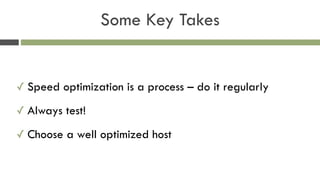
Some Key Takes
✓ Speed optimization is a process – do it regularly
✓ Always test!
✓ Choose a well optimized host
QUESTIONS
TIME
?
THANK YOU!
Daniel Kanchev

daniel.k@siteground.com

How to Speed Up Your Joomla! Site

  • 1.
    HOW TO SPEEDUP YOUR JOOMLA SITE? Daniel Kanchev
 Performance Guru
  • 2.
    Before We Begin– Who’s That Guy Daniel? ✓ 7+ years of Joomla! experience ✓ 5 years with SiteGround ✓ Love travelling the world ✓ Addicted to extreme sports
  • 3.
    ✓ Site speedaffects your Google Rankings! ✓ Keep readers/customers happy & paying ✓ Be able to handle more visitors ✓ Go green and save $$$ from servers WHY BOTHER DOING IT?
  • 4.
    Faster Joomla =Optimizations ! ! KEEP CALMIT’S NOT ROCKET SCIENCE
  • 5.
    ✓ Keep yourJoomla! updated ✓ Choose extensions wisely ✓ Deactivate unused extensions, upgrade used ✓ Simplify your templates as much as possible GENERAL GUIDELINES
  • 6.
    Simple Front PageIs Better ✓ Fancy stuff – only if you really need it ✓ Remove unnecessary large images ✓ Use fewer internal/external links – add sitemap ✓ Avoid loading content from remote servers
  • 7.
  • 8.
    Enable Compression ✓ Nativelysupported by Joomla! – no extensions needed ✓ Requires mod_gzip/deflate to be enabled on the server *** Site Global Configuration Server
  • 9.
    Enable Joomla! Cache ✓Enable the “System – Cache” plugin
  • 10.
  • 11.
    Some .htaccess Magic ✓Get the code:
 http://goo.gl/ze09B ✓ How it works:
 - Etag – Tells browsers that an image/unit does not need to be reloaded
 - Expires Headers – Set different expiration dates for various file types
 - AddOutputFilterByType DEFLATE – minifies the compiled HTML source code
  • 12.
    Some .htaccess Magic ✓The code: FileETag MTime Size 
 AddOutputFilterByType DEFLATE text/html text/css application/javascript
 ExpiresActive On
 ExpiresDefault "now plus 1 hour" 
 ExpiresByType text/css "now plus 1 week“
 ExpiresByType application/javascript "now plus 1 week" 
 ExpiresByType application/x-javascript "now plus 1 week”
  • 13.
    More Optimizations: Images,CSS & JS ✓ Resize images – never upload 2560x1600 pictures ✓ Smush your images ✓ Minify and combine CSS and JS files ✓ Use image sprites
  • 14.
    Sounds Nice, HowDo I Begin? ✓ Use smush.it ✓ Photoshop/Fireworks ✓ Joomla! Extensions
  • 15.
    Some Highly RatedExtensions ✓ JCH Optimize – Combines JS and CSS, Combines images in sprites, Minify and Compress ✓ Jbetolo – same as above but + CDN support ✓ JotCache – improves the Joomla! built in Core Cache ✓ Cache Cleaner – easily clean the cache from the Joomla! admin panel
  • 16.
    JCH Optimize ✓ Enablethe “System – JCH Optimize” plugin
  • 17.
  • 18.
    Google mod_pagespeed ✓ Anopen-source Apache module - compress, combine and cache ✓ Needs to be installed/configured by a System Administrator ✓ Available on SiteGround servers *
  • 19.
    Check How’s YourWebsite Doing ✓ Google Page Speed Insights - http://goo.gl/zPkxx ✓ YSlow - http://goo.gl/qIios ✓ GTmetrix - http://gtmetrix.com/
  • 20.
    Some Results –Default Joomla! No Optimizations Cache/ Compression .htaccess rules JCH Page Load Time 1.61s 1.49s 1.32s 1.02s Total Page Size 563KB 162KB 162KB 151KB Number of Requests 35 35 35 19 Page Speed Grade F (41%) B (65%) B (87%) A (91%) YSlow Grade C (70%) B (66%) B (86%) A (92%)
  • 21.
  • 22.
  • 23.
    CDN Features ✓ CDNwill make your website faster ✓ CDN will help avoid unneeded I/O on your hard drives ✓ CDN will appeal to both Google and your visitors
  • 24.
    Software Tweaks ✓ Usefast and secure PHP like FastCGI ✓ Move PHP binaries to RAM ✓ Move TMP to RAM ✓ Move MySQL to a separate hard drive: RAID & SSD ✓ Enable MySQL query cache ✓ Use TMPFS for MySQL’s tmpdir
  • 25.
    Opcode/Object Caching ✓ FastCGI+ APC PHP extension ✓ Memcached and PHP/MySQL ✓ eAccelerator 
  • 26.
    Joomla Interaction withYour Database ✓ First request goes to the database server
 

  • 27.
    Object Caching ✓ Firstrequest goes to the database server
 ✓ Objects are also stored in Memcached
  • 28.
    Object Caching ✓ Allconsecutive requests are forwarded to the Memcached server
  • 29.
    How PHP works !Scanning ! Lexing ! Parsing ! Compilation ! Opcode ! Execution
  • 30.
    ! Opcode !Execution PHP Opcode Caching
  • 31.
  • 32.
  • 33.
  • 34.
  • 35.
    ✓ Custom PHP/MySQLconfiguration ✓ Memcached/PHP APC ✓ Joomla! friendly reverse proxy setup Our Own Solution: The SUPERCACHER
  • 36.
    Final Results: Joomla+ VirtueMart No Optimizations Application Level Optimizations Server Level Optimizations Page Load Time 5.22s 3.49s 1.09s Total Page Size 1.89MB 0.67MB 0.67MB Number of Requests 76 28 28 Page Speed Grade F (41%) B (85%) A (92%) YSlow Grade C (70%) B (84%) A (94%)
  • 37.
    Some Key Takes ✓Speed optimization is a process – do it regularly ✓ Always test! ✓ Choose a well optimized host
  • 38.
  • 39.