Lesson 20-Wireless Security


                              1
Overview


Introduction to wireless networks.

Understanding current wireless technology.

   Transmission security, authentication

Understanding wireless security issues.

   WLAN detection, evaesdroping, active attacks,

Deploying wireless safely.

   AP , Transmission, workstation, site security

                                                   2
Introduction to Wireless
        Networks


Wireless networks are inexpensive and easy to set up and

use.

But wireless technology opens up some serious security

issues to organizations using them.

As yet no effective solution has been put forward to handle

the risk of wireless networks.


                                                     3
Understanding Current
        Wireless Technology


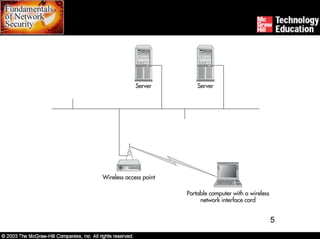
Wireless LANs (WLAN) center around IEEE 802.11x

standards.

These standards allow workstations to establish connections

with a wireless access point (AP).

Access points are in turn connected to wired LAN or another

workstation.

802.11x standard provides for exchange of authentication

information and for encryption of the information.
                                                     4
5
Understanding Current
          Wireless Technology


Standard architectures:

     Typical 802.11x standard allows for connectivity up to 150 feet

     indoors and 1,500 feet outdoors.

     DHCP server in this architecture provides necessary

     information that allows proper workstation communication to

     network.


                                                            6
Understanding Current
          Wireless Technology


Transmission security:

     802.11x standard defines Wired Equivalent Privacy (WEP)

     protocol to protect information passing over WLAN.

     WEP provides authentication, confidentiality, and integrity

     services.

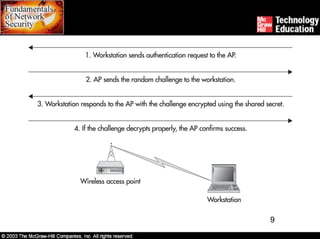
     Authentication service can be used to authenticate a

     workstation to the AP.


                                                             7
Understanding Current
          Wireless Technology


Transmission security:

     Open System authentication or cryptographic authentication

     provides no proof to the AP of the workstation’s identity.

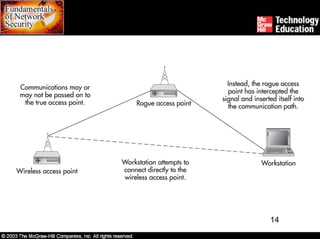
     This method leaves the workstation open to attach itself to any

     rogue AP.

     Authentication and confidentiality services use RC4 algorithm,

     which cannot be easily attacked.


                                                             8
9
Understanding Current
          Wireless Technology


Transmission security:

     Confidentiality mechanism protects all protocol header

     information and data above the 802.11x protocol.

     WEP supports 40-bit and 128-bit keys.

     WEP does not specify a key management system, which

     means that WEP installations rely on static keys.


                                                              10
Understanding Current
          Wireless Technology


Transmission security:

     Another problem with WEP is that an intruder can capture the

     initialization vectors and also determine the encryption key.

     Implementation of RC4 in WEP is flawed and open to

     compromise.

     Integrity check on each packet should be done by using cyclic

     redundancy check (CRC) of 32 bits.


                                                             11
Understanding Current
          Wireless Technology


Authentication:

     Authentication is a part of securing a WLAN.

     WLAN users have service set identifier (SSID), MAC address,

     WEP, and 802.1x port-based network access control options

     for authentication.

     These options cannot manage risk of WLAN by themselves.

     For a workstation to associate with an AP, it must have the

     SSID.


                                                            12
Understanding Current
          Wireless Technology


Authentication:

     Since SSID is broadcast by many APs, listening workstations

     can use it to add themselves to the appropriate network.

     Some APs use MAC address authentication to authorize

     computers to access the WLAN.

     MAC addresses must be transmitted in clear or the network

     would not function.

     An intruder listening to the traffic could misuse MAC addresses.


                                                             13
14
Understanding Current
          Wireless Technology


Authentication:

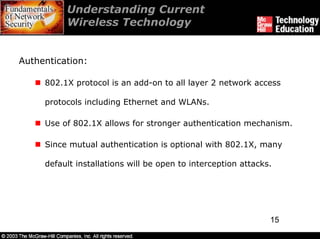
     802.1X protocol is an add-on to all layer 2 network access

     protocols including Ethernet and WLANs.

     Use of 802.1X allows for stronger authentication mechanism.

     Since mutual authentication is optional with 802.1X, many

     default installations will be open to interception attacks.


                                                               15
Understanding Wireless
        Security Issues


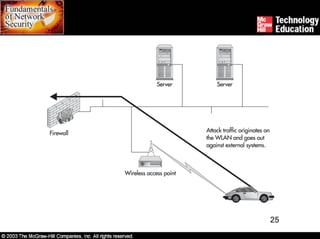
Use of WLANs involves risks like eavesdropping, direct

internal attacks, and attacks against external sites.

Several tools are available to detect WLANs easily.

WLANs allow computers close to the physical network to

communicate as if on the network.

In WLANs, intruders have the ability to gain access to an

organization’s internal network.


                                                        16
Understanding Wireless
          Security Issues


Organizations using WEP are also subject to eavesdropping

because of tools like WEPCrack.

WEPCrack requires the intruder to collect millions of

packets to determine the encryption key.

A passive eavesdropping attack is almost impossible to

detect.

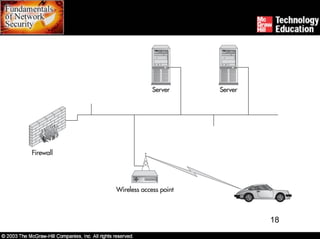
An intruder can attack WLANs internally or externally and

discover and exploit vulnerabilities.                   17
18
Understanding Wireless
        Security Issues


It is difficult to find the physical location of an intruder since

IP addresses are not location-specific.

The organization may be legally responsible if an intruder

gained access to the internal network.


                                                          19
Deploying Wireless Safely


Deployment of WLAN should be preceded by a thorough

risk assessment.

Proper security measures should be implemented by the

organization to reduce risk while deploying a WLAN.

Access point security, transmission security, workstation

security, and site security measures assist in risk

management.

                                                      20
Deploying Wireless Safely


Access point security:

     Configuring the AP is an important starting point.

     Setting WEP key and using MAC addresses help to limit AP

     detection.

     HTTPS should be used to manage AP when possible along with

     strong passwords.

     APs should be positioned so that their range outside the facility

     is limited.


                                                              21
Deploying Wireless Safely


Transmission security:

     Though WEP has serious vulnerabilities, it does not provide

     easy access to casual intruders.

     It is appropriate to use another encryption system along with

     WEP.

     WLAN can be treated as a semi-trusted or untrusted segment

     of the network.


                                                            22
Deploying Wireless Safely


Workstation security:

     It is possible to directly attack workstations on a WLAN.

     Appropriate anti-virus software or personal firewalls should be

     used on workstations for protection.


                                                             23
Deploying Wireless Safely


Site security:

      WLANs should be placed on their own network and protected

      with a firewall between WLAN and the internal network.

      An intrusion detection system should be deployed on WLAN to

      detect unauthorized visitors.

      Organizations must address illegal or unauthorized APs by

      performing periodic wireless assessments on their networks.


                                                            24
25
Summary


Wireless LANs center around the 802.11x standards.

WEP provides authentication, confidentiality, and integrity

services.

WLAN users have service set identifier (SSID), MAC address,

WEP, and 802.1x port-based network access control options

for authentication.


                                                      26
Summary


Security risks in WLANs include eavesdropping, direct

internal attacks, and attacks against external sites.

Security measures like access point security, transmission

security, workstation security, and site security assist in

managing risk.


                                                        27

Ch20 Wireless Security

  • 1.
  • 2.
    Overview Introduction to wirelessnetworks. Understanding current wireless technology. Transmission security, authentication Understanding wireless security issues. WLAN detection, evaesdroping, active attacks, Deploying wireless safely. AP , Transmission, workstation, site security 2
  • 3.
    Introduction to Wireless Networks Wireless networks are inexpensive and easy to set up and use. But wireless technology opens up some serious security issues to organizations using them. As yet no effective solution has been put forward to handle the risk of wireless networks. 3
  • 4.
    Understanding Current Wireless Technology Wireless LANs (WLAN) center around IEEE 802.11x standards. These standards allow workstations to establish connections with a wireless access point (AP). Access points are in turn connected to wired LAN or another workstation. 802.11x standard provides for exchange of authentication information and for encryption of the information. 4
  • 5.
  • 6.
    Understanding Current Wireless Technology Standard architectures: Typical 802.11x standard allows for connectivity up to 150 feet indoors and 1,500 feet outdoors. DHCP server in this architecture provides necessary information that allows proper workstation communication to network. 6
  • 7.
    Understanding Current Wireless Technology Transmission security: 802.11x standard defines Wired Equivalent Privacy (WEP) protocol to protect information passing over WLAN. WEP provides authentication, confidentiality, and integrity services. Authentication service can be used to authenticate a workstation to the AP. 7
  • 8.
    Understanding Current Wireless Technology Transmission security: Open System authentication or cryptographic authentication provides no proof to the AP of the workstation’s identity. This method leaves the workstation open to attach itself to any rogue AP. Authentication and confidentiality services use RC4 algorithm, which cannot be easily attacked. 8
  • 9.
  • 10.
    Understanding Current Wireless Technology Transmission security: Confidentiality mechanism protects all protocol header information and data above the 802.11x protocol. WEP supports 40-bit and 128-bit keys. WEP does not specify a key management system, which means that WEP installations rely on static keys. 10
  • 11.
    Understanding Current Wireless Technology Transmission security: Another problem with WEP is that an intruder can capture the initialization vectors and also determine the encryption key. Implementation of RC4 in WEP is flawed and open to compromise. Integrity check on each packet should be done by using cyclic redundancy check (CRC) of 32 bits. 11
  • 12.
    Understanding Current Wireless Technology Authentication: Authentication is a part of securing a WLAN. WLAN users have service set identifier (SSID), MAC address, WEP, and 802.1x port-based network access control options for authentication. These options cannot manage risk of WLAN by themselves. For a workstation to associate with an AP, it must have the SSID. 12
  • 13.
    Understanding Current Wireless Technology Authentication: Since SSID is broadcast by many APs, listening workstations can use it to add themselves to the appropriate network. Some APs use MAC address authentication to authorize computers to access the WLAN. MAC addresses must be transmitted in clear or the network would not function. An intruder listening to the traffic could misuse MAC addresses. 13
  • 14.
  • 15.
    Understanding Current Wireless Technology Authentication: 802.1X protocol is an add-on to all layer 2 network access protocols including Ethernet and WLANs. Use of 802.1X allows for stronger authentication mechanism. Since mutual authentication is optional with 802.1X, many default installations will be open to interception attacks. 15
  • 16.
    Understanding Wireless Security Issues Use of WLANs involves risks like eavesdropping, direct internal attacks, and attacks against external sites. Several tools are available to detect WLANs easily. WLANs allow computers close to the physical network to communicate as if on the network. In WLANs, intruders have the ability to gain access to an organization’s internal network. 16
  • 17.
    Understanding Wireless Security Issues Organizations using WEP are also subject to eavesdropping because of tools like WEPCrack. WEPCrack requires the intruder to collect millions of packets to determine the encryption key. A passive eavesdropping attack is almost impossible to detect. An intruder can attack WLANs internally or externally and discover and exploit vulnerabilities. 17
  • 18.
  • 19.
    Understanding Wireless Security Issues It is difficult to find the physical location of an intruder since IP addresses are not location-specific. The organization may be legally responsible if an intruder gained access to the internal network. 19
  • 20.
    Deploying Wireless Safely Deploymentof WLAN should be preceded by a thorough risk assessment. Proper security measures should be implemented by the organization to reduce risk while deploying a WLAN. Access point security, transmission security, workstation security, and site security measures assist in risk management. 20
  • 21.
    Deploying Wireless Safely Accesspoint security: Configuring the AP is an important starting point. Setting WEP key and using MAC addresses help to limit AP detection. HTTPS should be used to manage AP when possible along with strong passwords. APs should be positioned so that their range outside the facility is limited. 21
  • 22.
    Deploying Wireless Safely Transmissionsecurity: Though WEP has serious vulnerabilities, it does not provide easy access to casual intruders. It is appropriate to use another encryption system along with WEP. WLAN can be treated as a semi-trusted or untrusted segment of the network. 22
  • 23.
    Deploying Wireless Safely Workstationsecurity: It is possible to directly attack workstations on a WLAN. Appropriate anti-virus software or personal firewalls should be used on workstations for protection. 23
  • 24.
    Deploying Wireless Safely Sitesecurity: WLANs should be placed on their own network and protected with a firewall between WLAN and the internal network. An intrusion detection system should be deployed on WLAN to detect unauthorized visitors. Organizations must address illegal or unauthorized APs by performing periodic wireless assessments on their networks. 24
  • 25.
  • 26.
    Summary Wireless LANs centeraround the 802.11x standards. WEP provides authentication, confidentiality, and integrity services. WLAN users have service set identifier (SSID), MAC address, WEP, and 802.1x port-based network access control options for authentication. 26
  • 27.
    Summary Security risks inWLANs include eavesdropping, direct internal attacks, and attacks against external sites. Security measures like access point security, transmission security, workstation security, and site security assist in managing risk. 27