#ATM16
WLAN Design 101:
Fundamentals in the
Campus
Introduction to WLAN design
Peter Lane, Director Product Management @ArubaNetworks |
2#ATM16
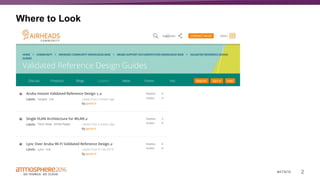
Where to Look
3#ATM16
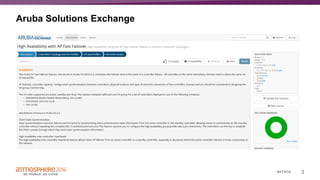
Aruba Solutions Exchange
4#ATM16
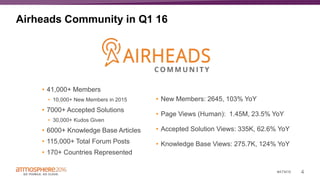
Airheads Community in Q1 16
• New Members: 2645, 103% YoY
• Page Views (Human): 1.45M, 23.5% YoY
• Accepted Solution Views: 335K, 62.6% YoY
• Knowledge Base Views: 275.7K, 124% YoY
• 41,000+ Members
• 10,000+ New Members in 2015
• 7000+ Accepted Solutions
• 30,000+ Kudos Given
• 6000+ Knowledge Base Articles
• 115,000+ Total Forum Posts
• 170+ Countries Represented
5#ATM16
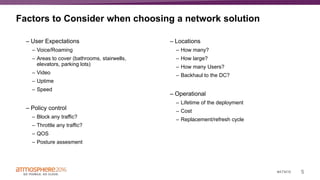
Factors to Consider when choosing a network solution
– User Expectations
– Voice/Roaming
– Areas to cover (bathrooms, stairwells,
elevators, parking lots)
– Video
– Uptime
– Speed
– Policy control
– Block any traffic?
– Throttle any traffic?
– QOS
– Posture assesment
– Locations
– How many?
– How large?
– How many Users?
– Backhaul to the DC?
– Operational
– Lifetime of the deployment
– Cost
– Replacement/refresh cycle
6#ATM16
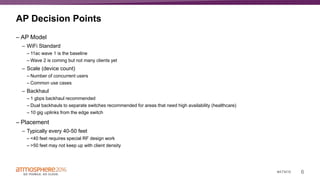
AP Decision Points
– AP Model
– WiFi Standard
– 11ac wave 1 is the baseline
– Wave 2 is coming but not many clients yet
– Scale (device count)
– Number of concurrent users
– Common use cases
– Backhaul
– 1 gbps backhaul recommended
– Dual backhauls to separate switches recommended for areas that need high availability (healthcare)
– 10 gig uplinks from the edge switch
– Placement
– Typically every 40-50 feet
– <40 feet requires special RF design work
– >50 feet may not keep up with client density
7#ATM16
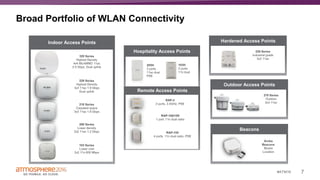
Broad Portfolio of WLAN Connectivity
Beacons
Hospitality Access Points
Remote Access Points
Indoor Access Points
Outdoor Access Points
Hardened Access Points
Broad Portfolio of WLAN Connectivity
8#ATM16
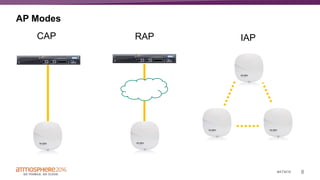
AP Modes
CAP IAPRAP
9#ATM16
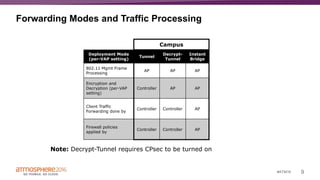
Forwarding Modes and Traffic Processing
Campus Remote
Deployment Mode
(per-VAP setting)
Tunnel
Decrypt-
Tunnel
Bridge Tunnel
Decrypt-
Tunnel
Split-
Tunnel
Bridge
802.11 Mgmt Frame
Processing
AP AP AP AP AP AP AP
Encryption and
Decryption (per-VAP
setting)
Controller AP AP Controller AP AP AP
Client Traffic
Forwarding done by
Controller Controller AP Controller Controller AP AP
Firewall policies
applied by
Controller Controller AP Controller Controller AP AP
Note: Decrypt-Tunnel requires CPsec to be turned on
Campus
Deployment Mode
(per-VAP setting)
Tunnel
Decrypt-
Tunnel
Instant
Bridge
802.11 Mgmt Frame
Processing
AP AP AP
Encryption and
Decryption (per-VAP
setting)
Controller AP AP
Client Traffic
Forwarding done by
Controller Controller AP
Firewall policies
applied by
Controller Controller AP
10#ATM16
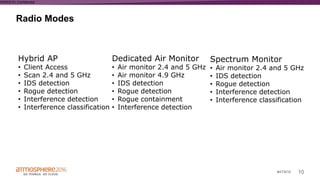
Radio Modes
WWAS16 | Confidential
Hybrid AP
• Client Access
• Scan 2.4 and 5 GHz
• IDS detection
• Rogue detection
• Interference detection
• Interference classification
Dedicated Air Monitor
• Air monitor 2.4 and 5 GHz
• Air monitor 4.9 GHz
• IDS detection
• Rogue detection
• Rogue containment
• Interference detection
Spectrum Monitor
• Air monitor 2.4 and 5 GHz
• IDS detection
• Rogue detection
• Interference detection
• Interference classification
11#ATM16
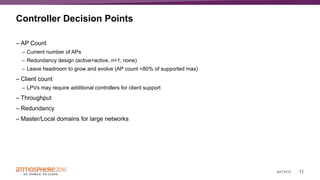
Controller Decision Points
– AP Count
– Current number of APs
– Redundancy design (active+active, n+1, none)
– Leave headroom to grow and evolve (AP count <80% of supported max)
– Client count
– LPVs may require additional controllers for client support
– Throughput
– Redundancy
– Master/Local domains for large networks
12#ATM16
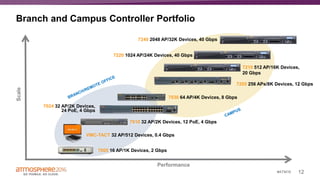
Branch and Campus Controller Portfolio
Performance
Scale
7005 16 AP/1K Devices, 2 Gbps
7010 32 AP/2K Devices, 12 PoE, 4 Gbps
7030 64 AP/4K Devices, 8 Gbps
7210 512 AP/16K Devices,
20 Gbps
7205 256 APs/8K Devices, 12 Gbps
7220 1024 AP/24K Devices, 40 Gbps
7024 32 AP/2K Devices,
24 PoE, 4 Gbps
VMC-TACT 32 AP/512 Devices, 0.4 Gbps
7240 2048 AP/32K Devices, 40 Gbps
13#ATM16
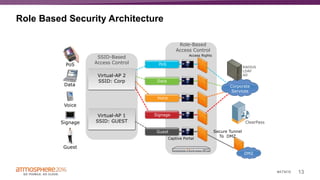
Role Based Security Architecture
Corporate
Services
Signage
Voice
Data
PoS
Virtual-AP 2
SSID: Corp
Virtual-AP 1
SSID: GUEST
DMZ
ClearPass
Guest
Captive Portal
Role-Based
Access Control
Access Rights
Secure Tunnel
To DMZ
SSID-Based
Access ControlPoS
Data
Voice
Signage
Guest
RADIUS
LDAP
AD
14#ATM16
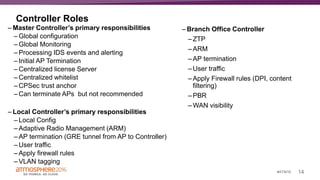
Controller Roles
– Master Controller’s primary responsibilities
– Global configuration
– Global Monitoring
– Processing IDS events and alerting
– Initial AP Termination
– Centralized license Server
– Centralized whitelist
– CPSec trust anchor
– Can terminate APs but not recommended
– Local Controller’s primary responsibilities
– Local Config
– Adaptive Radio Management (ARM)
– AP termination (GRE tunnel from AP to Controller)
– User traffic
– Apply firewall rules
– VLAN tagging
– Branch Office Controller
– ZTP
– ARM
– AP termination
– User traffic
– Apply Firewall rules (DPI, content
filtering)
– PBR
– WAN visibility
15#ATM16
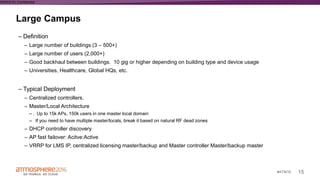
Large Campus
WWAS16 | Confidential
– Definition
– Large number of buildings (3 – 500+)
– Large number of users (2,000+)
– Good backhaul between buildings. 10 gig or higher depending on building type and device usage
– Universities, Healthcare, Global HQs, etc.
– Typical Deployment
– Centralized controllers.
– Master/Local Architecture
– . Up to 15k APs, 150k users in one master local domain
– If you need to have multiple master/locals, break it based on natural RF dead zones
– DHCP controller discovery
– AP fast failover: Acitve:Active
– VRRP for LMS IP, centralized licensing master/backup and Master controller Master/backup master
16#ATM16
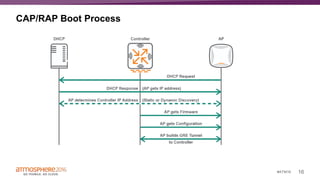
CAP/RAP Boot Process
17#ATM16
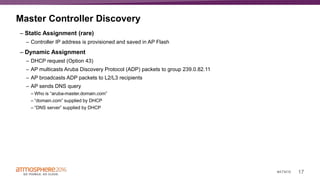
Master Controller Discovery
– Static Assignment (rare)
– Controller IP address is provisioned and saved in AP Flash
– Dynamic Assignment
– DHCP request (Option 43)
– AP multicasts Aruba Discovery Protocol (ADP) packets to group 239.0.82.11
– AP broadcasts ADP packets to L2/L3 recipients
– AP sends DNS query
– Who is “aruba-master.domain.com”
– “domain.com” supplied by DHCP
– “DNS server” supplied by DHCP
18#ATM16
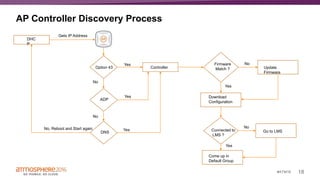
AP Controller Discovery Process
DHC
P
Gets IP Address
Option 43 Controller
Yes
ADP
Yes
No
DNS
No
YesNo, Reboot and Start again
Firmware
Match ?
Download
Configuration
Update
Firmware
No
Yes
Connected to
LMS ?
Come up in
Default Group
Yes
Go to LMS
No
19#ATM16
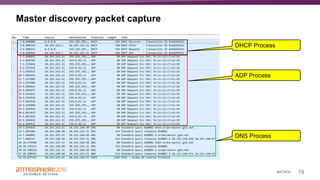
Master discovery packet capture
DHCP Process
ADP Process
DNS Process
20#ATM16
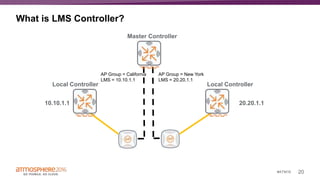
What is LMS Controller?
Master Controller
Local Controller Local Controller
AP Group = New York
LMS = 20.20.1.1
10.10.1.1 20.20.1.1
AP Group = California
LMS = 10.10.1.1
21#ATM16
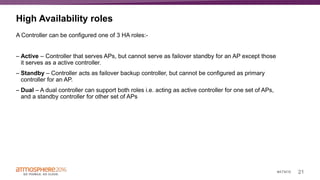
High Availability roles
A Controller can be configured one of 3 HA roles:-
– Active – Controller that serves APs, but cannot serve as failover standby for an AP except those
it serves as a active controller.
– Standby – Controller acts as failover backup controller, but cannot be configured as primary
controller for an AP.
– Dual – A dual controller can support both roles i.e. acting as active controller for one set of APs,
and a standby controller for other set of APs
22#ATM16
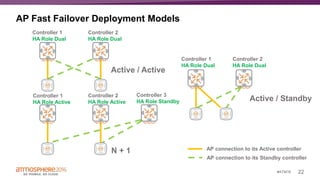
AP Fast Failover Deployment Models
Controller 1
HA Role Dual
Controller 2
HA Role Dual
Controller 1
HA Role Active
Controller 1
HA Role Dual
Controller 2
HA Role Active
Controller 2
HA Role Dual
Controller 3
HA Role Standby
Active / Active
Active / Standby
N + 1 AP connection to its Active controller
AP connection to its Standby controller
23#ATM16
AP Fast Failover – AOS 6.4
– Inter Controller Heartbeat
– Client state sync
– N+1 Oversubscription
24#ATM16
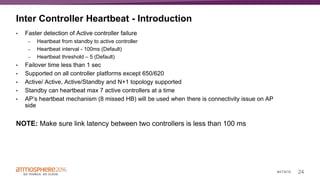
Inter Controller Heartbeat - Introduction
• Faster detection of Active controller failure
– Heartbeat from standby to active controller
– Heartbeat interval - 100ms (Default)
– Heartbeat threshold – 5 (Default)
• Failover time less than 1 sec
• Supported on all controller platforms except 650/620
• Active/ Active, Active/Standby and N+1 topology supported
• Standby can heartbeat max 7 active controllers at a time
• AP’s heartbeat mechanism (8 missed HB) will be used when there is connectivity issue on AP
side
NOTE: Make sure link latency between two controllers is less than 100 ms
28#ATM16
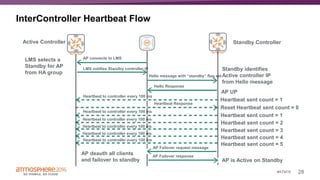
InterController Heartbeat Flow
Active Controller Standby Controller
LMS selects a
Standby for AP
from HA group
AP connects to LMS
LMS notifies Standby controller IP
Hello message with “standby” flag set
Hello Response
Heartbeat to controller every 100 ms
Heartbeat Response
AP Failover request message
AP Failover response
AP is Active on Standby
AP deauth all clients
and failover to standby
Standby identifies
Active controller IP
from Hello message
AP UP
Heartbeat sent count = 1
Heartbeat sent count = 2
Heartbeat sent count = 3
Heartbeat sent count = 4
Heartbeat sent count = 5
Reset Heartbeat sent count = 0
29#ATM16
AP Fast Failover – AOS 6.4
– Inter Controller Heartbeat
– Client state sync
– N+1 Oversubscription
30#ATM16
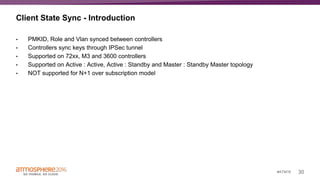
Client State Sync - Introduction
• PMKID, Role and Vlan synced between controllers
• Controllers sync keys through IPSec tunnel
• Supported on 72xx, M3 and 3600 controllers
• Supported on Active : Active, Active : Standby and Master : Standby Master topology
• NOT supported for N+1 over subscription model
31#ATM16
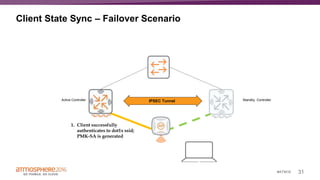
Client State Sync – Failover Scenario
Active Controller Standby ControllerIPSEC Tunnel
1. Client successfully
authenticates to dot1x ssid;
PMK-SA is generated
32#ATM16
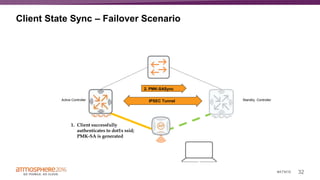
Client State Sync – Failover Scenario
Active Controller Standby ControllerIPSEC Tunnel
1. Client successfully
authenticates to dot1x ssid;
PMK-SA is generated
2. PMK-SASync
33#ATM16
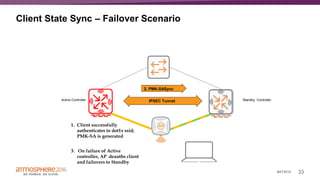
Client State Sync – Failover Scenario
Active Controller Standby ControllerIPSEC Tunnel
1. Client successfully
authenticates to dot1x ssid;
PMK-SA is generated
2. PMK-SASync
3. On failure of Active
controller, AP deauths client
and failovers to Standby
34#ATM16
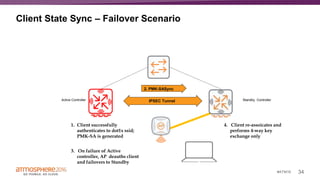
Client State Sync – Failover Scenario
Active Controller Standby ControllerIPSEC Tunnel
1. Client successfully
authenticates to dot1x ssid;
PMK-SA is generated
2. PMK-SASync
3. On failure of Active
controller, AP deauths client
and failovers to Standby
4. Client re-assoicates and
performs 4-way key
exchange only
35#ATM16
Supported Topologies
– Inter Controller Heartbeat and Client State Sync is not supported in Master-Standby Master
topology because standby controller does not allow AP termination unless its VRRP state
becomes active.
36#ATM16
AP Fast Failover – AOS 6.4
– Inter Controller Heartbeat
– Client state sync
– N+1 Oversubscription
37#ATM16
N+1 Oversubscription - Introduction
• Allows backup controller to terminate standby AP tunnels above its platform limit
• Supported for 72xx, M3 and 3600 controllers
– 72xx allows 4 times oversubscription
– M3 & 3600 allows 2 times oversubscription
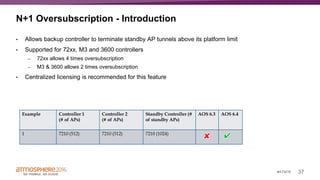
• Centralized licensing is recommended for this feature
Example Controller 1
(# of APs)
Controller 2
(# of APs)
Standby Controller (#
of standby APs)
AOS 6.3 AOS 6.4
1 7210 (512) 7210 (512) 7210 (1024)
38#ATM16
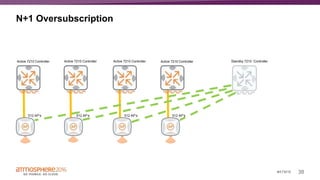
N+1 Oversubscription
Active 7210 Controller Active 7210 Controller Standby 7210 ControllerActive 7210 Controller
512 AP’s 512 AP’s 512 AP’s 512 AP’s
Active 7210 Controller
39#ATM16
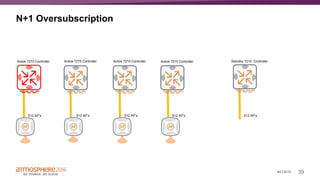
N+1 Oversubscription
Active 7210 Controller Active 7210 Controller Standby 7210 ControllerActive 7210 Controller
512 AP’s 512 AP’s 512 AP’s 512 AP’s
Active 7210 Controller
512 AP’s
40#ATM16
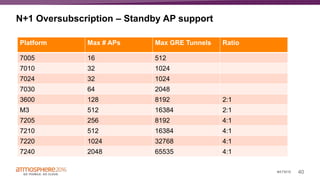
N+1 Oversubscription – Standby AP support
Platform Max # APs Max GRE Tunnels Ratio
7005 16 512
7010 32 1024
7024 32 1024
7030 64 2048
3600 128 8192 2:1
M3 512 16384 2:1
7205 256 8192 4:1
7210 512 16384 4:1
7220 1024 32768 4:1
7240 2048 65535 4:1
41#ATM16
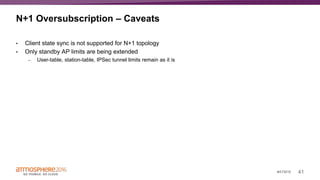
N+1 Oversubscription – Caveats
• Client state sync is not supported for N+1 topology
• Only standby AP limits are being extended
– User-table, station-table, IPSec tunnel limits remain as it is
42#ATM16
Large Campus
WWAS16 | Confidential
– Definition
– Large number of buildings (3 – 500+)
– Large number of users (2,000+)
– Good backhaul between buildings. 10 gig or higher depending on building type and device usage
– Universities, Healthcare, Global HQs, etc.
– Typical Deployment
– Centralized controllers
– Master/Local Architecture
– . Up to 15k APs, 150k users in one master local domain
– If you need to have multiple master/locals, break it based on natural RF dead zones
– DHCP controller discovery
– AP fast failover: Acitve:Active
– VRRP for LMS IP, centralized licensing master/backup and Master controller Master/backup master
43#ATM16
What about putting a controller in each building?
– Supported deployment
– Rare due to increased controller cost
– Appropriate for large buildings with small backhauls between buildings
WWAS16 | Confidential
44#ATM16
K-12 Deployment Types
– Central Controllers
– Architecture:
– Master/Local centralized in DC
– AP Fast Failover: N+1
– DHCP discovery
– Common for schools with:
– Fiber between them
– Traffic typically heading through the
DC
– Benefits:
– Leverage low cost large scale
controllers
– Simple fail over solution
– Single point of config for all
controllers
– Single location for all controllers
– Controllers per school
– Architecture:
– Local Controller per school
– Master controller in DC
– Optional
– Standby Failover controller in DC
– AP FF Active Active per school
– Common for schools with:
– Weak connections between
schools or back to DC
– Traffic patterns that go straight to
the internet
– Benefits
– All controller features
– Single master configuration point
for all schools
– Instant
– Architecture:
– IAPs
– AirWave
– Common for schools:
– Aerohive has talked with them
– Not a fan of controllers
– Comfortable with configuring
VLANs
– Benefits:
– ZTP
– Great redundancy
– Low Cost (not as low as you
think)
WWAS16 | Confidential

Wireless LAN Design Fundamentals in the Campus

  • 1.
    #ATM16 WLAN Design 101: Fundamentalsin the Campus Introduction to WLAN design Peter Lane, Director Product Management @ArubaNetworks |
  • 2.
  • 3.
  • 4.
    4#ATM16 Airheads Community inQ1 16 • New Members: 2645, 103% YoY • Page Views (Human): 1.45M, 23.5% YoY • Accepted Solution Views: 335K, 62.6% YoY • Knowledge Base Views: 275.7K, 124% YoY • 41,000+ Members • 10,000+ New Members in 2015 • 7000+ Accepted Solutions • 30,000+ Kudos Given • 6000+ Knowledge Base Articles • 115,000+ Total Forum Posts • 170+ Countries Represented
  • 5.
    5#ATM16 Factors to Considerwhen choosing a network solution – User Expectations – Voice/Roaming – Areas to cover (bathrooms, stairwells, elevators, parking lots) – Video – Uptime – Speed – Policy control – Block any traffic? – Throttle any traffic? – QOS – Posture assesment – Locations – How many? – How large? – How many Users? – Backhaul to the DC? – Operational – Lifetime of the deployment – Cost – Replacement/refresh cycle
  • 6.
    6#ATM16 AP Decision Points –AP Model – WiFi Standard – 11ac wave 1 is the baseline – Wave 2 is coming but not many clients yet – Scale (device count) – Number of concurrent users – Common use cases – Backhaul – 1 gbps backhaul recommended – Dual backhauls to separate switches recommended for areas that need high availability (healthcare) – 10 gig uplinks from the edge switch – Placement – Typically every 40-50 feet – <40 feet requires special RF design work – >50 feet may not keep up with client density
  • 7.
    7#ATM16 Broad Portfolio ofWLAN Connectivity Beacons Hospitality Access Points Remote Access Points Indoor Access Points Outdoor Access Points Hardened Access Points Broad Portfolio of WLAN Connectivity
  • 8.
  • 9.
    9#ATM16 Forwarding Modes andTraffic Processing Campus Remote Deployment Mode (per-VAP setting) Tunnel Decrypt- Tunnel Bridge Tunnel Decrypt- Tunnel Split- Tunnel Bridge 802.11 Mgmt Frame Processing AP AP AP AP AP AP AP Encryption and Decryption (per-VAP setting) Controller AP AP Controller AP AP AP Client Traffic Forwarding done by Controller Controller AP Controller Controller AP AP Firewall policies applied by Controller Controller AP Controller Controller AP AP Note: Decrypt-Tunnel requires CPsec to be turned on Campus Deployment Mode (per-VAP setting) Tunnel Decrypt- Tunnel Instant Bridge 802.11 Mgmt Frame Processing AP AP AP Encryption and Decryption (per-VAP setting) Controller AP AP Client Traffic Forwarding done by Controller Controller AP Firewall policies applied by Controller Controller AP
  • 10.
    10#ATM16 Radio Modes WWAS16 |Confidential Hybrid AP • Client Access • Scan 2.4 and 5 GHz • IDS detection • Rogue detection • Interference detection • Interference classification Dedicated Air Monitor • Air monitor 2.4 and 5 GHz • Air monitor 4.9 GHz • IDS detection • Rogue detection • Rogue containment • Interference detection Spectrum Monitor • Air monitor 2.4 and 5 GHz • IDS detection • Rogue detection • Interference detection • Interference classification
  • 11.
    11#ATM16 Controller Decision Points –AP Count – Current number of APs – Redundancy design (active+active, n+1, none) – Leave headroom to grow and evolve (AP count <80% of supported max) – Client count – LPVs may require additional controllers for client support – Throughput – Redundancy – Master/Local domains for large networks
  • 12.
    12#ATM16 Branch and CampusController Portfolio Performance Scale 7005 16 AP/1K Devices, 2 Gbps 7010 32 AP/2K Devices, 12 PoE, 4 Gbps 7030 64 AP/4K Devices, 8 Gbps 7210 512 AP/16K Devices, 20 Gbps 7205 256 APs/8K Devices, 12 Gbps 7220 1024 AP/24K Devices, 40 Gbps 7024 32 AP/2K Devices, 24 PoE, 4 Gbps VMC-TACT 32 AP/512 Devices, 0.4 Gbps 7240 2048 AP/32K Devices, 40 Gbps
  • 13.
    13#ATM16 Role Based SecurityArchitecture Corporate Services Signage Voice Data PoS Virtual-AP 2 SSID: Corp Virtual-AP 1 SSID: GUEST DMZ ClearPass Guest Captive Portal Role-Based Access Control Access Rights Secure Tunnel To DMZ SSID-Based Access ControlPoS Data Voice Signage Guest RADIUS LDAP AD
  • 14.
    14#ATM16 Controller Roles – MasterController’s primary responsibilities – Global configuration – Global Monitoring – Processing IDS events and alerting – Initial AP Termination – Centralized license Server – Centralized whitelist – CPSec trust anchor – Can terminate APs but not recommended – Local Controller’s primary responsibilities – Local Config – Adaptive Radio Management (ARM) – AP termination (GRE tunnel from AP to Controller) – User traffic – Apply firewall rules – VLAN tagging – Branch Office Controller – ZTP – ARM – AP termination – User traffic – Apply Firewall rules (DPI, content filtering) – PBR – WAN visibility
  • 15.
    15#ATM16 Large Campus WWAS16 |Confidential – Definition – Large number of buildings (3 – 500+) – Large number of users (2,000+) – Good backhaul between buildings. 10 gig or higher depending on building type and device usage – Universities, Healthcare, Global HQs, etc. – Typical Deployment – Centralized controllers. – Master/Local Architecture – . Up to 15k APs, 150k users in one master local domain – If you need to have multiple master/locals, break it based on natural RF dead zones – DHCP controller discovery – AP fast failover: Acitve:Active – VRRP for LMS IP, centralized licensing master/backup and Master controller Master/backup master
  • 16.
  • 17.
    17#ATM16 Master Controller Discovery –Static Assignment (rare) – Controller IP address is provisioned and saved in AP Flash – Dynamic Assignment – DHCP request (Option 43) – AP multicasts Aruba Discovery Protocol (ADP) packets to group 239.0.82.11 – AP broadcasts ADP packets to L2/L3 recipients – AP sends DNS query – Who is “aruba-master.domain.com” – “domain.com” supplied by DHCP – “DNS server” supplied by DHCP
  • 18.
    18#ATM16 AP Controller DiscoveryProcess DHC P Gets IP Address Option 43 Controller Yes ADP Yes No DNS No YesNo, Reboot and Start again Firmware Match ? Download Configuration Update Firmware No Yes Connected to LMS ? Come up in Default Group Yes Go to LMS No
  • 19.
    19#ATM16 Master discovery packetcapture DHCP Process ADP Process DNS Process
  • 20.
    20#ATM16 What is LMSController? Master Controller Local Controller Local Controller AP Group = New York LMS = 20.20.1.1 10.10.1.1 20.20.1.1 AP Group = California LMS = 10.10.1.1
  • 21.
    21#ATM16 High Availability roles AController can be configured one of 3 HA roles:- – Active – Controller that serves APs, but cannot serve as failover standby for an AP except those it serves as a active controller. – Standby – Controller acts as failover backup controller, but cannot be configured as primary controller for an AP. – Dual – A dual controller can support both roles i.e. acting as active controller for one set of APs, and a standby controller for other set of APs
  • 22.
    22#ATM16 AP Fast FailoverDeployment Models Controller 1 HA Role Dual Controller 2 HA Role Dual Controller 1 HA Role Active Controller 1 HA Role Dual Controller 2 HA Role Active Controller 2 HA Role Dual Controller 3 HA Role Standby Active / Active Active / Standby N + 1 AP connection to its Active controller AP connection to its Standby controller
  • 23.
    23#ATM16 AP Fast Failover– AOS 6.4 – Inter Controller Heartbeat – Client state sync – N+1 Oversubscription
  • 24.
    24#ATM16 Inter Controller Heartbeat- Introduction • Faster detection of Active controller failure – Heartbeat from standby to active controller – Heartbeat interval - 100ms (Default) – Heartbeat threshold – 5 (Default) • Failover time less than 1 sec • Supported on all controller platforms except 650/620 • Active/ Active, Active/Standby and N+1 topology supported • Standby can heartbeat max 7 active controllers at a time • AP’s heartbeat mechanism (8 missed HB) will be used when there is connectivity issue on AP side NOTE: Make sure link latency between two controllers is less than 100 ms
  • 25.
    28#ATM16 InterController Heartbeat Flow ActiveController Standby Controller LMS selects a Standby for AP from HA group AP connects to LMS LMS notifies Standby controller IP Hello message with “standby” flag set Hello Response Heartbeat to controller every 100 ms Heartbeat to controller every 100 ms Heartbeat to controller every 100 ms Heartbeat to controller every 100 ms Heartbeat to controller every 100 ms Heartbeat to controller every 100 ms Heartbeat Response AP Failover request message AP Failover response AP is Active on Standby AP deauth all clients and failover to standby Standby identifies Active controller IP from Hello message AP UP Heartbeat sent count = 1 Heartbeat sent count = 1 Heartbeat sent count = 2 Heartbeat sent count = 3 Heartbeat sent count = 4 Heartbeat sent count = 5 Reset Heartbeat sent count = 0
  • 26.
    29#ATM16 AP Fast Failover– AOS 6.4 – Inter Controller Heartbeat – Client state sync – N+1 Oversubscription
  • 27.
    30#ATM16 Client State Sync- Introduction • PMKID, Role and Vlan synced between controllers • Controllers sync keys through IPSec tunnel • Supported on 72xx, M3 and 3600 controllers • Supported on Active : Active, Active : Standby and Master : Standby Master topology • NOT supported for N+1 over subscription model
  • 28.
    31#ATM16 Client State Sync– Failover Scenario Active Controller Standby ControllerIPSEC Tunnel 1. Client successfully authenticates to dot1x ssid; PMK-SA is generated
  • 29.
    32#ATM16 Client State Sync– Failover Scenario Active Controller Standby ControllerIPSEC Tunnel 1. Client successfully authenticates to dot1x ssid; PMK-SA is generated 2. PMK-SASync
  • 30.
    33#ATM16 Client State Sync– Failover Scenario Active Controller Standby ControllerIPSEC Tunnel 1. Client successfully authenticates to dot1x ssid; PMK-SA is generated 2. PMK-SASync 3. On failure of Active controller, AP deauths client and failovers to Standby
  • 31.
    34#ATM16 Client State Sync– Failover Scenario Active Controller Standby ControllerIPSEC Tunnel 1. Client successfully authenticates to dot1x ssid; PMK-SA is generated 2. PMK-SASync 3. On failure of Active controller, AP deauths client and failovers to Standby 4. Client re-assoicates and performs 4-way key exchange only
  • 32.
    35#ATM16 Supported Topologies – InterController Heartbeat and Client State Sync is not supported in Master-Standby Master topology because standby controller does not allow AP termination unless its VRRP state becomes active.
  • 33.
    36#ATM16 AP Fast Failover– AOS 6.4 – Inter Controller Heartbeat – Client state sync – N+1 Oversubscription
  • 34.
    37#ATM16 N+1 Oversubscription -Introduction • Allows backup controller to terminate standby AP tunnels above its platform limit • Supported for 72xx, M3 and 3600 controllers – 72xx allows 4 times oversubscription – M3 & 3600 allows 2 times oversubscription • Centralized licensing is recommended for this feature Example Controller 1 (# of APs) Controller 2 (# of APs) Standby Controller (# of standby APs) AOS 6.3 AOS 6.4 1 7210 (512) 7210 (512) 7210 (1024)
  • 35.
    38#ATM16 N+1 Oversubscription Active 7210Controller Active 7210 Controller Standby 7210 ControllerActive 7210 Controller 512 AP’s 512 AP’s 512 AP’s 512 AP’s Active 7210 Controller
  • 36.
    39#ATM16 N+1 Oversubscription Active 7210Controller Active 7210 Controller Standby 7210 ControllerActive 7210 Controller 512 AP’s 512 AP’s 512 AP’s 512 AP’s Active 7210 Controller 512 AP’s
  • 37.
    40#ATM16 N+1 Oversubscription –Standby AP support Platform Max # APs Max GRE Tunnels Ratio 7005 16 512 7010 32 1024 7024 32 1024 7030 64 2048 3600 128 8192 2:1 M3 512 16384 2:1 7205 256 8192 4:1 7210 512 16384 4:1 7220 1024 32768 4:1 7240 2048 65535 4:1
  • 38.
    41#ATM16 N+1 Oversubscription –Caveats • Client state sync is not supported for N+1 topology • Only standby AP limits are being extended – User-table, station-table, IPSec tunnel limits remain as it is
  • 39.
    42#ATM16 Large Campus WWAS16 |Confidential – Definition – Large number of buildings (3 – 500+) – Large number of users (2,000+) – Good backhaul between buildings. 10 gig or higher depending on building type and device usage – Universities, Healthcare, Global HQs, etc. – Typical Deployment – Centralized controllers – Master/Local Architecture – . Up to 15k APs, 150k users in one master local domain – If you need to have multiple master/locals, break it based on natural RF dead zones – DHCP controller discovery – AP fast failover: Acitve:Active – VRRP for LMS IP, centralized licensing master/backup and Master controller Master/backup master
  • 40.
    43#ATM16 What about puttinga controller in each building? – Supported deployment – Rare due to increased controller cost – Appropriate for large buildings with small backhauls between buildings WWAS16 | Confidential
  • 41.
    44#ATM16 K-12 Deployment Types –Central Controllers – Architecture: – Master/Local centralized in DC – AP Fast Failover: N+1 – DHCP discovery – Common for schools with: – Fiber between them – Traffic typically heading through the DC – Benefits: – Leverage low cost large scale controllers – Simple fail over solution – Single point of config for all controllers – Single location for all controllers – Controllers per school – Architecture: – Local Controller per school – Master controller in DC – Optional – Standby Failover controller in DC – AP FF Active Active per school – Common for schools with: – Weak connections between schools or back to DC – Traffic patterns that go straight to the internet – Benefits – All controller features – Single master configuration point for all schools – Instant – Architecture: – IAPs – AirWave – Common for schools: – Aerohive has talked with them – Not a fan of controllers – Comfortable with configuring VLANs – Benefits: – ZTP – Great redundancy – Low Cost (not as low as you think) WWAS16 | Confidential

Editor's Notes

  • #3 Many of the concepts, and much of the content in this presentation is pulled from the VRDs posted on the AirHeads Community.
  • #6 At this point the user expectations discussion is very simple. The answer is ‘yes’. Users expect it all. You have no choice but to plan for Voice (WIFI calling), Video (Youtube, Netflix, company updates, etc.), Uptime is always (someone is always in the building and will always need access. Janitors, night shift, security guards, works stuck in the office late etc.) Refresh cycle – Important to have a plan early. Networks do not last forever. Even if you have a 10 year refresh cycle, have plans for when to start allocating new budget and what users can expect in between.
  • #9 GRE for campus can be IPSEC if using CPSEC IPSEC for RAP
  • #13 ** change to a higher level version of families and fit to customer (like APs)
  • #14 Basis of a lot of the aruba features role based firewall DPI QOS Per Port Tunnel node
  • #15 7000 seies controllers can be used as master in lab environments Aruba Mobility Controllers can be deployed either in Master mode or Local mode. The master controller is responsible for all global configuration. This includes the AP groups, WLAN settings, firewall roles and policies, RF radio settings, and many more configurations options. On a local controller VLANs and the IP address need to be configured for connectivity. From the master controller GUI, you can monitor the entire WLAN environment. The master can also terminate APs but when the controller is running two functions there are scalability limits. When APs boot they look for a controller and are initially directed to the master controller. This is not a requirement but is done in the majority of networks. The master controller acts as the control-plane-security trust anchor. It issues certificates to the local controllers, which in turn issues certificates to the APs. Local controllers terminate APs up the limit of the controllers capabilities. All user traffic is decrypted/encrypted , firewalled and switched or routed in and out of the local controller. ARM (Adaptive Radio Management) allows all APs to scan for better channels and power levels. They inform their local controller of the wanted change. The local controller then confirms the change by issuing the actual channel power change as a config override.
  • #17 AP Boot Process AP sends DHCP Request and receives IP address Determines Master controller IP address (Static or Dynamic process) AP downloads firmware from controller AP gets configuration from controller Creates GRE tunnel through which user traffic will be sent
  • #18 There are 5 ways for an AP to find the controller, one static method and 4 dynamic methods. You can statically configure an AP with the master controller IP address, the APs IP address, network mask, default gateway and other parameters. But when installing hundreds of APs this could prove exhausting. It is easier to use one of the dynamic methods. Once the AP is powered up it will send a DHCP request. The AP looks at DHCP reply to see if an Option 43 is present. If so, it will assume the IP address, in the Option 43 field is the master controllers IP address. But Option 43 could also be used by other vendors equipment like SIP server. This would confuse the AP and cause it to continuously reboot. To avoid this problem a vendor code Option 60 should be configured in the DHCP scope. If Option 43 is not available in DHCP reply, then the AP will attempt a multicast to address 239.0.82.11. This will only work if multicast has been enabled and configured in your network which is rarely used in most networks. If no reply to multicast, then a broadcast is sent. This is a layer 2 broadcast. It would require a controller in the same subnet as APs. The most commonly used method is a DNS lookup. The AP will use the domain name it received in the DHCP reply and formulate a DNS lookup using aruba-master.domain.com. If properly configured in the DNS server, the DNS reply will return the IP address of a controller. Typically, but not necessarily, the Master controller.
  • #19 When an AP first boots, it looks for an IP address. This is typically given by a DHCP server. The next step is to locate the controller. There are 5 ways of doing this and will be explained in following slides. If the AP is running different firmware than the controller will use FTP/TFTP to download the same firmware version on the AP. Once the AP reboots with the new firmware, it will repeat the same process starting from step 1 (i.e. getting an IP address). The controller will use PAPI (Aruba Proprietary communication protocol) to send the AP its configuration. This configuration configures AP to advertise specific WLAN SSIDs. The AP will create a GRE (protocol 47) to pass the user traffic to the controller. The AP and controller communication between themselves using the PAPI protocol that runs over UDP 8211.
  • #20 Here is a packet capture showing master discover process.
  • #21 VRRP still needed for master controller discovery Local Management Switch (LMS) is controller that terminates APs and handles traffic. Typically, when you power up an AP, it will get IP address and try to reach master controller to get its configuration. Once the AP is provisioned to an AP Group, it will received LMS IP address. This is the controller where AP will terminate its GRE Tunnel. As you can see here, if you configure your AP to “California” AP group, it will receive LMS IP address as 10.10.1.1 and build a tunnel with that LMS controller. Similarly, if you provision AP to be in “New York” AP group, it will receive LMS IP address as 20.20.1.1 and build a tunnel with that LMS controller.
  • #22 Typically it is recommended to configure controller’s HA role as Dual except for N+1 deployment, where you would configure your standby controller as “Standby”
  • #23 Let us understand different models in which controllers can be deployed. Active / Active – Here both the controllers are deployed in dual mode and actively terminating APs and processing user traffic. In this model, both controllers are terminating 40% of the Maximum AP capacity and are acting as back up for each other. If one of the controller goes down, APs will failover to other controller. Active / Standby – Here one of the controller will be active and terminates APs while other controller is acting as standby controller and terminates standby tunnels. If active controllers goes down, APs failover to standby controller. N+1 model – In this model, you can have multiple active controllers terminating access points and 1 standby controller acting as backup for all the active controllers. This model requires that the AP capacity of the standby controller is able to support the total number of APs distributed across all active controllers in the cluster.
  • #25 Inter Controller Heartbeat feature was introduced in AOS 6.4. It allows for faster AP failover incase if the active controller goes down or looses connectivity to the network. Note : Inter Controller Heartbeat works independently from the AP mechanism that sends heartbeats from AP to controller and it supersedes the APs Heartbeat to its controller. If Inter Controller Heartbeat is enabled, by default heartbeats are sent every 100 msec from standby controller to active controller and if 5 consecutive heartbeat are missed (Default threshold is 5 and is configurable), standby controller will inform APs to failover to standby controller, even if those APs have not detected any missed heartbeats between the APs and their Active controller (i.e. Failover will occur before AP heartbeat failover mechanism kicks in). Note: You might have to change the default heartbeat interval and hearbeat threshold value if the active and standby controllers are separated over high-latency WAN links. This feature is disabled by default. It can be used in conjunction with the high availability state synchronization feature only in topologies that use a single active and standby controller, or a pair of dual-mode active controllers that act as standby controllers for each other. NOT supported for Master-Redundancy because standby controller will not terminate AP’s until its VRRP state becomes Active.
  • #26 InterController Heartbeat provides faster detection of primary controller failure. Standby controller sends heartbeats to primary controller. By default, Heartbeats are sent every 100ms (Default- configurable) and 5 missed heartbeats triggers AP Failover (Default - configurable). AP failover time is reduced from 8 second to less than 1 second. Heartbeat frame is PAPI message which will go from standby controller to active controller through normal network path. If IPSEC tunnel is already established, than it will go through IPSEC tunnel. If AP is already on standby controller, standby doesn’t send heartbeat. InterController Heartbeat is supported on all controller platforms. It is supported for Active/Active, Active/Standby and N+1 controller topologies. NOT supported for Master-Redundancy because standby controller will not terminate AP’s until its VRRP state becomes Active.
  • #29 Standby would heartbeat Active at the configured interval (default 100ms). At first response from Active, Standby marks Active as reachable. In case Standby detects heartbeat miss for the configured threshold (default is 5), Standby requests APs connected to Active to fail-over. APs receiving the failover message from Standby would failover immediately. If Standby never saw a response to its heartbeat, it would never initiate a fail-over. Heartbeat packets are PAPI packets sent by the Standby controller to Active Controller.
  • #31 Client state synchronization allows faster client reauthentication in the event of a controller failure by synchronizing PMK and Key cache entries between active and standby controllers. When you enable this feature, clients only have to perform a four-way key exchange to reconnect to the network, (instead of performing a full authentication to the RADIUS server) dramatically shortening the time required for the client to reconnect. When associating with an access point, the station determines if it has a valid PMK with the target access point by checking if it has a PMKSA that matches the target access point's MAC address. PMKSA = AP Mac address + lifetime of PMK + PMKID Client State Sync is not supported on 600 and 3200/3400 platforms.
  • #32 Client successfully authenticates and generates Key and PMK-SA (User, BSSID) The Client PMKID, Role and VLAN are synced between the controllers Upon an Active controller failure, AP Fast Failover occurs to Standby Controller. AP becomes Active on Standby Controller Client is deauthenticated and when it reconnects, it performs only a 4-way key exchange because the PMK-SA and Key have already been synced. Does not require full authentication to Radius Servers. NOTE: Client sessions are not synced
  • #36 Check if we need to have this slide.
  • #38 The standby controller over-subscription feature allows a standby controller to support connections to standby APs beyond the controller's original rated AP capacity. This feature is an enhancement from the high availability feature introduced in ArubaOS 6.3.0.0, which requires the standby controller have a AP capacity equal to or greater than the total AP capacity of all the active controllers it supports. Starting with ArubaOS 6.4.0.0, a 7200 Series controller acting as a standby controller can oversubscribe to standby APs by up to four times that controller's rated AP capacity, and a standby M3 controller module or 3600 controller can oversubscribe by up to two times its rated AP capacity, as long as the tunnels consumed the standby APs do not exceed the maximum tunnel capacity for that standby controller. Useful in N+1 deployment, where for multiple primary controller there is just one backup controller Assumes that at a time only one controller will fail
  • #40 If a standby controller reaches its AP oversubscription capacity or exceeds its maximum BSSID limit, the standby controller drops any subsequent standby AP connections. A dropped AP attempts to reconnect to the standby controller, but after it exceeds the maximum number of request retries, the AP informs the active controller that it is unable to connect to the standby controller. The active controller then prompts the AP to create a standby tunnel to another standby controller, if one is configured. If an active controller fails, the APs on the active controller fail over to the standby controller. Once the standby controller has reached its capacity for active APs, it terminates tunnels to any standby APs that controller can no longer serve. When these APs detect that there is no longer a heartbeat between the AP and the standby controller, they notify their active controller that they can no longer connect to the standby. The active controller then prompts the APs to establish standby tunnels to another standby controller, if one is configured.
  • #41 Ratio shows the capacity of controller to accept standby AP tunnels. For example, a 7240 controller can support standby AP tunnels for 4 other 7240 controllers.
  • #42 This feature can be enabled on controllers in a master-local topology where centralized licensing is enabled on the active and standby controllers, or on independent master controllers that are not using VRRP-based redundancy. Note: If centralized licensing is disabled, then standby AP oversubscription feature is disabled. Standby Controller oversubscription and the high availability state synchronization features are mutually incompatible and cannot be enabled simultaneously. If your deployment uses the state synchronization feature, you must disable it before you enable standby controller oversubscription.