Wireless LAN Security
Mandy Andress
ArcSec Technologies
Black Hat Briefings
July 12, 2001
Agenda
 Uses
 Benefits
 Standards
 Functionality
 Security Issues
 Solutions and Implementations
Uses
 Key drivers are mobility and accessibility
 Easily change work locations in the office
 Internet access at airports, cafes, conferences,
etc.
Benefits
 Increased productivity
– Improved collaboration
– No need to reconnect to the network
– Ability to work in more areas
 Reduced costs
– No need to wire hard-to-reach areas
Standards
 IEEE 802.11
 IEEE 802.11b
 IEEE 802.11a
 IEEE 802.11e
 HiperLAN/2
 Interoperability
802.11
 Published in June 1997
 2.4GHz operating frequency
 1 to 2 Mbps throughput
 Can choose between frequency hopping or
direct sequence spread modulation
802.11b
 Published in late 1999 as supplement to
802.11
 Still operates in 2.4GHz band
 Data rates can be as high as 11 Mbps
 Only direct sequence modulation is specified
 Most widely deployed today
802.11a
 Also published in late 1999 as a supplement to 802.11
 Operates in 5GHz band (less RF interference than
2.4GHz range)
 Users Orthogonal Frequency Division Multiplexing
(OFDM)
 Supports data rates up to 54 Mbps
 Currently no products available, expected in fourth
quarter
802.11e
 Currently under development
 Working to improve security issues
 Extensions to MAC layer, longer keys, and key
management systems
 Adds 128-bit AES encryption
HiperLAN/2
 Development led by the European
Telecommunications Standards Institute (ETSI)
 Operates in the 5 GHz range, uses OFDM
technology, and support data rates over
50Mbps like 802.11a
Interoperability
 802.11a and 802.11b work on different
frequencies, so little chance for interoperability
 Can coexist in one network
 HiperLAN/2 is not interoperable with 802.11a
or 802.11b
Functionality
 Basic Configuration
 WLAN Communication
 WLAN Packet Structure
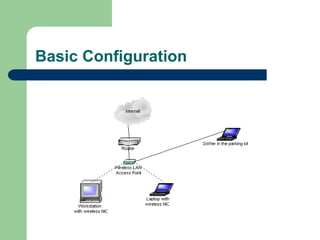
Basic Configuration
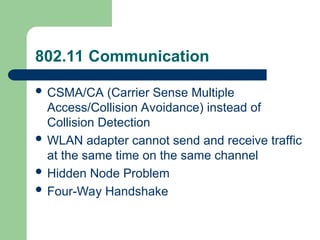
802.11 Communication
 CSMA/CA (Carrier Sense Multiple
Access/Collision Avoidance) instead of
Collision Detection
 WLAN adapter cannot send and receive traffic
at the same time on the same channel
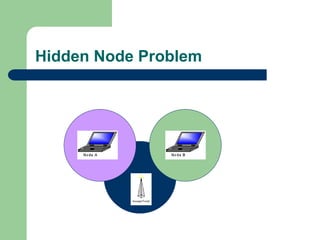
 Hidden Node Problem
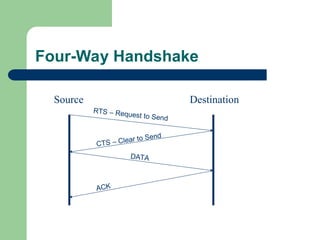
 Four-Way Handshake
Hidden Node Problem
Four-Way Handshake
Source Destination
RTS – Request to Send
CTS – Clear to Send
DATA
ACK
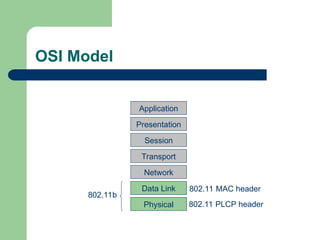
OSI Model
Application
Presentation
Session
Transport
Network
Data Link
Physical
802.11b
802.11 MAC header
802.11 PLCP header
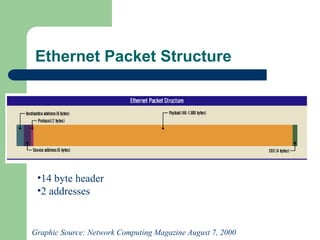
Ethernet Packet Structure
Graphic Source: Network Computing Magazine August 7, 2000
•14 byte header
•2 addresses
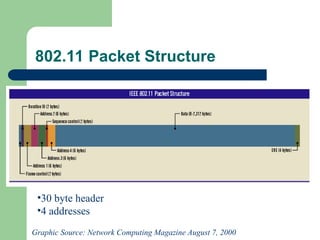
802.11 Packet Structure
Graphic Source: Network Computing Magazine August 7, 2000
•30 byte header
•4 addresses
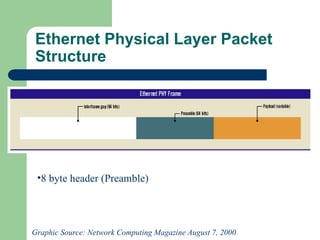
Ethernet Physical Layer Packet
Structure
•8 byte header (Preamble)
Graphic Source: Network Computing Magazine August 7, 2000
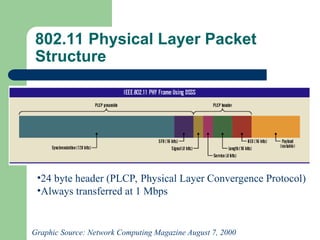
802.11 Physical Layer Packet
Structure
Graphic Source: Network Computing Magazine August 7, 2000
•24 byte header (PLCP, Physical Layer Convergence Protocol)
•Always transferred at 1 Mbps
Security Issues and Solutions
 Sniffing and War Driving
 Rogue Networks
 Policy Management
 MAC Address
 SSID
 WEP
War Driving
 Default installation allow any wireless NIC to
access the network
 Drive around (or walk) and gain access to
wireless networks
 Provides direct access behind the firewall
 Heard reports of an 8 mile range using a 24dB
gain parabolic dish antenna.
Rogue Networks
 Network users often set up rogue wireless
LANs to simplify their lives
 Rarely implement security measures
 Network is vulnerable to War Driving and
sniffing and you may not even know it
Policy Management
 Access is binary
 Full network access or no network access
 Need means of identifying and enforcing
access policies
MAC Address
 Can control access by allowing only defined
MAC addresses to connect to the network
 This address can be spoofed
 Must compile, maintain, and distribute a list of
valid MAC addresses to each access point
 Not a valid solution for public applications
Service Set ID (SSID)
 SSID is the network name for a wireless network
 WLAN products common defaults: “101” for 3COM and
“tsunami” for Cisco
 Can be required to specifically request the access point
by name (lets SSID act as a password)
 The more people that know the SSID, the higher the
likelihood it will be misused.
 Changing the SSID requires communicating the
change to all users of the network
Wired Equivalent Privacy (WEP)
 Designed to be computationally efficient, self-synchronizing,
and exportable
 Vulnerable to attack
– Passive attacks to decrypt traffic based on statistical analysis
– Active attacks to inject new traffic from unauthorized mobile stations,
based on known plaintext
– Dictionary-building attack that, after analysis of a day’s worth of traffic,
allows real-time automated decryption of all traffic
 All users of a given access point share the same encryption
key
 Data headers remain unencrypted so anyone can see the
source and destination of the data stream
WLAN Implementations
 Varies due to organization size and security
concerns
 Current technology not ideal for large-scale
deployment and management
 Will discuss a few tricks that can help the
process and a few technologies under
development to ease enterprise deployments
Basic WLAN
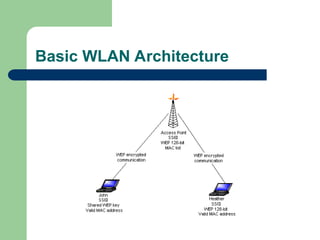
 Great for small (5-10 users) environments
 Use WEP (some vendors provide 128-bit
proprietary solution)
 Only allow specific MAC addresses to access
the network
 Rotate SSID and WEP keys every 30-60 days
 No need to purchase additional hardware or
software.
Basic WLAN Architecture
Secure LAN (SLAN)
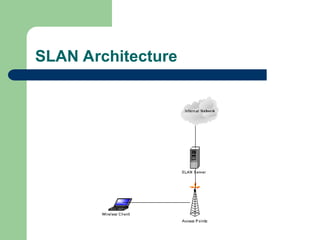
 Intent to protect link between wireless client and
(assumed) more secure wired network
 Similar to a VPN and provides server authentication,
client authentication, data privacy, and integrity using
per session and per user short life keys
 Simpler and more cost efficient than a VPN
 Cross-platform support and interoperability, not highly
scaleable, though
 Supports Linux and Windows
 Open Source (slan.sourceforge.net)
SLAN Architecture
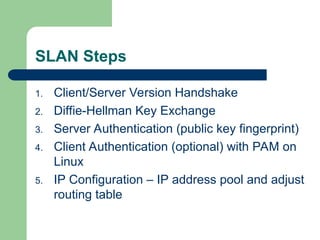
SLAN Steps
1. Client/Server Version Handshake
2. Diffie-Hellman Key Exchange
3. Server Authentication (public key fingerprint)
4. Client Authentication (optional) with PAM on
Linux
5. IP Configuration – IP address pool and adjust
routing table
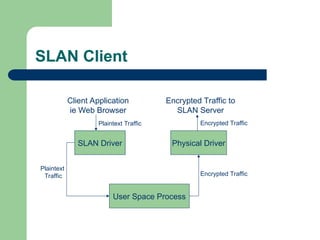
SLAN Client
SLAN Driver
User Space Process
Physical Driver
Client Application
ie Web Browser
Plaintext Traffic
Plaintext
Traffic Encrypted Traffic
Encrypted Traffic to
SLAN Server
Encrypted Traffic
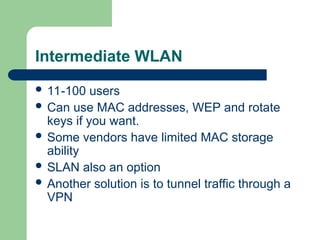
Intermediate WLAN
 11-100 users
 Can use MAC addresses, WEP and rotate
keys if you want.
 Some vendors have limited MAC storage
ability
 SLAN also an option
 Another solution is to tunnel traffic through a
VPN
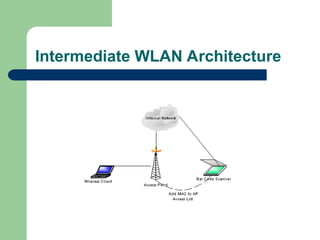
Intermediate WLAN Architecture
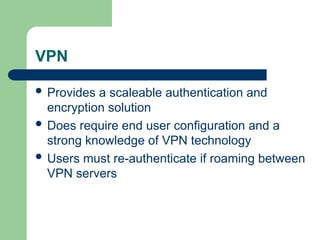
VPN
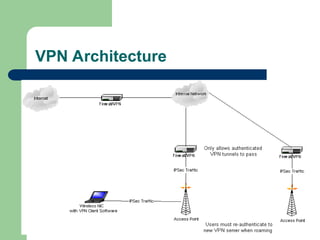
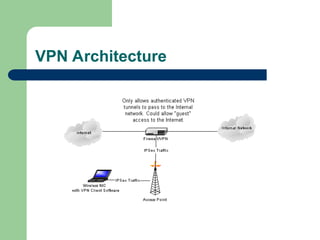
 Provides a scaleable authentication and
encryption solution
 Does require end user configuration and a
strong knowledge of VPN technology
 Users must re-authenticate if roaming between
VPN servers
VPN Architecture
VPN Architecture
Enterprise WLAN
 100+ users
 Reconfiguring WEP keys not feasible
 Multiple access points and subnets
 Possible solutions include VLANs, VPNs,
custom solutions, and 802.1x
VLANs
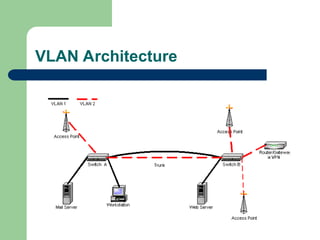
 Combine wireless networks on one VLAN
segment, even geographically separated
networks.
 Use 802.1Q VLAN tagging to create a wireless
subnet and a VPN gateway for authentication
and encryption
VLAN Architecture
Customized Gateway
 Georgia Institute of Technology
 Allows students with laptops to log on to the campus
network
 Uses VLANs, IP Tables, and a Web browser
 No end user configuration required
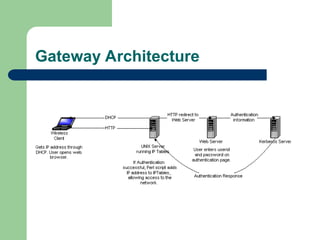
– User access a web site and enters a userid and password
– Gateway runs specialized code authenticating the user with
Kerberos and packet filtering with IPTables, adding the user’s
IP address to the allowed list to provide network access
Gateway Architecture
802.1x
 General-purpose port based network access control
mechanism for 802 technologies
 Based on AAA infrastructure (RADIUS)
 Also uses Extensible Authentication Protocol (EAP,
RFC 2284)
 Can provide dynamic encryption key exchange,
eliminating some of the issues with WEP
 Roaming is transparent to the end user
802.1x (cont)
 Could be implemented as early as 2002.
 Cisco Aironet 350 supports the draft standard.
 Microsoft includes support in Windows XP
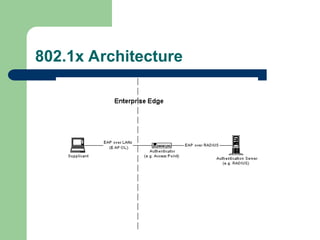
802.1x Architecture
Third-Party Products
 NetMotion Wireless authenticates against a
Windows domain and uses better encryption
(3DES) than WEP. Also offers the ability to
remotely disable a wireless network card’s
connection.
 Fortress Wireless Link Layer Security (WLLS).
Improves WEP and works with 802.1x.
 Enterasys provides proprietary RADIUS
solution similar to 802.1x
Client Considerations
 Cannot forget client security
 Distributed Personal Firewalls
 Strong end user security policies and
configurations
 Laptop Theft Controls
Conclusion
 Wireless LANs very useful and convenient, but
current security state not ideal for sensitive
environments.
 Cahners In-Stat group predicts the market for
wireless LANs will be $2.2 billion in 2004, up
from $771 million in 2000.
 Growing use and popularity require increased
focus on security
Contact Information
 Mandy@arcsec.com
 Presentation available for download at
www.arcsec.com and
www.survivingsecurity.com

wireless lan security for their all details

  • 1.
    Wireless LAN Security MandyAndress ArcSec Technologies Black Hat Briefings July 12, 2001
  • 2.
    Agenda  Uses  Benefits Standards  Functionality  Security Issues  Solutions and Implementations
  • 3.
    Uses  Key driversare mobility and accessibility  Easily change work locations in the office  Internet access at airports, cafes, conferences, etc.
  • 4.
    Benefits  Increased productivity –Improved collaboration – No need to reconnect to the network – Ability to work in more areas  Reduced costs – No need to wire hard-to-reach areas
  • 5.
    Standards  IEEE 802.11 IEEE 802.11b  IEEE 802.11a  IEEE 802.11e  HiperLAN/2  Interoperability
  • 6.
    802.11  Published inJune 1997  2.4GHz operating frequency  1 to 2 Mbps throughput  Can choose between frequency hopping or direct sequence spread modulation
  • 7.
    802.11b  Published inlate 1999 as supplement to 802.11  Still operates in 2.4GHz band  Data rates can be as high as 11 Mbps  Only direct sequence modulation is specified  Most widely deployed today
  • 8.
    802.11a  Also publishedin late 1999 as a supplement to 802.11  Operates in 5GHz band (less RF interference than 2.4GHz range)  Users Orthogonal Frequency Division Multiplexing (OFDM)  Supports data rates up to 54 Mbps  Currently no products available, expected in fourth quarter
  • 9.
    802.11e  Currently underdevelopment  Working to improve security issues  Extensions to MAC layer, longer keys, and key management systems  Adds 128-bit AES encryption
  • 10.
    HiperLAN/2  Development ledby the European Telecommunications Standards Institute (ETSI)  Operates in the 5 GHz range, uses OFDM technology, and support data rates over 50Mbps like 802.11a
  • 11.
    Interoperability  802.11a and802.11b work on different frequencies, so little chance for interoperability  Can coexist in one network  HiperLAN/2 is not interoperable with 802.11a or 802.11b
  • 12.
    Functionality  Basic Configuration WLAN Communication  WLAN Packet Structure
  • 13.
  • 14.
    802.11 Communication  CSMA/CA(Carrier Sense Multiple Access/Collision Avoidance) instead of Collision Detection  WLAN adapter cannot send and receive traffic at the same time on the same channel  Hidden Node Problem  Four-Way Handshake
  • 15.
  • 16.
    Four-Way Handshake Source Destination RTS– Request to Send CTS – Clear to Send DATA ACK
  • 17.
  • 18.
    Ethernet Packet Structure GraphicSource: Network Computing Magazine August 7, 2000 •14 byte header •2 addresses
  • 19.
    802.11 Packet Structure GraphicSource: Network Computing Magazine August 7, 2000 •30 byte header •4 addresses
  • 20.
    Ethernet Physical LayerPacket Structure •8 byte header (Preamble) Graphic Source: Network Computing Magazine August 7, 2000
  • 21.
    802.11 Physical LayerPacket Structure Graphic Source: Network Computing Magazine August 7, 2000 •24 byte header (PLCP, Physical Layer Convergence Protocol) •Always transferred at 1 Mbps
  • 22.
    Security Issues andSolutions  Sniffing and War Driving  Rogue Networks  Policy Management  MAC Address  SSID  WEP
  • 23.
    War Driving  Defaultinstallation allow any wireless NIC to access the network  Drive around (or walk) and gain access to wireless networks  Provides direct access behind the firewall  Heard reports of an 8 mile range using a 24dB gain parabolic dish antenna.
  • 24.
    Rogue Networks  Networkusers often set up rogue wireless LANs to simplify their lives  Rarely implement security measures  Network is vulnerable to War Driving and sniffing and you may not even know it
  • 25.
    Policy Management  Accessis binary  Full network access or no network access  Need means of identifying and enforcing access policies
  • 26.
    MAC Address  Cancontrol access by allowing only defined MAC addresses to connect to the network  This address can be spoofed  Must compile, maintain, and distribute a list of valid MAC addresses to each access point  Not a valid solution for public applications
  • 27.
    Service Set ID(SSID)  SSID is the network name for a wireless network  WLAN products common defaults: “101” for 3COM and “tsunami” for Cisco  Can be required to specifically request the access point by name (lets SSID act as a password)  The more people that know the SSID, the higher the likelihood it will be misused.  Changing the SSID requires communicating the change to all users of the network
  • 28.
    Wired Equivalent Privacy(WEP)  Designed to be computationally efficient, self-synchronizing, and exportable  Vulnerable to attack – Passive attacks to decrypt traffic based on statistical analysis – Active attacks to inject new traffic from unauthorized mobile stations, based on known plaintext – Dictionary-building attack that, after analysis of a day’s worth of traffic, allows real-time automated decryption of all traffic  All users of a given access point share the same encryption key  Data headers remain unencrypted so anyone can see the source and destination of the data stream
  • 29.
    WLAN Implementations  Variesdue to organization size and security concerns  Current technology not ideal for large-scale deployment and management  Will discuss a few tricks that can help the process and a few technologies under development to ease enterprise deployments
  • 30.
    Basic WLAN  Greatfor small (5-10 users) environments  Use WEP (some vendors provide 128-bit proprietary solution)  Only allow specific MAC addresses to access the network  Rotate SSID and WEP keys every 30-60 days  No need to purchase additional hardware or software.
  • 31.
  • 32.
    Secure LAN (SLAN) Intent to protect link between wireless client and (assumed) more secure wired network  Similar to a VPN and provides server authentication, client authentication, data privacy, and integrity using per session and per user short life keys  Simpler and more cost efficient than a VPN  Cross-platform support and interoperability, not highly scaleable, though  Supports Linux and Windows  Open Source (slan.sourceforge.net)
  • 33.
  • 34.
    SLAN Steps 1. Client/ServerVersion Handshake 2. Diffie-Hellman Key Exchange 3. Server Authentication (public key fingerprint) 4. Client Authentication (optional) with PAM on Linux 5. IP Configuration – IP address pool and adjust routing table
  • 35.
    SLAN Client SLAN Driver UserSpace Process Physical Driver Client Application ie Web Browser Plaintext Traffic Plaintext Traffic Encrypted Traffic Encrypted Traffic to SLAN Server Encrypted Traffic
  • 36.
    Intermediate WLAN  11-100users  Can use MAC addresses, WEP and rotate keys if you want.  Some vendors have limited MAC storage ability  SLAN also an option  Another solution is to tunnel traffic through a VPN
  • 37.
  • 38.
    VPN  Provides ascaleable authentication and encryption solution  Does require end user configuration and a strong knowledge of VPN technology  Users must re-authenticate if roaming between VPN servers
  • 39.
  • 40.
  • 41.
    Enterprise WLAN  100+users  Reconfiguring WEP keys not feasible  Multiple access points and subnets  Possible solutions include VLANs, VPNs, custom solutions, and 802.1x
  • 42.
    VLANs  Combine wirelessnetworks on one VLAN segment, even geographically separated networks.  Use 802.1Q VLAN tagging to create a wireless subnet and a VPN gateway for authentication and encryption
  • 43.
  • 44.
    Customized Gateway  GeorgiaInstitute of Technology  Allows students with laptops to log on to the campus network  Uses VLANs, IP Tables, and a Web browser  No end user configuration required – User access a web site and enters a userid and password – Gateway runs specialized code authenticating the user with Kerberos and packet filtering with IPTables, adding the user’s IP address to the allowed list to provide network access
  • 45.
  • 46.
    802.1x  General-purpose portbased network access control mechanism for 802 technologies  Based on AAA infrastructure (RADIUS)  Also uses Extensible Authentication Protocol (EAP, RFC 2284)  Can provide dynamic encryption key exchange, eliminating some of the issues with WEP  Roaming is transparent to the end user
  • 47.
    802.1x (cont)  Couldbe implemented as early as 2002.  Cisco Aironet 350 supports the draft standard.  Microsoft includes support in Windows XP
  • 48.
  • 49.
    Third-Party Products  NetMotionWireless authenticates against a Windows domain and uses better encryption (3DES) than WEP. Also offers the ability to remotely disable a wireless network card’s connection.  Fortress Wireless Link Layer Security (WLLS). Improves WEP and works with 802.1x.  Enterasys provides proprietary RADIUS solution similar to 802.1x
  • 50.
    Client Considerations  Cannotforget client security  Distributed Personal Firewalls  Strong end user security policies and configurations  Laptop Theft Controls
  • 51.
    Conclusion  Wireless LANsvery useful and convenient, but current security state not ideal for sensitive environments.  Cahners In-Stat group predicts the market for wireless LANs will be $2.2 billion in 2004, up from $771 million in 2000.  Growing use and popularity require increased focus on security
  • 52.
    Contact Information  Mandy@arcsec.com Presentation available for download at www.arcsec.com and www.survivingsecurity.com