Learning Outcomes
1. Understand wireless technologies.
2. Build wireless LANs.
3. Implement wireless LAN security.
UNDERSTAND WIRELESS
TECHNOLOGIES
4.1
Wireless Computer Networking
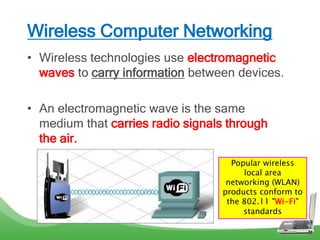
• Wireless technologies use electromagnetic
waves to carry information between devices.
• An electromagnetic wave is the same
medium that carries radio signals through
the air.
Popular wireless
local area
networking (WLAN)
products conform to
the 802.11 "Wi-Fi"
standards
Advantages of WiFi
• Mobility – allows for easy connection of both
stationary and mobile clients
• Scalability – allow more users (coverage area)
• Flexibility – provide anytime connectivity
• Cost Saving – equipment costs
• Reduce Installation Time – easy to install
Disadvantages of WiFi
• Interference - due to weather, other wireless
devices, or obstructions like walls.
• Speed - Wireless connections are slower.
• Price - Wireless hardware is more expensive.
• Technology – WLAN technology continues to
involve. The speed and technology (not fix as
wired technology)
Wireless Technologies
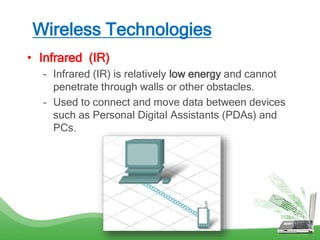
• Infrared (IR)
– Infrared (IR) is relatively low energy and cannot
penetrate through walls or other obstacles.
– Used to connect and move data between devices
such as Personal Digital Assistants (PDAs) and
PCs.
Wireless Technologies (cont…)
• Radio Frequency (RF)
– RF waves can penetrate through walls and other
obstacles, allowing a much greater range than IR.
Bluetooth is a technology that makes use of the 2.4
GHz band. It is limited to low-speed, short-range
communications, but has the advantage of
communicating with many devices at the same time.
IEEE 802.11 standards - transmit at a much higher
power level, which gives them a greater range.
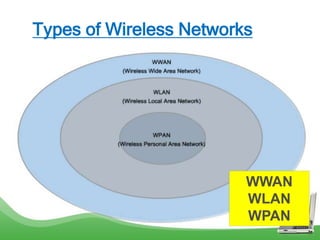
Types of Wireless Networks
WWAN
WLAN
WPAN
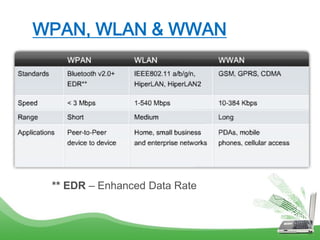
WPAN, WLAN & WWAN
** EDR – Enhanced Data Rate
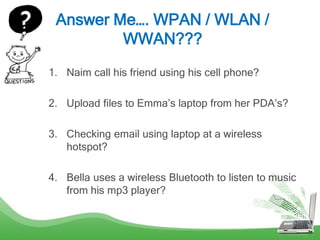
Answer Me…. WPAN / WLAN /
WWAN???
1. Naim call his friend using his cell phone?
2. Upload files to Emma’s laptop from her PDA’s?
3. Checking email using laptop at a wireless
hotspot?
4. Bella uses a wireless Bluetooth to listen to music
from his mp3 player?
WLAN Standards
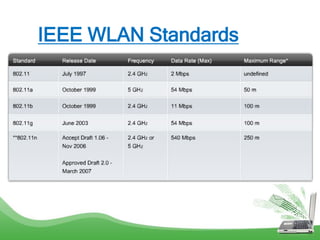
• IEEE 802.11 standard governs the WLAN
environment.
• There are four amendments to the IEEE
802.11 standard:
– 802.11a
– 802.11b
– 802.11g
– 802.11n
IEEE WLAN Standards
BUILD WIRELESS LANs
4.2
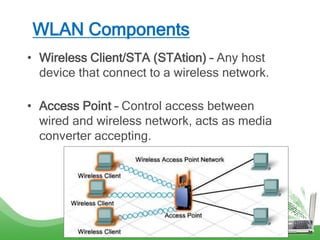
WLAN Components
• Wireless Client/STA (STAtion) – Any host
device that connect to a wireless network.
• Access Point – Control access between
wired and wireless network, acts as media
converter accepting.
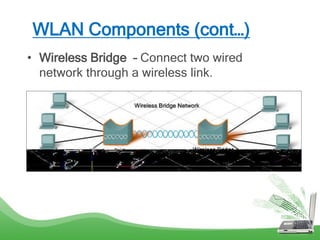
WLAN Components (cont…)
• Wireless Bridge – Connect two wired
network through a wireless link.
WLAN Components (cont…)
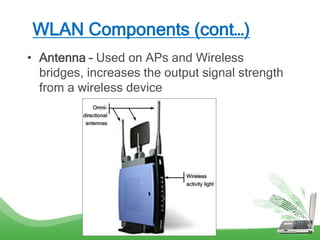
• Antenna – Used on APs and Wireless
bridges, increases the output signal strength
from a wireless device
Service Set Identifier (SSID)
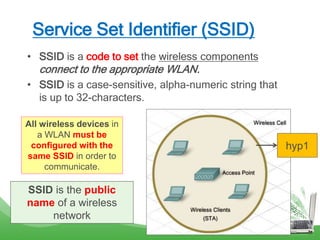
• SSID is a code to set the wireless components
connect to the appropriate WLAN.
• SSID is a case-sensitive, alpha-numeric string that
is up to 32-characters.
All wireless devices in
a WLAN must be
configured with the
same SSID in order to
communicate.
SSID is the public
name of a wireless
network
hyp1
Basic form of WLAN installations
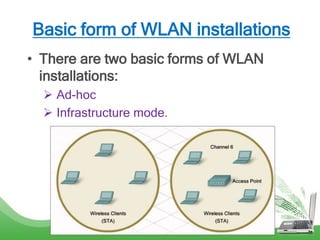
• There are two basic forms of WLAN
installations:
 Ad-hoc
 Infrastructure mode.
Ad-Hoc / IBSS
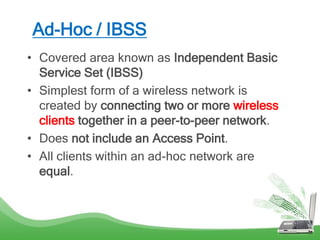
• Covered area known as Independent Basic
Service Set (IBSS)
• Simplest form of a wireless network is
created by connecting two or more wireless
clients together in a peer-to-peer network.
• Does not include an Access Point.
• All clients within an ad-hoc network are
equal.
Infrastructure Mode / BSS
• Covered area known as Basic Service Set
(BSS)
• Require a single device that controls
communications in the wireless cell.
• Individual STAs can not communicate
directly with each other.
• To communicate, each device must obtain
permission from the AP.
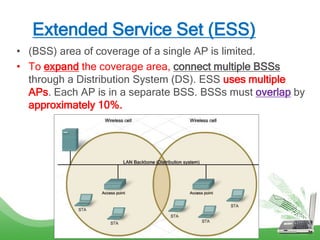
Extended Service Set (ESS)
• (BSS) area of coverage of a single AP is limited.
• To expand the coverage area, connect multiple BSSs
through a Distribution System (DS). ESS uses multiple
APs. Each AP is in a separate BSS. BSSs must overlap by
approximately 10%.
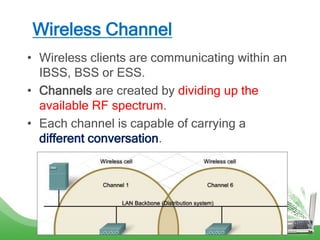
Wireless Channel
• Wireless clients are communicating within an
IBSS, BSS or ESS.
• Channels are created by dividing up the
available RF spectrum.
• Each channel is capable of carrying a
different conversation.
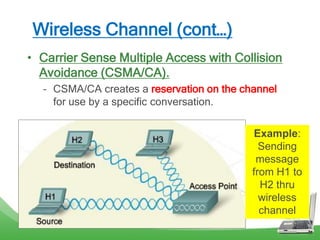
Wireless Channel (cont…)
• Carrier Sense Multiple Access with Collision
Avoidance (CSMA/CA).
– CSMA/CA creates a reservation on the channel
for use by a specific conversation.
Example:
Sending
message
from H1 to
H2 thru
wireless
channel
CSMA/CA
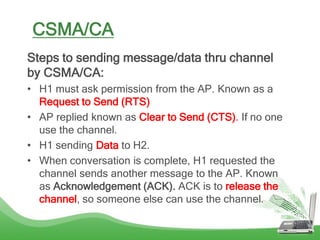
Steps to sending message/data thru channel
by CSMA/CA:
• H1 must ask permission from the AP. Known as a
Request to Send (RTS)
• AP replied known as Clear to Send (CTS). If no one
use the channel.
• H1 sending Data to H2.
• When conversation is complete, H1 requested the
channel sends another message to the AP. Known
as Acknowledgement (ACK). ACK is to release the
channel, so someone else can use the channel.
IMPLEMENT WIRELESS
LAN SECURITY
4.3
WLAN Attacks
WLAN attacks avoid by:
1. Limited access to a WLAN – filter MAC
address
2. Authentication on a WLAN – username
and password
3. Encryption on a WLAN – data transfer
4. Traffic filtering on a WLAN – filter MAC
address, IP address, application etc.
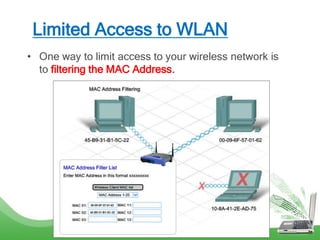
Limited Access to WLAN
• One way to limit access to your wireless network is
to filtering the MAC Address.
Authentication to WLAN
• Authentication is the process of permitting entry to a
network based on a set of credentials.
• There are three types of wireless authentication
methods:
– Open authentication
– Pre-Shared Key (PSK)
– Extensible Authentication Protocol (EAP)
Authentication to WLAN (cont…)
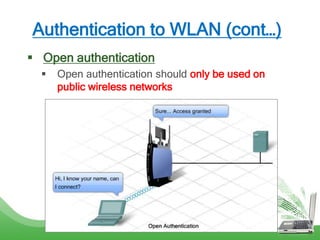
 Open authentication
 Open authentication should only be used on
public wireless networks
Authentication to WLAN (cont…)
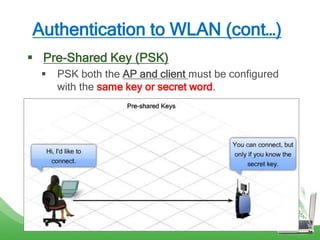
 Pre-Shared Key (PSK)
 PSK both the AP and client must be configured
with the same key or secret word.
Authentication to WLAN (cont…)
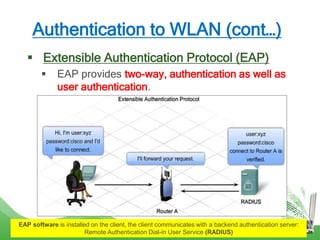
 Extensible Authentication Protocol (EAP)
 EAP provides two-way, authentication as well as
user authentication.
EAP software is installed on the client, the client communicates with a backend authentication server:
Remote Authentication Dial-in User Service (RADIUS)
Encryption on a WLAN
• Authentication and MAC filtering ONLY stop an
attacker from connecting to a wireless network.
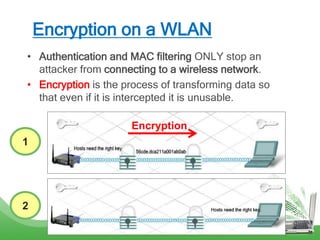
• Encryption is the process of transforming data so
that even if it is intercepted it is unusable.
1
2
Encryption
Encryption on a WLAN (cont…)
• Types of Encryption:
1. Wired Equivalency Protocol (WEP)
2. Wi-Fi Protected Access (WPA)
** WPA also have another version called WPA2
Wired Equivalency Protocol (WEP)
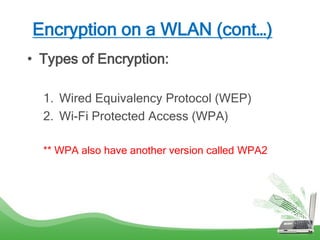
• Wired Equivalency Protocol (WEP) is an advanced
security feature that encrypts network traffic through
the air.
• WEP uses pre-configured keys to encrypt and
decrypt data. A WEP key is entered as a string of
numbers and letters and is generally 64 bits or 128
bits long.
• Every wireless device must have the same WEP key
entered. Without this key, devices will not be able to
understand the wireless transmissions.
Wired Equivalency Protocol (WEP)
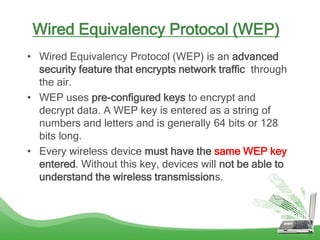
Weakness of WEP is the use of a
static key on all WEP enabled
devices
Wi-Fi Protected Access (WPA)
• WPA uses encryption keys from 64 bits up to
256 bits.
• Generates new, dynamic keys each time a
client establishes a connection with the AP.
• More secure than WEP because it is
significantly more difficult to crack
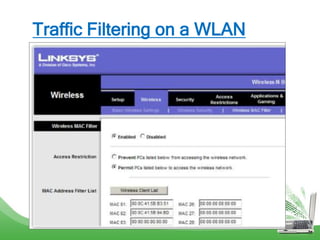
Traffic Filtering on a WLAN
• Traffic filtering is control the types of traffic
transmitted across a WLAN.
• Traffic filtering blocks undesirable traffic from
entering or leaving the wireless network.
• Filtering is done by the AP as traffic passes. We can
remove the traffic by filter a specific MAC or IP
address.
• It can also block certain applications by port
numbers.
Traffic Filtering on a WLAN
I don’t stop when I’m tired.
I only stop when I’m done…

Topic 4.0 wireless technology

  • 2.
    Learning Outcomes 1. Understandwireless technologies. 2. Build wireless LANs. 3. Implement wireless LAN security.
  • 3.
  • 4.
    Wireless Computer Networking •Wireless technologies use electromagnetic waves to carry information between devices. • An electromagnetic wave is the same medium that carries radio signals through the air. Popular wireless local area networking (WLAN) products conform to the 802.11 "Wi-Fi" standards
  • 5.
    Advantages of WiFi •Mobility – allows for easy connection of both stationary and mobile clients • Scalability – allow more users (coverage area) • Flexibility – provide anytime connectivity • Cost Saving – equipment costs • Reduce Installation Time – easy to install
  • 6.
    Disadvantages of WiFi •Interference - due to weather, other wireless devices, or obstructions like walls. • Speed - Wireless connections are slower. • Price - Wireless hardware is more expensive. • Technology – WLAN technology continues to involve. The speed and technology (not fix as wired technology)
  • 7.
    Wireless Technologies • Infrared(IR) – Infrared (IR) is relatively low energy and cannot penetrate through walls or other obstacles. – Used to connect and move data between devices such as Personal Digital Assistants (PDAs) and PCs.
  • 8.
    Wireless Technologies (cont…) •Radio Frequency (RF) – RF waves can penetrate through walls and other obstacles, allowing a much greater range than IR. Bluetooth is a technology that makes use of the 2.4 GHz band. It is limited to low-speed, short-range communications, but has the advantage of communicating with many devices at the same time. IEEE 802.11 standards - transmit at a much higher power level, which gives them a greater range.
  • 9.
    Types of WirelessNetworks WWAN WLAN WPAN
  • 10.
    WPAN, WLAN &WWAN ** EDR – Enhanced Data Rate
  • 11.
    Answer Me…. WPAN/ WLAN / WWAN??? 1. Naim call his friend using his cell phone? 2. Upload files to Emma’s laptop from her PDA’s? 3. Checking email using laptop at a wireless hotspot? 4. Bella uses a wireless Bluetooth to listen to music from his mp3 player?
  • 12.
    WLAN Standards • IEEE802.11 standard governs the WLAN environment. • There are four amendments to the IEEE 802.11 standard: – 802.11a – 802.11b – 802.11g – 802.11n
  • 13.
  • 14.
  • 15.
    WLAN Components • WirelessClient/STA (STAtion) – Any host device that connect to a wireless network. • Access Point – Control access between wired and wireless network, acts as media converter accepting.
  • 16.
    WLAN Components (cont…) •Wireless Bridge – Connect two wired network through a wireless link.
  • 17.
    WLAN Components (cont…) •Antenna – Used on APs and Wireless bridges, increases the output signal strength from a wireless device
  • 18.
    Service Set Identifier(SSID) • SSID is a code to set the wireless components connect to the appropriate WLAN. • SSID is a case-sensitive, alpha-numeric string that is up to 32-characters. All wireless devices in a WLAN must be configured with the same SSID in order to communicate. SSID is the public name of a wireless network hyp1
  • 19.
    Basic form ofWLAN installations • There are two basic forms of WLAN installations:  Ad-hoc  Infrastructure mode.
  • 20.
    Ad-Hoc / IBSS •Covered area known as Independent Basic Service Set (IBSS) • Simplest form of a wireless network is created by connecting two or more wireless clients together in a peer-to-peer network. • Does not include an Access Point. • All clients within an ad-hoc network are equal.
  • 21.
    Infrastructure Mode /BSS • Covered area known as Basic Service Set (BSS) • Require a single device that controls communications in the wireless cell. • Individual STAs can not communicate directly with each other. • To communicate, each device must obtain permission from the AP.
  • 22.
    Extended Service Set(ESS) • (BSS) area of coverage of a single AP is limited. • To expand the coverage area, connect multiple BSSs through a Distribution System (DS). ESS uses multiple APs. Each AP is in a separate BSS. BSSs must overlap by approximately 10%.
  • 23.
    Wireless Channel • Wirelessclients are communicating within an IBSS, BSS or ESS. • Channels are created by dividing up the available RF spectrum. • Each channel is capable of carrying a different conversation.
  • 24.
    Wireless Channel (cont…) •Carrier Sense Multiple Access with Collision Avoidance (CSMA/CA). – CSMA/CA creates a reservation on the channel for use by a specific conversation. Example: Sending message from H1 to H2 thru wireless channel
  • 25.
    CSMA/CA Steps to sendingmessage/data thru channel by CSMA/CA: • H1 must ask permission from the AP. Known as a Request to Send (RTS) • AP replied known as Clear to Send (CTS). If no one use the channel. • H1 sending Data to H2. • When conversation is complete, H1 requested the channel sends another message to the AP. Known as Acknowledgement (ACK). ACK is to release the channel, so someone else can use the channel.
  • 26.
  • 27.
    WLAN Attacks WLAN attacksavoid by: 1. Limited access to a WLAN – filter MAC address 2. Authentication on a WLAN – username and password 3. Encryption on a WLAN – data transfer 4. Traffic filtering on a WLAN – filter MAC address, IP address, application etc.
  • 28.
    Limited Access toWLAN • One way to limit access to your wireless network is to filtering the MAC Address.
  • 29.
    Authentication to WLAN •Authentication is the process of permitting entry to a network based on a set of credentials. • There are three types of wireless authentication methods: – Open authentication – Pre-Shared Key (PSK) – Extensible Authentication Protocol (EAP)
  • 30.
    Authentication to WLAN(cont…)  Open authentication  Open authentication should only be used on public wireless networks
  • 31.
    Authentication to WLAN(cont…)  Pre-Shared Key (PSK)  PSK both the AP and client must be configured with the same key or secret word.
  • 32.
    Authentication to WLAN(cont…)  Extensible Authentication Protocol (EAP)  EAP provides two-way, authentication as well as user authentication. EAP software is installed on the client, the client communicates with a backend authentication server: Remote Authentication Dial-in User Service (RADIUS)
  • 33.
    Encryption on aWLAN • Authentication and MAC filtering ONLY stop an attacker from connecting to a wireless network. • Encryption is the process of transforming data so that even if it is intercepted it is unusable. 1 2 Encryption
  • 34.
    Encryption on aWLAN (cont…) • Types of Encryption: 1. Wired Equivalency Protocol (WEP) 2. Wi-Fi Protected Access (WPA) ** WPA also have another version called WPA2
  • 35.
    Wired Equivalency Protocol(WEP) • Wired Equivalency Protocol (WEP) is an advanced security feature that encrypts network traffic through the air. • WEP uses pre-configured keys to encrypt and decrypt data. A WEP key is entered as a string of numbers and letters and is generally 64 bits or 128 bits long. • Every wireless device must have the same WEP key entered. Without this key, devices will not be able to understand the wireless transmissions.
  • 36.
    Wired Equivalency Protocol(WEP) Weakness of WEP is the use of a static key on all WEP enabled devices
  • 37.
    Wi-Fi Protected Access(WPA) • WPA uses encryption keys from 64 bits up to 256 bits. • Generates new, dynamic keys each time a client establishes a connection with the AP. • More secure than WEP because it is significantly more difficult to crack
  • 38.
    Traffic Filtering ona WLAN • Traffic filtering is control the types of traffic transmitted across a WLAN. • Traffic filtering blocks undesirable traffic from entering or leaving the wireless network. • Filtering is done by the AP as traffic passes. We can remove the traffic by filter a specific MAC or IP address. • It can also block certain applications by port numbers.
  • 39.
  • 40.
    I don’t stopwhen I’m tired. I only stop when I’m done…