CH. 1 – OVERVIEW OF WIRELESS LANS (WLANS) FUNDAMENTALS OF WIRELESS LANS
OVERVIEW OF WIRELESS LANS (WLANS) Today’s theme:  “ More later!”
NOTE Much of the technical information in this chapter will be discussed in detail in later chapters.
WHAT IS A WIRELESS LAN? Wireless LAN (WLAN) - provides all the features and benefits of traditional LAN technologies such as Ethernet and Token Ring, but without the limitations of wires or cables.
WHAT IS A WIRELESS LAN? WLAN, like a LAN, requires a physical medium to transmit signals.  Instead of using UTP, WLANs use: Infrared light (IR) 802.11 does include an IR specification limitations, easily blocked, no real 802.11 products (IrDA) Radio frequencies (RFs) Can penetrate ‘most’ office obstructions http://earlyradiohistory.us/1920au.htm
WHAT IS A WIRELESS LAN? WLANs use the 2.4 GHz and 5-GHz frequency bands.  ISM (Industry, Scientific, Medical) license-free (unlicensed) frequency bands. S-Band ISM 802.11b and 802.11g:  2.4- 2.5 GHz C-Band ISM 802.11a:  5.725 – 5.875 GHz More later!
ICONS – WIRELESS DEVICES AND FUNCTIONS
ICONS - BUILDINGS
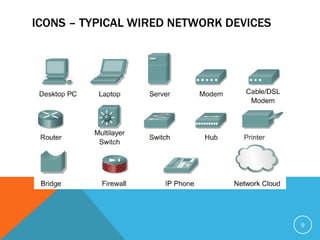
ICONS – TYPICAL WIRED NETWORK DEVICES
ICONS – WIRELESS LAN ANTENNA
IEEE 802.11 AND THE WI-FI ALLIANCE  IEEE  LAN/MAN Standards Committee (LMSC)  First 802.11 standard released in 1997, several since then Wireless Ethernet Compatibility Alliance (WECA) Advertises its Wi-Fi (wireless fidelity) program Any 802.11 vendor can have its products tested for interoperability Cisco is a founding member
WI-FI™ Wi-Fi™ Alliance WECA changed its name to Wi-Fi Wireless Fidelity Alliance 170+ members Over 350 products certified Wi-Fi’s™ Mission Certify interoperability of WLAN products (802.11) Wi-Fi™ is the “stamp of approval” Promote Wi-Fi ™  as the global standard
OTHER WIRELESS TECHNOLOGIES Not  discussed in this course: Cellular Bluetooth or PAN (Personal Area Network) 3G (3rd Generation) UWB (Ultra Wide Band) FSO (Free Space Optics) Radio waves off meteor trails!
WHY WIRELESS?
WLAN EVOLUTION Warehousing Retail Healthcare Education Businesses Home 802.11  Ratified 802.11a,b  Ratified 802.11g  Drafted IEEE 802.11Begins Drafting 860 Kbps 900 MHz 1 and 2 Mbps 2.4 GHz Proprietary 1986 1988 1990 1992 1994 1996 1998 2000 2002 1 and 2 Mbps 2.4 GHz 11 Mbps 54 Mbps Standards-based 5 GHz Radio Network Speed
CURRENT STANDARDS – A, B, G 802.11a Up to 54 Mbps 5 GHz Not compatible with either 802.11b or 802.11g 802.11b Up to 11 Mbps 2.4 GHz 802.11g Up to 54 Mbps 2.4 GHz 802.11  Ratified 802.11a,b  Ratified IEEE 802.11Begins Drafting 802.11g is backwards compatible with 802.11b, but with a drawback (later) 802.11g  Ratified More later! 860 Kbps 900 MHz 1 and 2 Mbps 2.4 GHz Proprietary 1986 1988 1990 1992 1994 1996 1998 2000 2003 1 and 2 Mbps 2.4 GHz 11 Mbps 54 Mbps Standards-based 5 GHz Radio Network Speed
802.11 PHY (PHYSICAL LAYER) TECHNOLOGIES Infrared light  Three types of radio transmission within the unlicensed 2.4-GHz frequency bands:  Frequency hopping spread spectrum (FHSS) 802.11b (not used) Direct sequence spread spectrum (DSSS) 802.11b Orthogonal frequency-division multiplexing (OFDM) 802.11g  One type of radio transmission within the unlicensed 5-GHz frequency bands:  Orthogonal frequency-division multiplexing (OFDM) 802.11a 802.11  Ratified 802.11a,b  Ratified 802.11g  Ratified IEEE 802.11Begins Drafting More later! 860 Kbps 900 MHz 1 and 2 Mbps 2.4 GHz Proprietary 1986 1988 1990 1992 1994 1996 1998 2000 2003 1 and 2 Mbps 2.4 GHz 11 Mbps 54 Mbps Standards-based 5 GHz Radio Network Speed
ATMOSPHERE: THE WIRELESS MEDIUM Wireless signals are electromagnetic waves No physical medium is necessary  The ability of radio waves to pass through walls and cover great distances makes wireless a versatile way to build a network.
COMPONENTS REVIEW
WLAN DEVICES In-building Infrastructure 1200 Series (802.11a and 802.11b) 1100 Series (802.11b) 350 Series (802.11b)  not shown Bridging 350 Series (802.11b) BR350 WGB350 1400 Series (802.11a)
ANTENNAS Antenna 2.4GHz Antennas 5 GHz Antennas
CABLE, ACCESSORIES, WIRELESS IP PHONE Cable and Accessories Low Loss Cable Antenna Mounts Lightening Arrestor Wireless IP Phone
CLIENT ADAPTERS Clients (NICs) 350 Series (802.11b) 5 GHz client adapter (802.11a) Drivers are supported for all popular operating systems, including Windows 95, 98, NT 4.0, Windows 2000, Windows ME, Windows XP, Mac OS Version 9.x, and Linux.
CISCO AIRONET 350 SERIES MINI PCI ADAPTER 2.4 GHz/802.11b embedded wireless for notebooks  100 mW transmit power Must order through PC manufactures (not orderable directly through Cisco)
BEYOND LAPTOPS: OTHER 802.11-ENABLED DEVICES PDA’s Phones Printers Projectors Tablet PC’s Security Cameras Barcode scanners Custom devices for vertical markets: Healthcare Manufacturing Retail Restaurants HP iPAQ 5450 PDA Compaq Tablet PC HHP Barcode Scanner Epson Printer Sharp M25X Projector SpectraLink Phone
“ BUSINESS-CLASS”VS CONSUMER WLAN Industry has segmented:  consumer  vs.  business “ Cisco” offers only  “business-class”  products: Security Upgradeability Network management Advanced features Choice of antennas Highest throughput Scalability
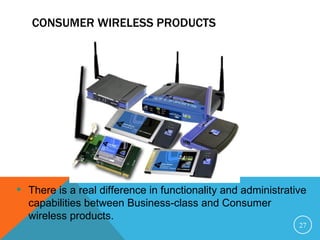
CONSUMER WIRELESS PRODUCTS There is a real difference in functionality and administrative capabilities between Business-class and Consumer wireless products.
WIRELESS LAN MARKET
IMPLICATIONS Over the last decade, the networking and wireless communities expected each year to become the year of the WLAN.  WLAN technology had some false starts in the 1990s, for a variety of reasons. Immature technology, security concerns, and slow connectivity speeds kept WLAN technology from becoming a viable alternative to wired LANs.
WLAN GROWTH AND APPLICATIONS Don’t know the source of this and there is considerable debate whether 802.11a will win out over 802.11b/g
MOMENTUM IS BUILDING IN WIRELESS LANS Wireless LANs are an “addictive” technology Strong commitment to Wireless LANs by technology heavy-weights Cisco, IBM, Intel, Microsoft Embedded market is growing Laptop PC’s with “wireless inside” PDA’s are next The WLAN market is expanding  from Industry-Specific Applications,  to Universities, Homes, & Offices Professional installers and technicians  will be in demand
WIRELESS LANS ARE TAKING OFF ($ Billions) Source:  Forward Concepts, 2003 Future Growth Due To: Standards High Bandwidth Needs Low Cost Embedded in Laptops Variety of Devices Voice + Data Multiple Applications Security Issues Solved Ease of Deployment Network Mgmt. Tools Enterprise Adoption Worldwide WLAN Market *includes embedded clients, add-on client cards, & infrastructure equipment for both the business and consumer segments CAGR = 43%
FOUR MAIN REQUIREMENTS FOR A WLAN SOLUTION  High availability — High availability is achieved through system redundancy and proper coverage-area design.  Scalability — Scalability is accomplished by supporting multiple APs per coverage area, which use multiple frequencies. APs can also perform load balancing, if desired.  Manageability — Diagnostic tools represent a large portion of management within WLANs. Customers should be able to manage WLAN devices through industry standard APIs, including SNMP and Web, or through major enterprise management applications like CiscoWorks 2000, Cisco Stack Manager, and Cisco Resource Monitor.  Open architecture — Openness is achieved through adherence to standards such as 802.11a and 802.11b, participation in interoperability associations such as the Wi-Fi Alliance, and certification such as U.S. FCC certification.
OTHER REQUIREMENTS  Security — It is essential to encrypt data packets transmitted through the air. For larger installations, centralized user authentication and centralized management of encryption keys are also required.  Cost — Customers expect continued reductions in price of 15 to 30 percent each year, and increases in performance and security. Customers are concerned not only with purchase price but also with total cost of ownership (TCO), including costs for installation.
RADIO SIGNAL INTERFERENCE Network managers must ensure that different channels are utilized.  Interference cannot always be detected until the link is actually implemented.  Because the 802.11 standards use unlicensed spectrum, changing channels is the best way to avoid interference.  If someone installs a link that interferes with a wireless link, the interference is probably mutual.
RADIO SIGNAL INTERFERENCE To minimize the possible effects of electromagnetic interference (EMI), the best course of action is to isolate the radio equipment from potential sources of EMI.
POWER CONSUMPTION Power consumption is always an issue with laptops, because the power and the battery have limited lives.  802.11a uses a higher frequency (5 GHz) than 802.11a/g (2.4 GHz) which requires higher power and more of a drain on batteries.
INTEROPERABILITY Non-standard (for now) 802.11 devices include: Repeater APs Universal Clients (Workgroup Bridges) Wireless Bridges Cisco bridges, like many other vendor bridges, are proprietary implementations of the 802.11 standard and therefore vendor interoperability cannot be attained.
WIRELESS LAN SECURITY: LESSONS “ War Driving” Hacking into WEP Lessons: Security must be turned on (part of the installation process) Employees will install WLAN equipment on their own (compromises security of your entire network) WEP keys can be easily broken (businesses need better security)
WIRELESS LAN SECURITY Security in the IEEE 802.11 specification—which applies to 802.11b, 802.11a, and 802.11g—has come under intense scrutiny.  Researchers have exposed several vulnerabilities. As wireless networks grow, the threat of intruders from the inside and outside is great. Attackers called “war drivers” are continually driving around searching for insecure WLANs to exploit.
INSTALLATION AND SITE DESIGN ISSUES—BRIDGING
INSTALLATION AND SITE DESIGN ISSUES—WLAN
HEALTH ISSUES
IEEE 802.11 STANDARDS ACTIVITIES 802.11a: 5GHz, 54Mbps 802.11b: 2.4GHz, 11Mbps 802.11d: Multiple regulatory domains  802.11e: Quality of Service (QoS) 802.11f: Inter-Access Point Protocol (IAPP) 802.11g: 2.4GHz, 54Mbps 802.11h: Dynamic Frequency Selection (DFS)  and Transmit Power Control (TPC) 802.11i: Security 802.11j: Japan 5GHz Channels (4.9-5.1 GHz) 802.11k: Measurement

Capitulo 5

  • 1.
    CH. 1 –OVERVIEW OF WIRELESS LANS (WLANS) FUNDAMENTALS OF WIRELESS LANS
  • 2.
    OVERVIEW OF WIRELESSLANS (WLANS) Today’s theme: “ More later!”
  • 3.
    NOTE Much ofthe technical information in this chapter will be discussed in detail in later chapters.
  • 4.
    WHAT IS AWIRELESS LAN? Wireless LAN (WLAN) - provides all the features and benefits of traditional LAN technologies such as Ethernet and Token Ring, but without the limitations of wires or cables.
  • 5.
    WHAT IS AWIRELESS LAN? WLAN, like a LAN, requires a physical medium to transmit signals. Instead of using UTP, WLANs use: Infrared light (IR) 802.11 does include an IR specification limitations, easily blocked, no real 802.11 products (IrDA) Radio frequencies (RFs) Can penetrate ‘most’ office obstructions http://earlyradiohistory.us/1920au.htm
  • 6.
    WHAT IS AWIRELESS LAN? WLANs use the 2.4 GHz and 5-GHz frequency bands. ISM (Industry, Scientific, Medical) license-free (unlicensed) frequency bands. S-Band ISM 802.11b and 802.11g: 2.4- 2.5 GHz C-Band ISM 802.11a: 5.725 – 5.875 GHz More later!
  • 7.
    ICONS – WIRELESSDEVICES AND FUNCTIONS
  • 8.
  • 9.
    ICONS – TYPICALWIRED NETWORK DEVICES
  • 10.
    ICONS – WIRELESSLAN ANTENNA
  • 11.
    IEEE 802.11 ANDTHE WI-FI ALLIANCE IEEE LAN/MAN Standards Committee (LMSC) First 802.11 standard released in 1997, several since then Wireless Ethernet Compatibility Alliance (WECA) Advertises its Wi-Fi (wireless fidelity) program Any 802.11 vendor can have its products tested for interoperability Cisco is a founding member
  • 12.
    WI-FI™ Wi-Fi™ AllianceWECA changed its name to Wi-Fi Wireless Fidelity Alliance 170+ members Over 350 products certified Wi-Fi’s™ Mission Certify interoperability of WLAN products (802.11) Wi-Fi™ is the “stamp of approval” Promote Wi-Fi ™ as the global standard
  • 13.
    OTHER WIRELESS TECHNOLOGIESNot discussed in this course: Cellular Bluetooth or PAN (Personal Area Network) 3G (3rd Generation) UWB (Ultra Wide Band) FSO (Free Space Optics) Radio waves off meteor trails!
  • 14.
  • 15.
    WLAN EVOLUTION WarehousingRetail Healthcare Education Businesses Home 802.11 Ratified 802.11a,b Ratified 802.11g Drafted IEEE 802.11Begins Drafting 860 Kbps 900 MHz 1 and 2 Mbps 2.4 GHz Proprietary 1986 1988 1990 1992 1994 1996 1998 2000 2002 1 and 2 Mbps 2.4 GHz 11 Mbps 54 Mbps Standards-based 5 GHz Radio Network Speed
  • 16.
    CURRENT STANDARDS –A, B, G 802.11a Up to 54 Mbps 5 GHz Not compatible with either 802.11b or 802.11g 802.11b Up to 11 Mbps 2.4 GHz 802.11g Up to 54 Mbps 2.4 GHz 802.11 Ratified 802.11a,b Ratified IEEE 802.11Begins Drafting 802.11g is backwards compatible with 802.11b, but with a drawback (later) 802.11g Ratified More later! 860 Kbps 900 MHz 1 and 2 Mbps 2.4 GHz Proprietary 1986 1988 1990 1992 1994 1996 1998 2000 2003 1 and 2 Mbps 2.4 GHz 11 Mbps 54 Mbps Standards-based 5 GHz Radio Network Speed
  • 17.
    802.11 PHY (PHYSICALLAYER) TECHNOLOGIES Infrared light Three types of radio transmission within the unlicensed 2.4-GHz frequency bands: Frequency hopping spread spectrum (FHSS) 802.11b (not used) Direct sequence spread spectrum (DSSS) 802.11b Orthogonal frequency-division multiplexing (OFDM) 802.11g One type of radio transmission within the unlicensed 5-GHz frequency bands: Orthogonal frequency-division multiplexing (OFDM) 802.11a 802.11 Ratified 802.11a,b Ratified 802.11g Ratified IEEE 802.11Begins Drafting More later! 860 Kbps 900 MHz 1 and 2 Mbps 2.4 GHz Proprietary 1986 1988 1990 1992 1994 1996 1998 2000 2003 1 and 2 Mbps 2.4 GHz 11 Mbps 54 Mbps Standards-based 5 GHz Radio Network Speed
  • 18.
    ATMOSPHERE: THE WIRELESSMEDIUM Wireless signals are electromagnetic waves No physical medium is necessary The ability of radio waves to pass through walls and cover great distances makes wireless a versatile way to build a network.
  • 19.
  • 20.
    WLAN DEVICES In-buildingInfrastructure 1200 Series (802.11a and 802.11b) 1100 Series (802.11b) 350 Series (802.11b) not shown Bridging 350 Series (802.11b) BR350 WGB350 1400 Series (802.11a)
  • 21.
    ANTENNAS Antenna 2.4GHzAntennas 5 GHz Antennas
  • 22.
    CABLE, ACCESSORIES, WIRELESSIP PHONE Cable and Accessories Low Loss Cable Antenna Mounts Lightening Arrestor Wireless IP Phone
  • 23.
    CLIENT ADAPTERS Clients(NICs) 350 Series (802.11b) 5 GHz client adapter (802.11a) Drivers are supported for all popular operating systems, including Windows 95, 98, NT 4.0, Windows 2000, Windows ME, Windows XP, Mac OS Version 9.x, and Linux.
  • 24.
    CISCO AIRONET 350SERIES MINI PCI ADAPTER 2.4 GHz/802.11b embedded wireless for notebooks 100 mW transmit power Must order through PC manufactures (not orderable directly through Cisco)
  • 25.
    BEYOND LAPTOPS: OTHER802.11-ENABLED DEVICES PDA’s Phones Printers Projectors Tablet PC’s Security Cameras Barcode scanners Custom devices for vertical markets: Healthcare Manufacturing Retail Restaurants HP iPAQ 5450 PDA Compaq Tablet PC HHP Barcode Scanner Epson Printer Sharp M25X Projector SpectraLink Phone
  • 26.
    “ BUSINESS-CLASS”VS CONSUMERWLAN Industry has segmented: consumer vs. business “ Cisco” offers only “business-class” products: Security Upgradeability Network management Advanced features Choice of antennas Highest throughput Scalability
  • 27.
    CONSUMER WIRELESS PRODUCTSThere is a real difference in functionality and administrative capabilities between Business-class and Consumer wireless products.
  • 28.
  • 29.
    IMPLICATIONS Over thelast decade, the networking and wireless communities expected each year to become the year of the WLAN. WLAN technology had some false starts in the 1990s, for a variety of reasons. Immature technology, security concerns, and slow connectivity speeds kept WLAN technology from becoming a viable alternative to wired LANs.
  • 30.
    WLAN GROWTH ANDAPPLICATIONS Don’t know the source of this and there is considerable debate whether 802.11a will win out over 802.11b/g
  • 31.
    MOMENTUM IS BUILDINGIN WIRELESS LANS Wireless LANs are an “addictive” technology Strong commitment to Wireless LANs by technology heavy-weights Cisco, IBM, Intel, Microsoft Embedded market is growing Laptop PC’s with “wireless inside” PDA’s are next The WLAN market is expanding from Industry-Specific Applications, to Universities, Homes, & Offices Professional installers and technicians will be in demand
  • 32.
    WIRELESS LANS ARETAKING OFF ($ Billions) Source: Forward Concepts, 2003 Future Growth Due To: Standards High Bandwidth Needs Low Cost Embedded in Laptops Variety of Devices Voice + Data Multiple Applications Security Issues Solved Ease of Deployment Network Mgmt. Tools Enterprise Adoption Worldwide WLAN Market *includes embedded clients, add-on client cards, & infrastructure equipment for both the business and consumer segments CAGR = 43%
  • 33.
    FOUR MAIN REQUIREMENTSFOR A WLAN SOLUTION High availability — High availability is achieved through system redundancy and proper coverage-area design. Scalability — Scalability is accomplished by supporting multiple APs per coverage area, which use multiple frequencies. APs can also perform load balancing, if desired. Manageability — Diagnostic tools represent a large portion of management within WLANs. Customers should be able to manage WLAN devices through industry standard APIs, including SNMP and Web, or through major enterprise management applications like CiscoWorks 2000, Cisco Stack Manager, and Cisco Resource Monitor. Open architecture — Openness is achieved through adherence to standards such as 802.11a and 802.11b, participation in interoperability associations such as the Wi-Fi Alliance, and certification such as U.S. FCC certification.
  • 34.
    OTHER REQUIREMENTS Security — It is essential to encrypt data packets transmitted through the air. For larger installations, centralized user authentication and centralized management of encryption keys are also required. Cost — Customers expect continued reductions in price of 15 to 30 percent each year, and increases in performance and security. Customers are concerned not only with purchase price but also with total cost of ownership (TCO), including costs for installation.
  • 35.
    RADIO SIGNAL INTERFERENCENetwork managers must ensure that different channels are utilized. Interference cannot always be detected until the link is actually implemented. Because the 802.11 standards use unlicensed spectrum, changing channels is the best way to avoid interference. If someone installs a link that interferes with a wireless link, the interference is probably mutual.
  • 36.
    RADIO SIGNAL INTERFERENCETo minimize the possible effects of electromagnetic interference (EMI), the best course of action is to isolate the radio equipment from potential sources of EMI.
  • 37.
    POWER CONSUMPTION Powerconsumption is always an issue with laptops, because the power and the battery have limited lives. 802.11a uses a higher frequency (5 GHz) than 802.11a/g (2.4 GHz) which requires higher power and more of a drain on batteries.
  • 38.
    INTEROPERABILITY Non-standard (fornow) 802.11 devices include: Repeater APs Universal Clients (Workgroup Bridges) Wireless Bridges Cisco bridges, like many other vendor bridges, are proprietary implementations of the 802.11 standard and therefore vendor interoperability cannot be attained.
  • 39.
    WIRELESS LAN SECURITY:LESSONS “ War Driving” Hacking into WEP Lessons: Security must be turned on (part of the installation process) Employees will install WLAN equipment on their own (compromises security of your entire network) WEP keys can be easily broken (businesses need better security)
  • 40.
    WIRELESS LAN SECURITYSecurity in the IEEE 802.11 specification—which applies to 802.11b, 802.11a, and 802.11g—has come under intense scrutiny. Researchers have exposed several vulnerabilities. As wireless networks grow, the threat of intruders from the inside and outside is great. Attackers called “war drivers” are continually driving around searching for insecure WLANs to exploit.
  • 41.
    INSTALLATION AND SITEDESIGN ISSUES—BRIDGING
  • 42.
    INSTALLATION AND SITEDESIGN ISSUES—WLAN
  • 43.
  • 44.
    IEEE 802.11 STANDARDSACTIVITIES 802.11a: 5GHz, 54Mbps 802.11b: 2.4GHz, 11Mbps 802.11d: Multiple regulatory domains 802.11e: Quality of Service (QoS) 802.11f: Inter-Access Point Protocol (IAPP) 802.11g: 2.4GHz, 54Mbps 802.11h: Dynamic Frequency Selection (DFS) and Transmit Power Control (TPC) 802.11i: Security 802.11j: Japan 5GHz Channels (4.9-5.1 GHz) 802.11k: Measurement