A PRESENTATION
ON
WIRELESS NETWORKS
Presented By:-
Himanshu Derwal
ID - 10EE020
ANAND
INTERNATIONAL COLLEGE OF ENGINEERING
A PRESENTATION
ON
WIRELESS NETWORKS
Presented By:-
Himanshu Derwal
ID - 10EE020
DEPARTMENT OF ELECTRICAL ENGINEERING
WIRELESS NETWORKSWIRELESS NETWORKS
Management Center
(Database large storage, analysis)
BSC
(Base Station
Controller,
Preprocessing)BTS
Wireless Sensor
Machine
Monitoring
Medical Monitoring
Wireless SensorWireless
Data Collection Networks
Data Acquisition
Network
Animal
Monitoring
Vehicle Monitoring
Wireless networks
Submarine Monitoring
PDA
Wireless
(Wi-Fi 802.11 2.4GHz
BlueTooth
Cellular Network, -CDMA, GSM)
Data Distribution
Network
Printer
Wireland
(Ethernet WLAN, Optical)
Online
monitoring Server
transmitter
Any where to
monitor and any
where to access
Notebook Cellular
Phone
PC
Presentation Outline
• History
• Wireless Technology overview
• The IEEE 802.11 WLAN Standards
• Secure Wireless LANs
• Migrating to Wireless LANs (Cutting the
cord)
• History
• Wireless Technology overview
• The IEEE 802.11 WLAN Standards
• Secure Wireless LANs
• Migrating to Wireless LANs (Cutting the
cord)
The beginning…
• Most credit Guglielmo Marconi, “the father of radio”, with
the initiation of wireless technology
• 1894 Marconi experimented with Hertzian Waves (radio
waves) to produce and detect waves over long distances
• 1896 Marconi established the Wireless Telegraph &
Signal Company, the first radio factory
• 1901 St John’s, New Foundland, Marconi received the
first trans-Atlantic wireless signal from Poldhu, England
• 1905 the first distress signal sent using Morse Code
• 1919 Radio Corporation of America (RCA) was
incorporated, and consumer radio broadcasts for news
and entertainment soon became popular
• Most credit Guglielmo Marconi, “the father of radio”, with
the initiation of wireless technology
• 1894 Marconi experimented with Hertzian Waves (radio
waves) to produce and detect waves over long distances
• 1896 Marconi established the Wireless Telegraph &
Signal Company, the first radio factory
• 1901 St John’s, New Foundland, Marconi received the
first trans-Atlantic wireless signal from Poldhu, England
• 1905 the first distress signal sent using Morse Code
• 1919 Radio Corporation of America (RCA) was
incorporated, and consumer radio broadcasts for news
and entertainment soon became popular
US Military jumps into Wireless
• During World War II the US Military used wireless signals
with encryption to send battle plans and instructions
• US Military started the shift to radio data transmission
technology
Wireless Networking: Birth of the
Wireless Network
• 1971 network technologies met radio technologies when
the first wireless Local Area Network (LAN) was
established at the University of Hawaii during the
experiment, ‘ALOHANET’
• ALOHANET used a bidirectional star topology consisting
of (7) computers over (4) islands
• 1971 network technologies met radio technologies when
the first wireless Local Area Network (LAN) was
established at the University of Hawaii during the
experiment, ‘ALOHANET’
• ALOHANET used a bidirectional star topology consisting
of (7) computers over (4) islands
Wireless Networking: Cellular
• 1973 Dr Martin Cooper, Motorola Labs, invented the
first personal mobile cellular telephone (weighed 2.5 lbs,
30 individual circuit boards, no display screen,
9”x5”x1.75”, 10 hours to charge for 35 minutes of use)
• 1983 marked American entry into the commercial
cellular service market
• 1987 FCC allows and encourages cellular service
providers to use alternate technologies in the 800Mhz
radio spectrum to prompt use of digital transmission
• 1973 Dr Martin Cooper, Motorola Labs, invented the
first personal mobile cellular telephone (weighed 2.5 lbs,
30 individual circuit boards, no display screen,
9”x5”x1.75”, 10 hours to charge for 35 minutes of use)
• 1983 marked American entry into the commercial
cellular service market
• 1987 FCC allows and encourages cellular service
providers to use alternate technologies in the 800Mhz
radio spectrum to prompt use of digital transmission
Wireless Networking: IEEE
• 1990 IEEE 802 Executive Committee established the
802.11 Working Group to create a wireless LAN standard.
• 1997 working group approved IEEE 802.11 as the
world’s first wireless LAN standard
• New standards are continuously being developed by the
Institute of Electrical and Electronics Engineers
• 1990 IEEE 802 Executive Committee established the
802.11 Working Group to create a wireless LAN standard.
• 1997 working group approved IEEE 802.11 as the
world’s first wireless LAN standard
• New standards are continuously being developed by the
Institute of Electrical and Electronics Engineers
Wireless?
• A wireless LAN or WLAN is a wireless local
area network that uses radio waves as its
carrier.
• The last link with the users is wireless, to
give a network connection to all users in a
building or campus.
• The backbone network usually uses cables
• A wireless LAN or WLAN is a wireless local
area network that uses radio waves as its
carrier.
• The last link with the users is wireless, to
give a network connection to all users in a
building or campus.
• The backbone network usually uses cables
How do wireless LANs work?
Wireless LANs operate in almost the same
way as
wired LANs, using the same networking
protocols
and supporting the most of the same
applications.
Wireless LANs operate in almost the same
way as
wired LANs, using the same networking
protocols
and supporting the most of the same
applications.
How are WLANs Different?
• They integrate into existing networks through
access points which provide a bridging
function
• They let you stay connected as you roam from
one coverage area to another
• They have unique security considerations
• They have specific interoperability
requirements
• They require different hardware
• They offer performance that differs from wired
LANs.
• They integrate into existing networks through
access points which provide a bridging
function
• They let you stay connected as you roam from
one coverage area to another
• They have unique security considerations
• They have specific interoperability
requirements
• They require different hardware
• They offer performance that differs from wired
LANs.
Integration With Existing
Networks
• Wireless Access Points (APs) - a small
device that bridges wireless traffic to your
network.
• Most access points bridge wireless LANs
into Ethernet networks, but Token-Ring
options are available as well.
• Wireless Access Points (APs) - a small
device that bridges wireless traffic to your
network.
• Most access points bridge wireless LANs
into Ethernet networks, but Token-Ring
options are available as well.
Integration With Existing
Networks
Roaming
• Users maintain a continuous connection as they roam
from one physical area to another
• Mobile nodes automatically register with the new
access point.
• Methods: DHCP, Mobile IP
• IEEE 802.11 standard does not
address roaming, you may need
to purchase equipment from one
vendor if your users need to roam
from one access point to another.
• Users maintain a continuous connection as they roam
from one physical area to another
• Mobile nodes automatically register with the new
access point.
• Methods: DHCP, Mobile IP
• IEEE 802.11 standard does not
address roaming, you may need
to purchase equipment from one
vendor if your users need to roam
from one access point to another.
Security
• In theory, spread spectrum radio signals
are inherently difficult to decipher without
knowing the exact hopping sequences or
direct sequence codes used
• The IEEE 802.11 standard specifies
optional security called "Wired Equivalent
Privacy" whose goal is that a wireless LAN
offer privacy equivalent to that offered by
a wired LAN. The standard also specifies
optional authentication measures.
• In theory, spread spectrum radio signals
are inherently difficult to decipher without
knowing the exact hopping sequences or
direct sequence codes used
• The IEEE 802.11 standard specifies
optional security called "Wired Equivalent
Privacy" whose goal is that a wireless LAN
offer privacy equivalent to that offered by
a wired LAN. The standard also specifies
optional authentication measures.
Hardware
• PC Card, either with integral antenna or
with external antenna/RF module.
• ISA Card with external antenna connected
by cable.
• Handheld terminals
• Access points
• PC Card, either with integral antenna or
with external antenna/RF module.
• ISA Card with external antenna connected
by cable.
• Handheld terminals
• Access points
Hardware
CISCO Aironet 350 series Wireless Handheld TerminalCISCO Aironet 350 series
Semi Parabolic Antenna
BreezeCOM AP
Microstrain
G-Sensor
Microstrain Wireless Sensors
Microstrain
V-Link
Transceiver
Microstrain
Transceiver
Connect to PC
RFID node
Berkeley
Crossbow
Sensor
Crossbow
transceiver
Performance
• 802.11a offers speeds with a
theoretically maximum rate of 54Mbps in
the 5 GHz band
• 802.11b offers speeds with a
theoretically maximum rate of 11Mbps at
in the 2.4 GHz spectrum band
• 802.11g is a new standard for data rates
of up to a theoretical maximum of 54
Mbps at 2.4 GHz.
• 802.11a offers speeds with a
theoretically maximum rate of 54Mbps in
the 5 GHz band
• 802.11b offers speeds with a
theoretically maximum rate of 11Mbps at
in the 2.4 GHz spectrum band
• 802.11g is a new standard for data rates
of up to a theoretical maximum of 54
Mbps at 2.4 GHz.
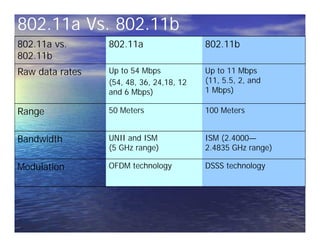
802.11a Vs. 802.11b
802.11a vs.
802.11b
802.11a 802.11b
Raw data rates Up to 54 Mbps
(54, 48, 36, 24,18, 12
and 6 Mbps)
Up to 11 Mbps
(11, 5.5, 2, and
1 Mbps)
Range 50 Meters 100 Meters
Bandwidth UNII and ISM
(5 GHz range)
ISM (2.4000—
2.4835 GHz range)
Modulation OFDM technology DSSS technology
Authentication
Means:
• Based on cryptography
• Non-cryptographic
• Both are identity-based verification
mechanisms (devices request access
based on the SSID – Service Set Identifier
of the wireless network).
Means:
• Based on cryptography
• Non-cryptographic
• Both are identity-based verification
mechanisms (devices request access
based on the SSID – Service Set Identifier
of the wireless network).
Security Problems
• Security features in Wireless products are
frequently not enabled.
• Use of static WEP keys (keys are in use for a
very long time). WEP does not provide key
management.
• Cryptographic keys are short.
• No user authentication occurs – only devices are
authenticated. A stolen device can access the
network.
• Identity based systems are vulnerable.
• Packet integrity is poor.
• Security features in Wireless products are
frequently not enabled.
• Use of static WEP keys (keys are in use for a
very long time). WEP does not provide key
management.
• Cryptographic keys are short.
• No user authentication occurs – only devices are
authenticated. A stolen device can access the
network.
• Identity based systems are vulnerable.
• Packet integrity is poor.
Antenna Selection and
Placement
• Permanently attached.
• Remote antennas connected using an antenna
cable.
• Coax cable used for RF has a high signal loss,
should not be mounted more than a 1 or 2
meters away from the device.
• Placement: consider building construction,
ceiling height, obstacles, and aesthetics.
Different materials (cement, steel) have different
radio propagation characteristics.
• Permanently attached.
• Remote antennas connected using an antenna
cable.
• Coax cable used for RF has a high signal loss,
should not be mounted more than a 1 or 2
meters away from the device.
• Placement: consider building construction,
ceiling height, obstacles, and aesthetics.
Different materials (cement, steel) have different
radio propagation characteristics.
Vendor Information
• CISCO Systems Wireless
http://www.cisco.com/warp/public/44/jump/wi
reless.shtml
• 3Com Wireless
http://www.3com.com/products/en_US/prodlist
.jsp?tab=cat&pathtype=purchase&cat=13&selcat
=Wireless+Products
• Breeze Wireless Communications
http://www.breezecom.com
• Lucent Technologies
http://www.wavelan.com
• Symbol Technologies http://www.symbol.com
• CISCO Systems Wireless
http://www.cisco.com/warp/public/44/jump/wi
reless.shtml
• 3Com Wireless
http://www.3com.com/products/en_US/prodlist
.jsp?tab=cat&pathtype=purchase&cat=13&selcat
=Wireless+Products
• Breeze Wireless Communications
http://www.breezecom.com
• Lucent Technologies
http://www.wavelan.com
• Symbol Technologies http://www.symbol.com
References
• CISCO Packet Magazine, 2nd Quarter 2002
http://www.cisco.com/en/US/about/ac123/ac11
4/ac173/ac168/about_cisco_packet_issue_home.
html
• 3Com University – Wireless LANs A Technology
Overview www.3com.com/3comu
• National Institute of Standards and Technology
Wireless Network Security
http://csrc.nist.gov/publications/drafts/draft-
sp800-48.pdf
• CISCO Packet Magazine, 2nd Quarter 2002
http://www.cisco.com/en/US/about/ac123/ac11
4/ac173/ac168/about_cisco_packet_issue_home.
html
• 3Com University – Wireless LANs A Technology
Overview www.3com.com/3comu
• National Institute of Standards and Technology
Wireless Network Security
http://csrc.nist.gov/publications/drafts/draft-
sp800-48.pdf
QueryQuery
Thank YouThank You

Wireless Networks

  • 1.
    A PRESENTATION ON WIRELESS NETWORKS PresentedBy:- Himanshu Derwal ID - 10EE020 ANAND INTERNATIONAL COLLEGE OF ENGINEERING A PRESENTATION ON WIRELESS NETWORKS Presented By:- Himanshu Derwal ID - 10EE020 DEPARTMENT OF ELECTRICAL ENGINEERING
  • 2.
  • 3.
    Management Center (Database largestorage, analysis) BSC (Base Station Controller, Preprocessing)BTS Wireless Sensor Machine Monitoring Medical Monitoring Wireless SensorWireless Data Collection Networks Data Acquisition Network Animal Monitoring Vehicle Monitoring Wireless networks Submarine Monitoring PDA Wireless (Wi-Fi 802.11 2.4GHz BlueTooth Cellular Network, -CDMA, GSM) Data Distribution Network Printer Wireland (Ethernet WLAN, Optical) Online monitoring Server transmitter Any where to monitor and any where to access Notebook Cellular Phone PC
  • 4.
    Presentation Outline • History •Wireless Technology overview • The IEEE 802.11 WLAN Standards • Secure Wireless LANs • Migrating to Wireless LANs (Cutting the cord) • History • Wireless Technology overview • The IEEE 802.11 WLAN Standards • Secure Wireless LANs • Migrating to Wireless LANs (Cutting the cord)
  • 5.
    The beginning… • Mostcredit Guglielmo Marconi, “the father of radio”, with the initiation of wireless technology • 1894 Marconi experimented with Hertzian Waves (radio waves) to produce and detect waves over long distances • 1896 Marconi established the Wireless Telegraph & Signal Company, the first radio factory • 1901 St John’s, New Foundland, Marconi received the first trans-Atlantic wireless signal from Poldhu, England • 1905 the first distress signal sent using Morse Code • 1919 Radio Corporation of America (RCA) was incorporated, and consumer radio broadcasts for news and entertainment soon became popular • Most credit Guglielmo Marconi, “the father of radio”, with the initiation of wireless technology • 1894 Marconi experimented with Hertzian Waves (radio waves) to produce and detect waves over long distances • 1896 Marconi established the Wireless Telegraph & Signal Company, the first radio factory • 1901 St John’s, New Foundland, Marconi received the first trans-Atlantic wireless signal from Poldhu, England • 1905 the first distress signal sent using Morse Code • 1919 Radio Corporation of America (RCA) was incorporated, and consumer radio broadcasts for news and entertainment soon became popular
  • 6.
    US Military jumpsinto Wireless • During World War II the US Military used wireless signals with encryption to send battle plans and instructions • US Military started the shift to radio data transmission technology
  • 7.
    Wireless Networking: Birthof the Wireless Network • 1971 network technologies met radio technologies when the first wireless Local Area Network (LAN) was established at the University of Hawaii during the experiment, ‘ALOHANET’ • ALOHANET used a bidirectional star topology consisting of (7) computers over (4) islands • 1971 network technologies met radio technologies when the first wireless Local Area Network (LAN) was established at the University of Hawaii during the experiment, ‘ALOHANET’ • ALOHANET used a bidirectional star topology consisting of (7) computers over (4) islands
  • 8.
    Wireless Networking: Cellular •1973 Dr Martin Cooper, Motorola Labs, invented the first personal mobile cellular telephone (weighed 2.5 lbs, 30 individual circuit boards, no display screen, 9”x5”x1.75”, 10 hours to charge for 35 minutes of use) • 1983 marked American entry into the commercial cellular service market • 1987 FCC allows and encourages cellular service providers to use alternate technologies in the 800Mhz radio spectrum to prompt use of digital transmission • 1973 Dr Martin Cooper, Motorola Labs, invented the first personal mobile cellular telephone (weighed 2.5 lbs, 30 individual circuit boards, no display screen, 9”x5”x1.75”, 10 hours to charge for 35 minutes of use) • 1983 marked American entry into the commercial cellular service market • 1987 FCC allows and encourages cellular service providers to use alternate technologies in the 800Mhz radio spectrum to prompt use of digital transmission
  • 9.
    Wireless Networking: IEEE •1990 IEEE 802 Executive Committee established the 802.11 Working Group to create a wireless LAN standard. • 1997 working group approved IEEE 802.11 as the world’s first wireless LAN standard • New standards are continuously being developed by the Institute of Electrical and Electronics Engineers • 1990 IEEE 802 Executive Committee established the 802.11 Working Group to create a wireless LAN standard. • 1997 working group approved IEEE 802.11 as the world’s first wireless LAN standard • New standards are continuously being developed by the Institute of Electrical and Electronics Engineers
  • 10.
    Wireless? • A wirelessLAN or WLAN is a wireless local area network that uses radio waves as its carrier. • The last link with the users is wireless, to give a network connection to all users in a building or campus. • The backbone network usually uses cables • A wireless LAN or WLAN is a wireless local area network that uses radio waves as its carrier. • The last link with the users is wireless, to give a network connection to all users in a building or campus. • The backbone network usually uses cables
  • 11.
    How do wirelessLANs work? Wireless LANs operate in almost the same way as wired LANs, using the same networking protocols and supporting the most of the same applications. Wireless LANs operate in almost the same way as wired LANs, using the same networking protocols and supporting the most of the same applications.
  • 12.
    How are WLANsDifferent? • They integrate into existing networks through access points which provide a bridging function • They let you stay connected as you roam from one coverage area to another • They have unique security considerations • They have specific interoperability requirements • They require different hardware • They offer performance that differs from wired LANs. • They integrate into existing networks through access points which provide a bridging function • They let you stay connected as you roam from one coverage area to another • They have unique security considerations • They have specific interoperability requirements • They require different hardware • They offer performance that differs from wired LANs.
  • 13.
    Integration With Existing Networks •Wireless Access Points (APs) - a small device that bridges wireless traffic to your network. • Most access points bridge wireless LANs into Ethernet networks, but Token-Ring options are available as well. • Wireless Access Points (APs) - a small device that bridges wireless traffic to your network. • Most access points bridge wireless LANs into Ethernet networks, but Token-Ring options are available as well.
  • 14.
  • 15.
    Roaming • Users maintaina continuous connection as they roam from one physical area to another • Mobile nodes automatically register with the new access point. • Methods: DHCP, Mobile IP • IEEE 802.11 standard does not address roaming, you may need to purchase equipment from one vendor if your users need to roam from one access point to another. • Users maintain a continuous connection as they roam from one physical area to another • Mobile nodes automatically register with the new access point. • Methods: DHCP, Mobile IP • IEEE 802.11 standard does not address roaming, you may need to purchase equipment from one vendor if your users need to roam from one access point to another.
  • 16.
    Security • In theory,spread spectrum radio signals are inherently difficult to decipher without knowing the exact hopping sequences or direct sequence codes used • The IEEE 802.11 standard specifies optional security called "Wired Equivalent Privacy" whose goal is that a wireless LAN offer privacy equivalent to that offered by a wired LAN. The standard also specifies optional authentication measures. • In theory, spread spectrum radio signals are inherently difficult to decipher without knowing the exact hopping sequences or direct sequence codes used • The IEEE 802.11 standard specifies optional security called "Wired Equivalent Privacy" whose goal is that a wireless LAN offer privacy equivalent to that offered by a wired LAN. The standard also specifies optional authentication measures.
  • 17.
    Hardware • PC Card,either with integral antenna or with external antenna/RF module. • ISA Card with external antenna connected by cable. • Handheld terminals • Access points • PC Card, either with integral antenna or with external antenna/RF module. • ISA Card with external antenna connected by cable. • Handheld terminals • Access points
  • 18.
    Hardware CISCO Aironet 350series Wireless Handheld TerminalCISCO Aironet 350 series Semi Parabolic Antenna BreezeCOM AP
  • 19.
  • 20.
  • 21.
    Performance • 802.11a offersspeeds with a theoretically maximum rate of 54Mbps in the 5 GHz band • 802.11b offers speeds with a theoretically maximum rate of 11Mbps at in the 2.4 GHz spectrum band • 802.11g is a new standard for data rates of up to a theoretical maximum of 54 Mbps at 2.4 GHz. • 802.11a offers speeds with a theoretically maximum rate of 54Mbps in the 5 GHz band • 802.11b offers speeds with a theoretically maximum rate of 11Mbps at in the 2.4 GHz spectrum band • 802.11g is a new standard for data rates of up to a theoretical maximum of 54 Mbps at 2.4 GHz.
  • 22.
    802.11a Vs. 802.11b 802.11avs. 802.11b 802.11a 802.11b Raw data rates Up to 54 Mbps (54, 48, 36, 24,18, 12 and 6 Mbps) Up to 11 Mbps (11, 5.5, 2, and 1 Mbps) Range 50 Meters 100 Meters Bandwidth UNII and ISM (5 GHz range) ISM (2.4000— 2.4835 GHz range) Modulation OFDM technology DSSS technology
  • 23.
    Authentication Means: • Based oncryptography • Non-cryptographic • Both are identity-based verification mechanisms (devices request access based on the SSID – Service Set Identifier of the wireless network). Means: • Based on cryptography • Non-cryptographic • Both are identity-based verification mechanisms (devices request access based on the SSID – Service Set Identifier of the wireless network).
  • 24.
    Security Problems • Securityfeatures in Wireless products are frequently not enabled. • Use of static WEP keys (keys are in use for a very long time). WEP does not provide key management. • Cryptographic keys are short. • No user authentication occurs – only devices are authenticated. A stolen device can access the network. • Identity based systems are vulnerable. • Packet integrity is poor. • Security features in Wireless products are frequently not enabled. • Use of static WEP keys (keys are in use for a very long time). WEP does not provide key management. • Cryptographic keys are short. • No user authentication occurs – only devices are authenticated. A stolen device can access the network. • Identity based systems are vulnerable. • Packet integrity is poor.
  • 25.
    Antenna Selection and Placement •Permanently attached. • Remote antennas connected using an antenna cable. • Coax cable used for RF has a high signal loss, should not be mounted more than a 1 or 2 meters away from the device. • Placement: consider building construction, ceiling height, obstacles, and aesthetics. Different materials (cement, steel) have different radio propagation characteristics. • Permanently attached. • Remote antennas connected using an antenna cable. • Coax cable used for RF has a high signal loss, should not be mounted more than a 1 or 2 meters away from the device. • Placement: consider building construction, ceiling height, obstacles, and aesthetics. Different materials (cement, steel) have different radio propagation characteristics.
  • 26.
    Vendor Information • CISCOSystems Wireless http://www.cisco.com/warp/public/44/jump/wi reless.shtml • 3Com Wireless http://www.3com.com/products/en_US/prodlist .jsp?tab=cat&pathtype=purchase&cat=13&selcat =Wireless+Products • Breeze Wireless Communications http://www.breezecom.com • Lucent Technologies http://www.wavelan.com • Symbol Technologies http://www.symbol.com • CISCO Systems Wireless http://www.cisco.com/warp/public/44/jump/wi reless.shtml • 3Com Wireless http://www.3com.com/products/en_US/prodlist .jsp?tab=cat&pathtype=purchase&cat=13&selcat =Wireless+Products • Breeze Wireless Communications http://www.breezecom.com • Lucent Technologies http://www.wavelan.com • Symbol Technologies http://www.symbol.com
  • 27.
    References • CISCO PacketMagazine, 2nd Quarter 2002 http://www.cisco.com/en/US/about/ac123/ac11 4/ac173/ac168/about_cisco_packet_issue_home. html • 3Com University – Wireless LANs A Technology Overview www.3com.com/3comu • National Institute of Standards and Technology Wireless Network Security http://csrc.nist.gov/publications/drafts/draft- sp800-48.pdf • CISCO Packet Magazine, 2nd Quarter 2002 http://www.cisco.com/en/US/about/ac123/ac11 4/ac173/ac168/about_cisco_packet_issue_home. html • 3Com University – Wireless LANs A Technology Overview www.3com.com/3comu • National Institute of Standards and Technology Wireless Network Security http://csrc.nist.gov/publications/drafts/draft- sp800-48.pdf
  • 28.
  • 29.