Windows Server Containers
Vishwanath Srikanth
Service Engineer 2, R&P, MPSIT
https://in.linkedin.com/in/vishsrik
Vishwanathsrikanth.wordpress.com
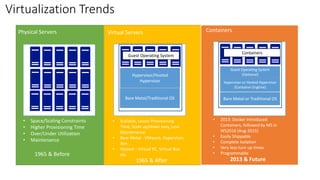
Physical Servers ContainersVirtual Servers
• Space/Scaling Constraints
• Higher Provisioning Time
• Over/Under Utilization
• Maintenance
Hypervisor/Hosted
Hypervisor
• Scalable, Lesser Provisioning
Time, Scale up/down easy, Less
Maintenance.
• Bare Metal - VMware, Hypervisor,
Xen
• Hosted – Virtual PC, Virtual Box
etc.1965 & Before
1965 & After
Bare Metal or Traditional OSBare Metal/Traditional OS
Hypervisor or Hosted Hypervisor
(Container Engtine)
Guest Operating System
(Optional)
Guest Operating System
Containers
2013 & Future
• 2013: Docker Introduced
Containers, followed by MS in
WS2016 (Aug-2015)
• Easily Shippable
• Complete Isolation
• Very less turn up times
• Programmable
Virtualization Trends
www.docker.com
• An Open Source framework built by Solomon Hykes and team @dotCloud to build,
manage and deploy containers on Linux.
• Written using Go (Google) Programming Language
• Standardized in collaboration with Amazon, Cisco, Google, VM Ware and Microsoft and
works consistently across all major Linux Brands. OCI – Open Container Initiative
• Docker is built using LXC, namespaces, CGroups features on Linux.
• Open Source, 2013: https://www.docker.com/contribute, 400 Million downloads so far.
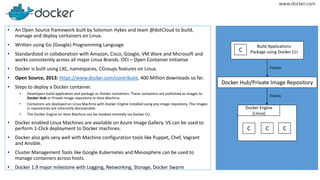
• Steps to deploy a Docker container.
• Developers build application and package as Docker containers. These containers are published as images to
Docker Hub or Private Image repository or Host Machine.
• Containers are deployed on Linux Machine with Docker Engine Installed using any image repository. The images
in repositories are inherently discoverable.
• The Docker Engine on Host Machine can be invoked remotely via Docker CLI.
• Docker enabled Linux Machines are available on Azure Image Gallery. VS can be used to
perform 1-Click deployment to Docker machines.
• Docker also gels very well with Machine configuration tools like Puppet, Chef, Vagrant
and Ansible.
• Cluster Management Tools like Google Kubernetes and Mesosphere can be used to
manage containers across hosts.
• Docker 1.9 major milestone with Logging, Networking, Storage, Docker Swarm
C C C
Docker Engine
(Linux)
Docker Hub/Private Image Repository
C
Build Applications
Package using Docker CLI
Publish
Deploy
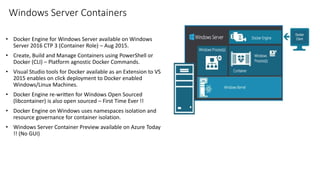
Windows Server Containers
• Docker Engine for Windows Server available on Windows
Server 2016 CTP 3 (Container Role) – Aug 2015.
• Create, Build and Manage Containers using PowerShell or
Docker (CLI) – Platform agnostic Docker Commands.
• Visual Studio tools for Docker available as an Extension to VS
2015 enables on click deployment to Docker enabled
Windows/Linux Machines.
• Docker Engine re-written for Windows Open Sourced
(libcontainer) is also open sourced – First Time Ever !!
• Docker Engine on Windows uses namespaces isolation and
resource governance for container isolation.
• Windows Server Container Preview available on Azure Today
!! (No GUI)
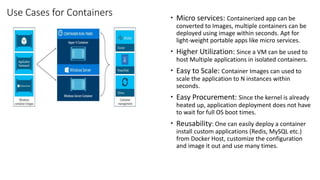
Use Cases for Containers  Micro services: Containerized app can be
converted to Images, multiple containers can be
deployed using image within seconds. Apt for
light-weight portable apps like micro services.
 Higher Utilization: Since a VM can be used to
host Multiple applications in isolated containers.
 Easy to Scale: Container Images can used to
scale the application to N instances within
seconds.
 Easy Procurement: Since the kernel is already
heated up, application deployment does not have
to wait for full OS boot times.
 Reusability: One can easily deploy a container
install custom applications (Redis, MySQL etc.)
from Docker Host, customize the configuration
and image it out and use many times.
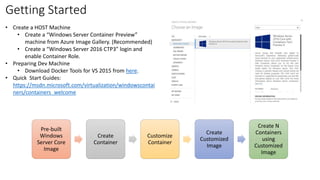
Getting Started
• Create a HOST Machine
• Create a “Windows Server Container Preview”
machine from Azure Image Gallery. (Recommended)
• Create a “Windows Server 2016 CTP3” login and
enable Container Role.
• Preparing Dev Machine
• Download Docker Tools for VS 2015 from here.
• Quick Start Guides:
https://msdn.microsoft.com/virtualization/windowscontai
ners/containers_welcome
Pre-built
Windows
Server Core
Image
Create
Container
Customize
Container
Create
Customized
Image
Create N
Containers
using
Customized
Image
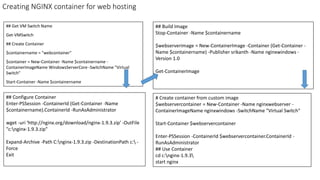
Creating NGINX container for web hosting
## Get VM Switch Name
Get-VMSwitch
## Create Container
$containername = "webcontainer"
$container = New-Container -Name $containername -
ContainerImageName WindowsServerCore -SwitchName "Virtual
Switch"
Start-Container -Name $containername
# Create container from custom image
$webservercontainer = New-Container -Name nginxwebserver -
ContainerImageName nginxwindows -SwitchName "Virtual Switch"
Start-Container $webservercontainer
Enter-PSSession -ContainerId $webservercontainer.ContainerId -
RunAsAdministrator
## Use Container
cd c:nginx-1.9.3
start nginx
## Configure Container
Enter-PSSession -ContainerId (Get-Container -Name
$containername).ContainerId -RunAsAdministrator
wget -uri 'http://nginx.org/download/nginx-1.9.3.zip' -OutFile
"c:nginx-1.9.3.zip"
Expand-Archive -Path C:nginx-1.9.3.zip -DestinationPath c: -
Force
Exit
## Build Image
Stop-Container -Name $containername
$webserverimage = New-ContainerImage -Container (Get-Container -
Name $containername) -Publisher srikanth -Name nginxwindows -
Version 1.0
Get-ContainerImage
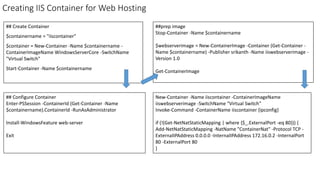
Creating IIS Container for Web Hosting
## Create Container
$containername = "iiscontainer"
$container = New-Container -Name $containername -
ContainerImageName WindowsServerCore -SwitchName
"Virtual Switch"
Start-Container -Name $containername
New-Container -Name iiscontainer -ContainerImageName
iiswebserverimage -SwitchName "Virtual Switch"
Invoke-Command -ContainerName iiscontainer {ipconfig}
if (!(Get-NetNatStaticMapping | where {$_.ExternalPort -eq 80})) {
Add-NetNatStaticMapping -NatName "ContainerNat" -Protocol TCP -
ExternalIPAddress 0.0.0.0 -InternalIPAddress 172.16.0.2 -InternalPort
80 -ExternalPort 80
}
## Configure Container
Enter-PSSession -ContainerId (Get-Container -Name
$containername).ContainerId -RunAsAdministrator
Install-WindowsFeature web-server
Exit
##prep image
Stop-Container -Name $containername
$webserverimage = New-ContainerImage -Container (Get-Container -
Name $containername) -Publisher srikanth -Name iiswebserverimage -
Version 1.0
Get-ContainerImage
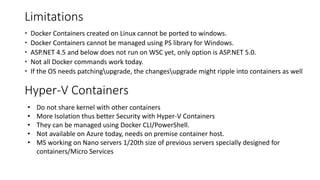
Limitations
 Docker Containers created on Linux cannot be ported to windows.
 Docker Containers cannot be managed using PS library for Windows.
 ASP.NET 4.5 and below does not run on WSC yet, only option is ASP.NET 5.0.
 Not all Docker commands work today.
 If the OS needs patchingupgrade, the changesupgrade might ripple into containers as well
• Do not share kernel with other containers
• More Isolation thus better Security with Hyper-V Containers
• They can be managed using Docker CLI/PowerShell.
• Not available on Azure today, needs on premise container host.
• MS working on Nano servers 1/20th size of previous servers specially designed for
containers/Micro Services
Hyper-V Containers

Windows Server Containers

  • 1.
    Windows Server Containers VishwanathSrikanth Service Engineer 2, R&P, MPSIT https://in.linkedin.com/in/vishsrik Vishwanathsrikanth.wordpress.com
  • 2.
    Physical Servers ContainersVirtualServers • Space/Scaling Constraints • Higher Provisioning Time • Over/Under Utilization • Maintenance Hypervisor/Hosted Hypervisor • Scalable, Lesser Provisioning Time, Scale up/down easy, Less Maintenance. • Bare Metal - VMware, Hypervisor, Xen • Hosted – Virtual PC, Virtual Box etc.1965 & Before 1965 & After Bare Metal or Traditional OSBare Metal/Traditional OS Hypervisor or Hosted Hypervisor (Container Engtine) Guest Operating System (Optional) Guest Operating System Containers 2013 & Future • 2013: Docker Introduced Containers, followed by MS in WS2016 (Aug-2015) • Easily Shippable • Complete Isolation • Very less turn up times • Programmable Virtualization Trends
  • 3.
    www.docker.com • An OpenSource framework built by Solomon Hykes and team @dotCloud to build, manage and deploy containers on Linux. • Written using Go (Google) Programming Language • Standardized in collaboration with Amazon, Cisco, Google, VM Ware and Microsoft and works consistently across all major Linux Brands. OCI – Open Container Initiative • Docker is built using LXC, namespaces, CGroups features on Linux. • Open Source, 2013: https://www.docker.com/contribute, 400 Million downloads so far. • Steps to deploy a Docker container. • Developers build application and package as Docker containers. These containers are published as images to Docker Hub or Private Image repository or Host Machine. • Containers are deployed on Linux Machine with Docker Engine Installed using any image repository. The images in repositories are inherently discoverable. • The Docker Engine on Host Machine can be invoked remotely via Docker CLI. • Docker enabled Linux Machines are available on Azure Image Gallery. VS can be used to perform 1-Click deployment to Docker machines. • Docker also gels very well with Machine configuration tools like Puppet, Chef, Vagrant and Ansible. • Cluster Management Tools like Google Kubernetes and Mesosphere can be used to manage containers across hosts. • Docker 1.9 major milestone with Logging, Networking, Storage, Docker Swarm C C C Docker Engine (Linux) Docker Hub/Private Image Repository C Build Applications Package using Docker CLI Publish Deploy
  • 4.
    Windows Server Containers •Docker Engine for Windows Server available on Windows Server 2016 CTP 3 (Container Role) – Aug 2015. • Create, Build and Manage Containers using PowerShell or Docker (CLI) – Platform agnostic Docker Commands. • Visual Studio tools for Docker available as an Extension to VS 2015 enables on click deployment to Docker enabled Windows/Linux Machines. • Docker Engine re-written for Windows Open Sourced (libcontainer) is also open sourced – First Time Ever !! • Docker Engine on Windows uses namespaces isolation and resource governance for container isolation. • Windows Server Container Preview available on Azure Today !! (No GUI)
  • 5.
    Use Cases forContainers  Micro services: Containerized app can be converted to Images, multiple containers can be deployed using image within seconds. Apt for light-weight portable apps like micro services.  Higher Utilization: Since a VM can be used to host Multiple applications in isolated containers.  Easy to Scale: Container Images can used to scale the application to N instances within seconds.  Easy Procurement: Since the kernel is already heated up, application deployment does not have to wait for full OS boot times.  Reusability: One can easily deploy a container install custom applications (Redis, MySQL etc.) from Docker Host, customize the configuration and image it out and use many times.
  • 6.
    Getting Started • Createa HOST Machine • Create a “Windows Server Container Preview” machine from Azure Image Gallery. (Recommended) • Create a “Windows Server 2016 CTP3” login and enable Container Role. • Preparing Dev Machine • Download Docker Tools for VS 2015 from here. • Quick Start Guides: https://msdn.microsoft.com/virtualization/windowscontai ners/containers_welcome Pre-built Windows Server Core Image Create Container Customize Container Create Customized Image Create N Containers using Customized Image
  • 7.
    Creating NGINX containerfor web hosting ## Get VM Switch Name Get-VMSwitch ## Create Container $containername = "webcontainer" $container = New-Container -Name $containername - ContainerImageName WindowsServerCore -SwitchName "Virtual Switch" Start-Container -Name $containername # Create container from custom image $webservercontainer = New-Container -Name nginxwebserver - ContainerImageName nginxwindows -SwitchName "Virtual Switch" Start-Container $webservercontainer Enter-PSSession -ContainerId $webservercontainer.ContainerId - RunAsAdministrator ## Use Container cd c:nginx-1.9.3 start nginx ## Configure Container Enter-PSSession -ContainerId (Get-Container -Name $containername).ContainerId -RunAsAdministrator wget -uri 'http://nginx.org/download/nginx-1.9.3.zip' -OutFile "c:nginx-1.9.3.zip" Expand-Archive -Path C:nginx-1.9.3.zip -DestinationPath c: - Force Exit ## Build Image Stop-Container -Name $containername $webserverimage = New-ContainerImage -Container (Get-Container - Name $containername) -Publisher srikanth -Name nginxwindows - Version 1.0 Get-ContainerImage
  • 8.
    Creating IIS Containerfor Web Hosting ## Create Container $containername = "iiscontainer" $container = New-Container -Name $containername - ContainerImageName WindowsServerCore -SwitchName "Virtual Switch" Start-Container -Name $containername New-Container -Name iiscontainer -ContainerImageName iiswebserverimage -SwitchName "Virtual Switch" Invoke-Command -ContainerName iiscontainer {ipconfig} if (!(Get-NetNatStaticMapping | where {$_.ExternalPort -eq 80})) { Add-NetNatStaticMapping -NatName "ContainerNat" -Protocol TCP - ExternalIPAddress 0.0.0.0 -InternalIPAddress 172.16.0.2 -InternalPort 80 -ExternalPort 80 } ## Configure Container Enter-PSSession -ContainerId (Get-Container -Name $containername).ContainerId -RunAsAdministrator Install-WindowsFeature web-server Exit ##prep image Stop-Container -Name $containername $webserverimage = New-ContainerImage -Container (Get-Container - Name $containername) -Publisher srikanth -Name iiswebserverimage - Version 1.0 Get-ContainerImage
  • 9.
    Limitations  Docker Containerscreated on Linux cannot be ported to windows.  Docker Containers cannot be managed using PS library for Windows.  ASP.NET 4.5 and below does not run on WSC yet, only option is ASP.NET 5.0.  Not all Docker commands work today.  If the OS needs patchingupgrade, the changesupgrade might ripple into containers as well • Do not share kernel with other containers • More Isolation thus better Security with Hyper-V Containers • They can be managed using Docker CLI/PowerShell. • Not available on Azure today, needs on premise container host. • MS working on Nano servers 1/20th size of previous servers specially designed for containers/Micro Services Hyper-V Containers