@ITProGuru
Dan Stolts (@ITProGuru)
Chief Technology Strategist
US DX North East – Audience
Blog: ITProGuru.com
dstolts@Microsoft.com
www.linkedin.com/in/danstolts
Containers: DevOps Enablers
of Technical Solutions
aka.ms/70-534-book
Blaize Stewart
Senior Consultant
www.blaize.net
@theonemule
Wintellect
www.wintellect.com
@Wintellectuals
@ITProGuru
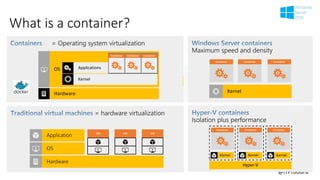
What is a container?
@ITProGuru
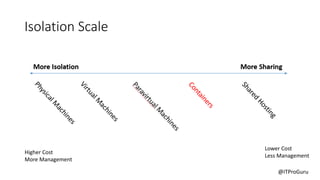
Isolation Scale
Higher Cost
More Management
Lower Cost
Less Management
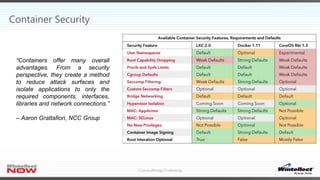
Container Security
“Containers offer many overall
advantages. From a security
perspective, they create a method
to reduce attack surfaces and
isolate applications to only the
required components, interfaces,
libraries and network connections.”
– Aaron Grattafiori, NCC Group
@ITProGuru
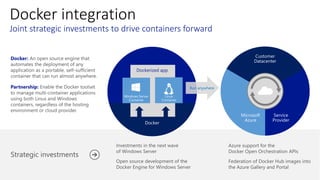
Docker integration
Docker:
Partnership:
Dockerized app
Run anywhere
What Problem(s) is Docker Trying to Solve?
 Enable DevOps
 The synthesis of operations and development working together
through the entire service lifecycle, from design through the
development process to production support.
 Support for Microservice Architecture (MSA)
 MSA is an approach to developing a single application as a suite of
small services, each running in its own process and communicating
with lightweight mechanisms, often an HTTP resource API.
 These services are built around business capabilities and
independently deployable by fully automated deployment
machinery.
 There is a bare minimum of centralized management of these
services, which may be written in different programming languages
and use different data storage technologies.
@ITProGuru
Dan Stolts (@ITProGuru)
Chief Technology Strategist
US DX North East – Audience
Blog: ITProGuru.com
dstolts@Microsoft.com
www.linkedin.com/in/danstolts
Containers: DevOps
Enablers of Technical
Solutions
aka.ms/70-534-book
Blaize Stewart
Senior Consultant
www.blaize.net
@theonemule
Wintellect
www.wintellect.com
@Wintellectuals
@ITProGuru
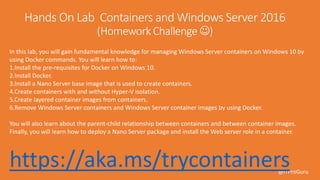
https://aka.ms/trycontainers
In this lab, you will gain fundamental knowledge for managing Windows Server containers on Windows 10 by
using Docker commands. You will learn how to:
1.Install the pre-requisites for Docker on Windows 10.
2.Install Docker.
3.Install a Nano Server base image that is used to create containers.
4.Create containers with and without Hyper-V isolation.
5.Create layered container images from containers.
6.Remove Windows Server containers and Windows Server container images by using Docker.
You will also learn about the parent-child relationship between containers and between container images.
Finally, you will learn how to deploy a Nano Server package and install the Web server role in a container.
@ITProGuru
Containers
@ITProGuru
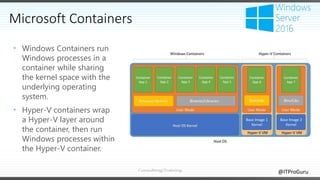
• Windows Containers run
Windows processes in a
container while sharing
the kernel space with the
underlying operating
system.
• Hyper-V containers wrap
a Hyper-V layer around
the container, then run
Windows processes within
the Hyper-V container.
Microsoft Containers
@ITProGuru
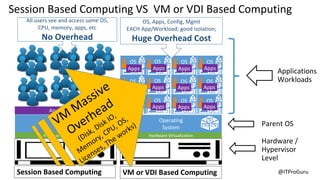
VM/VDI Based
Computing
Session Based Computing
AKA Terminal Services
Parent OS
Applications
Workloads
Hardware /
Hypervisor
Level
All users see and access same OS,
CPU, memory, apps, etc
No Overhead
OS, Apps, Config, Mgmt
EACH App/Workload; good isolation;
Huge Overhead Cost
Session Based Computing VS VM or VDI Based Computing
Session Based Computing VM or VDI Based Computing
@ITProGuru
Containers
Parent OS
Workloads
Hardware /
Hypervisor
Level
Application(s)
App App App App
App App App App
App App App App
App App App App
Linux VM
App App App App
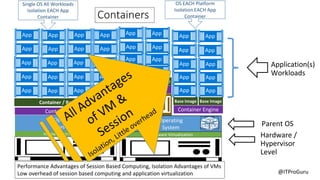
Single OS All Workloads
Isolation EACH App
Container
App App
App App
App App
App App
App App
App App
App App
App App
App App
OS EACH Platform
Isolation EACH App
Container
Performance Advantages of Session Based Computing, Isolation Advantages of VMs
Low overhead of session based computing and application virtualization
@ITProGuru
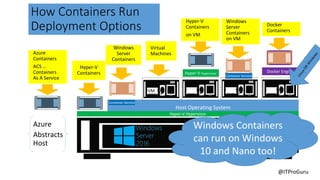
How Containers Run
Deployment Options
Virtual
Machines
Hyper-V
Containers
Windows
Server
Containers
Docker
Containers
VM
Windows
Server
Containers
on VM
Hyper-V
Containers
on VM
Azure
Abstracts
Host
Azure
Containers
ACS …
Containers
As A Service
Windows Containers
can run on Windows
10 and Nano too!
@ITProGuru
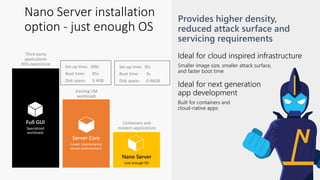
Nano Server installation
option - just enough OS
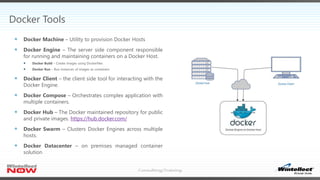
Docker Tools
 Docker Machine – Utility to provision Docker Hosts
 Docker Engine – The server side component responsible
for running and maintaining containers on a Docker Host.
 Docker Build – Create images using Dockerfiles
 Docker Run – Run instances of images as containers
 Docker Client – the client side tool for interacting with the
Docker Engine.
 Docker Compose – Orchestrates complex application with
multiple containers.
 Docker Hub – The Docker maintained repository for public
and private images. https://hub.docker.com/
 Docker Swarm – Clusters Docker Engines across multiple
hosts.
 Docker Datacenter – on premises managed container
solution
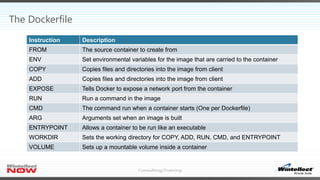
The Dockerfile
Instruction Description
FROM The source container to create from
ENV Set environmental variables for the image that are carried to the container
COPY Copies files and directories into the image from client
ADD Copies files and directories into the image from client
EXPOSE Tells Docker to expose a network port from the container
RUN Run a command in the image
CMD The command run when a container starts (One per Dockerfile)
ARG Arguments set when an image is built
ENTRYPOINT Allows a container to be run like an executable
WORKDIR Sets the working directory for COPY, ADD, RUN, CMD, and ENTRYPOINT
VOLUME Sets up a mountable volume inside a container
Deploying Docker Containers on Windows
Blaize Stewart
Docker on Linux + Installing Container Service
Dan Stolts
@ITProGuru
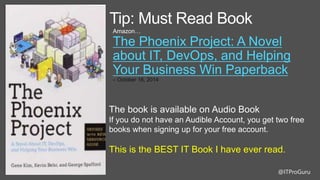
Tip: Must Read Book
Amazon…
The Phoenix Project: A Novel
about IT, DevOps, and Helping
Your Business Win Paperback
– October 16, 2014
The book is available on Audio Book
If you do not have an Audible Account, you get two free
books when signing up for your free account.
This is the BEST IT Book I have ever read.
@ITProGuru
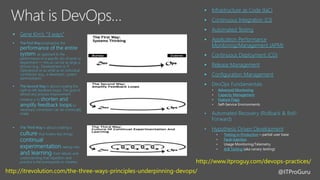
 Gene Kim’s “3 ways”



 Infrastructure as Code (IaC)
 Continuous Integration (CI)
 Automated Testing
 Application Performance
Monitoring/Management (APM)

 Release Management
 Configuration Management

• Advanced Monitoring
• Capacity Management
• Feature Flags
•
•
• Hypothesis Driven Development
• Testing in Production
• Fault Injection
•
• A/B Testing
http://itrevolution.com/the-three-ways-principles-underpinning-devops/
http://www.itproguy.com/devops-practices/
@ITProGuru
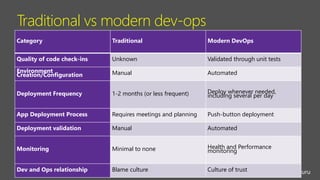
Traditional vs modern dev-ops
Category Traditional Modern DevOps
Quality of code check-ins Unknown Validated through unit tests
Environment
Creation/Configuration Manual Automated
Deployment Frequency 1-2 months (or less frequent) Deploy whenever needed,
including several per day
App Deployment Process Requires meetings and planning Push-button deployment
Deployment validation Manual Automated
Monitoring Minimal to none Health and Performance
monitoring
Dev and Ops relationship Blame culture Culture of trust
@ITProGuru
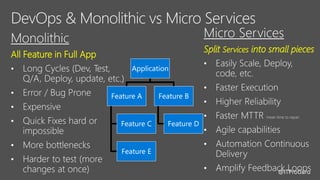
Split Services into small pieces
•
•
•
•
•
•
•
All Feature in Full App
•
•
•
•
•
•
Application
Feature A
Feature C
Feature E
Feature B
Feature D
@ITProGuru
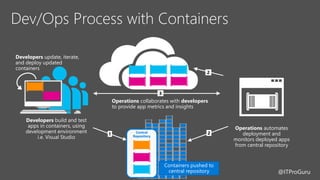
Dev/Ops Process with Containers
Developers
Operations automates
deployment and
monitors deployed apps
from central repository
Operations collaborates with developers
to provide app metrics and insights
Developers update, iterate,
and deploy updated
containers
Central
Repository
Containers pushed to
central repository
@ITProGuru
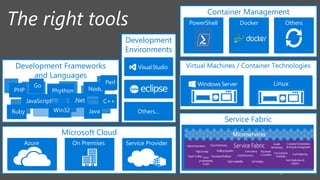
Virtual Machines / Container Technologies
Service Fabric
Development Frameworks
and Languages
.Net
PHP Node
C++
JavaRuby Win32
Go
Perl
Phython
JavaScript
Microsoft Cloud
Azure On Premises Service Provider
Container Management
PowerShell OthersDocker
Development
Environments
Others…
@ITProGuru
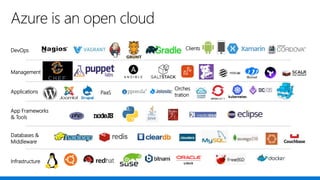
Applications
Clients
Infrastructure
Management
Databases &
Middleware
App Frameworks
& Tools
DevOps
PaaS
Azure is an open cloud
Orches
tration
@ITProGuru
https://itproguru.com/expert/2016/10/docker-create-container-change-
container-save-as-new-image-and-connect-to-container/
http://www.blaize.net/2016/10/an-introduction-to-docker/
http://www.blaize.net/2016/11/an-introduction-to-azure-container-services/
https://www.nccgroup.trust/us/our-research/understanding-and-hardening-
linux-containers/
https://msftdevops.learnondemandsystems.com/
ITProGuru.com
Blaize.net
@ITProGuru
In this lab, you will gain fundamental knowledge for managing Windows Server containers on Windows 10 by using Docker
commands. You will learn how to:
1.Install the pre-requisites for Docker on Windows 10.
2.Install Docker.
3.Install a Nano Server base image that is used to create containers.
4.Create containers with and without Hyper-V isolation.
5.Create layered container images from containers.
6.Remove Windows Server containers and Windows Server container images by using Docker.
You will also learn about the parent-child relationship between containers and between container images. Finally, you will
learn how to deploy a Nano Server package and install the Web server role in a container.
https://aka.ms/trycontainers
@ITProGuru
1.
https://beta.docker.com/docs/
2.
3.
https://docs.docker.com/engine/installation/windows/
Additional Homework [Optional]
@ITProGuru
aka.ms/devops
aka.ms/iac_tlp
aka.ms/devopsmva
#TalkDevOps
@ITProGuru

https://aka.ms/trycontainers




 http://ITProGuru.com

 http://www.blaize.net
 http://aka.ms/windowscontainers
https://msdn.microsoft.com/virtualization/windowscontainers

Containers: DevOp Enablers of Technical Solutions

  • 1.
    @ITProGuru Dan Stolts (@ITProGuru) ChiefTechnology Strategist US DX North East – Audience Blog: ITProGuru.com dstolts@Microsoft.com www.linkedin.com/in/danstolts Containers: DevOps Enablers of Technical Solutions aka.ms/70-534-book Blaize Stewart Senior Consultant www.blaize.net @theonemule Wintellect www.wintellect.com @Wintellectuals
  • 2.
  • 3.
    @ITProGuru Isolation Scale Higher Cost MoreManagement Lower Cost Less Management
  • 4.
    Container Security “Containers offermany overall advantages. From a security perspective, they create a method to reduce attack surfaces and isolate applications to only the required components, interfaces, libraries and network connections.” – Aaron Grattafiori, NCC Group
  • 5.
  • 6.
    What Problem(s) isDocker Trying to Solve?  Enable DevOps  The synthesis of operations and development working together through the entire service lifecycle, from design through the development process to production support.  Support for Microservice Architecture (MSA)  MSA is an approach to developing a single application as a suite of small services, each running in its own process and communicating with lightweight mechanisms, often an HTTP resource API.  These services are built around business capabilities and independently deployable by fully automated deployment machinery.  There is a bare minimum of centralized management of these services, which may be written in different programming languages and use different data storage technologies.
  • 7.
    @ITProGuru Dan Stolts (@ITProGuru) ChiefTechnology Strategist US DX North East – Audience Blog: ITProGuru.com dstolts@Microsoft.com www.linkedin.com/in/danstolts Containers: DevOps Enablers of Technical Solutions aka.ms/70-534-book Blaize Stewart Senior Consultant www.blaize.net @theonemule Wintellect www.wintellect.com @Wintellectuals
  • 8.
    @ITProGuru https://aka.ms/trycontainers In this lab,you will gain fundamental knowledge for managing Windows Server containers on Windows 10 by using Docker commands. You will learn how to: 1.Install the pre-requisites for Docker on Windows 10. 2.Install Docker. 3.Install a Nano Server base image that is used to create containers. 4.Create containers with and without Hyper-V isolation. 5.Create layered container images from containers. 6.Remove Windows Server containers and Windows Server container images by using Docker. You will also learn about the parent-child relationship between containers and between container images. Finally, you will learn how to deploy a Nano Server package and install the Web server role in a container.
  • 9.
  • 10.
    @ITProGuru • Windows Containersrun Windows processes in a container while sharing the kernel space with the underlying operating system. • Hyper-V containers wrap a Hyper-V layer around the container, then run Windows processes within the Hyper-V container. Microsoft Containers
  • 11.
    @ITProGuru VM/VDI Based Computing Session BasedComputing AKA Terminal Services Parent OS Applications Workloads Hardware / Hypervisor Level All users see and access same OS, CPU, memory, apps, etc No Overhead OS, Apps, Config, Mgmt EACH App/Workload; good isolation; Huge Overhead Cost Session Based Computing VS VM or VDI Based Computing Session Based Computing VM or VDI Based Computing
  • 12.
    @ITProGuru Containers Parent OS Workloads Hardware / Hypervisor Level Application(s) AppApp App App App App App App App App App App App App App App Linux VM App App App App Single OS All Workloads Isolation EACH App Container App App App App App App App App App App App App App App App App App App OS EACH Platform Isolation EACH App Container Performance Advantages of Session Based Computing, Isolation Advantages of VMs Low overhead of session based computing and application virtualization
  • 13.
    @ITProGuru How Containers Run DeploymentOptions Virtual Machines Hyper-V Containers Windows Server Containers Docker Containers VM Windows Server Containers on VM Hyper-V Containers on VM Azure Abstracts Host Azure Containers ACS … Containers As A Service Windows Containers can run on Windows 10 and Nano too!
  • 14.
  • 15.
    Docker Tools  DockerMachine – Utility to provision Docker Hosts  Docker Engine – The server side component responsible for running and maintaining containers on a Docker Host.  Docker Build – Create images using Dockerfiles  Docker Run – Run instances of images as containers  Docker Client – the client side tool for interacting with the Docker Engine.  Docker Compose – Orchestrates complex application with multiple containers.  Docker Hub – The Docker maintained repository for public and private images. https://hub.docker.com/  Docker Swarm – Clusters Docker Engines across multiple hosts.  Docker Datacenter – on premises managed container solution
  • 16.
    The Dockerfile Instruction Description FROMThe source container to create from ENV Set environmental variables for the image that are carried to the container COPY Copies files and directories into the image from client ADD Copies files and directories into the image from client EXPOSE Tells Docker to expose a network port from the container RUN Run a command in the image CMD The command run when a container starts (One per Dockerfile) ARG Arguments set when an image is built ENTRYPOINT Allows a container to be run like an executable WORKDIR Sets the working directory for COPY, ADD, RUN, CMD, and ENTRYPOINT VOLUME Sets up a mountable volume inside a container
  • 17.
    Deploying Docker Containerson Windows Blaize Stewart
  • 18.
    Docker on Linux+ Installing Container Service Dan Stolts
  • 19.
    @ITProGuru Tip: Must ReadBook Amazon… The Phoenix Project: A Novel about IT, DevOps, and Helping Your Business Win Paperback – October 16, 2014 The book is available on Audio Book If you do not have an Audible Account, you get two free books when signing up for your free account. This is the BEST IT Book I have ever read.
  • 20.
    @ITProGuru  Gene Kim’s“3 ways”     Infrastructure as Code (IaC)  Continuous Integration (CI)  Automated Testing  Application Performance Monitoring/Management (APM)   Release Management  Configuration Management  • Advanced Monitoring • Capacity Management • Feature Flags • • • Hypothesis Driven Development • Testing in Production • Fault Injection • • A/B Testing http://itrevolution.com/the-three-ways-principles-underpinning-devops/ http://www.itproguy.com/devops-practices/
  • 21.
    @ITProGuru Traditional vs moderndev-ops Category Traditional Modern DevOps Quality of code check-ins Unknown Validated through unit tests Environment Creation/Configuration Manual Automated Deployment Frequency 1-2 months (or less frequent) Deploy whenever needed, including several per day App Deployment Process Requires meetings and planning Push-button deployment Deployment validation Manual Automated Monitoring Minimal to none Health and Performance monitoring Dev and Ops relationship Blame culture Culture of trust
  • 22.
    @ITProGuru Split Services intosmall pieces • • • • • • • All Feature in Full App • • • • • • Application Feature A Feature C Feature E Feature B Feature D
  • 23.
    @ITProGuru Dev/Ops Process withContainers Developers Operations automates deployment and monitors deployed apps from central repository Operations collaborates with developers to provide app metrics and insights Developers update, iterate, and deploy updated containers Central Repository Containers pushed to central repository
  • 24.
    @ITProGuru Virtual Machines /Container Technologies Service Fabric Development Frameworks and Languages .Net PHP Node C++ JavaRuby Win32 Go Perl Phython JavaScript Microsoft Cloud Azure On Premises Service Provider Container Management PowerShell OthersDocker Development Environments Others…
  • 25.
  • 26.
  • 27.
    @ITProGuru In this lab,you will gain fundamental knowledge for managing Windows Server containers on Windows 10 by using Docker commands. You will learn how to: 1.Install the pre-requisites for Docker on Windows 10. 2.Install Docker. 3.Install a Nano Server base image that is used to create containers. 4.Create containers with and without Hyper-V isolation. 5.Create layered container images from containers. 6.Remove Windows Server containers and Windows Server container images by using Docker. You will also learn about the parent-child relationship between containers and between container images. Finally, you will learn how to deploy a Nano Server package and install the Web server role in a container. https://aka.ms/trycontainers
  • 28.
  • 29.
  • 30.
    @ITProGuru  https://aka.ms/trycontainers      http://ITProGuru.com   http://www.blaize.net http://aka.ms/windowscontainers https://msdn.microsoft.com/virtualization/windowscontainers

Editor's Notes

  • #2 Abstract: Containers, the next wave of virtualization, are changing everything!  As companies learn about the value of DevOps practices and containerization they are flocking to containers.  Now with Docker running on Windows and Docker Containers built into both Azure and Windows Server, containers are poised to take over the virtualization landscape.  Come to the session to learn all about containers and how you can put these technologies to use in your organization.  You will learn about DevOps, Docker Containers, Running Containers on Windows 10, Windows Server 2016 and Linux on-premises or in the Azure cloud.  You will learn about the tools and practices for leveraging containers, deploying containers as well as how you can continue on your journey to becoming a container expert as you grow your technical career. Name of Presenters: Dan Stolts Bio of Presenter (max 500 spaces): Dan Stolts “ITProGuru” is a technology expert who is a master of systems management and security. He is Chief Technology Strategist for Microsoft, owns several businesses and is a published author. Reach him on his primary blog http://itproguru.com or twitter @ITProGuru. He is proficient in many datacenter technologies (Windows Server, System Center, Virtualization, Cloud, Etc) and holds many certifications including MCT, MCITP, MCSE, TS, etc. Dan is currently specializing in system management, virtualization and cloud technologies. Dan is and has been a very active member of the user group community. Dan is an enthusiastic advocate of technology and is passionate about helping others. See more at: http://itproguru.com/about Blaize loves learning, using, and teaching about technologies to bring people and technology together to solve problems. He brings two decades of experience in both development and operations, so he has a deep understanding of how each side can both help or hinder one another. Blaize’s technical expertise include modern web development, microservices, containerization, IT automation, and application architecture, and he has applied these skills to countless applications. He has served in developer roles, architect roles, and within IT administration. Currently, Blaize works for Wintellect (www.wintellect.com) as a consultant, trainer, speaker, and writer. His work has been featured within Microsoft and a variety of major publications. Blaize is online at www.blaize.net or on Twitter at @theonemule   Blaize Stewart Senior Consultant – Wintellect www.wintellect.com @theonemule
  • #3   Name of Presenter: Dan Stolts Bio of Presenter (max 500 spaces): Dan Stolts “ITProGuru” is a technology expert who is a master of systems management and security. He is Chief Technology Strategist for Microsoft, owns several businesses and is a published author. Reach him on his primary blog http://itproguru.com or twitter @ITProGuru. He is proficient in many datacenter technologies (Windows Server, System Center, Virtualization, Cloud, Etc) and holds many certifications including MCT, MCITP, MCSE, TS, etc. Dan is currently specializing in system management, virtualization and cloud technologies. Dan is and has been a very active member of the user group community. Dan is an enthusiastic advocate of technology and is passionate about helping others. See more at: http://itproguru.com/about Blaize loves learning, using, and teaching about technologies to bring people and technology together to solve problems. He brings two decades of experience in both development and operations, so he has a deep understanding of how each side can both help or hinder one another. Blaize’s technical expertise include modern web development, microservices, containerization, IT automation, and application architecture, and he has applied these skills to countless applications. He has served in developer roles, architect roles, and within IT administration. Currently, Blaize works for Wintellect (www.wintellect.com) as a consultant, trainer, speaker, and writer. His work has been featured within Microsoft and a variety of major publications. Blaize is online at www.blaize.net or on Twitter at @theonemule   Blaize Stewart Senior Consultant – Wintellect 804.467.5651 www.wintellect.com @theonemule
  • #11 Abstract: Containers, the next wave of virtualization, are changing everything!  As companies learn about the value of DevOps practices and containerization they are flocking to containers.  Now with Docker running on Windows and Docker Containers built into both Azure and Windows Server, containers are poised to take over the virtualization landscape.  Come to the session to learn all about containers and how you can put these technologies to use in your organization.  You will learn about DevOps, Docker Containers, Running Containers on Windows 10, Windows Server 2016 and Linux on-premises or in the Azure cloud.  You will learn about the tools and practices for leveraging containers, deploying containers as well as how you can continue on your journey to becoming a container expert as you grow your technical career. Name of Presenters: Dan Stolts Bio of Presenter (max 500 spaces): Dan Stolts “ITProGuru” is a technology expert who is a master of systems management and security. He is Chief Technology Strategist for Microsoft, owns several businesses and is a published author. Reach him on his primary blog http://itproguru.com or twitter @ITProGuru. He is proficient in many datacenter technologies (Windows Server, System Center, Virtualization, Cloud, Etc) and holds many certifications including MCT, MCITP, MCSE, TS, etc. Dan is currently specializing in system management, virtualization and cloud technologies. Dan is and has been a very active member of the user group community. Dan is an enthusiastic advocate of technology and is passionate about helping others. See more at: http://itproguru.com/about Blaize loves learning, using, and teaching about technologies to bring people and technology together to solve problems. He brings two decades of experience in both development and operations, so he has a deep understanding of how each side can both help or hinder one another. Blaize’s technical expertise include modern web development, microservices, containerization, IT automation, and application architecture, and he has applied these skills to countless applications. He has served in developer roles, architect roles, and within IT administration. Currently, Blaize works for Wintellect (www.wintellect.com) as a consultant, trainer, speaker, and writer. His work has been featured within Microsoft and a variety of major publications. Blaize is online at www.blaize.net or on Twitter at @theonemule   Blaize Stewart Senior Consultant – Wintellect www.wintellect.com @theonemule
  • #41 CI/CD = Continuous Integration/Continuous Deployment
  • #46 https://www.digitalocean.com/community/tutorials/docker-explained-using-dockerfiles-to-automate-building-of-images