From VMs to Containers:
Introducing Docker Containers for
Linux and Windows Server
Ido Flatow
Senior Architect, Sela Group
Microsoft MVP & RD
Level: Intermediate
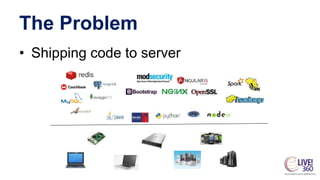
The Problem
• Shipping code to server
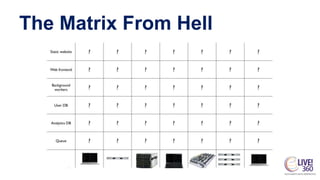
The Matrix From Hell
The Solution
Docker Containers are NOT VMs
• Easy connection to make
• Fundamentally different architectures
• Fundamentally different benefits
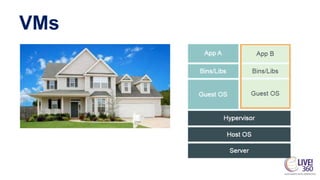
VMs
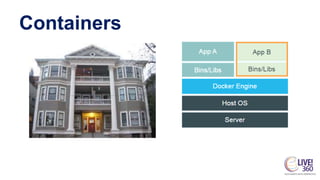
Containers
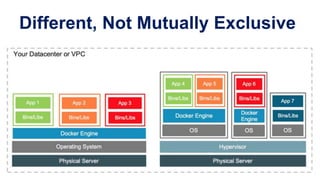
Different, Not Mutually Exclusive
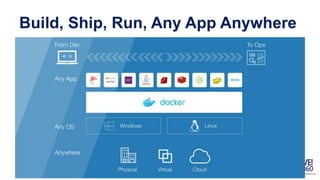
Build, Ship, Run, Any App Anywhere
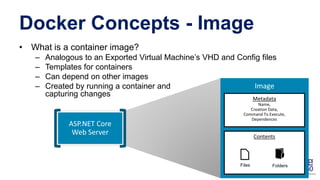
Docker Concepts - Image
• What is a container image?
– Analogous to an Exported Virtual Machine’s VHD and Config files
– Templates for containers
– Can depend on other images
– Created by running a container and
capturing changes
Metadata
Name,
Creation Data,
Command To Execute,
Dependences
Contents
Docker Concepts - Registry
• https://hub.docker.com
• Official Docker images from known vendors
• Share and download Docker containers from
anywhere around the globe
• Or… create your own trusted Docker registry
for your images
Docker Concepts – Dockerfile
• Definition of a container
FROM ubuntu:14.04
RUN 
apt-get update && 
apt-get -y install apache2
COPY index.html /var/www/html/index.html
EXPOSE 80
CMD ["/usr/sbin/apache2ctl", "-D", "FOREGROUND"]
Basic Docker Commands
$ docker pull # Download an image from a registry
$ docker images # List all images on a Docker host
$ docker build # Build an image from a Dockerfile
$ docker run # Run an image
$ docker commit # Create an image from a container
$ docker ps # List all running and stopped instances
$ docker stop # Stop a running instances
$ docker rm # Remove an instance
$ docker rmi # Remove an image
BASIC WEB APP
DEMO
OK, LET’S TALK ABOUT
WINDOWS CONTAINERS
What About Windows Containers?
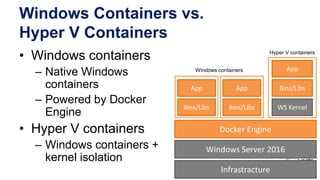
Windows Containers vs.
Hyper V Containers
• Windows containers
– Native Windows
containers
– Powered by Docker
Engine
• Hyper V containers
– Windows containers +
kernel isolation
Infrastracture
Windows Server 2016
Docker Engine
Bins/Libs
App Bins/Libs
App
WS KernelBins/Libs
App
Windows containers
Hyper V containers
Dockerfile for Windows
FROM windowsservercore
# Uses dism.exe to install the IIS role
RUN dism.exe /online /enable-feature /all /featurename:iis-webserver
/NoRestart
# Creates an html file and add content to this file
RUN echo "Hello World - Dockerfile" > c:inetpubwwwrootindex.html
# Open cmd when the container runs from the new image
CMD [ "cmd" ]
WINDOWS AND DOCKER
DEMO
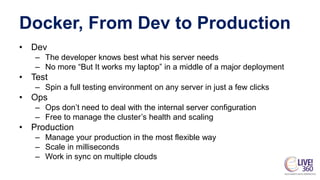
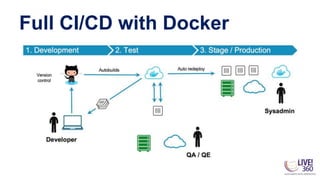
Docker, From Dev to Production
• Dev
– The developer knows best what his server needs
– No more “But It works my laptop” in a middle of a major deployment
• Test
– Spin a full testing environment on any server in just a few clicks
• Ops
– Ops don’t need to deal with the internal server configuration
– Free to manage the cluster’s health and scaling
• Production
– Manage your production in the most flexible way
– Scale in milliseconds
– Work in sync on multiple clouds
Full CI/CD with Docker
DOCKER HUB WITH GITHUB
DEMO
Docker File System
• Logical file system by grouping FS primitives into
branches (directories, file systems, snapshots)
• Each branch represents a layer in a Docker image
• Images can be constructed / deconstructed as
needed (vs. a huge monolithic image in VMs)
• When a container is started, a writeable layer is
added to the “top” of the file system
Container Layers
Docker Concepts - Volume
• Volumes provide data persistency
• Map a volume to a directory in the container
• Volumes persist after the container is deleted
• Can be created in a Dockerfile, or via CLI
• Can map to an existing directory on the host
• Use volumes to share data between
containers
DATA PERSISTENCY
DEMO
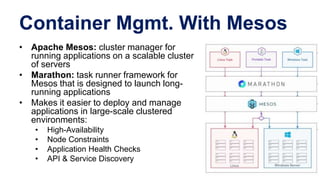
Container Mgmt. With Mesos
• Apache Mesos: cluster manager for
running applications on a scalable cluster
of servers
• Marathon: task runner framework for
Mesos that is designed to launch long-
running applications
• Makes it easier to deploy and manage
applications in large-scale clustered
environments:
• High-Availability
• Node Constraints
• Application Health Checks
• API & Service Discovery
AZURE CONTAINER SERVICES
DEMO
Getting Your Feet Wet
• Stroll on the beach
– Setup your preferred Docker environment
– Fire up some prebuilt images (nginx, hello-world)
• Take a swim
– Pick a well documented solution, such as Wordpress
– Build it for yourself (maybe you have a flower shop?)
• Dive in
– Dockerize an existing project
– Build your own Dockerfiles
– Experiment with Docker Compose and Docker clusters
Resources
• Know your Docker
– http://training.docker.com
– http://docs.docker.com/userguide
• Docker on Windows Server 2016
– https://blog.docker.com/2016/09/dockerforws2016/
• Docker on Azure (IaaS and PaaS)
– https://azure.microsoft.com/en-us/documentation/articles/virtual-
machines-linux-containers/
– https://azure.microsoft.com/en-us/services/container-service/
• My Info
– @IdoFlatow // idof@sela.co.il // http://www.idoflatow.net/downloads

From VMs to Containers: Introducing Docker Containers for Linux and Windows Server

  • 1.
    From VMs toContainers: Introducing Docker Containers for Linux and Windows Server Ido Flatow Senior Architect, Sela Group Microsoft MVP & RD Level: Intermediate
  • 2.
  • 3.
  • 4.
  • 5.
    Docker Containers areNOT VMs • Easy connection to make • Fundamentally different architectures • Fundamentally different benefits
  • 6.
  • 7.
  • 8.
  • 9.
    Build, Ship, Run,Any App Anywhere
  • 10.
    Docker Concepts -Image • What is a container image? – Analogous to an Exported Virtual Machine’s VHD and Config files – Templates for containers – Can depend on other images – Created by running a container and capturing changes Metadata Name, Creation Data, Command To Execute, Dependences Contents
  • 11.
    Docker Concepts -Registry • https://hub.docker.com • Official Docker images from known vendors • Share and download Docker containers from anywhere around the globe • Or… create your own trusted Docker registry for your images
  • 12.
    Docker Concepts –Dockerfile • Definition of a container FROM ubuntu:14.04 RUN apt-get update && apt-get -y install apache2 COPY index.html /var/www/html/index.html EXPOSE 80 CMD ["/usr/sbin/apache2ctl", "-D", "FOREGROUND"]
  • 13.
    Basic Docker Commands $docker pull # Download an image from a registry $ docker images # List all images on a Docker host $ docker build # Build an image from a Dockerfile $ docker run # Run an image $ docker commit # Create an image from a container $ docker ps # List all running and stopped instances $ docker stop # Stop a running instances $ docker rm # Remove an instance $ docker rmi # Remove an image
  • 14.
  • 15.
    OK, LET’S TALKABOUT WINDOWS CONTAINERS What About Windows Containers?
  • 16.
    Windows Containers vs. HyperV Containers • Windows containers – Native Windows containers – Powered by Docker Engine • Hyper V containers – Windows containers + kernel isolation Infrastracture Windows Server 2016 Docker Engine Bins/Libs App Bins/Libs App WS KernelBins/Libs App Windows containers Hyper V containers
  • 17.
    Dockerfile for Windows FROMwindowsservercore # Uses dism.exe to install the IIS role RUN dism.exe /online /enable-feature /all /featurename:iis-webserver /NoRestart # Creates an html file and add content to this file RUN echo "Hello World - Dockerfile" > c:inetpubwwwrootindex.html # Open cmd when the container runs from the new image CMD [ "cmd" ]
  • 18.
  • 19.
    Docker, From Devto Production • Dev – The developer knows best what his server needs – No more “But It works my laptop” in a middle of a major deployment • Test – Spin a full testing environment on any server in just a few clicks • Ops – Ops don’t need to deal with the internal server configuration – Free to manage the cluster’s health and scaling • Production – Manage your production in the most flexible way – Scale in milliseconds – Work in sync on multiple clouds
  • 20.
  • 21.
    DOCKER HUB WITHGITHUB DEMO
  • 22.
    Docker File System •Logical file system by grouping FS primitives into branches (directories, file systems, snapshots) • Each branch represents a layer in a Docker image • Images can be constructed / deconstructed as needed (vs. a huge monolithic image in VMs) • When a container is started, a writeable layer is added to the “top” of the file system
  • 23.
  • 24.
    Docker Concepts -Volume • Volumes provide data persistency • Map a volume to a directory in the container • Volumes persist after the container is deleted • Can be created in a Dockerfile, or via CLI • Can map to an existing directory on the host • Use volumes to share data between containers
  • 25.
  • 26.
    Container Mgmt. WithMesos • Apache Mesos: cluster manager for running applications on a scalable cluster of servers • Marathon: task runner framework for Mesos that is designed to launch long- running applications • Makes it easier to deploy and manage applications in large-scale clustered environments: • High-Availability • Node Constraints • Application Health Checks • API & Service Discovery
  • 27.
  • 28.
    Getting Your FeetWet • Stroll on the beach – Setup your preferred Docker environment – Fire up some prebuilt images (nginx, hello-world) • Take a swim – Pick a well documented solution, such as Wordpress – Build it for yourself (maybe you have a flower shop?) • Dive in – Dockerize an existing project – Build your own Dockerfiles – Experiment with Docker Compose and Docker clusters
  • 29.
    Resources • Know yourDocker – http://training.docker.com – http://docs.docker.com/userguide • Docker on Windows Server 2016 – https://blog.docker.com/2016/09/dockerforws2016/ • Docker on Azure (IaaS and PaaS) – https://azure.microsoft.com/en-us/documentation/articles/virtual- machines-linux-containers/ – https://azure.microsoft.com/en-us/services/container-service/ • My Info – @IdoFlatow // idof@sela.co.il // http://www.idoflatow.net/downloads

Editor's Notes

  • #7 Each virtualized application includes not only the application - which may be only 10s of MB - and the necessary binaries and libraries, but also an entire guest operating system - which may weigh 10s of GB.
  • #8 The Docker Engine container comprises just the application and its dependencies. It runs as an isolated process on the host operating system, sharing the kernel with other containers. Thus, it enjoys the resource isolation and allocation benefits of VMs but is much more portable and efficient.