Group no 1
Sultan Shaikh
Yash Dhapodkar
Sagar Pathak
Kewal Thakur
Group NO:1
Windows 7
Starting windows.
History of Windows
 Microsoft Windows is the most
popular operating system for
personal computers
 Past versions of Windows
 Windows NT
 Windows Me
 Windows 2000
 Windows XP
 Windows Vista
 Each version provides new added
features for the user
Parts of the Windows Desktop
Desktop
Taskbar – Includes
Start Button
Running Applications
Notification Area
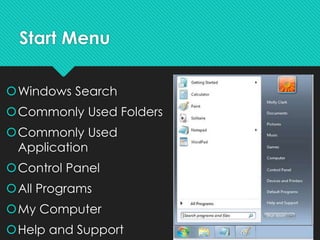
Start Menu
Windows Search
Commonly Used Folders
Commonly Used
Application
Control Panel
All Programs
My Computer
Help and Support
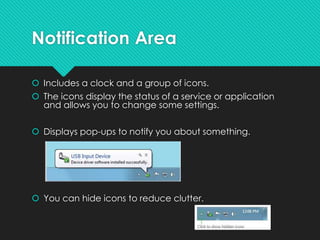
Notification Area
 Includes a clock and a group of icons.
 The icons display the status of a service or application
and allows you to change some settings.
 Displays pop-ups to notify you about something.
 You can hide icons to reduce clutter.
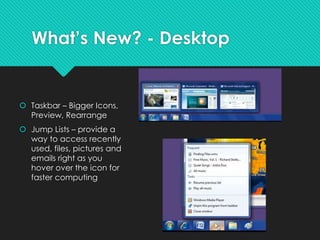
What’s New? - Desktop
 Taskbar – Bigger Icons,
Preview, Rearrange
 Jump Lists – provide a
way to access recently
used, files, pictures and
emails right as you
hover over the icon for
faster computing
What’s New?-Performance
64-bit processor
Large amount of information support
Can use more RAM up to 4GB
More responsive when running multiple
programs
Compared to the 32-bit processor more
power
Windows Snap
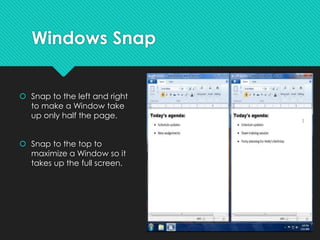
 Snap to the left and right
to make a Window take
up only half the page.
 Snap to the top to
maximize a Window so it
takes up the full screen.
Windows Explorer
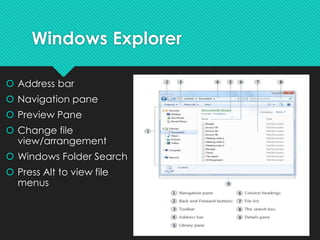
 Address bar
 Navigation pane
 Preview Pane
 Change file
view/arrangement
 Windows Folder Search
 Press Alt to view file
menus
Devices and Printers
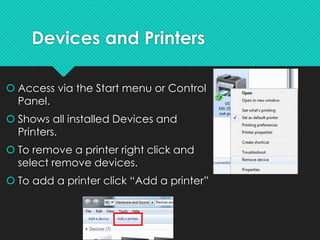
 Access via the Start menu or Control
Panel.
 Shows all installed Devices and
Printers.
 To remove a printer right click and
select remove devices.
 To add a printer click “Add a printer”
Help and Support
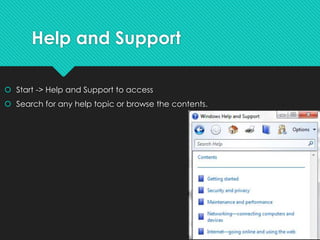
 Start -> Help and Support to access
 Search for any help topic or browse the contents.
Trouble?
Alt + F4 - closes the current Window/Application
without mouse input.
Ctrl + Shift + Esc - Opens task manager
where you can end misbehaving applications or services.
 Try a reboot.
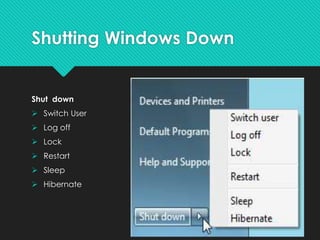
Shutting Windows Down
Shut down
 Switch User
 Log off
 Lock
 Restart
 Sleep
 Hibernate
Windows 7 Editions
 windows 7 are available in six different editions:
1. Windows 7 Starter
2. Windows 7 Home Basic
3. Windows 7 Home Premium
4. Windows 7 Professional
5. Windows 7 Enterprise
6. Windows 7 Ultimate
Comparison Between Windows and
Mac
 Windows are More customizable: Change the desktop theme – including wallpaper,
taskbar, window styles and fonts – to anything you like. Try doing that on a Mac.
 Windows Pcs are much more compatble : The windows are beating by the macs by
over 100%. This means that all your softwares or perhiprials (Ig: cameras, usb drive and
other things) may not work on a mac
 Easier file manager : In windows it is easy to find a file anywhere on your pc where as in
a mac if it’s not on the homescreen, unless you’re very mac savy or atleast used to the os,
it’s a huge hassle to find
 Specification and price Comparison:
 IMAC :Processer:2.5 ghz quad core, 4gb Ram, 500 GB Hard drive
Price :1199.00$
 PC: Processer:2.4 ghz quad core,8 GB ram, 1.5 TB hard drive(1,500 GB) Hard
drive
Price: 550.00$
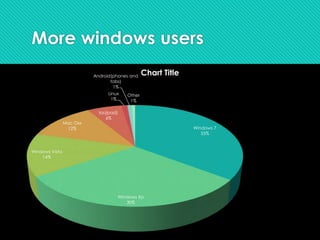
More windows users
Windows 7
35%
Windows Xp
30%
Windows Vista
14%
Mac Osx
12%
Ios(ipad)
6%
Linux
1%
Android(phones and
tabs)
1%
Other
1%
Chart Title
Reasons to Switch to
windows 7
 Best operating system by Microsoft up to date
 Taskbar & Jump List
 Better security and interface
 Speed
 Better integration with hardware
 Upgrading won’t screw you over
 XP Mode
 Automatically Installed Device Drivers
 It just looks better 
windows 7

windows 7

  • 1.
    Group no 1 SultanShaikh Yash Dhapodkar Sagar Pathak Kewal Thakur
  • 2.
  • 3.
    History of Windows Microsoft Windows is the most popular operating system for personal computers  Past versions of Windows  Windows NT  Windows Me  Windows 2000  Windows XP  Windows Vista  Each version provides new added features for the user
  • 4.
    Parts of theWindows Desktop Desktop Taskbar – Includes Start Button Running Applications Notification Area
  • 5.
    Start Menu Windows Search CommonlyUsed Folders Commonly Used Application Control Panel All Programs My Computer Help and Support
  • 6.
    Notification Area  Includesa clock and a group of icons.  The icons display the status of a service or application and allows you to change some settings.  Displays pop-ups to notify you about something.  You can hide icons to reduce clutter.
  • 7.
    What’s New? -Desktop  Taskbar – Bigger Icons, Preview, Rearrange  Jump Lists – provide a way to access recently used, files, pictures and emails right as you hover over the icon for faster computing
  • 8.
    What’s New?-Performance 64-bit processor Largeamount of information support Can use more RAM up to 4GB More responsive when running multiple programs Compared to the 32-bit processor more power
  • 9.
    Windows Snap  Snapto the left and right to make a Window take up only half the page.  Snap to the top to maximize a Window so it takes up the full screen.
  • 10.
    Windows Explorer  Addressbar  Navigation pane  Preview Pane  Change file view/arrangement  Windows Folder Search  Press Alt to view file menus
  • 11.
    Devices and Printers Access via the Start menu or Control Panel.  Shows all installed Devices and Printers.  To remove a printer right click and select remove devices.  To add a printer click “Add a printer”
  • 12.
    Help and Support Start -> Help and Support to access  Search for any help topic or browse the contents.
  • 13.
    Trouble? Alt + F4- closes the current Window/Application without mouse input. Ctrl + Shift + Esc - Opens task manager where you can end misbehaving applications or services.  Try a reboot.
  • 14.
    Shutting Windows Down Shutdown  Switch User  Log off  Lock  Restart  Sleep  Hibernate
  • 15.
    Windows 7 Editions windows 7 are available in six different editions: 1. Windows 7 Starter 2. Windows 7 Home Basic 3. Windows 7 Home Premium 4. Windows 7 Professional 5. Windows 7 Enterprise 6. Windows 7 Ultimate
  • 16.
    Comparison Between Windowsand Mac  Windows are More customizable: Change the desktop theme – including wallpaper, taskbar, window styles and fonts – to anything you like. Try doing that on a Mac.  Windows Pcs are much more compatble : The windows are beating by the macs by over 100%. This means that all your softwares or perhiprials (Ig: cameras, usb drive and other things) may not work on a mac  Easier file manager : In windows it is easy to find a file anywhere on your pc where as in a mac if it’s not on the homescreen, unless you’re very mac savy or atleast used to the os, it’s a huge hassle to find  Specification and price Comparison:  IMAC :Processer:2.5 ghz quad core, 4gb Ram, 500 GB Hard drive Price :1199.00$  PC: Processer:2.4 ghz quad core,8 GB ram, 1.5 TB hard drive(1,500 GB) Hard drive Price: 550.00$
  • 17.
    More windows users Windows7 35% Windows Xp 30% Windows Vista 14% Mac Osx 12% Ios(ipad) 6% Linux 1% Android(phones and tabs) 1% Other 1% Chart Title
  • 18.
    Reasons to Switchto windows 7  Best operating system by Microsoft up to date  Taskbar & Jump List  Better security and interface  Speed  Better integration with hardware  Upgrading won’t screw you over  XP Mode  Automatically Installed Device Drivers  It just looks better 